Honda CR-V (2022 year). Manual in english - page 7
 

  Index      Manuals     Honda CR-V (2022 year). Manual in english


Search            copyright infringement  


Content      ..     5      6      7      8     ..


Honda CR-V (2022 year). Manual in english - page 7


109

uu

Indicators

u

Continued

In

strum

e

nt Pa

nel

*1:Models with the keyless access system have an 

ENGINE START/STOP

 button instead of an ignition switch.

Indicator

Name

On/Blinking

Explanation

Message

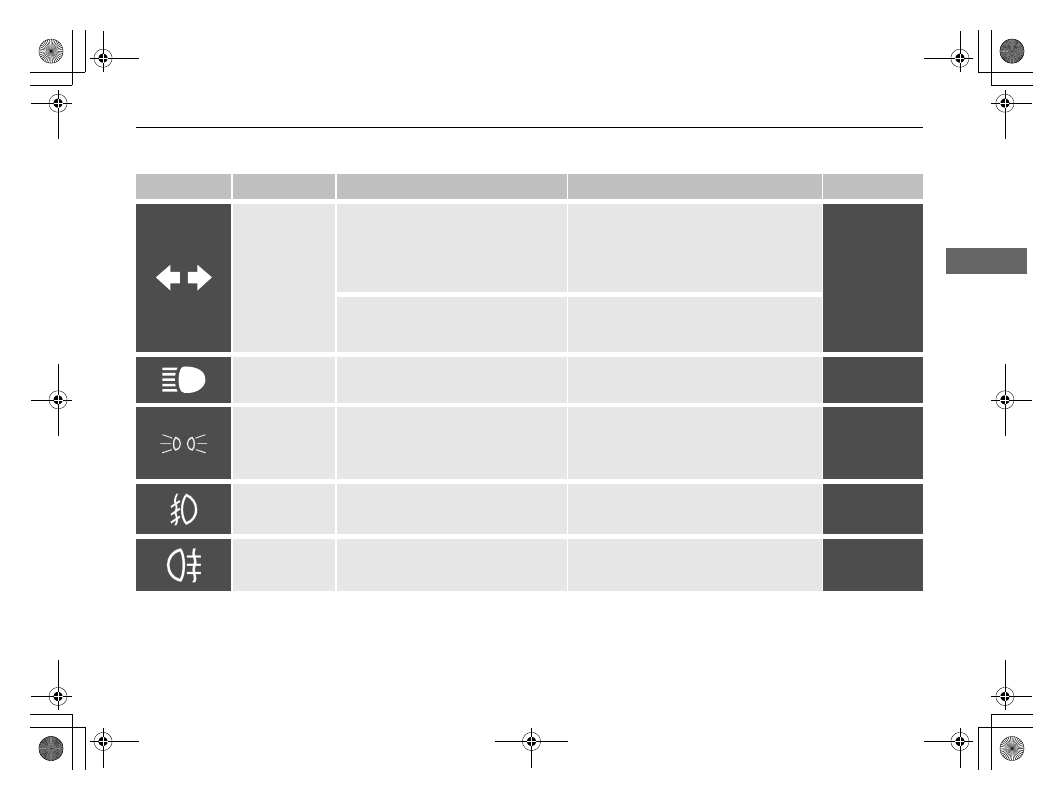
Turn Signal and 
Hazard Warning 
Indicators

Blinks when you operate the turn 
signal lever.

Blink along with all turn signals if 
you press the hazard warning 
button.

Does not blink or blinks rapidly 

- A 

turn signal light bulb has blown. Change 
the bulb immediately.

2

Replacing Light Bulbs

 P. 695

Blink along with all turn signals 
when you depress the brake pedal 
while the high speed driving.

2

Emergency Stop Signal

 P. 636

High Beam 
Indicator

Comes on when the high beam 
headlights are on.

Lights On 
Indicator

Comes on whenever the light switch 
is on, or in 

AUTO

 when the exterior 

lights are on.

If you remove the key from the ignition 
switch

*1

 while the lights are on, a chime 

sounds when the driver’s door is 
opened.

Front Fog Light 
Indicator

*

Comes on when the front fog lights 
are on.

Rear Fog Light 
Indicator

Comes on when the rear fog light is 
on.

* Not available on all models

110

uu

Indicators

u

In

strum

e

nt Pa

nel

*1:Models with the keyless access system have an 

ENGINE START/STOP

 button instead of an ignition switch.

Indicator

Name

On/Blinking

Explanation

Message

Immobilizer 
System Indicator

Blinks if the immobilizer system 
cannot recognize the key 
information.

Blinks 

- You cannot start the engine. 

Turn the ignition switch to LOCK 

(

0

*1

pull the key out, and then insert the key 
and turn it to ON 

(

w

*1

 again.

Depress and hold the brake and/or 
clutch pedal before turning the ignition 
switch to ON 

(

w

*1

.

Repeatedly blinks 

- The system may be 

malfunctioning. Have your vehicle 
checked by a dealer.

Do not attempt to alter this system or 
add other devices to it. Electrical 
problems can occur.

Indicator

Right-hand drive type

All models

Models without 
keyless access 
system

Models with 
keyless access 
system

111

uu

Indicators

u

Continued

In

strum

e

nt Pa

nel

Indicator

Name

On/Blinking

Explanation

Message

Security System 
Alarm Indicator

Blinks when the security system 
alarm has been set.

2

Security System Alarm

 P. 201

ECON Mode 
Indicator

Comes on when ECON mode is on.

2

ECON Mode

 P. 527

Indicator

112

uu

Indicators

u

In

strum

e

nt Pa

nel

*1:Models with the keyless access system have an 

ENGINE START/STOP

 button instead of an ignition switch.

Indicator

Name

On/Blinking

Explanation

Message

Auto Idle Stop 
Indicator 
(Green)

*

Comes on when Auto Idle Stop is in 
operation. The engine automatically 
shuts off.

2

Auto Idle Stop

 P. 528

Blinks when the ambient conditions 
may cause the windows to fog up.

Blinks when the ambient conditions 
may become different from the 
climate control settings you have 
selected.

Blinks when the 

 button is 

pressed.

Depress the clutch pedal. The engine 
automatically restarts.

2

Auto Idle Stop

 P. 528

Auto Idle Stop 
System Indicator 
(Amber)

*

Comes on for a few seconds when 
you turn the ignition switch to ON 

(

w

*1

, then goes off.

Comes on when the Auto Idle Stop 
system has been turned off by the 
Auto Idle Stop system 

OFF

 button.

2

Auto Idle Stop System ON/OFF


P. 529

Blinks if there is a problem with the 
Auto Idle Stop system.

Blinks 

- Have your vehicle checked by a 

dealer.

* Not available on all models

113

uu

Indicators

u

Continued

In

strum

e

nt Pa

nel

Indicator

Name

On/Blinking

Explanation

Message

Adjustable 
Speed Limiter 
Indicator

Comes on when you press the 

MAIN

 button. If a different indicator 

comes on, subsequently press the 

LIM

 button.

2

Adjustable Speed Limiter

 P. 532

Adaptive Cruise 
Control (ACC) 
and Adjustable 
Speed Limiter 
Set Speed 
Indicator

Comes on when you have set a 
speed for adaptive cruise control.

Comes on when you have set a 
speed for adjustable speed limiter.

2

Adaptive Cruise Control (ACC) with 
Low Speed Follow (LSF)

 P. 569

2

Adaptive Cruise Control (ACC)


P. 586

2

Adjustable Speed Limiter

 P. 532

Intelligent Speed 
Limiter Indicator

Comes on when you press the 

MAIN

 button. If a different indicator 

comes on, subsequently press the 

LIM

 button.

2

Intelligent Speed Limiter

 P. 536

Adaptive Cruise 
Control (ACC) 
and Intelligent 
Speed Limiter 
Set Speed 
Indicator

Comes on when the intelligent 
speed limiter is set to the speed limit 
that the traffic sign recognition 
system detects.

Comes on when you have set a 
speed for intelligent speed limiter.

2

Adaptive Cruise Control (ACC) with 
Low Speed Follow (LSF)

 P. 569

2

Adaptive Cruise Control (ACC)


P. 586

2

Intelligent Speed Limiter

 P. 536

Indicator

Indicator

114

uu

Indicators

u

In

strum

e

nt Pa

nel

*1:Models with the keyless access system have an 

ENGINE START/STOP

 button instead of an ignition switch.

Indicator

Name

On/Blinking

Explanation

Message

Road Departure 
Mitigation 
Indicator

Comes on for a few seconds when 
you turn the ignition switch to ON 

(

w

*1

, then goes off.

Comes on if there is a problem with 
the road departure mitigation 
system.

Stays on constantly 

- Have your 

vehicle checked by a dealer.

Comes on if the road departure 
mitigation system is deactivated 
temporarily after the battery has 
been disconnected, then re-
connected.

Drive a short distance at more than 20 
km/h (12 mph). The indicator should go 
off. If it does not, have your vehicle 
checked by a dealer.

Indicator may come on temporarily 
when the Maximum Load Limit is 
exceeded.

Make sure the total load is within the 
Maximum Load Limit.

2

Load Limit

 P. 499

Stays on constantly 

- Have your 

vehicle checked by a dealer.

115

uu

Indicators

u

Continued

In

strum

e

nt Pa

nel

Indicator

Name

On/Blinking

Explanation

Message

Road Departure 
Mitigation 
Indicator

Comes on when the road departure 
mitigation system shuts itself off.

Indicator may come on temporarily 
when passing through an enclosed 
space, such as a tunnel.

The area around the radar sensor is 
blocked by dirt, mud, etc. Stop your 
vehicle in a safe place and wipe the 
debris off with a soft cloth. Indicator 
may take some time to go off after the 
radar sensor is cleaned.

Have your vehicle checked by a dealer if 
the indicator does not go off even after 
you cleaned the sensor cover.

2

Radar Sensor

 P. 625

Stays on 

- The temperature inside the 

camera is too high.
Use the climate control system to cool 
down the camera.
The system activates when the 
temperature inside the camera cools 
down.

2

Front Sensor Camera

 P. 623

116

uu

Indicators

u

In

strum

e

nt Pa

nel

Indicator

Name

On/Blinking

Explanation

Message

Road Departure 
Mitigation 
Indicator

Comes on when the road departure 
mitigation system shuts itself off.

Stays on 

- The area around the camera 

is blocked by dirt, mud, etc. Stop your 
vehicle in a safe place, and wipe it off 
with a soft cloth.

Have your vehicle checked by a dealer if 
the indicator and message come back on 
after you cleaned the area around the 
camera.

2

Front Sensor Camera

 P. 623

117

uu

Indicators

u

Continued

In

strum

e

nt Pa

nel

*1:Models with the keyless access system have an 

ENGINE START/STOP

 button instead of an ignition switch.

Indicator

Name

On/Blinking

Explanation

Message

Adaptive Cruise 
Control (

ACC

with Low Speed 
Follow (LSF)

*


Indicator 
(Amber)

Comes on for a few seconds when 
you turn the ignition switch to ON 

(

w

*1

, then goes off.

Comes on if there is a problem with 
ACC with LSF

*

.

Comes on while driving 

- Have your 

vehicle checked by a dealer.

Comes on if the ACC with LSF

*

 is 

deactivated temporarily after the 
battery has been disconnected, then 
re-connected.

Drive a short distance at more than 20 
km/h (12 mph). The indicator should go 
off. If it does not, have your vehicle 
checked by a dealer.

Indicator may come on temporarily 
when the Maximum Load Limit is 
exceeded.

ACC with LSF

*

 has been 

automatically cancelled.

Make sure the total load is within the 
Maximum Load Limit.

2

Load Limit

 P. 499

Stays on constantly 

- Have your 

vehicle checked by a dealer.

Adaptive Cruise 
Control (

ACC

with Low Speed 
Follow (LSF)

*


Indicator 
(Green)

Comes on when you press the 

MAIN

 button.

2

Adaptive Cruise Control (ACC) with 
Low Speed Follow (LSF)

 P. 569

2

Adaptive Cruise Control (ACC)


P. 586

* Not available on all models

118

uu

Indicators

u

In

strum

e

nt Pa

nel

*1:Models with the keyless access system have an 

ENGINE START/STOP

 button instead of an ignition switch.

Indicator

Name

On/Blinking

Explanation

Message

Lane Keeping 
Assist System 
(

LKAS

) Indicator 

(Amber)

Comes on for a few seconds when 
you turn the ignition switch to ON 

(

w

*1

, then goes off.

Comes on if there is a problem with 
the LKAS.

Stays on constantly 

- Have your 

vehicle checked by a dealer.

Lane Keeping 
Assist System 
(

LKAS

) Indicator 

(Green)

Comes on when you press the 

MAIN

 button.

2

Lane Keeping Assist System (LKAS)


P. 601

119

uu

Indicators

u

Continued

In

strum

e

nt Pa

nel

*1:Models with the keyless access system have an 

ENGINE START/STOP

 button instead of an ignition switch.

Indicator

Name

On/Blinking

Explanation

Message

Collision 
Mitigation 
Braking System 
(CMBS) 
Indicator

Comes on for a few seconds when 
you turn the ignition switch to ON 

(

w

*1

, then goes off.

Comes on when you deactivate the 
CMBS. A driver information 
interface message appears for five 
seconds.

Comes on if there is a problem with 
the CMBS.

Stays on constantly without the 
CMBS off 

- Have your vehicle checked 

by a dealer.

2

Collision Mitigation Braking System 
(CMBS)

 P. 558

Comes on if the CMBS is deactivated 
temporarily after the battery has 
been disconnected, then re-
connected.

Drive a short distance at more than 20 
km/h (12 mph). The indicator should go 
off. If it does not, have your vehicle 
checked by a dealer.

Indicator may come on temporarily 
when the Maximum Load Limit is 
exceeded.

Make sure the total load is within the 
Maximum Load Limit.

2

Load Limit

 P. 499

Stays on constantly 

- Have your 

vehicle checked by a dealer.

Comes on when the CMBS shuts 
itself off.

Stays on 

- The area around the camera 

is blocked by dirt, mud, etc. Stop your 
vehicle in a safe place, and wipe it off 
with a soft cloth.

2

Front Sensor Camera

 P. 623

Have your vehicle checked by a dealer if 
the indicator does not go off even after 
you cleaned the camera.

2

Collision Mitigation Braking System 
(CMBS)

 P. 558

120

uu

Indicators

u

In

strum

e

nt Pa

nel

Indicator

Name

On/Blinking

Explanation

Message

Collision 
Mitigation 
Braking System 
(CMBS) Indicator

Comes on when the CMBS shuts 
itself off.

Stays on 

- The temperature inside the 

camera is too high. Use the climate 
control system to cool down the camera. 
The system activates when the 
temperature inside the camera cools 
down.

2

Front Sensor Camera

 P. 623

Indicator may come on temporarily 
when passing through an enclosed 
space, such as a tunnel.

The area around the radar sensor is 
blocked by dirt, mud, etc. Stop your 
vehicle in a safe place, and wipe it off 
with a soft cloth. Indicator may take 
some time to go off after the radar 
sensor is cleaned.

Have your vehicle checked by a dealer if 
the indicator does not go off even after 
you cleaned the sensor cover.

2

Radar Sensor

 P. 625

121

uu

Indicators

u

In

strum

e

nt Pa

nel

Indicator

Name

On/Blinking

Explanation

Message

Blind spot 
information 
System 
Indicator

*

Comes on for a few seconds when 
you set the power mode to ON, then 
goes off.

Stays on while the blind spot 
information system is turned off.

Comes on when mud, snow, or ice 
accumulates in the vicinity of sensor.

Comes on while driving 

- Remove the 

obstacle in the vicinity of sensor.

2

Blind spot information System

*


P. 552

Comes on if there is a problem with 
the system.

Comes on while driving 

- Have your 

vehicle checked by a dealer.

* Not available on all models

122

uu

Indicators

u

Driver Information Interface Warning and Information Messages

In

strum

e

nt Pa

nel

Driver Information Interface Warning and Information Messages

The following messages appear only on the driver information interface. Press the 

 (display/information) button to see the message 

again with the system message indicator on.

*1:Driver information interface
*2:Audio/Information screen

Message

Condition

Explanation

Appears when the vehicle is no longer able to run 
due to a malfunction.

Immediately stop in a safe place.

Appears when there is a risk that the vehicle will 
move unexpectedly after you have stopped due to a 
malfunction with the vehicle.

While the vehicle is stopped, apply the parking brake.

2

Parking Brake

 P. 626

Have your vehicle checked by a dealer.

Appears if any door or the tailgate is not completely 
closed.

Appears if any door or the tailgate is opened while 
driving. The beeper sounds.

Goes off when all doors and the tailgate are closed.

Appears if there is a problem with the parking sensor 
system.

If there is a problem with any of the sensors, the all 
sensor indicator(s) comes on in red.

Check if the area around the sensor(s) is covered with 
mud, ice, snow, etc. If the indicator(s) stays on or the 
beeper does not stop even after you clean the area, 
have the system checked by a dealer.

Appears when there is a problem with the sensor on 
the battery.

Have your vehicle checked by a dealer.

2

Checking the Battery

 P. 710

(Amber)

*1

*2

Models with parking sensor system

123

uu

Indicators

u

Driver Information Interface Warning and Information Messages

Continued

In

strum

e

nt Pa

nel

*1:Models with the keyless access system have an 

ENGINE START/STOP

 button instead of an ignition switch.

Message

Condition

Explanation

Appears once if the outside temperature is below 
3°C while the ignition switch is in ON 

(

w

*1

.

There is a possibility that the road surface is icy and 
slippery.

Appears when the engine oil level is low while the 
engine is running.

Appears while driving 

- Immediately stop in a safe 

place.

2

If the Low Oil Level Symbol Appears

 P. 755

Appears when the engine is running, there is a 
system problem in the engine oil level sensor.

Have your vehicle checked by a dealer.

Appears if there is a problem with the automatic 
lighting control system.

Appears while driving 

- Manually turn the lights on, 

and have your vehicle checked by a dealer.

Appears when there is a problem with the 
headlights.

Appears while driving 

- The headlights may not be 

on. When conditions allow you to drive safely, have 
your vehicle checked by a dealer as soon as possible.

Appears if there is a problem a problem with the e-
pretensioner system.

Have your vehicle checked by a dealer.

124

uu

Indicators

u

Driver Information Interface Warning and Information Messages

In

strum

e

nt Pa

nel

*1:Models with the keyless access system have an 

ENGINE START/STOP

 button instead of an ignition switch.

Message

Condition

Explanation

Appears if there is a problem with the shutter grill, 
and the radiator coolant temperature is too high.

Power output will be reduced, so you may not be able 
to accelerate or maintain your current speed. Have your 
vehicle checked by a dealer.

Appears when the engine coolant temperature is 
near its upper limit.

Drive slowly to prevent overheating.

Appears when the engine coolant temperature gets 
abnormally high.

2

Overheating

 P. 747

Appears when you turn the ignition switch to ON 

(

w

*1

 without fastening the driver’s seat belt.

Fasten the seat belt properly before you start to drive.

Appears while you are customizing the settings and 
the parking brake is released.

2

Customized Features

 P. 157

(White)

(Red)

(White)

Models with colour audio system


Content      ..     5      6      7      8     ..