Honda e (2021 year). Manual in english - page 8
 

  Index      Manuals     Honda e (2021 year). Manual in english


Search            copyright infringement  


Content      ..     6      7      8      9     ..


Honda e (2021 year). Manual in english - page 8


114

uu

Indicators

u

In

strum

e

nt Pa

nel

Indicator

Name

On/Blinking

Explanation

Message

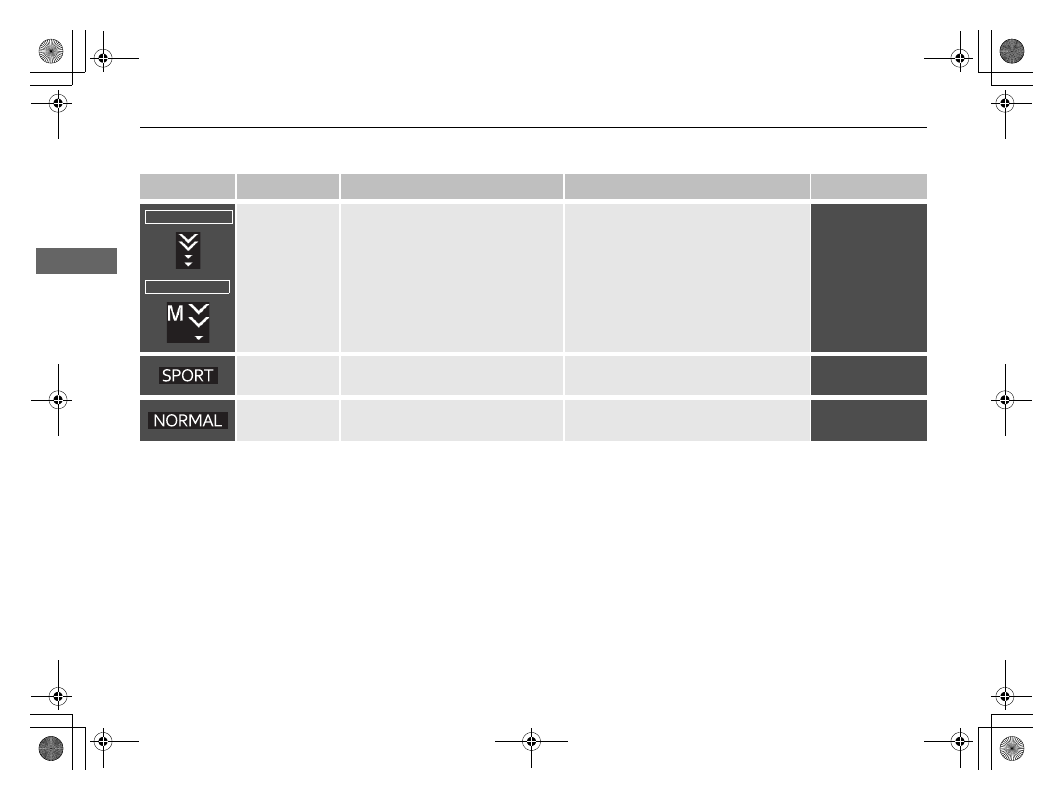
Deceleration 
Paddle Selector 
Indicator

Comes on when the paddle 
selector is pulled.

Blinks when deceleration does not 
occur while pulling the paddle 
selector.

2

Deceleration Paddle Selector


P. 395

2

Single Pedal Control

 P. 398

SPORT

 Mode 

Indicator

Comes on when you set the driving 
mode to 

SPORT

.

2

SPORT Mode

 P. 394

NORMAL

 Mode 

Indicator

Comes on when you set the driving 
mode to 

NORMAL

.

2

NORMAL Mode

 P. 394

Single Pedal OFF

Single Pedal ON

115

uu

Indicators

u

Continued

In

strum

e

nt Pa

nel

Indicator

Name

On/Blinking

Explanation

Message

Seat Belt 
Reminder 
Indicator

Comes on if you are not wearing a 
seat belt when you set the power 
mode to ON.

If the front passenger is not 
wearing a seat belt, the indicator 
comes on a few seconds later.

Blinks while driving if either you or 
the passenger has not fastened a 
seat belt. The beeper sounds and 
the indicator blinks at regular 
intervals.

Comes on for a while when the 
rear seat belt is unfastened while 
the power mode to on, and a red 
icon is displayed on the driver 
information interface.

The beeper stops and the indicator 
goes off when you and the passenger 
fasten their seat belts.

Stays on after you or the passenger 
has fastened the seat belt 

- A 

detection error may have occurred in 
the sensor. Have your vehicle checked 
by a dealer.

When the seat belt has fastened, the 
indicator will turn off and a green icon 
is displayed on the driver information 
interface.

2

Seat Belt Reminder

 P. 48

Low Charge 
Indicator 
(Amber)

Comes on when the High Voltage 
battery is running low 
(approximately 15% left).

Comes on

 - There is a decrease in 

acceleration performance.
Recharge the High Voltage battery as 
soon as possible.

116

uu

Indicators

u

In

strum

e

nt Pa

nel

Indicator

Name

On/Blinking

Explanation

Message

Anti-lock Brake 
System (

ABS

Indicator

Comes on if there is a problem 
with the ABS.

Stays on constantly 

- Have your 

vehicle checked by a dealer. With this 
indicator on, your vehicle still has 
normal braking ability but no anti-lock 
function.

2

Anti-lock Brake System (ABS)


P. 507

Supplemental 
Restraint System 
Indicator

Comes on if a problem with any of 
the following is detected:

-

Supplemental restraint system

-

Side airbag system

-

Side curtain airbag system

-

Seat belt tensioner

Stays on constantly 

- Have your 

vehicle checked by a dealer.

Passenger Front 
Airbag On/Off 
Indicators

When the passenger front airbag is 
active: The on indicator comes 
back on and remains on for about 
65 seconds.
When the passenger front airbag is 
inactive: The off indicator comes 
back on and stays on. This is a 
reminder that the passenger front 
airbag is deactivated.

2

Passenger Front Airbag Off 
System

 P. 62

117

uu

Indicators

u

Continued

In

strum

e

nt Pa

nel

Indicator

Name

On/Blinking

Explanation

Message

Vehicle Stability 
Assist (VSA) 
System Indicator

Blinks when VSA is active.

Comes on if there is a problem 
with the VSA system or hill start 
assist system.

Stays on constantly 

- Have your 

vehicle checked by a dealer.

2

Vehicle Stability Assist (VSA) 
System

 P. 418

2

Hill Start Assist System

 P. 383

Vehicle Stability 
Assist (VSA) 

OFF


Indicator

Comes on when you partially 
disable VSA.

2

VSA On and Off

 P. 419

Electric Power 
Steering (EPS) 
System Indicator

Comes on if there is a problem 
with the EPS System.

Comes on while driving

 - 

Immediately stop in a safe place.

Stays on constantly 

- Have your 

vehicle checked by a dealer.

2

If the Electric Power Steering 
(EPS) System Indicator Comes On


P. 657

118

uu

Indicators

u

In

strum

e

nt Pa

nel

Indicator

Name

On/Blinking

Explanation

Message

Low Tyre 
Pressure/
Deflation 
Warning System 
Indicator

May come on briefly if the power 
mode is set to ON and the vehicle is 
not moved within 45 seconds, to 
indicate the initialisation process is 
not yet complete.

Comes on and stays on when:

-

One or more tyres’ pressures are 
determined to be significantly 
low.

-

The system has not been 
initialised.

Comes on while driving 

- Stop in a 

safe place, check tyre pressures, and 
inflate the tyre(s) if necessary.

Stays on after the tyres are inflated 
to the recommended pressures 

The system needs to be initialised.

2

Deflation Warning System

 P. 420

Blinks for about one minute, and 
then stays on if there is a problem 
with the deflation warning system.

Blinks and remains on 

- Have your 

vehicle checked by a dealer.

119

uu

Indicators

u

Continued

In

strum

e

nt Pa

nel

Indicator

Name

On/Blinking

Explanation

Message

System Message 
Indicator

Comes on along with a beep when 
a problem is detected. A system 
message on the driver information 
interface appears at the same time.

While the indicator is on, press the 


(home) button, and select 


(information) to see the message 
again.

2

Switching the Display

 P. 156

Refer to the Indicators information in 
this chapter when a system message 
appears on the driver information 
interface. Respond to the message 
accordingly.

The driver information interface does 
not return to the normal screen unless 
the warning is cancelled, or the 


(home) button is pressed.

Auto High-Beam 
Indicator

Comes on when all the operating 
conditions of the auto high-beam 
are met.

2

Auto High-Beam

 P. 206

Turn Signal and 
Hazard Warning 
Indicators

Blinks when you operate the turn 
signal lever.

Blink along with all turn signals 
when you press the hazard 
warning button.

Does not blink or blinks rapidly 

Have your vehicle checked by a dealer.

Blink along with all turn signals 
when you depress the brake pedal 
while the high speed driving.

2

Emergency Stop Signal

 P. 509

120

uu

Indicators

u

In

strum

e

nt Pa

nel

Indicator

Name

On/Blinking

Explanation

Message

High Beam 
Indicator

Comes on when the high beam 
headlights are on.

Lights On 
Indicator

Comes on when the position, tail, 
and other external lights are on.

2

Lights

 P. 201

Front Fog Light 
Indicator

Comes on when the front fog 
lights are on.

2

Fog Lights

 P. 204

Rear Fog Light 
Indicator

Comes on when the rear fog light 
is on.

2

Fog Lights

 P. 204

121

uu

Indicators

u

Continued

In

strum

e

nt Pa

nel

Indicator

Name

On/Blinking

Explanation

Message

Immobilizer 
System Indicator

Blinks if the immobilizer system 
cannot recognise the key 
information.

Blinks 

- You cannot start the power 

system. Set the power mode to 
VEHICLE OFF, then select the ON mode 
again.

Depress and hold the brake pedal 
before setting the power mode to ON.

Repeatedly blinks 

- The system may 

be malfunctioning. Have your vehicle 
checked by a dealer.

Do not attempt to alter this system or 
add other devices to it. Electrical 
problems can occur.

Security System 
Alarm Indicator

Blinks when the security system 
alarm has been set.

2

Security System Alarm

 P. 189

Indicator

Right-hand drive type

All models

Indicator

122

uu

Indicators

u

In

strum

e

nt Pa

nel

Indicator

Name

On/Blinking

Explanation

Message

Adjustable 
Speed Limiter 
Indicator 
(White/Green)

Lights up in white when you press 
the  

button.

If a different indicator comes on, 
subsequently press the 

LIM


button.

Lights up in green when the 
adjustable speed limiter is set.

2

Adjustable Speed Limiter

 P. 405

Intelligent 
Speed Limiter 
Indicator 
(White/Green)

Lights up in white when you press 

the  

button.

If a different indicator comes on, 
subsequently press the 

LIM


button.

Lights up in green when you press 
the 

RES/+

 button or 

SET/-

 button.

2

Intelligent Speed Limiter

 P. 410

Adaptive 
Cruise Control 
(

ACC

) with 

Low Speed 
Follow 
Indicator 
(Amber)

Comes on if there is a problem 
with ACC with Low Speed Follow.

Comes on while driving 

- Have your 

vehicle checked by a dealer.

123

uu

Indicators

u

Continued

In

strum

e

nt Pa

nel

Indicator

Name

On/Blinking

Explanation

Message

Adaptive Cruise 
Control (

ACC

with Low Speed 
Follow Indicator 
(White/Green)

Lights up in white when you press 

the  

button.

If a different indicator comes on, 
subsequently press the 

LIM


button.

Lights up in green when you press 
the 

RES

/+ button or 

SET

/- button.

2

Adaptive Cruise Control (ACC) 
with Low Speed Follow

 P. 447

Adaptive Cruise 
Control (ACC) 
with Low Speed 
Follow Distance 
Indicator

Comes on when Adaptive Cruise 
Control (ACC) with Low Speed 
Follow indicator comes on.

Each time you press the interval button, 
the following interval (the interval 
behind a vehicle detected ahead of 
you) setting cycles through extra long, 
long, middle, and short following 
intervals.

2

To Set or Change Following-
interval

 P. 459

Lane Keeping 
Assist System 
(

LKAS

) Indicator 

(Amber)

Comes on if there is a problem 
with the LKAS.

Stays on constantly 

- Have your 

vehicle checked by a dealer.

Lane Keeping 
Assist System 
(

LKAS

) Indicator 

(Green)

Comes on when you press the 
LKAS button.

2

Lane Keeping Assist System 
(LKAS)

 P. 467

124

uu

Indicators

u

In

strum

e

nt Pa

nel

Indicator

Name

On/Blinking

Explanation

Message

Road Departure 
Mitigation 
Ready to Assist 
Indicator

Comes on when all activation 
conditions for the Road Departure 
Mitigation system are satisfied and 
lane markers are detected.

2

Road Departure Mitigation 
System

 P. 478

Parking Sensor 
Indicator 
(Amber)

Comes on if there is a problem with 
the parking sensor.

Check if the area around the sensor(s) 
is covered with mud, ice, snow, etc. If 
the indicator(s) stays on even after you 
clean the area, have the system 
checked by a dealer.

Parking Sensor 
Indicator 
(Green)

Comes on when parking sensor is 
on.

2

Parking Sensor System

 P. 512

Single Pedal 
Indicator

Comes on when the single pedal 
control system is turned on.

2

Single Pedal Control

 P. 398

125

uu

Indicators

u

Continued

In

strum

e

nt Pa

nel

Indicator

Name

On/Blinking

Explanation

Message

Safety Support 
Indicator 
(Amber)

Comes on if there is a problem 
with the Road Departure 
Mitigation system, Blind Spot 
Information

*

, Low Speed Braking 

Control or CMBS.

Stays on constantly

 - Have your 

vehicle checked by a dealer.

* Not available on all models

126

uu

Indicators

u

In

strum

e

nt Pa

nel

Indicator

Name

On/Blinking

Explanation

Message

Safety Support 
Indicator 
(Amber)

Comes on when the Road 
Departure Mitigation system, Blind 
Spot Information

*

, Low Speed 

Braking Control and/or CMBS 
shuts itself off.

Indicator may come on temporarily 
when passing through an enclosed 
space, such as a tunnel.

The area around the radar sensor is 
blocked by dirt, mud, etc. Stop your 
vehicle in a safe place and wipe the 
debris off with a soft cloth. Indicator 
may take some time to go off after the 
radar sensor is cleaned.

Have your vehicle checked by a dealer 
if the indicator does not go off even 
after you have cleaned the radar 
sensor.

2

Radar Sensor

 P. 496

Stays on

 - The temperature inside the 

camera is too high.
Use the climate control system to cool 
down the camera.
The system activates when the 
temperature inside the camera cools 
down.

2

Front Sensor Camera

 P. 494

* Not available on all models

127

uu

Indicators

u

Continued

In

strum

e

nt Pa

nel

Indicator

Name

On/Blinking

Explanation

Message

Safety Support 
Indicator 
(Amber)

Comes on when the Road 
Departure Mitigation system, Blind 
Spot Information

*

, Low Speed 

Braking Control and/or CMBS 
shuts itself off.

Stays on

 - The area around the 

camera is blocked by dirt, mud, etc. 
Stop your vehicle in a safe place and 
wipe the debris off with a soft cloth.

Have your vehicle checked by a dealer 
if the indicator and message are still 
displayed even after you have cleaned 
the area around the camera.

2

Front Sensor Camera

 P. 494

Comes on when mud, snow, or ice 
accumulates in the vicinity of sonar.

Remove the obstacle in the vicinity of 
sonar sensor.

2

Low Speed Braking Control

 P. 441

Comes on when mud, snow, or ice 
has accumulated in the vicinity of 
the blind spot information system 
sensor.

Comes on while driving

 - Something 

may be interfering with the blind spot 
information system sensor. Check the 
vicinity of the blind spot information 
system sensor and remove any 
obstacles.

2

Blind spot information System

*


P. 423

Models with blind spot information 
system

* Not available on all models

128

uu

Indicators

u

In

strum

e

nt Pa

nel

Indicator

Name

On/Blinking

Explanation

Message

Safety Support 
Indicator 
(Green/Gray)

Lights up in green when the Road 
Departure Mitigation system, Blind 
Spot Information

*

, Low Speed 

Braking Control and CMBS are on.

Lights up in green and gray when 
the Road Departure Mitigation 
system, Blind Spot Information

*

Low Speed Braking Control or 
CMBS is off.

Lights up in gray when the Road 
Departure Mitigation system, Blind 
Spot Information

*

, Low Speed 

Braking Control and CMBS are off.

2

Road Departure Mitigation On 
and Off

 P. 481

2

Blind spot information On and Off


P. 426

2

System On and Off

 P. 444

2

CMBS On and Off

 P. 434

* Not available on all models

129

uu

Indicators

u

In

strum

e

nt Pa

nel

Indicator

Name

On/Blinking

Explanation

Message

Side Camera 
Mirror System 
Indicator

Comes on when there is a problem 
with the side camera mirror 
system.

Have your vehicle checked by a dealer.

Comes on when the vehicle 
interior is too hot and the image is 
dark or no image is displayed.

Comes on when the image is 
deteriorated when the 
temperature inside the vehicle is 
too low.

2

Side Camera Mirror System

 P. 221


Content      ..     6      7      8      9     ..