Ford F-150 (2024 year). Manual in english - page 12
 

  Index      Manuals     Ford F-150 (2024 year). Manual in english


Search            copyright infringement  


Content      ..     10      11      12      13     ..


Ford F-150 (2024 year). Manual in english - page 12


HOW DOES ALERT MODE WORK

E165515

When in alert mode, the lane keeping
system alerts you by vibrating the steering
wheel. The intensity of the vibration is set
through the lane keeping system menu.

ADJUSTING THE STEERING
WHEEL VIBRATION INTENSITY

To change the steering wheel vibration
intensity, use the touchscreen:

1.

Press 

Features

 on the touchscreen.

2. Press 

Driver Assistance

.

3. Press 

Lane-Keeping System

.

4. Press 

Lane-Keeping Intensity

.

5. Select an intensity setting.

AID MODE

WHAT IS AID MODE

Aid mode provides temporary steering
assistance toward the center of the lane.

HOW DOES AID MODE WORK

E165516

The lane keeping system aids you when
an unintentional lane departure occurs.
The system provides a small steering input
to move the vehicle towards the center of
the lane.

ALERT AND AID MODE

WHAT IS ALERT AND AID MODE

Alert and aid mode uses multiple features
to keep you in your lane. The system first
provides a small steering input to bring
your vehicle back towards the center of
the lane. If your vehicle moves too far from
the center of the lane the system alerts
you with vibration in the steering wheel.

381

Lane Keeping System

HOW DOES ALERT AND AID MODE
WORK

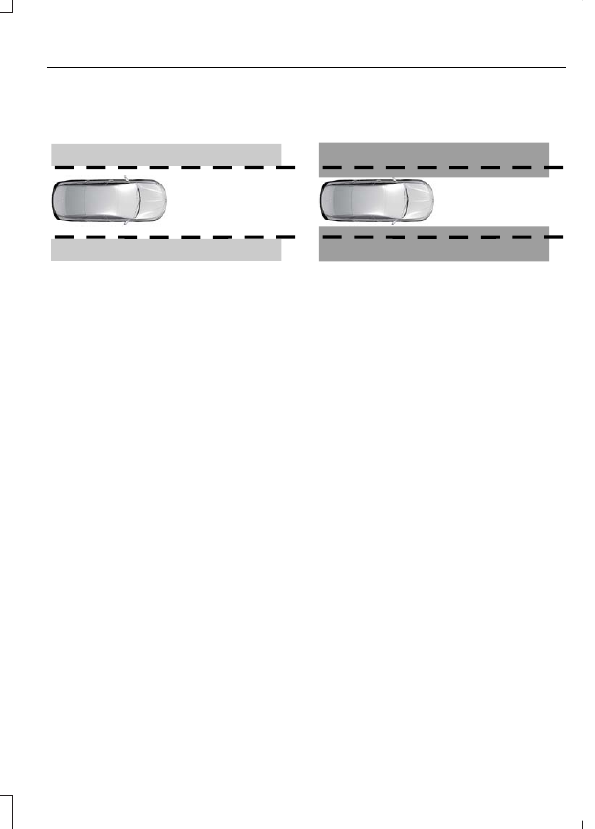
E165517

Alert.

A

Aid.

B

The lane keeping system detects a lane
departure and provides aid when the
vehicles enters 

B

 and applies the

additional alert warning if 

A

 is entered.

LANE KEEPING SYSTEM
INDICATORS

E335296

If you switch the lane keeping system on,
a graphic with lane markings appears in
the instrument cluster display.

When you switch the system off, the lane
marking graphics do not display.

Note:

The overhead vehicle graphic may

still display if adaptive cruise control is
enabled.

While the lane keeping system is on, the
color of the lane markings change to
indicate the system status.

Red

Orange

Green

Gray

Indicates that the

system is providing

or has just provided
a lane keeping alert

warning.

Indicates that the

system is providing

or has just provided

a lane keeping aid

intervention.

Indicates that the

system is available

or ready to provide a

warning or interven-

tion on the indicated

side.

Indicates that the

system is tempor-

arily unavailable to

provide a warning or

intervention on the

indicated side.

382

Lane Keeping System

BLIND SPOT ASSIST

WHAT IS BLIND SPOT ASSIST

Blind spot assist is an extension of the lane
keeping system.

It may help you identify adjacent vehicles
during a lane change.

Blind spot assist provides a blind spot
warning and steering assistance to help
you become aware of and steer away from
vehicles in your blind spot during lane
changes.

HOW DOES BLIND SPOT ASSIST
WORK

E334922

Activate and deactivate the
system using the lane keeping
system button on the steering

wheel.

During lane changes, the design of the
blind spot assist feature detects vehicles
in, or approaching, your blind spot and
provides a warning, plus steering
assistance to direct your vehicle back into
your lane.

When active, this system functions with or
without the use of turn signals and hazard
flashers.

You must keep your hands on the steering
wheel at all times.

BLIND SPOT ASSIST LIMITATIONS

All system limitations present in the basic
lane keeping system also apply to blind
spot assist.

Blind spot assist does not function under
the following conditions:

No lane markings are detected.

One or both rear radar sensors become
blocked or faulty.

Attaching bike or cargo racks could
cause false alerts due to obstruction
of the sensor.

Blind spot assist may have difficulty
detecting hazards under the following
conditions:

If a vehicle is approaching in an
adjacent lane at a speed higher than
your vehicle.

Bad weather obstructing the sensors.

BLIND SPOT ASSIST WITH
TRAILER COVERAGE

WHAT IS BLIND SPOT ASSIST
WITH TRAILER COVERAGE

Blind spot assist with trailer coverage is an
extension of the lane keeping system.

It may help you identify adjacent vehicles
during a lane change.

Blind spot assist provides a blind spot
warning and steering assistance to help
you become aware of and steer away from
vehicles in your blind spot during lane
changes.

When attaching a trailer, ensure you have
properly set up the trailer coverage
settings.  See 

Blind Spot Information

System With Trailer Coverage

 (page

389).

HOW DOES BLIND SPOT ASSIST
WITH TRAILER COVERAGE WORK

E334922

Activate and deactivate the
system using the lane keeping
system button on the steering

wheel.

383

Lane Keeping System

During lane changes, the design of the
blind spot assist feature detects vehicles
in, or approaching, your blind spot and
provides a warning, plus steering
assistance to direct your vehicle back into
your lane.

If a supported trailer is connected, the
function is reduced to only detecting
vehicles on both sides of your vehicle and
trailer, extending rearward from the
exterior mirrors to the end of your trailer.
See 

Blind Spot Information System

With Trailer Coverage

 (page 389).

When active, this system functions with or
without the use of direction indicators and
hazard flashers.

You must keep your hands on the steering
wheel at all times.

BLIND SPOT ASSIST WITH
TRAILER COVERAGE
LIMITATIONS

All system limitations present in the basic
lane keeping system also apply to blind
spot assist.

Blind spot assist does not function under
the following conditions:

No lane markings are detected.

One or both rear radar sensors become
blocked or faulty.

You have not configured the attached
trailer correctly in the trailer tow menus
or you attached an unsupported trailer.
The system only supports certain trailer
shapes and dimensions.

Note:

Blind spot assist with trailer coverage

could have reduced performance if any of
the above limitations are present.

Blind spot assist may have difficulty
detecting hazards under the following
conditions:

If a vehicle is approaching in an
adjacent lane at a relative speed much
higher than your vehicle.

Bad weather conditions are present
that obstruct the sensors.

Attaching bike or cargo racks could
cause false alerts due to obstruction
of the sensor.

BLIND SPOT ASSIST WITH TRAILER COVERAGE INDICATORS

E310089

384

Lane Keeping System

Diagram 1:

 Vehicle A uses its left turn

signal preparing to change from the right
lane to the middle lane. Vehicle B is already
in the middle lane and just entered Vehicle
A's blind spot causing the blind spot
information system alert indicator to flash
on the exterior mirror.

Diagram 2:

 The driver of Vehicle A begins

to steer into the center lane not aware of
Vehicle B.

Diagram 3:

 Blind spot assist counter

steers to help alert the driver of Vehicle A
to direct their vehicle back into the right
lane to help avoid a possible collision with
Vehicle B.

The lane keeping aid warning lamp or
yellow lane marking in your instrument
cluster display indicate blind spot assist
activation. In addition, the blind spot
information system alert indicator flashes
on the exterior mirror on the same side as
the detection.  See 

Blind Spot

Information System

 (page 388).

Blind Spot Assist Information Messages

Action

Message

Displays if you attach a trailer to your vehicle with the blind
spot information system switched off or you have not
configured the trailer.

Blind Spot Assist Not
Available Trailer
Attached

Displays if your blind spot information system sensors are
blocked.

Blind Spot Assist Not
Available Side Sensor
Blocked

The system has detected a fault that requires service.  Have
your vehicle checked as soon as possible.

Blind Spot Assist System
fault

Lost communication with the trailer module. Blind spot assist
is disabled until the failure is fixed.

Trailer Brake Module
Fault

Lost communication with the trailer module. Blind spot assist
is disabled until the failure is fixed.

Trailer Lighting Module
Fault See Manual

Front camera fault. Blind spot assist is disabled until the
failure is fixed.

Front Camera Fault
Service Required

385

Lane Keeping System

LANE KEEPING SYSTEM – TROUBLESHOOTING

LANE KEEPING SYSTEM – INFORMATION MESSAGES

Action

Message

The system has malfunctioned. Have your

vehicle checked as soon as possible.

Lane Keeping Sys. Malfunction Service

Required

The system has detected a condition that

has caused the system to be temporarily

unavailable.

Front Camera Temporarily Not Available

The system has detected a condition that

requires you to clean the windshield in order

for it to operate properly.

Front Camera Low Visibility Clean Screen

The system has malfunctioned. Have your

vehicle checked as soon as possible.

Front Camera Malfunction Service Required

The system requests that you keep your

hands on the steering wheel.

Keep Hands on Steering Wheel

386

Lane Keeping System

LANE KEEPING SYSTEM –
FREQUENTLY ASKED QUESTIONS

Why is the feature not available
(lane markings are gray) when I
can see the lane markings on the
road?

Your vehicle speed is less than 40 mph
(65 km/h).

The sun is shining directly into the
camera lens.

A quick intentional lane change has
occurred.

You are driving your vehicle too close
to the lane markings for an extended
interval of time.

Driving at high speeds in curves.

The last alert warning or aid
intervention occurred a short time ago.

Ambiguous lane markings, for example,
in construction zones.

Rapid transition from light to dark, or
from dark to light.

Sudden offset in lane markings.

ABS or AdvanceTrac™ is active.

There is a camera blockage due to dirt,
grime, fog, frost or water on the
windshield.

You are driving too close to the vehicle
in front of you.

Transitioning between no lane
markings to lane markings, or vice
versa.

There is standing water on the road.

Faint lane markings, for example,
partial yellow lane markings on
concrete roads.

Lane width is too narrow or too wide.

You have not calibrated the camera
after a windshield replacement.

Driving on roads with tight curves or
uneven surfaces.

Why does the vehicle not come
back toward the middle of the
lane, as expected, in the Aid, or Aid
+ Alert mode?

High cross winds are present.

There is a large road crown.

Rough roads, grooves or shoulder
drop-offs.

Heavy, uneven loading of the vehicle
or improper tire inflation pressure.

You changed the tires or modified the
suspension.

387

Lane Keeping System

WHAT IS BLIND SPOT
INFORMATION SYSTEM

Blind spot information system detects
vehicles that may have entered the blind
spot zone.

HOW DOES BLIND SPOT
INFORMATION SYSTEM WORK

Blind spot information system uses
sensors on both sides of your vehicle,
detecting rearward from the exterior
mirrors to approximately 13 ft (4 m)
beyond the rear bumper. The detection
area extends to approximately 59 ft (18 m)
beyond the rear bumper when the vehicle
speed is greater than 30 mph (48 km/h)
to alert you of faster approaching vehicles.

E255695

BLIND SPOT INFORMATION
SYSTEM PRECAUTIONS

WARNING: 

Do not use the blind

spot information system as a
replacement for using the interior and
exterior mirrors or looking over your
shoulder before changing lanes. The
blind spot information system is not a
replacement for careful driving.

WARNING: 

The system may not

operate properly during severe weather
conditions, for example snow, ice, heavy
rain and spray. Always drive with due
care and attention. Failure to take care
may result in a crash.

Note:

 Blind spot information system does

not prevent contact with other vehicles. It
does not detect parked vehicles,
pedestrians, animals or other infrastructure.

BLIND SPOT INFORMATION
SYSTEM LIMITATIONS

Blind spot information system does not
operate in park (P) or reverse (R).

The system may not alert you if a vehicle
quickly passes through the detection zone
while overtaking.

Note:

For vehicles without the trailer

coverage feature, we recommend that you
switch the blind spot information system
off when you attach a trailer.

BLIND SPOT INFORMATION
SYSTEM REQUIREMENTS

Blind spot information system turns on
when all the following occur:

You start your vehicle.

You shift into drive (D).

The vehicle speed is greater than
6 mph (10 km/h).

SWITCHING BLIND SPOT
INFORMATION SYSTEM ON
AND OFF

To switch blind spot information system
on or off, use the touchscreen:

388

Blind Spot Information System

1.

Press 

Features

 on the touchscreen.

2. Press 

Driver Assistance

.

3. Press 

Blind Spot Information System

.

4. Switch the feature on or off.

When you switch blind spot information
system off, a warning lamp illuminates.
When you switch the system on or off, the
alert indicators flash twice.

Note:

The system remembers the last

setting when you start your vehicle.

LOCATING THE BLIND SPOT
INFORMATION SYSTEM
SENSORS

E310325

The sensors are inside the brake lamp on
both sides of your vehicle.

Note:

Keep the sensors free from snow, ice

and large accumulations of dirt.

Note:

Do not cover the sensors with bumper

stickers, repair compound or other objects.

Note:

Bike and cargo racks could cause

false alerts due to obstruction of the sensor.
We recommend switching the feature off
when using a bike or cargo rack.

Note:

Blocked sensors may affect system

accuracy.

If the sensors become blocked, a message
appears in the instrument cluster display.
See 

Blind Spot Information System –

Information Messages

 (page 391).  The

alert indicators illuminate but the system
does not alert you.

BLIND SPOT INFORMATION
SYSTEM WITH TRAILER
COVERAGE

WHAT IS BLIND SPOT
INFORMATION SYSTEM WITH
TRAILER COVERAGE

A

A

E293525

Trailer coverage detection zone.

A.

Blind spot information system detects
vehicles that may have entered the blind
spot zone. The detection area is on both
sides your vehicle and trailer, extending
rearward from the exterior mirrors to the
end of your trailer.

BLIND SPOT INFORMATION
SYSTEM WITH TRAILER
COVERAGE LIMITATIONS

Trailer coverage only supports
conventional trailers.

389

Blind Spot Information System

Make sure the trailer width is less than or
equal to 8.5 ft (2.6 m) and the length is
less than 33 ft (10.1 m).

Some trailers could cause a slight change
in system performance:

Large box trailers, including v-nose or
horse trailers, could cause false alerts
to occur when driving next to
infrastructures or near parked cars. A
false alert could also occur while
making a 90° turn.

Trailers that have a width greater than
8.5 ft (2.6 m) at the front and have a
total length greater than 20 ft (6 m)
could cause delayed alerts when a
vehicle is passing at high speeds.

Box trailers that have a width greater
than 8.5 ft (2.6 m) at the front could
cause early alerts when you pass a
vehicle.

Clam shell or v-nose box trailers with
a width greater than 8.5 ft (2.6 m) at
the front could cause delayed alerts
when a vehicle traveling the same
speed as your vehicle merges lanes.

SETTING A TRAILER LENGTH

C

A

B

E293526

Trailer length.

A

Trailer width.

B

Trailer hitch ball.

C

You can set-up a trailer to work with the
blind spot information system through the
touchscreen by using the add trailer menu.

1.

Input the trailer name and trailer type,
conventional, gooseneck or fifth wheel,
then save to continue trailer setup.

Note:

The system only supports

conventional trailers.

2. Trailer width measurement. Measure

the width at the front of the trailer. It is
not measured at the widest point of
the trailer. The maximum width at the
front of the trailer the system can
support is 8.5 ft (2.6 m).

Note:

If the trailer is a bike rack or cargo

rack with electrical lighting, enter a length
of around 3 ft (1 m). Cross traffic alert
remains on for trailers with a length of 3 ft
(1 m) or less.

Note:

The system requires proper

measurement and measure entry to properly
function.

SELECTING A TRAILER

When you connect a trailer to your vehicle,
the trailer set up menu appears in the
touchscreen. This menu allows you to set
up a new trailer or choose from a
previously set up trailer. A warning
message appears and the system turns off
if you do not choose or add a new trailer.

Note:

The warning message may not

appear until your vehicle reaches 22 mph
(35 km/h).

390

Blind Spot Information System

BLIND SPOT INFORMATION
SYSTEM INDICATORS

E309137

E249861

E249861

When blind spot information
system detects a vehicle, an
alert indicator illuminates in the

exterior mirror on the side from which the
vehicle is approaching. If you turn the turn
signal on for that side of your vehicle, the
alert indicator flashes.

BLIND SPOT INFORMATION SYSTEM – TROUBLESHOOTING

BLIND SPOT INFORMATION SYSTEM – INFORMATION MESSAGES

Action

Message

A fault with the system has occurred.  Have

your vehicle checked as soon as possible.

Blind Spot System Fault

Something is blocking the sensors. Clean

the sensors.

Blind Spot Not Available Sensor Blocked

See Manual

The system automatically turns off and

displays this message when you connect a

trailer to your vehicle under any of the

following conditions:

- Your vehicle does not have blind spot

information system with trailer coverage.

- You switch the blind spot information

system off through the touchscreen.

- Your trailer exceeds the limits for the

system. See 

Setting a Trailer Length

(page 390).

Blind Spot Alert Deactivated Trailer

Attached

391

Blind Spot Information System

Note:

When connecting a trailer, the system

may detect the trailer and turn the system
OFF. If the system does not automatically
turn OFF, manually switch the blind spot
information system OFF. If your vehicle has
the blind spot information system with
trailer coverage, the system prompts you to
set up a trailer that allows the feature to
function, if your trailer meets the
requirements of the system.

392

Blind Spot Information System

WHAT IS EXIT WARNING

Exit warning uses radar sensors to alert
you to traffic objects approaching your
open door.

HOW DOES EXIT WARNING
WORK

Exit warning detects traffic objects such
as vehicles, cyclists, scooters and
motorcycles that approach your vehicle
from the rear and cross into the exit
warning zone. The exit warning zones are
along the left and right sides of your vehicle
and extend slightly past a fully open door.

E371193

Note:

The system cannot detect animals,

slow moving pedestrians or any type of
stationary object.

EXIT WARNING PRECAUTIONS

WARNING: 

The system is not a

crash warning or avoidance system.

WARNING: 

Always pay attention

to the traffic situation and the area
around the vehicle.

WARNING: 

In cold and severe

weather conditions the system may not
function. Rain, snow and spray can all
limit sensor performance.

WARNING: 

If damage occurs in the

immediate area surrounding the sensor,
have your vehicle checked as soon as
possible.

WARNING: 

You are responsible for

controlling your vehicle at all times. The
system is designed to be an aid and does
not relieve you of your responsibility to
drive with due care and attention. Failure
to follow this instruction could result in
the loss of control of your vehicle,
personal injury or death.

WARNING: 

The system may not

detect objects with surfaces that absorb
reflection. Always drive with due care
and attention. Failure to take care may
result in a crash.

Note:

The exit warning system becomes

active once you have started your vehicle
and the vehicle is not moving.

EXIT WARNING LIMITATIONS

The exit warning system is operational in
any gear position once you start your
vehicle and anytime the vehicle is not
moving. The exit warning system remains
on for about 3 minutes after turning your
vehicle off. The system immediately turns
off when locking the doors. Exit warning
informs you when it turns off.

Note:

Do not use exit warning as a

replacement for paying attention when
exiting your vehicle.

Note:

The system does not prevent contact

with other vehicles by automatically closing
the doors.

393

Exit Warning

Note:

The system may not inform and/or

alert you if a traffic object is approaching
too quickly or if the parking position prevents
detection.

Exit Warning Alert

Note:

Exit warning is designed to provide a

visual and audible alert during an exit when
an occupant opens any door and a traffic
object is approaching on the same side.

EXIT WARNING INDICATORS

E309137

When exit warning detects an approaching
traffic object on one side, the
corresponding alert indicator in the exterior
mirror is illuminated. If exit warning alert
or the optional exit warning prevention are
active, the same alert indicator flashes.
See 

Blind Spot Information System

Indicators

 (page 391).

In addition to the mirror indicator there is
also visual indicator in the information
display noting what side a traffic object
has been detected on.

SWITCHING EXIT WARNING
ON AND OFF

You can switch off the exit warning system
using the touchscreen.

Exit warning turns off approximately 3
minutes after you switch your vehicle off.
It turns off immediately after you lock the
doors. When exit warning turns off, a
message appears in the instrument cluster
display.

Note:

The system remembers the last

setting when you start your vehicle.

LOCATING THE EXIT WARNING
SENSORS

E310325

The sensors for exit warning are mounted
behind the rear bumper on both sides of
your vehicle.

Note:

Keep the sensors free from snow, ice

and large accumulations of dirt.

Note:

Do not cover the sensors with bumper

stickers, repair compound or other objects.

Note:

Blocked sensors may affect system

accuracy.

Note:

The system may not correctly operate

when towing a trailer or bike rack.

394

Exit Warning

EXIT WARNING – TROUBLESHOOTING

EXIT WARNING – INFORMATION MESSAGES

Reason

Message

Left/Right exit warning alert or exit warning

prevention is active.

Left/Right Side Check surroundings before

exiting

Displays if the exit warning system turns

off/shuts down.

Exit Warning turning off. Exit safely

Displays if the exit warning system detects

any system error.

Exit Warning System Fault

If exit warning detects a fault, the system
deactivates and the following message
appears in the instrument cluster display.

E371199

395

Exit Warning

WHAT IS CROSS TRAFFIC
ALERT

The system alerts you of vehicles
approaching from the sides behind your
vehicle when you shift into reverse (R).

HOW DOES CROSS TRAFFIC
ALERT WORK

Cross traffic alert detects vehicles that
approach at a speed between 4–37 mph
(6–60 km/h). Coverage decreases when
the sensors are partially, mostly or fully
obstructed.

E142440

The sensor on the left-hand side is only
partially obstructed and zone coverage on
the right-hand side is maximized.

E142441

Zone coverage also decreases when
parking at narrow angles. The sensor on
the left-hand side is mostly obstructed and
zone coverage on that side is severely
reduced.

Note:

 Slowly reversing helps increase the

coverage area and effectiveness.

CROSS TRAFFIC ALERT
PRECAUTIONS

WARNING: 

Do not use the cross

traffic alert system as a replacement for
using the interior and exterior mirrors or
looking over your shoulder before
reversing out of a parking space. The
cross traffic alert system is not a
replacement for careful driving.

WARNING: 

The system may not

operate properly during severe weather
conditions, for example snow, ice, heavy
rain and spray. Always drive with due
care and attention. Failure to take care
may result in a crash.

CROSS TRAFFIC ALERT
LIMITATIONS

The system may not correctly operate
when any of the following occur:

Something is blocking the sensors.

Adjacently parked vehicles or objects
are obstructing the sensors.

Vehicles approach at speeds less than
4 mph (6 km/h) or greater than 37 mph
(60 km/h).

Your vehicle speed is greater than
7 mph (12 km/h).

You reverse out of an angled parking
space.

396

Cross Traffic Alert

Cross Traffic Alert Limitations
with a Trailer Attached

The system remains on when you attach
a trailer to vehicles with blind spot
information system with trailer coverage
under the following conditions:

You connect a trailer.

The trailer is a bike rack or cargo rack
with a maximum length of 3 ft (1 m).

You set the trailer length to 3 ft (1 m)
in the instrument cluster display.

Note:

The system may not correctly operate

when towing a trailer. For vehicles with a
trailer tow module and tow bar approved
by the manufacturer, the system turns off
when you attach a trailer. For vehicles with
an aftermarket trailer tow module or tow
bar, we recommend that you switch the
system off when you attach a trailer.

SWITCHING CROSS TRAFFIC
ALERT ON AND OFF

To switch cross traffic alert on or off use
the touchscreen.

1.

Press 

Features

 on the touchscreen.

2. Press 

Driver Assistance

.

3. Switch 

Cross Traffic Alert

 on or off.

When you switch the system on or off, the
alert indicators flash twice.

Note:

The system switches on every time

you switch the ignition on.

LOCATING THE CROSS
TRAFFIC ALERT SENSORS

E310325

The sensors are inside the brake lamp on
both sides of your vehicle.

Note:

Keep the sensors free from snow, ice

and large accumulations of dirt.

Note:

Do not cover the sensors with bumper

stickers, repair compound or other objects.

Note:

Blocked sensors may affect system

accuracy.

If something is blocking the sensors, a
message may appear in the information
display when you shift into reverse (R).

Note:

Bike and cargo racks could cause

false alerts due to obstruction of the sensor.
We recommend switching the feature off
when using a bike or cargo rack.

397

Cross Traffic Alert

CROSS TRAFFIC ALERT
INDICATORS

When the cross traffic alert detects an
approaching vehicle, a tone sounds, a
warning lamp illuminates in the relevant
exterior mirror and arrows appear in the
instrument cluster display to show from
which side the vehicle is approaching.

If the system malfunctions, a warning lamp
illuminates in the instrument cluster and
a message appears in the instrument
cluster display.  Have your vehicle checked
as soon as possible.

Note:

In some conditions, the system could

alert you, even when there is nothing in the
detection zone, for example a vehicle
passing further away from your vehicle.

CROSS TRAFFIC ALERT – TROUBLESHOOTING

CROSS TRAFFIC ALERT – INFORMATION MESSAGES

Action

Message

Displays instead of indication arrows when

the system detects a vehicle. Check for

approaching traffic.

Only available in vehicles with 8 inch

displays.

Cross Traffic Alert

Indicates blocked cross traffic alert system
sensors. Clean the sensors. If the message

continues to appear, have your vehicle

checked as soon as possible.

Cross Traffic Not Available Sensor Blocked

See Manual

The system has malfunctioned.

Have your vehicle checked as soon as

possible.

Cross Traffic System Fault

Displays if you attach a trailer to your

vehicle.

Cross Traffic Alert Deactivated Trailer

Attached

Note:

When connecting a trailer, the system

may detect the trailer and turn the system
OFF. If the system does not turn OFF
automatically, switch the cross traffic alert
system OFF manually.  See 

Switching

Cross Traffic Alert On and Off

 (page 397).

398

Cross Traffic Alert

WHAT IS PRE-COLLISION
ASSIST

Pre-collision assist detects and warns of
approaching hazards in the roadway. The
system provides multiple levels of
assistance to help avoid a collision if your
vehicle is rapidly approaching another
stationary vehicle, a vehicle traveling in the
same direction as yours, or a pedestrian or
cyclist within your driving path.

HOW DOES PRE-COLLISION
ASSIST WORK

The system warns the driver of potential
hazards by providing three levels of
assistance.

E156130

If your vehicle is rapidly approaching
potential hazards the system provides the
following levels of functionality:

1.

Alert.

2. Brake support.

3. Automatic emergency braking.

E329466

Alert

: When active, a flashing

visual warning appears and an
audible warning tone sounds.

Brake Support

: The system helps reduce

the impact speed by preparing the brakes
for rapid braking. The system does not
automatically apply the brakes. If you press
the brake pedal, the system may apply
additional braking up to maximum braking
force, even if you lightly press the brake
pedal.

Automatic Emergency Braking

:

Automatic emergency braking may
activate if the system determines that a
collision is imminent.

Note:

If the pre-collision assist alerts are

too frequent or disturbing, you can reduce
the alert sensitivity. Setting the low
sensitivity results in fewer and later
warnings of a potential forward collision.
The manufacturer recommends using the
high sensitivity setting where possible.

Note:

Automatic emergency braking

performance is not affected by the
sensitivity setting.

Each system has various levels of
detection capabilities.  See 

Pre-Collision

Assist Limitations

 (page 400).

PRE-COLLISION ASSIST
PRECAUTIONS

WARNING: 

You are responsible for

controlling your vehicle at all times. The
system is designed to be an aid and does
not relieve you of your responsibility to
drive with due care and attention. Failure
to follow this instruction could result in
the loss of control of your vehicle,
personal injury or death.

WARNING: 

The system does not

detect vehicles moving in a different
direction or animals. Apply the brakes
when necessary. Failure to follow this
instruction could result in the loss of
control of your vehicle, personal injury or
death.

WARNING: 

The system does not

operate during hard acceleration or
steering. Failure to take care may lead
to a crash or personal injury.

399

Pre-Collision Assist

WARNING: 

The system may

operate with reduced function during
cold and inclement weather conditions.
Snow, ice, rain, spray and fog can
adversely affect the system. Keep the
front camera and radar free of snow and
ice. Failure to follow this instruction may
result in the loss of control of your
vehicle, serious personal injury or death.

WARNING: 

Take additional care if

your vehicle is heavily loaded or you are
towing a trailer. These conditions could
result in reduced performance of this
system. Failure to follow this instruction
could result in the loss of control of your
vehicle, personal injury or death.

WARNING: 

The system cannot

help prevent all crashes. Do not rely on
this system to replace driver judgment
and the need to maintain a safe distance
and speed.

WARNING: 

In situations where the

vehicle camera has limited detection
capability, this may reduce system
performance. These situations include
but are not limited to direct or low
sunlight, vehicles at night without tail
lights, unconventional vehicle types,
pedestrians with complex backgrounds,
running pedestrians, partly obscured
pedestrians, or pedestrians that the
system cannot distinguish from a group.
Failure to take care may result in the loss
of control of your vehicle, serious
personal injury or death.

PRE-COLLISION ASSIST
LIMITATIONS

Pre-collision assist depends on the
detection ability of its camera and sensors.
Any obstructions or damage to these areas
can limit detection or prevent the system
from functioning.  See 

Locating the

Pre-Collision Assist Sensors

 (page 402).

The system is active at 3 mph (5 km/h)
and above.

Note:

The pre-collision assist system

automatically disables when you select
four-wheel drive low or manually disable
AdvanceTrac™.

Note:

Brake support and automatic

emergency braking are active at speeds up
to 80 mph (130 km/h). If your vehicle has a
radar sensor included with adaptive cruise
control, then brake support and automatic
emergency braking are active up to the
maximum speed of your vehicle.

Pedestrian Detection Limitations

Pedestrian detection is active at speeds
up to 50 mph (80 km/h).

Pedestrian detection operates optimally
when detected hazards are clearly
identifiable. The system can have reduced
performance in situations where
pedestrians are running, partly obscured,
have a complex background, or when the
system cannot distinguish them from a
group.

Cyclist Detection Limitations

Cyclist detection is active at speeds up to
50 mph (80 km/h).

400

Pre-Collision Assist

Cyclist detection functions optimally when
detected hazards are clearly identifiable.
The system can have reduced performance
in situations where cyclists are
fast-moving, partly obscured, have a
complex background, or where the system
cannot distinguish them from a group.

Intersection Assist

 (If Equipped)

The system operates when you turn across
the path of an oncoming vehicle, or a
pedestrian or cyclist crossing the road.
Detection of oncoming vehicles is active if
you are driving your vehicle at speeds up
to 19 mph (30 km/h). Detection of crossing
pedestrians or cyclists at an intersection
is active if you are driving your vehicle at
speeds up to 19 mph (30 km/h). The
system also operates when you approach
the path of a crossing vehicle. Detection
of crossing vehicles is active if you are
driving your vehicle at speeds up to 40 mph
(65 km/h).

Note:

In the following intersection

scenarios, your vehicle is represented in
yellow.

E406606

E406607

Pre-Collision Assist - Oncoming
Vehicles

This feature expands the function of
pre-collision assist to oncoming vehicles
within your same lane. The system can
help to reduce the severity of a crash by
providing a warning to you as well as
automatically applying the brakes.
Detection of oncoming vehicles is active if
you are driving your vehicle above 19 mph
(30 km/h).

SWITCHING PRE-COLLISION
ASSIST ON AND OFF -
VEHICLES WITHOUT: POLICE
PACK, VEHICLES WITH: 12
INCH SCREEN

To switch the system on or off, use the
touchscreen:

1.

Press 

Features

 on the touchscreen.

2. Press 

Driver Assistance

.

3. Press 

Pre-Collision Assist

.

401

Pre-Collision Assist

4. Switch the feature on or off.

Adjusting the Pre-Collision Assist
Settings

You can adjust the following settings by
using the touchscreen controls in the
pre-collision assist menu:

Change alert and distance alert
sensitivity to one of three possible
settings.

Switch distance indication and alert on
or off.

If required, switch automatic
emergency braking on or off.

If required, switch evasive steering
assist on or off.

Note:

Automatic emergency braking and

evasive steering turn on every time you start
your vehicle.

Note:

If your vehicle has a radar sensor, we

recommend that you switch the system off
if you install a snow plow or similar object
in such a way that it may block the radar
sensor. Your vehicle remembers the selected
setting across key cycles.

Note:

If you switch automatic emergency

braking off, evasive steering assist switches
off.

SWITCHING PRE-COLLISION
ASSIST ON AND OFF -
VEHICLES WITH: POLICE PACK

You can switch the entire system off at any
time by pressing the button next to the
display screen.

E296163

LOCATING THE PRE-
COLLISION ASSIST SENSORS

E328125

Camera.

1.

Radar sensor (if equipped).

2.

If a message regarding a blocked sensor
or camera appears in the information
display, something is obstructing the radar
signals or camera images. The radar sensor
is behind the fascia cover in the center of
the lower grille. With a blocked sensor or
camera, the system may not function, or
performance may reduce.  See

Pre-Collision Assist – Information
Messages

 (page 406).

402

Pre-Collision Assist

Note:

Proper system operation requires a

clear view of the road by the camera. Have
any windshield damage in the area of the
camera's field of view repaired.

Note:

If something hits the front end of your

vehicle or damage occurs and your vehicle
has a radar sensor, the radar sensing zone
could change. This could cause missed or
false vehicle detections. Have your vehicle
serviced to have the radar checked for
proper coverage and operation.

Note:

If your vehicle detects excessive heat

at the camera or a potential misalignment
condition, a message could display in the
information display indicating temporary
sensor unavailability. When operational
conditions are correct, the message
deactivates. For example, when the ambient
temperature around the sensor decreases
or the sensor recalibrates successfully.

DISTANCE INDICATION

WHAT IS DISTANCE INDICATION

Distance indication displays the gap
between your vehicle and the vehicle
ahead of you.

Note:

The graphic does not display if you

switch on cruise control or adaptive cruise
control.

Time Gap

Distance Gap

Distance Indic-

ator Color

System Sensit-

ivity

Vehicle Speed

Greater than 0.9

seconds.

Greater than
82 ft (25 m).

Blue.

Normal.

62 mph

(100 km/h).

0.6-0.9

seconds.

56–82 ft

(17–25 m).

Yellow.

Less than 0.6

seconds.

Less than 56 ft

(17 m).

Red.

403

Pre-Collision Assist

SWITCHING DISTANCE
INDICATION ON AND OFF

To switch the system on or off, use the
touchscreen:

1.

Press 

Features

 on the touchscreen.

2. Press 

Driver Assistance

.

3. Press 

Pre-Collision Assist

.

4. Switch 

Distance Indication

 on or off.

DISTANCE INDICATION
INDICATOR

The indicator displays the time gap
between your vehicle and vehicles traveling
in the same direction ahead of you.

E413765

DISTANCE ALERT

WHAT IS DISTANCE ALERT

The system alerts you with a warning lamp
if the distance to the vehicle ahead is
small.

Note:

The warning lamp does not

illuminate if cruise control or adaptive cruise
control is active.

ADJUSTING THE SENSITIVITY OF
DISTANCE ALERT

To adjust the sensitivity of the system, use
the touchscreen:

1.

Press 

Features

 on the touchscreen.

2. Press 

Driver Assistance

.

3. Press 

Pre-Collision Assist

.

4. Press 

Alert Sensitivity

.

5. Select a setting.

AUTOMATIC EMERGENCY
BRAKING

WHAT IS AUTOMATIC
EMERGENCY BRAKING

Automatic emergency braking may
activate if the system determines that a
collision is imminent. The system may help
to reduce impact damage or avoid the
crash completely.

Automatic emergency braking is only
available up to certain speeds.  See

Pre-Collision Assist Limitations

 (page

400).

SWITCHING AUTOMATIC
EMERGENCY BRAKING ON AND
OFF

To switch the system on or off, use the
touchscreen:

1.

Press 

Features

 on the touchscreen.

2. Press 

Driver Assistance

.

3. Press 

Pre-Collision Assist

.

4. Press 

Auto Emergency Braking

.

5. Switch the feature on or off.

404

Pre-Collision Assist

EVASIVE STEERING ASSIST

WHAT IS EVASIVE STEERING
ASSIST

If your vehicle is rapidly approaching a road
user, defined as a pedestrian, a cyclist or
a stationary vehicle in your lane, or a
vehicle traveling in your lane in the same
direction as yours, evasive steering assist
helps you steer around the road user.

After you turn the steering wheel in an
attempt to avoid a crash with the road
user, the system applies additional steering
torque to help you steer around the road
user. After you pass the road user, the
system applies steering torque when you
turn the steering wheel to steer back into
the lane. The system deactivates after you
fully pass the road user.  See

Pre-Collision Assist Precautions

 (page

399).

EVASIVE STEERING ASSIST
LIMITATIONS

Evasive steering assist only activates when
all the following occur:

Automatic emergency braking and
evasive steering assist are on.

The system detects a road user ahead
and starts to apply the brakes.

You significantly turn the steering
wheel to steer around a road user.

Note:

Evasive steering assist does not

automatically steer around a road user. If
you do not turn the steering wheel, evasive
steering assist does not activate.

Note:

Evasive steering assist does not

activate if the distance to the road user
ahead is too small and the system cannot
avoid a crash.

SWITCHING EVASIVE STEERING
ASSIST ON AND OFF

To switch the system on or off, use the
touchscreen:

1.

Press 

Features

 on the touchscreen.

2. Press 

Driver Assistance

.

3. Press 

Pre-Collision Assist

.

4. Switch 

Evasive Steering

 on or off.

Note:

If you switch automatic emergency

braking off, evasive steering assist turns off.

Note:

Automatic emergency braking and

evasive steering assist turn on every time
you start your vehicle.

PRE-COLLISION ASSIST –
TROUBLESHOOTING

PRE-COLLISION ASSIST –
WARNING LAMPS

E335612

A telltale illuminates in the
instrument cluster display to
indicate if the system is disabled,

unavailable, or temporarily degraded due
to external environmental conditions.

Note:

No action is needed if the telltale

illuminates without a corresponding
information message.  See 

Pre-Collision

Assist Precautions

 (page 399).

405

Pre-Collision Assist

PRE-COLLISION ASSIST – INFORMATION MESSAGES

Action

Message

You have a blocked sensor due to bad

weather, ice, mud or water in front of the

radar sensor. You can typically clean the

sensor to resolve.

Pre-Collision Assist Not Available Sensor

Blocked

A fault with the system has occurred. Have

your vehicle checked as soon as possible.

Pre-Collision Assist Not Available

406

Pre-Collision Assist

PRE-COLLISION ASSIST –
FREQUENTLY ASKED QUESTIONS

What should I do if the windshield
in front of the camera is dirty or
obstructed?

Clean the outside of the windshield in
front of the camera.

What if the windshield in front of
the camera is clean, but the
message remains in the
instrument cluster display?

Wait a short time. It could take several
minutes for the camera to detect that
there is no obstruction.

What should I do if the surface of
the radar in the grille is dirty or
obstructed?

Clean the grille surface in front of the
radar or remove the object causing the
obstruction.

What if the surface of the radar in
the grille is clean, but the message
remains in the instrument cluster
display?

Wait a short time. It could take several
minutes for the radar to detect that
there is no obstruction.

Can weather or road conditions
interfere with the radar signals?

Yes, weather such as heavy rain, spray
or fog as well as water, snow or ice on
the surface of the road can interfere
with the radar signals. In these
situations, the system temporarily
disables this feature. Pre-collision
assist reactivates a short time after the
weather conditions improve.

What if the radar is out of
alignment due to a front end
impact?

Have your vehicle serviced to have the
radar checked for proper coverage and
operation.

407

Pre-Collision Assist

WHAT IS SPEED SIGN
RECOGNITION

Speed sign recognition detects speed limit
signs to inform you of the current speed
limit. Detected speed signs appear in the
instrument cluster display.

HOW DOES SPEED SIGN
RECOGNITION WORK

Speed sign recognition uses the front
windshield camera to detect speed signs.

If your vehicle has speed sign recognition
with Map Data, stored speed sign data may
influence the indicated speed limit value.

SPEED SIGN RECOGNITION
PRECAUTIONS

WARNING: 

You are responsible for

controlling your vehicle at all times. The
system is designed to be an aid and does
not relieve you of your responsibility to
drive with due care and attention. Failure
to follow this instruction could result in
the loss of control of your vehicle,
personal injury or death.

WARNING: 

In cold and severe

weather conditions the system may not
function. Rain, snow and spray can all
limit sensor performance.

WARNING: 

The system may not

operate properly if the sensor is blocked.
Keep the windshield free from
obstruction.

WARNING: 

Do not perform

windshield repairs in the area
surrounding the sensor.

WARNING: 

The system may not

correctly operate if your vehicle is fitted
with a suspension kit not approved by
Ford.

WARNING: 

Not all traffic signs can

be recognized by the system and
displayed correctly.

Note:

Always fit our original parts when

replacing headlamp bulbs. Other bulbs may
reduce system performance.

SPEED SIGN RECOGNITION
LIMITATIONS

Speed sign recognition may not operate
correctly due to:

Outdated map data.

Incorrect recognition of speed limits by
the sensor of signs on parallel roads or
exit ramps.

Missed recognition of faded, dirty, or
distorted signs.

SPEED SIGN RECOGNITION
INDICATORS

E317824

408

Speed Sign Recognition

 (If Equipped)

When the system detects a speed limit
sign, it appears in the instrument cluster
display.

Note:

Sign indicator image may vary based

on your vehicle's display type.

SETTING THE SPEED SIGN
RECOGNITION SPEED
WARNING

To set the speed warning, use the
touchscreen.

1.

Press 

Features

 on the touchscreen.

2. Press 

Driver Assistance

.

3. Press 

Speed Limit Assist

.

4. Switch the feature on or off.

SETTING THE SPEED SIGN
RECOGNITION SPEED
TOLERANCE

To set the tolerance of the speed warning,
use the touchscreen.

1.

Press 

Features

 on the touchscreen.

2. Press 

Driver Assistance

.

3. Press 

Speed Limit Assist

.

4. Press 

Tolerance

.

5. Use the slider bar to select the required

level.

SPEED SIGN RECOGNITION – TROUBLESHOOTING

SPEED SIGN RECOGNITION – INFORMATION MESSAGES

Details

Message

The traffic sign data provided by the Map

Data is unavailable due to weak or no

signal. Wait for a short period of time for

the signal to improve. If the message

continues to appear, have the system

checked as soon as possible.

Traffic Sign Reduced Performance See

Manual

409

Speed Sign Recognition

 (If Equipped)

SPEED SIGN RECOGNITION –
FREQUENTLY ASKED QUESTIONS

Why does the speed limit change
without any sign on the road?

The speed limit changes due to the
speed limit data stored in the map
data.

Why does speed sign recognition
show a wrong speed limit?

The system shows a wrong speed limit
due to incorrect and outdated map
data or due to incorrect recognition of
the speed limits by the camera.

410

Speed Sign Recognition

 (If Equipped)

WHAT IS DRIVER ALERT

Driver alert alerts you if it determines that
you are becoming drowsy or if your driving
deteriorates.

HOW DOES DRIVER ALERT
WORK

Driver alert determines your alertness level
based on your driving behavior in relation
to the lane markings and other factors
using the front windshield camera.

E309385

DRIVER ALERT PRECAUTIONS

WARNING: 

You are responsible for

controlling your vehicle at all times. The
system is designed to be an aid and does
not relieve you of your responsibility to
drive with due care and attention. Failure
to follow this instruction could result in
the loss of control of your vehicle,
personal injury or death.

WARNING: 

Take regular rest

breaks if you feel tired. Do not wait for
the system to warn you.

WARNING: 

Certain driving styles

may result in the system warning you
even if you are not feeling tired.

WARNING: 

In cold and severe

weather conditions the system may not
function. Rain, snow and spray can all
limit sensor performance.

WARNING: 

The system will not

operate if the sensor cannot track the
road lane markings.

WARNING: 

If damage occurs in the

immediate area surrounding the sensor,
have your vehicle checked as soon as
possible.

WARNING: 

The system may not

correctly operate if your vehicle is fitted
with a suspension kit not approved by
us.

WARNING: 

The system may not

operate properly if the sensor is blocked.
Keep the windshield free from
obstruction.

Note:

If something is blocking the camera

or damaged the windshield, Driver Alert may
not function.

DRIVER ALERT LIMITATIONS

Driver alert may not function correctly if:

The sensor cannot track the road lane
markings.

Your vehicle's speed is less than
approximately 40 mph (65 km/h).

SWITCHING DRIVER ALERT ON
AND OFF

1.

Press 

Features

 on the touchscreen.

411

Driver Alert

2. Press 

Driver Assistance

.

3. Switch 

Driver Alert

 on or off.

Note:

The system remains on or off

depending on how it was last set.

Resetting Driver Alert

You can reset the system by either:

Switching your vehicle off and on.

Opening and closing the driver door
when your vehicle is stationary, and it
is safe to do so.

DRIVER ALERT – TROUBLESHOOTING

DRIVER ALERT – INFORMATION MESSAGES

Action

Message

Stop and rest as soon as it is safe to do so.

Driver Alert Warning Rest Now

Take a rest soon.

Driver Alert Warning Rest Suggested

412

Driver Alert


Content      ..     10      11      12      13     ..