Ford Escape (2024 year). Manual in english - page 13
 

  Index      Manuals     Ford Escape (2024 year). Manual in english


Search            copyright infringement  


Content      ..     11      12      13      14     ..


Ford Escape (2024 year). Manual in english - page 13


1

E181745

2

WARNING: 

Only use the jack

provided as original equipment with your
vehicle.

WARNING: 

The jack supplied with

this vehicle is only intended for changing
a flat tire in an emergency. Do not
attempt to do any other work on your
vehicle when it is supported by the jack,
as your vehicle could slip off the jack.
Failure to follow this instruction could
result in personal injury or death.

WARNING: 

Only use the specified

jacking points. If you use any other
locations you could damage vehicle
components, such as brake lines.

WARNING: 

Never place anything

between the vehicle jack and the ground.

WARNING: 

Never place anything

between the vehicle jack and your
vehicle.

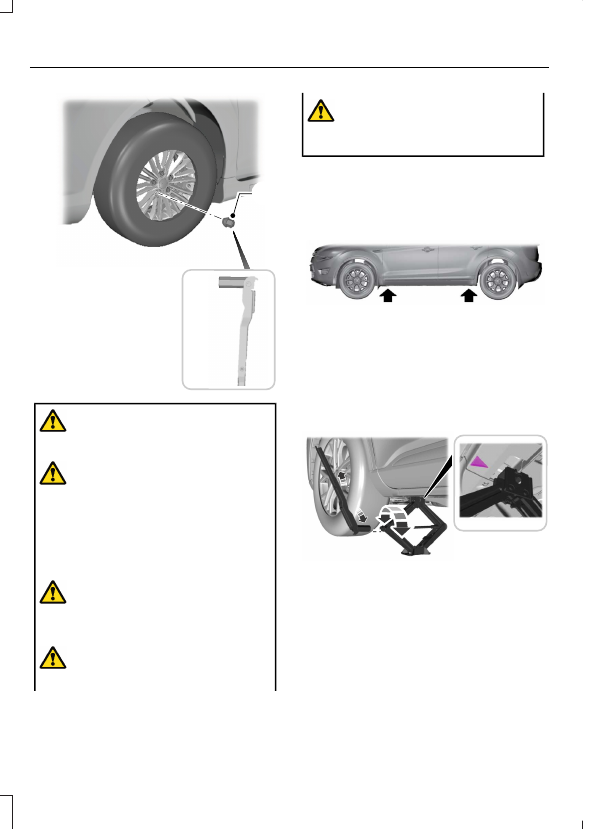
11.

The vehicle jacking points shown here
are also depicted on the warning
label on the jack. Small arrow-shaped
marks on the vehicle sills show the
location of the jacking points.

E145908

12.

Turn the wrench clockwise to raise
the vehicle until the flat tire is
completely off the ground.

E338668

13.

Remove the wheel nuts with the
wheel nut wrench.

Note:

For vehicles with full wheel covers

with exposed wheel nuts, remove the wheel
nuts prior to removing the wheel cover or
damage to the wheel cover may occur.

408

Changing a Road Wheel

14.

Replace the flat tire with the spare
tire, making sure the valve stem is
facing outward. Reinstall the wheel
nuts until the wheel is snug against
the hub. Do not fully tighten the
wheel nuts until the wheel has been
lowered.

15.

Lower the wheel by turning the jack
handle counterclockwise.

16.

Remove the jack and fully tighten the
wheel nuts in the order shown.

WARNING: 

Make sure there is no

grease or oil on the threads or the
surface between the wheel studs and
the wheel nuts. This can cause the wheel
nuts to loosen while driving.

WARNING: 

Only use the spare

wheel and tire assembly provided as
original equipment with your vehicle.

WARNING: 

When you install a

wheel, remove any corrosion, dirt or
foreign materials present on the
mounting surfaces of the wheel or the
surface of the wheel hub, brake drum or
brake disc that contacts the wheel. Make
sure to secure any fasteners that attach
the rotor to the hub so they do not
interfere with the mounting surfaces of
the wheel. Installing wheels without
following these steps can cause the
wheel nuts to loosen and the wheel to
come off while your vehicle is in motion,
resulting in loss of vehicle control,
personal injury or death.

WARNING: 

Have the wheel nuts

checked for tightness and the tire
pressure checked as soon as possible.

1

2

3

4

5

E306781

Stowing the flat tire

1.

To store the jack kit on Non Plug-in or
Full Hybrid Electric Vehicles, fold the
jack and wrench handle and engage it
to the bracket of the jack base using
the wheel nut wrench pin.

Note:

To store the jack and wrench on

Plug-in and Full Hybrid Electric Vehicles,
fold the jack and wrench into the closed
position, and place the wrench into the
storage compartment. Position the jack
assembly into the closed position and make
sure the jack is fastened securely before you
drive.

2. When attaching the folded wrench on

the jack, swing the wrench upward and
adjust the jack height until the wrench
hook engages the hole on the jack.
Tighten the hex nut clockwise until
secure.

409

Changing a Road Wheel

E294121

3. Re-position the jack kit assembly into

the original vehicle position and secure
with the plastic wing nut. Make sure
the jack is fastened securely before you
drive.

4. Unblock the wheels.

5. Stow the flat tire on the floor in the

cargo area. Secure with the flat tire
retainer strap by following the next
steps:

E142906

6. Locate the cargo tie-down near the

seatback. Push the loop of the retainer
strap through the tie-down. Thread the
non-loop end through the loop.

E157926

7.

Weave the retainer strap through the
wheel openings.

8. Locate the front cargo tie-down at the

opposite corner of the cargo area to
the tie-down used in Step 6. Thread
the retainer strap through the tie-down
and pull tight.

9. Secure by tying a 2-half hitch knot.

E143746

410

Changing a Road Wheel

WHEEL NUTS

WARNING: 

When you install a wheel, remove any corrosion, dirt or foreign materials

present on the mounting surfaces of the wheel or the surface of the wheel hub, brake
drum or brake disc that contacts the wheel. Make sure to secure any fasteners that
attach the rotor to the hub so they do not interfere with the mounting surfaces of the
wheel. Installing wheels without following these steps can cause the wheel nuts to
loosen and the wheel to come off while your vehicle is in motion, resulting in loss of
vehicle control, personal injury or death.

 lb.ft (Nm)

Bolt size

100 lb.ft (135 Nm)

M12 x 1.5

*

Torque specifications are for nut and bolt threads free of dirt and rust. Use only Ford

recommended replacement fasteners.

Retighten the wheel nuts to the specified torque within 100 mi (160 km) after any wheel
disturbance (such as tire rotation, changing a flat tire, wheel removal).

E145950

Wheel pilot bore.

A

Inspect the wheel pilot bore and
mounting surface prior to installation.
Remove any visible corrosion or loose
particles.

411

Changing a Road Wheel

ENGINE SPECIFICATIONS - 1.5L ECOBOOST™

Specification

Engine

11:1

Compression ratio.

91.35 in³ (1,497 cm³)

Displacement.

1-2-3

Firing order.

Coil on plug

Ignition system.

0.026–0.030 in (0.65–0.75 mm)

Spark plug gap.

412

Capacities and Specifications

ENGINE SPECIFICATIONS - 2.0L ECOBOOST™

Specification

Engine

10.8:1

Compression ratio.

121.7 in³ (1,995 cm³)

Displacement.

1-3-4-2

Firing order.

Coil on plug

Ignition system.

0.026–0.030 in (0.65–0.75 mm)

Spark plug gap.

413

Capacities and Specifications

ENGINE SPECIFICATIONS - 2.5L DURATEC, FULL HYBRID
ELECTRIC VEHICLE (FHEV)/PLUG-IN HYBRID ELECTRIC VEHICLE
(PHEV)

Specification

Engine

13.0:1

Compression ratio.

152 in³ (2,490 cm³)

Displacement.

1-3-4-2

Firing order.

Coil on plug

Ignition system.

0.049–0.053 in (1.25–1.35 mm)

Spark plug gap.

414

Capacities and Specifications

MOTORCRAFT PARTS - 1.5L ECOBOOST™

Motorcraft Part Number

Component

FA-2065

Air filter element.

BAGM-48H6-760

Battery.

FP-100-A

Cabin air filter.

FL-910-S

Engine oil filter.

1

SP-597-X

Spark plug.

WW-2502-A (driver side)

Windshield wiper blade.

WW-2051-A (passenger side)

WW-1112-A (rear window)

If a Motorcraft oil filter is not available, use an oil filter that aligns to SAE/USCAR – 36

Performance Specifications. Filter Type B.

We recommend Motorcraft parts that are
available at your authorized dealer or at
www.fordparts.com. We engineer these
parts for your vehicle to meet or exceed
our specifications. Use of other parts could
impact vehicle performance, emissions
and durability. Your warranty could be void
for any damage related to use of other
parts.

MOTORCRAFT PARTS - 2.0L ECOBOOST™

Motorcraft Part Number

Component

FA-2064

Air filter element.

BAGM-48H6-760

Battery.

FP-100-A

Cabin air filter.

FL-2127

Engine oil filter.

1

SP-597-X

Spark plug.

WW-2502-A (driver side)

Windshield wiper blade.

WW-2051-A (passenger side)

415

Capacities and Specifications

Motorcraft Part Number

Component

WW-1112-A (rear window)

If a Motorcraft oil filter is not available, use an oil filter that aligns to SAE/USCAR – 36

Performance Specifications. Filter Type B.

We recommend Motorcraft parts that are
available at your authorized dealer or at
www.fordparts.com. We engineer these
parts for your vehicle to meet or exceed
our specifications. Use of other parts could
impact vehicle performance, emissions
and durability. Your warranty could be void
for any damage related to use of other
parts.

MOTORCRAFT PARTS - 2.5L DURATEC, FULL HYBRID ELECTRIC
VEHICLE (FHEV)/PLUG-IN HYBRID ELECTRIC VEHICLE (PHEV)

Motorcraft Part Number

Component

FA-1948

Air filter element.

BXT-99RT4-A

12V Battery.

FP-100-A

Cabin air filter.

FL-910-S

Engine oil filter.

1

SP-530-X

Spark plug.

WW-2502-A (driver side)

Windshield wiper blade.

WW-2051-A (passenger side)

WW-1112-A (rear window)

If a Motorcraft oil filter is not available, use an oil filter that aligns to SAE/USCAR – 36

Performance Specifications. Filter Type B.

We recommend Motorcraft parts that are
available at your authorized dealer or at
www.fordparts.com. We engineer these
parts for your vehicle to meet or exceed
our specifications. Use of other parts could
impact vehicle performance, emissions
and durability. Your warranty could be void
for any damage related to use of other
parts.

ENGINE OIL CAPACITY AND
SPECIFICATION - 1.5L
ECOBOOST™

Use oil that meets the defined
specification and viscosity grade.

416

Capacities and Specifications

If you do not use oil that meets the defined
specification and viscosity grade, it could
result in:

Component damage that your vehicle
warranty does not cover.

Longer engine cranking periods.

Increased emission levels.

Reduced vehicle performance.

Reduced fuel economy.

E142732

An oil that displays this symbol conforms
to current engine, emission system and
fuel economy performance standards of
ILSAC.

We recommend Motorcraft motor oil for
your vehicle. If Motorcraft oil is not
available, use motor oils of the
recommended viscosity grade that display
the API Certification Mark for gasoline
engines.

Do not use supplemental engine oil
additives because they are unnecessary
and could lead to engine damage that your
vehicle warranty does not cover.

Capacities

Including the Oil Filter

Variant

1.25 gal (4.73 L)

All.

Materials

Specification

Name

WSS-M2C962-A1

Motorcraft® SAE 0W-20 Motor Oil(U.S.)
Motorcraft® SAE 0W-20 Motor Oil / Huile moteur
SAE 0W-20 Motorcraft®(Canada)
XO-0W20-QFS(U.S.)
CXO-0W20-LFS6(Canada)

417

Capacities and Specifications

ENGINE OIL CAPACITY AND
SPECIFICATION - 2.0L
ECOBOOST™

Use oil that meets the defined
specification and viscosity grade.

If you do not use oil that meets the defined
specification and viscosity grade, it could
result in:

Component damage that your vehicle
warranty does not cover.

Longer engine cranking periods.

Increased emission levels.

Reduced vehicle performance.

Reduced fuel economy.

E142732

An oil that displays this symbol conforms
to current engine, emission system and
fuel economy performance standards of
ILSAC.

We recommend Motorcraft motor oil for
your vehicle. If Motorcraft oil is not
available, use motor oils of the
recommended viscosity grade that display
the API Certification Mark for gasoline
engines.

Do not use supplemental engine oil
additives because they are unnecessary
and could lead to engine damage that your
vehicle warranty does not cover.

Capacities

Including the Oil Filter

Variant

1.53 gal (5.8 L)

All.

Materials

Specification

Name

WSS-M2C961-A1

Motorcraft® SAE 5W-30 Motor Oil(U.S.)
Motorcraft® SAE 5W-30 Motor Oil / Huile moteur
SAE 5W-30 Motorcraft®(Canada)
XO-5W30-Q1SP, XO-5W30-Q1FS(U.S.)
CXO-5W30-LSP6, CXO-5W30-LFS6(Canada)

418

Capacities and Specifications

Alternative Engine Oil for
Extremely Cold Climates

To improve engine cold start performance,

we recommend that you use the following
alternative engine oil in extremely cold
climates, where the ambient temperature
reaches -22.0°F (-30°C) or below.

Materials

Specification

Name

WSS-M2C963-A1

Engine Oil - SAE 0W-30

E240523

Note:

If you use your vehicle regularly above

the altitude of 5,000 ft (1,524 m) and below
the temperature of -4.0°F (-20°C), it is
recommended to use the alternative engine
oil.

ENGINE OIL CAPACITY AND
SPECIFICATION - 2.5L
DURATEC, FULL HYBRID
ELECTRIC VEHICLE (FHEV)/
PLUG-IN HYBRID ELECTRIC
VEHICLE (PHEV)

Use oil that meets the defined
specification and viscosity grade.

If you do not use oil that meets the defined
specification and viscosity grade, it could
result in:

Component damage that your vehicle
warranty does not cover.

Longer engine cranking periods.

Increased emission levels.

Reduced vehicle performance.

Reduced fuel economy.

419

Capacities and Specifications

E142732

An oil that displays this symbol conforms
to current engine, emission system and
fuel economy performance standards of
ILSAC.

We recommend Motorcraft motor oil for
your vehicle. If Motorcraft oil is not
available, use motor oils of the
recommended viscosity grade that display
the API Certification Mark for gasoline
engines.

Do not use supplemental engine oil
additives because they are unnecessary
and could lead to engine damage that your
vehicle warranty does not cover.

Capacities

Including the Oil Filter

Variant

1.43 gal (5.4 L)

All.

Materials

Specification

Name

WSS-M2C962-A1

Motorcraft® SAE 0W-20 Motor Oil(U.S.)
Motorcraft® SAE 0W-20 Motor Oil / Huile moteur
SAE 0W-20 Motorcraft®(Canada)
XO-0W20-QFS(U.S.)
CXO-0W20-LFS6(Canada)

COOLING SYSTEM CAPACITY AND SPECIFICATION - 1.5L
ECOBOOST™

Capacities

Quantity

Variant

1.98 gal (7.5 L)

All.

420

Capacities and Specifications

Materials

Specification

Name

WSS-M97B57-A2

Motorcraft® Yellow Prediluted Antifreeze/
Coolant(U.S.)
Motorcraft® Yellow Prediluted Antifreeze/Coolant
/ Antigel/liquide de refroidissement prédilué jaune
Motorcraft®(Canada)
VC-13DL-G(U.S.)
CVC-13DL-G(Canada)

WSS-M97B57-A2 is yellow coolant. It may
appear fluorescent green in some cooling
systems which is a normal characteristic.

Note:

The WSS-M97B57-A2 yellow coolant

is compatible with the WSS-M97B44-D
orange coolant so all vehicles with orange
coolant can be serviced with yellow coolant.
However, if the vehicle was manufactured
with yellow coolant it must be serviced with
yellow coolant to maintain a longer service
life.

COOLING SYSTEM CAPACITY AND SPECIFICATION - 2.0L
ECOBOOST™

Capacities

Quantity

Variant

2.25 gal (8.5 L)

All.

Materials

Specification

Name

WSS-M97B57-A2

Motorcraft® Yellow Prediluted Antifreeze/
Coolant(U.S.)
Motorcraft® Yellow Prediluted Antifreeze/Coolant
/ Antigel/liquide de refroidissement prédilué jaune
Motorcraft®(Canada)
VC-13DL-G(U.S.)
CVC-13DL-G(Canada)

WSS-M97B57-A2 is yellow coolant. It may
appear fluorescent green in some cooling
systems which is a normal characteristic.

421

Capacities and Specifications

Note:

The WSS-M97B57-A2 yellow coolant

is compatible with the WSS-M97B44-D
orange coolant so all vehicles with orange
coolant can be serviced with yellow coolant.
However, if the vehicle was manufactured
with yellow coolant it must be serviced with
yellow coolant to maintain a longer service
life.

COOLING SYSTEM CAPACITY AND SPECIFICATION - 2.5L
DURATEC, FULL HYBRID ELECTRIC VEHICLE (FHEV)

Capacities

Quantity

Variant

1.24 gal (4.7 L)

Low temperature cooling circuit.

2.40 gal (9.1 L)

High temperature cooling circuit.

Materials

Specification

Name

WSS-M97B57-A2

Motorcraft® Yellow Prediluted Antifreeze/
Coolant(U.S.)
Motorcraft® Yellow Prediluted Antifreeze/Coolant
/ Antigel/liquide de refroidissement prédilué jaune
Motorcraft®(Canada)
VC-13DL-G(U.S.)
CVC-13DL-G(Canada)

WSS-M97B57-A2 is yellow coolant. It may
appear fluorescent green in some cooling
systems which is a normal characteristic.

Note:

The WSS-M97B57-A2 yellow coolant

is compatible with the WSS-M97B44-D
orange coolant so all vehicles with orange
coolant can be serviced with yellow coolant.
However, if the vehicle was manufactured
with yellow coolant it must be serviced with
yellow coolant to maintain a longer service
life.

422

Capacities and Specifications

COOLING SYSTEM CAPACITY AND SPECIFICATION - 2.5L
DURATEC, PLUG-IN HYBRID ELECTRIC VEHICLE (PHEV)

Capacities

Quantity

Variant

1.64 gal (6.2 L)

Low temperature cooling circuit.

2.54 gal (9.6 L)

High temperature cooling circuit.

Materials

Specification

Name

WSS-M97B57-A2

Motorcraft® Yellow Prediluted Antifreeze/
Coolant(U.S.)
Motorcraft® Yellow Prediluted Antifreeze/Coolant
/ Antigel/liquide de refroidissement prédilué jaune
Motorcraft®(Canada)
VC-13DL-G(U.S.)
CVC-13DL-G(Canada)

WSS-M97B57-A2 is yellow coolant. It may
appear fluorescent green in some cooling
systems which is a normal characteristic.

Note:

The WSS-M97B57-A2 yellow coolant

is compatible with the WSS-M97B44-D
orange coolant so all vehicles with orange
coolant can be serviced with yellow coolant.
However, if the vehicle was manufactured
with yellow coolant it must be serviced with
yellow coolant to maintain a longer service
life.

FUEL TANK CAPACITY - 1.5L ECOBOOST™/2.0L ECOBOOST™

Capacities

Quantity

Variant

15.7 gal (59.5 L)

1.5L all-wheel drive.

14.8 gal (56.2 L)

1.5L front-wheel drive.

15.7 gal (59.5 L)

2.0L all-wheel drive.

15.7 gal (59.5 L)

2.0L front-wheel drive.

423

Capacities and Specifications

FUEL TANK CAPACITY - 2.5L DURATEC, FULL HYBRID ELECTRIC
VEHICLE (FHEV)

Capacities

Quantity

Variant

14.3 gal (54.2 L)

All.

424

Capacities and Specifications

FUEL TANK CAPACITY - 2.5L DURATEC, PLUG-IN HYBRID
ELECTRIC VEHICLE (PHEV)

Capacities

Quantity

Variant

11.1 gal (42 L)

All.

425

Capacities and Specifications

AIR CONDITIONING SYSTEM
CAPACITY AND
SPECIFICATION - 1.5L
ECOBOOST™

WARNING: 

The air conditioning

refrigerant system contains refrigerant
under high pressure. Only qualified
personnel should service the air
conditioning refrigerant system. Opening
the air conditioning refrigerant system
can cause personal injury.

Capacities

Refrigerant Oil

Refrigerant

Variant

2.7 fl oz (80 cm³)

18.7 oz (0.53 kg)

All.

Materials

Specification

Name

WSS-M17B21-A

R-1234yf Refrigerant(U.S.)
R-1234yf Refrigerant / Frigorigène R-1234yf(Canada)
YN-33-A(U.S.)
HS7Z-19B519-BA(Canada)

WSS-M2C31-B2

Motorcraft® POE Electric A/C Compressor Oil(U.S.)
Motorcraft® POE Electric A/C Compressor Oil / Huile
d’ester à base de polyol pour compresseur de
climatiseur électrique Motorcraft®(Canada)
YN-50(U.S. & Canada)

AIR CONDITIONING SYSTEM
CAPACITY AND
SPECIFICATION - 2.0L
ECOBOOST™

WARNING: 

The air conditioning

refrigerant system contains refrigerant
under high pressure. Only qualified
personnel should service the air
conditioning refrigerant system. Opening
the air conditioning refrigerant system
can cause personal injury.

Use refrigerant and oil that meets the
defined specifications.

If you do not use refrigerant and oil that
meets the defined specifications, it could
result in:

Component damage that your vehicle
warranty does not cover.

Reduced vehicle performance.

426

Capacities and Specifications

Capacities

Refrigerant Oil

Refrigerant

Variant

3.4 fl oz (100 ml)

19.4 oz (0.55 kg)

All.

Materials

Specification

Name

WSS-M17B21-A

R-1234yf Refrigerant(U.S.)
R-1234yf Refrigerant / Frigorigène R-1234yf(Canada)
YN-33-A(U.S.)
HS7Z-19B519-BA(Canada)

WSS-M2C300-A2

Motorcraft® R-1234yf Refrigerant PAG Oil(U.S.)
Motorcraft® R-1234yf Refrigerant PAG Oil / Huile
PAG pour frigorigène R-1234yf Motorcraft®(Canada)
YN-35(U.S. & Canada)

AIR CONDITIONING SYSTEM
CAPACITY AND
SPECIFICATION - 2.5L
DURATEC, FULL HYBRID
ELECTRIC VEHICLE (FHEV),
PLUG-IN HYBRID ELECTRIC
VEHICLE (PHEV)

WARNING: 

The air conditioning

refrigerant system contains refrigerant
under high pressure. Only qualified
personnel should service the air
conditioning refrigerant system. Opening
the air conditioning refrigerant system
can cause personal injury.

427

Capacities and Specifications

Capacities

Refrigerant Oil

Refrigerant

Variant

4.7 fl oz (140 cm³)

19.4 oz (0.55 kg)

FHEV (with battery chiller)

4.7 fl oz (140 cm³)

18.3 oz (0.52 kg)

FHEV (without battery chiller)

4.7 fl oz (140 cm³)

19.4 oz (0.55 kg)

PHEV

Materials

Specification

Name

WSS-M17B21-A

R-1234yf Refrigerant(U.S.)
R-1234yf Refrigerant / Frigorigène R-1234yf(Canada)
YN-33-A(U.S.)
HS7Z-19B519-BA(Canada)

WSS-M2C31-B2

Motorcraft® POE Electric A/C Compressor Oil(U.S.)
Motorcraft® POE Electric A/C Compressor Oil / Huile
d’ester à base de polyol pour compresseur de
climatiseur électrique Motorcraft®(Canada)
YN-50(U.S. & Canada)

WASHER FLUID SPECIFICATION

Capacities

Quantity

Variant

Fill as required.

All.

Materials

Specification

Name

WSS-M14P19-A

Motorcraft® Premium Windshield Wash Concen-
trate with Bitterant(U.S.)
Motorcraft® Premium Quality Windshield Washer
Fluid -35 °C / Liquide lave-glace de haute qualité -
35 °C Motorcraft®(Canada)
ZC-32-B2(U.S.)
CXC-37-M(Canada)

428

Capacities and Specifications

AUTOMATIC TRANSMISSION FLUID CAPACITY AND
SPECIFICATION - 8-SPEED AUTOMATIC TRANSMISSION

Capacities

Quantity

Variant

11.6 qt (11 L)

1

Eight-speed automatic transmission
(8F35).

Approximate dry fill capacity. Actual amount could vary during fluid changes.

Materials

Specification

Name

WSS-M2C949-A,

Motorcraft® MERCON® ULV Automatic Transmis-
sion Fluid(U.S.)
Motorcraft® MERCON® ULV Automatic Transmis-
sion Fluid / MERCON® ULV huile pour boîtes auto-
matique Motorcraft®(Canada)
XT-12-QULV(U.S. & Canada)

Note:

Only use transmission fluid that

conforms to the defined specification. Use
of other fluids could result in vehicle
damage not covered by the vehicle
warranty.

AUTOMATIC TRANSMISSION FLUID CAPACITY AND
SPECIFICATION - 1-SPEED AUTOMATIC TRANSMISSION

Capacities

Quantity

Variant

5.0 qt (4.7 L)

1

All.

Approximate dry fill capacity. Actual amount could vary during fluid changes.

429

Capacities and Specifications

Materials

Specification

Name

WSS-M2C949-A,

Motorcraft® MERCON® ULV Automatic Transmis-
sion Fluid(U.S.)
Motorcraft® MERCON® ULV Automatic Transmis-
sion Fluid / MERCON® ULV huile pour boîtes auto-
matique Motorcraft®(Canada)
XT-12-QULV(U.S. & Canada)

Note:

Only use transmission fluid that

conforms to the defined specification. Use
of other fluids could result in vehicle
damage not covered by the vehicle
warranty.

BRAKE FLUID SPECIFICATION

Materials

Specification

Name

WSS-M6C65-A2

Motorcraft® DOT 4 LV High Performance Motor
Vehicle Brake Fluid(U.S.)
Motorcraft® DOT 4 LV High Performance Motor
Vehicle Brake Fluid / Liquide de frein automobile
haute performance DOT 4 LV Motorcraft®(Canada)
PM-20(U.S. & Canada)

Note:

We recommend using DOT 4 LV

(Low Viscosity) High Performance Brake
Fluid meeting WSS-M6C65-A2 or ISO 4925
Class 6 standards. Use of any fluid other
than the recommended fluid could cause
reduced brake performance and not meet
our performance standards. Keep brake fluid
clean and dry. Contamination with dirt,
water, petroleum products or other
materials could result in brake system
damage and possible failure.

430

Capacities and Specifications

REAR AXLE FLUID CAPACITY AND SPECIFICATION

Capacities

Quantity

Variant

0.8 qt (0.75 L)

All.

Note:

Ford rear axles contain a synthetic lubricant that does not require changing unless

you submerge the axle in water.

Materials

Specification

Name

-

Motorcraft® Disconnect Rear Drive Unit Fluid(U.S.)
Motorcraft® Disconnect Rear Drive Unit Fluid /
Déconnecter le liquide du pont arrière Motor-
craft®(Canada)
XY-75W-QL(U.S. & Canada)

431

Capacities and Specifications

VEHICLE IDENTIFICATION
NUMBER

LOCATING THE VEHICLE
IDENTIFICATION NUMBER

The vehicle identification number is on the
left-hand side of the instrument panel.

E311767

Note:

In the illustration, XXXX is

representative of your vehicle identification
number.

VEHICLE IDENTIFICATION
NUMBER OVERVIEW

The vehicle identification number contains
the following information:

E142477

World manufacturer identifier.

A

Brake system, gross vehicle
weight rating, restraint devices
and their locations.

B

Make, vehicle line, series, body
type.

C

Engine or motor type.

D

Check digit.

E

Model year.

F

Assembly plant.

G

Production sequence number.

H

432

Vehicle Identification

WHAT IS A CONNECTED
VEHICLE

A connected vehicle has technology that
allows your vehicle to connect to a mobile
network and for you to access a range of
features. When used in conjunction with
the FordPass app, it could allow you to
monitor and control your vehicle further,
for example checking the tire pressures,
the fuel level and the vehicle location. For
additional information, refer to the local
Ford website.

CONNECTED VEHICLE
REQUIREMENTS

Connected service and related feature
functionality requires a compatible vehicle
network.

Some remote features require additional
service activation. Log in to your Ford
account for details. Some restrictions, third
party terms and message or data rates
may apply.

CONNECTED VEHICLE
LIMITATIONS

Evolving technology, cellular networks, or
regulations could affect functionality and
availability, or continued provision of some
features. These changes could even stop
some features from functioning.

CONNECTING THE VEHICLE TO
A MOBILE NETWORK

WHAT IS THE MODEM

The modem allows access to a
range of features built into your
vehicle.

ENABLING AND DISABLING THE
MODEM

1.

Press 

Settings

 on the touchscreen.

2. Press 

Connectivity

.

3. Press 

Connected Vehicle Features

.

4. Switch vehicle connectivity on or off.

CONNECTING FORDPASS TO THE
MODEM

1.

Make sure that the modem is enabled
using the vehicle settings menu.

2. Open the FordPass app on your device

and log in.

3. Add your vehicle or select your vehicle

if already added.

4. Select the option to activate your

vehicle.

5. Make sure that the name on the screen

matches the name shown in your
FordPass account.

6. Confirm that FordPass account is

connected to the modem.

CONNECTING THE VEHICLE TO
A WI-FI NETWORK

1.

Press 

Settings

 on the touchscreen.

2. Press 

Connectivity

.

3. Press 

Manage Wi-Fi Networks

.

4. Switch 

Wi-Fi

 on.

5. Press 

View Available Networks

.

6. Select an available Wi-Fi network.

Note:

Enter the network password to

connect to a secure network.

433

Connected Vehicle

CONNECTED VEHICLE
SETTINGS

You can adjust several settings on the
touchscreen under the connected vehicle
features menu, such as:

Vehicle connectivity.

Share vehicle data.

Share vehicle location.

Share driving data.

Note:

Depending on your vehicle, different

options may be available.

Note:

Editing connectivity settings could

result in some features not operating
correctly or at all. When you edit
connectivity settings, pop-up messages may
appear to notify you that services will not
work without that setting. If you switch a
feature on, pop-up messages could appear
informing you of the settings that will be
turned on.

E366956

Press the button next to a menu
option for more information.

CONNECTED VEHICLE –
TROUBLESHOOTING

CONNECTED VEHICLE –
FREQUENTLY ASKED QUESTIONS

Why can I not confirm the
connection of my FordPass
account to the modem?

The modem is not enabled. Switch
vehicle connectivity on.

The network signal is weak. Move your
vehicle closer to a place where the
network signal is not obstructed.

Why can I not connect to a Wi-Fi
network?

You entered the wrong network
password. Enter the correct password.

The network signal is weak. Move your
vehicle closer to the Wi-Fi router or to
a place where the network signal is not
obstructed.

There are multiple access points in
range with the same network name.
Choose a unique name for your
network. Do not use the default name
unless it contains a unique identifier,
for example as part of the MAC
address.

Why does the Wi-Fi connection
disconnect after successful
connection?

The network signal is weak. Move your
vehicle closer to the Wi-Fi router or to
a place where the network signal is not
obstructed.

What can I do if I am close to a Wi-
Fi router but the network signal
strength is weak?

If your vehicle has a heated windshield,
position your vehicle so that the
windshield is not facing the Wi-Fi
router.

If your vehicle has metallic tinting on
the windows but not on the windshield,
position your vehicle so that the
windshield is facing the Wi-Fi router or
open the windows that are facing the
router.

If your vehicle has metallic tinting on
the windows and the windshield, open
the windows that are facing the router.

If your vehicle is in a garage and you
have the garage door closed, open the
garage door as it could block the signal.

434

Connected Vehicle

Why can I not see a network I
expect to see in the list of available
networks?

The network is hidden. Make the
network visible and try again, or
manually add a network in the Wi-Fi
settings menu.

Some network security types are not
supported, for example WEP.

Why do software downloads take
too long?

The network signal is weak. Move your
vehicle closer to the Wi-Fi router or to
a place where the network signal is not
obstructed.

Wi-Fi network is in high demand or has
a slow Internet connection. Use a more
reliable Wi-Fi network.

Why does the software not update
when the system seems to connect

to a Wi-Fi network and the signal
strength is excellent?

No software update is available at this
time.

Select automatic updates option in the
settings menu to enable automatic
software update or contact an
authorized dealer.

There could be a connection problem.
Test the network using another device.

435

Connected Vehicle

CREATING A VEHICLE WI-FI
HOTSPOT

You can create a Wi-Fi hotspot in your
vehicle and allow devices to connect to it
for access to the Internet.

1.

Press 

Settings

 on the touchscreen.

2. Press 

Vehicle Hotspot

.

Note:

The vehicle hotspot default setting

is on.

3. Press 

Settings

.

4. Press 

Edit

.

5. Press 

Hotspot Visibility

.

Note:

The hotspot visibility default setting

is on.

Finding the Wi-Fi Hotspot Name
and Password

1.

Press 

Settings

 on the touchscreen.

2. Press 

Vehicle Hotspot

.

3. Press 

Settings

.

Note:

The network name is the hotspot

name.

4. Press 

Show Password

.

Connecting a Device to the Wi-Fi

Hotspot

1.

On your device, switch Wi-Fi on and
select the hotspot from the list of
available Wi-Fi networks.

2. When prompted, enter the password.

Purchasing a Data Plan

1.

Connect a device to the hotspot.

Note:

The vehicle network carrier’s portal

opens on your device.

2. If the portal does not open on your

device, open a website and it redirects
to the vehicle network carrier’s portal.

Note:

Secure websites do not redirect.

3. Follow the instructions on the carrier

portal to purchase a plan.

Note:

If you have an active plan, the system

does not redirect to the vehicle network
carrier’s portal when you connect a device.
Visit the vehicle network carrier’s website
to purchase more data.

Note:

If data usage information is available

in the vehicle hotspot menu, it is
approximate.

Note:

If you carry out a vehicle system reset,

the system does not remove your vehicle
from your vehicle network carrier’s account.
To remove your vehicle from the account,
contact your vehicle network carrier.

Note:

The vehicle network carrier provides

Vehicle Hotspot services, subject to your
vehicle network carrier agreement, coverage
and availability.

CHANGING THE VEHICLE WI-
FI HOTSPOT NAME OR
PASSWORD

1.

Press 

Settings

 on the touchscreen.

2. Press 

Vehicle Hotspot

.

3. Press 

Settings

.

4. Press 

Edit

.

5. Press 

Change Network Name

.

6. Enter your required network name.

7.

Press 

Done

.

8. Press 

Change Password

.

9. Enter your required password.

10.

Press 

Done

.

436

Vehicle Wi-Fi Hotspot

 (If Equipped)

Changing the Wi-Fi Hotspot
Frequency

Note:

The Vehicle Hotspot frequency band

is selectable depending upon your device
capabilities. You will be unable to connect
your device to the Vehicle Hotspot if it does
not support the selected frequency band.

1.

Press 

Settings

 on the touchscreen.

2. Press 

Vehicle Hotspot

.

3. Press 

Settings

.

4. Press 

Edit

.

5. Select a frequency.

VEHICLE WI-FI HOTSPOT –
TROUBLESHOOTING

VEHICLE WI-FI HOTSPOT –
FREQUENTLY ASKED QUESTIONS

Why can I not see the Wi-Fi hotspot

name when I search for Wi-Fi
networks on my cell phone or other
device?

Make sure Wi-Fi hotspot visibility is on.

The system does not provide a Wi-Fi
hotspot at this time.

Check what frequency the hotspot is
transmitting in the vehicle hotspot
settings menu. If the frequency is 5 GHz
and your device cannot see the
network, change the frequency to 2.4
GHz.

437

Vehicle Wi-Fi Hotspot

 (If Equipped)

AUDIO SYSTEM
PRECAUTIONS

WARNING: 

Driving while distracted

can result in loss of vehicle control, crash
and injury. We strongly recommend that
you use extreme caution when using any
device that may take your focus off the
road. Your primary responsibility is the
safe operation of your vehicle. We
recommend against the use of any
hand-held device while driving and
encourage the use of voice-operated
systems when possible. Make sure you
are aware of all applicable local laws
that may affect the use of electronic
devices while driving.

Listening to loud audio for long periods of
time could damage your hearing.

SWITCHING THE AUDIO UNIT
ON AND OFF

Press the button on the volume
control or on the touchscreen.

SELECTING THE AUDIO
SOURCE

1.

Select 

Sources

.

2. Select the desired source by pressing

the tile on the touchscreen.

PLAYING OR PAUSING THE
AUDIO SOURCE

Press to pause playback. Press
again to resume playback.

Note:

Not all sources can be paused. The

button mutes these sources.

Note:

The mute button on the steering

wheel pauses the media source.

ADJUSTING THE VOLUME

E248939

Turn to adjust the volume.

Some vehicles may be able to adjust the
volume using buttons on the steering
wheel.

SWITCHING SHUFFLE MODE
ON AND OFF

Press the button on the
touchscreen to switch shuffle
mode on or off.

Note:

Not all sources have shuffle mode.

SWITCHING REPEAT MODE ON
AND OFF

Press the button on the
touchscreen to switch repeat
mode on or off.

438

Audio System

Note:

Not all sources have repeat mode.

SETTING A MEMORY PRESET

To store a radio station, press and hold one
of the preset buttons.

Note:

A maximum of thirty presets can be

stored depending on the selected number
of preset pages.

MUTING THE AUDIO

Press to mute the signal. Press
again to restore the signal.

Note:

The mute function is only available

for sources that cannot be paused.

E383782

Press the button on the steering
wheel to mute the signal. Press
again to restore the signal.

SCROLLING THROUGH MENU
ITEMS

Use the touchscreen to scroll through
menu items.

SELECTING A MENU ITEM

Use the touchscreen to select a menu item.

ADJUSTING THE SOUND
SETTINGS

1.

 Press the settings icon on the

touchscreen.

2. Press 

Sound Settings

.

3. Select the desired menu point and

adjust the settings.

SETTING THE CLOCK AND
DATE

1.

Press 

Settings

 on the touchscreen.

2. Press 

Clock Settings

.

3. Set the time.

Note:

The 

AM

 and 

PM

 options are not

available if 

24-hour mode

 is on.

Switching Automatic Time
Updates On and Off

1.

Press 

Settings

 on the touchscreen.

2. Press 

Clock Settings

.

3. Switch 

Auto Time Update

 on or off.

FM RADIO

FM RADIO LIMITATIONS

The further you travel from an FM station,
the weaker the signal and the weaker the
reception.

Hills, mountains, tall buildings, bridges,
tunnels, freeway overpasses, parking
garages, dense tree foliage and
thunderstorms can interfere with the
reception.

When you pass a ground-based broadcast
repeating tower, a stronger signal may
overtake a weaker one and result in the
audio system muting.

SELECTING AN FM RADIO
STATION

Manually Changing Radio Stations

Use the touchscreen to change radio
stations.

Note:

You can recall radio stations using

the preset buttons.

439

Audio System


Content      ..     11      12      13      14     ..