Ford Explorer (2022 year). Manual in english - page 17
Switching the System On and Off
To switch the system on or off, adjust the
setting. Depending on your vehicle options,
the setting could be in the following:
•
Information display. See
•
Touchscreen. See
When you switch the system off, a warning
lamp illuminates and the alert indicators
flash twice.
Note:
The system remembers the last
setting when you start your vehicle.
To permanently switch the system off,
contact an authorized dealer.
Blind Spot Information System
with Trailer Tow
(If Equipped)
E293525
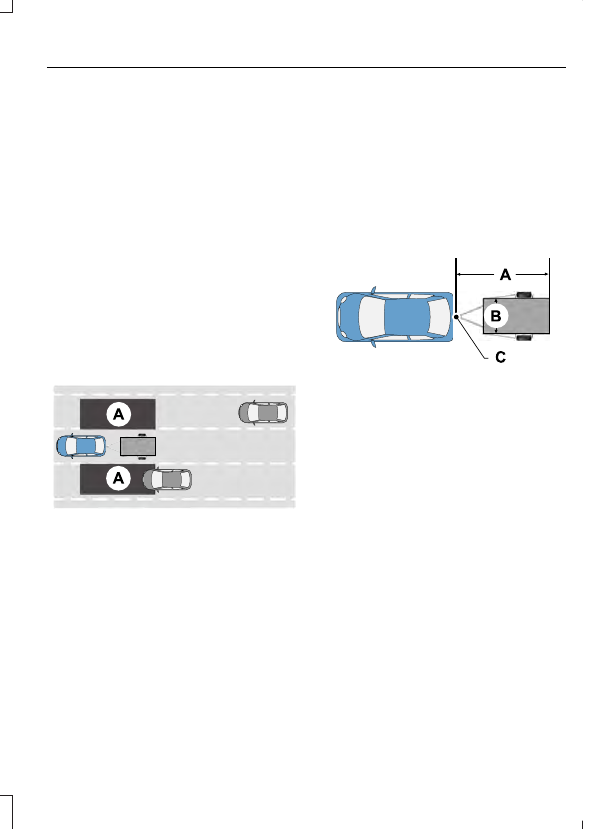
The design of the system is to aid you in
detecting vehicles that could have entered
the detection area zone (A). The detection
area is on both sides of your vehicle and
trailer, extending rearward from the
exterior mirrors to the end of your trailer.
When you attach and have setup a trailer,
the blind spot information system with
trailer tow becomes active when driving
forward above 6 mph (10 km/h).
You can switch the system off in the
information display. See
(page 113). If you switch the
blind spot information system off, blind
spot information system with trailer tow
turns off.
Setting up a Trailer
You can setup a trailer through the
information display. See
E293526
Trailer length.
A
Trailer width.
B
Trailer hitch ball.
C
Note:
Measure the width of the trailer at
the front of the trailer, not the widest point.
The maximum width that the system can
support is 8.2 ft (2.5 m)(B).
Note:
The trailer length is the distance
between the trailer hitch ball and the rear
of the trailer. The maximum length that the
system can support is 33 ft (10 m)(A).
When setting up a trailer, a sequence of
screens appear asking for trailer
information:
•
Select trailer screen: None, Trailer A,
Trailer B or Trailer C.
Note:
You can select only one trailer on
small information displays.
Select one of the trailers and press OK. The
menu goes to the next screen.
•
Width less than 8.2 ft (2.5 m) and
length less than 33 ft (10 m)?
265
Driving Aids