Ford Transit (2022 year). Manual in english - page 19
 

  Index      Manuals     Ford Transit (2022 year). Manual in english


Search            copyright infringement  


Content      ..     17      18      19      20     ..


Ford Transit (2022 year). Manual in english - page 19


WHAT IS CROSS TRAFFIC
ALERT

The system is designed to alert you of
vehicles approaching from the sides behind
your vehicle when you shift into reverse
(R).

HOW DOES CROSS TRAFFIC
ALERT WORK

The system is designed to detect vehicles
that approach at a speed between 4 mph
(6 km/h) and 37 mph (60 km/h). Coverage
decreases when the sensors are partially,
mostly or fully obstructed. Slowly reversing
helps increase the coverage area and
effectiveness.

The system turns on when you start the
engine and you shift into reverse (R). The
system turns off when you shift out of
reverse (R).

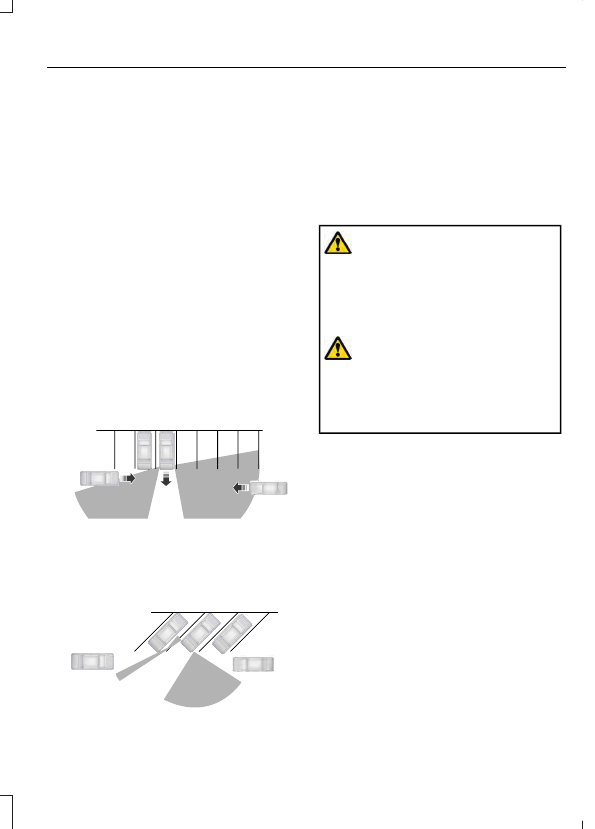
E142440

The sensor on the left-hand side is only
partially obstructed and zone coverage on
the right-hand side is maximized.

E142441

Zone coverage also decreases when
parking at narrow angles. The sensor on
the left-hand side is mostly obstructed and
zone coverage on that side is severely
reduced.

CROSS TRAFFIC ALERT
PRECAUTIONS

WARNING: 

Do not use the cross

traffic alert system as a replacement for
using the interior and exterior mirrors or
looking over your shoulder before
reversing out of a parking space. The
cross traffic alert system is not a
replacement for careful driving.

WARNING: 

The system may not

operate properly during severe weather
conditions, for example snow, ice, heavy
rain and spray. Always drive with due
care and attention. Failure to take care
may result in a crash.

CROSS TRAFFIC ALERT
LIMITATIONS

The system may not correctly operate
when any of the following occur:

The sensors are blocked.

Adjacently parked vehicles or objects
are obstructing the sensors.

Vehicles approach at speeds less than
4 mph (6 km/h) or greater than 37 mph
(60 km/h).

The vehicle speed is greater than 7 mph
(12 km/h).

You reverse out of an angled parking
space.

309

Cross Traffic Alert

Note:

The system may not correctly operate

when towing a trailer. For vehicles with a
trailer tow module and tow bar approved
by us, the system turns off when you attach
a trailer. For vehicles with an aftermarket
trailer tow module or tow bar, we
recommend that you switch the system off
when you attach a trailer.

SWITCHING CROSS TRAFFIC
ALERT ON AND OFF

1.

Using the instrument cluster display
controls on the steering wheel, select

Settings

.

2. Select 

Driver Assistance

.

3. Switch 

Cross Traffic Alert

 on or off.

Note:

If you temporarily switch the system

off, it turns on the next time you switch the
ignition on.

To permanently switch the system off,
contact an authorized dealer.

LOCATING THE CROSS
TRAFFIC ALERT SENSORS

E205199

The sensors are behind the rear bumper
on both sides of your vehicle.

Note:

Keep the sensors free from snow, ice

and large accumulations of dirt.

Note:

Do not cover the sensors with bumper

stickers, repair compound or other objects.

Note:

Blocked sensors could affect system

performance.

If the sensors are blocked, a message may
appear in the instrument cluster display
when you shift into reverse (R).

CROSS TRAFFIC ALERT WITH
TRAILER COVERAGE

WHAT IS CROSS TRAFFIC ALERT
WITH TRAILER COVERAGE

Cross traffic alert with trailer coverage
allows the system to continue operating
with a trailer or trailer hitch attachment.

CROSS TRAFFIC ALERT WITH
TRAILER COVERAGE
LIMITATIONS

Cross traffic alert remains on when you
attach a trailer in vehicles that come with
blind spot information system with trailer
coverage under the following conditions:

You connect a trailer.

The trailer is a bike rack or cargo rack
with a maximum length of 3 ft (1 m).

You set the trailer length to 3 ft (1 m)
in the center display.

Note:

The system may not correctly operate

when towing a trailer. For vehicles with an
approved trailer tow module and tow bar,
the system turns off when you attach a
trailer. For vehicles with an aftermarket
trailer tow module or tow bar, we
recommend that you switch the system off
when you attach a trailer.

310

Cross Traffic Alert

CROSS TRAFFIC ALERT
INDICATORS

E268294

When the system detects an
approaching vehicle a tone
sounds, an indicator illuminates

in the relevant exterior mirror and direction
indicators appear in the center display to
show which side the approaching vehicle
is coming from.

Note:

If the direction indicators do not

display, a message appears in the
instrument cluster display.

Note:

In exceptional conditions, the system

could alert you even when there is nothing
in the detection zone, for example a vehicle
passing further away from your vehicle.

CROSS TRAFFIC ALERT –
TROUBLESHOOTING

CROSS TRAFFIC ALERT –
WARNING LAMPS

E268294

If the system malfunctions, it
illuminates in the instrument
cluster and a message appears

in the instrument cluster display.  Have
your vehicle checked as soon as possible.

CROSS TRAFFIC ALERT – INFORMATION MESSAGES

Details

Message

Displays instead of direction indicators when the system
detects a vehicle. Check for approaching traffic.

Cross Traffic Alert

Displays if the cross traffic alert system sensors are blocked.
Clean the sensors. If the message continues to appear, have
your vehicle checked as soon as possible.

Cross Traffic Not Avail-
able Sensor Blocked See
Manual

The system has malfunctioned.  Have your vehicle checked
as soon as possible.

Cross Traffic System
Fault

Displays if you attach a trailer to your vehicle.

Cross Traffic Alert Deac-
tivated Trailer Attached

311

Cross Traffic Alert

WHAT IS PRE-COLLISION
ASSIST

Pre-collision assist detects vehicles,
cyclists or pedestrians in the road ahead
of you, or who could cross the vehicle’s
path, and warns you of their presence. If
you do not respond, the system
automatically applies the brakes.

HOW DOES PRE-COLLISION
ASSIST WORK

The pre-collision assist system is active
when your vehicle reaches a speed greater
than approximately 6 mph (10 km/h).
Pedestrian and cyclist detection is active
at speeds up to 50 mph (80 km/h).

E156130

If your vehicle is rapidly approaching
another stationary vehicle, a vehicle
traveling in the same direction as yours, a
pedestrian or a cyclist within your driving
path, the system is designed to provide
three levels of functionality.

Details

Level of Functionality

When activated, a warning lamp flashes and an audible
warning sounds.

Alert

The system is designed to help reduce the impact speed by
preparing the brakes for rapid braking. The system does not
automatically apply the brakes. If you press the brake pedal,
the system could apply additional braking up to maximum
braking force, even if you lightly press the brake pedal.

Brake support

The system is designed to apply the brakes if it detects a
crash is imminent. This may help reduce impact or avoid the
crash.

Automatic emergency
braking - vehicles without
adaptive cruise control

The system is active at speeds up to 80 mph (130 km/h).

The system is designed to apply the brakes if it detects a
crash is imminent. This may help reduce impact or avoid the
crash.

Automatic emergency
braking - vehicles with
adaptive cruise control

312

Pre-Collision Assist

HOW DOES PRE-COLLISION
ASSIST WITH INTERSECTION
ASSIST WORK

The pre-collision assist system could apply
brakes if you are turning across an
oncoming vehicle's path. Detection of
vehicles driving in an oncoming direction
is active if your vehicle is driving at speeds
up to 18.6 mph (30 km/h).

E309750

PRE-COLLISION ASSIST
PRECAUTIONS

WARNING: 

You are responsible for

controlling your vehicle at all times. The
system is designed to be an aid and does
not relieve you of your responsibility to
drive with due care and attention. Failure
to follow this instruction could result in
the loss of control of your vehicle,
personal injury or death.

WARNING: 

The system does not

operate during hard acceleration or
steering. Failure to take care may lead
to a crash or personal injury.

WARNING: 

The system may fail or

operate with reduced function during
cold and severe weather conditions.
Snow, ice, rain, spray and fog can
adversely affect the system. Keep the
front camera and radar free of snow and
ice. Failure to take care may result in the
loss of control of your vehicle, serious
personal injury or death.

WARNING: 

The system may not

operate properly if your vehicle has a
non-Ford windshield. Do not carry out
windshield repairs in the area around the
sensor.

WARNING: 

System performance

could be reduced in situations where the
vehicle camera has limited detection
capability. These situations include but
are not limited to direct or low sunlight,
vehicles at night without tail lights,
unconventional vehicle types,
pedestrians or cyclists with complex
backgrounds, running pedestrians or fast
moving cyclists, partly obscured
pedestrians or cyclists, pedestrians or
cyclists that the system cannot
distinguish from a group. Failure to take
care may result in the loss of control of
your vehicle, personal injury or death.

WARNING: 

The Pre-Collision Assist

system with brake support cannot help
prevent all collisions. Do not rely on this
system to replace your judgment and the
need to maintain correct distance and
speed.

PRE-COLLISION ASSIST
LIMITATIONS

The system is not designed to detect
animals.

313

Pre-Collision Assist

The system is not designed to detect
vehicles that are traveling in a different
direction.

LOCATING THE PRE-
COLLISION ASSIST SENSORS
- VEHICLES WITHOUT:
ADAPTIVE CRUISE CONTROL

E243054

The camera is mounted behind the interior
mirror.

Note:

Keep the sensors free from snow, ice

and large accumulations of dirt.

Note:

Do not clean the sensors with sharp

objects.

Note:

If your vehicle sustains damage

leaving the sensors misaligned, this may
cause inaccurate measurements or false
alerts.

Blocked sensors could affect system
accuracy. A message could appear in the
instrument cluster display.

LOCATING THE PRE-
COLLISION ASSIST SENSORS
- VEHICLES WITH: ADAPTIVE
CRUISE CONTROL

E243054

The camera is mounted behind the interior
mirror.

E244279

The radar sensor is behind the front grille
below the license plate.

Note:

Keep the sensors free from snow, ice

and large accumulations of dirt.

Note:

Do not clean the sensors with sharp

objects.

Note:

If your vehicle sustains damage

leaving the sensors misaligned, this may
cause inaccurate measurements or false
alerts.

Blocked sensors could affect system
accuracy. A message could appear in the
instrument cluster display.

314

Pre-Collision Assist

DISTANCE INDICATION

WHAT IS DISTANCE INDICATION

Distance indication displays in the
instrument cluster display the time gap to
vehicles ahead of you traveling in the same
direction.

Note:

The graphic does not display if you

switch on cruise control or adaptive cruise
control.

SWITCHING DISTANCE
INDICATION ON AND OFF

1.

Using the instrument cluster display
controls on the steering wheel, select

Settings

.

2. Select 

Driver Assistance

.

3. Select 

Pre-Collision Assist

.

4. Switch 

Distance Indication

 on or off.

DISTANCE INDICATION INDICATOR

Time Gap

Distance Gap

Distance Indic-

ator Color

System Sensit-

ivity

Vehicle Speed

Greater than 0.9

seconds.

Greater than

82.0 ft (25 m) .

Gray.

Normal.

62 mph

(100 km/h)

0.6-0.9

seconds.

55.8–82.0 ft

(17–25 m).

Yellow.

Less than 0.6

seconds.

Less than

55.8 ft (17 m).

Red.

DISTANCE ALERT

WHAT IS DISTANCE ALERT

A warning lamp illuminates if the distance
to the vehicle ahead is small.

Note:

The warning lamp does not

illuminate if cruise control or adaptive cruise
control is active.

ADJUSTING THE SENSITIVITY OF
DISTANCE ALERT

1.

Using the instrument cluster display
controls on the steering wheel, select

Settings

.

2. Select 

Driver Assistance

.

3. Select 

Pre-Collision Assist

.

4. Select 

Alert Sensitivity

.

5. Select a setting and press the 

OK

button.

AUTOMATIC EMERGENCY
BRAKING

WHAT IS AUTOMATIC
EMERGENCY BRAKING

Automatic emergency braking is an active
safety system that activates the vehicle
brakes when a potential crash is detected.

315

Pre-Collision Assist

SWITCHING AUTOMATIC
EMERGENCY BRAKING ON AND
OFF

1.

Using the instrument cluster display
controls on the steering wheel, select

Settings

.

2. Select 

Driver Assistance

.

3. Select 

Pre-Collision Assist

.

4. Switch 

Active Braking

 on or off.

PRE-COLLISION ASSIST –
TROUBLESHOOTING

PRE-COLLISION ASSIST –
WARNING LAMPS

It illuminates if your vehicle
rapidly approaches another
vehicle, to warn you of the risk of

a crash with the vehicle in front of you.

It could illuminate red if the distance to the
vehicle ahead is small.

It illuminates amber when you switch the
system off or if the system is not available.

PRE-COLLISION ASSIST – INFORMATION MESSAGES

Details

Message

The system has malfunctioned.  Have your vehicle checked
as soon as possible.

Pre-Collision Assist Not
Available

The sensors are dirty. Clean the sensors. If the message
continues to appear, have your vehicle checked as soon as
possible.

Pre-Collision Assist Not
Available Sensor Blocked

The following table lists possible causes and actions for when a blocked sensor
message could display.

Action

Cause

Clean the radiator grille in front of the radar
or remove any obstruction.

The surface of the radar in the radiator grille
is dirty or obstructed.

Wait for a short period of time. It may take
several minutes for the system to detect
that there is no obstruction.

The surface of the radar is clean but the
message remains in the display.

The system is temporarily disabled. The
system should reactivate after a short
period of time when the weather conditions
improve.

Heavy rain, spray, snow, or fog is interfering
with the radar signals.

Have your vehicle checked as soon as
possible.

The radar is misaligned.

316

Pre-Collision Assist

Action

Cause

Clean the outside of the windshield in front
of the camera.

The windshield in front of the camera is
dirty or obstructed.

Wait for a short period of time. It may take
several minutes for the camera to detect
that there is no obstruction.

The windshield in front of the camera is
clean but the message remains in the
display.

Wait for a short period of time. The
message should clear when the temper-
ature around the camera decreases.

Excessive heat around the camera.

317

Pre-Collision Assist

WHAT IS DRIVER ALERT

The system is designed to alert you if it
calculates that you are becoming drowsy
or if your driving deteriorates.

HOW DOES DRIVER ALERT
WORK

The system calculates your alertness level
based upon your driving behavior in relation
to the lane markings and other factors
when the vehicle speed is greater than
approximately 40 mph (65 km/h).

The warning system has two stages:
1.

A temporary warning is issued to advise
you to take a rest. This message only
appears for a short time.

2. If you do not rest and the system

continues to detect that your driving
deteriorates, it issues a further warning.
This remains in the instrument cluster
display until you cancel it.

DRIVER ALERT PRECAUTIONS

WARNING: 

You are responsible for

controlling your vehicle at all times. The
system is designed to be an aid and does
not relieve you of your responsibility to
drive with due care and attention. Failure
to follow this instruction could result in
the loss of control of your vehicle,
personal injury or death.

WARNING: 

The system may not

operate properly if the sensor is blocked.
Keep the windshield free from
obstruction.

WARNING: 

Take regular rest

breaks if you feel tired. Do not wait for
the system to warn you.

WARNING: 

Certain driving styles

may result in the system warning you
even if you are not feeling tired.

WARNING: 

In cold and severe

weather conditions the system may not
function. Rain, snow and spray can all
limit sensor performance.

WARNING: 

The system will not

operate if the sensor cannot track the
road lane markings.

WARNING: 

If damage occurs in the

immediate area surrounding the sensor,
have your vehicle checked as soon as
possible.

WARNING: 

The system may not

correctly operate if your vehicle is fitted
with a suspension kit not approved by
us.

SWITCHING DRIVER ALERT ON
AND OFF

1.

Using the instrument cluster display
controls on the steering wheel, select

Settings

.

2. Select 

Driver Assistance

.

3. Switch 

Driver Alert

 on or off.

Note:

The system remains on or off

depending on how it was last set.

RESETTING DRIVER ALERT

You can reset driver alert by:

Switching the ignition off and on when
your vehicle is stationary.

Opening and closing the driver door
when your vehicle is stationary.

318

Driver Alert

DRIVER ALERT – TROUBLESHOOTING

DRIVER ALERT – INFORMATION MESSAGES

Action

Message

Displays when we recommend that you take a break due to
low alertness levels.

Driver Alert Warning Rest
Suggested

Displays when you must take a break due to low alertness
levels.

Driver Alert Warning Rest
Now

319

Driver Alert

WHAT IS SPEED SIGN
RECOGNITION

The system is designed to detect speed
limit signs to inform you of the current
speed limit.

HOW DOES SPEED SIGN
RECOGNITION WORK

Detected speed signs appear in the
instrument cluster display. The sensor is
behind the interior mirror.

The system turns on when you switch the
ignition on and you cannot switch the
system off.

Note:

Speed sign data provided by the

navigation system contains information
integrated to the data carrier release.

SPEED SIGN RECOGNITION
PRECAUTIONS

WARNING: 

You are responsible for

controlling your vehicle at all times. The
system is designed to be an aid and does
not relieve you of your responsibility to
drive with due care and attention. Failure
to follow this instruction could result in
the loss of control of your vehicle,
personal injury or death.

WARNING: 

The system may not

operate properly if the sensor is blocked.
Keep the windshield free from
obstruction.

Note:

Do not carry out windshield repairs

in the immediate area surrounding the
sensor.

Note:

Always fit Ford approved parts when

replacing headlamp bulbs. Other bulbs
could reduce system performance.

SPEED SIGN RECOGNITION
LIMITATIONS

The system could not detect all speed
signs and could incorrectly read signs.

In cold and severe weather conditions the
system could not function. Rain, snow,
spray and large contrasts in lighting can all
prevent the sensor from correctly
functioning.

If your vehicle has a suspension kit not
approved by us, the system could not
correctly function.

SPEED SIGN RECOGNITION
INDICATORS

E317824

When the system detects a speed limit
sign, the speed limit appears in the
instrument cluster display.

Note:

If your vehicle has a navigation

system, stored speed sign data could
influence the indicated speed limit value.

320

Speed Sign Recognition

SETTING THE SPEED SIGN
RECOGNITION SPEED
TOLERANCE

You can set the system speed warning to
alert you when the vehicle speed exceeds
the speed limit recognized by the system
by a certain speed tolerance.

1.

Using the instrument cluster display
controls on the steering wheel, select

Settings

.

2. Select 

Driver Assistance

.

3. Select 

Traffic Sign Recognition

.

4. Select 

Activate TSR

.

5. Select 

Activate Speed Warning

.

6. Select 

Speed Warning

.

7.

Select a setting and press the 

OK

button.

Note:

The system remembers the last

setting when you start your vehicle.

SPEED SIGN RECOGNITION – TROUBLESHOOTING

SPEED SIGN RECOGNITION – INFORMATION MESSAGES

Action

Message

The traffic sign data provided by the navigation system is
unavailable due to weak or no signal. Wait for a short period
of time for the signal to improve. If the message continues
to appear, have your vehicle checked as soon as possible.

Traffic Sign Reduced
Performance See Manual

321

Speed Sign Recognition

LOAD CARRYING
PRECAUTIONS

Keep your loaded vehicle weight
within its design rating capability,
with or without a trailer. Properly
loading your vehicle provides
maximum return of vehicle design
performance. Before you load your
vehicle, become familiar with the
following terms for determining
your vehicle’s weight rating, with
or without a trailer, from the
vehicle’s Tire and Loading
Information label or Safety
Compliance Certification label.

WARNING: 

The

appropriate loading capacity of
your vehicle can be limited either
by volume capacity (how much
space is available) or by payload
capacity (how much weight the
vehicle should carry). Once you
have reached the maximum
payload of your vehicle, do not
add more cargo, even if there is
space available. Overloading or
improperly loading your vehicle
can contribute to loss of vehicle
control and vehicle rollover.

WARNING: 

Exceeding the

Safety Compliance Certification
label vehicle weight limits can
adversely affect the
performance and handling of
your vehicle, cause vehicle
damage and can result in the
loss of control of your vehicle,
serious personal injury or death.

WARNING: 

Do not use

replacement tires with lower
load carrying capacities than the
original tires because they may
lower your vehicle's GVWR and
GAWR limitations. Replacement
tires with a higher limit than the
original tires do not increase the
GVWR and GAWR limitations.

WARNING: 

Do not exceed

the GVWR or the GAWR
specified on the certification
label.

WARNING: 

Exceeding any

vehicle weight rating can
adversely affect the
performance and handling of
your vehicle, cause vehicle
damage and can result in the
loss of control of your vehicle,
serious personal injury or death.

WARNING: 

When loading

the roof racks, we recommend
you evenly distribute the load,
as well as maintain a low center
of gravity. Loaded vehicles, with
higher centers of gravity, may

322

Load Carrying

handle differently than unloaded
vehicles. Take extra precautions,
such as slower speeds and
increased stopping distance,
when driving a heavily loaded
vehicle.

The gross combined weight must
never exceed the Gross Combined
Weight Rating.

LOCATING THE SAFETY
COMPLIANCE CERTIFICATION
LABELS

Safety Compliance Certification Label
Example:

E198828

The Safety Compliance Certification label
is located on the door hinge pillar,
door-latch post, or the door edge that
meets the door-latch post, next to the
driver seating position.

WHAT IS THE GROSS AXLE
WEIGHT RATING

GAWR (Gross Axle Weight
Rating)

GAWR is the maximum allowable
weight that a single axle (front or
rear) can carry. These numbers
are on the Safety Compliance
Certification label.

WHAT IS THE GROSS VEHICLE
WEIGHT RATING

GVWR is the maximum allowable
weight of the fully loaded vehicle.
This includes all options,
equipment, passengers and cargo.
It appears on the Safety
Compliance Certification label.

WHAT IS THE GROSS
COMBINED WEIGHT RATING

Gross Combined Weight Rating
(GCWR) is the maximum
allowable weight of the vehicle
and the loaded trailer, including
all cargo and passengers, that the
vehicle can handle without risking
damage. (Important: The towing
vehicle’s braking system is rated
for operation at Gross Vehicle
Weight Rating, not at Gross
Combined Weight Rating.)
Separate functional brakes should

323

Load Carrying

be used for safe control of towed
vehicles and for trailers where the
Gross Combined Weight of the
towing vehicle plus the trailer
exceed the Gross Vehicle Weight
Rating of the towing vehicle.

Note:

For trailer towing

information refer to the RV and
Trailer Towing Guide available at
an authorized dealer, or online at
the website that follows.

RV & Trailer Towing Guide Online

www.fleet.ford.com/towing-guides

Website

324

Load Carrying


Content      ..     17      18      19      20     ..