Ford Transit (2022 year). Manual in english - page 10
 

  Index      Manuals     Ford Transit (2022 year). Manual in english


Search            copyright infringement  


Content      ..     8      9      10      11     ..


Ford Transit (2022 year). Manual in english - page 10


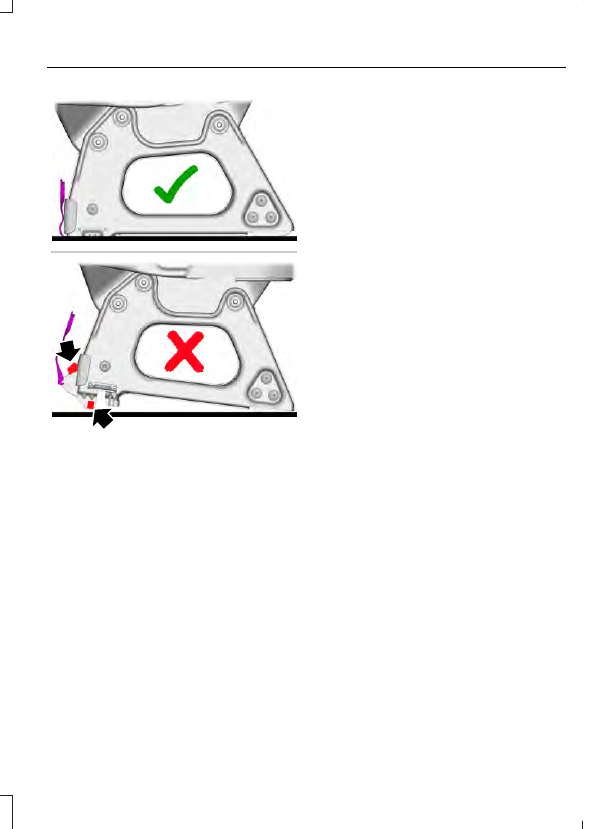
E178062

1.

Align the seat frame front catches.

2. Push the seat forward to engage the

seat frame front catches.

3. Align the seat frame rear catches.

4. Allow the seat to drop under its own

weight for the last 6-8 in (15-20 cm).

165

Rear Seats

WHAT IS THE REAR
OCCUPANT ALERT SYSTEM

The rear occupant alert system monitors
vehicle conditions and notifies you to check
for rear seat occupants when you switch
the ignition off.

HOW DOES THE REAR
OCCUPANT ALERT SYSTEM
WORK

The system monitors when rear doors have
been opened and closed to indicate the
potential presence of an occupant in the
rear seat.

A message displays in the information and
entertainment display screen and an
audible warning sounds when you switch
the ignition off after any of the following
conditions have been met:

A rear door is opened or closed while
the ignition is on.

You switch the ignition on within 15
minutes of a rear door opening and
closing.

You switch the ignition on within 15
minutes of the alert having displayed
or sounded.

REAR OCCUPANT ALERT
SYSTEM PRECAUTIONS

WARNING: 

On hot days, the

temperature inside the vehicle can rise
very quickly. Exposure of people or
animals to these high temperatures for
even a short time can cause death or
serious heat related injuries, including
brain damage. Small children are
particularly at risk.

WARNING: 

Do not leave children

or pets unattended in your vehicle.
Failure to follow this instruction could
result in personal injury or death.

REAR OCCUPANT ALERT
SYSTEM LIMITATIONS

The system does not detect the presence
of objects or passengers in the rear seat.
It monitors when rear doors are opened
and closed.

Note:

It is possible to receive an alert when

there is no rear seat occupant, but alert
conditions are met.

Note:

It is possible to receive no alert when

there is an occupant in the rear seat, if alert
conditions are not met. For example, if a rear
seat occupant does not enter the vehicle
through a rear door.

Note:

The audible warning does not sound

when the front door is opened before you
switch the ignition off.

SWITCHING REAR OCCUPANT
ALERT SYSTEM ON AND OFF

1.

Press 

Settings

 on the touchscreen.

2. Press 

Vehicle

.

3. Switch 

Rear Occupant Alert

 on or off.

Note:

The default setting is on.

Note:

Performing a master reset causes the

system to switch on again.

Semiannual Reminder

 (If Equipped)

When you switch the system off, a
message appears every six months as a
reminder that the system is off. You can
switch the system back on or leave it off.

166

Rear Occupant Alert System

 (If Equipped)

REAR OCCUPANT ALERT
SYSTEM INDICATORS

E350472

Message

Check rear seats for occupants.

Displays when you switch your vehicle off
after the alert conditions are met.

The message displays for a short period of
time.  Press 

Close

 to acknowledge and

remove the message.

Note:

Depending on your SYNC version, the

graphic may look different from what you
see here.

REAR OCCUPANT ALERT
SYSTEM AUDIBLE WARNINGS

Sounds when you switch your vehicle off
after the alert conditions are met.

The warning sounds for a short period of
time.

167

Rear Occupant Alert System

 (If Equipped)

WHAT IS THE MEMORY
FUNCTION

The memory function recalls the position
of these features:

Driver seat.

Power mirrors.

Optional power steering column.

Optional power adjustable pedals.

MEMORY FUNCTION
PRECAUTIONS

WARNING: 

Before activating the

memory seat, make sure that the area
immediately surrounding the seat is clear
of obstructions and that all occupants
are clear of moving parts.

WARNING: 

Do not use the memory

function when your vehicle is moving.

LOCATING THE MEMORY
FUNCTION BUTTONS

E332006

The memory function buttons are on the
driver door.

SAVING A PRESET POSITION

1.

Adjust the memory features to your
preferred position.

2. Press and hold the preferred preset

button until you hear a single tone.

A confirmation message appears in the
information display.

You can save up to three preset memory
positions at any time.

RECALLING A PRESET
POSITION

Press and release a preset button.

Note:

You can recall a preset memory

position when the ignition is off, or when you
place the transmission in park (P) or neutral
(N) if the ignition is on and the vehicle is not
moving.

Note:

Pressing any of the preset buttons or

any memory feature control during a
memory recall cancels the operation.

You can also recall a preset memory
position by:

Pressing the unlock button on your
remote control if you linked it to a
preset position.

Unlocking the intelligent driver door
handle if a linked remote control is
present.

Using a linked remote control to recall your
memory position when the ignition is off
moves the seat and steering column to the
easy entry position.

Linking a Preset Position to Your
Remote Control or Passive Key

168

Memory Function

 (If Equipped)

LOCATING THE USB PORTS

Data Transfer USB Ports

The USB ports could be in the following
locations:

On the lower instrument panel below
the climate control.

Inside the center console.

Note:

 These USB ports can also charge

devices.

Note:

 Not all USB ports in your vehicle have

data transfer capabilities.

Note:

 We recommend using only USB-IF

certified cables and adapters. Non-certified
cables and adapters may not work.

Charge Only USB Ports

The USB ports could be in the following
locations:

On the lower instrument panel.

On the upper instrument panel.

Inside the media bin.

Inside the center console.

On the rear of the center console.

In the cargo area.

PLAYING MEDIA USING THE
USB PORT - VEHICLES WITH:
SYNC 4

WARNING: 

Driving while distracted

can result in loss of vehicle control, crash
and injury. We strongly recommend that
you use extreme caution when using any
device that may take your focus off the
road. Your primary responsibility is the
safe operation of your vehicle. We
recommend against the use of any
hand-held device while driving and
encourage the use of voice-operated
systems when possible. Make sure you
are aware of all applicable local laws
that may affect the use of electronic
devices while driving.

1.

Connect your device to a USB port.

2. Press the audio system tile on the

touchscreen.

3. Press 

Sources

.

Press the USB option.

Press to play a track. Press again
to pause the track.

Press to skip to the next track.

Press and hold to fast forward
through the track.

Press once to return to the
beginning of a track. Repeatedly
press to return to previous

tracks.

Press and hold to fast rewind through the
track.

169

USB Ports

CHARGING A DEVICE

Connect your device to the USB port.

Data Transfer USB Ports

You can charge your device through the
data transfer USB port when SYNC is on.

Charge Only USB Ports

You can charge your device through the
charge only USB port when the vehicle is
in accessory mode or when the vehicle is
running.

170

USB Ports

WHAT IS THE POWER OUTLET

The power outlet can power devices that
require up to the rating on the outlet cover.

Note:

The total power delivered is divided

if more than one outlet is used.

POWER OUTLET
PRECAUTIONS

WARNING: 

Do not keep electrical

devices plugged into the power outlet
whenever the device is not in use. The
outlet provides power when the vehicle
is on. Failure to follow this instruction
could result in personal injury.

WARNING: 

Do not use an

extension cord or connect multiple
devices to the power outlet. Doing so
could result in overloading the power
outlet. Failure to follow this instruction
could result in fire, personal injury or
property damage.

Note:

This feature has a maximum output

of 400 watts when the vehicle is in park (P).

Note:

While in drive (D), the maximum

outlet output is 300 watts.

POWER OUTLET LIMITATIONS

Devices could exceed the power rating
shown the device label when plugged in.
Unplug the device and switch the ignition
on and off to reset the system.

Do not use the power outlet for these types
of electric devices:

Cathode ray tube type televisions.

Motor loads, for example vacuum
cleaners, electric saws and other
electric power tools, or
compressor-driven refrigerators.

Measuring devices which process
precise data, for example medical
equipment or measuring equipment.

Other appliances requiring an
extremely stable power supply, for
example microcomputer-controlled
electric blankets or touch sensor
lamps.

LOCATING THE POWER
OUTLETS

The power outlet could be located on both
sides of the passenger seats.

E337927

POWER OUTLET INDICATORS

The power outlet indicator illuminates to
let you know the status of the system.

171

Power Outlet - Vehicles With: 110-120V Power Outlet

Description

Indicator Status

The power outlet is

on.

On

The power outlet is

off.

Off

The power outlet is

in fault mode.

Flashing

Note:

Due to different technologies used

on its construction, some devices may
exceed the capacity shown on its label
when they are initially plugged in.

Note:

The power outlet temporarily turns

off power when in fault mode if the device
exceeds the Watt limit. Unplug your device
and switch the ignition off. Open the driver
door to reset the power outlet. Switch the
ignition back on and make sure the indicator
light remains on. Do not plug your device
back in if it exceeds the maximum outlet
output.

172

Power Outlet - Vehicles With: 110-120V Power Outlet

WHAT IS THE POWER OUTLET

The vehicle functions as a portable
generator and can power devices that
require up to the rating listed on power
outlet label.

POWER OUTLET
PRECAUTIONS

WARNING: 

Do not connect any

vehicle power outlets to any premises.
This can create a backfeed to utility lines.
Failure to follow this instruction could
result in property damage, fire, electrical
shock or death.

WARNING: 

Do not keep electrical

devices plugged in the power point
whenever the device is not in use. Power
points power up during remote start.

When you switch the rear power outlet on,
the vehicle power down timer is disabled
and the vehicle continues to be powered
on.

Note:

We recommend using UL approved

devices for use with the power outlet.

Note:

Make sure there is no damage to the

outlets before driving your vehicle.

Note:

Power could be limited during

extreme hot or cold temperatures to
optimize the performance of the system.

Note:

Make sure the windows of the vehicle

are closed and the doors are locked if you
are using the outlets and leave your vehicle
unattended.

Note:

Pro Power Onboard

 is unavailable

when your vehicle is charging.

Grounding Type

Neutral bonded: The neutral of the inverter
generator is bonded to system ground.
Connecting loads that also have neutral
bonded to ground causes the ground fault
detection to trip.

Note:

If additional grounding measures are

required, consult with a qualified electrician.

LOCATING THE POWER
OUTLETS

Front Location

E357518

The front power outlet is on the inner side
of the passenger seat.

173

Power Outlet - Vehicles With: 110-120V 2.4kW Power Outlet

Rear Location

E357247

The rear power outlet could be in the rear
of the vehicle.

POWER OUTLET INDICATORS

Power Outlet Status Indicator

The power outlet indicator illuminates to
let you know the status of the system.

Description

Indicator Status

The power point is

working and the

vehicle is on.

On

The power point is
off and the vehicle

is off.

Off

The power point is

in fault mode.

Flashing

Power Mode Indicator

E357527

The power mode indicator displays the
currently used power and total available
power level on the touchscreen. When you
switch the power outlets off, the indicator
displays a reduced available power level.
When you switch the power outlets on, the
indicator displays the full available power.

Note:

Make sure that plugged in devices do

not exceed the available power displayed
on the power mode indicator.

SWITCHING THE REAR POWER
OUTLET ON AND OFF

Using the Center Display

1.

Press 

Features

 on the touchscreen.

2. Press 

Pro Power Onboard

.

3. Switch 

Rear Outlets

 on or off.

174

Power Outlet - Vehicles With: 110-120V 2.4kW Power Outlet

Using the Rear Outlet Control

E337175

Press the button to switch the rear outlet
on and off.

SETTING THE HIGH VOLTAGE
BATTERY RESERVE LIMIT

When the vehicle is in Park (P) you can set
a high voltage battery reserve limit to save
a range which you can drive your vehicle
before recharging.

You can set the high voltage battery
reserve limit on the touchscreen.

A notification indicates when the vehicle
reaches the pre-set limit and 

Pro Power

Onboard

 turns off.

Note:

After your vehicle reaches the pre-set

limit, the vehicle power down timer is
enabled again  See 

What Is the Vehicle

Power Down Timer

 (page 192).

RESETTING GROUND FAULT
DETECTION

Disconnect all electrical loads before you
reset the ground fault.

Use the controls on the touchscreen to test
the ground fault detection circuit.

175

Power Outlet - Vehicles With: 110-120V 2.4kW Power Outlet

POWER OUTLET – TROUBLESHOOTING

POWER OUTLET – INFORMATION MESSAGES

Description

Message

Make sure that plugged in devices do not

exceed the available power displayed.

Devices could exceed the power rating

shown the device label when plugged in.

Unplug the device and switch the vehicle

on and off to reset the system.

Item(s) plugged in exceeded the system's

maximum capacity. Try unplugging one or

more items and reset. See owner's manual

for details.

Power could be limited during extreme hot

or cold temperatures to optimize the

performance of the system.

Generator system is outside its operating

temperature and capability is reduced. See

owner's manual for details.

Do not plug in any device that supplies

power to the vehicle through the power

outlets. This could result in damage to

vehicle systems.

Another power source is trying to supply

power to your vehicle's AC outlets. Discon-

nect vehicle from that power source. See

owner's manual for details.

The power outlet is in fault mode. Make

sure that all devices are unplugged from

the system. Use the controls on the touch-

screen to reset the system. Switch your

vehicle on and off if the touchscreen

controls are unable to reset the system. See

an authorized dealer if these steps do not

fix the fault.

This button tests outlets for proper opera-

tion of ground fault detection. In a

successful test, Pro Power Onboard detects
the ground fault and turns off. See owner’s

manual for details.

176

Power Outlet - Vehicles With: 110-120V 2.4kW Power Outlet

POWER OUTLET – FREQUENTLY
ASKED QUESTIONS

Why is there a warning about
something being plugged into the rear
power outlet when I do not have
anything plugged in?

One or more of the rear power outlet
covers could be ajar or broken. Make
sure the generator is off and check the
outlet covers. Select OK on the
instrument cluster display to
acknowledge the warning.

Why can I not shift my vehicle out of
Park (P)?

Make sure the rear power outlet covers
are closed and not damaged. Press
OK on the instrument cluster display
to acknowledge the warning to be able
to move the transmission from Park
(P).

What do I do when my instrument
cluster display is malfunctioning and
I cannot acknowledge the warning to
put the transmission in Drive (D).

Power the vehicle off and make sure
nothing is plugged into the rear power
outlet and all outlet covers are closed.
Start the vehicle and select OK on the
instrument cluster display to
acknowledge the warning. Have your
vehicle serviced soon.

177

Power Outlet - Vehicles With: 110-120V 2.4kW Power Outlet

WHAT IS THE POWER OUTLET

The power outlet can power devices using
a 12 V outlet adapter.

POWER OUTLET
PRECAUTIONS

WARNING: 

Do not use a power

point for operating a cigar lighter.
Incorrect use of the power points can
cause damage not covered by the
vehicle warranty, and can result in fire or
serious injury.

When you switch the vehicle on, you can
use the socket to power 12 V appliances
with a maximum current rating of 15 A. Do
not use the power point over the vehicle
capacity of 12 V DC 180 W or a fuse could
blow. Do not plug in any device that
supplies power to the vehicle through the
power points. This could result in damage
to vehicle systems. Do not hang any
accessory from the accessory plug. Always
keep the power point caps closed when
not in use. Do not insert objects other than
an accessory plug into the power point.

To prevent the battery from running out of
charge:

Do not use the power point longer than
necessary when the vehicle is off.

Do not leave devices plugged in
overnight or when you park your vehicle
for extended periods.

LOCATING THE POWER
OUTLETS

Power outlets are in the following
locations:

On the instrument panel.

Inside the center console.

On the rear of the center console.

178

Power Outlet - Vehicles With: 12V Power Outlet

CIGAR LIGHTER
PRECAUTIONS

WARNING: 

Do not plug optional

electrical accessories into the cigar
lighter socket. Incorrect use of the cigar
lighter can cause damage not covered
by the vehicle warranty, and can result
in fire or serious injury.

Note:

If the power supply does not work

after you switch the ignition off, switch the
ignition on.

Note:

If you use the socket when the engine

is not running, the battery may run out of
charge.

Note:

When you switch the ignition on, you

can use the socket to power 12 V appliances
with a maximum current rating of 15 A.

USING THE CIGAR LIGHTER

E103382

Press the element in to use the cigar
lighter.  It pops out after a short period of
time.

Do not hold the cigar lighter element
pressed in.

179

Cigar Lighter

BOTTLE HOLDERS

BOTTLE HOLDER PRECAUTIONS

WARNING: 

Do not place glass

objects in the bottle holder. Items could
become loose during hard braking,
acceleration or crashes. Failure to follow
this instruction could result in personal
injury.

LOCATING THE BOTTLE HOLDERS

E171160

OVERHEAD STORAGE

LOCATING THE OVERHEAD
STORAGE

WARNING: 

Do not place heavy

objects in the overhead console. Failure
to follow this instruction could result in
personal injury or death in the event of a
sudden stop or crash.

E169073

OVERHEAD STORAGE LOAD
CAPACITIES

The maximum evenly distributed shelf load
is 44 lb (20 kg).

180

Storage


Content      ..     8      9      10      11     ..