Ford F-450 (2022 year). Manual in english - page 19
SWITCHING DISTANCE
INDICATION ON AND OFF -
VEHICLES WITH: 2.3 INCH
SCREEN
To switch the system on or off, use the
instrument cluster display:
1.
Select
Driver Assist
.
2. Select
Pre-Collision
.
3. Select
Distance Indication
.
4. Switch the feature on or off.
SWITCHING DISTANCE
INDICATION ON AND OFF -
VEHICLES WITH: 4.2 INCH
SCREEN
To switch the system on or off, use the
instrument cluster display:
1.
Select
Driver Assist
.
2. Select
Pre-Collision
.
3. Select
Distance Indication
.
4. Switch the feature on or off.
SWITCHING DISTANCE
INDICATION ON AND OFF -
VEHICLES WITH: 8 INCH SCREEN
To switch the system on or off, use the
instrument cluster display:
1.
Select
Driver Assist
.
2. Select
Pre-Collision
.
3. Select
Distance Indication
.
4. Switch the feature on or off.
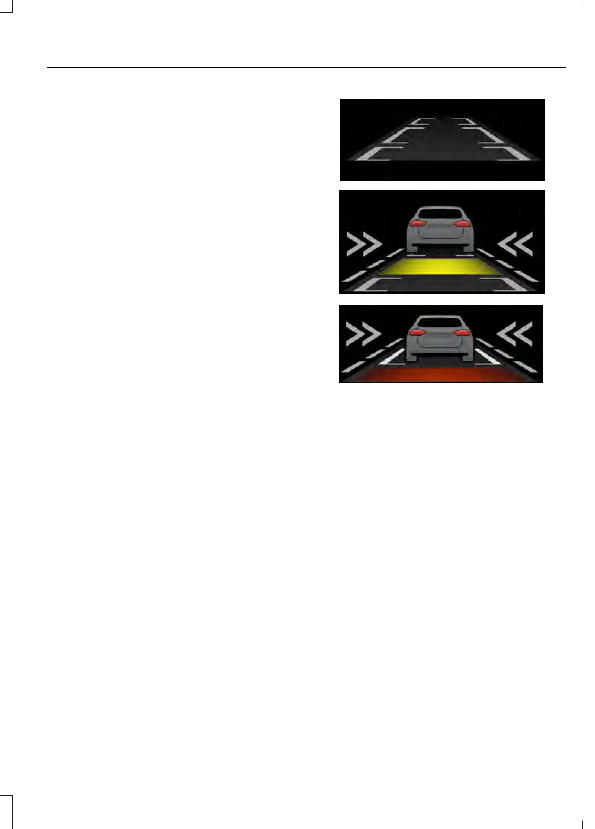
DISTANCE INDICATION
INDICATOR
The indicator displays the time gap
between your vehicle and vehicles traveling
in the same direction ahead of you.
E254791
DISTANCE ALERT
(IF EQUIPPED)
WHAT IS DISTANCE ALERT
The system alerts you with a warning lamp
if the distance to the vehicle ahead is
small.
Note:
The warning lamp does not
illuminate if cruise control or adaptive cruise
control is active.
ADJUSTING THE SENSITIVITY OF
DISTANCE ALERT - VEHICLES
WITH: 2.3 INCH SCREEN
To switch the system on or off, use the
instrument cluster display:
1.
Select
Driver Assist
.
2. Select
Pre-Collision
.
3. Select
Alert Sens.
.
305
Pre-Collision Assist
(If Equipped)