Ford Galaxy / Ford S-MAX. Manual - part 62
 

  Index      Ford     Ford Galaxy / Ford S-MAX - service repair manual 2006 year


Search            


Content   ..  60  61  62  63   ..


Ford Galaxy / Ford S-MAX. Manual - part 62


Brake System - General Information - 
Front Brake Disc Runout Check

S-MAX/Galaxy 2006.5 (02/2006-)


Print


General Procedures 

Special Tool(s) 

205-069 
Dial Indicator Gauge (Metric) 

205-070 
Holding Fixture, Dial Indicator Gauge 

206-003 
Holding Fixture, Dial Indicator Gauge (Disc Brake) 

1. Remove the following items: 

1. Wheel and tire. 

Refer to: 

Wheels and Tires

 (204-04 Wheels 

and Tires, Diagnosis and Testing). 

2. Brake pads.  

Refer to: 

Brake Pads

 (206-03 Front Disc 

Brake, Removal and Installation). 

2.   

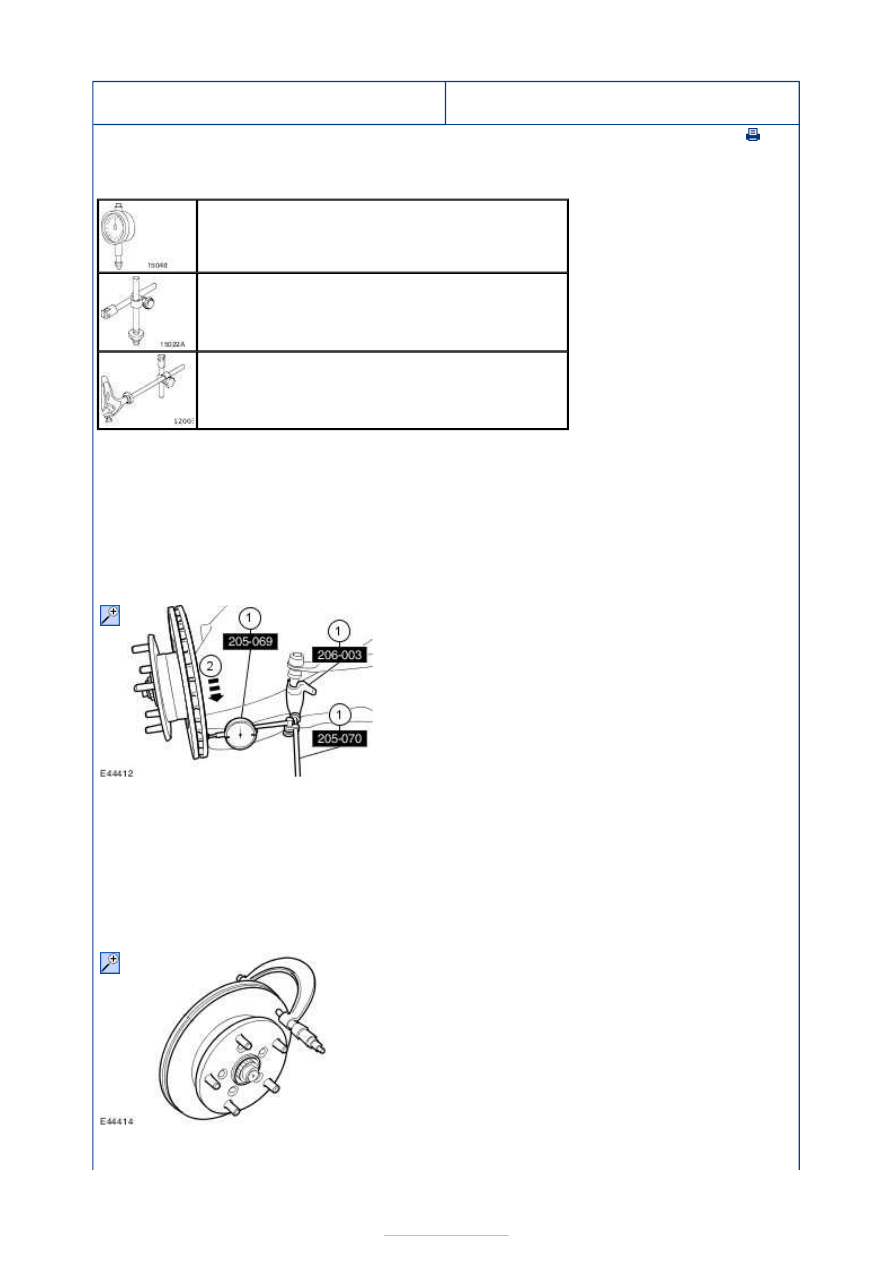
1. Position the dial indicator gauge so that it 

contacts the brake disc face approximately 
10 mm from the outer edge (inner face 
measurement shown). 

Special Tool(s): 

205-069

205-070

206-

003


2. Slowly rotate the brake disc and note the 

readings. 

3. Repeat sub-steps 1 and 2 on the brake 

disc outer face. 

4. If any of the measurements exceed the 

brake disc runout specification, a new 
brake disc must be installed and the brake 
disc runout re-checked. 

Refer to: 

Specifications

 (206-03 Front Disc 

Brake, Specifications). 

3.   

1. Measure the brake disc thickness at eight 

positions, 45 degrees apart and 
approximately 15 mm from the outer edge 
of the brake disc. 

2. If any of the measurements exceed the 

brake disc thickness variation specification, 
a new brake disc must be installed and the 
brake disc runout re-checked. 

Refer to: 

Specifications

 (206-03 Front Disc 


Brake, Specifications). 

4. If all the brake disc runout measurements and 

the thickness variation are within the 
specifications, check the wheel balance. 

Brake System - General Information - 
Rear Brake Disc Runout Check

S-MAX/Galaxy 2006.5 (02/2006-)


Print


General Procedures 

Special Tool(s) 

205-069 
Dial Indicator Gauge (Metric) 

205-070 
Holding Fixture, Dial Indicator Gauge 

206-003 
Holding Fixture, Dial Indicator Gauge (Disc Brake) 

1. Remove the following items: 

1. Wheel and tire. 

Refer to: 

Wheels and Tires

 (204-04 Wheels 

and Tires, Diagnosis and Testing). 

2. Brake pads.  

Refer to: 

Brake Pads

 (206-04 Rear Disc 

Brake, Removal and Installation). 
Refer to: 

Brake Pads - Vehicles With: 

Electronic Parking Brake (EPB)

 (206-04 

Rear Disc Brake, Removal and 
Installation). 

2.   

1. Position the dial indicator gauge so that it 

contacts the brake disc face approximately 
10 mm from the outer edge (inner face 
measurement shown). 

Special Tool(s): 

205-069

205-070

206-

003


2. Slowly rotate the brake disc and note the 

readings. 

3. Repeat sub-steps 1 and 2 on the brake 

disc outer face. 

4. If any of the measurements exceed the 

brake disc runout specification, a new 
brake disc must be installed and the brake 
disc runout re-checked. 

Refer to: 

Specifications

 (206-04 Rear Disc 

Brake, Specifications). 

3.   

1. Measure the brake disc thickness at eight 

positions, 45 degrees apart and 
approximately 15 mm from the outer edge 
of the brake disc. 

2. If any of the measurements exceed the 

brake disc thickness variation specification, 
a new brake disc must be installed and the 


brake disc runout re-checked. 

Refer to: 

Specifications

 (206-04 Rear Disc 

Brake, Specifications). 

4. If all the brake disc runout measurements and 

the thickness variation are within the 
specifications, check the wheel balance. 


Content   ..  60  61  62  63   ..