Ford GT (2018 year). Manual - part 15
 

  Index      Ford     Ford GT - service manual 2018 year in english


Search            


Content   ..  13  14  15  16   ..


Ford GT (2018 year). Manual - part 15


Remote Control Front Windows

You can open the windows for a short time
after you unlock your vehicle with the
remote control. After you unlock your
vehicle, press and hold the remote control
unlock button to open the windows.
Release the button once movement starts.
Press the lock or unlock button to stop
movement.

EXTERIOR MIRRORS

Power Exterior Mirrors

WARNING

Do not adjust the mirrors when your
vehicle is moving. This could result
in the loss of control of your vehicle,

serious personal injury or death.

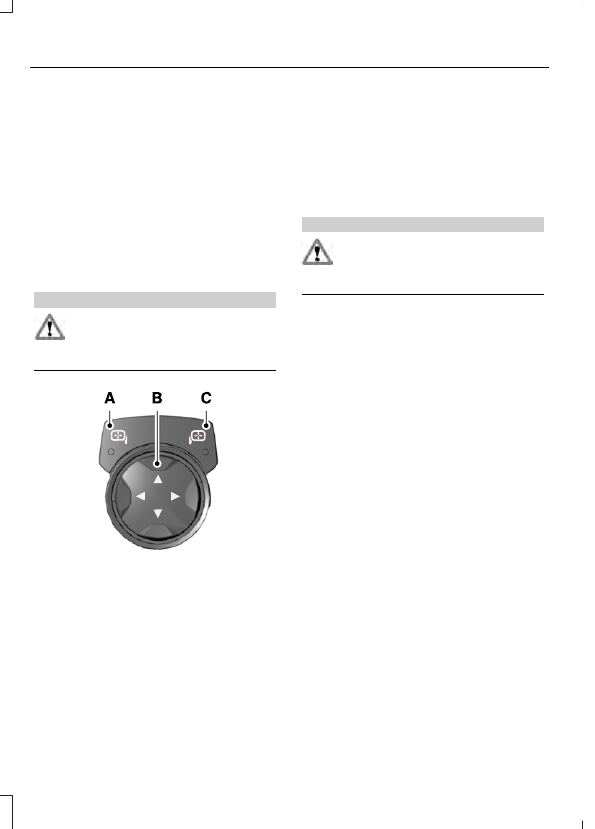
E176804

Left-hand mirror

A

Adjustment control

B

Right-hand mirror

C

To adjust a mirror:

1.

Select the mirror you want to adjust.
The control will illuminate.

2. Adjust the position of the mirror.

3. Press the mirror switch again.

Fold-Away Exterior Mirrors

Push the mirror toward the door window
glass.  Make sure that you fully engage the
mirror in its support when returning it to its
original position.

INTERIOR MIRROR

WARNING

Do not adjust the mirrors when your
vehicle is moving. This could result
in the loss of control of your vehicle,

serious personal injury or death.

Note: Do not clean the housing or glass of
any mirror with harsh abrasives, fuel or other
petroleum or ammonia-based cleaning
products.

You can adjust the interior mirror to your
preference. This mirror has a second pivot
point, which lets you move the mirror head
up or down and from side to side.

Pull the tab below the mirror toward you
to reduce glare at night.

GAUGES

Note: Cluster shown in standard measure.
Metric clusters are similar.

E227915

Transmission Gear Position.

A

Left Information Display.

B

Drive Mode.

C

Center Information Display.

D

Tachometer.

E

Right Information Display.

F

Odometer.

G

Information Display

Left Information Display

Varies depending on drive mode.

Normal, Wet and Sport Mode:

Fuel Level.

Engine Coolant Temperature.

Track Mode:

Speedometer.

V-Max Mode:

Fuel Level.

Drive Mode

See Drive Mode Control (page 122).

Center Information Display

Varies depending on drive mode.

Normal, Wet and V-Max Mode:

Speedometer.

Sport and Track Mode:

Gear.

Right Information Display

Varies depending on drive mode.

Normal and Wet Mode:

Gear.

Sport Mode:

Speedometer.

Track Mode:

Engine Coolant Temperature.

Engine Oil Temperature.

Transmission Temperature.

Fuel Level.

V-Max Mode:

Engine Coolant Temperature.

Engine Oil Temperature.

Engine Oil Pressure.

Turbo Boost Pressure.

Trip Computer

The trip computer functions only operate
when the engine is running.  See General
Information (page 70).

Fuel Gauge

Note: The fuel gauge may vary slightly
when your vehicle is moving or on a slope.

Switch the ignition on.  The fuel gauge will
indicate approximately how much fuel is
left in the fuel tank.  The arrow adjacent to
the fuel pump symbol indicates on which
side of your vehicle the fuel filler door is
located.

The gauge is divided into four segments
and moves towards the right when you
refuel your vehicle. If the gauge remains in
the far left segment after adding fuel, this
indicates your vehicle needs service soon.

After refueling, some variability in gauge
position is normal:

It may take a short time for the gauge
to reach full after leaving the gas
station. This is normal and depends
upon the slope of pavement at the gas
station.

The fuel amount dispensed into the
tank is a little less or more than the
gauge indicated. This is normal and
depends upon the slope of pavement
at the gas station.

If the gas station nozzle shuts off
before the tank is full, try a different
gas pump nozzle.

Low Fuel Reminder

A low fuel reminder triggers when the
distance to empty value reaches 50 mi
(80 km) to empty, with additional
warnings at 25 mi (40 km), 10 mi (20 km)
and 0 mi (0 km) to empty if the message
is cleared each time.

In Track Mode, the distance to empty
warnings appear at 10 mi (20 km) and 0 mi
(0 km) to empty if the message is cleared
each time.

After extended periods of performance
driving, your distance to empty value may
display low even after refueling. Drive your
vehicle under normal operating conditions
to recalibrate the distance to empty.

Variations

Note: The low fuel warning and distance-to-empty warning can appear at different fuel
gauge positions depending on fuel economy conditions. This variation is normal.

Fuel Gauge Position

Distance to Empty

Driving Type (Fuel Economy

Conditions)

1/8 tank.

50 mi (80 km)

Highway driving.

1/4 tank.

50 mi (80 km)

Performance driving or

extended idle.

Engine Coolant Temperature
Gauge

WARNING

Do not remove the coolant reservoir
cap when the cooling system is hot.
Wait 10 minutes for the cooling

system to cool down. Cover the coolant
reservoir cap with a thick cloth to prevent
the possibility of scalding and slowly
remove the cap. Failure to follow this
instruction could result in personal injury.

At normal operating temperature, the
engine coolant temperature will be in the
middle range of the gauge. If the engine
coolant temperature exceeds the normal
range, the gauge will be highlighted. Stop
your vehicle as soon as safely possible,
switch off the engine and let it cool.

Engine Oil Temperature Gauge

If the engine oil temperature exceeds the
normal range, the engine is overheating.
Reduce engine speed as soon as safely
possible to allow the engine to cool.  If you
continue to operate the engine at high
engine speeds, the engine speed reduces
automatically to prevent engine damage.

Engine Oil Pressure Gauge

Oil pressure varies with engine speed.  The
pressure rises as engine speed rises and
drops as engine speed drops.

If the pressure drops below the normal
range of the gauge, a warning lamp
illuminates and a message appears in the
information display.  Stop your vehicle as
soon as it is safe to do so and switch the
engine off.  Check the engine oil level.

Gauge Mode

On the right side of the instrument cluster,
you can configure which gauges are
displayed.

WARNING LAMPS AND
INDICATORS

The following warning lamps and
indicators alert you to a vehicle condition
that may become serious.  Some lamps
illuminate when you start your vehicle to
make sure they work.  If any lamps remain
on after starting your vehicle, refer to the
respective system warning lamp for further
information.

Note: Some warning indicators appear in
the information display and operate the
same as a warning lamp but do not
illuminate when you start your vehicle.

Anti-Lock Braking System

If it illuminates when you are
driving, this indicates a
malfunction.  You will continue

to have the normal braking system
(without ABS) unless the brake system
warning lamp is also illuminated.  Have the
system checked by your authorized dealer.


Content   ..  13  14  15  16   ..