Ford Focus Electric (2018 year). Manual - part 56
 

  Index      Ford     Ford Focus Electric - service manual 2018 year in english


Search            


Content   ..  54  55  56  57   ..


Ford Focus Electric (2018 year). Manual - part 56


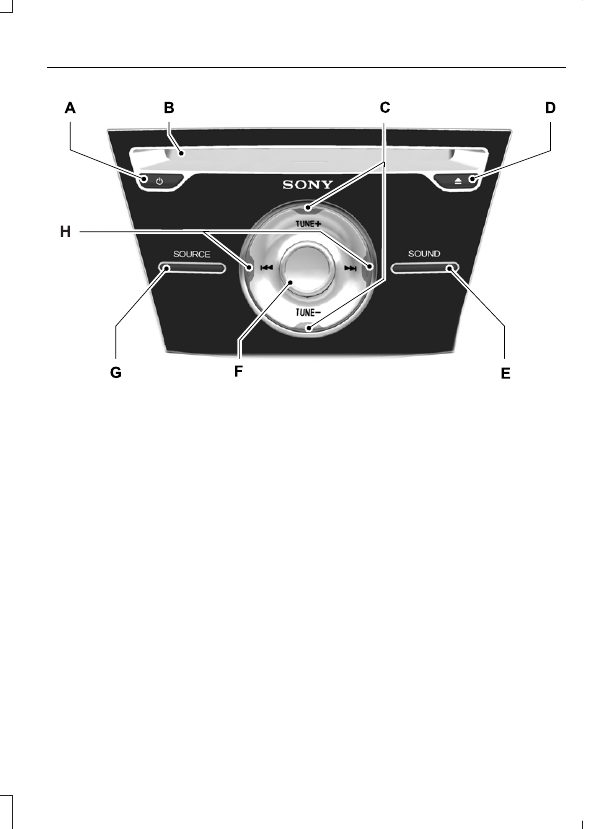
E184903

Power: Press to switch the system on and off.

A

CD slot: Insert a CD.

B

TUNE: In radio mode, press to manually search through the radio frequency
band. In SIRIUS mode, press to find the previous or next available satellite radio
station.

C

Eject: Press to eject a CD.

D

SOUND: Press to access settings for Treble, Midrange, Bass, Fade or Balance.

E

Volume: Turn to adjust the volume.

F

SOURCE: Press to access different audio modes, such as AM, FM, Satellite
Radio and Line in.

G

Seek, Fast Forward and Reverse: In radio mode, select a frequency band
and press this button. The system stops at the first station it finds in that
direction. In SIRIUS mode, press to select the next or previous satellite radio
station. If a specific category is selected (such as jazz, rock or news), press to
find the next or previous in the selected category. In CD mode, press to select
the previous or next track. Press and hold to move quickly forward through the
current track.

H

MEDIA HUB

 (If Equipped)

You can locate the media hub inside the
center console or on the instrument panel.

E211463

See your SYNC information.

GENERAL INFORMATION

WARNING

Driving while distracted can result in
loss of vehicle control, crash and
injury. We strongly recommend that

you use extreme caution when using any
device that may take your focus off the
road. Your primary responsibility is the safe
operation of your vehicle. We recommend
against the use of any hand-held device
while driving and encourage the use of
voice-operated systems when possible.
Make sure you are aware of all applicable
local laws that may affect the use of
electronic devices while driving.

Getting to Know Your System

The SYNC 3 system allows you to interact
with a variety of features using the
touchscreen and voice commands. By
integrating with your Bluetooth-enabled
phone, the touchscreen provides easy
interaction with audio, multimedia, climate
control, navigation, and your phone's SYNC
AppLink.

Using the Touchscreen

To operate the touchscreen, you can
simply touch the item or option that you
want to select. The button highlights when
you select it.

The SYNC 3 layout allows you to quickly
select the feature you wish to use.

E207614

Action and Description

Menu Item

Item

This bar displays icons and messages pertaining to current
system activities including climate settings, voice
commands and phone functions such as text messages.

Status Bar

A

This button is available on the main screens. Pressing it
takes you to the home screen view.

Home

B

This shows the current time. You can set the clock manually
or have it controlled by the vehicle's GPS location.  See
Settings (page 290).

Clock

C

This displays the current outside temperature.

Outside
Temperature

D

You can touch any of the buttons on this bar to select a
feature.

Feature Bar

E

The touchscreen allows you quick access
to all of your comfort, navigation,
communication and entertainment
options. Using the status and feature bar
you can quickly select the feature you want
to use.

Note: Your system is equipped with a
feature that allows you to access and
control audio features for 10 minutes after
you switch the ignition off (and no doors
open).

The Status Bar

Additional icons also display in the status
bar depending on market, vehicle options
and current operation. If a feature is not
active, the icon does not display. Certain
icons may move to the left or right
depending on what options are active.


Content   ..  54  55  56  57   ..