Ford Focus Electric (2018 year). Manual - part 28
 

  Index      Ford     Ford Focus Electric - service manual 2018 year in english


Search            


Content   ..  26  27  28  29   ..


Ford Focus Electric (2018 year). Manual - part 28


Your vehicle is equipped with a standard
DC charge feature. You can charge your
vehicle using SAEJ1772 compatible
charging stations. Charging to 80% takes
approximately 33 minutes, or to 75 miles
range in 30 minutes.

Note: If charging for your plug-in vehicle
fails, please call the Customer Relationship
Center, or click on Call for support or Live
chat at www.owner.ford.com

Connecting the Charging Coupler

A

B

E243055

AC charge port.

A

Charge indicator.

B

The charge indicator displays the state of
charge in 25 percent increments.

1.

Shift into park (P), apply the parking
brake and turn the vehicle off.

2. Open the charge port door.

Note: To open the charge port door, press
the center rear edge of the charge port door
and then release.

3. Fully open the charge port door until it

engages.

4. Connect your vehicle to the charging

system.

Note: The charge indicator flashes to
confirm you have fully engaged the charging
coupler.

Charging

1.

If using a 240 volt charging station,
follow the instructions on the charge
station to begin the charging process.

The charge indicator shows the progress
of the charge. Starting at the bottom, the
four lights will either flash to indicate
charging in progress or remain illuminated
to indicate charge level. When all four
lights illuminate, charging is complete. The
charge indicator will turn off one minute
after reaching a full charge.

Locking the AC Charging Coupler

To lock the charging coupler, you need a
padlock or a combination lock with a
shackle diameter of 0.2 in (5 mm) or less.
The straight portion of the shackle must
be 1.0 in (25 mm) or longer.

E258257

1.

Insert the lock through the hole in the
charging coupler button.

2. Lock the padlock or combination lock.

Waiting to Charge

You can personalize the charge settings.
See Charging the High Voltage Battery
(page 110). 
When you select Value Charge,
the vehicle may delay charging to take
advantage of off-peak electricity rates. The
vehicle will optimize the charge schedule
to be complete by the next GO Time.

When waiting to charge, the charge
indicator will show the current state of
charge of the high voltage battery.

When all four lights are off the charge level
is between 0 and 25 percent.

Note: When the vehicle is waiting to charge,
the charge indicator will turn off one minute
after displaying the current state of charge.
When the vehicle automatically begins
charging, the charge indicator will turn on
and indicate the progress of the charge.

Note: If the system detects a vehicle
charging system fault at any point in a
charge cycle, the entire charge indicator will
flash continuously for one minute and then
turn off. If this happens, unplug the charging
coupler and then plug it back into the charge
port. If the problem persists, contact an
authorized dealer.

Disconnecting the Charging Coupler

1.

Press and hold the button on the
charging coupler and disconnect from
the charging port.

Note: Do not pull the wall plug from the
wall while the vehicle is charging. Doing so
may damage the outlet and the cord.

2. Close the charge port door.

Note: To close the charge port door, press
the center rear edge of the charge port door
and then release.

Convenience Charging and MyFord
Mobile

Use the MyFord Mobile app to set up the
charging convenience features. Visit
myfordmobile.com for more complete
information and to set up your MyFord
Mobile account.

Your vehicle has the following features to
improve your charging experience.

Value Charge

The vehicle schedules charging at the
lowest available utility rates. Contact your
utility company to see what rates are
available.

Charge Now

Fully charge your vehicle at the quickest
rate. The vehicle starts charging
immediately after you connect the
charging plug into the vehicle.

My GO Time

Setting My GO Times through the MyFord
Mobile application allows you to set
charging schedules and cabin
preconditioning settings so your vehicle is
ready to drive when you are. By setting a
My GO Time the vehicles charge can be
completed before your next set drive time.
A calendar view allows you to program two
My GO Times per day for each of the seven
days of the week. Remember, your vehicle
must be plugged in for My GO Time to
work.

Cabin Preconditioning

Get the most miles out of every charge by
preconditioning your vehicle while it’s still
plugged in and charging. Use your smart
phone to set the cabin temperature and
departure time before you leave so you use
energy from your home wall outlet instead
of your battery to heat or cool your vehicle.

DC Charging

Connecting the Charging Coupler

A

B

E245030

DC charge port.

A

Charge indicator.

B

The charge indicator displays the state of
charge in 25 percent increments.

Repeated use of this charging method
could have a long term effect on the
battery.

1.

Shift into park (P), apply the parking
brake and turn the vehicle off.

2. Open the charge port door.

Note: To open the charge port door, press
the center rear edge of the charge port door
and then release.

3. Fully open the charge port door until it

engages.

E243056

4. Remove the charge port cover.

5. Connect your vehicle to the charging

system.

Note: The charge indicator flashes to
confirm you have fully engaged the charging
coupler.

Charging

The charge indicator shows the progress
of the charge. Starting at the bottom, the
four lights will either flash to indicate
charging in progress or remain illuminated
to indicate charge level. When all four
lights illuminate, charging is complete. The
charge indicator will turn off one minute
after reaching a full charge.

Note: Exact charge time will depend on
ambient temperatures.

Stop Charging

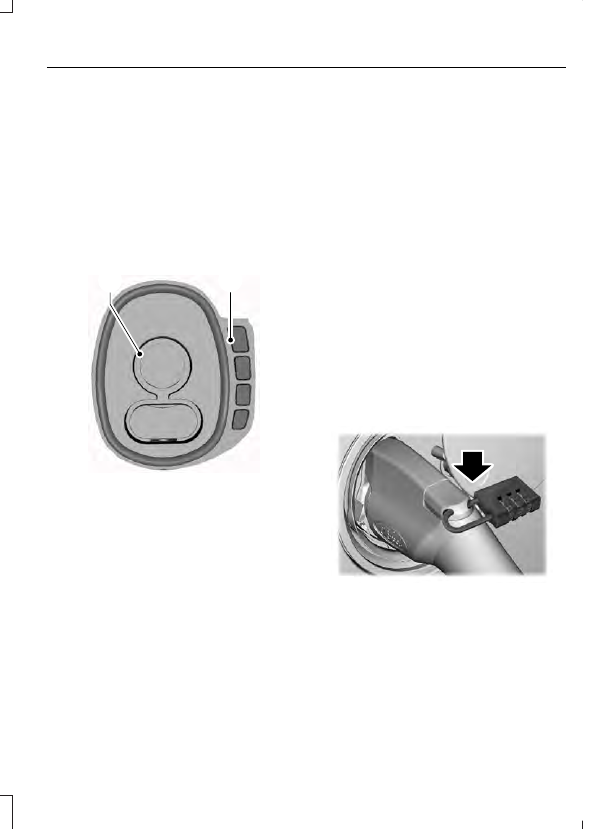
E242991

Press the charge unlock button
on the center console.

You can also press the charging system
stop button or touch the charge unlock
button in the touchscreen vehicle settings
menu.

Disconnecting the Charging Coupler

1.

Press and hold the button on the
charging coupler and disconnect from
the charging port.

Note: Do not try to disconnect the charging
coupler with force. This could damage the
charging port and charging coupler.

Note: You cannot disconnect the charging
coupler until charging has been stopped or
completed.

2. Replace the charge port cover.

3. Close the charge port door.

Note: To close the charge port door, press
the center rear edge of the charge port door
and then release.

Overriding the Lock

If DC charging has stopped and you are still
unable to disconnect the charging coupler,
you must complete the following button
sequence within 10 seconds.

1.

Press the charge unlock button on the
center console.

2. Touch the charge unlock button in the

touchscreen vehicle settings menu.

3. Press the charge unlock button on the

center console.

Note: A message requesting confirmation
that your vehicle is unplugged appears on
the instrument cluster. See Information
Messages
 (page 87).

4. Switch the power off, leave your

vehicle and close the door.

5. After one minute, press and hold the

button on the charging coupler and
disconnect from the charging port.

If the previous steps fail to unlock the
charging coupler, you may need to switch
the power off, then on, and off again and
wait another minute to allow the system
to reset.

If your first attempt was unsuccessful,
repeat steps 1 through 5.

If you are still unable to disconnect the
charging coupler, press the emergency
stop button on the charging system.

Note: For additional instructions, please
refer to information available from the
charging networks or the charging system
site.

Call the Ford Roadside Assistance at
1-800-241-3673 for US sold vehicles
traveling within the US or Canada and
1-800-665-2006 for Canadian sold
vehicles traveling with the US or Canada
for additional information.

HIGH VOLTAGE BATTERY CUT-
OFF SWITCH

The high voltage shut off operation shuts
off power from the high-voltage battery
after a collision, or if your vehicle receives
a substantial physical jolt.

To reactivate your vehicle after either
event, perform the following steps:

1.

Press the START/STOP button to
power off your vehicle.

2. Wait for your vehicle to fully shut down

and the instrument cluster to turn off.

Note: Your vehicle may take between 30
to 90 seconds to shut down.

3. Press the brake pedal and press the

START/STOP button.

4. If your vehicle is not powered after this

sequence, repeat steps 1 through 3 up
to two more times.

Note: During this process, your vehicle
detects if the electrical system is safe and
reactivates. Once your vehicle determines
the electrical system safe, you can start your
vehicle as you would normally by pressing
the brake in combination with the
START/STOP button.


Content   ..  26  27  28  29   ..