Ford F-150 (2018 year). Manual - part 68
 

  Index      Ford     Ford F-150 - service manual 2018 year in english


Search            


Content   ..  66  67  68  69   ..


Ford F-150 (2018 year). Manual - part 68


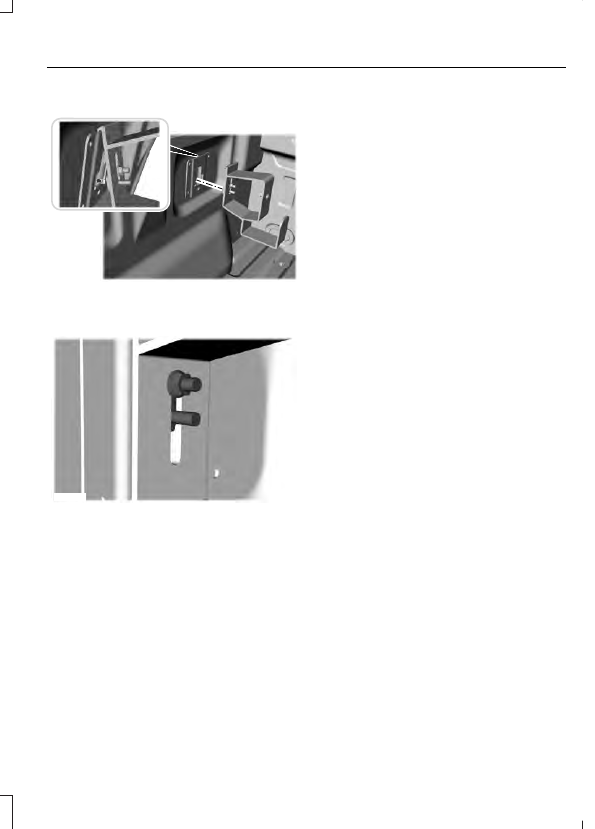
Installing the Ramp Holder

E194387

1.

Hook the top of the ramp holder over
the mounting plate and rotate the
ramp holder into position.

E194388

2. Slide the ramp holder studs upwards

into the installed position.

3. Tighten the ramp holder nut.

Note: The nut should be on the upper stud.

TOWING A TRAILER

WARNINGS

Do not exceed the GVWR or
the GAWR specified on the

certification label.

Towing trailers beyond the
maximum recommended

gross trailer weight exceeds the
limit of your vehicle and could
result in engine damage,
transmission damage, structural
damage, loss of vehicle control,
vehicle rollover and personal
injury.

Do not exceed the lowest
rating capacity for your

vehicle or trailer hitch. Overloading
your vehicle or trailer hitch can
impair your vehicle stability and
handling. Failure to follow this
instruction could result in the loss
of control of your vehicle, personal
injury or death.

Do not cut, drill, weld or
modify the trailer hitch.

Modifying the trailer hitch could
reduce the hitch rating.

Note: To prevent your trailer from
accumulating distance, and the
trailer information status appearing
when you restart your vehicle after
disconnecting your trailer, you must
deactivate your trailer. Using the
information display, go to the
Towing menu and then the Select
Trailer option. Select the No active
trailer option.  See Information
Displays
 (page 111).

Your vehicle may have electrical
items, such as fuses or relays,
related to towing.  See Fuses
(page 329).

Your vehicle may have ability to
modify trailer towing features.
See General Information (page
111).

Your vehicle's load capacity
designation is by weight, not by
volume, so you cannot necessarily
use all available space when
loading a vehicle or trailer.

Towing a trailer places an extra
load on your vehicle's engine,
transmission, axle, brakes, tires
and suspension. Inspect these
components periodically during,
and after, any towing operation.

Load Placement

To help minimize how trailer
movement affects your vehicle
when driving:

Load the heaviest items closest
to the trailer floor.

Load the heaviest items
centered between the left and
right side trailer tires.

Load the heaviest items above
the trailer axles or just slightly
forward toward the trailer
tongue. Do not allow the final
trailer tongue weight to go
above or below 10-15% of the
loaded trailer weight.

Select a ball mount with the
correct rise or drop. When both
the loaded vehicle and trailer
are connected, the trailer frame
should be level, or slightly
angled down toward your
vehicle, when viewed from the
side.

When driving with a trailer or
payload, a slight takeoff vibration
or shudder may be present due to
the increased payload weight.
Additional information regarding
proper trailer loading and setting
your vehicle up for towing is
located in another chapter of this
manual.  See Load Limit (page
268).

You can also find information in
the RV & Trailer Towing Guide
available at your authorized
dealer, or online.

RV & Trailer Towing Guide Online

http://www.fleet.ford.com/towing-guides/

Website

TRAILER REVERSING AIDS

 (If

Equipped)

Pro Trailer Backup Assist™

WARNINGS

Driving while distracted can result in
loss of vehicle control, crash and
injury. We strongly recommend that

you use extreme caution when using any
device that may take your focus off the
road. Your primary responsibility is the safe
operation of your vehicle. We recommend
against the use of any hand-held device
while driving and encourage the use of
voice-operated systems when possible.
Make sure you are aware of all applicable
local laws that may affect the use of
electronic devices while driving.

This system is an extra driving aid. It
does not replace your attention and
judgment, or the need to apply the

brakes. This system does NOT
automatically brake your vehicle. If you fail
to press the brake pedal when necessary,
you may collide with another vehicle.

Note: The system is not a substitute for
safe driving practices.

Note: You must always be aware of the
vehicle and trailer combination and the
surrounding environment.

Note: The system does not detect or
prevent the vehicle or trailer from making
contact with obstacles in the surrounding
environment.

Note: Keep in mind that the front end of
the vehicle swings out when changing the
direction of the trailer.

Note: The system relies on user
measurements to determine sticker
placement and system limits. It is critical to
take the key measurements correctly.
Incorrect measurements can result in the
improper function of the system up to and
including contact between the vehicle and
trailer.

Note: The system limits vehicle speed when
backing up. The system is not a replacement
for proper use of the throttle and brake
pedals.

Principle of Operation

This feature helps you to steer your vehicle
when backing up with a trailer attached.
Turn and hold the control knob in the
direction you want the trailer to go and the
system takes over the steering. This allows
you to focus on checking the mirrors and
operating the brake and accelerator.

Each trailer you use with your vehicle has
to be setup once.

You must take care to follow the setup
process accurately, to make sure the
sticker is placed correctly.

Setting Up Pro Trailer Backup
Assist

Note: Once you have entered a trailer's
information into the system, it is stored for
easy recall. A maximum of 10 trailers can be
added to the system.

Step 1: Position your Vehicle and Trailer

Hitch your conventional trailer to your
vehicle.  See Essential Towing Checks
(page 299).

Park your vehicle and hitched trailer on a
level surface.


Content   ..  66  67  68  69   ..