Ford F-150 (2018 year). Manual - part 27
 

  Index      Ford     Ford F-150 - service manual 2018 year in english


Search            


Content   ..  25  26  27  28   ..


Ford F-150 (2018 year). Manual - part 27


GENERAL INFORMATION

WARNING

Driving while distracted can result in
loss of vehicle control, crash and
injury. We strongly recommend that

you use extreme caution when using any
device that may take your focus off the
road. Your primary responsibility is the safe
operation of your vehicle. We recommend
against the use of any hand-held device
while driving and encourage the use of
voice-operated systems when possible.
Make sure you are aware of all applicable
local laws that may affect the use of
electronic devices while driving.

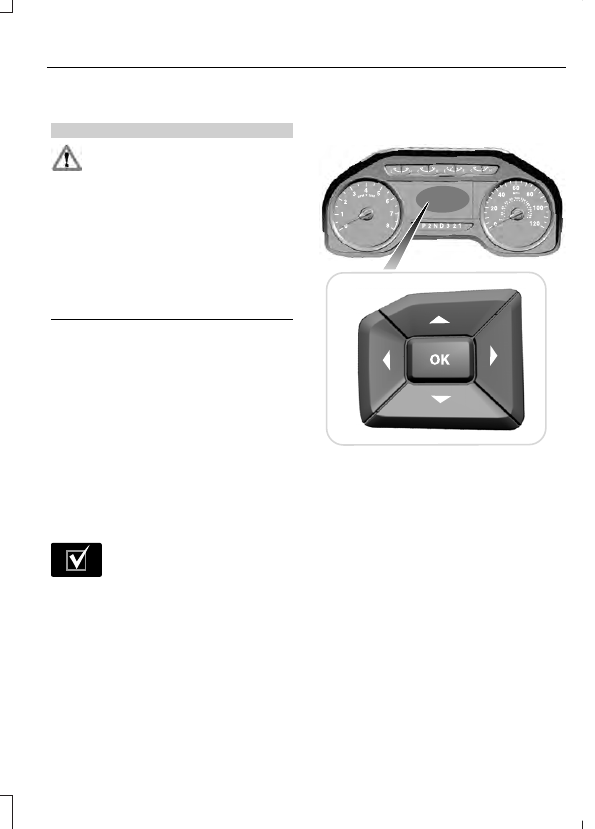
Various systems on your vehicle can be
controlled using the information display
controls on the steering wheel.
Corresponding information is displayed in
the information display.

Note:  Some options may appear slightly
different or not at all if the items are
optional.

Note: Trailer options are not available if
your vehicle speed is greater than 3 mph
(5 km/h).

Note: Some MyKey menu options only
appear if MyKey is enabled and at least one
MyKey is programmed.

E204495

This icon gives you the ability to
switch a feature on or off. A
check in the box indicates the

feature is switched on, and unchecked
indicates the feature is switched off.

Information Display Controls
(Type 1 and 2)

E176092

Press the up and down arrow buttons
to scroll through and highlight the
options within a menu.

Press the right arrow button to enter a
sub-menu.

Press the left arrow button to exit a
menu.

Press the OK button to choose and
confirm a setting or messages.

Main menu (Type 1)

Trip 1 & 2

Fuel economy

Driver assist

Settings

Trip 1 & 2

Note: Use the arrow buttons to choose between the following trip options.

Trip 1 & 2

Digital Speed - Press OK for km/h

Trip Odometer

Trip Timer

DTE

Average Fuel

Digital Speed - Shows a digital display of your vehicle speed.

Trip Odometer - Registers the distance of individual journeys.

Trip Timer - Registers the time of individual journeys.

DTE - Shows the approximate distance your vehicle can travel before running out of
fuel.

Average Fuel - Shows the average fuel economy for a given trip.

Note: Press and hold OK to reset the currently displayed trip information.

Fuel Economy

Note: Use the arrow buttons to choose the desired fuel economy display.

Fuel Economy

Distance to E

Instant Fuel Economy

Average Fuel Economy

Fuel Economy

Average Speed

Auto StartStop

Distance to E - Shows the approximate distance your vehicle can travel before running
out of fuel.

Instant Fuel Economy - Shows your instantaneous fuel usage.

Average Fuel Economy - Shows the average fuel usage based on time. Press and hold
OK to reset this value.

Average Speed - Shows the average speed your vehicle travels.

Auto StartStop - Shows the current status of the Auto StartStop system.

Note: You can reset your average fuel economy by pressing and holding the OK button on
the left hand steering wheel controls.

Driver Assist

Note: Use the arrow buttons to configure different driver setting choices.

Driver Assist

Prog Range Sel

Driver Assist

DEF Gauge

Exhaust Filter

Engine Hours

Tire Pressure

Trans. Temp.

Rear Park Aid

Brake Type

Brake Effort

Trailer Sway

Settings

Settings

Auto Regen

Vehicle

DTE Calculate

Lighting

Locks

Neutral Tow

Oil Life Reset

Remote Start

Wiper Controls

MyKey Status

MyKey

Create MyKey

911 Assist

Do Not Disturb

AdvanceTrac

Max Speed

Speed Minder

Vol. Limiter

Clear MyKeys

Units

Display Setup

Temperature

Tire Pressure

Language

Main menu (Type 2)

Display Mode

Trip/Fuel

Towing

Off Road

Settings


Content   ..  25  26  27  28   ..