Ford F-150 (2018 year). Manual - part 14
 

  Index      Ford     Ford F-150 - service manual 2018 year in english


Search            


Content   ..  12  13  14  15   ..


Ford F-150 (2018 year). Manual - part 14


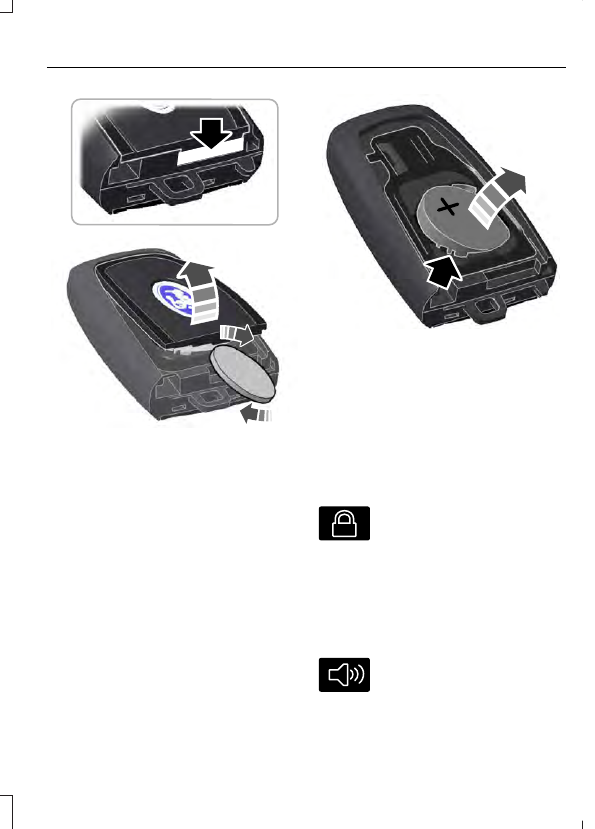
E218401

2. Twist a thin coin under the tab hidden

behind the key blade head to remove
the battery cover.

E218402

3. Insert a suitable tool, for example a

screwdriver, in the position shown and
carefully remove the battery.

4. Install a new battery with the + facing

upward.

5. Reinstall the battery housing cover

onto the transmitter and install the key
blade.

Car Finder

E138623

Press the button twice within
three seconds.  The horn sounds
and the direction indicators

flash.  We recommend you use this method
to locate your vehicle, rather than using
the panic alarm.

Sounding a Panic Alarm

Note: The panic alarm only operates when
the ignition is off.

E138624

Press the button to activate the
alarm. Press the button again or
switch the ignition on to

deactivate.

Remote Start

 (If Equipped)

WARNING

To avoid exhaust fumes, do not use
remote start if your vehicle is parked
indoors or in areas that are not well

ventilated.

Note: Do not use remote start if your fuel
level is low.

E138625

The remote start button is on the
transmitter.

This feature allows you to start your
vehicle from the outside.  The transmitter
has an extended operating range.

If your vehicle has automatic climate
control, you can configure it to operate
when you remote start your vehicle.  See
Climate Control (page 137). 
 A manual
climate control system will run at the
setting it was set to when you switched
your vehicle off.

Many states and provinces have
restrictions for the use of remote start.
Check your local and state or provincial
laws for specific requirements regarding
remote start systems.

The remote start system does not work if:

The ignition is on.

The alarm system triggers.

You disable the feature.

The hood is open.

The transmission is not in park (P).

The vehicle battery voltage is too low.

The service engine soon light is on.

Remote Control Feedback (If
Equipped)

An LED on the remote control provides
status feedback of remote start or stop
commands.

Status

LED

Remote start

successful

Solid green

Remote stop

successful

Solid red

Request failed or

status not received

Blinking red

Status incomplete

Blinking green

Remote Starting your Vehicle

Note:  You must press each button within
three seconds of each other.  If you do not
follow this sequence, your vehicle does not
start remotely, the direction indicators do
not flash twice and the horn does not sound.

E138626

The label on your transmitter details the
starting procedure.

To remote start your vehicle:

1.

Press the lock button to lock all the
doors.

2. Press the remote start button twice.

The exterior lamps flash twice.

The horn sounds if the system fails to start.

Note: You must press the push button
ignition switch on the instrument panel once
while applying the brake pedal before
driving your vehicle.

The power windows do not work during
remote start and the radio does not turn
on automatically.

The parking lamps remain on and your
vehicle will run for 5, 10 or 15 minutes,
depending on the setting.

Extending the Engine Running Time

To extend the engine running time duration
of your vehicle during remote start, repeat
steps 1 and 2 while the engine is running.
If the duration is set to 15 minutes, the
duration extends by another 15 minutes.
For example, if your vehicle had been
running from the first remote start for 10
minutes, your vehicle continues to run now
for a total of 30 minutes.  You can extend
the engine running time duration to a
maximum of 30 minutes.

Wait at least five seconds before remote
starting after the engine stops running.

Turning Your Vehicle Off After Remote
Starting

E138625

Press the button once.  Your
vehicle and the parking lamps
turn off.

You may have to be closer to your vehicle
than when starting due to ground reflection
and the added noise of your running
vehicle.

You can switch this feature on or off in the
information display.

Memory Feature

You can program your intelligent access
key to recall memory positions. See
Memory Function (page 150).

REPLACING A LOST KEY OR
REMOTE CONTROL

PRINCIPLE OF OPERATION

MyKey allows you to program keys with
restricted driving modes to promote good
driving habits. All but one of the keys
programmed to the vehicle can be
activated with these restricted modes.

Any keys that have not been programmed
are referred to as administrator keys or
admin keys. They can be used to:

Create a MyKey.

Program configurable MyKey settings.

Clear all MyKey features.

When you have programmed a MyKey, you
can access the following information using
the information display:

How many admin keys and MyKeys are
programmed to your vehicle.

The total distance your vehicle has
traveled using a MyKey.

Note: All MyKeys are programmed to the
same settings. You cannot program them
individually.

Note: For vehicles equipped with a
push-button start switch: When both a
MyKey and an admin key are present when
you start your vehicle, the system recognizes
the admin key only.

Non-configurable Settings

The following settings cannot be changed
by an admin key user:

Belt-Minder or safety belt reminder.
You cannot disable this feature. The
audio system will mute when the front
seat occupants’ safety belts are not
fastened.

Early low fuel. The low fuel warning is
activated earlier, giving the MyKey user
more time to refuel.

Driver assist features, if equipped on
your vehicle, are forced on: parking aid,
blind spot information system (BLIS),
cross traffic alert, lane departure
warning and forward collision warning
system.

Satellite radio adult content
restrictions (available only in some
markets).

Note: When you switch lane departure
warning off temporarily, it turns on at the
next ignition cycle.

Configurable Settings

With an admin key, you can configure
certain MyKey settings when you first
create a MyKey and before you recycle the
key or restart the vehicle. You can also
change the settings afterward with an
admin key:

A vehicle speed limit can be set.
Warnings will be shown in the display,
followed by an audible tone when your
vehicle reaches the set speed. You
cannot override the set speed by fully
depressing the accelerator pedal or by
setting cruise control.

WARNING

Do not set MyKey maximum speed
limit to a limit that will prevent the
driver from maintaining a safe speed

considering posted speed limits and
prevailing road conditions. The driver is
always responsible to drive in accordance
with local laws and prevailing conditions.
Failure to do so could result in accident or
injury.

 (If Equipped)


Content   ..  12  13  14  15   ..