Ford C-MAX Hybrid / Energi (2017 year). Manual - part 99
 

  Index      Ford     Ford C-MAX Hybrid / Energi - service manual 2017 year in english


Search            


Content   ..  97  98  99  100   ..


Ford C-MAX Hybrid / Energi (2017 year). Manual - part 99


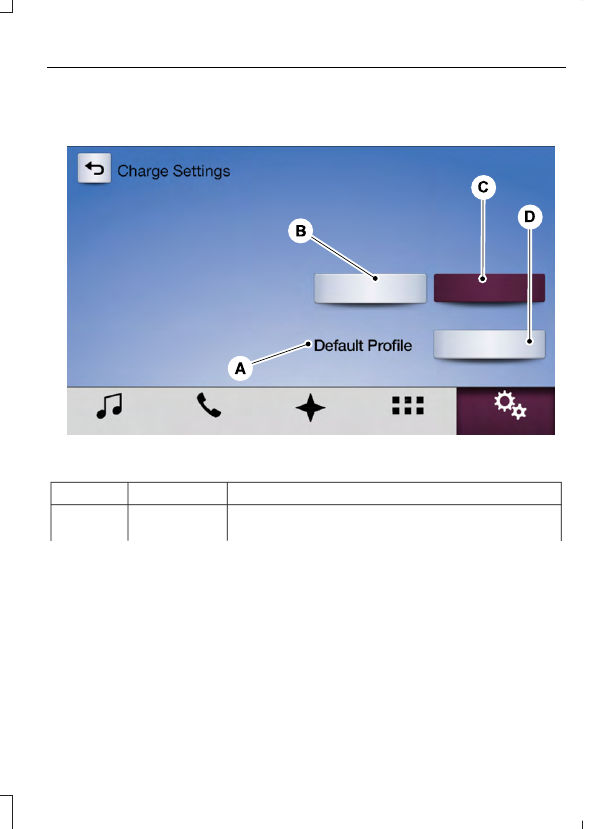
Value Charge Profile and Mode

E231150

Action and Description

Menu Item

Item

This is the name of the presently detected Value Charge
Profile.

Value Charge
Profile

A

Action and Description

Menu Item

Item

The system detects a customer defined value charge
profile when the vehicle is within approximately 300 ft
(91.4 m) of the GPS location registered for the profile. If
the vehicle is close to more than one charge profile
location, it chooses the closest.

Displays if you have not set up
value charge profiles for
specific locations through
MyFord Mobile or if you are not
close enough to a defined
profile location.

Default Profile

Touch this button if you want your vehicle to immediately
charge when plugged in at this profile location. This
button illuminates when Charge Now is the charge mode
selected for the presently detected charge profile.

Charge Now

B

Touch this button if you want to take advantage of off-
peak electricity rates. The vehicle optimizes the charge
schedule to be complete by the next GO Time. This
button illuminates when Value Charge is the charge mode
selected for the presently detected charge profile.

Value Charge

C

Touch this button to access your Value Charge profiles
settings screen (see Value Charge Profiles later in this
section).

Edit

D

Estimated Charge Time Limits

E231151

Action and Description

Menu Item

Item

This shows you the battery's current charge displayed
as a percentage. A reading of 100% means the battery
has a full charge. A reading of 0% indicates the battery
has no plug-in energy left.

Battery

A

240V / High Power is the estimated minimum charging
time from the present high-voltage battery level to full
charge (100%). This represents the shortest amount of
time you should expect the high-voltage battery to
recharge under ideal conditions. Ideal conditions include
a 240V charging station and a minimum 30A service and
high-voltage battery at a moderate temperature.

To Fully Charge

B

Action and Description

Menu Item

Item

Note: Some charging stations use lower voltage (208V),
which result in longer charge times.

120V / Low Power is the estimated maximum charging
time from the present high-voltage battery level to full
charge (100%). This represents the longest amount of
time you should expect the high-voltage battery to
recharge under normal conditions. Normal conditions
include a 120V convenience cord and 12A service.
Note: Charging may take longer when the AC line voltage
is low and may indicate your electrical source is not
meeting certain requirements.  See Charging the High
Voltage Battery (page 153).

Note: These charging times are only estimates. It is normal for your actual charge duration
to be longer.

GO Time Schedule

You can access the GO Time Schedule by
selecting the edit option under MY GO
Time on the Charge Setting screen.

Action and Description

Menu Item

This turns on the GO Time schedule.

On

This turns off the GO Time schedule. This also turns off the cabin
conditioning function. Use this mode to prevent using energy for
cabin preconditioning when you leave your vehicle plugged in and
do not plan to use it for a while, such as when on vacation.

Off

Note: If you choose to perform Value Charging with the schedule
off, the vehicle schedules charging to finish at the lowest cost
within 24 hours of plugging the vehicle in.

This displays the GO Time day-of-week and time. The blue high-
lighted GO Time is the present GO Time, which the vehicle is using
for charge scheduling and cabin conditioning. You can schedule
two GO Time events per day for each day of the week.

GO Time 1


Content   ..  97  98  99  100   ..