Ford C-MAX Hybrid / Energi (2017 year). Manual - part 43
 

  Index      Ford     Ford C-MAX Hybrid / Energi - service manual 2017 year in english


Search            


Content   ..  41  42  43  44   ..


Ford C-MAX Hybrid / Energi (2017 year). Manual - part 43


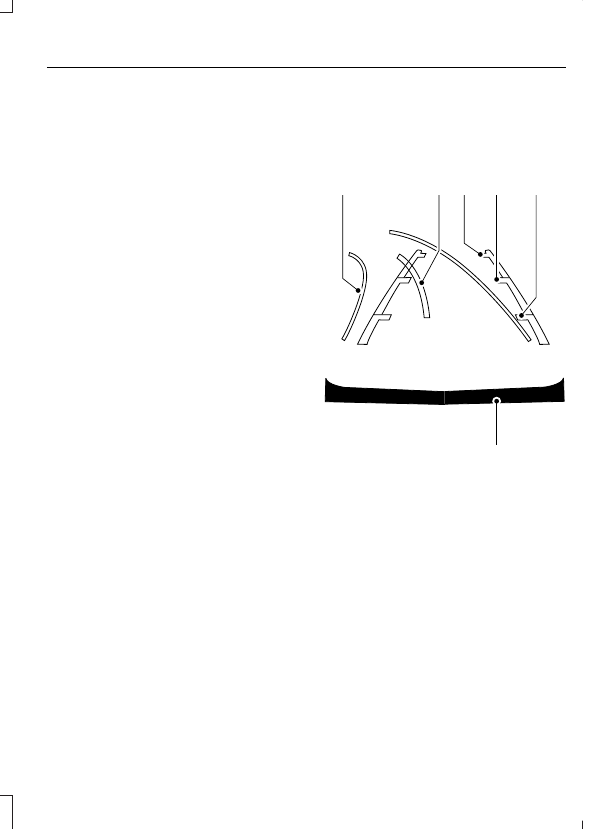
The system uses three types of guides to
help you see what is behind your vehicle:

Active guidelines: Show the intended
path of your vehicle when reversing.

Fixed guidelines: Show the actual path
your vehicle is moving in while reversing
in a straight line. This can be helpful
when backing into a parking space or
aligning your vehicle with another
object behind you.

Centerline: Helps align the center of
your vehicle with an object (for
example, a trailer).

Note: If the transmission is in reverse (R)
and the rear cargo door is ajar, no rear view
camera features are displayed.

Note: If the image comes on while the
transmission is not in reverse (R), have the
system inspected by your authorized dealer.

Note: When towing, the camera only sees
what is being towed behind your vehicle.
This might not provide adequate coverage
as it usually provides in normal operation
and some objects might not be seen. In
some vehicles, the guidelines may disappear
once the trailer tow connector is engaged.

Note: The camera may not operate
correctly under the following conditions:

Nighttime or dark areas if one or both
reverse lamps are not operating.

The camera's view is obstructed by
mud, water or debris. Clean the lens
with a soft, lint-free cloth and
non-abrasive cleaner.

The rear of your vehicle is hit or
damaged, causing the camera to
become misaligned.

Access the rear view camera system
settings through the information display.
See General Information (page 92).

After changing a system setting, the
display screen shows a preview of the
selected features.

Camera Guidelines

Note: Dynamic guidelines are only available
when the transmission is in reverse (R).

A

B C

D

F

E

E142436

Active guidelines

A

Centerline

B

Fixed guideline: Green zone

C

Fixed guideline: Yellow zone

D

Fixed guideline: Red zone

E

Rear bumper

F

Active guidelines are only shown with fixed
guidelines. To use active guidelines, turn
the steering wheel to point the guidelines
toward an intended path. If the steering
wheel position is changed while reversing,
your vehicle might deviate from the original
intended path.

The fixed and active guidelines fade in and
out depending on the steering wheel
position. The active guidelines are not
shown when the steering wheel position
is straight.

Always use caution while reversing.
Objects in the red zone are closest to your
vehicle and objects in the green zone are
farther away. Objects are getting closer to
your vehicle as they move from the green
zone to the yellow or red zones. Use the
side view mirrors and rear view mirror to
get better coverage on both sides and rear
of your vehicle.

Enhanced Park Aids

Note: The reverse sensing system is not
effective at speeds above 6 mph (10 km/h)
and may not detect certain angular or
moving objects.

The system uses red, yellow and green
highlights that appear on top of the video
image when the sensing systems detect
an object. The alert highlights all objects
detected.

Selectable settings for this feature are ON
and OFF.

Manual Zoom

WARNING

When manual zoom is on, the full
area behind your vehicle may not
show. Be aware of your surroundings

when using the manual zoom feature.

Note: Manual zoom is only available when
the transmission is in reverse (R).

Note: When manual zoom is enabled, only
the centerline is shown.

This allows you to get a closer view of an
object behind your vehicle. The zoomed
image keeps the bumper in the image to
provide a reference. The zoom is only
active while the transmission is in reverse
(R). When the transmission is shifted out
of reverse (R), the feature automatically
turns off and must be reset when it is used
again.

Selectable settings for this feature are +
and -. The default setting for the manual
zoom is OFF.

Rear Camera Delay (If Equipped)

When you shift the transmission out of
reverse (R) and into any gear while the rear
camera delay is active, the camera image
displays until:

Your vehicle speed sufficiently
increases.

You shift your vehicle into park (P).

Selectable settings for this feature are ON
and OFF. The default setting for the rear
camera delay is OFF.

PRINCIPLE OF OPERATION

Cruise control lets you maintain a set
speed without keeping your foot on the
accelerator pedal. You can use cruise
control when your vehicle speed is greater
than 20 mph (30 km/h).

USING CRUISE CONTROL

WARNINGS

Do not use cruise control on winding
roads, in heavy traffic or when the
road surface is slippery. This could

result in loss of vehicle control, serious
injury or death.

When you are going downhill, your
vehicle speed may increase above
the set speed. The system will not

apply the brakes. Failure to follow this
warning could result in serious personal
injury or death.

Note: Cruise control will disengage if the
vehicle speed decreases more than 10 mph
(16 km/h) below the set speed while driving
uphill.

E142437

The cruise controls are on the steering
wheel.

Switching Cruise Control On

Press and release ON.

E71340

The indicator appears in the
information display.

Note: Using cruise control with ECO Cruise
switched on may change the operation of
the system. This feature saves vehicle
energy by relaxing acceleration compared
to standard cruise control. For example, your
vehicle may temporarily lose speed when
going uphill.

Energi vehicles: ECO Cruise can be turned
on or off through the information display.
See Information Displays (page 92).

Hybrid vehicles: ECO Cruise is included in
EcoSelect which is turned on or off using
the ECO button on the center console.

For additional information, refer to ECO
Cruise and EcoSelect.  See Unique Driving
Characteristics (page 135).

Note: When you are going downhill while
using cruise control, the battery charging
system and engine work together to help
maintain your set speed. Engine noise may
increase or decrease under these conditions.

Setting the Cruise Speed

1.

Drive to desired speed.

2. Press and release SET+ or SET-.
3. Take your foot off the accelerator

pedal.

Changing the Set Speed

Press and release SET+ or SET-. When
you select km/h as the display
measurement in the information
display the set speed changes in
approximately 2 km/h increments.
When you select mph as the display
measurement in the information
display the set speed changes in
approximately 1 mph increments.

Press the accelerator or brake pedal
until you reach the desired speed. Press
and release SET+.

Press and hold SET+ or SET-. Release
the control when you reach the desired
speed.

Canceling the Set Speed

Pull and release CAN toward you or tap
the brake pedal. The set speed does not
erase.

Resuming the Set Speed

Pull and release RES toward you.

Switching Cruise Control Off

Press and release OFF when the system is
in stand by mode or switch the ignition off.

Note: You erase the set speed when you
switch the system off.


Content   ..  41  42  43  44   ..