Ford C-MAX Hybrid / Energi (2017 year). Manual - part 42
 

  Index      Ford     Ford C-MAX Hybrid / Energi - service manual 2017 year in english


Search            


Content   ..  40  41  42  43   ..


Ford C-MAX Hybrid / Energi (2017 year). Manual - part 42


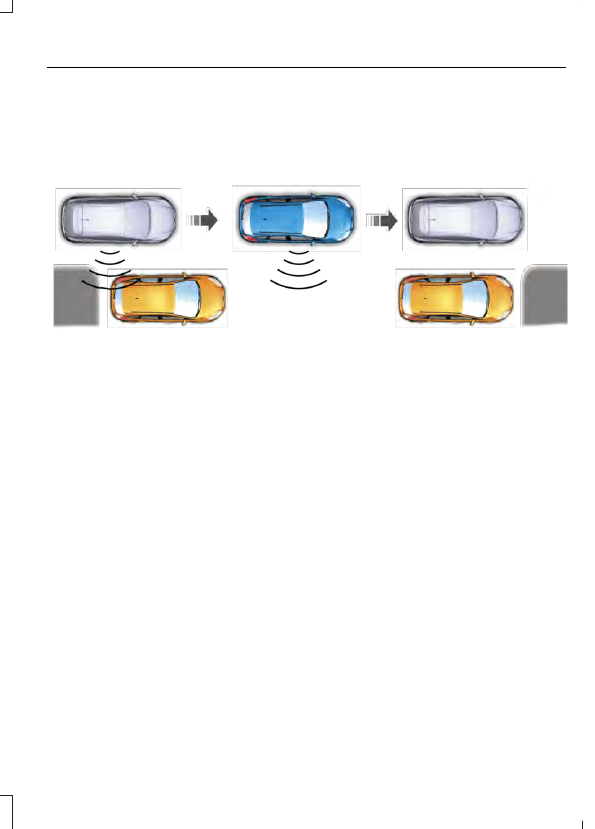
Note: You can also activate the Active Park
Assist system after you have already driven
partially or completely past a parking space.
To do so, press the Active Park button and
the system will inform you if you have
recently passed a suitable parking space.

E130107

When the system finds a suitable space,
it displays a message and a tone sounds.
Stop your vehicle and follow the
instructions on the screen. If your vehicle
is moving very slowly, you may need to pull
forward a short distance before the system
is ready to park.

Note: You must observe that the selected
space remains clear of obstructions at all
times during the maneuver.

Note: You should drive your vehicle within
5 ft (1.5 m) and as parallel as possible to
the other vehicles while passing a parking
space.

Note: The system always offers the last
detected parking space (for example, if the
vehicle detects multiple spaces while you
are driving, it offers the last one).

Note: If driven above approximately 22 mph
(35 km/h), the touch screen shows a
message to alert you to reduce vehicle
speed.

Automatic Steering into Parking
Space

Note: If vehicle speed exceeds 6 mph
(10 km/h), the system switches off and you
need to take full control of the vehicle.

When you shift the transmission into
reverse (R), with your hands off the wheel
(and nothing obstructing its movement),
your vehicle steers itself into the space.
The system displays instructions to move
your vehicle back and forth in the space.

E130108

When you think the vehicle is properly
parked, or you hear a solid tone from the
parking aid (accompanied by a display
message and a chime), bring the vehicle
to a complete stop.

E130109

When automatic steering is complete, the
system displays a message and a tone
sounds, indicating that the process is
finished. You are responsible for checking
the parking job and making any necessary
corrections before leaving your vehicle.

Deactivating the Park Assist
Feature

Manually deactivate the system by:

Pressing the active park assist button
during an active maneuver.

Grabbing the steering wheel during
automatic steering.

Driving above approximately 22 mph
(35 km/h) for 30 seconds during an
active park search.

Driving above approximately 6 mph
(10 km/h) during automatic steering.

Turning off the traction control system.

Certain vehicle conditions can also
deactivate the system, such as:

Traction control has activated on a
slippery or loose surface.

There is an anti-lock brake system
activation or failure.

Something touches the steering wheel.

If a problem occurs with the system, a
warning message is displayed, followed
by a chime. Occasional system messages
may occur in normal operation. For
recurring or frequent system faults, contact
an authorized dealer to have your vehicle
serviced.

Troubleshooting the System

The system does not look for a space

The traction control system may be off.

The transmission is in reverse (R). Your vehicle must be moving forward to be able to
detect a parking space.

The system does not offer a particular space

The sensors may be covered (for example snow, ice or dirt buildup). Covered sensors
can affect the system's functionality.

There is not enough space for the parking maneuver on the opposite side of the parking
space.

The parking space is farther than 5 ft (1.5 m) away or closer than 16 in (40 cm).

Your vehicle is going faster than 22 mph (35 km/h).

You may have recently disconnected or replaced the battery. After a battery disconnect,
your vehicle must be driven on a straight road at a speed greater than 12 mph (20 km/h)
for up to 30 seconds.

The system does not position the vehicle where I want in the space

The vehicle is rolling in the opposite direction of the transmission (for example, rolling
forward when reverse [R] is selected).

An irregular curb along the parking space prevents the system from aligning the vehicle
properly.

Vehicles or objects bordering the space may not be positioned correctly.

The vehicle was pulled too far past the parking space. The system performs best when
you drive the same distance past the parking space.

The tires may not be installed or maintained correctly (for example, tires not inflated
correctly, improper tire size, or tires of different sizes).

A repair or alteration has changed detection capabilities.

The system does not position the vehicle where I want in the space

A parked vehicle has a high attachment (for example, a salt sprayer, snowplow, moving
truck bed, and so forth).

The parking space length or position of parked objects changed after your vehicle passed.

The temperature around your vehicle changes quickly (for example, driving from a
heated garage into the cold, or after leaving a car wash).

REAR VIEW CAMERA

 (If Equipped)

WARNINGS

The rear view camera system is a
reverse aid supplement device that
still requires the driver to use it in

conjunction with the interior and exterior
mirrors for maximum coverage.

Objects that are close to either
corner of the bumper or under the
bumper, might not be seen on the

screen due to the limited coverage of the
camera system.

Reverse your vehicle as slow as
possible, higher speeds may limit
your reaction time to stop your

vehicle.

Use caution when the rear cargo door
is ajar. If the rear cargo door is ajar,
the camera will be out of position

and the video image may be incorrect. All
guidelines disappear when the rear cargo
door is ajar. Some vehicles may not come
equipped with guidelines.

Use caution when turning camera
features on or off when the
transmission is not in park (P). Make

sure your vehicle is not moving.

The rear view camera system provides a
video image of the area behind your
vehicle.

During operation, lines appear in the
display which represent your vehicle’s path
and proximity to objects behind your
vehicle.

E162528

The camera is located on the rear cargo
door.

Using the Rear View Camera
System

The rear view camera system displays
what is behind your vehicle when you place
the transmission in reverse (R).


Content   ..  40  41  42  43   ..