Citroën Berlingo Van (2022 year). Manual in english - page 3
 

  Index      Manuals     Citroën Berlingo Van (2022 year). Manual in english


Search            copyright infringement  


Content      ..     1      2      3      4      ..


Citroën Berlingo Van (2022 year). Manual in english - page 3


34

Access

Purchasing a second-hand vehicle

Have the key codes memorised by a 

CITROËN dealer, to ensure that the keys in 

your possession are the only ones able to 

start the vehicle.

Accumulations (water, dust, grime, salt, 

etc.) on the inner surface of the door 

handle may affect detection.

If cleaning the inner surface of the door 

handle using a cloth does not restore 

detection, contact a CITROËN dealer or a 

qualified workshop.

A sudden splash of water (stream of water, 

high pressure jet washer, etc.) may be 

identified by the system as the desire to open 

the vehicle.

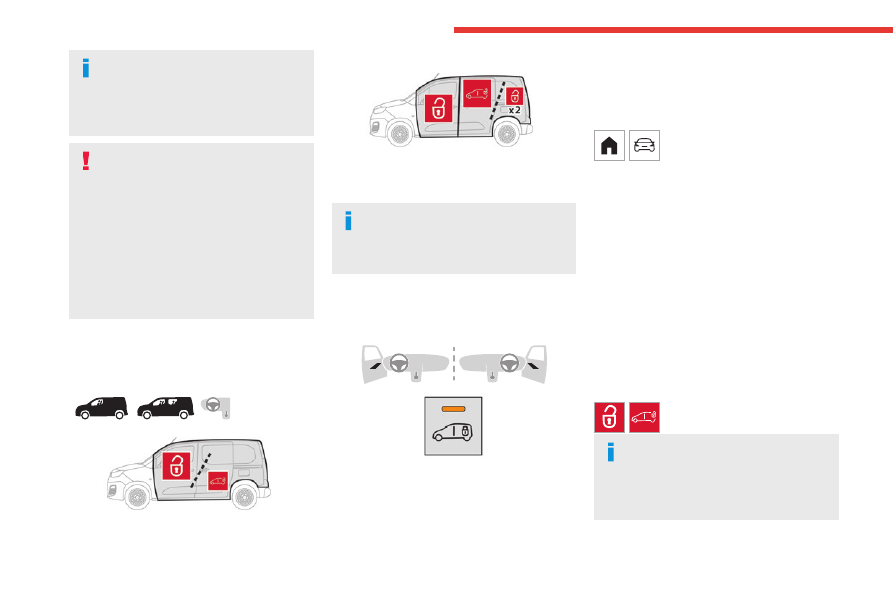
Total or selective 

unlocking


Complete unlocking unlocks 

all

 the vehicle’s 

doors (front, side and rear).


Selective unlocking unlocks either the 

cabin


doors, or the doors of the 

loading area

 (side 

and rear).

The separation of the 

cabin

 and 

loading 

area

 unlocking is a security measure.

It is used to lock out access to the part of the 

vehicle in which you are not present.

Activation/Deactivation

With button


►  To 

activateselective

 unlocking between 

the 

cab

 and the 

loading area

 or to 

deactivate


selective unlocking and return to 

total

 unlocking 

mode, switch on the ignition and press this 

button for more than two seconds.

An audible signal and, depending on equipment, 

a display message, confirm that the request has 

been acknowledged.

Without button

The selectivity between the 

driver's door

 and the 

other doors


and the 

boot

 is activated or deactivated via the 

vehicle configuration menu.

Complete unlocking

With the key

►  To 

completely

 unlock the vehicle, insert the 

key in the lock then turn it towards the front of 

the vehicle.

►  Then pull the handle to open the door.

If fitted to your vehicle, the alarm is not 

deactivated. Opening a door will trigger the 

alarm, which can be stopped by switching the 

ignition on.

Using the remote control

►  Press one of these buttons to 

unlock the vehicle.

Unlocking is confirmed by rapid flashing 

of the direction indicators for around 2 

seconds.

At the same time, depending on your version, 

the door mirrors unfold.

-------------------------------------------------------------------------------------------------------------------------------------------------------------

35

Access

2

With Keyless Entry and Start on your 

person


►  To unlock the vehicle, with the remote control 

on your person in recognition zone 

A

, pass 

your hand behind one of the door handles (front 

door(s), manual sliding side door(s) or side-

hinged doors).

►  Pull the handle to open the corresponding 

door.

With side-hinged doors


►  To unlock the vehicle, remote control in 

the recognition zone 

A

, run a hand behind the 

handle of the side-hinged door.

►  Then pull the handle to open it.

With tailgate


►  To unlock the vehicle, with the remote control 

in recognition zone 

A

, press the tailgate release 

control.

►  Raise the tailgate.

Selective unlocking

Using the remote control

►  To unlock just the 

passenger 

compartment

 doors, press this button 

once.

►  To unlock the side and rear doors in the 

loading area

, press this button a second time.

or

►  Press this button on the remote 

control to unlock only the 

loading area

.

Unlocking is confirmed by rapid flashing 

of the direction indicators for around 2 

seconds.

At the same time, depending on your version, 

the door mirrors unfold.

With Keyless Entry and Start on your 

person


►  To unlock the 

cabin

 alone, with the 

remote control on your person in 

recognition zone 

A

, pass your hand behind the 

handle of the 

driver’s

 door.

►  To unlock the 

cabin

 alone, with the 

remote control on your person in 

recognition zone 

B

, pass your hand behind the 

handle of the 

driver's

 door.

►  Then pull the handle to open the cabin.

The door locking state of the 

loading 

area

 remains unchanged.

-------------------------------------------------------------------------------------------------------------------------------------------------------------

36

Access

►  To unlock the 

loading area

 alone, with the 

remote control on your person in the recognition 

zone 

A

B

 or 

C

, pass your hand behind a handle 

of the left side door, right side door or the rear 

door (the left-hand hinged door or the tailgate).

►  Then pull the handle to open the loading 

area.

Depending on version, the door mirrors 

unfold only when the cabin is unlocked, 

the alarm is deactivated.

Unlocking


Unlocking is signalled by rapid flashing of 

the direction indicators for a few 

seconds.

Depending on version, the door mirrors unfold 

and the alarm is deactivated.

With the key

►  To 

completely

 unlock the vehicle, insert the 

key in the lock then turn it towards the front of 

the vehicle.

►  Then pull the handle to open the door.

If fitted to your vehicle, the alarm is not 

deactivated. Opening a door will trigger the 

alarm, which can be stopped by switching the 

ignition on.

Using the remote control

►  Press this button to unlock the vehicle.


With Keyless Entry and 

Start on your person


►  To unlock the vehicle, with the remote control 

on your person in recognition zone 

A

, pass 

your hand behind one of the door handles (front 

door(s), manual sliding side door(s) or side-

hinged doors).


►  To unlock the vehicle, with the remote control 

on your person in recognition zone 

A

, pass 

your hand behind one of the door handles (front 

door(s)).

►  Pull the handle to open the corresponding 

door.

With side-hinged doors/tailgate


►  To unlock the vehicle, with the remote control 

in the recognition zone 

A, pass 

your hand 

behind the side-hinged door handle or press the 

tailgate unlocking control. 

-------------------------------------------------------------------------------------------------------------------------------------------------------------

37

Access

2

►  Pull the side-hinged door handle or raise the 

tailgate.

With an opening rear screen in the 

tailgate


►  With the Keyless Entry and Start on your 

person, to unlock the vehicle, press the tailgate 

opening rear screen unlocking control. The 

screen will open slightly; then, lift it up to open it.

Locking

Ensure that no person or object prevents 

the correct closing of the windows.

Be particularly aware of children when 

operating the windows.

The locking/deadlocking is signalled by 

the fixed illumination of the direction 

indicators for about two seconds.

Depending on your version, the door mirrors 

fold at the same time.

If your vehicle is so equipped, pressing 

and holding the locking button closes the 

windows. The window stops in position when 

you release the button.

With the key

►  To lock the vehicle, insert the key in the lock 

then turn it towards the rear of the vehicle.

With the remote control

►  To lock the vehicle, press this button.


With Keyless Entry and 

Start on your person


►  To lock the vehicle, with the remote control in 

recognition zone 

A

, press the markings on one 

of the front or rear door handles.


►  To lock the vehicle, with the remote control in 

recognition zone 

A

, press the markings on one 

of the front door handles.

With side-hinged doors


►  To lock the vehicle, with the remote control 

in recognition zone 

A

, press the left-hand door 

locking control.

Driving with the doors locked could make 

it more difficult for the emergency 

services to enter the vehicle in an emergency.

As a safety measure, never leave the vehicle, 

even for a short time, without taking the 

remote control with you.

If a door is not properly closed (except the 

right-hand door with side-hinged rear 

doors):

-------------------------------------------------------------------------------------------------------------------------------------------------------------

38

Access

–  when the vehicle is stationary and engine 

running, this warning lamp comes on, 

accompanied by a warning message for a few 

seconds, 

–  when the vehicle is moving (at speeds above 

6 mph (10 km/h)), this warning lamp comes on, 

accompanied by an audible signal and a warning 

message for a few seconds.

Deadlocking


Deadlocking renders the exterior and 

interior door controls inoperative. It also 

deactivate the manual central control button.

The horn remains operational.

Never leave anyone inside the vehicle 

when it is deadlocked.

With the key

►  To deadlock the vehicle, turn the key in the 

driver's door lock towards the rear of the vehicle.

►  Then 

within five seconds

, turn the key 

towards the rear again.

With the remote control

►  To deadlock the vehicle, press this 

button.

►  Then press this button again 

within five 

seconds after locking

.

With Keyless Entry and Start on your 

person


►  To lock the vehicle, with the remote control in 

recognition zone 

A

, press the markings on one 

of the front or rear door handles.

►  To deadlock the vehicle, press the markings 

again 

within five seconds.

With side-hinged doors


►  To lock the vehicle, with the remote control 

in recognition zone 

A

, press the left-hand door 

locking control.

►  To deadlock the vehicle, press the control 

again 

within five seconds

.

Back-up procedures

Lost keys, remote control, 

electronic key

Go to a CITROËN dealer with the vehicle's 

registration certificate, your personal 

identification documents and if possible, the label 

bearing the key code.

The CITROËN dealer will be able to retrieve the 

key code and the transponder code, enabling a 

new key to be ordered.

Complete unlocking/locking 

of the vehicle with the key

Use this procedure in the following situations:

–  Remote control battery discharged.

–  Remote control malfunction.

–  Vehicle battery discharged.

–  Vehicle in an area subject to strong 

electromagnetic interference.

In the first case, change the remote control 

battery.

In the second case, reinitialise the remote 

control.

Refer to the corresponding sections.

►  Insert the key into the front left-hand door 

lock.

►  Turn the key towards the front/rear to unlock/

lock the vehicle.

►  Turn the key towards the rear again within 

5 seconds to deadlock the vehicle.

-------------------------------------------------------------------------------------------------------------------------------------------------------------

39

Access

2

If the vehicle is fitted with an alarm, it will 

not be activated when locking with the 

key.

If the alarm is activated, the siren sounds 

when the door is opened; switch on the 

ignition to stop it.


If the vehicle is unlocked with the key in 

the lock 

after locking it with the remote 

control or the Keyless Entry and Start 

system

all doors and the boot

 are 

unlocked.

If the vehicle is unlocked with the key in the 

lock 

after locking it with the key

, only the 

doors (front door and sliding side door(s)) are 

unlocked. The side-hinged doors and tailgate 

are not unlocked. Switching on the ignition 

unlocks them.

Central locking not 

functioning

Use these procedures in the following cases:

–  Central locking malfunction.

–  Battery disconnected or discharged.

In the event of a malfunction of the 

central locking system, the battery must 

be disconnected to ensure that the vehicle is 

locked fully.

Locking part of the vehicle (front 

door/sliding side door/side-hinged 

doors)

►  If a 

sliding side door

 or 

side-hinged doors


are fitted to your vehicle, check that the electric 

child lock is not activated.

►  Open the door.


Front door


Sliding side door


Side-hinged doors

►  Remove the cap located on the edge of the 

door.

►  Insert the built-in key into the latch (without 

forcing it) and then 

turn

 the assembly.

►  Remove the key and refit the cap. 

►  Close the door(s) and check from the outside 

that the vehicle is locked correctly.

Unlocking of one part of the vehicle 

(front passenger door/sliding side 

door/side-hinged doors)

►  Use the interior opening control.

or

►  With 

side-hinged doors

, insert the built-in 

key into the (left-hand) door lock, then turn it.

For more information on the 

Child lock


on a 

sliding side door

 or 

side-hinged 

doors

, refer to the corresponding section.

Unlocking the tailgate


►  From inside the vehicle, insert a small 

screwdriver into hole 

A

 on the lock to unlock the 

tailgate.

►  Move the latch to the left.


-------------------------------------------------------------------------------------------------------------------------------------------------------------

40

Access


If the battery is discharged and your 

vehicle is equipped with a tailgate and 

an Extenso Cab, you will not be able to 

access the loading area.

Replace the battery to regain access.

For more information on the 

12 V battery

refer to the corresponding section.

In the event of a malfunction or if you 

experience difficulty opening or closing 

the tailgate, have it checked by a CITROËN 

dealer or a qualified workshop without delay, 

to avoid the issue deteriorating and prevent 

any risk of the tailgate dropping, potentially 

causing serious injury.

Changing the battery

If the battery is flat, this warning lamp 

comes on, accompanied by an audible 

signal and the display of a message.

Battery type: CR2032/3 volts.
Without Keyless Entry and Start


With Keyless Entry and Start


►  Unclip the cover by inserting a small 

screwdriver in the slot and lift the cover.

►  Remove the flat battery from its housing.

►  Put the new battery in place, respecting the 

polarity. Start by inserting it into the contacts 

located in the corner, then clip the cover onto 

the unit.

►  Reinitialise the remote control.

For more information on 

Reinitialising the 

remote control

, refer to the corresponding 

section.

Do not throw remote control batteries 

away, as they contain metals that are 

harmful to the environment. Take them to an 

approved disposal point.

This equipment contains a button type 

battery.

Do not swallow the battery. Risk of chemical 

burns!

Swallowing the battery can cause serious 

internal burning in only 2 hours and can be 

fatal.

If batteries have been swallowed or inserted 

into a part of the body, seek immediate 

medical advice.

Keep new and used batteries out of the reach 

of children.

If the battery compartment does not close 

properly, stop using the product and keep it 

out of the reach of children.

Risk of explosion if the battery is 

replaced with an incorrect type!

Replace the battery with the same type.

-------------------------------------------------------------------------------------------------------------------------------------------------------------

41

Access

2

Risk of explosion or leaking of 

inflammable liquid or gas!

Do not use in/store in/place in an environment 

where the temperature is extremely high or 

where the pressure is extremely low due to 

very high altitude.

Do not try to burn, crush or cut a used battery.

Reinitialising the remote 

control

Following replacement of the battery or in 

the event of a fault, it may be necessary to 

reinitialise the remote control.

Without Keyless Entry and Start


►  Switch the ignition off.

►  Turn the key to position 

2 (Ignition on)

.

►  Immediately press the closed padlock button 

for a few seconds.

►  Switch off the ignition and remove the key 

from the ignition switch.

The remote control is now fully operational 

again.


►  Insert the mechanical key (incorporated into 

the remote control) into the lock to open the 

vehicle.

►  Place the electronic key against the back-up 

reader on the steering column and hold it there 

until the ignition is switched on.

► 

With a manual gearbox,

 place the gear lever 

in neutral then fully depress the clutch pedal.

► 

With an automatic gearbox,

 while in mode 

P

, depress the brake pedal.

►  Switch on the ignition by pressing the 

"

START/STOP

" button.

If the fault persists after reinitialisation, contact a 

CITROËN dealer or a qualified workshop without 

delay.

Central locking / unlocking

This function enables the doors to be locked or 

unlocked simultaneously from inside the vehicle.


When locking/deadlocking from the 

outside

When the vehicle is locked or deadlocked 

from the outside, the indicator lamp flashes 

and the button is deactivated.

►  After normal locking, pull one of the 

interior door controls to unlock the vehicle.

►  After deadlocking, you must use the 

remote control, the "Keyless Entry and 

Start" system or the built-in key to unlock the 

vehicle.

Manual mode

►  Press this button to lock / unlock the 

vehicle.

Driving with the doors locked could make 

it difficult for the emergency services to 

enter the vehicle in an emergency.

-------------------------------------------------------------------------------------------------------------------------------------------------------------

42

Access

If one of the doors is open, the central 

locking from the inside does not function. 

This is signalled by a mechanical noise from 

the locks.

If the boot is open, only the locking of the 

other doors is carried out. The indicator lamp 

in the button remains off.

When locking from inside, the door 

mirrors do not fold.

The indicator lamp also goes off when 

unlocking one or more accesses.

Automatic mode

This is the automatic central locking of the 

vehicle when driving, also called anti-intrusion 

security.

For more information on 

Anti-intrusion 

security

, refer to the corresponding section.

Locking/unlocking the 

loading area


This button is unavailable if the vehicle 

has been locked or deadlocked from 

outside (using the key, remote control or 

Keyless Entry and Start, depending on 

equipment) or if any of the doors are still 

open.

For more information on the 

Key

, and, in 

particular, on programming selective 

locking for the loading area, refer to the 

corresponding section.

Manual mode

►  With complete unlocking activated, 

press this button to lock (indicator lamp 

comes on)/unlock (indicator lamp goes off) the 

vehicle

.

►  With selective unlocking activated, press this 

button to lock (indicator lamp comes on)/unlock 

(indicator lamp goes off) the 

loading area

.

Driving with the doors locked could make 

it more difficult for the emergency 

services to enter the vehicle in an emergency.

The indicator lamp goes off when 

unlocking one or more doors of the 

loading area

.

With the ignition off and the vehicle fully 

locked, the indicator lamp goes off for energy 

economy reasons.

Automatic mode

The 

loading area

 is always locked when driving.

To deactivate this automatic locking, go 

to a CITROËN dealer or a qualified 

workshop.

Anti-intrusion security

This system allows automatic simultaneous 

locking of the doors and boot as soon as the 

speed of the vehicle exceeds 6 mph (10 km/h).

Operation

If one of the doors or the boot is open, the 

automatic central locking does not take place.

This is signalled by the sound of the locks 

rebounding, accompanied by illumination 

of this warning lamp in the instrument panel, an 

audible signal and the display of an alert 

message.

-------------------------------------------------------------------------------------------------------------------------------------------------------------

43

Access

2

Activation/Deactivation

You can activate or deactivate this function 

permanently.

►  With the ignition on, press the central locking 

button until an audible signal is triggered and 

a corresponding message of confirmation is 

displayed.

The state of the system stays in the memory 

when the ignition is switched off.

Driving with the doors locked may render 

access by the emergency services to the 

interior difficult in an emergency.

Carrying long or voluminous objects

If you want to drive with the boot open, 

you should press the central locking button 

to lock the doors. Otherwise, every time the 

speed of the vehicle exceeds 6 mph (10 

km/h), the locks will rebound and the alerts 

mentioned above will appear.

Pressing the central locking button unlocks 

the vehicle.

Above 6 mph (10 km/h), this unlocking is 

temporary.

Side-hinged doors

Keeping the left-hand door closed with the 

right-hand door open


It is possible to drive with the right-hand 

door open, to enable the transportation 

of long loads.

The 

left-hand

 door is kept closed by the 

distinctive "yellow" lock, positioned at the 

base of the door.

This closed door must not be used to retain 

loads.

Driving with the right-hand door open is a 

special dispensation. Please comply with the 

usual safety instructions on how to warn other 

drivers.

Opening to approximately 180°


If fitted to your vehicle, a check strap system 

allows the doors to be opened from about 90° to 

about 180°.

►  Pull the yellow control when the door is open.

The check strap will engage again automatically 

on closing.

General 

recommendations for the 

sliding side doors

Doors must only be operated when the 

vehicle is stationary.

For your safety and that of your passengers, 

as well as for correct operation of the doors, 

you are strongly advised not to drive with a 

door open.

Always check that it is safe to operate the 

door and in particular, be sure not to leave 

children or animals near the door controls 

without supervision.

-------------------------------------------------------------------------------------------------------------------------------------------------------------

44

Access

The audible warning, the lighting of the "door 

open" warning lamp and the message on the 

screen are there to remind you. Contact a 

CITROËN dealer or a qualified workshop if 

you want to deactivate this warning.

Lock the vehicle when you use an automatic 

car wash.

Before opening or closing and while 

moving doors, ensure that no person, 

animal or object is in the door frame or any 

other position that would block the desired 

movement, inside or outside the vehicle.

If this advice is not followed, injuries or 

damage may occur if any part of a person or 

an object is trapped or caught.

Take care not to block the guide space 

on the floor so that the door can slide 

correctly.

For safety and functional reasons, do not 

drive with the sliding side door open.


To hold the sliding side door in the open 

position, open the door fully to engage 

the latch (located at the bottom of the door).

To hold the sliding side door in the open 

position, open the door fully to engage 

the latch (located at the bottom of the door).

Doors and door clearances


When open, a door projects beyond the body. 

Allow adequate clearance when parking 

alongside walls, lamp-posts, high pavements, 

etc.


When open, a door never projects 

beyond the rear bumper.

On a steep slope


Take care when opening doors while the vehicle 

is on a slope facing uphill. The sloping terrain 

could cause the door to open more quickly than 

usual.

On a steep slope, manually guide the side door 

to help it to close.

If the vehicle is on a slope facing downhill, 

the door may not stay open, instead closing 

suddenly

, with a risk of injury. Always hold 

the door to ensure that it does not close 

unexpectedly.

On a steep slope, the door's weight may 

cause it to move, opening or closing 

suddenly

 as a result.

Avoid leaving the vehicle unsupervised on a 

steep slope with one or more doors open. If 

this advice is not followed, injuries or damage 

may occur if a person or an object is trapped 

or caught.

Rear roof flap


-------------------------------------------------------------------------------------------------------------------------------------------------------------

45

Access

2

This roof flap at the rear is compatible only with 

side-hinged doors.


To open the rear roof flap:

–  Lift the black paddle of the toggle.

–  Relax the toggle by pressing on the rear roof 

flap (downwards) then release the hook.

–  Lift the rear roof flap.

–  Move past the point of resistance to lock the 

rear roof flap with the support props.

Never drive without the props in place. 

To close the rear roof flap:

–  Check that the support bar is properly 

secured.

–  Lower the rear roof flap.

–  While pressing on the rear roof flap 

(downwards), take the two spring rings and then 

place the hook in its housing.

–  Lower the black paddle to lock the rear roof 

flap.

Locking the rear roof flap holds it firmly against 

the seal, ensuring watertight sealing with no 

noise.

Support bar

The vehicle is equipped with a support bar for 

transporting long loads, after opening the rear 

roof flap.

►  Fold back the support bar by lifting the lever.

►  Guide it to the door pillar.

►  Support the long loads to be transported, lift 

them and reposition the support bar with one 

hand.

►  Ensure that it is secured correctly by 

pressing the handle downwards past the point of 

resistance and lash the load securely.

The side supports can be used as hooking 

points.

The rear bumper has been reinforced to 

serve as a step when entering the 

vehicle.

Never fasten a load to the roof flap.


Never drive without the support bar in 

place.

The rear doors will only lock when the support 

bar is installed.

When the roof flap is open, take care when 

driving where height is restricted.

Never rest loads directly on the rear doors.

Comply with the usual indications for warning 

other drivers.

Only use the roof flap on short trips.

Alarm


System which protects and provides a deterrent 

against theft and break-ins.

Self-protection function

The system checks for any malfunction 

in its components.

The alarm is triggered if the battery, button or 

siren wiring is disconnected or damaged.

For all work on the alarm system, contact a 

CITROËN dealer or a qualified workshop.

Exterior perimeter

The system checks whether the vehicle is 

opened.

The alarm is triggered if anyone tries to open 

one of the doors or the bonnet.

Volumetric

(without partition)


-------------------------------------------------------------------------------------------------------------------------------------------------------------

46

Access


The system checks for any variation in volume in 

the passenger compartment.

The alarm is triggered if anyone breaks a 

window, enters the passenger compartment or 

moves inside the vehicle.

(with partition)

The system only checks for a variation in volume 

inside the 

cab

.

The alarm is triggered if anyone breaks a 

window or enters the vehicle’s 

cab

.

It will not be triggered if someone enters the 

loading area.

If your vehicle is fitted with an Additional 

heating/ventilation system, interior 

volumetric monitoring is not compatible with it.

For more information on the 

Additional 

heating/ventilation system

, refer to the 

corresponding section.

Anti-tilt 

The system checks for any change in the attitude 

of the vehicle.

The alarm is triggered if the vehicle is lifted or 

moved.

When the vehicle is parked, the alarm 

will not be triggered if the vehicle is 

knocked.

Locking the vehicle with full 

alarm system

Activation

►  Switch off the ignition and exit the vehicle.

►  Lock the vehicle using the remote control or 

with the "Keyless Entry and Start" system.

The monitoring system is active: the red indicator 

lamp in the button flashes every second and 

the direction indicators come on for about 2 

seconds.

Following an instruction to lock the 

vehicle, the exterior perimeter monitoring 

is activated after 5 seconds and the interior 

volumetric and anti-tilt monitoring after 45 

seconds.

If a door, the tailgate or the bonnet is not 

closed properly, the vehicle is not locked 

but the exterior perimeter monitoring will be 

activated after 45 seconds at the same time 

as the interior volumetric and anti-tilt 

monitoring.

Deactivation

►  Press the remote control unlocking button.

or

►  Unlock the vehicle with the "Keyless Entry 

and Start" system.

The monitoring system is deactivated: the 

indicator lamp in the button goes off and the 

direction indicators flash for about 2 seconds.

If the vehicle automatically locks itself 

again (as happens if a door or the boot is 

not opened within 30 seconds of unlocking), 

the monitoring system is also reactivated 

automatically.

Locking the vehicle 

with exterior perimeter 

monitoring only

Deactivate the interior volumetric and anti-tilt 

monitoring to avoid the unwanted triggering of 

the alarm, in certain cases such as:

–  Slightly open window or sunroof. 

–  Washing the vehicle.

–  Changing a wheel.

–  Towing the vehicle.

–  Transport on a ship or ferry.

Deactivating the interior volumetric 

and anti-tilt monitoring

►  Switch off the ignition and within 10 seconds 

press the alarm button until its red indicator lamp 

is on fixed.

►  Get out of the vehicle.

-------------------------------------------------------------------------------------------------------------------------------------------------------------

47

Access

2

►  Immediately lock the vehicle using the remote 

control or the "Keyless Entry and Start" system.

Only the exterior perimeter monitoring is 

activated; the button's red indicator lamp flashes 

once every second.

To be taken into account, the deactivation 

must be carried out every time the 

ignition is switched off.

Reactivating the interior volumetric 

and anti-tilt monitoring

►  Deactivate the exterior perimeter monitoring 

by unlocking the vehicle using the remote control 

or the "Keyless Entry and Start" system.

The indicator lamp in the button goes off.

►  Reactivate all monitoring by locking the 

vehicle using the remote control or the "Keyless 

Entry and Start" system.

The red indicator lamp in the button once again 

flashes every second.

Triggering of the alarm

This is indicated by sounding of the siren 

and flashing of the direction indicators for 30 

seconds.

Depending on the country of sale, certain 

monitoring functions remain active until the alarm 

has been triggered eleven times consecutively.

When the vehicle is unlocked using the remote 

control or the "Keyless Entry and Start" system, 

rapid flashing of the indicator lamp in the button 

informs you that the alarm was triggered during 

your absence. When the ignition is switched on, 

this flashing stops immediately.

Failure of the remote control

To deactivate the monitoring functions:

►  Unlock the vehicle using the key in the front 

left-hand door lock.

►  Open the door; the alarm is triggered.

►  Switch on the ignition; this stops the alarm. 

The indicator lamp in the button goes off.

Locking the vehicle without 

activating the alarm

►  Lock or deadlock the vehicle using the key 

(built-in the remote control) in the driver's door 

lock.

Malfunction

When the ignition is switched on, the fixed 

lighting of the red indicator lamp in the button 

indicates a system malfunction.

Have it checked by a CITROËN dealer or a 

qualified workshop.

Automatic activation

(Depending on version)

The system is activated automatically 2 minutes 

after the last door or the boot is closed.

►  To avoid triggering the alarm on entering the 

vehicle, first press the unlocking button on the 

remote control or unlock the vehicle using the 

"Keyless Entry and Start" system.

Electric windows

Type 1


1.

Left-hand front.

2.

Right-hand front.

Type 2


-------------------------------------------------------------------------------------------------------------------------------------------------------------

48

Access

1.

Left-hand front

2.

Right-hand front

3.

Right-hand rear (depending on version)

4.

Left-hand rear (depending on version)

5.

Deactivation of electric window controls 

located by rear seats (depending on version)

Manual operation

►  To open/close the window, press/pull the 

switch without passing the point of resistance; 

the window stops as soon as the switch is 

released.

Automatic operation

(Depending on version)

►  To open/close the window, press/pull the 

switch past its resistance point: the window 

opens/closes completely when the switch is 

released.

Operating the switch again stops the movement 

of the window.

Window controls remain operational for 

approximately 45 seconds after switching 

off the ignition or after locking the vehicle.

After that time, the controls are disabled. 

To reactivate them, switch on the ignition or 

unlock the vehicle.

Anti-pinch

(Depending on version)

If the window meets an obstacle while rising, it 

stops and immediately partially lowers again.

Deactivating the rear 

controls for the rear electric 

windows

(Type 2)


For your children's safety, press control 

5

 to 

deactivate the controls for the rear electric 

windows, irrespective of their positions.

The red indicator lamp in the button comes 

on and a confirmation message is displayed. 

The lamp will remain lit until the controls are 

reactivated.

The rear electric windows can still be controlled 

using the driver's controls.

Reinitialising the electric 

windows

After reconnecting the battery, or in the event 

of abnormal window movement, the anti-pinch 

function must be reinitialised.

The anti-pinch function is disabled during the 

following sequence of operations.

For each window:

►  Lower the window fully, then raise it; it will 

rise in steps of a few centimetres each time the 

control is pressed. Repeat the operation until the 

window is fully closed.

►  Continue to pull the control for at least one 

second after the window reaches the closed 

position.

If an electric window meets an obstacle 

during operation, the movement of the 

window must be reversed. To do this, press 

the relevant control.

When the driver operates the passengers’ 

electric window controls, it is important to 

ensure that nothing can prevent the window 

from closing properly.

It is important to ensure that passengers use 

the electric windows correctly.

Pay particular attention to children when 

operating the windows.

-------------------------------------------------------------------------------------------------------------------------------------------------------------

49

Access

2

Be aware of passengers and/or other persons 

present when closing windows remotely using 

the electronic key.

Do not put your head or arms through the 

open windows when the vehicle is moving - 

risk of serious injury!

Tilting rear door windows

Opening


►  Turn the lever outwards.

►  Push it fully to secure the window in the open 

position.

Closing

►  Pull the lever to release the window.

►  Turn the lever fully inwards to secure the 

window in the closed position.

-------------------------------------------------------------------------------------------------------------------------------------------------------------


Content      ..     1      2      3      4      ..