Chery QQ3. Service Manual - part 6
 

  Index      Chery     Chery QQ3. Service Manual


Search            copyright infringement  


Content      ..     4      5      6      7     ..


Chery QQ3. Service Manual - part 6


Ventilation and A/C system 

72 

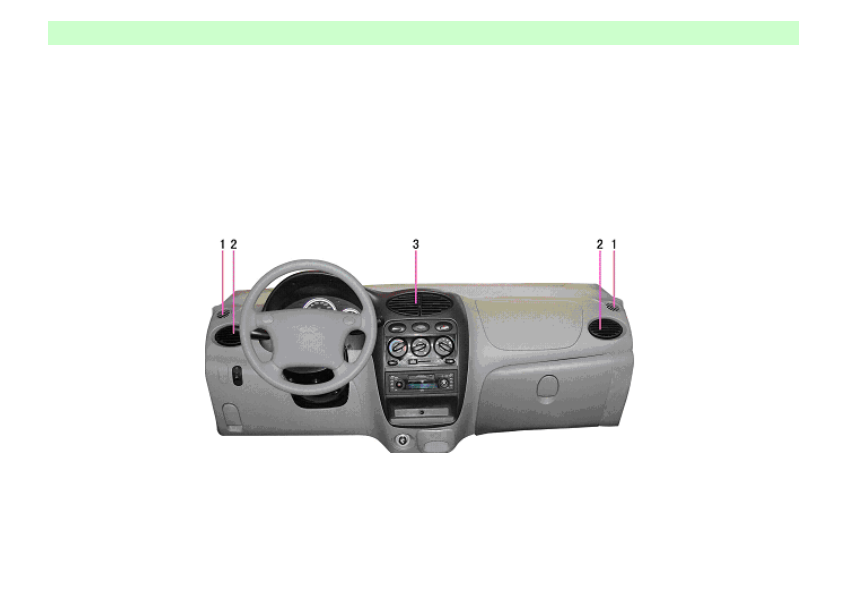
Center ventilation opening 

Air, after being conditioned, is directed 
into vehicle by two center ventilation 
openings.  Setting grids can change 
airflow direction 

Side ventilation opening 

Conditioned air is directed into vehicle by 
two side ventilation openings. 
 

Front windshield defroster 
ventilation opening 

Cold and warm air is directed to Side 
window by front windshield defroster 
ventilation openings  (controlled within 
the scope of outer back view mirror)


1Front windshield defroster ventilation opening2Side ventilation opening3Center ventilation opening 


-------------------------------------------------------------------------------------------------------------------------------------------------------------

Ventilation and A/C system 

73 

Temperature control 
switch 

Temperature control switch is used to 
control the air temperature of ventilation 
opening. 
Blue position: Cold 
Red position: Hot 


Blower motor switch 

Blower motor switch is used to control 
blower motor speed (four positions in all). 
Blower regulates wind speed.  Blower 
may be turned on to improve comfort 
during driving. 


Internal and external 
circulation control lever 

It is used to select exterior fresh air or 
interior circulating air. 

Outer circulation mode (

Allow outer air get into vehicle. 
Used for normal ventilation, heating and 
cooling. 

Internal circulation mode (

It is used when a internal circulation is  
needed for the air in vehicle.  This mode 
is used to prevent outside waste gas from 
getting into vehicle especially in dusty 
environment, it is also applied when fast 
cooling or heating of interior air is  
requested. 


Notice 
Continuous application of internal 
circulation mode will cause interior 
mugginess and fog on glass,  So internal 
circulation mode could not be engaged 
for a little while. 


-------------------------------------------------------------------------------------------------------------------------------------------------------------

Ventilation and A/C system 

74 

Airflow distribution 
switch 

Airflow distribution switch is used to 
select airflow direction.  There are five 
positions for switch: 


Head 
Head and foot 
Foot 
Foot/defrost 
Defrost 

" head" position(

Air flows out from center ventilation 
opening and side ventilation opening. 


" head and foot" position(

Air flows out from center ventilation 
opening and front bottom exhaust 
opening. 


" foot" position (

Air mostly flows from front  bottom 
exhaust opening. 


" foot / defrost" position(

Air flows out from front bottom exhaust 
opening, windshield defrosting 
ventilation opening and front windshield 
defrosting ventilation opening. 


" defrost" position(

Air flows out from windshield defrosting 
ventilation openings and front windshield 
defrosting ventilation openings.

-------------------------------------------------------------------------------------------------------------------------------------------------------------

Ventilation and A/C system 

75 


A/C system 

Ventilation,  heating and cool ing system 
parts compose a control system which 
could  (in any cold condition ant at any 
outdoors temperature)  supp ly maximal 
comfort .A/C system cooling element 
cools down air and removes moisture and 
dust such as pollen. 
A/C switch 
It is used to turn on or off A/C. 
After engine is started, turn blower 
switch to desirable speed and engage A/ 
C switch to activate A/C.  When A/C is  
turned on,  indicator light will come on. 
A/C could be shut if A/C switch button is 
pressed once more. When blower switch 
is set in " OFF " (turned off) position, 
A/C compressor will not be engaged. 


Not ice 

When vehicle is riding on a long slope or 
in heavy traffic, A/C application will 
cause engine overheating. M onitor water 
temperature gauge and shut off A/C if 
engine is overheated. 
 

Maximum cooling 

In torrid weather, vehicle window should 
be opened for a little while to let out 
indoor hot air quickly if vehicle is  
exposed to sunlight for a long time. 
A/C switch: On 
Internal  and outer circulation control 

lever:(

Airflow distribution switch:(

Temperature control switch: turn anti 
clockwise fully 
(Blue) 
Blower motor switch: Full speed 


Normal cooling 

Cooling for long distance travel and 
express travel. 
A/C switch: On 
Internal and external circulation 

switch:(

Airflow distribution switch:  (

)  Or 

(

Temperature cont rol switch: Blue 
Blower motor switch: Random 


-------------------------------------------------------------------------------------------------------------------------------------------------------------

Ventilation and A/C system 

76 


Head and foot 
It is design for transition stage such as at 
outer low temperature with no sunlight. 
When temperature control switch is set 
between cool (blue) and hot (red), hot air 
is directed to lower space of vehicle and  
cool air and natural air is directed to 
upper room. 
A/C switch: On or off 
Internal and external circulation control 

lever: (

Airflow distribution switch:(

Temperature cont rol switch:  Between 
blue (cool) and red    (hot) 
Blower motor switch: Random 


Ventilation 

Conditioned air from outside is directed 
into vehicle by center ventilation opening 
and side ventilation openings. 
A/C switch: Off 
Internal and external circulation control 

lever:(

Airflow distribution switch: 

(

)or(

Temperature control switch: Blue 
Blower motor switch: Random 


Compulsive heating 

A/C switch: Off 

Internal and external circulation control 

lever:(

Airflow distribution switch:(

Temperature cont rol switch: Turn 
clockwise fully 
Blower motor switch: full speed 
 

Notice 

Do not apply compulsive heating for a 
long term in case air in vehicle will get 
foul and fog comes on window. Turn off 
internal circulation switch if there is fog 
on window or moisture in vehicle. 
"compulsive heating " is designed  only 
for quick warming up ,then return to 
"normal heating". 


-------------------------------------------------------------------------------------------------------------------------------------------------------------

Ventilation and A/C system 

77 


Normal heating 

A/C switch: Off 
Internal and outer circulation control 

lever:(

Airflow distribution 

switch:(

)or(

Temperature control switch: Red   
Blower motor switch: Random 


Defrost 

A/C switch: Off or on 
Internal and outer circulation control 

lever:(

Airflow distribution switch:(

or(

Temperature control switch: Red 
Blower motor switch: Random 


Notice 

A/C application may increase defrosting 
efficiency. If weather is extremely moist, 

do not set A/C in (

)or(

)position 

during cooling., 

For temperature 

difference between outer air and 
windshield may be caused and fog, which 
will disturb sight, may form on the inner 
surface of windshield. 
 

Clues to the Operation of 
Cooling System 

If vehicle is in direct sunlight, open 
window before A/C is started.  Window 
should be cleaned in rainy day, while 
engaging A/C could lower indoor 
temperature, which is effective in both 
rainy day and hot weather. 
When driving in region with heavy traffic, 
cooling system may be cooled 
insufficiently for frequent parking and 
crawling. If A/C system is off for one or 
more than a month, even in winter, 
engine must be idled for several minutes 
with A/C on at least once each month to 
keep compressor lubricated and sealed 
properly prolonging system service life. 
A/C compressor does not work if blower 
switch is turned off. 


-------------------------------------------------------------------------------------------------------------------------------------------------------------

Ventilation and A/C system 

78 


-------------------------------------------------------------------------------------------------------------------------------------------------------------

Audio system 

79 


Audio system 


Note: If vehicle is equipped with system other than the following audio system , read carefully vehicle audio system instruction manual.


-------------------------------------------------------------------------------------------------------------------------------------------------------------

Audio system 

80 


-------------------------------------------------------------------------------------------------------------------------------------------------------------

Audio system 

81 

Function of Baoling Audio Panel (optional) 


1.Volume key 

2.Power on /off key 

3.M ode Select Key 

4.Band Select Key 

5.Clock Key 

6.Automatic Storage Key 

7.M emory Key 

8.Skip Forward Key 

9.Skip Backwards Key 

10.Cassette Holder 

11.Tune Key 

12.Eject Key 

13.LCD Display 


-------------------------------------------------------------------------------------------------------------------------------------------------------------

Audio system 

82 

Introduction to General 
Buttons Function 

1.Power Supply On/Off Key(POWR) 
One press on (2) key turns power on; 
once more press on (2) key turns off 
power (Note: when power is engaged for 
the first time, Radio/Cassette Player will 
be in initial Operating M ode  due to the 
Power On Reset of main control chip). 
2.M ode Select Key (M ODE) 
If (3) key is pressed repeatedly, 
functional mode selection 

will be 

performed  in the  following order.  VOL 
(Volume)-BAS (Bass)-TRE 
(Tremble)-BL (R.A.L.)-FA (F.A.R)-VOL 
(Volume) 
In any mode, pressing on “+” or "-'”key 
will regulate corresponding function level. 
Volume M ode (VOL) 
Pressing on “+ “ or “-“ key will regulate 
corresponding volume


level can b e freely 

regulated within the range from 0 to 63. 
Bass M ode (BAS)- 

Pressing on “+” or "-" key may regulate 
the content for bass and bass level can be 
freely regulated within 

the


range 

between - 7 and 7. 
Tremble M ode (TRE) 
Pressing key “+” or “-" key may regulate 
the content of


tremble and tremble level 

can be freely regulated within the range 
between - 7 ~ 7. 
Balanced M ode (BA) 
Pressing  key"+" or "-" key may regulate 
R.A.L. sound channel volume and 
volume level can be freely regulated 
within the range between 15L and 15R. 

3. Band Selection Key (BD) 
Pressing key (4) repeatedly will cycle 
radio bands in the following order:   
FM l

→FM2→FM3→FM4→AN→AM2 

After band selection is finished, repress 
key "

"or"

" to manually or 

automatically select radio station. After 
radio station is selected, press key (3) and 
key "+"or"-" to regulate volume level. 

4.Clock Key (CLK) 
Pressing key (5) could switch over 
between the display of radio frequency 

and clock: If "CLK" key is pressed when 
radio is in work, clock will return to 
Frequency Display M ode after clock 
display for 5 seconds; Pressing this key 
and key " "or"

" simultaneously may 

adjust hour and minute. 
5. Automatic P reset M emory Key (AS) 
If key (6) is pressed for less than 2 
seconds, pre-selected stored radio stations 
in M emory Keys (1~ 6) will be displayed 
in turn; Pressing the key for more than 2 
seconds , character " ATP " will appear on 
display, meanwhile, radio player enter 
into Automatic Scanning M ode and 6 
stations will be stored. Then radio will 
enter into Cycling Play M ode until any of 

keys (

1~ 6

) is pressed to select one 

station. 

6.M emory Key (1~ 6) 
M emory Key (1~ 6) may be used to store 
30 stations (18 FM , 12 AM ). If station 
needs to be selected  manually, you may 
press the key"

"or "

"to  key, then 

press anyone of the key (1~ 6), you will 
store the selected stations  into the 
location of program which the key is 
pressed for. 

-------------------------------------------------------------------------------------------------------------------------------------------------------------

Audio system 

83 

7.tuning Key( " "、"

") 

Press the key "

" or "

transitorily,  stations may be scanned 
manually  step by step ( AM :9KHZ 、
FM :50HZ) until desirable  stations are 
found. Press the key " " or "

" more 

than 1 second; automatic scanning will be 
enabled until desirable stations are found. 
If the key " " or "

"is  pressed  during 

automatic scanning, audio frequency will 
return to previous frequency. 


Radio receiving operation 

1.Turn on the radio, press power key (2). 
When characters app ear on display, radio 
is in the state of receiving signal. 
2.Press band key (4), select band FM l、
FM 2、FM 3、AM l、AM 2. 
3.tuning  key (11) press key" " or "

to  scan stations  forward  or backward 
manually. Press key more than 1 second; 
you may start automatic scanning until 
desirable stations are found. 

4.Store stations 

manually. Select 

desirable station, and select M emory Key 
(1 ~ 6), then press the key for 2 second, 
the  selected station will be stored in the 
key, six keys may memorize  any    
stations  of    FM l,  FM2,  FM 3,  AMI  and 
AM 2. 
5.Sound effect  regulation. Press key " 
MODE " to display character " VOL " on 
screen, pressing the key " + " or " -  " 
within 5 seconds may change volume. If 
the key" + " or " -  “  is pressed in 5 
seconds, display will return to main 
display  state. The control mode of 
BASTRE 、 BL 、 FA  are  the  same as 
volume  . 
6.Automatic scanning  storage  (6). Press 
key for 2 second  and a signal will be 
received for confirming memory function 
and display scanning. Six stations with 
strong signal will be stored. Press key or 
anyone of the keys 1 ~ 6 transitorily, the 
function will be ceased, if you cannot 
find  desirable  six stations, these stations 

will disappear. 
7.Stereo. When stereo station is received, 
ST9 (indicating stereo) will be displayed 
automatically.  
8.Scan memory stations. Press preset key 
1~ 6,you will find stored stations. 
Play   

Play Operation 

1.The procedure for start-up  is the same 
as receiving.


2.Insert the tape with  its  opening facing 
right, and push it into cassette holder, 

when the marks (TAPE  and  “

”  or 

”)  indicating  play and direction 

display on screen, radio is in normal play 
state. 

3.Volume regulation is the same as radio. 
4

.

Selecting songs. Press Fast Forward 

Key (8) or Fast Backward key (9) you 
may select desirable program quickly. 
5.Reverse Playing Direction.  
Pressing Fast Forward Key and Fast 
Backward  on the same time may have 

-------------------------------------------------------------------------------------------------------------------------------------------------------------

Audio system 

84 

tape play reversely. 
6.Switch between receiving and p laying 
1.  Push tape into cassette holder and 
receiving  mode  will change to  playing 
mode. 
2. Press  Eject Key (12) and tape will be 
ejected;  playing  mod e  will  be switched 
over  to  receiving  mode. Press Fast 
Forward or Fast Backward  Key ( after 
fast forward、Fast Backward is finished, 
radio will  return  to playing mode  from 
receiving mode). 
 
notice: 

In any  case, no broken wire is allowed to 
be  bare without insulation.  A  proper 
adapter may be used to connect circuit if 
necessary,  or  circuit overload, short 
circuit,  even fire, may be caused. 
furthermore, main  parts may also be 
damaged. According to customers' 
different requirements,  audio  system 
configurations are not same. Our 
corporation provides common/electronic 
tuning  radio;  Single disk/multi-disk  CD 
player; Antennas with or without 
amplifier etc; therefore, it is suggested to 
install  or refit aud io  system by CHERY 
AUTO authorized service station. If other 
type of radio and CD player is adopted, it 

must 

meet 

typ e and 

technology 

requirements which is specified in 
CHERY AUTO accessory  catalogue  and  
ensure its correct  installation. According 
to  CHRRY AUTO accessory  catalogue 
and  vehicle  type,  customer may also 
adopt other type of speaker、connector、
antennae and anti-interference unit. If the 
accessory out of 

CHERY AUTO 

specifications is app lied, there will be a 
failure in system. During antenna 
installation  and replacement,  antennae 

socket must be well 

sealed.  


-------------------------------------------------------------------------------------------------------------------------------------------------------------

Audio system 

85 

VDO Audio Panel Function (optional) 


-------------------------------------------------------------------------------------------------------------------------------------------------------------

Audio system 

86 


1.Preset key1 

RANDOM :CD Random Play Start/Stop 

2.Preset key2 

3.Preset key3 
REPEAT: CD Repeat Play Start/Stop 

4.SOURCE: Sound source 

5.SOUND Short press: sound effect mode 

SELECT: Lon g press: sound set mode 

6.MUTE: M ute 

7.Volume 

8.Power switch 

9.Display 

10.BAND: Band 

SCAN:  Radio frequency scan/CD play 

track scan 

High track, low track search (play)   

Forward/backward track (CD box)   

M usic search system 

11.AST: Automatic storage 

12.Preset key6 

DISC-: Forward disk selection  

13.Preset key5 

14.Preset key4 

DISC+: Backward disk selection  

15. 

Fast Forward 

16. 

Fast Backward 

17. 

Tape eject  Short press:  Reverse 

tape 

Long press: Tape eject 

18.Tape 


-------------------------------------------------------------------------------------------------------------------------------------------------------------

Audio system 

87 

Audio 

On/off 
 

Press POWER key to switch on or 

off volume 

 

Volume may be regulated by 

rotating the knob. 

Warning:  It is should be ensured that 

traffic signal  (whistle, siren)  could be 

heard. 

M ute 
 

Press M UTE key to activate or 

disable mute state. Audio effect 

 

Whether or not jazz music, popular 

music , verbal program , classical or 

rock music is preferred, 

SOUND(audio effect)  key will 

meet your requirement. 

 

A short press on SOUND key 

selects a manuf actory preset audio 

effect: 

-BASS-TREB:  Tremble and bass effect 

may be set by yourself     

-JAZZ: Jazz music   

-VOCAL: verbal program 

-POP: Popular music   

-CLASSIC: Classical music     

-ROCK: Rock music Audio setting   
·Press SOUND key for more than 2 
seconds and enter into audio setting mode     
·Press SOUND key or SELECT key to 

select desirable audio effect mode.   

-BASS (Bass, In BASS-TREB mode) 

-TREBLE  (Tremble,  In BA SS-TREB 

mode) 

-BALANCE: 

R.A.L. volume 

Balance-FADER  (Front and rear horn 

control) 

-L0uDNEss(OFF, LOW, M ID, HIGH,  in 

BASS~TREB mode) 
·Selected sound effect mode may be 
regulated by rotating volume 

knob  .Display will return to previous 

Operating M ode after 5 seconds.   

Sound source 

Press  SOURCE key to select desirable 

sound source: 

-Radio 

-Tape-Disk (If connected) 

Radio 

Band 

Press BAND key to select desirable band  

FM l

FM2

FM3

FM AST

FM A

z

M W(AM )l

M W(AM)2

M W 


Notice: 

If M W(AM ) or LW band is not preferred, 

it could be canceled.  If there are more 

preset stations than you preferred, 

corresponding cancel operation may be 

performed. 


Automatic C hannel Search 

Search for radio station by search tuning 

automatically.  

-------------------------------------------------------------------------------------------------------------------------------------------------------------


Content      ..     4      5      6      7     ..