Acura ILX (2021 year). Manual in english - page 27
 

  Index      Manuals     Acura ILX (2021 year). Manual in english


Search            copyright infringement  


Content      ..     25      26      27      28     ..


Acura ILX (2021 year). Manual in english - page 27


430

Driving

When Driving

Starting the Engine

1.

Make sure the parking brake is applied.

2.

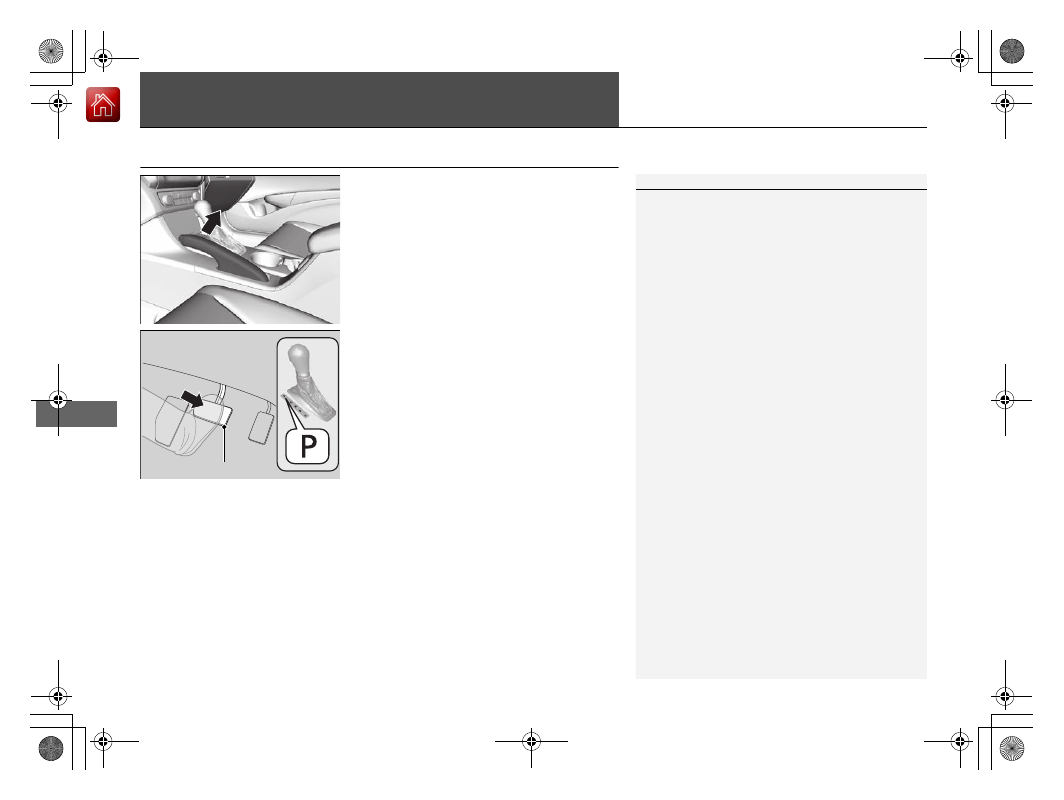
Check that the transmission is in 

(

P

, then 

depress the brake pedal.

u

Although it is possible to start the vehicle 
in 

(

N

, it is safer to start it in 

(

P

.

1

Starting the Engine

Keep your foot firmly on the brake pedal when 
starting the engine.

The engine is harder to start in cold weather and in 
thinner air found at altitudes above 8,000 feet (2,400 
meters).

When starting the engine in cold weather, turn off all 
electrical accessories such as the lights, climate 
control system, and rear defogger in order to reduce 
battery drain.

If you live in a region where winter is extremely cold, 
an engine block heater will improve starting and 
warming of the engine. Consult a dealer for details.

If exhaust system sounds abnormal or you can smell 
exhaust gas inside the vehicle, have your vehicle 
checked by a dealer. There may be a problem with 
the engine or exhaust system.

Brake Pedal

-------------------------------------------------------------------------------------------------------------------------------------------------------------

Continued

431

uu

When Driving

u

Starting the Engine

Driving

3.

Press the 

ENGINE START/STOP

 button 

without depressing the accelerator pedal.

You can turn the engine off when the vehicle is completely stopped.

1.

Put the transmission into 

(

P

.

2.

Press the 

ENGINE START/STOP

 button.

Stopping the Engine

1

Starting the Engine

Bring the keyless access remote close to the 

ENGINE 

START/STOP

 button if the battery in the keyless 

access remote is weak.

2

If the Keyless Access Remote Battery is 
Weak

 P. 584

The engine may not start if the keyless access remote 
is subjected to strong radio waves.

Do not hold the 

ENGINE START/STOP

 button to 

start the engine.
If the engine does not start, wait at least 30 seconds 
before starting the engine again.

The immobilizer system protects your vehicle from 
theft.
If an improperly coded device is used, the engine’s 
fuel system is disabled.

2

Immobilizer System

 P. 132

-------------------------------------------------------------------------------------------------------------------------------------------------------------

uu

When Driving

u

Starting the Engine

432

Driving

You can remotely start the engine using the two-way keyless access remote from 
extended distances.

To start the engine

The engine runs for up to 10 minutes without you starting the vehicle.
To extend the run time for another 10 minutes during the first run, press the 


button, then press and hold the 

 button.

u

The amber LED blinks, then the green LED comes back on if a 10-minute 
extension request was transmitted successfully.

After pressing the 

 button, wait for the green LED to blink. This indicates that 

the all the doors and the trunk are locked. 

Remote Engine Start

*

1

Remote Engine Start

*

The remote engine start may violate local laws.
Before using the remote engine start, check your 
local laws.

If there are buildings and obstacles between your 
vehicle and the remote, the range will be reduced.
This distance may vary by external electrical 
interference.
The engine may not start by the remote engine start 
if:

You have disabled a remote engine start setting 
using the multi-information display.

The power mode is not in VEHICLE OFF (LOCK).

The transmission is in a position other than 

(

P

.

The hood is open, or any door or the trunk is 
unlocked.

3

WARNING

Carbon monoxide gas is toxic and can 
rapidly accumulate in closed or even partly 
enclosed areas.

Breathing it can cause unconsciousness and 
even kill you.

Never use the remote engine starter with 
the vehicle parked in a garage or other 
areas with limited ventilation.

Press the 

 button, then press 

and hold the 

 button.

Amber LED: Blinks when any button is pressed.

Continues to blink 
during a vehicle 
self check until the 
engine starts.

Go within the range, 
and try again.

Green LED: Comes on while 
the engine is running.

Red LED: Blinks when the 
remote is out of the keyless 
access system range.

* Not available on all models

-------------------------------------------------------------------------------------------------------------------------------------------------------------

Continued

433

uu

When Driving

u

Starting the Engine

Driving

To stop the engine

1

Remote Engine Start

*

You have already used the remote twice to start 
the engine.

Another registered keyless access remote is in the 
vehicle.

There is any antenna failure.

The door is unlocked with the built-in key.

The engine oil pressure is low.

The engine coolant temperature is extremely high.

The telematics

*

 unit malfunctions.

The security system alarm is not set.

Before starting the engine, make sure to check the 
door lock status using the remote. When you press 
the 

 button, wait for the green LED to blink. If 

the red LED turns on, the doors and trunk did not 
lock, and the engine does not start.

While the engine is running, the vehicle will 
automatically precondition inside the vehicle.
When it is warm outside:

The climate control system is activated in 
recirculation mode.

When it is cold outside:

The defroster is activated at a moderately warm 
temperature.

The rear defogger and door mirror heaters are 
activated.

The seat heater is activated.

2

Seat Heaters

 P. 174

Press and hold the 

 button 

for one second.

Go within the range, 
and try again.

Amber LED: Blinks when any 
button is pressed.

Red LED:

Comes on for one second to let you 
know that the engine has stopped.

Blinks when the remote is out of 
the keyless access system range. 
The engine will not stop.

* Not available on all models

-------------------------------------------------------------------------------------------------------------------------------------------------------------

uu

When Driving

u

Starting the Engine

434

Driving

1.

Depress and hold the brake pedal, then press the 

ENGINE START/STOP

 button.

2.

Keeping your right foot on the brake pedal, release the parking brake. Check that 
the parking brake indicator has gone off.

3.

Put the transmission into 

(

D

. Select 

(

R

 when reversing.

4.

Gradually release the brake pedal and gently depress the accelerator pedal to pull 
away.

Hill Start Assist System

Hill start assist keeps the brake engaged briefly to help prevent the vehicle from 
rolling on inclines as you move your foot from the brake pedal to the accelerator.

Put the transmission into 

(

D

 or 

(

S

 when facing uphill, or 

(

R

 when facing downhill, 

then release the brake pedal.

Starting to Drive

When the engine was started using the keyless access remote

*

When the engine was started in any case

1

Hill Start Assist System

Hill start assist may not prevent the vehicle from 
rolling downhill on a very steep or slippery slope, and 
will not operate on small inclines.

Hill start assist will operate even when VSA

®

 is 

switched off.

Hill start assist is not a replacement for the parking 
brake.

* Not available on all models

-------------------------------------------------------------------------------------------------------------------------------------------------------------

435

uu

When Driving

u

Precautions While Driving

Driving

Precautions While Driving

Avoid driving in deep water and on flooded roads. This can damage the engine or 
driveline, or cause electrical component failure.

If there is a strong impact with something under the vehicle, stop in a safe location. 
Check the underside of the vehicle for damage or any fluid leaks.

In Rain

Other Precautions

1

Precautions While Driving

NOTICE

Do not operate the shift lever while pressing the 
accelerator pedal. You could damage the transmission.

NOTICE

If you repeatedly turn the steering wheel at an 
extremely low speed, or hold the steering wheel in 
the full left or right position for a while, the electric 
power steering (EPS) system heats up. The system 
goes into a protective mode, and limits its 
performance. The steering wheel becomes harder 
and harder to operate. Once the system cools down, 
the EPS system is restored.
Repeated operation under these conditions can 
eventually damage the system.

If the power mode is set to ACCESSORY while 
driving, the engine will shut down and all steering 
and brake power assist functions will stop, making it 
difficult to control the vehicle.

Do not select 

(

N

 while driving as you will lose engine 

braking (and acceleration) performance.

During the first 600 miles (1,000 km) of operation, 
avoid sudden acceleration or full throttle operation so 
as not to damage the engine or powertrain.

Avoid hard braking for the first 200 miles (300 km).
You should also follow this when the brake pads are 
replaced.

-------------------------------------------------------------------------------------------------------------------------------------------------------------

436

uu

When Driving

u

Dual Clutch Transmission

Driving

Dual Clutch Transmission

When the engine runs at higher idle speeds, the creeping force increases.
Keep the brake pedal firmly depressed when stopped.

Quickly depressing the accelerator pedal while driving uphill may cause the 
transmission to drop to a lower gear, unexpectedly increasing vehicle speed. Depress 
the accelerator pedal carefully, especially on slippery roads and curves.

Creeping

Kickdown

1

Precautions While Driving

NOTICE

The following can damage the under spoiler:

Parking the vehicle by a parking block

Parallel parking along the road shoulder

Driving towards the bottom of a hill

Driving up or down to a different surface level 
(such as a road shoulder)

Driving on a rutted or bumpy road

Driving on a road with potholes.

-------------------------------------------------------------------------------------------------------------------------------------------------------------

437

uu

When Driving

u

Shifting

Continued

Driving

Shifting

Change the shift position in accordance with your driving needs.

Shift lever positions

1

Shift lever positions

You cannot change the power mode from ON to 
VEHICLE OFF (LOCK) unless the shift lever is in 

(

P

.

The vehicle may move very slightly even in 

(

N

 while 

the engine is cold.
Depress the brake pedal firmly and, when necessary, 
apply the parking brake.

When shifting gears in extremely low temperatures 
(-22°F/-30°C), there may be a short delay before the 
shift is indicated in the display. Always confirm you 
are in the correct gear before driving.

Park

Used when parking, before turning off or 

starting the engine

Reverse

Used when reversing

Neutral

Transmission is not locked

Drive

Used:

For normal driving (gears change between 1st 
and 8th automatically)

When temporarily driving in the sequential mode

Drive (S)

Used for:

Automatically changing gears between 1st 
and 7th (7th gear is used only at high speed)

Driving in the sequential mode

Release Button

-------------------------------------------------------------------------------------------------------------------------------------------------------------

uu

When Driving

u

Shifting

438

Driving

Shift Lever Operation

1

Shifting

NOTICE

When you change the shift lever from 

(

D

 to 

(

R

 and 

vice versa, come to a complete stop and keep the 
brake pedal depressed.
Operating the shift lever before the vehicle has come 
to a complete standstill can damage the transmission.

Use the shift lever position indicator to check the 
lever position before pulling away.

Whichever position the shift lever is in when driving, 
a blinking transmission system indicator indicates a 
transmission problem.
Avoid sudden acceleration and have the transmission 
checked by a dealer as soon as possible.

The fuel supply may be cut off if you drive at engine 
speeds in or over the tachometer's red zone (engine 
speed limit). If this happens, you may experience a 
slight jolt.

When the engine speed is increased while the shift 
lever is in 

(

N

(

P

 or 

(

R

, the fuel supply may be cut 

off even without the engine speed entering the 
tachometer’s red zone.

It may not be possible to operate the shift lever if the 
brake pedal is applied while the shift lever release 
button is held down.
Depress the brake pedal first.

Shift Lever Position Indicator 

(transmission system indicator)

Depress the brake pedal and press the shift lever 

release button to shift.

Shift without pressing the shift lever release button.

Press the shift lever release button and shift.

Tachometer’s red zone

Gear Position Indicator

M

 (sequential mode) Indicator

-------------------------------------------------------------------------------------------------------------------------------------------------------------

439

uu

When Driving

u

Shifting

Continued

Driving

Use the paddle shifters to change between 1st and 8th gears without releasing your 
hands from the steering wheel. The transmission will switch to the sequential mode.

When the transmission is in 

(

D

:

The vehicle will go into the sequential mode momentarily, and the gear position 
indicator will come on.
Once you start traveling at a constant speed, the sequential mode will automatically 
switch off, and the gear position indicator will go off.

Hold the 

(

+

 paddle shifter for two seconds to return to normal drive.

When the transmission is in 

(

S

:

The vehicle will go into the sequential mode, and the 

M

 (sequential mode) indicator 

and gear position indicator will come on. At speeds of 2 mph (4 km/h) or less, the 
vehicle automatically shifts down into 1st gear. It will not automatically shift up, 
even if vehicle speed increases.
If you are in 1st through 6th gears and do not operate the paddle shifters as engine 
speed increases approaches the tachometer red zone, the transmission 
automatically shifts up to the next gear.
When switching out of the sequential mode, move the shift lever from 

(

S

 to 

(

D

When the sequential mode is canceled, the 

M

 indicator and gear position indicator 

will turn off.

Sequential Mode

-------------------------------------------------------------------------------------------------------------------------------------------------------------

uu

When Driving

u

Shifting

440

Driving

Second gear lock mode

If you pull the 

(

+

 paddle shifter while stopped or driving at 6 mph (10 km/h) or less, 

the gear position will be locked in 2nd gear. This makes it easier to pull away on 
slippery surfaces such as snow covered roads.

To cancel the 2nd gear lock mode, pull the 

(

-

 paddle shifter, or move the shift lever 

from 

(

S

 to 

(

D

.

Sequential Mode Operation

1

Sequential Mode Operation

Each paddle shift operation makes a single gear 
change.
To change gears continuously, release the paddle 
shifter before pulling it again for the next gear.

If the gear position indicator blinks when you try to 
shift up or down, this means your vehicle speed is not 
in its allowable gear range.
Slightly accelerate to shift up and decelerate to shift 
down while the indicator is blinking.

Downshifting when pulling 

the 

 paddle shifter.

(Changes to a lower gear)

Upshifting when pulling 

the 

 paddle shifter.

(Changes to a higher gear)

Paddle Shifter 

(Shift down)

Paddle Shifter 

(Shift up)

-------------------------------------------------------------------------------------------------------------------------------------------------------------

441

uu

When Driving

u

Vehicle Stability Assist

TM

 (VSA

®

), aka Electronic Stability Control (ESC), System

Continued

Driving

Vehicle Stability Assist

TM

 (VSA

®

), aka Electronic 

Stability Control (ESC), System

VSA

®

 helps to stabilize the vehicle during cornering if the vehicle turns more or less 

than what was intended. It also assists in maintaining traction on slippery surfaces. 
It does so by regulating engine output and selectively applying the brakes.

When VSA

®

 activates, you may notice that the 

engine does not respond to the accelerator. 
You may also notice some noise from the 
hydraulic brake system. You will also see the 
indicator blink.

VSA

®

 Operation

1

Vehicle Stability Assist

TM

 (VSA

®

), aka Electronic Stability Control 

(ESC), System

The VSA

®

 may not function properly if tire type and 

size are mixed. Make sure to use the same size and 
type of tire, and the air pressures as specified.

When the VSA

®

 system indicator comes on and stays 

on while driving, there may be a problem with the 
system. While this may not interfere with normal 
driving, have your vehicle checked by a dealer 
immediately.

VSA

®

 cannot enhance stability in all driving situations 

and does not control the entire braking system. You 
still need to drive and corner at speeds appropriate 
for the conditions and always leave a sufficient 
margin of safety.

The main function of the VSA

®

 system is generally 

known as Electronic Stability Control (ESC). The 
system also includes a traction control function.

VSA

®

 System 

Indicator

-------------------------------------------------------------------------------------------------------------------------------------------------------------

uu

When Driving

u

Vehicle Stability Assist

TM

 (VSA

®

), aka Electronic Stability Control (ESC), System

442

Driving

This button is on the driver side control panel. 
To partially disable VSA

®

 functionality/

features, press and hold it until you hear a 
beep.

Your vehicle will have normal braking and 
cornering ability, but traction control function 
will be less effective.

To restore VSA

®

 functionality/features, press 

the  

(VSA

®


OFF

) button until you hear a 

beep.

VSA

®

 is turned on every time you start the 

engine, even if you turned it off the last time 
you drove the vehicle.

VSA

®

 On and Off

1

Vehicle Stability Assist

TM

 (VSA

®

), aka Electronic Stability Control 

(ESC), System

In certain unusual conditions when your vehicle gets 
stuck in shallow mud or fresh snow, it may be easier 
to free it with the VSA

®

 temporarily switched off.

When the 

 button is pressed, the traction control 

function becomes less effective. This allows for the 
wheels to spin more freely at low speed. You should 
only attempt to free your vehicle with the VSA

®

 off if 

you are not able to free it when the VSA

®

 is on.

Immediately after freeing your vehicle, be sure to 
switch VSA

®

 on again. We do not recommend driving 

your vehicle with the VSA

®

 system switched off.

You may hear a motor sound coming from the 
engine compartment while system checks are being 
performed immediately after starting the engine or 
while driving. This is normal.

VSA

®


OFF

 Indicator

-------------------------------------------------------------------------------------------------------------------------------------------------------------

443

uu

When Driving

u

Blind spot information System

*

Continued

Driving

Blind spot information System

*

Is designed to detect vehicles in specified alert zones adjacent to your vehicle, 
particularly in harder to see areas commonly known as “blind spots.”

When the system detects vehicles approaching from behind in adjacent lanes, the 
appropriate indicator comes on for a few seconds, providing assistance when you 
change lanes.

How the system works

1

Blind spot information System

*

Important Safety Reminder

Like all assistance systems, blind spot information 
system has limitations. Over reliance on blind spot 
information system may result in a collision.

The system is for your convenience only. Even if an 
object is within the alert zone, the following 
situations may occur.

The blind spot information system alert indicator 
may not come on due to obstruction (splashes, 
etc.) even without the 

Blind Spot Info Not 

Available

 multi-information display appearing.

The blind spot information system alert indicator 
may come on even with the message appearing.

3

WARNING

Failure to visually confirm that it is safe to 
change lanes before doing so may result in 
a crash and serious injury or death.
Do not rely only on the blind spot 
information system when changing lanes.

Always look in your mirrors, to either side 
of your vehicle, and behind you for other 
vehicles before changing lanes.

The transmission is in 

(

D

 or 

(

S

.

Your vehicle speed is between 20 mph 
(32 km/h) and 100 mph (160 km/h)

Alert zone range

A: Approx. 1.6 ft. (0.5 m)
B: Approx. 9.5 ft. (2.9 m)
C: Approx. 10 ft. (3 m)

Radar Sensors:

underneath the 

rear bumper 

corners

Alert Zone

A

B

C

* Not available on all models

-------------------------------------------------------------------------------------------------------------------------------------------------------------

uu

When Driving

u

Blind spot information System

*

444

Driving

When the system detects a vehicle

Blind spot information System Alert Indicator: 
Located on the outside rearview mirror on 
both sides.

Comes on when:

A vehicle enters the alert zone from behind 
to overtake you with a speed difference of 
no more than 31 mph (50 km/h) from your 
vehicle.

You pass a vehicle with a speed difference 
of no more than 12 mph (20 km/h).

Blinks and a beeper sounds when:

You move the turn signal lever in the direction 
of the detected vehicle. The beeper sounds 
three times.

1

Blind spot information System

*

The blind spot information system alert indicator may 
not come on under the following conditions:

A vehicle does not stay in the alert zone for more 
than two seconds.

A vehicle is parked in a side lane.

The speed difference between your vehicle and the 
vehicle you are passing is greater than 6 mph (10 
km/h).

An object not detected by the radar sensors 
approaches or passes your vehicle.

A vehicle running in the adjacent lane is a 
motorcycle or other small vehicle.

You can turn off the audible alert, or all the blind spot 
information system alert using the information screen 
or multi-information display.

2

Customized Features

 P. 99, 315

The system is not active when the shift lever is in 

(

R

.

Blind spot information system may be adversely 
affected when:

Objects (guard rails, poles, trees, etc,.) are 
detected.

An object that does not reflect radio waves well, 
such as a motorcycle, is in the alert zone.

Driving on a curved road.

A vehicle is moving from a far lane to the adjacent 
lane.

The system picks up external electrical interference.

Comes On

Blinks

* Not available on all models

-------------------------------------------------------------------------------------------------------------------------------------------------------------

445

uu

When Driving

u

Blind spot information System

*

Driving

1

Blind spot information System

*

The rear bumper or the sensors have been 
improperly repaired or the rear bumper has been 
deformed.

The orientation of the sensors has been changed.

In bad weather (Heavy rain, snow, and fog).

For a proper blind spot information system operation:

Always keep the rear bumper corner area clean.

Do not cover the rear bumper corner area with 
labels or stickers of any kind.

Take your vehicle to a dealer if you need the rear 
bumper corner area or the radar sensors to be 
repaired, or the rear bumper corner area is strongly 
impacted.

* Not available on all models

-------------------------------------------------------------------------------------------------------------------------------------------------------------


Content      ..     25      26      27      28     ..