Acura ILX (2021 year). Manual in english - page 25
 

  Index      Manuals     Acura ILX (2021 year). Manual in english


Search            copyright infringement  


Content      ..     23      24      25      26     ..


Acura ILX (2021 year). Manual in english - page 25


uu

Bluetooth

®

 HandsFreeLink

®

u

HFL Menus

398

Features

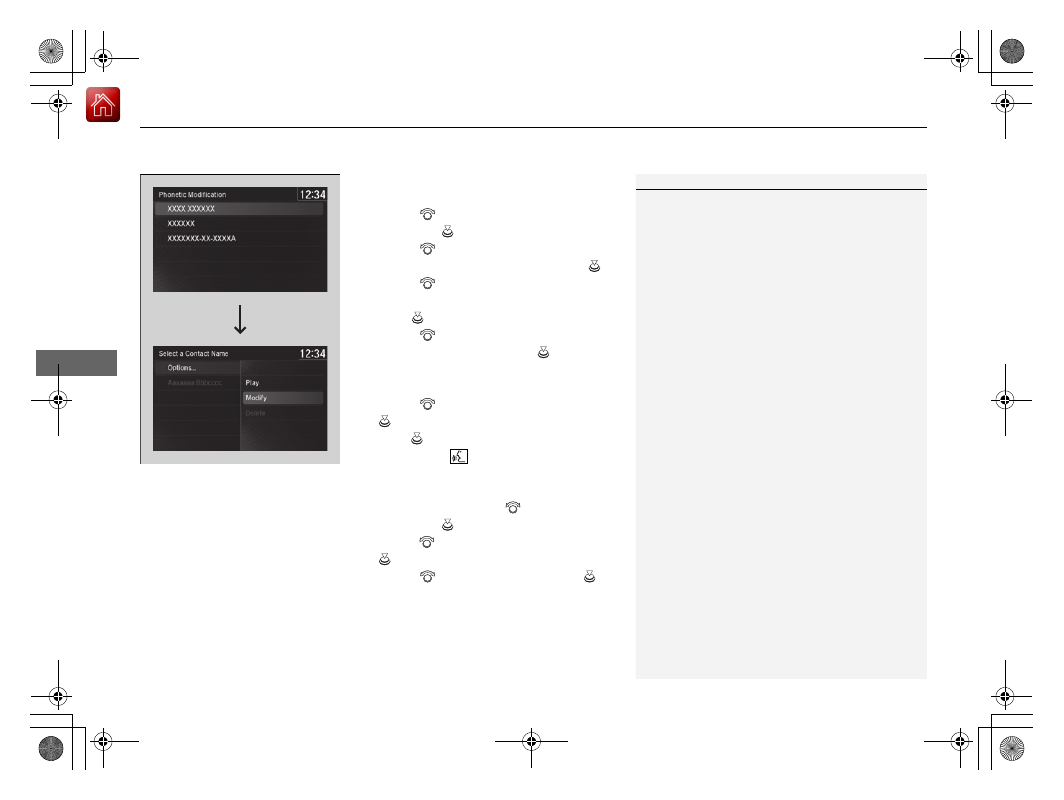
To modify a voice tag

1.

Press the 

SETTINGS

 button.

2.

Rotate 

 to select 

System Settings

then press 

.

3.

Rotate 

 to select 

Phonebook 

Phonetic Modification

, then press 

.

4.

Rotate 

 to select the phone you want 

to add phonetic modification to, then 
press .

5.

Rotate 

 to select a contact name you 

want to modify, then press 

.

u

The pop-up menu appears on the 
screen.

6.

Rotate 

 to select 

Modify

, then press 

.

7.

Press .

u

Using the 

 button, follow the 

prompts to complete the voice tag.

8.

You will receive a confirmation message 
on the screen. Rotate 

 to select 

OK

then press 

.

9.

Rotate  

to 

select 

Options...

, then press 

.

10.

Rotate 

 to select 

OK

, then press 

.

1

Phonebook Phonetic Modification

*

You can only modify or delete contact names for the 
currently connected phone.

* Not available on all models

-------------------------------------------------------------------------------------------------------------------------------------------------------------

399

uu

Bluetooth

®

 HandsFreeLink

®

u

HFL Menus

Continued

Features

To delete a modified voice tag

1.

Press the 

SETTINGS

 button.

2.

Rotate 

 to select 

System Settings

, then 

press .

3.

Rotate 

 to select 

Phonebook Phonetic 

Modification

, then press 

.

4.

Rotate 

 to select the phone you want to 

delete phonetic modification, then press 

.

5.

Rotate 

 to select a contact name you 

want to delete, then press 

.

u

The pop-up menu appears on the screen.

6.

Rotate 

 to select 

Delete

, then press 

.

u

Items to be deleted are indicated with a 
trash icon.

7.

Rotate 

 to select 

Options...

, then press 

.

8.

Rotate 

 to select 

OK

, then press 

.

Trash Icon

-------------------------------------------------------------------------------------------------------------------------------------------------------------

400

uu

Bluetooth

®

 HandsFreeLink

®

u

HFL Menus

Features

To delete all modified voice tags

1.

Press the 

SETTINGS

 button.

2.

Rotate 

 to select 

System Settings

, then 

press .

3.

Rotate 

 to select 

Phonebook Phonetic 

Modification

, then press 

.

4.

Rotate 

 to select the phone you want to 

delete phonetic modification, then press 

.

5.

Rotate 

 to select 

Options...

, then press 

.

6.

Rotate 

 to select 

Delete All

, then press 

.

7.

You will receive a confirmation message on 
the screen. Rotate 

 to select 

Yes

, then 

press .

-------------------------------------------------------------------------------------------------------------------------------------------------------------

Continued

401

uu

Bluetooth

®

 HandsFreeLink

®

u

HFL Menus

Features

You can make calls by inputting any phone 
number, or by using the imported 
phonebook, call history, speed dial entries, or 
redial.

Making a Call

1

Making a Call

Any voice-tagged speed dial entry, phonebook name, 
or number can be dialed by voice from most screens.

Press the 

 button and say 

“Call”

 and the voice tag 

name, 

“Call by name”

 and the phonebook name, or 

“Call”

 and the phone number.

The maximum range between your phone and 
vehicles is 30 feet (10 meters).

Once a call is connected, you can hear the voice of 
the person you are calling through the audio 
speakers.

While there is an active connection with Apple 
CarPlay, phone calls cannot be made with 
HandsFreeLink

®

 and are only made from Apple 

CarPlay.

-------------------------------------------------------------------------------------------------------------------------------------------------------------

uu

Bluetooth

®

 HandsFreeLink

®

u

HFL Menus

402

Features

To make a call using the imported 
phonebook

1.

Press the 

PHONE

 button.

2.

Rotate 

 to select 

Phonebook

, then 

press .

3.

Rotate 

 to select a contact name, then 

press .

u

The phonebook is stored alphabetically.

4.

Rotate 

 to select a number, then press 

.

u

Dialing starts automatically.

1

To make a call using the imported phonebook

You can call a stored voice-tagged speed dial 
number, phonebook name, or number using voice 
commands.

2

Speed Dial

 P. 393

You can use the keyboard on the On Demand Multi-
Use Display

TM

 for a partial match search.

You can use the keyboard on the On Demand Multi-
Use Display

TM

 for an alphabetical search.

Models with navigation system

Models without navigation system

-------------------------------------------------------------------------------------------------------------------------------------------------------------

403

uu

Bluetooth

®

 HandsFreeLink

®

u

HFL Menus

Continued

Features

To make a call using a phone number

1.

Press the 

PHONE

 button.

2.

Rotate 

 to select 

Dial

, then press 

.

3.

Select a number.

u

Use the keyboard on the On Demand 
Multi-Use Display

TM

 for entering 

numbers.

4.

Select .

To make a call using redial

1.

Press the 

PHONE

 button.

2.

Rotate 

 to select 

Redial

, then press 

.

u

Dialing starts automatically.

-------------------------------------------------------------------------------------------------------------------------------------------------------------

uu

Bluetooth

®

 HandsFreeLink

®

u

HFL Menus

404

Features

To make a call using the call history

Call history is stored by 

All

*1

Dialed

Received

, and 

Missed

.

1.

Press the 

PHONE

 button.

2.

Rotate 

 to select 

Call History

, then 

press .

3.

Move  

or  

to 

select 

All

*1

Dialed

Received

, and 

Missed

.

4.

Rotate 

 to select a number, then press 

.

u

Dialing starts automatically.

*1: This function may not be available depending on a cellular phone.

1

To make a call using the call history

The call history displays the last 20 dialed, received, or 
missed calls.
(Appears only when a phone is connected to HFL.)

These icons next to the number indicate the 
following:

: Dialed calls.
: Received calls.
: Missed calls.

-------------------------------------------------------------------------------------------------------------------------------------------------------------

Continued

405

uu

Bluetooth

®

 HandsFreeLink

®

u

HFL Menus

Features

To make a call using a speed dial entry

1.

Press the 

PHONE

 button.

2.

Rotate  

to 

select 

Speed Dial

, then press 

.

3.

Rotate 

 to select a number, then press 

.

u

Dialing starts automatically.

1

To make a call using a speed dial entry

Rotate 

 to select 

More Speed Dials

 to view 

another paired phone’s speed dial list. You can make 
a call from that list using the currently connected 
phone.

When a voice tag is stored, press the 

 button to 

call the number using the voice tag.

2

Speed Dial

 P. 393

Any voice-tagged speed dial entry, phonebook name 
or number can be dialed by voice from any screen.
Press the 

 button and follow the prompts.

-------------------------------------------------------------------------------------------------------------------------------------------------------------

uu

Bluetooth

®

 HandsFreeLink

®

u

HFL Menus

406

Features

When there is an incoming call, an audible 
notification sounds (if activated) and the 

Incoming Call

 screen appears.

Press the 

 button to answer the call.

Press the 

 button to decline or end the call.

Receiving a Call

1

Receiving a Call

Call Waiting

Press the 

 button to put the current call on hold to 

answer the incoming call.

Press the 

 button again to return to the current 

call.
Ignore the incoming call if you do not want to answer 
it.
Press the 

 button if you want to hang up the 

current call.

Information Screen

On Demand Multi-Use Display

TM

-------------------------------------------------------------------------------------------------------------------------------------------------------------

Continued

407

uu

Bluetooth

®

 HandsFreeLink

®

u

HFL Menus

Features

The following options are available during a call.

Phone Call Active - Transfer to Mobile

Transfer a call from HFL to your phone.

Mute

: Mute your voice.

Transfer to Mobile

: Transfer a call from HFL 

to your phone.

Touch Tones

: Send numbers during a call. 

This is useful when you call a menu-driven 
phone system.

The available options are shown on the On 
Demand Multi-Use Display

TM

.

Select the option.

u

The 

Mute

 icon is checked when 

Mute

 is 

selected. Select 

Mute

 again to turn it off.

Options During a Call

1

Options During a Call

Touch Tones

: Available on some phones.

Information Screen

On Demand Multi-Use Display

TM

Mute

 Icon

Information Screen

On Demand Multi-Use Display

TM

-------------------------------------------------------------------------------------------------------------------------------------------------------------

uu

Bluetooth

®

 HandsFreeLink

®

u

HFL Menus

408

Features

HFL can display newly received text and e-mail messages as well as 20 of the most 
recently received messages on a linked cell phone. Each received message can be 
read aloud and replied to using a fixed common phrase.

1.

A pop-up appears and notifies you of a new 
text or e-mail message.

2.

Rotate 

 to select 

Read

 to listen to the 

message, then press 

.

u

The text or e-mail message is displayed. 
The system automatically starts reading 
out the message.

3.

To discontinue the message read-out, press 

.

Receiving a Text/E-mail Message

1

Receiving a Text/E-mail Message

The system does not display any received messages 
while you are driving. You can only hear them read 
aloud.

With some phones, you may be able to display up to 
20 most recent text and e-mail messages.

State or local laws may limit your use of the HFL text/
e-mail message feature. Only use the text/e-mail 
message feature when conditions allow you to do so 
safely.

When you receive a text or e-mail message for the 
first time since the phone is paired to HFL, you are 
asked to turn the 

New Text/Email Alert

 setting to 

On

.

2

To turn on or off the text/e-mail message 
notice

 P. 386

-------------------------------------------------------------------------------------------------------------------------------------------------------------

Continued

409

uu

Bluetooth

®

 HandsFreeLink

®

u

HFL Menus

Features

If a paired phone has text or e-mail message accounts, you can select one of them 
to be active and receive notifications.

1.

Press the 

SETTINGS

 button.

2.

Rotate 

 to select 

Bluetooth/Phone 

Settings

, then press 

.

u

Repeat the procedure to select 

Select 

Account

.

3.

Rotate 

 to select 

Text Messages

 or an 

e-mail message account you want, then 
press .

Selecting a Text/E-mail Message Account

1

Selecting a Text/E-mail Message Account

You can also select an e-mail message account from 
the folder list screen or the message list screen.
Rotate 

 to select 

Select Account

, then press 

.

You can only receive notifications from one text or 
e-mail message account at a time.

-------------------------------------------------------------------------------------------------------------------------------------------------------------

uu

Bluetooth

®

 HandsFreeLink

®

u

HFL Menus

410

Features

Displaying text messages

1.

Press the 

PHONE

 button.

2.

Rotate 

 to select 

Text/Email

, then press 

.

u

Select account if necessary.

3.

Rotate 

 to select a message, then press 

.

u

The text message is displayed. The 
system automatically starts reading the 
message aloud.

4.

Rotate 

 to select 

View Full Message

.

5.

Press 

 to display the full text of the 

message.

Displaying Messages

1

Displaying Messages

The 

 icon appears next to an unread message.

If you delete a message on the phone, the message 
will also be deleted from the system. If you send a 
message from the system, the message goes to your 
phone’s outbox.

To see the previous or next message, move 

 or 


on the text message screen.

Message List

Text Message

-------------------------------------------------------------------------------------------------------------------------------------------------------------

Continued

411

uu

Bluetooth

®

 HandsFreeLink

®

u

HFL Menus

Features

Displaying e-mail messages

1.

Press the 

PHONE

 button.

2.

Rotate 

 to select 

Text/Email

, then press 

.

3.

Rotate 

 to select a folder, then press 

.

4.

Rotate 

 to select a message, then press 

.

u

The e-mail message is displayed. The 
system automatically starts reading the 
message aloud.

5.

Rotate 

 to select 

View Full Message

.

6.

Press 

 to display the full text of the 

message.

1

Displaying e-mail messages

Received text and e-mail messages may appear in the 
message list screen at the same time. In this case, text 
messages are titled 

No Subject

.

Folder List

Message List

E-mail 

Message

-------------------------------------------------------------------------------------------------------------------------------------------------------------

uu

Bluetooth

®

 HandsFreeLink

®

u

HFL Menus

412

Features

Read or stop reading a message

1.

Go to the text or e-mail message screen.

u

The system automatically starts reading 
the message aloud.

2

Displaying Messages

 P. 410

2.

Rotate 

 to select 

Stop Reading 

Messages

.

3.

Press 

 to stop reading.

Press 

 again to start reading the message 

from the beginning.

Reply to a message

1.

Go to the text or e-mail message screen.

u

The system automatically starts reading 
the message aloud.

2

Displaying Messages

 P. 410

2.

Rotate 

 to select 

Reply

, then press 

.

3.

Rotate 

 to select the reply message, then 

press .

u

Message sent

 appears on the screen 

when the reply message was successfully 
sent.

1

Reply to a message

The available fixed reply messages are as follows:

Talk to you later, I’m driving.

I’m on my way.

I’m running late.

OK

Yes

No

You cannot add, edit, or delete reply messages.

Only certain phones receive and send messages when 
paired and connected. For a list of compatible 
phones:

U.S.: Visit 

www.handsfreelink.com/Acura

, or call 1-

888-528-7876.

Canada: For more information on smartphone 
compatibility, call 1-855-490-7351.

-------------------------------------------------------------------------------------------------------------------------------------------------------------

413

uu

Bluetooth

®

 HandsFreeLink

®

u

HFL Menus

Continued

Features

Making a call to a sender

1.

Go to the text message screen.

u

The system automatically starts reading 
the message aloud.

2

Displaying text messages

 P. 410

2.

Rotate 

 to select 

Call

, then press 

.

-------------------------------------------------------------------------------------------------------------------------------------------------------------


Content      ..     23      24      25      26     ..