Acura ILX (2021 year). Manual in english - page 26
 

  Index      Manuals     Acura ILX (2021 year). Manual in english


Search            copyright infringement  


Content      ..     24      25      26      27     ..


Acura ILX (2021 year). Manual in english - page 26


uu

Bluetooth

®

 HandsFreeLink

®

u

HFL Menus

414

Features

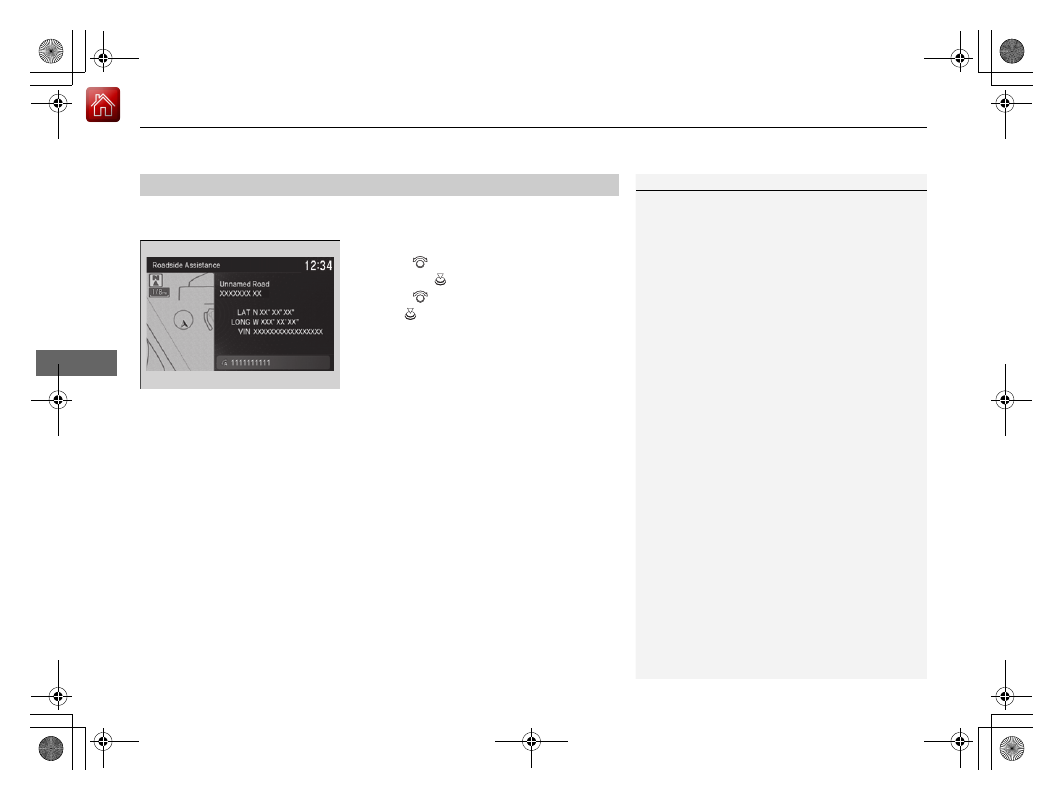
Provides a nationwide service for unexpected incidents. You can call for assistance 
using a phone paired and connected to 

Bluetooth

®

 HandsFreeLink

®

.

1.

Press the 

PHONE

 button.

2.

Rotate 

 to select 

Roadside Assistance

then press 

.

3.

Rotate 

 to select a phone number, then 

press .

u

Dialing starts automatically.

Roadside Assistance

*

1

Roadside Assistance

*

If you are subscribed to a paid AcuraLink package, 
you can call roadside assistance using the 

LINK


button instead of your phone.

2

AcuraLink

®

*

 P. 415

* Not available on all models

-------------------------------------------------------------------------------------------------------------------------------------------------------------

415

Continued

Features

AcuraLink

®

*

Is a subscription-based service that provides convenient features such as voice 
communication in case of emergency, online security, one-on-one operator 
assistance, and the transmission of important messages regarding your vehicle’s 
status.

For information on traffic rerouting and traffic information updates, provided by the 
AcuraLink server, see the Navigation System Manual.

Automatic collision notification

If your vehicle’s airbags deploy or if the unit 
detects that the vehicle is severely impacted, 
your vehicle will automatically attempt to 
connect to the AcuraLink operator. Once 
connected, information about your vehicle, its 
positioning, and its condition will be sent to 
the operator; you also can speak to the 
operator when connected.

In Case of Emergency

1

AcuraLink

®

*

AcuraLink also provides services you can operate 
from the Internet or your smartphone.

To subscribe to AcuraLink, or to get more 
information about all of its features, contact an Acura 
dealer, or visit 

owners.acura.com

 (U.S.) or 

www.acura.ca/owners/acuralink

 (Canada).

Canadian models

1

In Case of Emergency

Your vehicle may not be able to connect to the operator 
if the battery level is low, the line is disconnected, or you 
do not have adequate cellular coverage.

You cannot use emergency services when:

You travel outside the AcuraLink service coverage 
areas.

There is a problem with the connecting devices, 
such as the 

ASSIST

 button, microphone, speakers, 

or the unit itself.

You are not subscribed to the service or your 
subscription is no longer valid.

You cannot operate other navigation or phone 
related functions using the screens while talking to 
the operator.
Only the operator can terminate the connection to 
your vehicle.

1

Automatic collision notification

If the unit fails to connect to the operator, it 
repeatedly tries until it succeeds.

Information screen

On Demand Multi-Use Display

TM

When connected to the AcuraLink 

operator:

* Not available on all models

-------------------------------------------------------------------------------------------------------------------------------------------------------------

uu

AcuraLink

®

*

u

416

Features

Manual operator connection

If you need to talk to the AcuraLink operator 
in an emergency situation, you can manually 
connect to them by pressing the 

ASSIST


button with the power mode in ACCESSORY 
or ON.

1.

Open the cover attached to the ceiling 
console.

2.

Press the 

ASSIST

 button.

u

You are connected to the AcuraLink 
operator.

1

Manual operator connection

Do not press the button while driving. When you 
need to contact the operator, park the vehicle in a 
safe place.

If the unit fails to connect to the operator, it 
automatically cancels the action after three minutes.

In an emergency, the cover can be broken through to 
press the 

ASSIST

 button.

ASSIST

 Button

-------------------------------------------------------------------------------------------------------------------------------------------------------------

Continued

417

uu

AcuraLink

®

*

u

Features

Your subscribed telematics service provider can track your vehicle’s location, 
remotely lock or unlock doors, and help you find your vehicle.
To use these features, you need your user ID and personal identification number 
(PIN).

Stolen vehicle tracking

This feature searches and tracks down your vehicle position even if it is on the move. 
If you believe that your vehicle has been stolen, contact the police as well as the 
provider.

Remote door lock/unlock

The provider can remotely lock or unlock doors upon your request.

Vehicle finder

This feature is convenient to use when trying to locate your vehicle in large areas, 
such as a crowded parking lot. If you cannot locate your vehicle after using the 
remote transmitter’s answerback function, you can contact the provider which can 
then flash your vehicle’s exterior lights and sound the horn.

Security alarm notification

If the security system in your vehicle detects an abnormal condition, such as 
someone tampering with the lock on your vehicle, the provider notifies you by your 
preferred method.

Security Features

1

Security Features

The contact information of your provider, your user 
ID and PIN will be given when you subscribe to 
AcuraLink. If you forget any of the above, contact a 
dealer, or visit 

owners.acura.com

 (U.S.) or 

www.acura.ca/owners/acuralink

 (Canada).

You can also activate the remote door lock/unlock 
and vehicle finder features from the Internet or using 
your smartphone app. Ask a dealer, or visit 

owners.acura.com

 (U.S.) or 

www.acura.ca/owners/

acuralink

 (Canada) for details.

1

Vehicle finder

The lights will stop flashing and horn will stop 
sounding under the following conditions:

When 30 seconds have elapsed.

You unlock the doors using the remote transmitter.

You unlock the doors using the keyless access 
system.

You unlock the doors using the built-in key.

The power mode is set to ACCESSORY or ON.

-------------------------------------------------------------------------------------------------------------------------------------------------------------

uu

AcuraLink

®

*

u

418

Features

Connect to the AcuraLink operator when trying to find a destination or for roadside 
assistance.

1.

Press the 

LINK

 button.

u

Connection to the operator begins.

2.

Talk to the operator.

u

To disconnect, select 

End Call

 or press 

the 

 (Hang-up/back) button on the 

steering wheel.

Operator Assistance

1

Operator Assistance

Remain attentive to road conditions and driving 
during operator assistance.

LINK

 Button

-------------------------------------------------------------------------------------------------------------------------------------------------------------

Continued

419

uu

AcuraLink

®

*

u

Features

AcuraLink sends you messages on vehicle 
features, safety and emissions recall 
campaigns, maintenance reminders, and 
diagnostic information.
When you receive a new message, an icon 
appears on the information screen.

Message category

There are six message categories.

Feature Guide

: Appears for the first 30 days of ownership, introducing vehicle 

features each day.

Quick Tips

information.

Diagnostic Information

: Appears when a warning indicator or message comes 

on.
Rotate 

 to select 

Check Later

 or 

Check Now

.

u

Selecting 

Check Now

 lets you know if you should see a dealer immediately or 

later in accordance with the warning severity level.

Scheduled Dealer Appointment

: An appointment made through the Acura 

server or Acura Owners website can be rescheduled or canceled from this option. 

2

 P. 421

Maintenance Minder

: Lets you know which maintenance item is due along with 

a reminder message.

Recalls/Campaigns

: Reminds you of a recall or important safety information. 

You should also be notified by mail.

AcuraLink Message

1

AcuraLink Message

Messages may not appear immediately after your 
vehicle purchase. It can take several days for your 
dealer to register your vehicle’s ID.

If an icon includes an exclamation point, it indicates 
that Acura gives high priority to this message 
compared to the one without.

: An unread message with high priority

: An unread message

Message Icon

1

Message category

Message categories can be added, edited, or deleted 
through broadcast messages from Acura.

You can call your dealer, find the nearest dealer, or 
schedule appointments from the message options in 

Maintenance Minder

Recalls/Campaigns

, and 

Diagnostic Information

.

2

Message Options

 P. 420

-------------------------------------------------------------------------------------------------------------------------------------------------------------

uu

AcuraLink

®

*

u

420

Features

Reading a message

1.

Press the 

INFO

 button or press 

, follow 

the message on the information screen.

2.

Rotate  

to 

select 

AcuraLink/Messages

then press 

.

u

AcuraLink messages appears.

3.

Rotate 

 to select a category, then press 

.

u

If there are unread messages in a 
category, a message icon appears next to 
that category.

4.

Rotate 

 to select a message you want to 

read, then press 

.

Message Options

While a message is displayed, you can use options to take immediate action to the 
message.
Available options are:

Read Messages Aloud

: Reads the message aloud. Select 

Stop Reading 

Messages

 to cancel it.

View Full Message

: Displays the entire message.

Phone number

: Dials a number displayed in the message via HFL.

Delete

: Deletes the displayed message.

Call Your Dealer

: Calls your Acura dealer using HFL.

Find Acura Dealer

: Searches for the nearest Acura dealer.

Roadside Assistance

: Makes a call to the number for the Roadside Assistance 

service.

Schedule Dealer Appoi…

: Automatically sets an appointment date at your 

dealer.

1

Reading a message

If there is no message listed on the menu, each 
category items are grayed out and cannot be 
selected.

The message icon disappears once you read the 
message.

However, the exclamation mark that indicates that 
the message has a high priority remains.

: A read message with high priority.

1

Message Options

The available options vary by message category.

You can delete all messages in a category at once.

2

Customized Features

 P. 315

-------------------------------------------------------------------------------------------------------------------------------------------------------------

Continued

421

uu

AcuraLink

®

*

u

Features

Dealer Appointments

You can confirm the scheduled appointment date when you receive a 

Maintenance Minder

Recalls/Campaigns

, or 

Diagnostic Information


message, or reschedule any existing appointments.

1.

Select a 

Maintenance Minder

Recalls/Campaigns

Diagnostic Information

or 

Scheduled Dealer Appointment

 message.

2.

Rotate 

 to select 

Schedule Dealer Appoi…

 or 

Reschedule Appoint…


(depending on the screen). Press 

.

u

A suggested time and date are displayed.

3.

Rotate 

 to select 

Confirm Appointment

. Press 

 to accept the time and 

date.

4.

Press 

 to select 

OK

.

1

Dealer Appointments

To set up an automated dealer appointment when a 
regular maintenance is due, visit the Acura Owners 
website at 

owners.acura.com

 (U.S.) or 

www.acura.ca/owners/acuralink

 (Canada), and set 

the required option. A reminder message will be sent 
as the date for the dealer appointment approaches. A 
reminder message will also be sent if you schedule an 
appointment online using Schedule Service 
Appointment function.

If you are not satisfied with the proposed 
appointment date and time, call your dealer directly.

To cancel the scheduled appointment, select 

Cancel 

Appointment

 when a message is displayed.

-------------------------------------------------------------------------------------------------------------------------------------------------------------

422

uu

AcuraLink

®

*

u

Features

You can confirm your AcuraLink subscription status.

1.

Press the 

SETTINGS

 button.

2.

Rotate 

 to select 

AcuraLink Settings

then press 

.

u

Repeat the procedure to select 

AcuraLink Subscription Status

.

AcuraLink Subscription Status

Signal Strength

Item

Information

You can check the signal strength.

Current Contract

The AcuraLink subscription number and subscription level is 
displayed.

Service

You can confirm the type of service.

Subscription

You can confirm the expiration date.

Status

The following message can be displayed:

Check Antenna

: There is a problem with the AcuraLink 

antenna. Contact a dealer.

No Signal

: Signal is not received.

No data

: The signal is received, but some error has occurred 

in the system.

OK

: The system is receiving the signal or traffic data

*

.

* Not available on all models

-------------------------------------------------------------------------------------------------------------------------------------------------------------

423

Driving

This chapter discusses driving and refueling.

Before Driving

................................... 424

Maximum Load Limit........................ 427

Towing a Trailer

................................ 429

When Driving

Starting the Engine .......................... 430
Dual Clutch Transmission ................. 436
Shifting ............................................ 437

Vehicle Stability Assist

TM

 (VSA

®

), aka Electronic 

Stability Control (ESC), System............... 441

Blind spot information System

*

...........443

Tire Pressure Monitoring System (TPMS) .. 446

Tire Pressure Monitoring System (TPMS) - 

Required Federal Explanation ......... 448

AcuraWatch

TM

................................... 450

Collision Mitigation Braking System

TM


(CMBS

TM

) ....................................... 453

Adaptive Cruise Control (ACC)......... 463
Lane Keeping Assist System (LKAS).... 478

Road Departure Mitigation (RDM) System .488

Front Sensor Camera ....................... 493
Radar Sensor.................................... 495

Braking

Brake System ................................... 496

Anti-lock Brake System (ABS) ........... 498

Parking Your Vehicle

When Stopped ................................ 500
Cross Traffic Monitor

*

..................... 502

Multi-View Rear Camera

.................. 505

Refueling

Fuel Information .............................. 507
How to Refuel ................................. 508

Fuel Economy and CO

2

 Emissions

.... 510

Improving Fuel Economy and Reducing 

CO

2

 Emissions................................ 510

* Not available on all models

-------------------------------------------------------------------------------------------------------------------------------------------------------------

424

Driving

Before Driving

Driving Preparation

Check the following items before you start driving.

Make sure there are no obstructions on the windows, door mirrors, exterior 
lights, or other parts of the vehicle.

u

Remove any frost, snow, or ice.

u

Remove any snow on the roof, as this can slip down and obstruct your field of 
vision while driving. If frozen solid, remove ice once it has softened.

u

When removing ice from around the wheels, be sure not to damage the wheel 
or wheel components.

Make sure the hood is securely closed.

u

If the hood opens while driving, your front view will be blocked.

Make sure the tires are in good condition.

u

Check air pressures, and check for damage and excessive wear.

2

Checking and Maintaining Tires

 P. 538

Make sure there are no people or objects behind or around the vehicle.

u

There are blind spots from the inside.

Exterior Checks

1

Exterior Checks

NOTICE

When doors are frozen shut, use warm water around 
the door edges to melt any ice. Do not try to force 
them open, as this can damage the rubber trim 
around the doors. When done, wipe dry to avoid 
further freezing.

Do not pour warm water into the key cylinder.
You will be unable to insert the key if the water 
freezes in the hole.

Heat from the engine and exhaust can ignite 
flammable materials left under the hood, causing a 
fire. If you've parked your vehicle for an extended 
period, inspect and remove any debris that may have 
collected, such as dried grass and leaves that have 
fallen or have been carried in for use as a nest by a 
small animal. Also check under the hood for leftover 
flammable materials after you or someone else has 
performed maintenance on your vehicle.

-------------------------------------------------------------------------------------------------------------------------------------------------------------

Continued

425

uu

Before Driving

u

Driving Preparation

Driving

Store or secure all items on board properly.

u

Carrying too much cargo, or improperly storing it, can affect your vehicle's 
handling, stability, stopping distance, and tires, and make it unsafe.

2

Maximum Load Limit

 P. 427

Do not pile items higher than the seat height.

u

They can block your view and may be thrown forward in the event of sudden 
braking.

Do not place anything in the front seat footwells. Make sure to secure the floor 
mat.

u

An object or unsecured floor mat can interfere with your brake and accelerator 
pedal operation while driving.

If you have any animals on board, do not let them move around in the vehicle.

u

They may interfere with driving and a crash could occur.

Securely close and lock all doors and the trunk.

2

Locking/Unlocking the Doors from the Inside

 P. 124

Adjust your seating position properly.

u

Adjust the head restraint, too.

2

Adjusting the Seats

 P. 158

2

Adjusting the Front and Rear Outer Head Restraint Positions

 P. 162

Adjust the mirrors and steering wheel properly.

u

Adjust them while sitting in the proper driving position.

2

Mirrors

 P. 156

2

Adjusting the Steering Wheel

 P. 153

Interior Checks

1

Interior Checks

The headlight aim is set by the factory, and does not 
need to be adjusted. However, if you regularly carry 
heavy items in the trunk have the aiming readjusted 
at a dealer or by a qualified technician.

-------------------------------------------------------------------------------------------------------------------------------------------------------------

426

uu

Before Driving

u

Driving Preparation

Driving

Be sure items placed on the floor behind the front seats cannot roll under the 
seats.

u

They can interfere with the driver's ability to operate the pedals, the operation 
of the seats, or the operation of the sensors under the seats.

Everyone in the vehicle must fasten their seat belt.

2

Fastening a Seat Belt

 P. 37

Make sure that the indicators in the instrument panel come on when you start the 
vehicle, and go off soon after.

u

Always have a dealer check the vehicle if a problem is indicated.

2

Indicators

 P. 72

-------------------------------------------------------------------------------------------------------------------------------------------------------------

427

uu

Before Driving

u

Maximum Load Limit

Continued

Driving

Maximum Load Limit

The maximum load for your vehicle is 850 lbs (385 kg). See the Tire 
and Loading Information label attached to the driver's doorjamb.

This figure includes the total weight of all occupants, cargo, and 
accessories, and the tongue load if you are towing a trailer.

Steps for Determining Correct Load Limit -

(1)

Locate the statement “The combined weight of occupants and 
cargo should never exceed XXX kg or XXX lbs.” on your 
vehicle's placard.

(2)

Determine the combined weight of the driver and passengers 
that will be riding in your vehicle.

(3)

Subtract the combined weight of the driver and passengers 
from XXX kg or XXX lbs.

(4)

The resulting figure equals the available amount of cargo and 
luggage load capacity. For example, if the “XXX” amount 
equals 1,400 lbs. and there will be five 150 lb. passengers in 
your vehicle, the amount of available cargo and luggage load 
capacity is 650 lbs. (1,400 - 750 (5 x 150) = 650 lbs.)

1

Maximum Load Limit

Gross Vehicle Weight Rating (GVWR):
The maximum allowable weight of the vehicle, all 
occupants, all accessories, and all cargo.

2

Specifications

 P. 602

Gross Axle Weight Rating (GAWR):
The maximum allowable weight of the vehicle axle.

2

Specifications

 P. 602

3

WARNING

Overloading or improper loading 

can affect handling and stability 

and cause a crash in which you 

can be hurt or killed.
Follow all load limits and other 

loading guidelines in this manual.

Label Example

-------------------------------------------------------------------------------------------------------------------------------------------------------------

uu

Before Driving

u

Maximum Load Limit

428

Driving

(5)

Determine the combined weight of luggage and cargo being 
loaded on the vehicle. That weight may not safely exceed the 
available cargo and luggage load capacity calculated in step 4.

(6)

If your vehicle will be towing a trailer, load from your trailer will 
be transferred to your vehicle. Consult this manual to 
determine how this reduces the available cargo and luggage 
load capacity of your vehicle.

In addition, the total weight of the vehicle, all occupants, 
accessories, cargo, and trailer tongue load must not exceed the 
Gross Vehicle Weight Rating (GVWR) or the Gross Axle Weight 
Rating (GAWR). Both are on a label on the driver’s doorjamb.

1

Maximum Load Limit

Towing a Trailer:
See Towing a Trailer to determine whether your 
vehicle is designed to tow a trailer.

2

Towing a Trailer

 P. 429

Load Limits Example

Example1

Max Load 

850 lbs 

(385 kg)

Passenger Weight 

150 lbs x 2 = 300 lbs 

(68 kg x 2 = 136 kg)

Cargo Weight 

550 lbs 

(249 kg)

Example2

Max Load 

850 lbs 

(385 kg)

Passenger Weight 

150 lbs x 5 = 750 lbs 

(68 kg x 5 = 340 kg)

Cargo Weight 

100 lbs 

(45 kg)

-------------------------------------------------------------------------------------------------------------------------------------------------------------

429

Driving

Towing a Trailer

Your vehicle is not designed to tow a trailer. Attempting to do so can void your 
warranties.

Towing Behind a Motorhome

Your vehicle is not designed to be towed behind a motor home. If your vehicle needs 
to be towed in an emergency, refer to the emergency towing information.

2

Emergency Towing

 P. 599

-------------------------------------------------------------------------------------------------------------------------------------------------------------


Content      ..     24      25      26      27     ..