Acura RLX HYBRID (2020 year). Manual in english - page 25
 

  Index      Manuals     Acura RLX HYBRID (2020 year). Manual in english


Search            copyright infringement  


Content      ..     23      24      25      26     ..


Acura RLX HYBRID (2020 year). Manual in english - page 25


402

uu

When Driving

u

Adaptive Cruise Control (ACC) with Low Speed Follow

Driving

Adaptive Cruise Control (ACC) with Low Speed 
Follow

Helps maintain a constant vehicle speed and a set following-interval behind a vehicle 
detected ahead of yours and, if the detected vehicle comes to a stop, decelerates 
and stop your vehicle, without you having to keep your foot on the brake or the 
accelerator.
When ACC with Low Speed Follow slows your vehicle by applying the brakes, your 
vehicle's brake lights will illuminate.

1

Adaptive Cruise Control (ACC) with Low Speed Follow

Important Reminder

As with any system, there are limits to ACC with Low 
Speed Follow. Use the brake pedal whenever 
necessary, and always keep a safe interval between 
your vehicle and other vehicles.

3

WARNING

Improper use of ACC with Low Speed 
Follow can lead to a crash.

Use ACC with Low Speed Follow only when 
driving on expressways or freeways and in 
good weather conditions.

3

WARNING

ACC with Low Speed Follow has limited 
braking capability and may not stop your 
vehicle in time to avoid a collision with a 
vehicle that quickly stops in front of you.

Always be prepared to apply the brake 
pedal if the conditions require.

When to use

Vehicle speed for ACC with Low Speed Follow: 

A vehicle is detected ahead within 

ACC with Low Speed Follow range

 – ACC with Low Speed Follow operates at 

speeds up to 90 mph (145 km/h).

No vehicle is detected within ACC with Low Speed Follow range

 – ACC with Low 

Speed Follow operates at the speed of 25 mph (40 km/h) or above.

Gear position for ACC with Low Speed Follow: In 

(

D

.

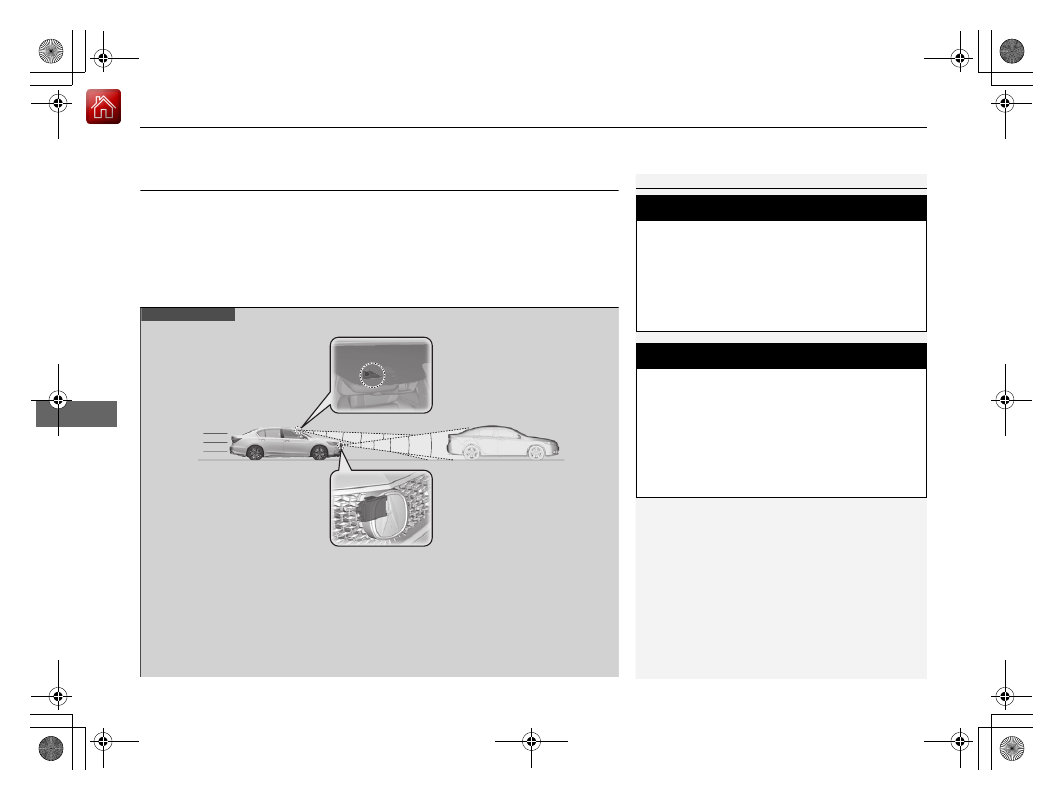
The radar sensor is 
in the front grille.

The camera is 
located behind 
the rearview 
mirror.

-------------------------------------------------------------------------------------------------------------------------------------------------------------

Continued

403

uu

When Driving

u

Adaptive Cruise Control (ACC) with Low Speed Follow

Driving

How to activate the system

1

Adaptive Cruise Control (ACC) with Low Speed Follow

When the 

MAIN

 button is pressed, both ACC with 

Low Speed Follow and the Lane Keeping Assist 
System (LKAS) are either turned on or off.

ACC with Low Speed Follow may not work properly 
under certain conditions.

2

ACC with Low Speed Follow Conditions 
and Limitations

 P. 407

When not using ACC with Low Speed Follow: Turn 
off adaptive cruise by pressing the 

MAIN

 button. This 

also will turn off the Lane Keeping Assist System 
(LKAS).

Do not use Traffic Jam Assist under the following 
conditions:

You are driving on a road with sharp curves.

u

The system may not allow your vehicle to respond in 

a manner best suited for the road conditions.

You are entering a toll booth, interchange, service 
area, or parking area.

u

If the vehicle ahead disappears from the travel path 

of your vehicle, your vehicle may suddenly accelerate 
to resume the set speed.

You are driving in bad weather (rain, fog, snow, 
etc.).

u

The system may not be able to correctly determine 

the distance between your vehicle and the one 
ahead.

The surface of the road is slippery, for example, it is 
icy or covered with snow.

u

The tires may slip, causing you to lose control of the 

vehicle.

How to use

Press the 

MAIN

 button on 

the steering wheel.

ACC

 (green) is on in the 

instrument panel.
ACC with Low Speed 
Follow is ready to use.

-------------------------------------------------------------------------------------------------------------------------------------------------------------

uu

When Driving

u

Adaptive Cruise Control (ACC) with Low Speed Follow

404

Driving

When driving at about 25 mph (40 km/h) or above: 

Take your foot off the 

pedal and press down the 

RES/+

/

SET/–

 switch when you reach the desired speed. 

The moment you release the switch, the set speed is fixed, and ACC with Low Speed 
Follow begins.

When driving at slower than about 25 mph (40 km/h): 

If the vehicle is moving 

and the brake pedal is not depressed, pressing the switch fixes the set speed to 
about 25 mph (40 km/h) regardless of current vehicle speed. If the vehicle is 
stationary, you can set the vehicle speed even with the brake pedal depressed.

When ACC with Low Speed Follow starts 
operating, the vehicle icon, interval bars and 
set speed appear on the multi-information 
display.

To Set the Vehicle Speed

1

To Set the Vehicle Speed

You can switch the displayed set speed 
measurements on the audio/information screen 
between mph and km/h.

2

Customized Features

 P. 295

On when ACC with 
Low Speed Follow 
begins

Press down and release

RES/+

/

SET/−

 Switch

Set Vehicle Speed

Set Vehicle Interval

-------------------------------------------------------------------------------------------------------------------------------------------------------------

Continued

405

uu

When Driving

u

Adaptive Cruise Control (ACC) with Low Speed Follow

Driving

There is a vehicle ahead

ACC with Low Speed Follow monitors if a vehicle ahead of you enters the ACC with 
Low Speed Follow range. If a vehicle is detected doing so, the ACC with Low Speed 
Follow system maintains or decelerates your vehicle’s set speed in order to keep the 
vehicle’s set following-interval from the vehicle ahead.

2

To Set or Change Following-Interval

 P. 410

When a vehicle whose speed is slower than your set speed is detected in front of 
you, your vehicle starts to slow down.

When in Operation

1

When in Operation

If the vehicle detected ahead of you slows down 
abruptly, or if another vehicle is detected cutting in 
front of you, the beeper sounds, a message appears 
on the multi-information display, and the head-up 
warning come on.
Depress the brake pedal, and keep an appropriate 
interval from the vehicle ahead.

Even if the interval between your vehicle and the 
vehicle detected ahead is short, ACC with Low Speed 
Follow may start accelerating your vehicle under the 
following circumstances:

The vehicle ahead of you is going at almost the 
same speed as, or faster than, your vehicle.

A vehicle that cuts in front of you is going faster 
than your vehicle, gradually increasing the interval 
between the vehicles.

You can also set the system to beep when a vehicle in 
front of you comes in and goes out of the ACC with 
Low Speed Follow detecting range. Change the 

ACC 

Forward Vehicle Detect Beep

 setting.

2

Customized Features

 P. 295

Beep

ACC with Low Speed Follow Range: 394 ft. (120 m)

A vehicle icon appears on the 
multi-information display

-------------------------------------------------------------------------------------------------------------------------------------------------------------

uu

When Driving

u

Adaptive Cruise Control (ACC) with Low Speed Follow

406

Driving

There is no vehicle ahead

Your vehicle maintains the set speed without 
having to keep your foot on the brake or 
accelerator pedal.
If there previously was a vehicle detected 
ahead that kept your vehicle from traveling at 
the set speed, ACC with Low Speed Follow 
accelerates your vehicle to the set speed, and 
then maintains it.

When you depress the accelerator pedal

You can temporarily increase the vehicle speed. In this case, there is no audible or 
visual alert even if a vehicle is in the ACC with Low Speed Follow range.
ACC with Low Speed Follow stays on unless you cancel it. Once you release the 
accelerator pedal, the system resumes an appropriate speed for keeping the 
following-interval while a vehicle ahead is within the ACC with Low Speed Follow 
range.

A vehicle detected ahead is within ACC with Low Speed Follow range and 
slows to a stop

Your vehicle also stops, automatically. The 

Stopped

 message appears on the multi-

information display.
When the vehicle ahead of you starts again, 
the vehicle icon on the multi-information 
display blinks. If you press the 

RES/+

/

SET/–


switch up or down, or depress the accelerator 
pedal, ACC with Low Speed Follow operates 
again within the prior set speed.

1

When in Operation

Limitations

You may need to use the brake to maintain a safe 
interval when using ACC with Low Speed Follow. 
Additionally, ACC with Low Speed Follow may not 
work properly under certain conditions.

2

ACC with Low Speed Follow Conditions 
and Limitations

 P. 407

A vehicle icon with dotted-line 
contour appears on the multi-
information display

1

A vehicle detected ahead is within ACC with Low Speed Follow 
range and slows to a stop

3

WARNING

Exiting a vehicle that has been stopped 
while the ACC with Low Speed Follow 
system is operating can result in the vehicle 
moving without operator control.

A vehicle that moves without operator 
control can cause a crash, resulting in 
serious injury or death.

Never exit a vehicle when the vehicle is 
stopped by ACC with Low Speed Follow.

-------------------------------------------------------------------------------------------------------------------------------------------------------------

Continued

407

uu

When Driving

u

Adaptive Cruise Control (ACC) with Low Speed Follow

Driving

The system may automatically shut off and the 

ACC

 indicator will come on under 

certain conditions. Some examples of these conditions are listed below. Other 
conditions may reduce some of the ACC functions.

2

Front Sensor Camera

 P. 400

Environmental conditions

Driving in bad weather (rain, fog, snow, etc.).

Roadway conditions

Driving on a snowy or wet roadway (obscured lane marking, vehicle tracks, 
reflected lights, road spray, high contrast).

Vehicle conditions

The outside of the windshield is blocked by dirt, mud, leaves, wet snow, etc.

An abnormal tire or wheel condition (Wrong sized, varied size or construction, 
improperly inflated, compact spare tire

*

, etc.).

The camera temperature gets too high.

The parking brake is applied.

When the front grille is dirty.

The vehicle is tilted due to a heavy load or suspension modifications.

When tire chains are installed.

ACC with Low Speed Follow Conditions and Limitations

1

ACC with Low Speed Follow Conditions and Limitations

The radar sensor for ACC with Low Speed Follow is 
shared with the Collision Mitigation Braking System

TM


(CMBS

TM

).

2

Collision Mitigation Braking System

TM


(CMBS

TM

)

 P. 458

You can read about handling information for the 
camera equipped with this system.

2

Front Sensor Camera

 P. 400

Always keep the radar sensor cover clean.

Never use chemical solvents or polishing powder for 
cleaning the sensor cover. Clean it with water or a 
mild detergent.

Do not put a sticker on the radar sensor cover or 
replace the radar sensor cover.

If you need the radar sensor to be repaired, or 
removed, or the radar sensor cover is strongly 
impacted, turn off the system by pressing the 

MAIN


button and take your vehicle to a dealer.

Have your vehicle checked by a dealer if you find any 
unusual behavior of the system (e.g., the warning 
message appears too frequently).

* Not available on all models

-------------------------------------------------------------------------------------------------------------------------------------------------------------

uu

When Driving

u

Adaptive Cruise Control (ACC) with Low Speed Follow

408

Driving

Detection limitations

A vehicle suddenly crosses in front of you.

The interval between your vehicle and the vehicle ahead of you is too short.

A vehicle cuts in front of you at a slow speed, and it brakes suddenly.

When you accelerate rapidly and approach the vehicle ahead of you at high 
speed.

The vehicle ahead of you is a motorcycle, bicycle, mobility scooter, or other small 
vehicle.

When there are animals in front of your vehicle.

When you drive on a curved or winding or undulating road that makes it difficult 
for the sensor to properly detect a vehicle in front of you.

The speed difference between your vehicle and a vehicle in front of you is 
significantly large.

An oncoming vehicle suddenly comes in front of you.

Your vehicle abruptly crosses over in front of an oncoming vehicle.

When driving through a narrow iron bridge.

When the vehicle ahead of you brakes suddenly.

When the vehicle ahead of you has a unique shape.

When your vehicle or the vehicle ahead of you is driving on one edge of the lane.

1

ACC with Low Speed Follow Conditions and Limitations

If the front of the vehicle is impacted in any of the 
following situations, the radar sensor may not work 
properly. Have your vehicle checked by a dealer:

The vehicle mounted onto a bump, curb, chock, 
embankment, etc.

You drive the vehicle where the water is deep.

Your vehicle has a frontal collision.

-------------------------------------------------------------------------------------------------------------------------------------------------------------

Continued

409

uu

When Driving

u

Adaptive Cruise Control (ACC) with Low Speed Follow

Driving

Increase or decrease the vehicle speed using the 

RES/+

/

SET/–

 switch on the steering 

wheel.

Each time you press the switch up or down, the vehicle speed is increased or 
decreased by about 1 mph or 1 km/h accordingly.

If you keep the switch pressed up or down, the vehicle speed increases or 
decreases by about 5 mph or 5 km/h accordingly.

To Adjust the Vehicle Speed

1

To Adjust the Vehicle Speed

If a vehicle detected ahead is going at a speed slower 
than your increased set speed, ACC with Low Speed 
Follow may not accelerate your vehicle. This is to 
maintain the set following-interval between your 
vehicle and the vehicle ahead.

To increase speed

To decrease speed

-------------------------------------------------------------------------------------------------------------------------------------------------------------

410

uu

When Driving

u

Adaptive Cruise Control (ACC) with Low Speed Follow

Driving

Press the 

 (interval) button to change the 

ACC with Low Speed Follow following-
interval.
Each time you press the button, the following-
interval (the interval behind a vehicle detected 
ahead of you) setting cycles through short, 
middle, long, and extra long following-
interval.

Determine the most appropriate following-
interval setting based on your specific driving 
conditions. Be sure to adhere to any 
following-interval requirements set by local 
regulation.

To Set or Change Following-Interval

Interval Button

-------------------------------------------------------------------------------------------------------------------------------------------------------------

411

uu

When Driving

u

Adaptive Cruise Control (ACC) with Low Speed Follow

Continued

Driving

The higher your vehicle’s following-speed is, the longer the short, middle, long or 
extra long following-interval becomes. See the following examples for your 
reference.

When your vehicle stops automatically because a vehicle detected ahead of you has 
stopped, the interval between the two vehicles will vary based on the ACC with Low 
Speed Follow interval setting.

Following-interval

When the Set Speed is:

50 mph (80 km/h)

65 mph (104 km/h)

Short

84 feet

26 meters

1.1 sec

102 feet

31 meters

1.1 sec

Middle

111 feet

34 meters

1.5 sec

139 feet

43 meters

1.5 sec

Long

155 feet

48 meters

2.1 sec

202 feet

62 meters

2.1 sec

Extra 
Long

204 feet

62 meters

2.8 sec

265 feet

81 meters

2.8 sec

-------------------------------------------------------------------------------------------------------------------------------------------------------------

uu

When Driving

u

Adaptive Cruise Control (ACC) with Low Speed Follow

412

Driving

To cancel ACC with Low Speed Follow, do any 
of the following:

Press the 

CANCEL

 button.

Press the 

MAIN

 button.

u

ACC with Low Speed Follow indicator 
goes off.

Depress the brake pedal.

u

When the Low Speed Follow function 
has stopped the vehicle, you cannot 
cancel ACC with Low Speed Follow by 
depressing the brake pedal.

To Cancel

1

To Cancel

Resuming the prior set speed:
After you have canceled ACC with Low Speed 
Follow, you can resume the prior set speed while it is 
still displayed. Press the 

RES/+

/

SET/–

 switch up.

The set speed cannot be set or resumed when ACC 
with Low Speed Follow has been turned off using the 

MAIN

 button. Press the 

MAIN

 button to activate the 

system, then set the desired speed.

CANCEL


Button

MAIN


Button

-------------------------------------------------------------------------------------------------------------------------------------------------------------

Continued

413

uu

When Driving

u

Adaptive Cruise Control (ACC) with Low Speed Follow

Driving

Automatic cancellation

The beeper sounds and a message appears on the multi-information display when 
ACC with Low Speed Follow is automatically canceled. Any of these conditions may 
cause the ACC with Low Speed Follow to automatically cancel:

Bad weather (rain, fog, snow, etc.)

When the radar sensor in the front grille gets dirty.

The vehicle ahead of you cannot be detected.

An abnormal tire condition is detected, or the tires are skidding.

Driving on a mountainous road, or driving off road for extended periods.

Abrupt steering wheel movement.

When the ABS, VSA

®

 or CMBS

TM

 is activated.

When the ABS or VSA

®

 system indicator comes on.

When the vehicle is stopped on a very steep slope.

When you manually apply the parking brake.

When the detected vehicle within the ACC with Low Speed Follow range is too 
close to your vehicle.

When a detected vehicle goes out of the ACC with Low Speed Follow range while 
your vehicle is stationary.

The camera behind the rearview mirror, or the area around the camera, including 
the windshield, gets dirty.

The ACC with Low Speed Follow automatic cancellation can be also triggered by the 
following causes. In these cases, the parking brake will be automatically applied.

The driver’s seat belt is unfastened when the vehicle is stationary.

The vehicle stops for more than 10 minutes.

The power system is turned off.

1

Automatic cancellation

Even though ACC with Low Speed Follow has been 
automatically canceled, you can still resume the prior 
set speed. Wait until the condition that caused ACC 
with Low Speed Follow to cancel improves, then 
press the 

RES/+

/

SET/–

 switch up.

-------------------------------------------------------------------------------------------------------------------------------------------------------------

uu

When Driving

u

Adaptive Cruise Control (ACC) with Low Speed Follow

414

Driving

Press and hold the 

 (interval) button for one 

second. 

Cruise Mode Selected

 appears on 

the multi-information display for two seconds, 
and then the mode switches to Cruise.
To switch back to ACC with Low Speed 
Follow, press and hold the 

 (interval) button 

again for one second. 

ACC Mode Selected


appears on the multi-information display for 
two seconds.

When to use

Desired speed in a range above roughly 25 mph (40 km/h) ~.

Take your foot off the pedal and press the 

RES/+

/

SET/–

 switch down when you 

reach the desired speed.
The moment you release the 

RES/+

/

SET/–

 switch, the set speed is fixed, and cruise 

control begins. The 

CRUISE CONTROL

 indicator comes on.

Each time you press the 

RES/+

/

SET/– 

switch up or down, the vehicle speed is 

increased or decreased by about 1 mph (1.6 km/h).
If you keep the 

RES/+

/

SET/–

 switch pressed up or down, the vehicle speed increases 

or decreases until you release it. This speed is then set.

To Switch ACC with Low Speed Follow to Cruise Control

1

To Switch ACC with Low Speed Follow to Cruise Control

Always be aware which mode you are in. When you 
are driving in Cruise mode, the system will not assist 
you to maintain a following-interval from a vehicle 
ahead of you.

ACC with 
Low Speed 
Follow ON

Cruise 
Control ON

To Set the Vehicle Speed

To Adjust the Vehicle Speed

-------------------------------------------------------------------------------------------------------------------------------------------------------------

415

uu

When Driving

u

Adaptive Cruise Control (ACC) with Low Speed Follow

Driving

To cancel cruise control, do any of the following:

Press the 

CANCEL

 button.

Press the 

MAIN

 button.

Depress the brake pedal.

The 

CRUISE CONTROL

 indicator goes off.

To Cancel

1

To Cancel

Resuming the prior set speed:
After cruise control has been canceled, you can still 
resume the prior set speed by pressing the 

RES/+

/

SET/–

 switch up while driving at a speed of at 

least 25 mph (40 km/h) or more.

You cannot set or resume in the following situations:

When vehicle speed is less than 25 mph (40 km/h)

When the 

MAIN

 button is turned off.

At vehicle speeds of 22 mph (35 km/h) or less, cruise 
control canceled automatically.

-------------------------------------------------------------------------------------------------------------------------------------------------------------

416

uu

When Driving

u

Road Departure Mitigation (RDM) System

Driving

Road Departure Mitigation (RDM) System

Alerts and helps to assist you when the system detects a possibility of your vehicle 
unintentionally crossing over detected lane markings and/or leaving the roadway 
altogether.

The front camera behind the rearview mirror 
monitors left and right lane markings (in white 
or yellow). If your vehicle is getting too close 
to detected lane markings without a turn 
signal activated, the system, in addition to a 
visual alert, applies steering torque and alerts 
you with rapid vibrations on the steering 
wheel, to help you remain within the detected 
lane.

2

Customized Features

 P. 295

As a visual alert, the 

Lane Departure


message appears on the multi-information 
display.

If the system determines that its steering input 
is insufficient to keep your vehicle on the 
roadway, it may apply braking.

u

Braking is applied only when the lane 
markings are solid continuous lines.

How the System Works

1

Road Departure Mitigation (RDM) System

Important Safety Reminder

Like all assistance systems, the RDM system has 
limitations.
Over-reliance on the RDM system may result in a 
collision. It is always your responsibility to keep the 
vehicle within your driving lane.

The RDM system only alerts you when lane drift is 
detected without a turn signal in use. The RDM 
system may not detect all lane markings or lane or 
roadway departures; accuracy will vary based on 
weather, speed and lane marker condition. It is 
always your responsibility to safely operate the 
vehicle and avoid collisions.

You can read about handling information for the 
camera equipped with this system.

2

Front Sensor Camera

 P. 400

The RDM system may not work properly or may work 
improperly under the certain conditions:

2

RDM Conditions and Limitations

 P. 419

There are times when you may not notice RDM 
functions due to your operation of the vehicle, or 
road surface conditions.

-------------------------------------------------------------------------------------------------------------------------------------------------------------

Continued

417

uu

When Driving

u

Road Departure Mitigation (RDM) System

Driving

The system cancels assisting operations when you turn the steering wheel to avoid 
crossing over detected lane markings.

If the system operates several times without detecting driver response, the system 
beeps to alert you.

1

Road Departure Mitigation (RDM) System

If LKAS is off and you have selected 

Narrow

 from the 

customized options using the audio/information 
screen, the message below will appear in case the 
system determines a possibility of your vehicle 
crossing over detected lane markings.

2

Customized Features

 P. 295

-------------------------------------------------------------------------------------------------------------------------------------------------------------


Content      ..     23      24      25      26     ..