Acura RL (1996-2004 year). Manual - part 676
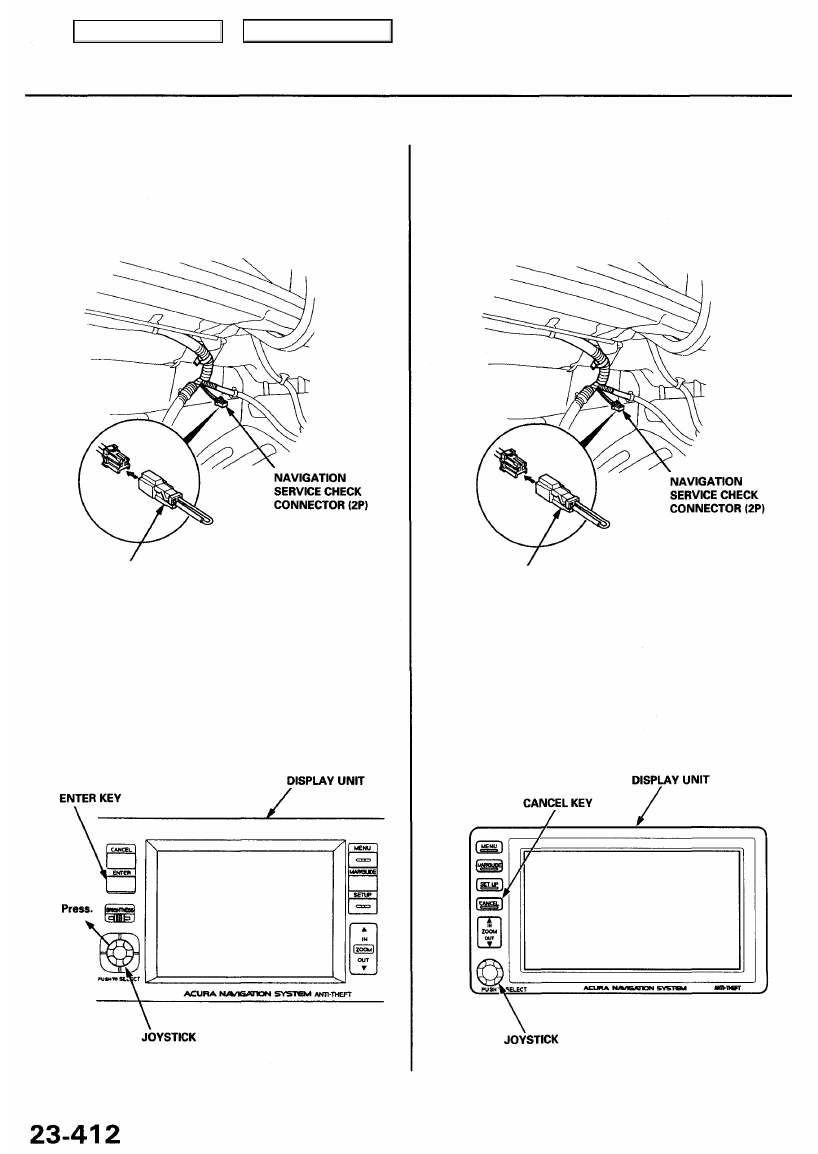
Forced Starting of Display
'96 - 99 Models
1. Pull back the front corner of the right trunk side
trim.
2. Connect the SCS service connector to the naviga-
tion service check connector (2P).
SCS SERVICE CONNECTOR
3. Press and hold the ENTER key, press and hold the
joystick toward the upper left corner, then turn the
ignition switch to ACC (I).
4. Check that the diagnosis menu for the picture diag-
nosis starts up and changes to the system link
screen.
SCS SERVICE CONNECTOR
'00 - 04 Models
1. Pull back the front corner of the right trunk side
trim.
2. Connect the SCS service connector to the naviga-
tion service check connector (2P).
3. Press and hold the CANCEL key, press and hold the
joystick up, then turn the ignition switch to ACC (I).
4. Check that the diagnosis menu for the picture diag-
nosis starts up and changes to the system link
screen.
Main Menu
Table of Contents