Kia Sorento (2024 year). Manual in english - page 12
 

  Index      Kia     Kia Sorento (2024 year). Manual in english


Search            copyright infringement  


Content      ..     10      11      12      13     ..


Kia Sorento (2024 year). Manual in english - page 12


99

5

5

Driving your vehicle

Blind-Spot Collision-Avoidance Assist (BCA)

→ Haptic warning' on the Infotain

-

ment system.

• Driving Safety Priority : Select ‘Vehicle 

Settings

→ Driver Assistance → Warn

-

ing Methods

→ Driving Safety Priority’ 

on the Infotainment system. For safe 
driving, the audio volume will tempo

-

rarily decrease to warn the driver with 
the audible warning.

NOTICE

• Ensure that warning sound you have

set may apply to the warning volume
of other driver assistance systems.

• Warning Methods will maintain its last

setting even if the vehicle is restarted.

• With the Warning Volume in '0' or 

'Off', if you turn off Steering Wheel 
Vibration Warning, the Warning Vol

-

ume will be activated with volume '2' 
or 'Medium'.

• With the Steering Wheel Vibration 

Warning off, if you adjust the Warning 
Volume to '0' or 'Off', the Steering 
Wheel Vibration Warning will be acti

-

vated.

• The setting menu may not be avail

-

able for your vehicle depending on 
the vehicle features and specifica

-

tions.

• Descriptions of each driver assistance 

system may be slightly different from 
the owner's manual after updating the 
software of your infotainment system. 
In this case, scan the QR code in the 
infotainment system manual to
access the web manual for checking 
the changes.

• Depending on your update, the menu 

may be displayed as Warning Sound 
or Warning Methods.

Blind-Spot Collision-Avoidance 
Assist Operation

Warning and control

Vehicle detection

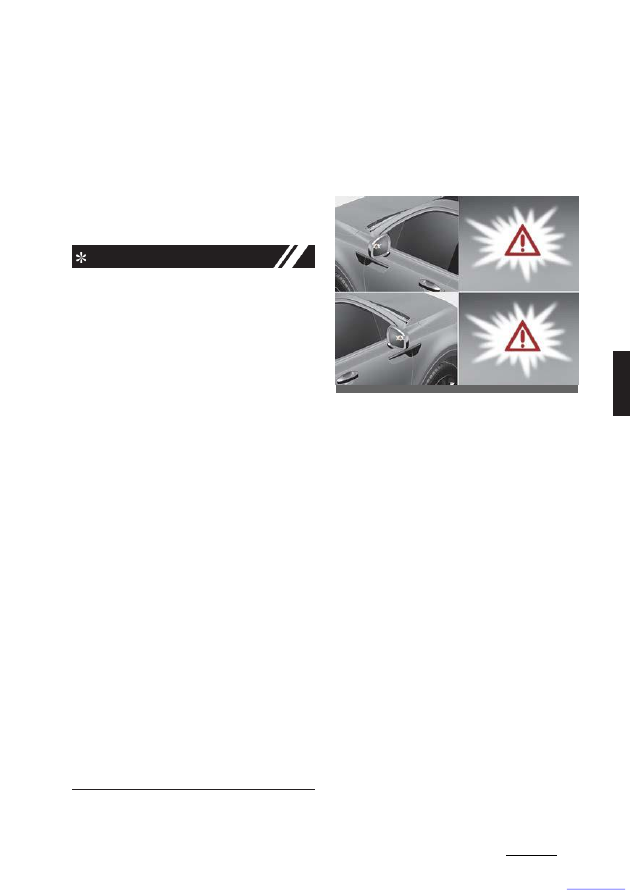
• To warn the driver a vehicle is 

detected, the warning light on the side 
view mirror and head-up display (if 
equipped) will appear.

• The function will operate when your 

vehicle speed is above 20 km/h (12 
mph) and the speed of the vehicle in 
the blind spot area is above 10 km/h 
(7 mph).

Collision Warning

• Collision Warning will operate when 

the turn signal is turned on in the 
direction of the detected vehicle.

• If 'Warning Only' is selected from the 

Settings menu, the collision warning 
will operate when your vehicle 
approaches the lane the blind spot 
vehicle is detected.

• To warn the driver of a collision, the 

warning light on the side view mirror 
and head-up display (if equipped) will 
blink. At the same time, an audible

OMQ4050098

CarManuals2.com

Driving your vehicle

100

5

Blind-Spot Collision-Avoidance Assist (BCA)

warning will sound and the steering 
wheel will vibrate.

• When the turn signal is turned off, the 

collision warning will be canceled and 
the function will return to vehicle 
detection state.

NOTICE

• The detecting range of the rear corner 

radar is determined by a standard 
road width, therefore, on a narrow 
road, the function may detect other 
vehicles in the next lane and warn 
you. In contrast, on a wide road, the 
function may not be able to detect a
vehicle driving in the next lane and 
may not warn you.

• When the hazard warning flasher is

on, the collision warning by the turn
signal will not operate.

NOTICE

If the driver's seat is on the left side, the 
collision warning may occur when you 
turn left. Maintain a proper distance with 
the vehicles in the left lane. If the driver's 
seat is on the right side, the collision 
warning may occur when you turn right. 
Maintain a proper distance with the 
vehicles in the right lane.

Collision-Avoidance Assist (while 
driving)

• To warn the driver of a collision, the 

warning light on the side view mirror 
will blink and a warning message will 
appear on the cluster. At the same 
time, an audible warning will sound, 
warning light on the head-up display 
(if equipped) will blink and the steer

-

ing wheel will vibrate.

• The function will operate when your 

vehicle speed is between 60 ~ 200 
km/h (40 ~ 120 mph) and both lane 
markings of the driving lane are 
detected.

• Emergency braking will be assisted to

help prevent collision with the vehicle
in the blind spot area.

NOTICE

• Collision-Avoidance Assist will be can

-

celed under the following circum

-

stances:

- Your vehicle enters the next lane by 

a certain distance

- Your vehicle is away from the colli

-

sion risk

- The steering wheel is sharply 

steered

- The brake pedal is depressed

OMQ4051281L

CarManuals2.com

101

5

5

Driving your vehicle

Blind-Spot Collision-Avoidance Assist (BCA)

- Forward Collision-Avoidance Assist 

is operating

• After Function Operation or changing 

lane, you must drive to the center of 
the lane. The function will not operate 
if the vehicle is not driven in the cen

-

ter of the lane.

Collision-Avoidance Assist (while 
departing)

• To warn the driver of a collision, the 

warning light on the side view mirror 
will blink and a warning message will 
appear on the cluster. At the same 
time, an audible warning will sound, 
warning light on the head-up display 
(if equipped) will blink and the steer

-

ing wheel will vibrate.

• Blind-Spot Collision-Avoidance Assist 

will operate when your vehicle speed 
is below 3 km/h (2 mph) and the 
speed of the vehicle in the blind spot 
area is above 5 km/h (3 mph).

• Emergency braking will be assisted to

help prevent collision with the vehicle
in the blind spot area.

Stopping vehicle and ending 
brake control

• When the vehicle is stopped due to 

emergency braking, the 'Drive care

-

fully' warning message will appear on 
the cluster.

• For your safety, the driver should 

depress the brake pedal immediately 
and check the surroundings.

• Brake control will end after the vehicle 

is stopped by emergency braking for 
approximately 2 seconds.

W ARNING

Take the following precautions when
using Blind-Spot Collision-Avoidance
Assist:
• For your safety, change the Settings 

after parking the vehicle at a safe 
location.

• If any other function's warning mes

-

sage is displayed or audible warning 
is generated, Blind-Spot Collision-
Avoidance Assist's warning message 
may not be displayed and audible 
warning may not be generated.

• You may not hear the warning sound 

of Blind-Spot Collision-Avoidance 
Assist if the surrounding is noisy.

OMQ4AH051311

OMQ4040504L

CarManuals2.com

Driving your vehicle

102

5

Blind-Spot Collision-Avoidance Assist (BCA)

• Blind-Spot Collision-Avoidance Assist

may not operate if the driver applies
the brake pedal to avoid collision.

• When Blind-Spot Collision-Avoidance

Assist is operating, braking control by
the function will automatically cancel
when the driver excessively depresses
the accelerator pedal or sharply steers
the vehicle.

• During Blind-Spot Collision-Avoidance 

Assist operation, the vehicle may stop 
suddenly injuring passengers and 
shifting loose objects. Always have the 
seat belt on and keep loose objects 
secured.

• Even if there is a problem with Blind-

Spot Collision-Avoidance Assist, the 
vehicle's basic braking performance 
will operate normally.

• Blind-Spot Collision-Avoidance Assist 

does not operate in all situations or 
cannot avoid all collisions.

• Blind-Spot Collision-Avoidance Assist 

may warn the driver late or may not 
warn the driver depending on the road
and driving conditions.

• Driver should maintain control of the 

vehicle at all times. Do not depend on 
Blind-Spot Collision-Avoidance Assist. 
Maintain a safe braking distance, and 
if necessary, depress the brake pedal 
to reduce driving speed or to stop the 
vehicle.

• Never operate Blind-Spot Collision-

Avoidance Assist on people, animal, 
objects, etc. It may cause serious 
injury or death.

NOTICE

• The brake control may not operate 

properly depending on the status of 
ESC (Electronic Stability Control).

• There will only be a warning when:

- The ESC (Electronic Stability

Con

-

trol) warning light is on

- ESC (Electronic Stability Control)

is engaged in a different function

Blind-Spot Collision-Avoidance 
Assist Malfunction and Limita

-

tions

Blind-Spot Collision-Avoidance 
Assist malfunction

When Blind-Spot Collision-Avoidance 
Assist is not working properly, the
'Check Blind-Spot Safety system' warn

-

ing message will appear on the cluster, 
and the function will turn off automati

-

cally or the function will be limited. Have 
the function inspected by an authorized 
Kia dealer.

OMQ4050229L

CarManuals2.com

103

5

5

Driving your vehicle

Blind-Spot Collision-Avoidance Assist (BCA)

When the side view mirror warning light is
not working properly, the 'Check side
view mirror warning light' warning mes

-

sage will appear on the cluster. Have the
function inspected by an authorized Kia
dealer.

Blind-Spot Collision-Avoidance 
Assist disabled

When the rear bumper around the rear 
corner radar or sensor is covered with 
foreign material, such as snow or rain, or 
installing a trailer or carrier, it can reduce 
the detecting performance and tempo

-

rarily limit or disable Blind-Spot Colli

-

sion-Avoidance Assist.

If this occurs, the 'Blind-Spot Safety 
Function disabled. Radar blocked' warn

-

ing message will appear on the cluster.

The function will operate normally when 
such foreign material or trailer, etc. is 
removed, and then the engine is 
restarted.

If the function does not operate normally 
after it is removed, have the function 
inspected by an authorized Kia dealer.

NOTICE

• Even though the warning message 

does not appear on the cluster, Blind-
Spot Collision-Avoidance Assist may 
not properly operate.

• Blind-Spot Collision-Avoidance Assist 

may not properly operate in an area 
(e.g. open terrain) where any sub

-

stance are not detected right after the 
engine is turned on, or when the 
detecting sensor is blocked with for

-

eign material right after the engine is 
turned on.

CAUTION

Turn off Blind-Spot Collision-Avoidance 
Assist to install a trailer, carrier, etc., or 
remove the trailer, carrier, etc. to use 
Blind-Spot Collision-Avoidance Assist.

Limitations of Blind-Spot Colli

-

sion- Avoidance Assist

Blind-Spot Collision-Avoidance Assist 
may not operate normally, or the func

-

tion may operate unexpectedly under 
the following circumstances:
• There is inclement weather, such as 

heavy snow, heavy rain, etc.

• The rear corner radar is covered with 

snow, rain, dirt, etc.

• The temperature around the rear cor

-

ner radar is high or low

• Driving on a highway (or motorway) 

ramp

OMQ4050291L

OMQ4050292L

CarManuals2.com

Driving your vehicle

104

5

Blind-Spot Collision-Avoidance Assist (BCA)

• The road pavement (or the peripheral

ground) abnormally contains metallic
components (i.e. possibly due to sub

-

way construction).

• There is a fixed object near the vehi

-

cle, such as sound barriers, guardrails, 
central dividers, entry barriers, street 
lamps, signs, tunnels, walls, etc. 
(including double structures)

• Driving in large areas where there are

few vehicles or structures (i.e. desert,
meadow, suburb, etc.)

• Driving through a narrow road where

trees or grass are overgrown

• Driving on a wet road surface, such as

a puddle on the road

• The other vehicle drives very close 

behind your vehicle, or the other vehi

-

cle passes by your vehicle in close 
proximity

• The speed of the other vehicle is very

fast that it passes by your vehicle in a
short time

• Your vehicle passes by the other vehi

-

cle

• Your vehicle changes lane
• Your vehicle has started at the same 

time as the vehicle next to you and 
has accelerated

• The vehicle in the next lane moves 

two lanes away from you, or when the 
vehicle two lanes away moves to the 
next lane from you

• A trailer or carrier is installed around 

the rear corner radar

• The bumper around the rear corner 

radar is covered with objects, such as 
a bumper sticker, bumper guard, bike 
rack, etc.

• The bumper around the rear corner 

radar is impacted, damaged or the 
radar is out of position

• Your vehicle height is low or high due 

to heavy loads, abnormal tire pres

-

sure, etc.

Blind-Spot Collision-Avoidance Assist 
may not operate normally, or the func

-

tion may operate unexpectedly when 
the following objects are detected:
• A motorcycle or bicycle is detected

A vehicle such as a flat trailer is
detected

• A big vehicle such as a bus or truck is 

detected

• A moving obstacle such as a pedes

-

trian, animal, shopping cart or a baby 
stroller is detected

• A vehicle with low height such as a

sports car is detected

Braking control may not work, driver's 
attention is required in the following cir

-

cumstances:
• The vehicle severely vibrates while

driving over a bumpy road, uneven
road or concrete patch

• Driving on a slippery surface due to

snow, water puddle, ice, etc.

• The tire pressure is low or a tire is

damaged

• The brake is reworked
• The vehicle makes abrupt lane

changes

CAUTION

For more details on the limitations of the 
front view camera, refer to "Forward Col

-

lision-Avoidance Assist (FCA) (Front view 
camera only) (if equipped)" on page 5-
62.

W ARNING

CarManuals2.com

• Driving on a curved road

105

5

5

Driving your vehicle

Blind-Spot Collision-Avoidance Assist (BCA)

Blind-Spot Collision-Avoidance Assist 
may not operate properly when driv

-

ing on a curved road. The function 
may not detect the vehicle in the next 
lane.

Always pay attention to road and driv

-

ing conditions while driving.

Blind-Spot Collision-Avoidance Assist 
may not operate properly when driv

-

ing on a curved road. The function 
may recognize a vehicle in the same 
lane.

Always pay attention to road and driv

-

ing conditions while driving.

• Driving where the road is merging/ 

dividing

Blind-Spot Collision-Avoidance Assist
may not operate properly when driv

-

ing where the road merges or divides.
The function may not detect the vehi

-

cle in the next lane.

Always pay attention to road and driv

-

ing conditions while driving.

• Driving on an inclined road

Blind-Spot Safety system may not 
operate properly when driving on a
slope. The function may not detect
the vehicle in the next lane or may 
incorrectly detect the ground or struc

-

ture.

Always pay attention to road and driv

-

ing conditions while driving.

• Driving where the heights of the lanes 

are different

OMQ4H052616

OMQ4H052617

OMQ4H052618

OMQ4H052619

CarManuals2.com

Driving your vehicle

106

5

Blind-Spot Collision-Avoidance Assist (BCA)

Blind-Spot Collision-Avoidance Assist 
may not operate properly when driv

-

ing where the heights of the lanes are 
different. The function may not detect 
the vehicle on a road with different 
lane heights (underpass joining sec

-

tion, grade separated intersections, 
etc.).

Always pay attention to road and driv

-

ing conditions while driving.

W ARNING

• When you are towing a trailer or 

another vehicle, make sure that you 
turn off Blind-Spot Collision-Avoid

-

ance Assist.

• Blind-Spot Collision-Avoidance Assist

may not operate normally if interfered
by strong electromagnetic waves.

• Blind-Spot Collision-Avoidance Assist 

may not operate for approximately 15 
seconds after the vehicle is started, or 
the front view camera or rear corner 
radars are initialized.

This device complies with Indus

-

try Canada licence-exempt RSS
standard(s).

Operation is subject to the following 
conditions:

1. This device may not cause interfer

-

ence, and

2. This device must accept any interfer

-

ence, including interference that may 
cause undesired operation of the 
device.

OMQ4H052620

CarManuals2.com

107

5

5

Driving your vehicle

Safe Exit Warning (SEW)

Safe Exit Warning (SEW) (if 
equipped)

After the vehicle stops, when an 
approaching vehicle from the rear area is
detected as soon as a passenger opens 
a door, Safe Exit Warning will warn the
driver with a warning message and an
audible warning to help prevent a 
collision.

NOTICE

Warning Timing may vary depending on 
the speed of the approaching vehicle.

Detecting sensor

Rear corner radar

Refer to the picture above for the detailed
location of the detecting sensor.

NOTICE

For more details on the precautions of 
the rear corner radars, refer to "Blind-
Spot Collision-Avoidance Assist (BCA)
(if equipped)" on page 5-95.

Safe Exit Warning Settings 

Safe Exit Warning

With the ENGINE START/STOP button
in

the

ON

position,

select

'Driver

Assistance

→ Blind-Spot Safety → Safe Exit Warn

-

ing from the Settings menu to turn on
Safe Exit Warning and deselect to turn
off the function.

NOTICE

The driver should always be aware of 
unexpected and sudden situations from 
occurring. If 'Safe Exit Warning' is dese

-

lected, the function cannot assist you.

NOTICE

If the engine is restarted, Safe Exit Warn

-

ing will maintain the last setting.

OMQ4H052621

OMQ4A042598

OMQ4A051336N

CarManuals2.com

Driving your vehicle

108

5

Safe Exit Warning (SEW)

Warning Methods

You can adjust the Warning Methods 
with the ignition switch or ENGINE 
START/ STOP button in the ON
position.
• Warning Volume : Select 'User Set

-

tings

→ Driver Assistance → Warning 

Volume' on the LCD display or 'Set

-

tings

→ Vehicle → Driver Assistance

→ Warning Methods → Warning vol

-

ume' on the Infotainment system.
Even if '0' or 'Off' is selected, the func

-

tion's Warning Volume will not turn off
but the volume will sound as '1' or
'Low'.

• Driving Safety Priority : Select ‘Vehicle 

Settings

→ Driver Assistance → Warn

-

ing Methods

→ Driving Safety Priority’ 

on the Infotainment system. For safe 
driving, the audio volume will tempo

-

rarily decrease to warn the driver with 
the audible warning.

NOTICE

• Ensure that warning sound you have

set may apply to the warning volume
of other driver assistance systems.

• Warning Methods will maintain its last

setting even if the vehicle is restarted.

• The setting menu may not be avail

-

able for your vehicle depending on 
the vehicle features and specifica

-

tions.

• Descriptions of each driver assistance 

system may be slightly different from 
the owner's manual after updating the 
software of your infotainment system. 
In this case, scan the QR code in the 
infotainment system manual to
access the web manual for checking 
the changes.

• Depending on your update, the menu 

may be displayed as Warning Sound 
or Warning Methods.

Safe Exit Warning Operation 

Warning

Collision Warning when exiting 
vehicle

OMQ4A052388

OMQ4041606

OMQ4040505L

CarManuals2.com

109

5

5

Driving your vehicle

Safe Exit Warning (SEW)

• When an approaching vehicle from 

the rear is detected at the moment a
door is opened, the 'Watch for traffic' 
warning message will appear on the 
cluster, and an audible warning will 
sound.

• Safe Exit Warning will warn the driver 

when your vehicle speed is below 3
km/h (2 mph), and the speed of the 
approaching vehicle from the rear is 
above 5 km/h (3 mph).

NOTICE

Take the following precautions when 
using Safe Exit Warning :
• For your safety, change the Settings 

after parking the vehicle at a safe 
location.

• If any other function's warning mes

-

sage is displayed or audible warning 
is generated, Safe Exit Warning warn

-

ing message may not be displayed 
and audible warning may not be gen

-

erated.

• You may not hear the warning sound 

of Safe Exit Warning if the surround

-

ings are noisy.

• Safe Exit Warning does not operate in

all situations or cannot prevent all col

-

lisions.

• Safe Exit Warning may warn the

driver late or may not warn the driver 
depending on the road and driving 
conditions. Always check vehicle sur

-

roundings.

• The driver and passengers are 

responsible for accidents that occur 
while exiting the vehicle. Always check 
the surroundings before you exit the 
vehicle.

• Never deliberately operate Safe Exit 

Warning. Doing so may lead to serious 
injury or death.

• Safe Exit Warning does not operate if 

there is a problem with Blind-Spot 
Collision-Avoidance Assist. The warn

-

ing message of Blind-Spot Collision-
Avoidance Assist will appear when:

- Blind-Spot

Collision-Avoidance

Assist sensor or the sensor sur

-

rounding is polluted or covered

- Blind-Spot Collision-Avoidance 

Assist fails to warn passengers or 
falsely warn passengers

NOTICE

After the engine is turned off, Safe Exit 
Warning operates approximately for 3
minutes, but turns off immediately if the 
doors are locked.

CarManuals2.com

Driving your vehicle

110

5

Safe Exit Assist (SEA)

Safe Exit Assist (SEA) (if 
equipped)

After the vehicle stops, when an 
approaching vehicle from the rear area 
is detected as soon as a passenger 
opens a door, Safe Exit Assist will warn 
the driver with a warning message and 
an audible warning to help prevent a
collision.

In addition, when the electronic child 
safety lock button is in the LOCK posi

-

tion and an approaching vehicle from 
the rear area is detected, the electronic 
child safety lock button will not unlock 
even if the driver presses the button to 
prevent the rear doors from opening.

CAUTION

Warning Timing may vary depending on 
the speed of the approaching vehicle.

Detecting sensor

Rear corner radar

Refer to the picture above for the detailed
location of the detecting sensor.

NOTICE

For more details on the precautions of 
the rear corner radars, refer to "Blind-
Spot Collision-Avoidance Assist (BCA)
(if equipped)" on page 5-95.

OMQ4H052632

OMQ4AH040008

OMQ4A042598

CarManuals2.com

111

5

5

Driving your vehicle

Safe Exit Assist (SEA)

Safe Exit Assist Settings

Safe Exit Assist

With the ENGINE START/STOP button
in the ON position, select 'Driver
Assistance

→ Blind-Spot Safety → Safe Exit

Assist' from the Settings menu to turn
on Safe Exit Assist and deselect to turn
off the function.

NOTICE

The driver should always be aware of 
unexpected and sudden situations from 
occurring. If 'Safe Exit Assist' is dese

-

lected, the function cannot assist you.

NOTICE

If the engine is restarted, Safe Exit Assist 
will maintain the last setting.

Warning Methods

You can adjust the Warning Methods 
with the ignition switch or ENGINE 
START/ STOP button in the ON
position.
• Warning Volume : Select 'User Set

-

tings

→ Driver Assistance → Warning 

Volume' on the LCD display or 'Set

-

tings

→ Vehicle → Driver Assistance

→ Warning Methods → Warning vol

-

ume' on the Infotainment system.
Even if '0' or 'Off' is selected, the func

-

tion's Warning Volume will not turn off
but the volume will sound as '1' or
'Low'.

• Driving Safety Priority : Select ‘Vehicle 

Settings

→ Driver Assistance → Warn

-

ing Methods

→ Driving Safety Priority’ 

on the Infotainment system. For safe 
driving, the audio volume will tempo

-

OMQ4A051336N

OMQ4A052388

OMQ4041606

CarManuals2.com

Driving your vehicle

112

5

Safe Exit Assist (SEA)

rarily decrease to warn the driver with 
the audible warning.

NOTICE

• Ensure that warning sound you have

set may apply to the warning volume
of other driver assistance systems.

• Warning Methods will maintain its last

setting even if the vehicle is restarted.

• The setting menu may not be avail

-

able for your vehicle depending on 
the vehicle features and specifica

-

tions.

• Descriptions of each driver assistance 

system may be slightly different from 
the owner's manual after updating the 
software of your infotainment system. 
In this case, scan the QR code in the 
infotainment system manual to
access the web manual for checking 
the changes.

• Depending on your update, the menu 

may be displayed as Warning Sound 
or Warning Methods.

Safe Exit Assist Operation 

Warning and control

Collision Warning when exiting 
vehicle

• When an approaching vehicle from 

the rear is detected at the moment a
door is opened, the 'Watch for traffic' 
warning message will appear on the 
cluster, and an audible warning will 
sound.

• Safe Exit Assist will warn the driver 

when your vehicle speed is below 3
km/h (2 mph), and the speed of the 
approaching vehicle from the rear is 
above 5 km/h (3 mph).

Safe Exit Assist linked with Elec

-

tronic child safety lock

• When Electric child safety lock is oper

-

ating and an approaching vehicle
from the rear area is detected, the
rear doors cannot be unlocked even if 
the driver tries to unlock the rear doors
using the electronic child safety lock 
button. The 'Check surroundings then
try again' warning message will appear
on the cluster.

• Safe Exit Assist will warn the driver 

when vehicle speed is below 3 km/h (2 
mph) and the speed of the approach

-

ing vehicle from the rear is above 5
km/h (3 mph).

• For more details on electric child 

safety lock button, refer to "Electronic

OMQ4040505L

OMQ4040506L

CarManuals2.com

113

5

5

Driving your vehicle

Safe Exit Assist (SEA)

child safety lock system (if equipped)" 
on page 4-22.

CAUTION

If the driver presses the electronic child 
lock button again approximately within 10
seconds after the warning message 
appears, Safe Exit Assist judges that the 
driver has unlocked the doors acknowl

-

edging the rear status. The electronic 
child safety lock will turn off (button indi

-

cator OFF) and the rear doors will
unlock. Always check the surroundings 
before turning off the electronic child 
safety lock button.

W ARNING

Take the following precautions when 
using Safe Exit Assist:
• For your safety, change the Settings 

after parking the vehicle at a safe 
location.

• If any other function's warning mes

-

sage is displayed or audible warning 
is generated, Safe Exit Assist warning 
message may not be displayed and 
audible warning may not be gener

-

ated.

• You may not hear the warning sound

of Safe Exit Assist if the surroundings
are noisy.

• Safe Exit Assist does not operate in all 

situations and/or cannot prevent all 
collisions.

• Safe Exit Assist may warn the driver 

late or may not warn the driver 
depending on the road and driving 
conditions. Always check vehicle sur

-

roundings.

• The driver and passengers are 

responsible for accidents that occurs 
while exiting the vehicle. Always check

the surroundings before you exit the
vehicle.

• Never deliberately operate Safe Exit

Assist. Doing so may lead to serious
injury or death.

• Safe Exit Assist does not operate if

there is a problem with Blind-Spot
Collision-Avoidance Assist.

- The warning message of Blind-Spot 

Collision-Avoidance Assist will 
appears

- Blind-Spot

Collision-Avoidance

Assist sensor or the sensor sur

-

rounding is polluted or covered

- Blind-Spot Collision-Avoidance 

Assist fails to warn passengers or 
falsely warn passengers

NOTICE

After the engine is turned off, Safe Exit 
Assist operates approximately for 3 min

-

utes, but turns off immediately if the doors
are locked.

Safe Exit Assist Malfunction and
Limitations

Safe Exit Assist malfunction

When Safe Exit Assist is not working 
properly, the 'Check Blind-Spot Safety

OMQ4050229L

CarManuals2.com

Driving your vehicle

114

5

Safe Exit Assist (SEA)

system' warning message will appear on 
the cluster, and the function will turn off 
automatically or the function will be lim

-

ited. Have the function inspected by an 
authorized Kia dealer.

When the side view mirror warning light
is not working properly, the `Check side
view mirror warning light' warning mes

-

sage will appear on the cluster for sev

-

eral seconds, and the master (

)

warning light will appear on the cluster. If
the master warning light appears, have
the vehicle inspected by an autho

-

rized

Kia dealer.

Safe Exit Assist disabled

When the rear bumper around the rear 
corner radar or sensor is covered with 
foreign matter, such as snow or rain, or

installing a trailer or carrier, it can reduce 
the detecting performance and tempo

-

rarily limit or disable Safe Exit Assist.

If this occurs, the 'Blind-Spot Safety sys

-

tem disabled. Radar blocked' warning 
message will appear on the cluster.

The function will operate normally when 
such foreign matters or trailer, etc. is 
removed. Always keep it clean.

If the function does not operate normally 
after it is removed, have your vehicle 
inspected by an authorized Kia dealer.

NOTICE

• Even though the warning message 

does not appear on the cluster, Safe 
Exit Assist may not properly operate.

• Safe Exit Assist may not properly 

operate in an area (e.g., open terrain), 
where any substance are not detected 
after turning ON the engine.

CAUTION

Turn off Safe Exit Assist to install a
trailer, carrier, etc., or remove the trailer, 
carrier, etc. to use Safe Exit Assist.

Limitations of Safe Exit Assist

Safe Exit Assist may not operate nor

-

mally, or the function may operate unex

-

pectedly under the following 
circumstances:
• Driving through a narrow road where 

trees or grass or overgrown

• Driving on a wet road surface, such as 

a puddle in the road

• The speed of the other vehicle is very 

fast or slow

NOTICE

For more details on the precautions of 
the rear corner radars, refer to "Blind-

OMQ4050291L

OMQ4050292L

CarManuals2.com

115

5

5

Driving your vehicle

Manual Speed Limit Assist (MSLA)

Spot Collision-Avoidance Assist (BCA)
(if equipped)" on page 5-95.

NOTICE

• Safe Exit Assist may not operate nor

-

mally if interfered by strong electro

-

magnetic waves.

• Safe Exit Assist may not operate for 

approximately 3 seconds after the 
vehicle is started, or the rear corner 
radars are initialized.

Manual Speed Limit Assist 
(MSLA)

(1)Speed Limit indicator

(2) Set speed
You can set the speed limit when you do 
not want to drive over a specific speed. If 
you drive over the preset speed limit,
the warning function operates (set 
speed limit will blink and chime will 
sound) until the vehicle speed returns 
within the speed limit.

Manual Speed Limit Assist Opera

-

tion

Setting speed limit

1. Press and hold Driving Assist

(

) button at the desired 

speed.

OMQ4AH050312

CarManuals2.com

Driving your vehicle

116

5

Manual Speed Limit Assist (MSLA)

The speed limit indicator (

)

will appear on the cluster.

2. Push the + switch up or - switch down, 

and release it at the desired speed. 
Push the + switch up or - switch down
and hold it. The speed will increase or
decrease to the nearest multiple of
five (multiple of ten in km/h) at first,
and then increase or decrease by 10
km/h (5 mph).

3. The set speed limit will be displayed 

on the cluster.

The set speed limit will blink and 
chime will sound until you return the 
vehicle speed within the speed limit.

NOTICE

When the accelerator pedal is not 
depressed beyond the full stroke, vehi

-

cle speed will maintain within the speed 
limit.

OMQ4051128L

OMQ4051129L

OMQ4051130L

OMQ4AH050346

CarManuals2.com

117

5

5

Driving your vehicle

Manual Speed Limit Assist (MSLA)

To temporarily pause Manual 
Speed Limit Assist

Press the (

) button to temporarily 

pause the set speed limit. The set speed
limit will turn off but the Speed Limit 
indicator (

) will stay on.

To resume Manual Speed Limit 
Assist

To resume Manual Speed Limit Assist 
after the function was paused, operate 
the +, -, (

) switch.

If you push the + switch up or

– switch 

down, vehicle speed will be set to the 
current speed on the cluster.

If you press the (

) button, vehicle 

speed will resume to the preset speed.

To turn off Manual Speed Limit 
Assist

(

) button to turn Manual Speed

Limit Assist off when not in use.

W ARNING

Take the following precautions when 
using Manual Speed Limit Assist:
• Always set the vehicle speed to the 

speed limit in your country.

• Keep Manual Speed Limit Assist off 

when the function is not in use, to 
avoid inadvertently setting a speed. 
Check that the Speed Limit indicator 
(

) is off.

• Manual Speed Limit Assist does not 

substitute for proper and safe driving. It
is the responsibility of the driver to 
always drive safely and should always 
be aware of unexpected and sudden 
situations from occurring. Pay atten

-

tion to the road conditions at all times.

OMQ4051326L

OMQ4050205L

OMQ4051128L

Press the Driving Assist (

) but

-

ton to turn Manual Speed Limit Assist 
off. The Speed Limit indicator

(

) will go off.

Always press the Driving Assist

CarManuals2.com

Driving your vehicle

118

5

Intelligent Speed Limit Assist (ISLA)

Intelligent Speed Limit Assist 
(ISLA) (if equipped)

Intelligent Speed Limit Assist uses infor

-

mation from the detected road sign and 
navigation system to inform the driver of 
the speed limit and additional road signs 
of the current road. Also, the function 
helps the driver to maintain within the 
speed limit of the road.

NOTICE

• Intelligent Speed Limit Assist may not 

operate properly if the function is used
in other countries.

• Update navigation system regularly 

for Intelligent Speed Limit Assist to 
operate normally.

Detecting sensor

Front view camera

Refer to the picture above for the detailed
location of the detecting sensor.

NOTICE

For more details on the precautions of 
the front view camera, refer to "Forward 
Collision-Avoidance Assist (FCA) (Sen

-

sor fusion) (if equipped)" on page 5-74.

Intelligent Speed Limit Assist Set

-

tings

Speed limit

With the ENGINE START/STOP button
in the ON position, select or deselect 
'Driver Assistance

→ Intelligent Speed 

Limit Assist' from the Settings menu to 
set whether or not to use each function.
• If 'Speed Limit Assist' is selected, the 

function will inform the driver of speed
limit. In addition, the function will
inform the driver to change set speed
of Manual Speed Limit Assist and/or
Smart Cruise Control to help the
driver stay within the speed limit.

• If 'Speed Limit Warning' is selected, 

the function will inform the driver of 
speed limit. In addition, the function 
will warn the driver when the vehicle 
is driven faster than the speed limit.

• If 'Off' is selected, the function will 

turn off.

Speed limit offset

With the ENGINE START/STOP button
in the ON position, when 'Driver 
Assistance

→ Speed Limit → Speed Limit Offset' is 

selected, the Speed Limit Offset can be 
changed. Speed Limit Warning and 
Speed Limit Assist will operate by apply

-

ing the Speed Limit Offset setting to the 
detected speed limit.

W ARNING

• For your safety, change the Settings 

after parking the vehicle at a safe 
location.

• Speed Limit Assist function operates

based on the Offset setting added to
the speed limit. If you want to change

OMQ4051078

CarManuals2.com

119

5

5

Driving your vehicle

Intelligent Speed Limit Assist (ISLA)

the set speed according to the speed 
limit, set the offset to '0'.

• Speed Limit Warning function warns 

the driver when driving speed exceeds
the speed at which the set Offset is
added to speed limit. If you want
Speed Limit Warning to warn you
immediately when the driving speed
exceeds the speed limit, set the offset
to '0'.

NOTICE

The setting of 'Speed Offset' is not 
reflected in Navigation-based Smart 
Cruise Control (NSCC).

Warning Methods

You can adjust the Warning Methods 
with the ignition switch or ENGINE 
START/ STOP button in the ON
position.
• Warning Volume: Select 'User Settings

→ Driver Assistance → Warning Vol

-

ume' on the instrument cluster or 'Set

-

tings

→ Vehicle → Driver Assistance

→ Warning Methods' on the infotain

-

ment system to change the Warning
Methods. Even if '0' or 'Off' is selected,
the function's Warning Volume will not
turn off but the volume will sound as '1'
or 'Low'.

NOTICE

• Ensure that Warning Sound and Hap

-

tic you have set may apply to the 
Warning volume of other Driver Assis

-

tance systems.

• Warning Sound and Haptic will main

-

tain its last setting even if the vehicle
is restarted.

• If vehicle is not equipped with the 

navigation system, select 'User Set

-

tings

→ Driver Assistance' to adjust 

the Warning Volume.

• The setting menu may not be avail

-

able for your vehicle depending on 
the vehicle features and specifica

-

tions.

• Descriptions of each Driver Assistance 

system may be slightly different from 
the owner's manual after updating the 
software of your infotainment system. 
In this case, scan the QR code in the 
infotainment system manual to
access the web manual for checking 
the changes.

• Depending on your update, the menu

may be displayed as 'Warning Sound'
or 'Warning Methods'.

OMQ4A052388

OMQ4041606

CarManuals2.com

Driving your vehicle

120

5

Intelligent Speed Limit Assist (ISLA)

Intelligent Speed Limit Assist 
Operation

Warning and control

Intelligent Speed Limit Assist will warn
and control the vehicle by 'Displaying
speed limit' and 'Changing set speed'.

NOTICE

• Function warning and control are 

described based on the Offset set to 
'0'. For details on Offset setting, refer 
to "Intelligent Speed Limit Assist Set

-

tings" on page 5-118.

Displaying speed limit

Speed limit information is displayed on 
the instrument cluster.

NOTICE

Depending on the instrument panel 
specifications or theme, images or colors 
may be displayed differently.

Changing set speed

If the speed limit of the road changes 
during the operation of Manual Speed 
Limit Assist or Smart Cruise Control, an 
arrow in the direction of up or down is 
displayed to inform the driver that the 
set speed needs to be changed. At this 
time, the driver can change the set 
speed according to the speed limit by 
using the + or

– switch on the steering 

wheel.

W ARNING

• If the Offset is set over '0', the set 

speed will change to a higher speed 
than the speed limit of the road. If you 
want to drive below the speed limit, set
the Offset under '0' or use the

– switch

on the steering wheel to lower the set
speed.

OMQ4AH050337

OMQ4A050357

OMQ4A050358

CarManuals2.com

121

5

5

Driving your vehicle

Intelligent Speed Limit Assist (ISLA)

• Even after changing the set speed 

according to the speed limit of the 
road, the vehicle can still be driven 
over the speed limit. If necessary, 
depress the brake pedal to reduce 
your driving speed.

• If the speed limit of the road is under 

30 km/h (20 mph), the set speed 
change function will not work.

• Intelligent Speed Limit Assist oper

-

ates using the speed unit in the instru

-

ment cluster set by the driver. If the 
speed unit is set to a unit other than 
the speed unit used in your country, 
Intelligent Speed Limit Assist may not 
operate properly.

NOTICE

• For more details on function opera

-

tion of Manual Speed Limit Assist, 
refer to "Manual Speed Limit Assist 
(MSLA)" on page 5-115.

• For more details on operation of Smart

Cruise Control, refer to "Smart Cruise
Control (SCC) (if equipped)" on page
5-134.

Intelligent Speed Limit Assist 
Malfunction and Limitations

Intelligent Speed Limit Assist 
malfunction

When Intelligent Speed Limit Assist is not 
working properly, the warning message 
will appear on the cluster for several sec

-

onds. If this occurs, have the function 
checked by an authorized Kia dealer.

Intelligent Speed Limit Assist dis

-

abled

When the front windshield where the 
front view camera is located is covered 
with foreign material, such as snow or 
rain, it can reduce the detecting perfor

-

mance and temporarily limit or disable 
Intelligent Speed Limit Assist.

OMQ4050304L

OMQ4050305L

CarManuals2.com

Driving your vehicle

122

5

Intelligent Speed Limit Assist (ISLA)

If this occurs the 'Speed limit system dis

-

abled. Camera obscured' warning mes

-

sage will appear on the cluster. The 
function will operate normally when snow, 
rain or foreign material is removed.

If Intelligent Speed Limit Assist does not 
operate normally after it is removed, 
have the function checked by an autho

-

rized Kia dealer.

NOTICE

Even though the warning message or 
warning light does not appear on the 
cluster, Intelligent Speed Limit Assist 
may not operate properly.

Limitations of Intelligent Speed 
Limit Assist

Intelligent Speed Limit Assist may not 
operate normally, or the function may 
operate unexpectedly under the follow

-

ing circumstances :
• The road sign is contaminated or 

indistinguishable

- The road sign is difficult to see due

to bad weather, such as rain, snow,
fog, etc.

- The road sign is not clear or dam

-

aged

- The road sign is partially obscured

by surrounding objects or shadow

• The road signs do not conform to the

standard

- The text or picture on the road sign 

is different from the standard

- The road sign is installed between 

the main line and the exit road or 
between diverging roads

- A conditional road sign is not 

installed with a sign located on the 
road to enter or exit

- A sign is attached to another vehi

-

cle

• The distance between the vehicle and 

the road signs is too far

• The brightness changes suddenly, for 

example when entering or exiting a
tunnel or passing under a bridge

• Headlamps are not used or the bright

-

ness of the headlamps are weak at 
night or in the tunnel

• Road signs are difficult to recognize 

due to the reflection of sunlight, street 
lights, or oncoming vehicles

• The field of view of the Front view 

camera is obstructed by sun glare

• Driving on a road that is sharply 

curved or continuously curved

• Driving through speed bumps, or driv

-

ing up and down or left to right on 
steep inclines

• The vehicle is shaking heavily
• Intelligent Speed Limit Assist incor

-

rectly recognizes numbers in the 
street signals or other signs as the 
speed limit

• There is an error in the navigation 

map information or GPS information

• The driver is not driving along the 

navigation guide route

• Driving on a newly opened road
• The navigation information or GPS 

information contain errors.

• The minimum speed limit sign is on 

the road

W ARNING

CarManuals2.com

• Intelligent Speed Limit Assist is a sup

-

plemental function that helps the driver
to comply with the speed limit on the
road, and may not display the correct
speed limit or control the driv

-

ing

speed properly.

123

5

5

Driving your vehicle

Driver Attention Warning (DAW)

• Always set the vehicle speed to the 

speed limit in your country.

NOTICE

For more details on the limitations of the 
front view camera, refer to "Forward Col

-

lision-Avoidance Assist (FCA) (Front view 
camera only) (if equipped)" on page 5-
62.

Driver Attention Warning 
(DAW)

Basic function

Driver Attention Warning will help deter

-

mine the driver's attention level by ana

-

lyzing driving pattern, driving time, etc. 
while vehicle is being driven. The func

-

tion will recommend a break when the 
driver's attention level falls below a cer

-

tain level.

Leading vehicle departure alert 
function

Leading Vehicle Departure Alert function 
will inform the driver when the front 
vehicle departs from a stop.

Detecting sensor

Front view camera

The front view camera is used as a
detecting sensor to detect driving pat

-

terns and front vehicle departure while 
vehicle is being driven.

Refer to the picture above for the detailed
location of the detecting sensor.

OMQ4051078

CarManuals2.com

Driving your vehicle

124

5

Driver Attention Warning (DAW)

CAUTION

Always keep the front view camera in 
good condition to maintain optimal per

-

formance of Driver Attention Warning.

For more details on the precautions of 
the front view camera, refer to "Forward 
Collision-Avoidance Assist (FCA) (Front 
view camera only) (if equipped)" on page
5-62.

Driver Attention Warning Set

-

tings

Driver Attention Warning

With the ENGINE START/STOP button
in the ON position, select or deselect 
'Driver Assistance 

→ Driver Attention 

Warning' from the Settings menu to set 
whether or not to use each function.
• If 'Inattentive Driving Warning' is 

selected, the function will inform the 
driver the driver's attention level and 
will recommend taking a break when 
the level falls below a certain level.

NOTICE

If the engine is restarted, Driver Atten

-

tion Warning will maintain the last set

-

ting.

Leading Vehicle Departure Alert

• If 'Leading Vehicle Departure Alert' is

selected, the function will inform the
driver when the front vehicle departs
from a stop.

Warning Timing

With the ENGINE START/STOP button
in the ON position, select 'Driver
Assistance

→ Warning Timing' from the Settings

menu to change the initial warning acti

-

vation time for Driver Attention Warning.

When the vehicle is first delivered, Warn

-

ing Timing is set to 'Normal'. If you 
change the Warning Timing, the warning 
time of other Driver Assistance systems 
may change.

OMQ4A051351N

OMQ4A050338

OMQ4AH050334

CarManuals2.com

125

5

5

Driving your vehicle

Driver Attention Warning (DAW)

NOTICE

If the engine is restarted, Driver Warning 
Time will maintain the last setting.

Driver Attention Warning Opera

-

tion

Basic function

Display and warning

The basic function of Driver Attention 
Warning is to inform the driver the 
'Attention Level' and to warn the driver 
'Consider taking a break'.

Attention level

Function off

Standby

Attentive driving

Inattentive driving

• The driver can monitor his/her driving 

conditions on the cluster.

OMQ4050113L

OMQ4050117L

OMQ4050114L

OMQ4050115L

CarManuals2.com

Driving your vehicle

126

5

Driver Attention Warning (DAW)

- When the 'Inattentive Driving Warn

-

ing' is deselected from the Settings
menu, 'System Off' is displayed.

- The function will operate when 

vehicle speed is between 0 ~ 180 
km/h (0 ~ 110 mph).

- When vehicle speed is not within 

the operating speed, the message 
'Standby' will be displayed.

• The driver's attention level is dis

-

played on the scale of 1 to 5. The 
lower the level is, the more inattentive 
the driver is.

• The level decreases when the driver 

does not take a break for a certain 
period of time.

Taking a break

• The 'Consider taking a break' mes

-

sage will appear on the cluster and an 
audible warning will sound to suggest 
that the driver take a break, when the 
driver's attention level is below 1.

• Driver Attention Warning will not sug

-

gest a break when the total driving 
time is shorter than 10 minutes or 10 
minutes has not passed after the last 
break was suggested.

• For more details on setting the func

-

tions in the infotainment system, refer 
to the infotainment system manual.

• Driver Attention Warning will reset the

last break time to 00:00 in the follow

-

ing situations:

- The engine is turned off
- The driver unfastens the seat belt 

and opens the driver's door.

- The vehicle is stopped for more 

than 10 minutes.

• When the driver resets Driver Atten

-

tion Warning, the last break time is set 
to 00:00 and the driver's attention 
level is set to High.

W ARNING

For your safety, change the Settings 
after parking the vehicle at a safe loca

-

tion.

CAUTION

• Driver Attention Warning may suggest 

a break depending on the driver's 
driving pattern or habits, even if the 
driver doesn't feel fatigue.

• Driver Attention Warning is a supple

-

mental function and may not be able 
to determine whether the driver is 
inattentive.

• The driver who feels fatigued should

take a break at a safe location, even
though there is no break suggestion
by Driver Attention Warning.

NOTICE

OMQ4050116L

CarManuals2.com

127

5

5

Driving your vehicle

Driver Attention Warning (DAW)

Leading vehicle departure alert 
function

When the front vehicle departs from a
stop, Leading Vehicle Departure Alert
will inform the driver by displaying the 
'Leading vehicle is driving away' mes

-

sage on the cluster and an audible warn

-

ing will sound.

W ARNING

• If any other function's warning mes

-

sage is displayed or audible warning 
is generated, Leading Vehicle Depar

-

ture Alert warning message may not 
be displayed and audible warning 
may not be generated.

• The driver should hold the responsi

-

bility to safely drive and control the 
vehicle.

CAUTION

• Leading Vehicle Departure Alert is a

supplemental function and may not 
alert the driver whenever the front 
vehicle departs from a stop.

• Always check the front of the vehicle 

and road conditions before departure.

• Depending on the instrument panel 

specifications or theme, images or 
colors may be displayed differently.

Driver Attention Warning Mal

-

function and Limitations

Driver Attention Warning Mal

-

function

When Driver Attention Warning is not 
working properly, the 'Check Driver 
Attention Warning (DAW) system' warn

-

ing message will appear on the cluster. If 
this occurs, have the function inspected 
by an authorized Kia dealer.

Limitations of Driver Attention 
Warning

Driver Attention Warning may not work 
properly in the following situations:
• The vehicle is driven violently
• The vehicle intentionally crosses over 

lanes frequently

• The vehicle is controlled by Driver 

Assistance system, such as Lane 
Keeping Assist

Leading vehicle departure alert 
feature

• When the vehicle cuts in

OMQ4040507L

OMQ4050118L

CarManuals2.com

Driving your vehicle

128

5

Driver Attention Warning (DAW)

[A]: Your vehicle, [B]: Front vehicle
If a vehicle cuts in front of your vehi

-

cle, Leading Departure Alert may not
operate properly.

• When the vehicle ahead sharply

steers

[A]: Your vehicle, [B]: Front vehicle

If the vehicle in front makes a sharp 
turn, such as to turn left or right or 
make a U- turn, etc., Leading Vehicle 
Departure Alert may not operate 
properly.

• When the vehicle ahead abruptly 

departures

If the vehicle in front abruptly depar

-

tures, Leading Vehicle Departure Alert 
may not operate properly.

• When a pedestrian or bicycle is 

between you and the vehicle ahead

If there is a pedestrian(s) or bicycle(s) 
in between you and the vehicle in 
front, Leading Vehicle Departure Alert 
may not operate properly.

• When in a parking lot

OMQ4H052622

OMQ4H052623

OMQ4H052624

OMQ4H052625

ODL3059051

CarManuals2.com

129

5

5

Driving your vehicle

Blind-Spot View Monitor (BVM)

If a vehicle parked in front drives away
from you, Leading Vehicle Departure
Alert may alert you that the parked
vehicle is driving away.

• The vehicle in front is difficult to be 

specified

If you pass a tollgate or intersection 
with lots of vehicles or you drive where
lanes are merged or divided 
frequently, Leading Vehicle Departure 
Alert may not operate properly.

CAUTION

For more details on the precautions of 
the front view camera, refer to "Forward 
Collision-Avoidance Assist (FCA) (Front 
view camera only) (if equipped)" on page
5-62.

Blind-Spot View Monitor 
(BVM) (if equipped)

Left side

Right side

Blind-Spot View Monitor displays the rear
blind spot area of the vehicle in the 
cluster when the turn signal is turned on 
to help safely change lanes.

W ARNING

Vehicles may look closer than they actu

-

ally are. Failure to visually confirm that it is
safe to change lanes before doing so 
may result in an accident leading to seri

-

ous injury.

*For detailed information, refer to the 

infotainment system manual.

OMQ4H052626

OMQ4H052627

OMQ4AH050243

OMQ4AH050244

CarManuals2.com

Driving your vehicle

130

5

Blind-Spot View Monitor (BVM)

Detecting sensor

360

° camera monitoring system-side 

view camera

(camera located at bottom of the mirror) 

Refer to the picture above for the
detailed location of the detecting sen

-

sors.

W ARNING

The image shown on the cluster may dif

-

fer from the actual distance of the
object. Make sure to directly check the 
vehicle's surroundings for safety.

CAUTION

If the camera lens is covered with for

-

eign material, Blind-Spot View Monitor 
may not operate normally. Always keep 
the camera lens clean.

However, do not use chemical solvents 
such as strong detergents containing 
high alkaline or volatile organic solvents 
(gasoline, acetone etc.). This may dam

-

age the camera lens.

Blind-Spot View Monitor Settings

Blind-Spot View

• With the ENGINE START/STOP

button in the ON position, select 'Driver
Assis

-

tance

→ Blind-Spot Safety →

Blind Spot View' from the Settings
menu to turn on Blind-Spot View
Monitor and deselect to turn off the
function.

Blind-Spot View Monitor Opera

-

tion

Operating conditions

• ENGINE START/STOP button is in

the ON position

• Turn signal is ON

Off conditions

• ENGINE START/STOP button is in

the OFF position

• Turn signal is OFF
• Hazard warning flasher is ON
• Other warnings pops up and takes 

priority over the Blind-Spot View Mon

-

itor

OMQ4051247R

OMQ4AH050340

CarManuals2.com


Content      ..     10      11      12      13     ..