Kia Forte (2024 year). Manual in english - page 7
 

  Index      Kia     Kia Forte (2024 year). Manual in english


Search            copyright infringement  


Content      ..     5      6      7      8     ..


Kia Forte (2024 year). Manual in english - page 7


Features of your vehicle

124

4

Infotainment system

can lead to unpleasant listening condi

-

tions which might lead you to believe a
problem exists with your radio.

The following conditions are normal and
do not indicate radio trouble:
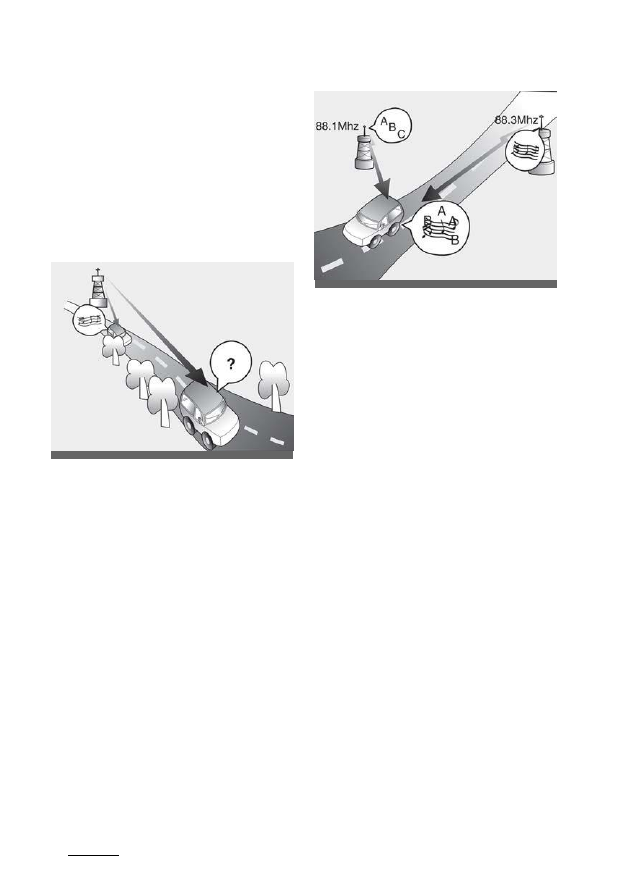
• Fading - As your vehicle moves away 

from the radio station, the signal will 
weaken and sound will begin to fade. 
When this occurs, select another sta

-

tion with a stronger signal.

• Flutter/Static - Weak FM signals or 

large obstructions between the trans

-

mitter and your radio can disturb the 
signal causing static or fluttering 
noises to occur. Reducing the treble 
level may lessen this effect until the 
disturbance clears.

• Station Swapping - As an FM signal 

weakens, more powerful signal near 
the same frequency may begin to 
play. This is because your radio is 
designed to lock onto the clearest sig

-

nal. If this occurs, select another sta

-

tion with a stronger signal.

• Multi-Path Cancellation - Radio sig

-

nals being received from several 
directions can cause distortion or flut

-

tering. This can be caused by a direct 
and reflected signal from the same 
station, or by signals from two sta

-

tions with close frequencies. If this 
occurs, select another station until the 
condition has passed.

Using a mobile phone or a two-
way radio

When a mobile phone is used inside the 
vehicle, noise may be produced from the 
audio system. This does not mean that 
something is wrong with the audio 
equipment. Operate mobile devices as 
far from the audio equipment as possi

-

ble.

When using a communication system 
such as a mobile phone or a radio set 
inside the vehicle, a separate external 
antenna must be affixed. When a mobile 
phone or radio set is used with only the 
internal antenna, it may interfere with the
vehicle's electrical system and adversely
affect the safe operation of the vehicle.

OSK3048403NR

ODEEV068220NR

125

4

4

Features of your vehicle

Declaration of Conformity

W ARNING

Cell phone use
Do not use a mobile phone while driving. 
Stop at a safe location to use a mobile 
phone.

W ARNING

Distracted driving
Driving while distracted can result in a
loss of vehicle control that may lead to an
accident, severe bodily injury, or death.
The driver's primary responsibility is in the
safe and legal operation of a vehicle. Any
use of handheld devices, other
equipment, or vehicle systems that take
the driver's eyes, attention, and focus
away from the safe operation of a vehicle
are not permissable by law.
These should never be used during the 
operation of the vehicle.

Declaration of Conformity

FCC

This equipment has been tested and 
found to comply with the limits for a
Class B digital device, pursuant to part 
15 of the FCC Rules. These limits are 
designed to provide reasonable protec

-

tion against harmful interference in a
residential installation.

This equipment generates, uses and can 
radiate radio frequency energy and, if not
installed and used in accordance with the
instructions, may cause harmful 
interference to radio communications. 
However, there is no guarantee that 
interference will not occur in a particular 
installation. If this equipment does cause 
harmful interference to radio or televi

-

sion reception, which can be determined 
by turning the equipment off and on, the 
user is encouraged to try to correct the 
interference by one or more of the fol

-

lowing measures :
• Reorient or relocate the receiving 

antenna.

• Increase the separation between the 

equipment and receiver.

• Connect the equipment into an outlet 

on a circuit different from that to which
the receiver is connected.

• Consult the dealer or an experienced 

radio/TV technician for help.

Caution: Any changes or modifications 
to this device not explicitly approved by 
manufacturer could void your authority 
to operate this equipment.

This device complies with part 15 of the 
FCC Rules. Operation is subject to the 
following two conditions :

(1) This device may not cause harmful 
interference, and (2) this device must 
accept any interference received, includ

-

Features of your vehicle

126

4

Declaration of Conformity

ing interference that may cause unde

-

sired operation.

This equipment complies with FCC radi

-

ation exposure limits set forth for an 
uncontrolled environment.

This equipment should be installed and 
operated with minimum 8 inches (20 cm)
between the radiator and your body.This
transmitter must not be collo

-

cated or

operating in conjunction with any other
antenna or transmitter unless authorized
to do so by the FCC.

Driving your vehicle

5

Before driving ................................................................................ 5-5

Before entering vehicle ................................................................................. 5-
5

Necessary inspections ................................................................................... 5-
5

Before

starting................................................................................................... 5-

5

Key positions..................................................................................5-6

Illuminated ignition switch ........................................................................... 5-6

Ignition switch position .................................................................................. 5-
6

Starting the engine.......................................................................................... 5-
8

Stopping the engine........................................................................................ 5-
9

ENGINE START/STOP button ......................................................5-9

Illuminated ENGINE START/STOP button.............................................
5-9

ENGINE START/STOP button position ................................................... 5-9

Starting the engine.........................................................................................5-

12

Stopping the engine...................................................................................... 5-
13

Manual Transmission .................................................................. 5-14

Manual Transmission operation .............................................................. 5-14

Good driving practices ................................................................................ 5-
16

Dual Clutch Transmission (DCT)................................................ 5-17

Dual Clutch Transmission operation ..................................................... 5-17

DCT warning messages .............................................................................. 5-

18

Paddle

shifter....................................................................................................5-

21

Shift lock system ............................................................................................ 5-
22

Ignition key interlock system .................................................................... 5-
23

Good driving practices ................................................................................ 5-
23

5

Driving your vehicle

Brake system ............................................................................... 5-30

Power brakes .................................................................................................. 5-
30

Parking

brake

(Hand-type).........................................................................5-

31

Electronic Parking Brake (EPB)................................................................ 5-
33

AUTO HOLD .....................................................................................................5-36

Anti-lock brake system (ABS) ...................................................................5-38

Electronic Stability Control (ESC) ........................................................... 5-
40

Hill-start assist control (HAC) ...................................................................5-
42

Vehicle stability management (VSM)....................................................5-

42

Good braking 

practices...............................................................................5-43
Drive mode integrated control system .................................... 5-45

Drive mode .......................................................................................................5-45

Economical operation................................................................. 5-47

Special driving conditions ......................................................... 5-48

Hazardous driving conditions ................................................................. 5-
48

Rocking the vehicle ...................................................................................... 5-
48

Smooth cornering ..........................................................................................5-
49

Driving at night ...............................................................................................5-
49

Driving in the rain ......................................................................................... 5-
50

Driving in flooded areas............................................................................. 5-
50

Driving off-road ............................................................................................. 5-
50

Highway driving ..............................................................................................5-
51

Winter

driving ..............................................................................5-52

Summer tires.................................................................................................... 5-
52
Snowy or icy conditions .............................................................................. 5-

Driving your vehicle

5

Don't let ice and snow accumulate underneath...............................5-55

Carry emergency equipment....................................................................5-55

Drive your vehicle when water vapor condenses and

accumulates inside the exhaust pipes ..................................................5-55

TRAILER TOW ING .......................................................................5-56

Vehicle load limit .........................................................................5-56

Tire and loading information label .........................................................5-56

Certification label ........................................................................................... 5-61

Vehicle weight .............................................................................5-62

Driving your vehicle

4

5

Driving your vehicle

W ARNING

ENGINE EXHAUST CAN BE DANGEROUS!
Engine exhaust fumes can be extremely dangerous. If you smell exhaust fumes 
inside the vehicle, open the windows immediately.
• Do not inhale exhaust fumes.

Exhaust fumes contain carbon monoxide, a colorless, odorless gas that can cause
unconsciousness and death by asphyxiation.

• Be sure the exhaust system does not leak.

The exhaust system should be checked whenever the vehicle is raised to change
the oil or for any other purpose. If you hear a change in the sound of the exhaust or
if you drive over something that strikes the under side of the vehicle, have the
exhaust system checked as soon as possible by an authorized Kia dealer.

• Do not run the engine in an enclosed area.

Letting the engine idle in your garage, even with the garage door open, is a haz

-

ardous practice. Never run the engine in your garage any longer than it takes to
start the engine and back the car out.

• Avoid idling the engine for prolonged periods with people inside the car.

If it is necessary to idle the engine for a prolonged period, be sure to do so only in an
open area with the air intake set at "Fresh" and fan operating at one of the higher
speeds so fresh air is drawn into the interior.

If you must drive with the trunk lid open because you are carrying objects that make 
this necessary:

1. Close all windows.

2. Open side vents.
3. Set the air intake control at "Fresh", the air flow control at "Floor" or "Face" and the 

fan at one of the higher speeds.

To assure proper operation of the ventilation system, be sure the ventilation air 
intakes located in front of the windshield are kept clear of snow, ice, leaves or other 
obstructions.

5

5

5

Driving your vehicle

Before driving

Before driving

Before entering vehicle

• Be sure that all windows, outside mir

-

ror(s), and outside lights are clean.

• Check the condition of the tires.
• Check under the vehicle for any sign 

of leaks.

• Be sure there are no obstacles behind 

you if you intend to back up.

Necessary inspections

Fluid levels, such as engine oil, engine 
coolant, brake fluid, and washer fluid 
should be checked at the recommended 
intervals. Refer to "Maintenance ser

-

vices" on page 8-5 for further details.

W ARNING

Driving while distracted can result in a
loss of vehicle control, that may lead to 
an accident, severe personal injury, or 
death. The driver's primary responsibility 
is in the safe and legal operation of a
vehicle. Any use of handheld devices, 
other equipment, or vehicle systems that 
take the driver's eyes, attention, and 
focus away from the safe operation of a
vehicle are not permissible by law. These 
should never be used during the opera

-

tion of the vehicle.

Before starting

• Close and lock all doors.
• Position the seat so that all controls 

are easily reached.

• Adjust the inside and outside rearview 

mirrors.

• Be sure that all lights work.

Check all gauges.

• Check the operation of warning lights 

when the ignition switch or ENGINE 
START/STOP button is turned to the 
ON position.

• Release the parking brake and make 

sure the brake warning light goes off.

For safe operation, be sure you are 
familiar with your vehicle and its equip

-

ment.

W ARNING

All passengers must be properly belted 
whenever the vehicle is moving. Refer to 
"Seat belts" on page 3-16 for more infor

-

mation on their proper use.

W ARNING

Always check the surrounding areas 
near your vehicle for people, especially 
children, before putting the car into D
(Drive) or R (Reverse).

W ARNING

Driving under the influence of alcohol
or drugs

Drinking and driving is dangerous.
Drunk driving is the number one contrib

-

utor to the highway death toll each year. 
Even a small amount of alcohol will affect
your reflexes, perceptions and judgment.
Driving while under the influ

-

ence of

drugs is as dangerous or more 
dangerous than driving drunk.

Driving your vehicle

6

5

Key positions

You are much more likely to have a seri

-

ous accident if you drink or take drugs 
and drive.

If you are drinking or taking drugs,

don’t 

drive. Do not ride with a driver who has 
been drinking or taking drugs. Choose a
designated driver or call a cab.

W ARNING

• When you intend to park or stop the 

vehicle with the engine on, be careful 
not to depress the accelerator pedal 
for time. It may overheat the engine or 
exhaust system and cause a fire.

• When you make a sudden stop or turn 

the steering wheel rapidly, loose 
objects may drop on the floor and 
could interfere with the operation of the
foot pedals, possibly causing an 
accident. Keep all things in the vehicle 
safely stored.

• If you do not focus on driving, it may 

cause an accident. Be careful when 
operating what may disturb driving 
such as audio or heater. It is the 
responsibility of the driver to always 
drive safely.

Key positions (if equipped)

Illuminated ignition switch (if
equipped)

Whenever a front door is opened, the
ignition switch will illuminate for your
convenience.

The light will go off immediately when the
ignition switch is turned on. It will also go
off after about 30 seconds when the door
is closed.

Ignition switch position

Your vehicle is equipped with four differ

-

ent ignition positions.

Type A

OMQ4050264L

OSK3058160NR

7

5

5

Driving your vehicle

Key positions

Type B

LOCK (1)

The steering wheel locks to protect 
against theft. The ignition key can be 
removed only in the LOCK position.

ACC (Accessory) (2)

The steering wheel is unlocked, and 
electrical accessories are operative.

NOTICE

If difficulty is experienced turning the 
ignition switch to the ACC position, turn 
the key while turning the steering wheel 
right and left to release the tension.

ON (3)

The warning lights can be checked 
before the engine is started. This is the 
normal running position after the engine 
is started.

Do not leave the ignition switch ON if the
engine is not running to prevent battery
discharge.

START (4)

Turn the ignition switch to the START 
position to start the engine. The engine

will crank until you release the key; then 
it returns to the ON position. The brake 
warning light can be checked in this 
position.

W ARNING

Ignition switch

• Do not attach small purses, multiple 

keys, or any other heavy accessories 
to the driver's key chain used to start 
the vehicle. This may cause the 
inserted key to inadvertently change 
the ignition position to the ACC posi

-

tion while the vehicle is moving, 
increasing the risk of an accident and 
deactivating several safety features.

• Never turn the ignition switch to LOCK 

or ACC while the vehicle is will result 
in loss of directional control and brak

-

ing function, which could cause an 
accident.

• The anti-theft steering column lock (if 

equipped) is not a substitute for the 
parking brake. Before exiting the car, 
always make sure the shift lever is 
engaged in 1st gear for Manual Trans

-

mission or P (Park) for Intelligent Vari

-

able Transmission, set the parking 
brake fully and shut the engine off. 
Unexpected and sudden vehicle 
movement may occur if these precau

-

tions are not taken.

OYB056068

OBDM061111

Driving your vehicle

8

5

Key positions

• Never reach for the ignition switch, or 

any other controls through the steer

-

ing wheel while the vehicle is in motion.
The presence of your hand or arm in
this area could cause a loss of vehicle
control, an accident, serious bodily
injury or death.

• Do not place any movable objects 

around the

driver’s seat as they may 

move while driving, interfering with the
driver and leading to an accident.

Starting the engine

W ARNING

• Always wear appropriate shoes when 

operating your vehicle. Unsuitable 
shoes (high heels, ski boots, etc.) may 
interfere with your ability to use the 
brake and accelerator pedal, and the 
clutch (if equipped).

• Do not start the vehicle with the accel

-

erator pedal depressed. The vehicle 
can move and lead to an accident.

• Wait until the engine rpm is normal. 

The vehicle may suddenly move if the 
brake pedal is released when the rpm 
is high.

Starting the gasoline engine

1. Make sure the parking brake is 

applied.

2. Manual Transmission - Depress the 

clutch pedal fully and shift the trans

-

mission into Neutral. Keep the clutch 
and brake pedals depressed while 
turning the ignition switch to the start 
position.

Dual Clutch Transmission/Intelli

-

gent

Variable Transmission - Place the
transmission shift lever in P (Park). 
Depress the brake pedal fully.

You can also start the engine when 
the shift level is in the N (Neutral) 
position.

3. Turn the ignition switch to START and 

hold it there until the engine starts (a 
maximum of 10 seconds), then 
release the key.

It should be started without depressing
the accelerator pedal.

4. Do not wait for the engine to warm up 

while the vehicle remains stationary. 
Start driving at a moderate engine
speed. (Rapid acceleration and decel

-

eration should be avoided.)

NOTICE

If the engine does not start within 10 
seconds, turn the ignition key once more 
to the LOCK position for 10 seconds, and 
then to the ON position.

Starting and stopping the engine 
for turbocharger intercooler

1. Do not race the engine immediately 

after starting. If the engine is cold, idle 
for several seconds to sufficiently 
lubricate so the turbocharger.

2. After high speed or extended driving,

requiring a heavy engine load, idle the
engine for about 1 minute before turn

-

ing it off.

This idle time will allow the turbo

-

charger to cool.

CAUTION

Do not turn off the engine immediately 
after it has been subjected to a heavy 
load. Doing so may cause severe dam

-

age to the engine or turbocharger.

9

5

5

Driving your vehicle

ENGINE START/STOP button

CAUTION

If the engine stalls while you are in 
motion, do not attempt to move the shift 
lever to the P (Park) position. If traffic and
road conditions permit, put the shift lever
in the N (Neutral) position while the 
vehicle is still moving and turn the igni

-

tion switch to the START position to 
restart the engine.

CAUTION

• Do not engage the starter for more 

than 10 seconds. If the engine stalls or 
fails to start, wait 5 to 10 seconds 
before reengaging the starter. 
Improper use of the starter may dam

-

age it.

• Do not turn the ignition switch to the

START position with the engine run

-

ning. It may damage the starter.

Stopping the engine 

Manual Transmission

1. Make sure the vehicle is completely 

stopped and keep the clutch pedal 
and brake pedal depressed.

2. Shift the transmission into Neutral 

while depressing the clutch pedal and 
brake pedal.

3. Engage the parking brake while 

depressing the brake pedal.

4. Turn the ignition key to the LOCK 

position and remove it.

ENGINE START/STOP button 
(if equipped)

Illuminated ENGINE START/STOP 
button (if equipped)

Whenever the front door is opened, the 
ENGINE START/STOP button will
illumi

-

nate for your convenience. The

light will go off after about 30 seconds
when the door is closed. It will also go off
immedi

-

ately when the theft-alarm

system is armed.

ENGINE START/STOP button 
position

OFF

With Manual Transmission

To turn off the engine (START/RUN
posi

-

tion) or vehicle power (ON position),

stop the vehicle then press the ENGINE 
START/STOP button.

With Dual Clutch Transmission/ 
Intelligent Variable Transmission

To turn off the engine (START/RUN
posi

-

tion) or vehicle power (ON position), 

press the ENGINE START/STOP button 
with the shift lever in the P (Park) posi

-

tion. When you press the ENGINE

OBD051001

Driving your vehicle

10

5

ENGINE START/STOP button

START/STOP button without the shift 
lever in the P (Park) position, the 
ENGINE START/STOP button will
not change to the OFF position but to
the ACC position.

Vehicles equipped with anti-theft 
steering column lock

The steering wheel locks when the 
ENGINE START/STOP button is in
the OFF position to protect against
theft. It locks when the door is opened.

If the steering wheel is not locked prop

-

erly when you open the driver's door, the 
warning chime will sound. Try locking the
steering wheel again. If the problem 
persists, have the system checked by an 
authorized Kia dealer.

If the ENGINE START/STOP button is
in the OFF position after the driver's door
is opened, the steering wheel will not lock 
and the warning chime will sound. In 
such a situation, close the door. Then the 
steering wheel will lock and the warning 
chime will stop.

NOTICE

If the steering wheel doesn't unlock 
properly, the ENGINE START/STOP
but

-

ton will not work. Press the ENGINE 

START/STOP button while turning the 
steering wheel right and left to release 
the tension.

NOTICE

You are can turn off the engine (START/ 
RUN) or vehicle power (ON), only when 
the vehicle is not in motion.

CAUTION

In an emergency when the vehicle is in 
motion, you can turn the engine off and 
change to the ACC position by pressing 
the ENGINE START/STOP button for 
more than 2 seconds or 3 times succes

-

sively within 3 seconds.

If the vehicle is still moving, to restart the 
vehicle:
• Manual Transmission - Press the 

ENGINE START/STOP button with
the shift lever in neutral and clutch
pedal depressed.

• Dual Clutch Transmission/Intelligent 

Variable Transmission - Press the 
ENGINE START/STOP button
when vehicle speed is 3 mph or over.

ACC (Accessory)

With Manual Transmission

Press the ENGINE START/STOP
button when the button is in the OFF
position without depressing the clutch
pedal.

OMQ4050294L

11

5

5

Driving your vehicle

ENGINE START/STOP button

With Dual Clutch Transmission/ 
Intelligent Variable Transmission

Press the ENGINE START/STOP
button while it is in the OFF position
without depressing the brake pedal.

The steering wheel unlocks and electri

-

cal accessories are operational.

If the ENGINE START/STOP button is
in the ACC position for more than 1
hour, the function turns off automatically
to prevent battery discharge.

ON

With Manual Transmission

Press

the

ENGINE

START/STOP

button when the button is in the ACC
position without depressing the clutch
pedal.

With Dual Clutch Transmission/ 
Intelligent Variable Transmission

Press the ENGINE START/STOP
button while it is in the ACC position
without depressing the brake pedal.

The warning lights can be checked 
before the engine is started. Do not 
leave the ENGINE START/STOP
button in the ON position for a long
time. The battery may discharge.

START/RUN

With Manual Transmission

To start the engine, depress the clutch 
and brake pedals, then press the 
ENGINE START/STOP button with
the shift lever in the N (Neutral) 
position.

With Dual Clutch Transmission/ 
Intelligent Variable Transmission

To start the engine, depress the brake 
pedal and press the ENGINE START/ 
STOP button with the shift lever in the P
(Park) or the N (Neutral) position. For 
your safety, start the engine with the shift
lever in the P (Park) position.

NOTICE

If you press the ENGINE START/STOP 
button without depressing the clutch 
pedal for Manual Transmission vehicles 
or without depressing the brake pedal for
Dual Clutch Transmission/Intelligent 
Variable Transmission vehicles, the 
engine will not start and the ENGINE 
START/STOP button changes as
follow:

OFF

→ ACC → ON → OFF or ACC

NOTICE

If you leave the ENGINE START/
STOP button in the ACC or ON
position for a long time, the battery will
discharge.

W ARNING

• Never press the ENGINE

START/STOP button while the vehicle
is in motion. This will result in loss of
directional control and braking
function, which could cause an
accident.

• The anti-theft steering column lock (if 

equipped) is not a substitute for the 
parking brake. Before exiting the car, 
always make sure the shift lever is 
engaged in P (Park), set the parking 
brake fully and shut the engine off. 
Unexpected and sudden vehicle 
movement may occur if these precau

-

tions are not taken.

• Never reach for the ENGINE

START/ STOP button or any other
controls

Driving your vehicle

12

5

ENGINE START/STOP button

through the steering wheel while the 
vehicle is in motion. The presence of 
your hand or arm in the area could 
cause loss of vehicle control, an acci

-

dent, serious bodily injury or death.

• Do not place any movable objects 

around the driver's seat as they may 
move while driving, interfere with the 
driver and lead to an accident.

Starting the engine

W ARNING

• Always wear appropriate shoes when 

operating your vehicle. Unsuitable 
shoes (high heels, ski boots, etc.) may 
interfere with your ability to use the 
brake, accelerator and clutch pedal.

• Do not start the vehicle with the accel

-

erator pedal depressed. The vehicle 
can move and lead to an accident.

• Wait until the engine rpm is normal. 

The vehicle may suddenly move if the 
brake pedal is released when the rpm 
is high.

Starting the gasoline engine

1. Carry the smart key or leave it inside 

the vehicle.

2. Make sure the parking brake is firmly 

applied.

3. Manual Transmission - Depress the 

clutch pedal fully and shift the trans

-

mission into Neutral. Keep the clutch 
pedal and brake pedal depressed 
while starting the engine.

Dual Clutch Transmission/Intelli

-

gent

Variable Transmission - Place the
transmission shift lever in P (Park). 
Depress the brake pedal fully.

You can also start the engine when 
the shift lever is in the N (Neutral) 
position.

4. Press the ENGINE START/STOP

but

-

ton.

It should be started without depress

-

ing the accelerator pedal.

5. Do not wait for the engine to warm up 

while the vehicle remains stationary. 
Start driving at moderate engine
speeds. (Rapid acceleration and 
deceleration should be avoided.)

Starting and stopping the engine 
for turbocharger intercooler

1. Do not race the engine immediately

after starting.

If the engine is cold, idle for several
seconds to sufficiently lubricate the
turbocharger.

2. After high speed or extended driving, 

requiring a heavy engine load, idle the 
engine for about 1 minute before turn

-

ing it off. This idle time will allow the 
turbocharger to cool prior to shutting 
the engine off.

CAUTION

Do not turn the engine off immediately 
after it has been subjected to a heavy 
load. Doing so may cause severe dam

-

age to the engine or turbocharger.

Starting the engine with smart 
key

• If the smart key is in the vehicle, but is 

far away from you, the engine may not
start.

• When the ENGINE START/STOP

but

-

ton is in any position other than

OFF, and any door is opened, the
system checks for the smart key. If the
smart key is not in the vehicle, the

” indi

-

13

5

5

Driving your vehicle

ENGINE START/STOP button

cator will blink or the warning "Key is 
not in vehicle" will illuminate on the 
LCD display. If all doors are closed, the 
chime will sound for 5 seconds. The 
indicator or warning will turn off while 
the vehicle is moving. Always have the 
smart key with you.

W ARNING

The engine will start only when the smart
key is in the vehicle. Never allow children 
or any person who is unfamiliar with the
vehicle touch the ENGINE 
START/STOP button or related parts.

CAUTION

If the engine stalls while the vehicle is in 
motion, do not move the shift lever to the
P (Park) position. If the traffic and road
conditions permit, you may put the shift
lever in the N (Neutral) position while the
vehicle is still moving and press the
ENGINE START/STOP button to restart 
the engine.

NOTICE

• If the battery is weak or the smart key 

does not work correctly, you can start 
the engine by pressing the ENGINE 
START/STOP button with the smart 
key. The side with the lock button

should contact the ENGINE START/ 
STOP button directly. The smart key 
should contact the button at a right 
angle.

• If the stop lamp fuse is blown, you 

can't start the engine normally. 
Replace the fuse with a new one. If it 
is not possible, you can start the 
engine by pressing the ENGINE 
START/STOP button for 10 seconds 
while it is in the ACC position. Always 
depress the brake pedal and clutch 
pedal (if equipped) before starting the 
engine.

CAUTION

• Do not press the ENGINE START/ 

STOP button for more than 10 sec

-

onds except when the stop lamp fuse 
is blown.

• Do not turn the ignition switch to the

START position with the engine run

-

ning.

It may damage the starter.

Stopping the engine 

Manual Transmission

1. Make sure the vehicle is completely 

stopped and keep the clutch and 
brake pedals depressed.

2. Shift the transmission into N (Neutral)

while depressing the clutch and brake
pedal.

3. Engage the parking brake while 

depressing the brake pedal.

4. Turn the ignition key to the LOCK 

position and remove it.

OBD051002

Driving your vehicle

14

5

Manual Transmission

Manual Transmission (if 
equipped)

Manual Transmission operation

The shift lever can be moved with

-

out pushing the button (1).

The button (1) should be pressed 

when moving the shift lever into R
(Reverse).

The Manual Transmission has 6 forward 
gears.

This shift pattern is imprinted on the shift 
knob. The transmission is fully syn

-

chronized in all forward gears so shifting 
to either a higher or a lower gear is eas

-

ily accomplished.

Depress the clutch pedal fully while 
shifting, then release it slowly.

If your vehicle is equipped with an igni

-

tion lock switch, the engine will not with

-

out depressing the clutch pedal (If 
equipped).

The shift lever must be returned to the N
(Neutral) position before shifting into R
(Reverse).

Push the button located immediately 
below the shift knob and pull the gear

-

shift lever to the left sufficiently, and then
shift into R (Reverse) gear position.

Make sure the vehicle is completely 
stopped before shifting into R (Reverse).

Never operate the engine with the 
tachometer (rpm) in the red zone.

CAUTION

• When downshifting from fifth to fourth

gear, caution should be taken not to
inadvertently press the shift lever 
sideways in such a manner that the
second gear is engaged. Such a
drastic downshift may cause the 
engine speed to increase to the point 
that the tachometer will enter the red 
zone. Such over-revving of the engine 
and transmission may cause engine 
damage.

• Do not downshift more than 2 gears 

or downshift the gear when the 
engine is running at high speed 
(5,000 RPM or higher). Such down

-

shifting may damage the engine, 
clutch and transmission.

• In cold weather, shifting may be diffi

-

cult until the transmission lubricant is 
warmed up. This is normal and not 
harmful to the transmission.

• If you come to a complete stop and

it's hard to shift into 1st or R (Reverse), 
leave the shift lever at N (Neutral) 
position and release the clutch. 
Depress the clutch pedal, and then 
shift into 1st or R (Reverse) gear posi

-

tion.

CAUTION

• To avoid premature clutch wear and 

damage, do not drive with your foot 
resting on the clutch pedal.

Don’t use 

the clutch to hold the vehicle stopped 
on an uphill grade, while waiting for a
traffic light, etc.

OSK3058162NR

15

5

5

Driving your vehicle

Manual Transmission

• Do not use the shift lever as a han

-

drest during driving. This can result in 
premature wear of the transmission 
shift forks.

• To prevent possible damage to the

clutch system, do not start in 2nd gear
except if starting on a slippery road.

• Do not overload the vehicle. Driving 

with the vehicle overloaded could 
cause abnormal friction heat to the 
clutch disc and damage the clutch 
cover and disc.

W ARNING

• Before exiting the car, always set the 

parking brake fully and shut the 
engine off. Make sure the transmis

-

sion is shifted into 1st gear when the 
vehicle is parked on a level or uphill 
grade, or shifted into R (Reverse) on a
downhill grade. Unexpected and sud

-

den vehicle movement can occur if 
these precautions are not followed.

• Do not shift from a high gear to lower 

gear rapidly on slippery roads.

The vehicle may slip causing an acci

-

dent.

Using the clutch

The clutch should be depressed fully 
before shifting, then released slowly. The 
clutch pedal should always be fully 
released while driving. Do not rest your 
foot on the clutch pedal while driving.
This can cause unnecessary wear. Do 
not partially engage the clutch to hold 
the vehicle on an incline. This causes 
unnecessary wear. Use the foot brake or 
parking brake. Do not operate the clutch 
pedal rapidly and repeatedly.

CAUTION

When operating the clutch pedal, 
depress the clutch pedal down fully. If 
you

don’t, the clutch may be damaged 

or noise may occur.

W ARNING

Using the clutch
Depress the clutch pedal as far as possi

-

ble. Be aware not to apply the pedal 
again before it returns to the normal 
position. If the pedal is repeatedly 
depressed before returning to its normal 
position, the clutch system might be 
damaged. Do not overload the vehi

-

cle.Starting or driving a vehicle in this sit

-

uation generates frictional heat to the 
clutch disc which might cause damage
to the clutch cover and disc. When start

-

ing the vehicle or driving in R (Reverse), 
releasing the clutch pedal too soon after 
shifting the lever might turn off the engine
and lead to an accident.

Downshifting

When you must slowdown in heavy traf

-

fic or while driving up steep hills, down

-

shift before the engine starts to labor.
Downshifting reduces the chance of 
stalling and gives better acceleration
when you need to increase your speed. 
When the vehicle is traveling down steep 
hills, downshifting helps maintain safe 
speed and prolongs brake life.

Driving your vehicle

16

5

Manual Transmission

Good driving practices

• Never take the vehicle out of gear and 

coast down a hill. This is extremely 
hazardous. Always leave the vehicle in 
gear.

• Don't "ride" the brakes. This can cause 

them to overheat and malfunction. 
When you are driving down a long hill, 
shift to a lower gear. It will help slow 
down the vehicle.

• Slow down before shifting to a lower 

gear. This will help avoid over-revving 
the engine, which can cause damage.

• Slow down when you encounter cross 

winds. This gives you much better 
control of your vehicle.

• Be sure t o completely stop before 

you attempt to shift into reverse. The 
transmission can be damaged if you 
do not.

• Exercise extreme caution when driv

-

ing on a slippery surface. Be espe

-

cially careful when braking, 
accelerating or shifting gears. On a
slippery surface, an abrupt change in 
vehicle speed can cause the drive 
wheels to lose traction and loss of 
control.

W ARNING

• Always buckle-up! In a collision, an 

unbelted occupant is significantly 
more likely to be seriously injured or 
killed than a properly belted occu

-

pant.

• Avoid high speeds when cornering or 

turning.

• Do not make quick steering wheel 

movements, such as sharp lane 
changes or fast, sharp turns.

• The risk of rollover is greatly 

increased if you lose control of your 
vehicle at highway speeds.

• Loss of control often occurs if two or 

more wheels drop off the roadway 
and the driver oversteers to reenter 
the roadway.

• In the event your vehicle leaves the 

roadway, do not steer sharply. 
Instead, slow down before pulling 
back into the travel lanes.

• Never exceed posted speed limits.

17

Dual Clutch Transmission opera

-

tion

The DCT has 7 forward speeds and one 
reverse speed.

The individual speeds are selected auto

-

matically when the shift button is in the D 
(Drive) position.
• The DCT an automatically shifting 

manual transmission. It gives the driv

-

ing feel of a manual yettransmission 
yet provides the ease of a fully auto

-

matic transmission.

• When D (Drive) is selected, the trans

-

mission will automatically shift
through the gears like a conventional

automatic transmission. Unlike a tra

-

ditional

automatic transmission, the
gear shifting can sometimes be felt 
and heard as the actuators engage 
the clutches and the gears are 
selected.

• The DCT incorporates a dry-type dual 

clutch mechanism, which allows for 
better acceleration performance and 
increased fuel efficiency. It differs from
a conventional automatic trans

-

mission because it does not incorpo

-

rate a torque converter. Instead, the 
transition from one gear to the next is 
managed by clutch slip, especially at 
lower speeds.

As a result, shifts are sometimes more 
noticeable, and a light vibration can be 
felt as the transmission shaft speed is 
matched with the engine shaft speed. 
This is a normal condition of the DCT.
• The dry-type clutch transfers torque

more directly and provides a direct-
drive feeling which may differ from a

5

Driving your vehicle

Dual Clutch Transmission (DCT)

Dual Clutch Transmission 
(DCT) (if equipped)

Depress the brake pedal and the 

lock release button when shifting.

Press the lock release button when 

shifting.

The shift lever can be shifted 

freely.

* To move the shift lever from/to P (Park)

or between R (Reverse) and D (Drive),
you must depress the brake pedal.

W ARNING

To reduce the risk of serious injury or 
death:
• ALWAYS check the surroundings

for people, especially children, before 
shifting a vehicle into D (Drive) or R
(Reverse).

• Before exiting the car make sure the 

shift lever is in P (Park) position, set 
the parking brake, and place the igni

-

tion switch or ENGINE START/STOP 
button in the LOCK/OFF position. 
Unexpected and sudden vehicle 
movement can occur if these precau

-

tions are not followed.

• Do not rapidly shift from a high gear to

lower gear on slippery roads. It may 
cause an accident.

OBD051005

Driving your vehicle

18

5

Dual Clutch Transmission (DCT)

conventional automatic transmission. 
This may be more noticeable when 
moving the vehicle in stop-and-go 
traffic.

• When rapidly accelerating from a

lower vehicle speed, the engine rpm 
may increase dramatically as a result 
of clutch slip as the DCT selects the 
correct gear. This is a normal condi

-

tion.

• When accelerating from a stop on an 

incline, depress the accelerator 
smoothly and gradually to avoid any 
shudder or jerkiness.

• When traveling at a lower vehicle 

speed, if you release the accelerator 
pedal quickly, you may feel before the 
transmission changes gears. This 
engine braking feeling is like operat

-

ing a manual transmission at low 
speed.

• When driving downhill, you may move 

the gear shift button to Manual Shift 
mode and downshift to a lower gear in
order to control your speed without 
using the brake pedal excessively.

• When you turn the engine on and off, 

you may hear clicking sounds as the 
system goes through a self-test. This
a normal sound for the DCT.

• During the first 1,000 miles (1,500 

km), the vehicle may not smoothly 
accelerate at low speeds. During this 
break-in period, the shift quality and 
performance of your new vehicle is 
continuously optimized.

W ARNING

Due to transmission failure, the vehicle 
may not move, and the position indica

-

tor (D, R) will blink on the cluster. In this 
case, have the system checked by an 
authorized Kia dealer.

DCT warning messages

This warning message is displayed when 
vehicle is driving slowly on a grade and 
the vehicle detects that the brake pedal 
is not applied.

Steep grade

Driving up hills or on steep grades:
• To hold the vehicle on an incline, use

the foot brake or parking brake.

• When in stop-and-go traffic on an

incline, keep some distance ahead
before moving the vehicle forward.
Hold the vehicle on the incline with
the foot brake.

• If the vehicle is held on a hill by apply

-

ing the accelerator pedal or by creep

-

ing with brake pedal disengaged, the 
clutch and transmission may overheat 
which can result in damage. A warn

-

ing message will appear on the LCD 
display.

• If the LCD warning appears, the foot 

brake must be applied.

• Ignoring the warning can lead to dam

-

age to the transmission.

OMQ4050027L

• If the vehicle continues to be driven 

and the clutch temperature reach the 
maximum limit, the "Transmission Hot!
Park with engine on" warning will be 
displayed. The clutches is disabled 
until the clutch cools to a normal tem

-

perature.

5

19

5

Driving your vehicle

Dual Clutch Transmission (DCT)

Transmission high temperature

• Under certain conditions, such as 

repeated stop-and-go moves on steep 
grades, sudden acceleration, or other 
harsh driving, the transmission clutch 
temperatures can overheat.

• When the clutch is overheated, the 

safe protection mode engages and the
gear position indicator on the 
instrument cluster blinks with a chime. 
The "Transmission temp. is high! Stop 
safely" warning message will appear 
on the LCD display and driving may 
not be smooth.

• If this occurs, pull over to a safe loca

-

tion, stop the vehicle with the engine 
running, apply the brakes, shift the 
vehicle to P (Park), and allow the 
transmission to cool.

• If you ignore this warning, driving 

conditions may worsen. You may 
experience abrupt shifts, frequent 
shifts, or jerkiness. To return to nor

-

mal driving conditions, stop the vehi

-

cle, apply the foot brake and shift into 
P (Park).

Allow the transmission to cool for a
few minutes with the engine on 
before driving.

• Drive the vehicle smoothly.

Transmission overheated

OMQ4050283L

OMQ4050023L

OMQ4050031L

OMQ4050032L

Driving your vehicle

20

5

Dual Clutch Transmission (DCT)

• The warning will display a time to wait 

for the transmission to cool.

• Pull over to a safe location, stop the 

vehicle with the engine running, apply 
the brakes and shift the vehicle to P
(Park), and allow the transmission to 
cool.

• When the message "Trans cooled. 

Resume driving." appears, you can 
reume driving.

• When possible, drive the vehicle 

smoothly.

If any of the warning messages in the 
LCD display continue to blink, have the 
system checked by an authorized Kia 
dealer.

Transmission ranges

The indicator in the instrument cluster 
displays the shift lever position when the 
ignition switch or ENGINE START/STOP 
button is in the ON position.

P (Park)

Always come to a complete stop before 
shifting into P (Park).

To shift from P (Park), you must firmly 
depress the brake pedal and make sure 
your foot is off the accelerator pedal.

The shift lever must be in P (Park) 
before turning the engine off.

W ARNING

• Shifting into P (Park) while the vehicle 

is in motion may cause you to lose 
control.

• After the vehicle has stopped, always

make sure the shift lever is in P (Park),
apply the parking brake, and turn the
engine off.

• Do not use the P (Park) position in

place of the parking brake.

R (Reverse)

Use this position to drive the vehicle 
backward.

CAUTION

Always come to a complete stop before 
shifting into or out of R (Reverse); you 
may damage the transmission if you shift
into R (Reverse) while the vehicle is in
motion.

N (Neutral)

The wheels and transmission are not 
engaged.

W ARNING

Do not shift into gear unless your foot 
firmly depressed on the brake pedal. 
Shifting into gear when the engine is 
running at high speed can cause the 
vehicle to move very rapidly. You could 
lose control of the vehicle and hit people 
or objects.

W ARNING

Do not drive with the shift lever in N
(Neutral).

The engine brake will not work and 
could lead to an accident.

D (Drive)

This is the normal driving position. The 
transmission will automatically shift 
through a 7-gear sequence, providing 
the best fuel economy and power.

For extra power when passing another 
vehicle or driving uphill depress the 
accelerator pedal further until you feel 
the transmission downshift to a lower 
gear.

21

5

5

Driving your vehicle

Dual Clutch Transmission (DCT)

To stop the vehicle during driving, fully 
depress the brake pedal to prevent unin

-

tended movement.

Manual mode

Whether the vehicle is stationary or in 
motion, manual mode is selected by 
pushing the shift lever from the D (Drive) 
position into the manual gate. To return 
to D (Drive) operation, push the shift 
lever into the main gate.

In manual mode, moving the shift lever
backwards and forwards will allow you
to select the desired range of gears for
the current driving conditions.
• Up (+): Push the lever forward once to 

shift up one gear.

• Down (-): Pull the lever backwards 

once to shift down one gear.

NOTICE

• Only the 7 forward gears can be 

selected. To reverse or park the vehi

-

cle, move the shift lever to the R
(Reverse) or P (Park) position as 
required.

• Downshifts are made automatically 

when the vehicle slows down. When 
the vehicle stops, 1st gear is automati

-

cally selected.

• When the engine rpm approaches the 

red zone, shift points vary to upshift 
automatically.

• If the driver presses the lever to + (Up) 

or - (Down) position, the transmission 
may not engage the requested gear 
change if the next gear is outside of 
the allowable engine rpm range. The 
driver must execute upshifts in accor

-

dance with road conditions, taking 
care to keep the engine rpms below 
the red zone.

Paddle shifter (if equipped)

The paddle shifter is available when the 
shifter lever is the D (Drive) position or 
the manual mode.

With the shift lever in the D posi

-

tion

The paddle shifter will operate when the 
vehicle speed is more than 2 mph. Pull 
the [+] or [-] paddle shifter once to shift 
up or down one gear and the system 
changes from automatic mode to man

-

ual mode. When the vehicle speed is 
lower than 2 mph, if you depress the 
accelerator pedal gently for more than 6
seconds. the system changes from man

-

ual mode to automatic mode. If you shift 
the lever from D (Drive) to manual mode

OBD051007

OBD051136

Driving your vehicle

22

5

Dual Clutch Transmission (DCT)

and shift it from manual mode to D
(Drive) again or pull the [+] paddle shifter
for more than 1 second, the sys

-

tem will 

also automatically change from manual
mode to automatic mode.

With the shift lever in the manual 
mode

Pull the [+] or [-] paddle shifter once to 
shift up or down one gear.

NOTICE

If you pull the [+] and [-] paddle shifters 
at the same time, you cannot shift the 
gear.

Shift lock system

For your safety, the Dual clutch trans

-

mission has a shift lock system which 
prevents shifting the transmission from 
P (Park) into R (Reverse) unless the 
brake pedal is depressed.

To shift the transmission from P (Park) 
into R (Reverse):

1. Depress and hold the brake pedal.
2. Start the engine or turn the ignition 

switch or ENGINE START/STOP
but

-

ton to the ON position.

3. Move the shift lever.
If the brake pedal is repeatedly 
depressed and released with the shift 
lever in the P (Park) position, a chatter

-

ing noise & vibration near the shift lever 
may be heard. This is a normal condi

-

tion.

W ARNING

Always fully depress the brake pedal 
before and while shifting out of the P
(Park) position to avoid inadvertent 
motion of the vehicle which could injure 
persons in or around the vehicle.

Shift-lock override

If the shift lever cannot be moved from 
the P (Park) position into R (Reverse) 
position with the brake pedal depressed, 
continue depressing the brake, and then 
do the following:

1. Remove the shift lever boots from the 

console by using a plastic trim tool.

2. After removing the boots, press and 

hold the button (1) on the left front side 
with a pointed tool and change it to the
N (Neutral) position.

If the shift lever does not move even 
after performing this procedure, have 
the system inspected by an authorized 
Kia dealer.

CAUTION

• Be careful not to damage the cover 

when removing the shift lever boots.

• Be sure that the vehicle is on flat level

ground when releasing the shift-lock.

OBD051006

23

5

5

Driving your vehicle

Dual Clutch Transmission (DCT)

Ignition key interlock system

The ignition key cannot be removed 
unless the shift lever is in the P (Park) 
position.

Good driving practices

• Never move the shift lever from P

(Park) or N (Neutral) to any other 
position with the accelerator pedal 
depressed.

• Never move the shift lever into P

(Park), R (Reverse) or D (Drive)
when the vehicle is in motion.

• Be sure the car is completely stopped 

before you attempt to shift into R
(Reverse) or D (Drive).

• Never take the car out of gear and 

coast down a hill. This may be 
extremely hazardous. Always leave 
the car in gear when moving.

• Do not "ride" the brakes. This can 

cause them to overheat and malfunc

-

tion. When driving down a long hill, 
slow down and shift to a lower gear. 
When you do this, engine braking will 
help slow the car.

• Slow down before shifting to a lower

gear. Otherwise, the lower gear may
not be engaged.

• Always use the parking brake. Do not

depend on placing the transmission in
P (Park) to keep the car from moving.

• Exercise extreme caution when driv

-

ing on a slippery surface. Be espe

-

cially careful when braking, 
accelerating or shifting gears. On a
slippery surface, an abrupt change in 
vehicle speed can cause the drive 
wheels to lose traction and you may 
lose control.

• Optimum vehicle performance and 

economy is obtained by smoothly

depressing and releasing the acceler

-

ator pedal.

W ARNING

• When driving uphill or downhill, always

shift to D (Drive) for driving forward or
shift to R (Reverse) for driving 
backwards and check the gear 
position indicated on the instrument 
cluster before driving.

Driving in the opposite direction of the 
selected gear can lead to a dangerous 
situation by shutting off the engine 
and affecting the braking perfor

-

mance.

• Always buckle-up! In a collision, an 

unbelted occupant is significantly 
more likely to be seriously injured or 
killed than a properly belted occu

-

pant.

• Avoid high speeds when cornering or 

turning.

• Do not make quick steering wheel 

movements, such as sharp lane 
changes or fast, sharp turns.

• The risk of rollover is greatly 

increased if you lose control of your 
vehicle at highway speeds.

• Loss of control often occurs if two or 

more wheels drop off the roadway 
and the driver oversteers to reenter 
the roadway.

• In the event your vehicle leaves the 

roadway, do not steer sharply. 
Instead, slow down before pulling 
back into the travel lanes.

• Never exceed posted speed limits.

W ARNING

If your vehicle becomes stuck in snow, 
mud, sand, etc., you may attempt to rock 
the vehicle free by moving it forward

Driving your vehicle

24

5

Intelligent Variable Transmission (IVT)

and backward. Do not attempt this pro

-

cedure if people or objects are anywhere 
near the vehicle. During the rocking 
operation the vehicle may suddenly 
move forward or backward as it becomes
unstuck, causing injury or damage to
nearby people or objects.

Intelligent Variable Transmis

-

sion (IVT) (if equipped)

The Intelligent Variable Transmission 
(IVT) automatically shifts depending on 
speed, accelerator pedal position. The 
individual speeds are selected automati

-

cally, depending on the position of the 
shift lever.

Depress the brake pedal and the 

lock release button when shifting.

Press the lock release button when 

shifting.

The shift lever can be freely 

shifted.

Intelligent Variable Transmission 
(IVT) operation

For smooth operation, depress the brake 
pedal when shifting from N (Neutral) to a
forward or reverse gear.

W ARNING

Intelligent Variable Transmission (IVT)
• Always check the surrounding areas 

near your vehicle for people, espe

-

cially children, before shifting a car 
into D (Drive) or R (Reverse).

• Before exiting the car, always en sure 

the shift lever is in the P (Park) posi

-

tion, then set the parking brake fully

OBD051005

25

5

5

Driving your vehicle

Intelligent Variable Transmission (IVT)

and shut the engine off. Unexpected 
and sudden vehicle movement can 
occur if these precautions are not fol

-

lowed.

• Do not shifting from a high gear to 

lower gear rapidly on slippery roads. 
It may cause an accident.

CAUTION

• To avoid damage to your transmis

-

sion, do not accelerate the engine in R
(Reverse) or any forward gear posi

-

tion with the brakes on.

• When stopped on an incline, do not 

hold the vehicle stationary with 
engine power. Use the service brake 
or the parking brake.

• Do not shift from N (Neutral) or P

(Park) into D (Drive), or R (Reverse) 
when the engine is above idle speed.

IVT warning message

A warning message is displayed on the 
LCD.

Transmission overheated

• When driving under severe conditions 

such as repeated ssudden starts and 
sudden acceleration, the transmis

-

sion may overheat, and a warning 
sound and a waring message appears 
on the instrument cluster.

• If this occurs, pull over to a safe loca

-

tion, stop the vehicle with the engine 
running, apply brakes, shift the gear
to P (Park), and allow the transmission 
to cool.

• If the warning message continues to 

appear, have the system checked by 
an authorized Kia dealer to prevent 
unexpected accidents. Overheated 
transmissions may lead to accidents.

Vehicle power limited

• If the transmission continues to over

-

heat and reaches its maximum tem

-

perature, the above warning message 
appears. The vehicle will limit trans

-

mission power.

• Normal driving is restricted until the 

transmission returns to a normal tem

-

perature. After moving the vehicle to a
safe place, shift the gear to P (Park) 
with the engine running and wait sev

-

eral minutes until the warning on the 
screen disappears.

• If the warning message continues to 

appear, have the system checked by 
an authorized Kia dealer to prevent 
unexpected accidents.

OMQ4050023L

OBD041618L

Driving your vehicle

26

5

Intelligent Variable Transmission (IVT)

Transmission cooled

• When the message "Trans cooled.

Resume driving" appears you can
continue to drive your vehicle.

Transmission ranges

The indicator in the instrument cluster 
displays the shift lever position when the 
ignition switch or ENGINE START/STOP 
button is in the ON position.

P (Park)

Always come to a complete stop before
shifting into P (Park). This position locks
the transmission and prevents the front
wheels from rotating.

W ARNING

• Shifting into P (Park) while the vehicle 

is in motion will cause the drive wheels
to lock which will cause you to lose
control of the vehicle.

• Do not use the P (Park) position in 

place of the parking brake. Always 
make sure the shift lever is latched in 
the P (Park) position and set the park

-

ing brake fully.

• Never leave a child unattended in a

vehicle.

CAUTION

The transmission may be damaged if 
you shift into P (Park) while the vehicle is 
in motion.

CAUTION

The RPM (revolution per minute) may 
increase or decrease when performing 
the Intelligent Variable Transmission 
(IVT) self-diagnosis.

R (Reverse)

Use this position to drive the vehicle 
backward.

CAUTION

Always come to a complete stop before 
shifting into or out of R (Reverse); you 
may damage the transmission if you shift
into R while the vehicle is in motion, 
except as explained in "Rocking the 
vehicle" on page 5-48.

N (Neutral)

The wheels and transmission are not 
engaged. The vehicle will roll freely even 
on the slightest incline unless the park

-

ing brake or service brakes are applied.

W ARNING

Do not drive with the shift lever in N
(Neutral).

The engine brake will not work and lead 
to an accident.

OMQ4050032L

27

5

5

Driving your vehicle

Intelligent Variable Transmission (IVT)

D (Drive)

This is the normal forward driving posi

-

tion. The transmission will automatically 
shift, providing the best fuel economy 
and power.

For extra power when passing another 
vehicle or climbing grades, depress the 
accelerator fully, at which time the trans

-

mission will automatically downshift to the
next lower gear.

NOTICE

Always come to a complete stop before 
shifting into D (Drive).

Manual mode

Whether the vehicle is stationary or in 
motion, manual mode is selected by 
pushing the shift lever from the D (Drive) 
position into the manual gate. To return 
to D (Drive) range operation, push the 
shift lever back into the main gate.

Manual mode manages the driving 
dynamics by automatically adjusting the 
steering effort, and the engine and 
transmission control logic for enhanced 
driver performance.

In manual mode, moving the shift lever 
backwards and forwards will allow you to
make gearshifts rapidly. In contrast to

a manual transmission, the manual mode
allows gearshifts with the acceler

-

ator

pedal depressed.
• Up (+): Push the lever forward once to 

shift up one gear.

• Down (-): Pull the lever backwards 

once to shift down one gear.

NOTICE

• Only the 7 forward gears can be 

selected. To reverse or park the vehi

-

cle, move the shift lever to the R
(Reverse) or P (Park) position as 
required.

• Downshifts are made automatically 

when the vehicle slows down. When 
the vehicle stops, 1st gear is automati

-

cally selected.

• When the engine rpm approaches the 

red zone shift points are varied to 
upshift automatically.

• To maintain the required levels of 

vehicle performance and safety, the 
system may not execute certain gear

-

shifts when the shift lever is operated.

• When driving on a slippery road, push 

the shift lever forward into the + (up) 
position. This causes the transmission 
to shift into the 2nd gear which is bet

-

ter for smooth driving on a slippery 
road. Push the shift lever to the -
(down) side to shift back to the 1st 
gear.

• When manual mode is activated:

- The engine rpm will tend to remain 

raised over a certain length of time 
even after releasing the accelera

-

tor.

- Upshifts are delayed when acceler

-

ating.

• In manual mode, fuel efficiency may 

decrease.

OBD051007

Driving your vehicle

28

5

Intelligent Variable Transmission (IVT)

Shift lock system

For your safety, the Intelligent Variable 
Transmission (IVT) has a shift lock sys

-

tem which prevents shifting the trans

-

mission from P (Park) into R (Reverse) 
unless the brake pedal is depressed.

To shift the transmission from P (Park) 
into R (Reverse):

1. Depress and hold the brake pedal.
2. Start the engine or turn the ignition 

switch or ENGINE START/STOP
but

-

ton to the ON position.

3. Move the shift lever.
If the brake pedal is repeatedly 
depressed and released with the shift 
lever in the P (Park) position, a chatter

-

ing noise near the shift lever may be 
heard. This is a normal condition.

W ARNING

Always fully depress the brake pedal 
before and while shifting out of the P
(Park) position into another position to 
avoid inadvertent motion of the vehicle 
which could injure persons in or around 
the vehicle.

Shift-lock override

If the shift lever cannot be moved from 
the P (Park) position into R (Reverse)

position with the brake pedal depressed,
continue depressing the brake, and then
do the following:

1. Remove the shift lever boots from the 

console by using a plastic trim tool.

2. After removing the boots, press and 

hold the button (1) on the left front side 
with a pointed tool and change it to the
N (Neutral) position.

If the shift lever does not move even 
after performing this procedure, have 
the system inspected by an authorized 
Kia dealer.

CAUTION

• Be careful not to damage the cover 

when removing the shift lever boots.

• Be sure that the vehicle is in flat level 

ground when releasing the shift-lock.

Good driving practices

• Never move the shift lever from P

(Park) or N (Neutral) to any other 
position with the accelerator pedal 
depressed.

• Never move the shift lever into P

(Park) when the vehicle is in motion.

• Be sure the vehicle is completely 

stopped before you attempt to shift 
into R (Reverse) or D (Drive).

• Never take the vehicle out of gear and 

coast down a hill. This may be 
extremely hazardous. Always leave 
the vehicle in gear when moving.

• Do not "ride" the brakes. This can 

cause them to overheat and malfunc

-

tion. Instead, when you are driving 
down a long hill, slow down and shift 
to a lower gear. When you do this, 
engine braking will help slow down the
vehicle.

OBD051006

29

5

5

Driving your vehicle

Intelligent Variable Transmission (IVT)

• Slow down before shifting to a lower

gear. Otherwise, the lower gear may
not be engaged.

• Always use the parking brake. Do not 

depend on placing the transmission in 
P (Park) to keep the vehicle from 
moving.

• Exercise extreme caution when driv

-

ing on a slippery surface. Be espe

-

cially careful when braking, 
accelerating or shifting gears. On a
slippery surface, an abrupt change in 
vehicle speed can cause the drive 
wheels to lose traction and the vehicle 
to go out of control.

• Optimum vehicle performance and 

economy is obtained by smoothly 
depressing and releasing the acceler

-

ator pedal.

W ARNING

• When driving uphill or downhill, 

always shift to D (Drive) for driving 
forward or shift to R (Reverse) for 
driving backwards, and check the 
gear position indicated on the cluster 
before driving.

Driving in the opposite direction of the 
selected gear can lead to a dangerous 
situation by shutting off the engine 
and affecting the braking perfor

-

mance.

• Always buckle-up! In a collision, an 

unbelted occupant is significantly 
more likely to be seriously injured or 
killed than a properly belted occu

-

pant.

• Avoid high speeds when cornering or 

turning.

• Do not make quick steering wheel 

movements, such as sharp lane 
changes or fast, sharp turns.

• The risk of a rollover is greatly 

increased if you lose control of your 
vehicle at highway speeds.

• Losing control often occurs if two or 

more wheels drop off the roadway 
and the driver oversteers to reenter 
the roadway.

• In the event your vehicle leaves the 

roadway, do not steer sharply. 
Instead, slow down before pulling 
back into the travel lanes.

• Never exceed posted speed limits.

W ARNING

If your vehicle becomes stuck in snow, 
mud, sand, etc., then you may attempt to
rock the vehicle free by moving it for

-

ward and backward. Do not attempt this 
procedure if people or objects are any

-

where near the vehicle. During the rock

-

ing operation the vehicle may suddenly 
move forward or backward as it becomes
unstuck, causing injury or damage to
nearby people or objects.

Moving up a steep grade from a
standing start

To move up a steep grade from a stand

-

ing start:

1. Depress the brake pedal, shift the 

shift lever to D (Drive).

2. Select the appropriate gear depend

-

ing on load weight and steepness of 
the grade and release the parking 
brake.

3. Depress the accelerator gradually 

while releasing the service brakes.


Content      ..     5      6      7      8     ..