Kia Forte (2024 year). Manual in english - page 3
 

  Index      Kia     Kia Forte (2024 year). Manual in english


Search            copyright infringement  


Content      ..     1      2      3      4      ..


Kia Forte (2024 year). Manual in english - page 3


Safety features of your vehicle

52

3

Air bag - advanced supplemental restraint system

*The actual air bags in the vehicle may 

differ from the illustration.

Side and/or curtain air bags may inflate 
when an impact is detected by the side 
collision sensors depending on the 
severity, speed and angle of impact.

The side and curtain air bags may inflate 
when a rollover (or possible rollover) is 
detected by a rollover sensor.

Although the front air bags

(driver’s and 

front

passenger’s air bags) are designed 

to inflate in frontal collisions, they also 
may inflate in other types of collisions if 
the front impact sensors detect a suffi

-

cient frontal force in another type of 
impact. Side and curtain air bags are 
designed to inflate in certain side impact 
collisions. They may inflate in other types
of collisions where a side force is 
detected by the sensors. Side air bag 
and/or curtain air bags may also inflate 
where rollover sensors indicate the pos

-

sibility of a rollover occurring (even if 
none occurs) or in other situations, 
including when the vehicle is tilted while 
being towed.

Even where side and/or curtain air bags 
would not provide impact protection in a
rollover, they may deploy to reduce the 
risk of ejection of occupants, especially 
those who are restrained with seat belts.

If the vehicle chassis is impacted by 
bumps or objects on unpaved roads, the 
air bags may deploy. Drive carefully on 
unpaved roads or on surfaces not 
designed for vehicle traffic to prevent 
unintended air bag deployment.

Air bag non-inflation conditions

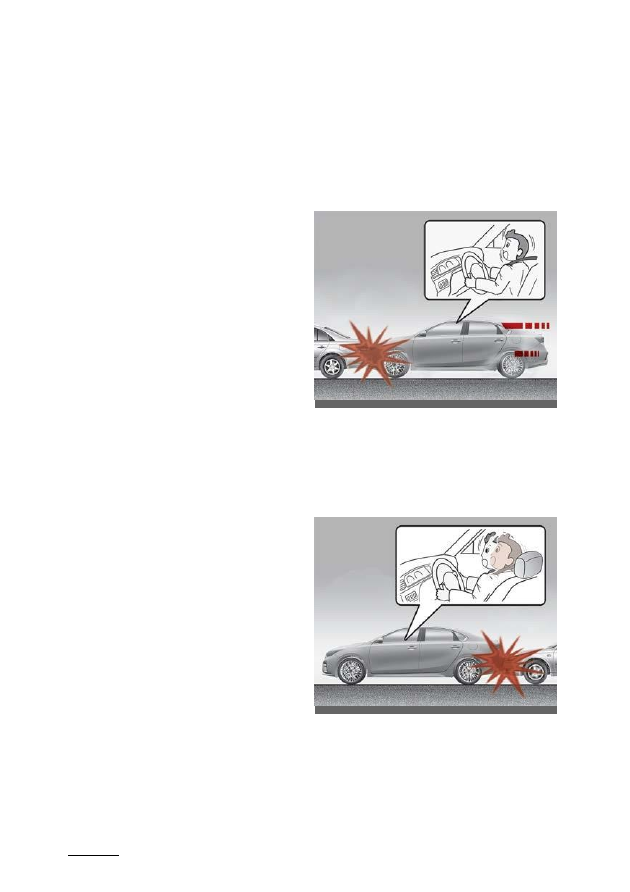
• In certain low-speed collisions the air 

bags may not deploy. The air bags are 
designed not to deploy in such cases 
because they may not provide bene

-

fits beyond the protection of the seat 
belts in such collisions.

• Air bags are not designed to inflate in 

rear collisions, because occupants are 
moved backward by the force of the 
impact. In this case, inflated air bags 
would not provide any additional ben

-

efit.

OBDM031042L

OBDM031044L
53

3

3

Safety features of your vehicle

Air bag - advanced supplemental restraint system

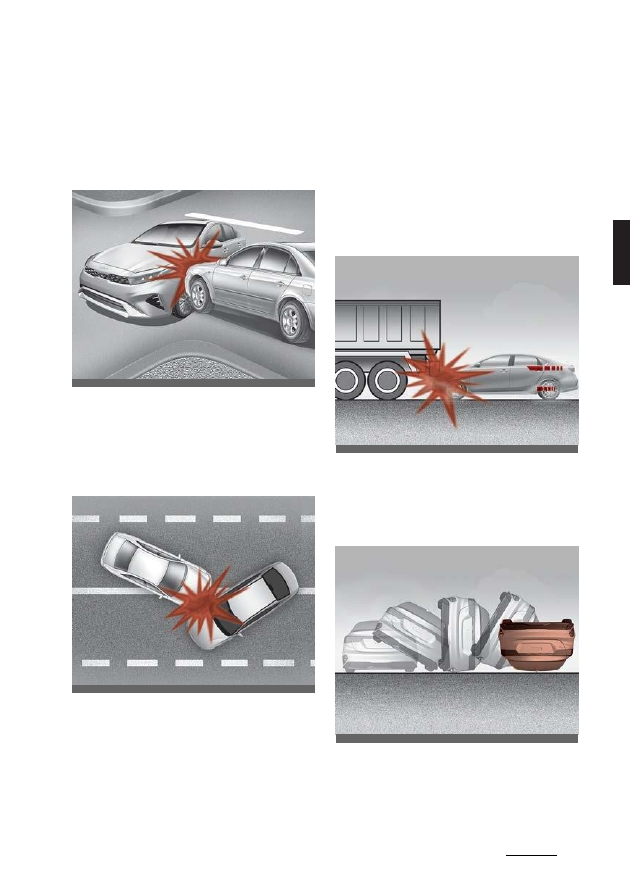
• Front air bags may not inflate in side 

impact collisions, because occupants 
move to the direction of the collision. In
side impacts, frontal air bag deploy

-

ment would not provide additional 
occupant protection.

• In an angled collision, the force of 

impact may direct the occupants in a
direction where the air bags would not 
be able to provide any additional ben

-

efit, and the sensors may not deploy 
any air bags.

• Just before an impact, drivers may 

brake heavily. Such heavy braking 
may lowers the front portion of the 
vehicle causing it to

“ride” under a

vehicle with a higher ground clear

-

ance. Air bags may not inflate in this 
“under-ride” situation because decel

-

eration forces that are detected by 
sensors may be significantly reduced 
by such

“under-ride” collisions.

• Front air bags may not inflate in all 

rollover accidents where the SRSCM 
indicates that the front air bag 
deployment would not provide addi

-

tional occupant protection.

OBDM031045L

OBD031203

OBDM031046L

OBD031052

Safety features of your vehicle

54

3

Air bag - advanced supplemental restraint system

• Air bags may not inflate if the vehicle 

collides with objects such as utility 
poles or trees, where the point of 
impact is concentrated to one area 
and the full force of the impact is not 
delivered to the sensors.

SRS Care

The SRS is virtually maintenance free 
and there are no parts you can safely 
service by yourself. If the SRS air bag 
warning light does not illuminate, or 
remains on, have your vehicle immedi

-

ately inspected by an authorized Kia 
dealer.

Any work on the SRS system, such as 
removing, installing, repairing, or any 
work on the steering wheel, the front 
passenger’s panel, front seats and roof 
rails must be performed by an autho

-

rized Kia dealer. Improper handling of 
the SRS system may result in serious 
personal injury.

For cleaning the air bag pad covers, use 
only a soft, dry cloth or one which has 
been moistened only with water. Sol

-

vents or cleaners could adversely affect 
the air bag covers and proper deploy

-

ment of the system.

If components of the air bag system must 
be discarded, or if the vehicle must be
scrapped, certain safety precautions

must be observed. An authorized Kia 
dealer knows these precautions and can 
provide necessary information. Failure to
follow these precautions could increase
the risk of personal injury.

W ARNING

Tampering with SRS
Do not tamper with or disconnect SRS 
wiring, or other components of the SRS 
system.

This could result in unintended inflation of
the air bags or render the SRS inoper

-

able.

W ARNING

Towing Vehicle
Always have the ignition switch or 
ENGINE START/STOP button in the
OFF position when your vehicle is being 
towed. The side air bags may inflate if 
the vehicle is tilted because of the roll

-

over sensors in the vehicle.

OBDM031049L

55

3

3

Safety features of your vehicle

Air bag - advanced supplemental restraint system

Adding equipment to or modify

-

ing

your air bag-equipped vehicle

If you modify your vehicle by changing 
your vehicle's frame, bumper system, 
front end or side sheet metal or ride 
height, this may affect the operation of 
your vehicle's air bag system.

Air bag warning label

Air bag warning labels, required by the
U.S. National Highway Traffic Safety
Administration (NHTSA, U.S. only), are 
attached to the sun visor to alert the 
driver and passengers of potential risks 
of the air bag system.

OBDM031067

Features of your vehicle

4

Keys .................................................................................................4-6

Key operations ..................................................................................................
4-6

Remote keyless entry.................................................................... 4-7

Remote keyless entry system operations ............................................. 4-7

Remote keyless entry precautions ........................................................... 4-9

Battery replacement ....................................................................................... 4-9

Smart key.......................................................................................4-11

Smart key functions ....................................................................................... 4-
11

Smart key precautions................................................................................. 4-
12

Immobilizer System ..................................................................... 4-14

Folding key immobilizer system.............................................................. 4-
14

Smart key immobilizer system................................................................. 4-
15

Theft-alarm system ..................................................................... 4-16

Door

locks..................................................................................... 4-18

Operating door locks from outside the vehicle ................................4-18

Operating door locks from inside the vehicle ................................... 4-19

Door lock/unlock features.......................................................................... 4-

21

Child-protector rear door lock.................................................................. 4-21

Rear Occupant Alert (ROA) system .......................................................4-
22

Safe Exit Warning (SEW) ............................................................4-23

Safe Exit Warning setting ...........................................................................4-
23

Safe Exit Warning operation .................................................................... 4-
24

Safe Exit Warning malfunction and limitations ................................4-25

Trunk ............................................................................................. 4-27

Opening the trunk .........................................................................................4-
27

Closing the trunk ............................................................................................4-27

Emergency trunk safety release .............................................................4-28

Smart Trunk..................................................................................4-29

4

Features of your vehicle

How to deactivate the Smart Trunk function using the smart 

key........................................................................................................................

4-

30

Detecting area ................................................................................................. 4-
31

Windows .......................................................................................4-32

Power

windows...............................................................................................4-

33

Power window lock button ........................................................................4-35

Remote window opening system ...........................................................4-36

Hood

..............................................................................................4-37

Opening the hood..........................................................................................4-
37

Hood open warning ......................................................................................4-
38

Closing the hood ............................................................................................4-
38

Fuel filler door............................................................................. 4-39

Opening the fuel filler door .......................................................................4-39

Closing the fuel filler door..........................................................................4-39

Sunroof..........................................................................................4-41

Sunshade...........................................................................................................4-
42

Tilt open/close .................................................................................................4-
42

Slide open/close .............................................................................................4-
43

Automatic reversal ........................................................................................4-
43

Resetting the sunroof.................................................................................. 4-
44

Sunroof open warning................................................................................ 4-
45

Steering wheel ............................................................................ 4-45

Motor Driven Power Steering (MDPS) ................................................. 4-
45

Tilt & telescopic steering wheel .............................................................. 4-46

Heated

steering

wheel.................................................................................4-

47

Horn

Features of your vehicle

4

Gauges................................................................................................................4-

53

Transmission Shift Indicator..................................................................... 4-

56

LCD display.................................................................................. 4-58

LCD Display Control..................................................................................... 4-
58

LCD display modes....................................................................................... 4-
58

Warning messages ....................................................................................... 4-
66

Trip Computer............................................................................. 4-69

Trip information (trip computer) ............................................................ 4-69

Warning and indicator lights ..................................................... 4-71

Warning lights.................................................................................................. 4-
71

Indicator lights .................................................................................................4-
76

Lighting........................................................................................ 4 - 80

Battery saver function.................................................................................4-
80

Headlight delay function ...........................................................................4-
80

Headlight welcome function ....................................................................4-80

Daytime Running Light (DRL)..................................................................4-
80

Lighting control ............................................................................................... 4-
81

Operating high beam ..................................................................................4-
82

Operating turn signals and lane change signals ............................ 4-83

Operating front fog light .......................................................................... 4-83

High Beam Assist (HBA)............................................................................. 4-
84

Wipers and washers ................................................................... 4-86

Operating windshield washers (front) ................................................. 4-87

Welcome system ......................................................................... 4-88

Interior lights............................................................................... 4-89

Map lamp.......................................................................................................... 4-
89

4

Features of your vehicle

Climate control system ...............................................................4-91

System

operation........................................................................................... 4-

91

Climate control air filter...............................................................................4-93

Air conditioning refrigerant label ........................................................... 4-94

Checking the amount of air conditioner refrigerant and

compressor lubricant................................................................................... 4-
94

Manual climate control system ................................................. 4-95

Heating and air conditioning ....................................................................4-96

Automatic climate control system .......................................... 4-100

Heating and air conditioning automatically.....................................4-101

Heating and air conditioning manually............................................. 4-102

Windshield defrosting and defogging....................................4-107

Defogging inside windshield with manual climate control

system .............................................................................................................. 4-
107

Defrosting outside windshield with manual climate control

system .............................................................................................................. 4-
107

Defogging inside windshield with automatic climate 
control...............................................................................................................

4-

108

Defrosting outside windshield with automatic climate 
control...............................................................................................................

4-

108

Auto defogging system (only for automatic climate control system, if

equipped).................................................................................................... 4-108

Sunroof inside air recirculation............................................................. 4-109

Automatic Air Ventilation.......................................................................... 4-
110

Activate upon Washer Fluid Use ........................................................... 4-
110

Recirculation Mode Plus ............................................................................ 4-
111

Defroster ........................................................................................................... 4-
111

Storage compartments ............................................................. 4-112

Center console storage ..............................................................................4-

Features of your vehicle

4

Interior features......................................................................... 4-114

Cup holder....................................................................................................... 4-
114

Seat warmer ................................................................................................... 4-
115

Air ventilation seat ....................................................................................... 4-
116

Sun visor........................................................................................................... 4-
117

USB charger ................................................................................................... 4-
117

Power outlet ................................................................................................... 4-
118

Wireless smart phone charging system............................................. 4-119

Coat hook ........................................................................................................ 4-

121

Infotainment system ................................................................. 4-122

Antenna ............................................................................................................ 4-
122

USB

port ........................................................................................................... 4-

122

How vehicle radio works...........................................................................4-
123

Declaration of Conformity ....................................................... 4-125

FCC.....................................................................................................................4-
125

Features of your vehicle

6

4

Keys

Features of your vehicle

Keys

Record your key number

The key code number 
is stamped on the key 
code tag attached to 
the key set. If you lose

your keys, this number will enable an 
authorized Kia dealer to duplicate the 
keys easily. Remove the key code tag 
and store it in a safe place. Also, record 
the key code number and keep it in a
safe and handy place, but not in the 
vehicle.

W ARNING

Aftermarket keys
Use only Kia original parts for the igni

-

tion key in your vehicle. If an aftermarket 
key is used, the ignition switch may not 
return to ON after START. The starter 
will continue to operate causing possible 
fire due to excessive current in the wir

-

ing.

Key operations

Folding key

To unfold the key, press the release but

-

ton. The key will unfold automatically.

Folding key

To fold the key, fold the key manually 
while pressing the release button.

CAUTION

Key button operation
Do not fold the key without pressing the 
release button. This may damage the 
key.

ODL3A041654

7

4

4

Features of your vehicle

Remote keyless entry

Smart key

To remove the mechanical key, press 
and hold the release button (1) and 
remove the mechanical key (2).

Smart key

To reinstall the mechanical key, put the 
key into the hole and push it until a click 
sound is heard.

W ARNING

Ignition key (Smart key)
Never leave the keys in your vehicle with 
unsupervised children. Leaving children 
unattended in a vehicle with a manual 
ignition key or a smart key is dangerous.

Children copy adults and they could 
place the key in the ignition switch or 
press the start button. The key would 
enable children to operate power win

-

dows or other controls, or even make the 
vehicle move, which could result in seri

-

ous bodily injury or death.

Remote keyless entry (if 
equipped)

Using the remote keyless entry, you can 
lock and unlock the doors remotely.

Remote keyless entry system 
operations

Folding key

Smart key

– Type A

OSK3048400NR

ODL3A041655

OBDM041620L

Features of your vehicle

8

4

Remote keyless entry

Smart key - Type B

Lock (1)

All doors are locked if the lock button is 
pressed. If all doors are closed, the haz

-

ard warning lights will blink and the 
chime will sound once (for smart key) to 
indicate that all doors are locked.

If the lock button is pressed again within 
4 seconds, the hazard warning lights will 
blink and the chime will sound once to 
confirm that the door is locked.

However, if any door remains open, the 
hazard warning lights (and/or the chime) 
will not operate. If all doors are closed 
after the lock button is pressed, the haz

-

ard warning lights will blink once.

Unlock (2)

The driver's door is unlocked if the 
unlock button is pressed once. The haz

-

ard warning lights will blink twice and the
chime will sound twice (for smart key) to
indicate that the driver's door is 
unlocked.

All doors are unlocked if the unlock but

-

ton is pressed once more within 4 sec

-

onds. The hazard warning lights will 
blink (for smart key, the chime also 
sounds) twice again to indicate that all 
doors are unlocked. After pressing this

button, the doors will lock automatically 
unless you open any door within 30 sec

-

onds.

If you attempt to lock or unlock the door 
by pressing the door lock/unlock button 
in any of the following states, the door 
will not be locked or unlocked.
• When you want to lock or unlock the 

door in the ACC or ON state.

• When you want to lock a door in a car 

with one or more doors open.

You can activate or deactivate 2 Press 
Unlock setting function by selecting 
'User Settings (LCD display) or
Settings

→ Vehicle (Infotainment System screen)
→ Door →2 Press Unlock'.

Trunk open (3)

The trunk is opened if the button is 
pressed for more than 1 second.

Panic alarm (4)

The horn sounds and the hazard warn

-

ing lights blink for about 30 seconds if 
this button is pressed for more than 0.5 
seconds. To stop the horn and lights, 
press any button on the transmitter.

Remote start (5, if equipped)

You can start the vehicle using the 
remote start button (5) of the smart key. 
To start the vehicle remotely:
• Lock the doors by pressing the door

lock button (1) within 32 ft (10 m) of
the vehicle.

• Press the remote start button for over 2

seconds within 4 seconds after lock

-

ing the doors. The hazard warning will
blink.

Press the remote start button (5) once to
turn off the vehicle.

ODL3A041656

9

4

4

Features of your vehicle

Remote keyless entry

If no action for operating the vehicle is 
taken, the vehicle will be turned off 10 
minutes after starting the vehicle 
remotely.

Remote keyless entry precautions 

The remote keyless entry will not oper

-

ate if any of the following occurs:
• The ignition key is in the ignition 

switch. (if equipped)

• You exceed the operating distance 

limit. (about 32 ft [10 m].)

• The battery in the remote keyless 

entry is weak.

• Other vehicles or objects may be 

blocking the signal.

• The weather is extremely cold.
• The remote keyless entry is close to a

radio transmitter such as a radio sta

-

tion or an airport which can interfere 
with normal operation of the transmit

-

ter.

When the remote keyless entry does not 
work properly, open and close the door 
with the ignition key. If you have a prob

-

lem with the remote keyless entry, con

-

tact an authorized Kia dealer.
• If the remote keyless entry is near 

your mobile or smart phone, the sig

-

nal from the remote keyless entry 
could be blocked. This is especially 
important when the phone is active 
such as making calls, receiving calls, 
text messaging, and/or sending/ 
receiving emails. Avoid placing the 
remote keyless entry and your phone 
in the same pants or jacket pocket 
and maintain adequate distance 
between the two devices.

CAUTION

Keep the transmitter away from water or 
other liquid as it can be damaged and 
not function properly.

NOTICE

If the keyless entry system is inoperable
from exposure to water or liquids, it will
not be covered by your warranty.

Battery replacement

A battery should last for several years, 
but if the remote keyless entry is not 
working properly, try replacing the bat

-

tery with a new one.

If you are unsure how to use or replace 
the battery, contact an authorized Kia 
dealer.

1. Remove the mechanical key. (for 

smart key)

2. Insert a slim tool into the slot and gen

-

tly pry open the folding key or smart 
key cover.

3. Replace the battery with a new bat

-

tery (CR2032). When replacing the 
battery, make sure the battery posi

-

tion is correct.

4. Install the battery in the reverse order 

of removal.

OSK3048402NR

Features of your vehicle

10

4

Remote keyless entry

W ARNING

THIS PRODUCT CONTAINS A
BUTTON BATTERY

If swallowed, a lithium button battery can
cause severe or fatal injuries within 2
hours.Keep batteries out of reach of 
children.

If you think batteries may have been 
swallowed or placed inside any part of 
the body, seek immediate medical atten

-

tion.

The remote keyless entry is designed to 
give you years of trouble-free use, how

-

ever it can malfunction if exposed to 
moisture or static electricity. If you are 
unsure how to use or replace the bat

-

tery, contact an authorized Kia dealer.

Using the wrong battery can cause the 
remote keyless entry to malfunction. Be 
sure to use the correct battery.

An inappropriately disposed 
battery can be harmful to the 
environment and human 
health. Dispose the battery

according to your local laws or regula

-

tions.

CAUTION

Remote keyless entry damage
The remote keyless entry can malfunc

-

tion if dropped, exposed to moisture, 
static electricity, heat or direct sunlight.

This device complies with Part 15
of the FCC rules.

Operation is subject to the following two
conditions:

1. This device may not cause harmful

interference, and

2. This device must accept any interfer

-

ence received, including interference
that may cause undesired operation.

NOTICE

Changes or modifications not expressly 
approved by the party responsible for 
compliance could void the user's author

-

ity to operate the equipment. If the key

-

less entry system is inoperative due to 
changes or modifications not expressly 
approved by the party responsible for 
compliance, it will not be covered by
your manufacturer's vehicle warranty.

11

4

4

Features of your vehicle

Smart key

Smart key (if equipped)

Type A

Type B

With a smart key, you can lock or unlock
a door and even start the engine without
inserting the key.

The functions of buttons on a smart key
are similar to the folding key.

Refer to "Remote keyless entry (if
equipped)" on page 4-7.

Smart key functions

Carrying the smart key, you may lock 
and unlock the vehicle doors and trunk, 
and start the engine.

Locking

Pressing the button of the front driver 
side door handles with all doors (and 
trunk) closed and any door unlocked, 
locks all the doors (and trunk). If all doors,
trunk and hood are closed, the hazard
warning lights will blink once and the
chime will sound once to indicate the 
vehicle is locked.

The button will only operate when the 
smart key is within 28~40 inches (0.7~1 
m) from the driver side door handle. To 
make sure that a door has locked, you 
should pull the driver side door handle.

Even though you press the driver side 
door handle buttons, the doors will not 
lock and the chime will sound for 3 sec

-

onds if any of following occur:
• The smart key is in the vehicle.
• The ENGINE START/STOP button is

in the ACC or ON position.

• Any door except the trunk is open.

OBDM041620

ODL3A041657

OBD041033

Features of your vehicle

12

4

Smart key

Unlocking

Pressing the button of the front outside 
door handle, with all doors (and trunk) 
closed and locked, unlocks all the doors 
(and trunk), if the 2 Press Unlock func

-

tion is deactivated.

The button will only operate when the 
smart key is within 28~40 inches (0.7~1 
m) from the outside door handle.

When the 2 Press Unlock function is acti

-

vated:
• If you press the Door Unlock button on

the smart key, the driver's door will 
unlock.

• If you press the Door Unlock button 

on the smart key within four seconds 
again, all the doors will unlock.

• If you press the driver's outside door 

handle button, the driver's door will 
unlock.

• If you press the driver's outside door 

handle button within four seconds 
again, all the doors will unlock.

You can activate or deactivate 2 Press 
Unlock setting function by selecting 
'User Settings (LCD display) or
Settings
→ Vehicle (Infotainment System screen)
→ Door →2 Press Unlock'.

Trunk unlocking

If you are within 28~40 inches (0.7~1 m) 
from the outside trunk handle, with your 
smart key in possession, the trunk will 
unlock and open when you press the 
trunk handle switch.

The hazard warning lights will blink 
twice to indicate that the trunk is 
unlocked.

Also, once the trunk is opened and then 
closed, the trunk will lock automatically.

Start-up

You can start the engine without insert

-

ing the key.

For detailed information refer to
"ENGINE START/STOP button
(if equipped)" on page 5-9.

NOTICE

Loss of the smart key
A maximum of 2 smart keys can be reg

-

istered to a single vehicle.

If you lose your smart key, you will not 
be able to start the vehicle. You should 
immediately take the vehicle and 
remaining key to your authorized Kia 
dealer (tow the vehicle, if necessary) to 
protect it from potential theft.

Smart key precautions

The smart key may not work if any of 
the following occur:
• The smart key is close to a radio 

transmitter such as a radio station or 
an airport which can interfere with 
normal operation of the smart key.

• The smart key is near a mobile two-

way radio system or a mobile phone.

• Another vehicle's smart key is being 

operated close to your vehicle.

When the smart key does not work cor

-

rectly, open and close the door with the 
mechanical key and contact an autho

-

rized Kia dealer.

If the smart key is near your phone, the 
signal from the smart key could be 
blocked by normal operation of your 
phone. This is especially important when 
the phone is active, such as when mak

-

ing calls, receiving calls, text messaging, 
and/or sending/receiving emails. Avoid 
placing the smart key and your phone in 
the same pants or jacket pocket and

13

4

4

Features of your vehicle

Smart key

maintain adequate distance between the 
two devices.

CAUTION

Transmitter
Keep the transmitter away from water or
any liquid, as it can be damaged and not
function properly.

NOTICE

If the keyless entry system is inoperable
from exposure to water or other liquids, it
will not be covered by your warranty.

NOTICE

To prevent the electronic key from 
becoming damaged by magnetic fields, 
do not leave it near the following electri

-

cal appliances:
• TVs
• Personal computers
• Mobile phones, cordless phones and 

battery chargers

• Table lamps
• Induction cookers

NOTICE

If you must leave the vehicle's key with a
parking attendant, remove the mechani

-

cal key for your own use and provide the
attendant with the electronic key only.

NOTICE

When bringing a smart key onto an air

-

plane, make sure you do not press any 
button on the key while inside the cabin. 
If you are carrying the key in your bag 
etc., make sure that the buttons cannot 
be pressed accidentally. If you press a
button, the key may emit radio waves

that could interfere with the operation of 
the aircraft.

This device complies with Part 15
of the FCC rules.

Operation is subject to the following two
conditions:

1. This device may not cause harmful

interference, and

2. This device must accept any interfer

-

ence received, including interference
that may cause undesired operation.

NOTICE

Changes or modifications not expressly 
approved by the party responsible for 
compliance could void the user's author

-

ity to operate the equipment. If the key

-

less entry system is inoperative due to 
changes or modifications not expressly 
approved by the party responsible for 
compliance, it will not be covered by your
manufacturer's vehicle warranty.

Features of your vehicle

14

4

Immobilizer System

Immobilizer System

Folding key immobilizer system

Your vehicle may be equipped with an 
electronic engine immobilizer system to 
reduce the risk of unauthorized vehicle 
use.

Your immobilizer system is comprised of a
small transponder in the ignition key and
electronic devices inside the vehicle.

With the immobilizer system, when you 
insert your ignition key into the ignition 
switch and turn it to ON, it checks and 
verifies that the ignition key is valid.

If the key is determined to be valid, the 
engine will start.

If the key is determined to be invalid, the 
engine will not start.

To deactivate the immobilizer 
system:

Insert the ignition key into the key cylin

-

der and turn it to the ON.

To activate the immobilizer sys

-

tem:

Turn the ignition key to the OFF position. 
The immobilizer system activates auto

-

matically. Without a valid ignition key for 
your vehicle, the engine will not start.

NOTICE

When starting the engine, do not use the 
key with other immobilizer keys around. 
The engine may not start or may stop 
soon after it starts.

Keep each key separated to avoid a
starting malfunction.

NOTICE

In order to prevent theft of your vehicle, 
do not leave spare keys anywhere in 
your vehicle. Your immobilizer password 
is a customer unique password and 
should be kept confidential. Do not leave 
this number anywhere in your vehicle.

Do not put metal accessories near the 
ignition switch.

Metal accessories may interrupt the 
transponder signal and may prevent the 
engine from being started.

NOTICE

If you need additional keys or lose your 
keys, consult an authorized Kia dealer.

CAUTION

Immobilizer damage
Do not expose your immobilizer system 
to moisture, static electricity or rough 
handling. This may damage your immo

-

bilizer.

CAUTION

Immobilizer alterations
Do not alter or adjust the immobilizer 
system because it could cause the 
immobilizer system to malfunction.

15

4

4

Features of your vehicle

Immobilizer System

This device complies with Part 15
of the FCC rules.

Operation is subject to the following two
conditions:

1. This device may not cause harmful

interference.

2. This device must accept any interfer

-

ence received, including interference
that may cause undesired operation.

NOTICE

Changes or modifications not expressly 
approved by the party responsible for 
compliance could void the user's author

-

ity to operate the equipment.

If the keyless entry system is inoperative 
due to changes or modifications not 
expressly approved by the party respon

-

sible for compliance, it will not be cov

-

ered by your manufacturer's vehicle 
warranty.

Smart key immobilizer system

The immobilizer system protects your 
vehicle from theft. If an improperly 
coded key (or other device) is used, the 
vehicle's power system is disabled.

When the ENGINE START/STOP
button is placed in the ON position, the
immobi

-

lizer system indicator should

come on briefly, then go off. If the
indicator starts to blink, the system does
not recognize the coding of the key.

Place the ENGINE START/STOP
button in the OFF position, then place
the ENGINE START/STOP button in
the ON position again.

If the system repeatedly does not recog

-

nize the coding of the key, contact an 
authorized Kia dealer.

Do not attempt to alter this system or 
add other devices to it. Electrical prob

-

lems could result that may make your 
vehicle inoperable.

NOTICE

When starting the vehicle, do not use the 
key with other immobilizer keys nearby. 
The vehicle may not start or may stop 
soon after it starts. Keep each key sepa

-

rated in order to avoid a starting mal

-

function.

NOTICE

If you need additional keys or lose your 
keys, contact an authorized Kia dealer.

This device complies with Part 15
of the FCC rules.

Operation is subject to the following two
conditions:

1. This device may not cause harmful

interference, and

2. This device must accept any interfer

-

ence received, including interference
that may cause undesired operation.

NOTICE

Changes or modifications not expressly 
approved by the party responsible for 
compliance could void the user's author

-

ity to operate the equipment. If the smart
key is inoperative due to changes or
modifications not expressly approved by
the party responsible for compliance, it
will not be covered by your manufac

-

turer's vehicle warranty.

Features of your vehicle

16

4

Theft-alarm system

Theft-alarm system (if 
equipped)

This system is designed to provide pro

-

tection from unauthorized entry into the 
vehicle.

This system is operated in three stages: 
the first is the "Armed" stage, the second 
is the "Theft-alarm" stage, and the third 
is the "Disarmed" stage. If triggered, the 
system provides an audible alarm with 
blinking of the hazard warning lights.

CAUTION

Do not attempt to alter this system or 
add other devices to it.

Armed stage

Using the smart key

Park the vehicle and stop the engine. 
Arm the system as described below.

1. Turn off the engine.
2. Make sure that all doors, the hood 

and trunk are closed and latched.

3. Lock the doors by pressing the button 

of the front outside door handle with 
the smart key in your possession. 
After completion of the steps above, 
the hazard warning lights will operate 
once to indicate that the system is

armed. If any door (or trunk) or hood 
remains open, the hazard warning 
lights and the chime will not operate 
and the theft-alarm will not arm. If all 
doors and trunk and hood are closed 
after the lock button is pressed, the 
hazard warning lights blink once. The 
system can also be armed by locking 
the doors with the key from the front 
doors. The hazard warning lights will 
not blink using this method.

4. Lock the doors by pressing the lock 

button on the smart key. After com

-

pletion of the steps above, the hazard 
warning lights will operate once to 
indicate that the system is armed.

Using the folding key

Park the vehicle and stop the engine.
Arm the system as described below.

1. Turn off the engine and remove the

ignition key from the ignition switch.

2. Make sure that all doors (and trunk)

and the engine hood are closed and
latched.

3. Lock the doors by pressing the lock

button on the folding key.

After completion of the steps above, the 
hazard warning lights will blink once to 
indicate that the system is armed.

If any door (and trunk) or engine hood 
remains open, the hazard warning lights 
won't operate, and theft-alarm will not 
arm. When all doors (and trunk) and 
hood are closed, the hazard warning 
lights blink once.

NOTICE

The theft-alarm system can be deacti

-

vated by an authorized Kia dealer.

17

4

4

Features of your vehicle

Theft-alarm system

NOTICE

Do not arm the system until all passen

-

gers have exited the vehicle. If the sys

-

tem is armed while a passenger remains 
in the vehicle, the alarm may be acti

-

vated when the remaining passenger 
exits the vehicle. If any door (or trunk) or 
hood is opened within 30 seconds after 
the system is in the armed stage, the 
system will be disarmed to prevent an 
unnecessary alarm.

Theft-alarm stage

The alarm will be activated if any of the 
following occurs while the system is 
armed.
• A front or rear door is opened without 

using the smart key.

• The trunk is opened without using the 

smart key.

• The hood is opened.
The horn will sound and the hazard 
warning lights will blink continuously for 
approximately 27 seconds, and the horn 
will sound 3 times unless the system is 
disarmed. To turn off the system, unlock 
the doors with the folding key or smart 
key.

Disarmed stage

The system will disarm when:

Folding key

• The door unlock button is pressed.

The engine is started within 3 sec

-

onds.

• The ignition switch is in the "ON" posi

-

tion for 30 seconds or more.

Smart key

• The door unlock button is pressed.
• The button of the front outside door is 

pressed while carrying the smart key.

• The engine is started within 3 sec

-

onds.

After pressing the unlock button, the 
hazard warning lights will blink and the 
chime will sound twice (in smart key) to 
indicate that the system is disarmed.

After pressing the unlock button, if any
door (or trunk) is not opened within 30
seconds, the system will be rearmed.

NOTICE

• Avoid trying to start the engine while 

the alarm is activated. The starting 
motor is disabled during the theft-
alarm stage.

If the system is not disarmed with the 
folding key, insert the key into the 
ignition switch (if equipped), turn the 
ignition switch to the ON position and 
wait for 30 seconds. The system will 
disarm.

• If you lose your keys, consult your 

authorized Kia dealer.

CAUTION

Adjusting alarm system
Do not alter or adjust the theft alarm 
system in your vehicle. Improper instal

-

lation of the alarm system could damage 
the vehicle or cause the system to mal

-

function.

NOTICE

Malfunctions caused by improper 
adjustments or modifications to the 
theft-alarm system are not covered by 
your warranty.

Features of your vehicle

18

4

Door locks

Door locks

Know how to use the door lock so that 
you can lock or unlock the door if neces

-

sary.

Operating door locks from out

-

side the vehicle

Mechanical key

To remove the cover :

1. Pull out the door handle.
2. Press the lever (1) located inside the 

bottom part of the cover with a key or 
flat-head screwdriver.

3. Push out the cover (2) while pressing 

the lever.

• Turn the key toward the rear of the 

vehicle to unlock and toward the front 
of the vehicle to lock.

• If you Lock (A)/Unlock (B) the doors

with a key, a driver's doors will lock/
unlock.

• Once the doors are unlocked, they 

may be opened by pulling the door 
handle.

• When closing a door, push the door 

by hand. Make sure the doors are 
closed securely.

Folding key/Smart key

• Door can be locked and unlocked with

the folding key/smart key.

• Door can be locked and unlocked

pressing the button of the outside
door handle with the smart key in
your possession.

• Once the doors are unlocked, they 

may be opened by pulling the door 
handle.

• When closing a door, push the door 

by hand. Make sure that doors are 
closed securely.

NOTICE

• When removing the cover, be careful 

not to scratch or lose the cover.

• When the key cover freezes and does 

not open, lightly tap or indirectly warm
(hand temperature, etc.) it.

• Do not apply excessive force to the 

door and door handle. It may be dam

-

aged.

• If the door is locked/unlocked multiple 

times in rapid succession with either 
the vehicle key or door lock switch, the
system may stop operating tem

-

porarily in order to protect the circuit 
and prevent damage to system com

-

ponents.

W ARNING

• Securely close your door before you 

begin driving. Failure to fully close 
your door may cause it to be opened 
during vehicle operation.

• Keep your body out of the way of the 

closing door to prevent injuries.

OBD041034L

19

4

4

Features of your vehicle

Door locks

W ARNING

If people must spend a longer time in the 
vehicle while it is very hot or cold out

-

side, there is risk of injuries or danger to 
life. Do not lock the vehicle from the out

-

side when there are people in it.

NOTICE

Always place the ignition key or ENGINE 
START/STOP button in the OFF
position, engage the parking brake,
close all win

-

dows, and lock all doors

when leaving your vehicle unattended.

Operating door locks from inside 
the vehicle

You can operate door locks with the 
door lock handle or central door lock/ 
unlock switch.

With the door handle

• To unlock a door, push the door lock 

button (1) to the

“Unlock” position. The 

red mark on the handle will be visible.

• To lock a door, push the door lock 

button (1) to the

“Lock” position. If the 

door is locked properly, the red mark 
on the door handle will not be visible.

• To open a door, pull the door handle

(2) outward.

• If the inner door handle of either front 

door is pulled with the door in the lock 
position, the button will unlock and the
door will open.

• Front doors cannot be locked if the

ignition key is in the ignition switch
and any front door is opened.

• Doors cannot be locked if the smart 

key is in the vehicle and a door is 
open.

If a power door lock fails to function while
you are in the vehicle, try one or more of
the following techniques to exit:
• Operate the door unlock feature 

repeatedly (both electronic and man

-

ual) while simultaneously pulling on 
the door handle.

• Operate the other door locks and han

-

dles, front and rear.

• Lower a front window and use the key 

to unlock the door from outside.

W ARNING

Do not pull the inner door handle of
either front door while the vehicle is
moving.

OBDM041036

Features of your vehicle

20

4

Door locks

With central door lock/unlock 
switch

Driver side

Passenger side

1. Door Lock

2. Door Unlock
Operate by pressing the central door 
lock/unlock switch.
• Press the switch to the "Lock" position 

(1), all vehicle doors will lock.

• Press the switch to the "Unlock" posi

-

tion (2), all vehicle doors will unlock.

• If the key is in the ignition switch (or if 

the smart key is in the vehicle) and 
any front door is opened, the doors will
not lock when the "Lock" position
(1) of the central door lock/unlock 
switch is pressed.

W ARNING

Doors
• The doors should always be fully 

closed and locked while the vehicle is 
in motion to prevent accidental open

-

ing of the door.

• Be careful when opening doors and 

watch out for vehicles, motorcycles, 
bicycles or pedestrians approaching 
the vehicle in the path of the door. 
Opening a door when something is 
approaching can result in an accident 
and cause vehicle damage or serious 
injury.

W ARNING

Unlocked vehicles
Leaving your vehicle unlocked can 
increase the risk of vehicle theft or any 
possible criminal harm caused by some

-

one hiding in your vehicle while you are 
gone. Always remove the ignition key, 
engage the parking brake, close all win

-

dows and lock all doors when leaving 
your vehicle unattended.

W ARNING

Unattended children, the elderly or
pets

An enclosed vehicle can become 
extremely hot, causing death or severe 
injury such as heatstroke to unattended 
children, the elderly or pets who cannot 
escape the vehicle. When left or trapped 
in a hot vehicle, make sure to stay 
hydrated and avoid sun exposure 
through the

vehicle’s windshield. Fur

-

thermore, children might operate fea

-

tures of the vehicle that could injure 
them, or they could encounter other 
harm, possibly from someone gaining 
entry to the vehicle. NEVER leave chil

-

OBDM041037

OBD041406L

21

4

4

Features of your vehicle

Door locks

dren, the elderly or pets unattended in 
your vehicle.

Door lock/unlock features

The vehicle is equipped with door lock/
unlock features for the safety and con

-

venience of passengers.

Impact sensing door unlock sys

-

tem

All doors will automatically unlock when 
an impact causes the air bags to deploy.

NOTICE

You can activate or deactivate some 
Automatic door lock/unlock features by 
selecting 'User Settings (LCD display) or 
Settings

→ Vehicle (Infotainment System 

screen)

→ Door → Automatically Lock/ 

Automatically Unlock'.

Child-protector rear door lock

The child safety lock is provided to help 
prevent children from accidentally open

-

ing the rear doors from inside the vehi

-

cle.The rear door safety locks should be 
used whenever children are in the vehi

-

cle.

1. Open the rear door.

2. Insert a key (or screwdriver) into the

hole (1) and turn it to the lock (

)

position. When the child safety lock is
in the lock position, the rear door will
not open even though the inner door
handle is pulled.

3. Close the rear door.
To open the rear door, pull the outside 
door handle (2).

Even though the doors may be 
unlocked, the rear door will not open by 
pulling the inner door handle until the rear
door child safety lock is unlocked.

W ARNING

Rear door locks
If children accidentally open the rear 
doors while the vehicle is in motion, they 
could fall out and be severely injured or 
killed. To prevent children from opening 
the rear doors from the inside, the rear 
door safety locks should be used when

-

ever children are in the vehicle.

OBDM041516L

Features of your vehicle

22

4

Door locks

Rear Occupant Alert (ROA) sys

-

tem

The Rear Occupant Alert (ROA)
system is provided to help prevent
exiting the vehicle with a rear passenger
left in the vehicle.
• When you open the front door after 

opening and closing the rear door and 
turning off the engine, the

“Check rear 

seats” warning message appears on 
the cluster.

You can activate or deactivate the Rear 
Occupant Alert by selecting 'User Set

-

tings (LCD display) or Settings

Vehicle (Infotainment System screen)

Conve

-

nience

→ Rear Occupant Alert'.

W ARNING

The Rear Occupant Alert (ROA) system 
does not detect objects or people in the 
rear seat. By using a rear door opened 
and closed history, the system informs 
the driver that there may be something 
in the rear seat.

CAUTION

The Rear Occupant Alert (ROA) system 
uses a rear door opened and closed his

-

tory.

The history is reset after the driver turns 
off the ignition normally, exits the vehi

-

cle and locks the door remotely using 
the remote keyless entry. Even if a rear 
door does not reopen, the ROA system 
alert can occur.

For example, after the ROA system alert 
occurs, if the driver does not lock the 
door, and drives again, the alert can 
occur.

OBD041654N

23

4

4

Features of your vehicle

Safe Exit Warning (SEW)

Safe Exit Warning (SEW) (if 
equipped)

After the vehicle stops, when an 
approaching vehicle from the rear area 
is detected after a passenger opens the 
door, Safe Exit Warning will warn the 
driver with a warning message and an 
audible warning to help prevent a colli

-

sion.

CAUTION

Warning timing may vary depending on 
the speed of the approaching vehicle.

Detecting sensor

[1] : Rear corner radar

Refer to the picture above for the 
detailed location of the detecting sen

-

sors.

NOTICE

For more details on the precautions of 
the rear corner radars, refer to "Blind-
Spot Collision-Avoidance Assist (BCA)
(if equipped)" on page 6-41.

Safe Exit Warning setting 

Safe Exit Warning

With the ignition switch or the ENGINE 
START/STOP button in the ON
position, and select 'User Settings (LCD
display) or Settings

→ Vehicle

(Infotainment Sys

-

tem screen)

→ Driver

Assistance

→ Blind-Spot Safety → Safe

Exit Warning' to turn on Safe Exit
Warning and dese

-

lect to turn off the

function.

W ARNING

The driver should always be aware of his 
or her surroundings. If 'Safe Exit Warn

-

ing' is deselected, the function cannot 
assist you.

ODL3A052057

OBDM052367N

OBD041260L

Features of your vehicle

24

4

Safe Exit Warning (SEW)

NOTICE

If the engine is restarted, Safe Exit Warn

-

ing will maintain the last setting.

Warning Volume

With the ignition switch or ENGINE 
START/STOP button in the ON position, 
and select 'User Settings (LCD display)
or Settings

→ Vehicle (Infotainment Sys

-

tem screen)

→ Driver Assistance →

Warning Volume' to change the Warning 
Volume to 'High', 'Medium' or 'Low' for 
Safe Exit Warning.

If you change the Warning Volume, the 
Warning Volume of other Driver Assis

-

tance systems may change.

CAUTION

The setting of the Warning Volume
applies to all functions of Safe Exit
Warning.

Safe Exit Warning operation 

Warning

Collision warning when exiting 
vehicle

• When an approaching vehicle from 

the rear is detected at the moment a
door is opened, the 'Watch for traffic' 
warning message will appear on the 
cluster, the warning light will illumi

-

nate on the outside rear view mirror 
and an audible warning will sound.

• Safe Exit Warning will warn the driver 

when your vehicle speed is below 
2mph (3km/h), and the speed of the 
approaching vehicle from the rear is 
above 4 mph (6 km/h).

OBD041619L

OBDM041669

OBD041261L

25

4

4

Features of your vehicle

Safe Exit Warning (SEW)

W ARNING

Take the following precautions when 
using Safe Exit Warning:
• For your safety, change the Settings 

after parking the vehicle at a safe 
location.

• If any other function's warning mes

-

sage is displayed or audible warning
is generated, Safe Exit Warning mes

-

sage may not be displayed and audi

-

ble warning may not be generated.

• You may not hear the warning sound 

of Safe Exit Warning if the surround

-

ing is noisy.

• Safe Exit Warning does not operate in

all situations or cannot prevent all col

-

lisions.

• Safe Exit Warning may warn the

driver late or may not warn the driver 
depending on the road and driving 
conditions. Always check vehicle sur

-

roundings.

• The driver and passengers are 

responsible for accidents that occur 
while exiting the vehicle. Always check 
the surroundings before you exit the 
vehicle.

NOTICE

After the engine is turned off, Safe Exit 
Warning operates approximately for 3
minutes, but turns off immediately if the 
doors are locked.

Safe Exit Warning malfunction 
and limitations

Safe Exit Warning malfunction

When Safe Exit Warning is not working 
properly, the

‘Check Blind-Spot Safety 

system’ warning message will appear on 
the cluster for several seconds, and the 
master (

) warning light will illuminate 

on the cluster. In this case, have the
vehicle inspected by an authorized Kia 
dealer.

When the outside rear view mirror warn

-

ing light is not working properly, the 
‘Check side view mirror warning light’ 
warning message will appear on the 
cluster for several seconds, and the

master (

) warning light will appear on

OBD041239L

OBD041240L

Features of your vehicle

26

4

Safe Exit Warning (SEW)

the cluster. In this case, have the vehicle 
inspected by an authorized Kia dealer.

Safe Exit Warning disabled

When the rear bumper around the rear 
corner radar or sensor is covered with 
foreign matters, such as snow or rain, or 
installing a trailer or carrier, it can reduce 
the detecting performance and tempo

-

rarily limit or disable Safe Exit Warning. If 
this occurs, the

‘Blind-Spot Safety sys

-

tem disabled. Radar

blocked’ warning 

message will appear on the cluster.Safe 
Exit Warning will operate properly when 
such foreign matters or trailer, etc., is 
removed, and then the engine is 
restarted.

If Safe Exit Warning does not operate 
properly after it is removed, have the 
vehicle inspected by an authorized Kia 
dealer.

W ARNING

• Even though the warning message 

does not appear on the cluster, Safe 
Exit Warning may not properly oper

-

ate.

• Safe Exit Warning may not properly 

operate in an area (for example, open 
terrain) where any objects are not 
detected right after the engine is 
turned on, or when the detecting sen

-

sor is blocked with foreign matters 
right after the engine is turned on.

CAUTION

Turn off Safe Exit Warning to install or 
remove a trailer, carrier, or another 
attachment. Turn on Safe Exit Warning 
when finished.

Limitations of Safe Exit Warning

Safety Exit Warning may not operate 
properly, or the function may operate 
unexpectedly under the following cir

-

cumstances:
• Getting out of the vehicle where trees 

or grass are overgrown

• Getting out of the vehicle where the 

road is wet.

• The approaching vehicle is very fast 

or very slow.

CAUTION

For more details on the limitations of the 
rear corner radar, refer to "Blind-Spot 
Collision-Avoidance Assist (BCA) (if
equipped)" on page 6-41.

W ARNING

• Safety Exit Warning may not operate 

properly if interfered with by strong 
electromagnetic waves.

• Safety Exit Warning may not operate 

for 3 seconds after the vehicle is 
started, or the rear corner radars are 
initialized.

OBD041262L

27

4

4

Features of your vehicle

Trunk

Trunk

Opening the trunk

1. Make sure the shift lever is in P (Park) 

(for Dual Clutch Transmission/ Intelli

-

gent Variable Transmission) or first 
gear or R (Reverse) (for Manual 
Transmission) and set the parking 
brake.

Type A/Type B/Type C

2. Do one of the following :

• Press the Folding key or Smart Key

Trunk Unlock button for more than
one second.

• Press the button on the trunk itself

with the Smart Key in your posses

-

sion.

• Use the mechanical key. (if

equipped with key hole)

• To open the trunk from inside the 

vehicle, pull the trunk release lever.

Once the trunk is opened and then 
closed, the trunk locks automatically.

W ARNING

The trunk swings upward. Make sure no
objects or people are near the rear of the
vehicle when opening the trunk.

CAUTION

Make certain that you close the trunk 
before driving your vehicle. Possible 
damage may occur to the attached 
hardware if the trunk is not closed prior 
to driving.

NOTICE

In cold and wet climates, trunk lock and
trunk mechanisms may not work prop

-

erly due to freezing conditions.

Closing the trunk

Lower the trunk lid and press down until it
locks. To be sure the trunk lid is securely
fastened, always check by try

-

ing to pull

it up again.

NOTICE

If the trunk is closed with the smart key 
in it, the chime will sound for approxi

-

mately 5 seconds.

W ARNING

Exhaust Fumes
The trunk lid should always be kept 
completely closed while the vehicle is in 
motion. If it is left open or ajar, poison

-

ous exhaust gases may enter the car 
and serious illness or death may result.

OBDM041039L

OBD041040


Content      ..     1      2      3      4      ..