FANUC Series 30i/300i/300is-MODEL A. Machining Center System. User's manual - page 217
12.SETTING AND DISPLAYING DATA
OPERATION
B-63944EN/03
- 1692 -
12.3.26.2
Password modification (15-inch display unit)
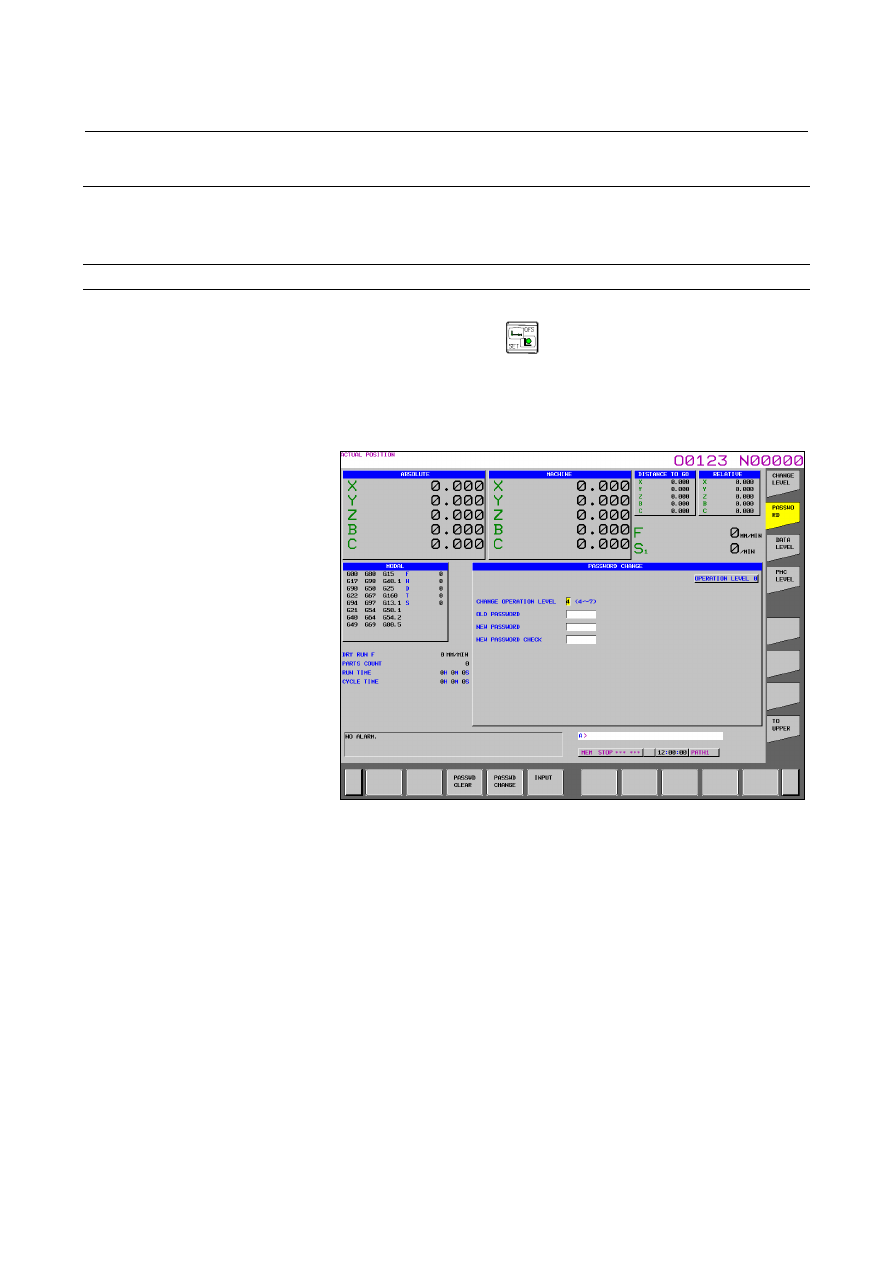
The current operation level is displayed.
The password for each of operation levels 4 to 7 can be modified.
Displaying and setting the password modification screen
Procedure
1
Press function key
.
2
Press vertical soft key [NEXT PAGE] several times to display
soft key [PROTECT].
3
Press vertical soft key [PROTECT].
4
Press vertical soft key [PASSWORD].
The PASSWORD CHANGE screen shown below is displayed.
Fig. 12.3.26.2 (a) PASSWORD CHANGE screen (15-inch)
5
Key in an operation level whose password is to be modified, then
press horizontal soft key [INPUT].
6 Key in the current password for the operation level whose
password is to be modified, then press horizontal soft key
[INPUT].
7
Key in a new password, then press horizontal soft key [INPUT].
8 Key in the new password again for confirmation, then press
horizontal soft key [INPUT].
9
Press horizontal soft key [PASSWD CHANGE].
10 To clear the password, press horizontal soft key [PASSWD
CLEAR].