FANUC Series 30i/300i/300is-MODEL A. Machining Center System. User's manual - page 207
 

  Index      Manuals     FANUC Series 30i/300i/300is-MODEL A. Machining Center System. User's manual (B-63944EN/03)


Search            copyright infringement  


Content      ..     205      206      207      208     ..


FANUC Series 30i/300i/300is-MODEL A. Machining Center System. User's manual - page 207


12.SETTING AND DISPLAYING DATA

 OPERATION 

B-63944EN/03


- 1612 - 

12.3.10 

Displaying and Switching the Display Language 

 
The language used for display can be switched to another language. 
A display language can be set using a parameter. However, by 
modifying the setting of the display language on this screen, the 
display language can be switched without turning off then on the 
power. 
 

Displaying and setting the display language 

Procedure 

Press function key 

Press the continuous menu key 

 several times. 

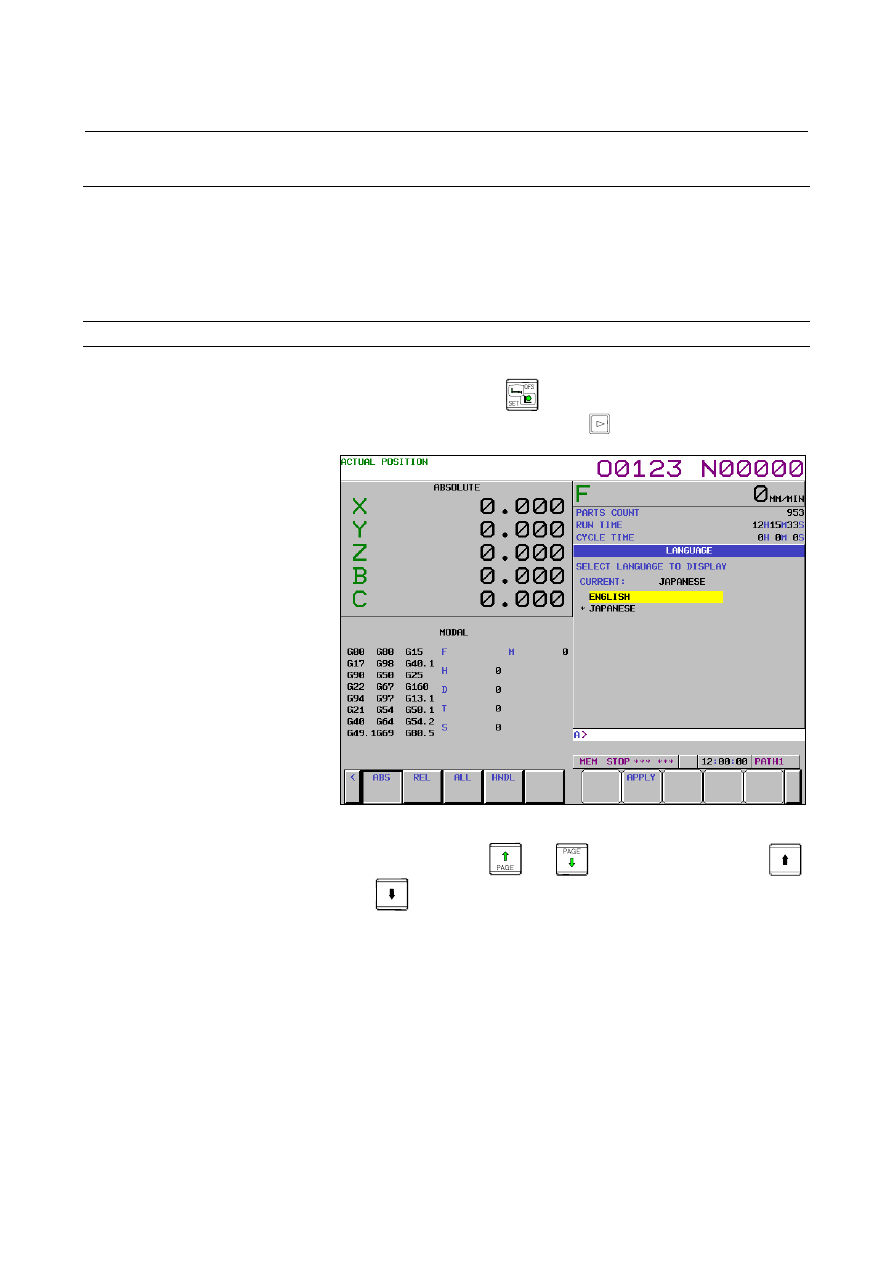
Press soft key [LANGUAGE] to display the language screen. 


Fig. 12.3.10 (a) LANGUAGE screen (10.4-inch) 

 
4  Press page key 

 or 

, then press cursor keys 

  to move the cursor to a desired display language. 

5  Press operation soft key [APPLY]. The display language is 

switched to the selected language. The language specified on this 
screen continues to be used if the power is turned off then back 
on. 


B-63944EN/03

 OPERATION 

12.SETTING AND DISPLAYING DATA


- 1613 - 

Explanation 
 - Language switching 

The language screen can be displayed if bit 0 (NLC) of parameter No. 
3280 is set to 0. 

 - Selectable languages 

The display languages selectable on this screen are as follows: 
1. English 
2. Japanese 
3. German 
4. French 
5. Chinese 

(Traditional) 

6. Chinese 

(Simplified) 

7. Italian 
8. Korean 
9. Spanish 
10. Dutch 
11. Danish 
12. Portuguese 
13. Polish 
14. Hungarian 
15. Swedish 
16. Czech 
17. Russian 
18. Turkish 
Among the languages listed above, English and other usable 
languages are displayed on the screen as a list of switchable 
languages.  
 

Limitation 
  - Language parameter modification on the parameter screen 

Which language to use for display is specified with parameter No. 
3281. This parameter can be modified using the parameter screen as 
well. However, if a modification is made on the parameter screen, the 
new setting is not reflected until “APPLY” operation is performed on 
the language screen or the power is turned on again. If an invalid 
value is set in parameter No. 3281 on the parameter screen, the screen 
is displayed in English after the power is turned on again. 

12.SETTING AND DISPLAYING DATA

 OPERATION 

B-63944EN/03


- 1614 - 

12.3.11 

Protection of Data at Eight Levels 

 
You can set eight CNC and PMC operation levels and one of eight 
protection levels for each type of CNC and PMC data. 
When an attempt is made to change CNC and PMC data or output it to 
an external unit, the operation level is compared with the protection 
level to determine whether to allow the change or external output. 
 

12.3.11.1 

Operation level setting 

 
You can set eight CNC and PMC operation levels. 
 

Displaying and setting the operation level setting screen 

Procedure 

Press function key 

Press the continuous menu key 

  several times until soft key 

[PROTECT] is displayed. 

Press soft key [PROTECT].   
The operation level setting screen shown below is displayed. 


Fig. 12.3.11.1 (a) Operation level setting screen (10.4-inch) 


Key in the password for an operation level to be set/modified, 
then press soft key [INPUT PASSWD]. 

5  To return the operation level to 0, 1, 2, or 3, press soft key 

[CANCEL PASSWD]. 


B-63944EN/03

 OPERATION 

12.SETTING AND DISPLAYING DATA


- 1615 - 

Explanation 
  - Operation level setting 

To select operation level 0 to 3, use the corresponding memory 
protection key signal. 
To select operation level 4 to 7, use the corresponding password. 

Table 12.3.11.1 (a) Operation level setting 

Operation level

Setting 

Sample grouping 

7 (high) 

Password 

6 Password 

MTB 

Password 

Dealer and integrator 

4 Password 

End 

user 

Memory protection key signal 

User level (level 1) 

Memory protection key signal 

User level (level 2) 

Memory protection key signal 

User level (level 3) 

0 (low) 

Memory protection key signal 

User level (level 4) 


When operation level 4 to 7 is set, the operation level remains 
unchanged until the password is cleared. 
(The operation level also remains unchanged if the power is turned 
off.) 
Operation level 7 is reserved for CNC and PMC maintenance. 


NOTE 


When a password is being entered, an asterisk (*) 
is displayed instead of each entered character. 


12.SETTING AND DISPLAYING DATA

 OPERATION 

B-63944EN/03


- 1616 - 

12.3.11.2 

Password modification 

 
The current operation level is displayed. 
The password for each of operation levels 4 to 7 can be modified. 


Displaying and setting the password modification screen 

Procedure 

Press function key 

Press the continuous menu key 

  several times until soft key 

[PROTECT] is displayed. 

Press soft key [PROTECT].   

Press soft key [PASSWORD].   
The PASSWORD CHANGE screen shown below is displayed. 


Fig. 12.3.11.2 (a) PASSWORD CHANGE screen (10.4-inch) 


Key in an operation level whose password is to be modified, then 
press soft key [INPUT]. 

6  Key in the current password for the operation level whose 

password is to be modified, then press soft key [INPUT]. 

Key in a new password, then press soft key [INPUT]. 

Key in the new password again for confirmation, then press soft 
key [INPUT]. 

Press soft key [PASSWDCHANGE]. 

10  To clear the password, press soft key [PASSWDCLEAR]. 
 

B-63944EN/03

 OPERATION 

12.SETTING AND DISPLAYING DATA


- 1617 - 

Explanation 

Up to eight characters (only uppercase alphabetic characters and 
numeric characters) can be input. 
 

NOTE 

1  For a password, consisting of three to eight 

characters, the following characters are available: 

  Uppercase alphabetic characters 

 Numeric characters 

2  When a password is being entered, an asterisk (*) 

is displayed instead of each entered character. 

3  Whether a password can be changed at the current 

operation level is determined as follows: 

  Password of an operation level higher than the 

current operation level 

  Cannot be changed. 

  Password of the current operation level 

  Can be changed. 

  Password of an operation level lower than the 

current operation level 

  Can be changed (only to the initial password). 

4  The set password is not displayed. 
 

Be careful not to forget the password. 


12.SETTING AND DISPLAYING DATA

 OPERATION 

B-63944EN/03


- 1618 - 

12.3.11.3 

Protection level setting 

 
The current operation level is displayed. 
The change protection level and output protection level of each data 
item are displayed. 
The change protection level and output protection level of each data 
item can be changed. 
 

Confirmation based on protection level setting 

Procedure 

Press function key 

Press the continuous menu key 

  several times until soft key 

[PROTECT] is displayed. 

Press soft key [PROTECT].   

Press soft key [DATA LEVEL] to change the protection level of 
CNC data or press soft key [PMC LEVEL] to change the 
protection level of PMC data. 

The following protection level change screen is displayed. 


Fig. 12.3.11.3 (a) Protection level change screen (10.4-inch) 


Move the cursor to the change level or output level of a desired 
data item.   

Key in a new desired level, then press soft key [INPUT]. 


NOTE 


When the protection level of PMC data is set, soft 
key [SWITCH PMC] is used to switch between 
PMC paths to be set, for multipath PMC. 


B-63944EN/03

 OPERATION 

12.SETTING AND DISPLAYING DATA


- 1619 - 

Explanation 

When the protection level of a data item is higher than the current 
operation level, the protection level of the data item cannot be 
changed. 
The protection level of a data item cannot be changed to a protection 
level higher than the current operation level. 
For each of the following types of data, you can set a data protection 
level. There are the following two types of data protection levels: 


Change protection level 

Sets the protection level used when data is changed. 


Output protection level 

Sets the protection level used when data is output (punched out) to an 

external unit.   

As a protection level, you can set a value of 0 (low) to 7 (high). 


Table 12.3.11.3 (a) Protection level of each type of data 

Initial protection level

Type of data 

Change Output 

Custom macro variable data <CUSTOM MACRO> 
(including variable data dedicated to the macro executor) 

0 0 

Periodical maintenance data <PERIODICAL MAINTENANCE DATA> 

0 0 

Tool management data <TOOL LIFE TIME DATA> 

0 0 

Tool offset data <TOOL OFFSET DATA> 
(For each type when tool geometry compensation and tool wear compensation 
are treated differently) 

0 0 

Clock data <TIME> 

0 0 

Workpiece origin shift amount data <WORK ZERO SHIFT> 

0 0 

Workpiece origin offset data <WORK ZERO OFFSET> 

0 0 

Ethernet setting data <ETHER NET SETTING> 

Fixture offset data <FIXTURE OFFSET DATA> 

Parameter data <PARAMETER DATA> 

4 0 

Settings <SETTING DATA> 

0 0 

Pitch error compensation data <PITCH ERROR DATA> 
(including three-dimensional error compensation data) 

4 0 

Parameter data for Power Mate CNC manager function 
<PARAMETER DATA FOR POWER MATE CNC MANAGER> 

0 0 

Each part program <PROGRAMS FOR EACH PARTS> 

0 0 

Part program editing operation <CHANGE PROGRAMS FOR EACH PARTS> 

0 0 

Absolute coordinate preset operation <PRESET OF ABSOLUTE AXIS DATA> 

0 0 


Table 12.3.11.3 (b) Protection level of PMC data 

Initial protection level

Type of data 

Change Output 

Composition parameter 

Setting (online) 

Setting (each path) 

Sequence program 

PMC parameter 

Timer 

0 0 

Counter 

0 0 

Keep relay 

0 0 

Keep relay (system) 

Data table 

0 0 

Data table control 

PMC momory 


Content      ..     205      206      207      208     ..