FANUC Series 30i/300i/300is-MODEL A. Machining Center System. User's manual - page 175
 

  Index      Manuals     FANUC Series 30i/300i/300is-MODEL A. Machining Center System. User's manual (B-63944EN/03)


Search            copyright infringement  


Content      ..     173      174      175      176     ..


FANUC Series 30i/300i/300is-MODEL A. Machining Center System. User's manual - page 175


10.EDITING PROGRAMS

 OPERATION 

B-63944EN/03


- 1356 - 

10.2.5 

Deleting a Word 


Procedure for deleting a word 


Search for or scan a word to be deleted. 

2 Press 

the 

 key. 


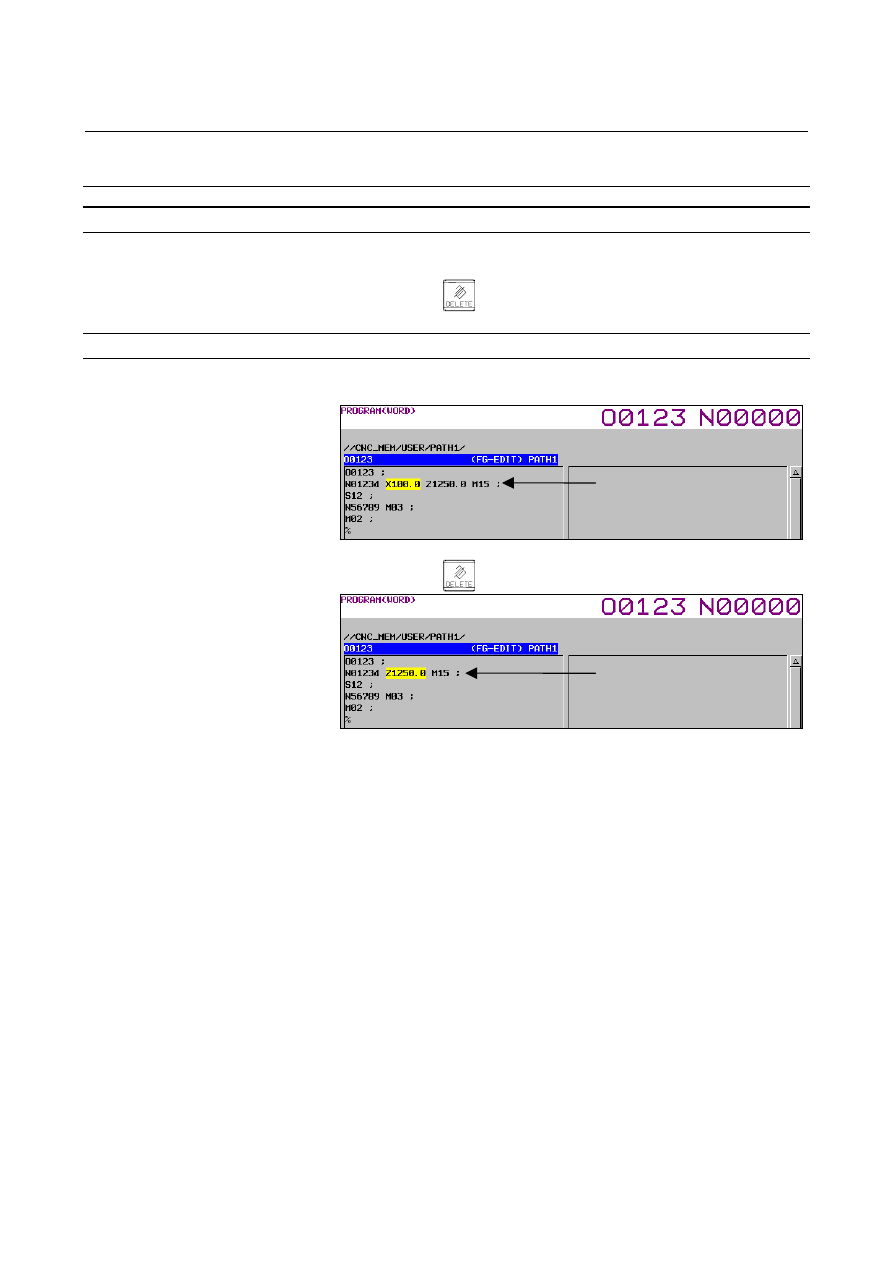
Example of deleting X100.0 


Search for or scan X100.0. 


2 Press 

the 

 key. 


X100.0 is searched 
for/scanned. 

X100.0 is deleted. 

B-63944EN/03

 OPERATION 

10.EDITING PROGRAMS


- 1357 - 

10.3 

DELETING BLOCKS 

 
A block or blocks can be deleted in a program. 
 

10.3.1 

Deleting a Block 

 
The portion from the current word position to the next EOB is deleted.   
The cursor is then placed in the word next to the deleted EOB. 
 

Procedure for deleting a block 

Search for or scan address N for a block to be deleted. 

2 Press 

the 


 key.


Press the editing key 

.


Example of deleting a block of N01234 

Search for or scan N01234. 


2 Press 

the 


 key.


Press the editing key 

.


N01234 is searched 
for/scanned. 

Block containing N01234 
has been deleted. 

10.EDITING PROGRAMS

 OPERATION 

B-63944EN/03


- 1358 - 

10.3.2 

Deleting Multiple Blocks 

 
The several blocks in the forward direction from the current word 
position up to the EOB of the farthest of those blocks are deleted.  
The cursor is then placed in the word next to the deleted EOB. 
 

Procedure for deleting blocks 

Search for or scan a word in the first block of a portion to be 
deleted. 

2 Press 

the 


  key as many times as the number of blocks that 

you want to delete. 

Press the editing key 

.


Example of deleting blocks from N01234 to the EOB of a block which is two blocks 
ahead 

Search for or scan N01234. 


2 Press 


Press the editing key 

.


N01234 is searched 
for/scanned. 

Blocks from N01234 
to the EOB of a block 
which is two blocks 
ahead are deleted. 

B-63944EN/03

 OPERATION 

10.EDITING PROGRAMS


- 1359 - 

10.4 

PROGRAM SEARCH 

 
When memory holds multiple programs, a program can be searched 
for.    There are four methods as follows. 
 

Procedure for program search 

Method 1 

1  Select EDIT or MEMORY mode. 


2  Press function key 

  to display the program screen. 


3  Enter a program number or program name.  When entering a 

program number, press address key 


then type the program 

number. 


4  Press soft key [PROGRM SEARCH]. Alternatively, press the cursor 

key 

 or 


5  Upon completion of search operation, the program number searched 

for is displayed in the upper-right corner of the screen 


  If the program is not found , alarm PS0071 occurs. 

Method 2 

1  Select EDIT or MEMORY mode. 


2  Press function key 

  to display the program screen. 


3  Press soft key [PROGRM SEARCH]. 


4  Then, press soft key [PREV PROGRM] or [NEXT PROGRM]. 

Pressing [PREV PROGRM] searches for the previous program on the 
folder, and pressing [NEXT PROGRM] searches for the next program. 

Method 

This method searches for the program number (0001 to 0031) 
corresponding to a signal on the machine tool side to start automatic 
operation. Refer to the relevant manual prepared by the machine tool 
builder for detailed information on operation. 


1  Select MEMORY mode. 


2  Set the reset state. 


The reset state is the state where the LED for indicating that 
automatic operation is in progress is off. (Refer to the relevant 
manual of the machine tool builder.) 


3  Set the program number selection signal on the machine tool side to a 

number from 01 to 31. 


4  Press the cycle start button. 


When the signal on the machine tool side represents 00, program 
number search operation is not performed. 


If the program corresponding to a signal on the machine tool side 
is not registered, alarm DS0059 is raised. 


10.EDITING PROGRAMS

 OPERATION 

B-63944EN/03


- 1360 - 

Method 4 

When bit 4 (PGS) of parameter No. 11308 is 1, search for an O number 
program by specifying digits only. 


1  Select EDIT or MEMORY mode. 


2  Press function key 

  to display the program screen. 


3  Enter the digits of a program number. Address key 


  need not be 

pressed before the digits. 


4  Press soft key [PROGRM SEARCH]. Alternatively, press the cursor 

key 

 or 


Example 


When bit 4 (PGS) of parameter No. 11308 is 1 

 Specify 

"1000" 

 Search for program O1000. 

 Specify 

"ABC" 

 Search for program ABC. 


When bit 4 (PGS) of parameter No. 11308 is 0 

 Specify 

"1000" 

 Search for program 1000. 

 Specify 

"ABC" 

 Search for program ABC. 

 
When bit 4 (PGS) of parameter No. 11308 is 1, it is not possible to 
search for a program with any name consisting of digits only. 
 

B-63944EN/03

 OPERATION 

10.EDITING PROGRAMS


- 1361 - 

10.5 

SEQUENCE NUMBER SEARCH 

 
Sequence number search operation is usually used to search for a 
sequence number in the middle of a program so that execution can be 
started or restarted at the block of the sequence number.   
 
Example) 
 

Sequence number 02346 in a program (O0002) is searched for. 

PROGRAM
O0001 ;
N01234 X100.0 Z100.0 ;

S12 ;

    :

O0002 ;

N02345 X20.0 Z20.0 ;

N02346 X10.0 Z10.0 ;

    :

O0003 ;

    :

Selected program

Target sequence

number is found.

This section is searched
starting at the beginning.
(Search operation is
performed only within a

program.)


Procedure for sequence number search 

Procedure 

Select MEMORY mode. 

Press function key 

If the program contains a sequence number to be searched for, 
perform the operations 4 to 7 below.   


If the program does not contain a sequence number to be 
searched for, select the program number of the program that 
contains the sequence number to be searched for. 

Press address key 

Key in a sequence number to be searched for. 

Press soft key [N SRH]. 

7  Upon completion of search operation, the sequence number 

searched for is displayed in the upper-right corner of the screen. 


If the specified sequence number is not found in the program 
currently selected, alarm PS0060 occurs. 


10.EDITING PROGRAMS

 OPERATION 

B-63944EN/03


- 1362 - 

Explanation 
  - Operation during Search 

Those blocks that are skipped do not affect the CNC. This means that 
the data in the skipped blocks such as coordinates and M, S, and T 
codes does not alter the CNC coordinates and modal values. 
So, in the first block where execution is to be started or restarted by 
using a sequence number search command, be sure to enter required 
M, S, and T codes and coordinates. A block searched for by sequence 
number search usually represents a point of shifting from one process 
to another. When a block in the middle of a process must be searched 
for to restart execution at the block, specify M, S, and T codes, G 
codes, coordinates, and so forth as required from the MDI after closely 
checking the machine tool and NC states at that point. 
 

  - Checking during search 

During search operation, the following checks are made: 


Optional block skip 


Limitation 
  - Searching in sub-program 

During sequence number search operation, M98Pxxxx (subprogram 
call) is not executed. So an alarm PS0060 is raised if an attempt is 
made to search for a sequence number in a subprogram called by the 
program currently selected. 

O1234

        :
        :

M98 P5678 ;

        :

        :

Main program

Subprogram

O5678

        :

N88888

        :

M99 ;

        :

If an attempt is made to search for N8888 in the example above, an alarm occurs.

Fig. 10.5 (a)


B-63944EN/03

 OPERATION 

10.EDITING PROGRAMS


- 1363 - 

10.6 

DELETING PROGRAMS 

 
Programs registered in memory can be deleted, either one program by 
one program or all at once. 
 

10.6.1 

Deleting One Program 

 
A single program in the folder containing the program currently being 
edited can be deleted. 
 

Procedure for deleting one program 


Select the EDIT mode. 

Press function key 

  to display the program screen. 

Press address key 


Key in a desired program number. 

5  Press the editing key 

. The program with the entered 

program number is deleted. 


10.6.2 

Deleting All Programs 

 
All programs in the folder containing the program currently being 
edited can be deleted. 
 

Procedure for deleting all programs 


Select the EDIT mode. 

Press function key 

  to display the program screen. 

Press address key 


Key in -9999. 

Press editing key 

  to delete all programs. 


Content      ..     173      174      175      176     ..