FANUC Series 30i/300i/300is-MODEL A. Machining Center System. User's manual - page 174
 

  Index      Manuals     FANUC Series 30i/300i/300is-MODEL A. Machining Center System. User's manual (B-63944EN/03)


Search            copyright infringement  


Content      ..     172      173      174      175     ..


FANUC Series 30i/300i/300is-MODEL A. Machining Center System. User's manual - page 174


10.EDITING PROGRAMS

 OPERATION 

B-63944EN/03


- 1348 - 

10 

EDITING PROGRAMS 

 
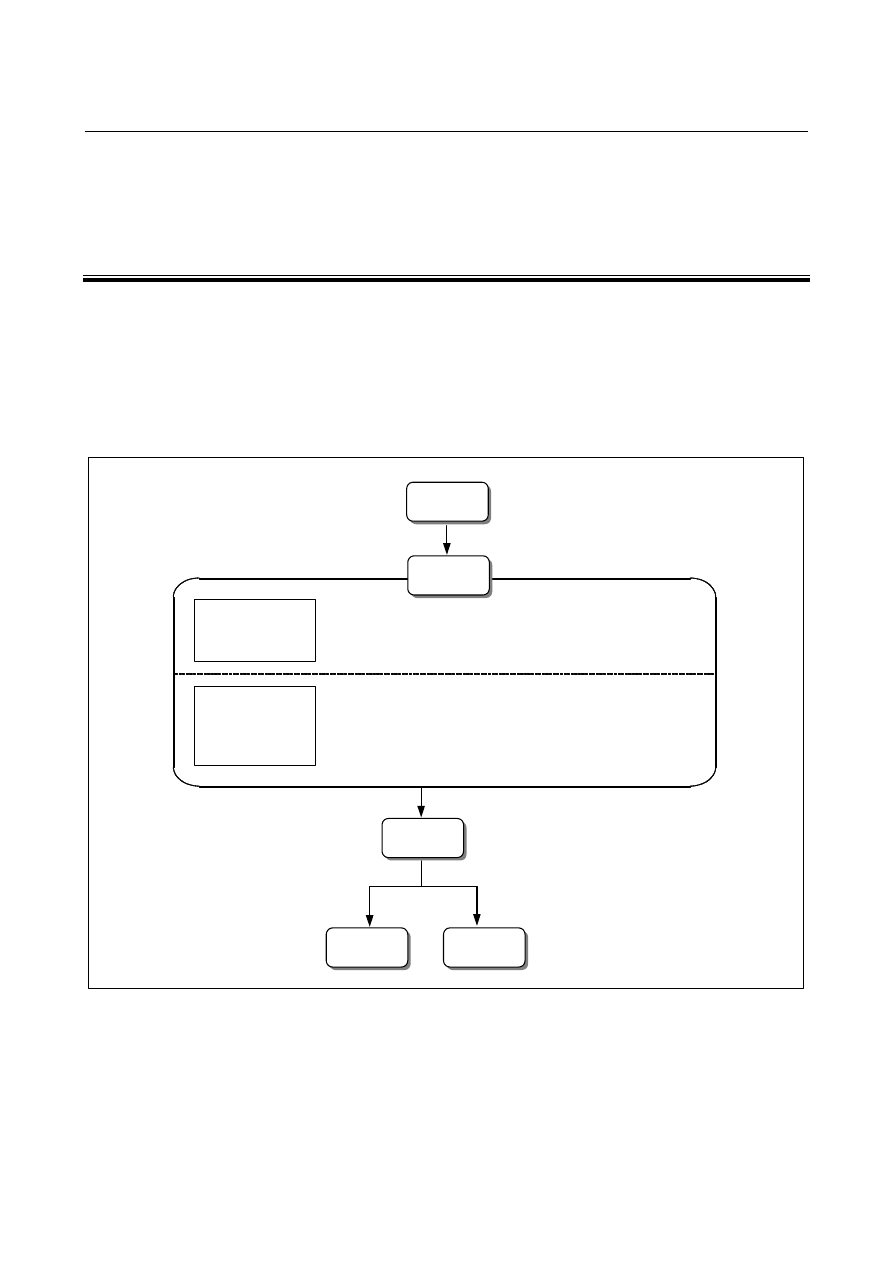
This chapter describes how to edit programs registered in the CNC. 
Editing includes the insertion, modification, and deletion of words. 
Editing also includes deletion of the entire program and automatic 
insertion of sequence numbers. In addition, PC-like program text copy 
and move operations are possible. This chapter also describes program 
search, sequence number search, word search, and address search, 
which are performed before editing the program. 
 

1) Program search .............................................................. See III-10.4.
2) Sequence number search ............................................... See III-10.5.
3) Word search................................................................. See III-10.2.1.
4) Address search ............................................................ See III-10.2.1.

1) Inserting, altering, and deleting a word ...........See III-10.2.3 to 10.2.5.
2) Deleting blocks................................................................ See III-10.3.
3) Deleting programs..........................................................  See III-10.6.
4) Editing characters ........................................................... See III-10.9.

Search for part of
program to be
edited

Inserting, altering,
and deleting
programs

Management

Execution

Output

Creation and
registration

Editing


B-63944EN/03

 OPERATION 

10.EDITING PROGRAMS


- 1349 - 

10.1 

EDIT DISABLE ATTRIBUTE 

 
Before a program can be edited, the edit disable attribute must be 
removed. 
The edit disable attribute can be set for each program and folder. 
Programs with the edit disable attribute and programs in folders with 
the edit disable attribute cannot be edited. 
 

Procedure for removing the edit disable attribute 


Select EDIT mode. 

Press the function key 

Press the chapter selection soft key [FOLDER]. 

Press the soft key [DETAIL ON]. 

Move the cursor to the program or folder from which you want to 
remove the edit disable attribute. 

Press the soft key [CHANGE ATTR]. 

Press the soft key [EDIT ENABLE]. 

Press the soft key [END]. 


CAUTION 

1  After completing editing, set the edit disable 

attribute as necessary. 

2  To set the edit disable attribute, follow the same 

procedure as for removing the attribute. 
In the step 7, press the soft key [EDIT DISABL]. 


10.EDITING PROGRAMS

 OPERATION 

B-63944EN/03


- 1350 - 

10.2 

INSERTING, ALTERING AND DELETING A WORD 

 
This section outlines the procedure for inserting, altering, and deleting 
a word in a program registered in memory. 


Procedure for inserting, altering and deleting a word 


Select EDIT mode. 

Press the function key 

Select a program to be edited. 


If a program to be edited is selected, perform the operation 4. 


If a program to be edited is not selected, search for the program 
number. 

Move the cursor to the position to be edited, with one of the 
methods below. 

 Scan 

method 


Word search method 


Address search method 

For each method, refer to III-10.2.1. 

Perform an operation such as altering, inserting, or deleting a 
word. 


Explanation 
  - Concept of word and editing unit 

A word is an address followed by a number.    With a custom macro, 
the concept of word is ambiguous. 
So the editing unit is considered here. 
The editing unit is a unit subject to alteration or deletion in one 
operation. In one scan operation, the cursor indicates the start of an 
editing unit. 
An insertion is made after an editing unit. 
Definition of editing unit   


Program portion from an address to immediately before the next 
address  


An address is an alphabet, IF, WHILE, GOTO, END, DO=, or ;   
(EOB). 

According to this definition, a word is an editing unit. 
The word "word," when used in the description of editing, means an 
editing unit according to the precise definition. 


 WARNING 


When a change, insertion, or deletion was performed on data of 
a program by pausing machining with the single block stop, feed 
hold, or other operations during execution of a program, be sure 
to return the cursor to the original position before restarting the 
program.    To execute the program with the cursor positioned at 
another position, be sure to make a reset. 


Otherwise, the program may not be executed as expected from 
the program shown on the screen after machining restarts. 

B-63944EN/03

 OPERATION 

10.EDITING PROGRAMS


- 1351 - 

10.2.1 

Word Search 

 
A word can be searched for by merely moving the cursor through the 
text (scanning), by word search, or by address search. 
 

Procedure for scanning a program 


Press the cursor key 


The cursor moves forward word by word; the cursor is displayed 
at a selected word. 

Press the cursor key 


The cursor moves backward word by word; the cursor is 
displayed at a selected word. 


Example:  Scanning Z1250.0 


3  Holding down the cursor key 

 or 

 scans  words 

continuously. 

The first word of the next block is searched for when the cursor 
key 

 is pressed. 

The first word of the previous block is searched for when the 
cursor key 

 is pressed. 

Holding down the cursor key 

 or 

  moves the cursor 

to the head of a block continuously. 

Pressing the page key 

  displays the next page and searches 

for the first word of the page. 

8  Pressing the page key 

 displays the previous page and 

searches for the first word of the page. 

Holding down the page key 

 or 

 displays one page 

after another. 

10.EDITING PROGRAMS

 OPERATION 

B-63944EN/03


- 1352 - 

Procedure for searching a word 

 
Example of searching for S12 


Press soft key [SEARCH]. 

Key in address 

S

3 Key 

in 

1

2


S12 cannot be searched for if only S1 is keyed in. 


S09 cannot be searched for by keying in only S9. 


To search for S09, be sure to key in S09. 

Pressing soft key [

 SEARCH] starts searching forward from the 

cursor position. Pressing [

 SEARCH] starts searching 

backward. 

To search for the same word successively, press [

 SEARCH] or 

[

 SEARCH]. 


Procedure for searching an address 

 
Example of searching for M03 


Pressing the [SEARCH] key 

Key in address 

M

Pressing soft key [

 SEARCH] starts searching forward from the 

cursor position. Pressing [

 SEARCH] starts searching 

backward. 

To search for the same word successively, press [

 SEARCH] or 

[

 SEARCH]. 


N01234 is being searched 
for/scanned currently.


S12 is searched for. 

N01234 is being searched 
for/scanned currently. 
M03 is searched for. 

B-63944EN/03

 OPERATION 

10.EDITING PROGRAMS


- 1353 - 

10.2.2 

Heading a Program 

 
The cursor can be jumped to the top of a program. This function is 
called heading the program pointer. This section describes the four 
methods for heading the program pointer. 
 

Procedure for heading a program 

Method 1 

1  Press 

 key

 when the program screen is selected in EDIT mode. 

When the cursor has returned to the start of the program, the contents 
of the program are displayed from its start on the screen. 
 

Method 2 

1  Search for the program number. 

When the program screen is selected in MEMORY or EDIT mode, 
enter a program number or program name. 
When entering a program number, press address key 

O


then type 

the program number

.


2  Press soft key [PROGRM SEARCH]. 


Method 3 

1  Select the program screen or program check screen in MEMORY 

mode. 


2  Press soft key [(OPRT)]. 


3  Press soft key [REWIND]. 

 
Method 4 

1  Select the program screen in EDIT mode. 


2  Press soft key [(OPRT)]. 


3  Press soft key [LINE SEARCH]. 


4  Press soft key [TOP]. 

10.EDITING PROGRAMS

 OPERATION 

B-63944EN/03


- 1354 - 

10.2.3 

Inserting a Word 


Procedure for inserting a word 


Search for or scan the word immediately before a word to be 
inserted. 

Key in an address to be inserted. 

Key in data. 

4 Press 

the 

 key. 


Example of Inserting T15 

Search for or scan Z1250. 


2 Key 

in 

T

1

5

3 Press 

the 

 key. 


Z1250.0 is searched 
for/scanned. 

T15 is inserted. 

B-63944EN/03

 OPERATION 

10.EDITING PROGRAMS


- 1355 - 

10.2.4 

Altering a Word 


Procedure for altering a word 


Search for or scan a word to be altered. 

Key in an address to be inserted. 

Key in data. 

4 Press 

the 

 key. 


Example of changing T15 to M15 


Search for or scan T15. 


2 Key 

in 


M


1

5

3 Press 

the 

 key. 


T15 is searched 
for/scanned.


T15 is changed to M15. 


Content      ..     172      173      174      175     ..