FANUC Series 30i/300i/300is-MODEL A. Machining Center System. User's manual - page 172
 

  Index      Manuals     FANUC Series 30i/300i/300is-MODEL A. Machining Center System. User's manual (B-63944EN/03)


Search            copyright infringement  


Content      ..     170      171      172      173     ..


FANUC Series 30i/300i/300is-MODEL A. Machining Center System. User's manual - page 172


8.DATA INPUT/OUTPUT

 OPERATION 

B-63944EN/03


- 1332 - 

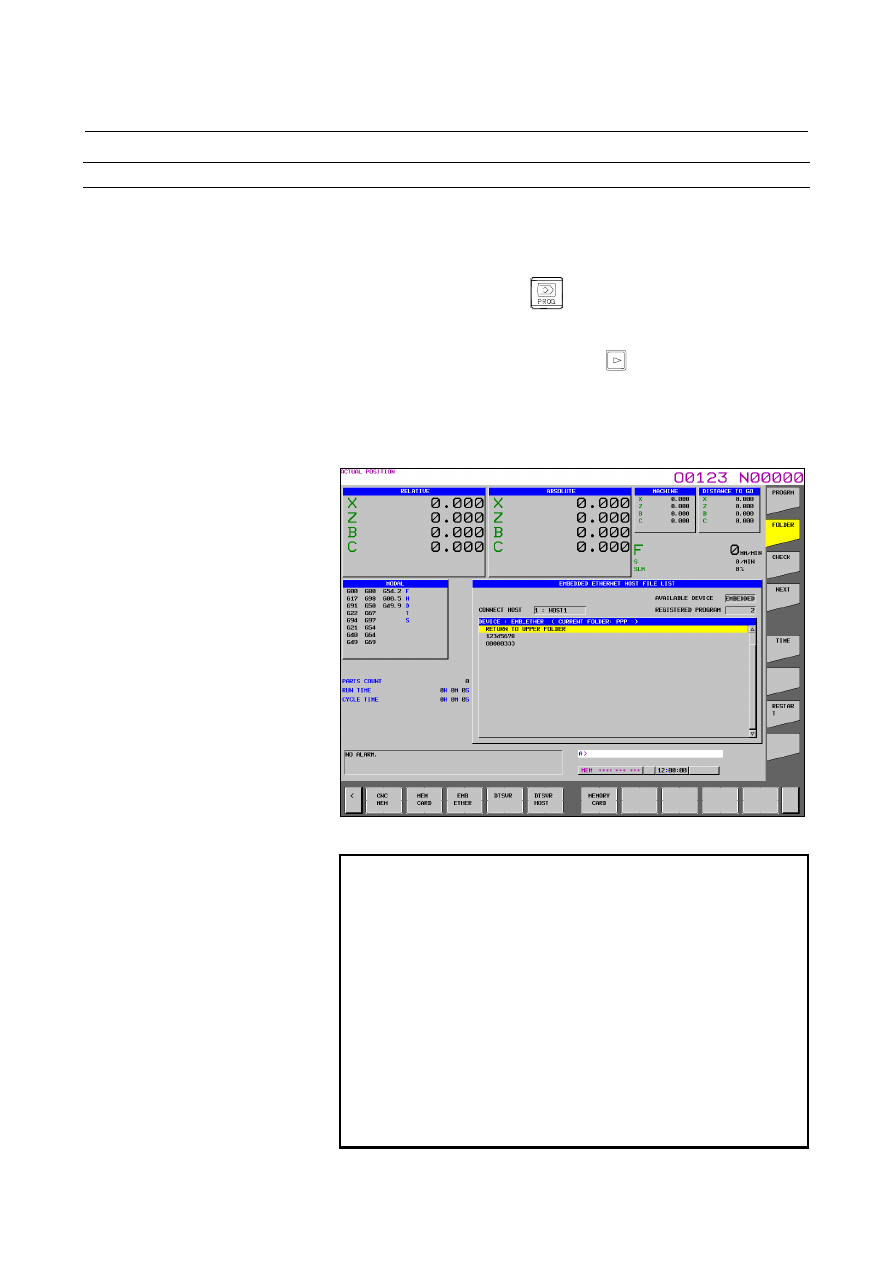
Host file list display (for 15-inch display unit) 

 
A list of the files held on the host computer is displayed. 
 

Procedure 

Press the function key 

Press the vertical soft key [FOLDER]. The program list screen 
appears. 

3  Press the continuous menu key 

 until horizontal soft key 

[DEVICE CHANGE] appears. 


Press the horizontal soft key [DEVICE CHANGE]. 

4  Press the horizontal soft key [EMB ETHER], and the 

EMBEDDED ETHERNET HOST FILE LIST screen appears. 


Fig. 8.4.1 (b)    Embedded Ethernet host file list screen 


NOTE 

1  When using the FTP file transfer function, check 

that the valid device is the embedded Ethernet port. 


The two conditions below determine a connection 
destination on the host file list screen: 

(1)  Check that the valid device is the embedded 

Ethernet port. Make a selection in "DEVICE 
SELECTION" on the Ethernet setting screen. 

(2)  A host computer can be selected from 

connection destinations 1, 2, and 3. Make a 
selection according to soft key [HOST 
CHANGE] described later. 

2  File names including kanji, hiragana, and katakana 

characters cannot be displayed correctly. 


B-63944EN/03

 OPERATION 

8.DATA INPUT/OUTPUT


- 1333 - 

When a list of files is larger than one page, the screen display can 
be switched using the page keys 

Press the horizontal soft key [REFRESH] to update the screen 
display. 

Press the horizontal soft key [DETAIL OFF] to display the host 
file list (file names only) screen. Press the horizontal soft key 
[DETAIL ON] to display the host file list (detail) screen. 

When selecting a folder with cursor and pressing the MDI key 

, the selected folder is changed to the new current folder.   


Display item (common to 7.2/8.4/10.4/15-inch display units) 


AVAILABLE DEVICE 

"EMBEDDED" or "PCMCIA" is displayed. 
 

CONNECT HOST 

The currently selected connection host number and host name are 
displayed. 
 

REGISTERED PROGRAM 

The number of files registered in the work folder of the connected host 
is displayed.    Up to 8 digits can be displayed. 
 

CURRENT FOLDER 

The current folder name of the connected host is displayed. 
If the folder-path is long compared with the display-item, characters: 
“…” and only the first and last ten letters of the folder name are 
displayed. 
 

FILE LIST 

There is no distinction between file names and folder names. 
Although the maximum number of displayed characters is 127, 
characters are displayed as far as they can be displayed in one line. 
 

8.DATA INPUT/OUTPUT

 OPERATION 

B-63944EN/03


- 1334 - 

Operation list (common to 7.2/8.4/10.4/15-inch display units) 


DETAIL ON, DETAIL OFF   

The screen display can be switched between the display of file names 
only and the display of details. 
 

REFRESH 

Display data can be updated. 
 

READ 

A file can be input from the host computer to the part program storage 
memory of the CNC. This item is displayed only when 9 is set as the 
I/O device number of the CNC. 
 

PUNCH 

A file can be output from the part program storage memory of the 
CNC to the host computer. This item is displayed only when 9 is set 
as the I/O device number of the CNC. 
 

DELETE 

A folder or file can be deleted from the host computer. 
 

RENAME 

A file or folder on the host computer can be renamed. 
 

DELETE FOLDER 

A folder can be deleted from the host computer. 
 

CREATE FOLDER 

A folder can be created on the host computer. 
 

HOST CHANGE 

The connected host can be changed. 
 

B-63944EN/03

 OPERATION 

8.DATA INPUT/OUTPUT


- 1335 - 


NC program input (for 7.2/8.4/10.4-inch display unit) 

 
A file (NC program) stored on the host computer can be input into the 
part program storage memory of the CNC. 
 

Procedure 

1  Display the EMBEDDED ETHERNET HOST FILE LIST 

screen. 

Press the EDIT switch on the machine operator’s panel.   

Press the soft key [(OPRT)]. 

4  Press the continuous menu key 

 until soft key [READ] 

appears. 
Press the soft key [READ]. 

Position the cursor on the file to input, and press [F GET] or type 
the file name to input. 
Press the soft key [F SET]. 
If the input file name is omitted, default input file name 
“ALL-PROG.TXT” is assumed. 

Type the program name, and press the soft key [P SET]. 
For an explanation of the operations to be performed if an input 
file name [F SET] and an input program name [P SET] are 
omitted, see the table below. 

Press the soft key [EXEC]. 
This starts reading the program, and “INPUT” blinks in the lower 
right part of the screen. When the read operation ends, the 
“INPUT” indication disappears. 
To cancel the input of the program, press the soft key [CAN]. 


[F SET]  [P SET]  Input file name 

Input program 

Input program name 

BLANK 

BLANK  ALL-PROG.TXT 

All programs in ALL-PROG.TXT 

File name at the time the file is saved

BLANK 

INPUT 

ALL-PROG.TXT 

First program in ALL-PROG.TXT

Program name set with [P SET] 

INPUT BLANK 

File name set 
with [F SET] 

All programs in the file specified 
with [F SET] 

File name at the time the file is saved

INPUT INPUT 

File name set 
with [F SET] 

First program in the file specified 
with [F SET] 

Program name set with [P SET] 


8.DATA INPUT/OUTPUT

 OPERATION 

B-63944EN/03


- 1336 - 


NC program input (for 15-inch display unit) 

 
A file (NC program) stored on the host computer can be input into the 
part program storage memory of the CNC. 

Procedure 

1  Display the EMBEDDED ETHERNET HOST FILE LIST 

screen. 

Press the EDIT switch on the machine operator’s panel.   

3  Press the continuous menu key 

 until horizontal soft key 

[READ] appears. 
Press the horizontal soft key [READ].   

Position the cursor on the file to input, and press [F GET] or type 
the file name to input. 
Press the horizontal soft key [F SET].   
If the input file name is omitted, default input file name 
“ALL-PROG.TXT” is assumed. 

5  Type the program name, and press the horizontal soft key [P 

SET]. 
For an explanation of the operations to be performed if an input 
file name [F SET] and an input program name [P SET] are 
omitted, see the table below. 

Press the horizontal soft key [EXEC]. 
This starts reading the program, and “INPUT” blinks in the lower 
right part of the screen. When the read operation ends, the 
“INPUT” indication disappears. 
To cancel the input of the program, press the horizontal soft key 
[CAN]. 


[F SET]  [P SET]  Input file name 

Input program 

Input program name 

BLANK 

BLANK  ALL-PROG.TXT 

All programs in ALL-PROG.TXT 

File name at the time the file is saved

BLANK 

INPUT 

ALL-PROG.TXT 

First program in ALL-PROG.TXT

Program name set with [P SET] 

INPUT BLANK 

File name set 
with [F SET] 

All programs in the file specified 
with [F SET] 

File name at the time the file is saved

INPUT INPUT 

File name set 
with [F SET] 

First program in the file specified 
with [F SET] 

Program name set with [P SET] 


B-63944EN/03

 OPERATION 

8.DATA INPUT/OUTPUT


- 1337 - 


NC program output (for 7.2/8.4/10.4-inch display unit) 

 
A file (NC program) stored in the part program storage memory of the 
CNC can be output to the host computer. 
 

Procedure 

1  Display the EMBEDDED ETHERNET HOST FILE LIST 

screen. 

Press the EDIT switch on the machine operator’s panel.   

Press the soft key [(OPRT)]. 

4  Press the continuous menu key 

 until soft key [PUNCH] 

appears. 
Press the soft key [PUNCH].   

Type the program name to output, and press the soft key [P SET]. 
To specify an output file name, type the output file name and 
press the soft key [F SET]. 
If, in this step, no output file name or no program name is 
specified, all programs in the foreground folders are output to 
“ALL-PROG.TXT”. 
For an explanation of the operations to be performed if an output 
file name [F SET] and an output program name [P SET] are 
omitted, see the table below. 
(For an explanation of foreground folders, see II-12.1.3, and for 
how to change foreground folders, see III-11.6) 

Press the soft key [EXEC]. 
This starts outputting the program, and “OUTPUT” blinks in the 
lower right part of the screen. When the read operation ends, the 
“OUTPUT” indication disappears. 
To cancel the output of the program, press the soft key [CAN]. 
 

[F SET] 

[P SET] 

Output file name 

Output program 

BLANK 

BLANK or (O-9999)  ALL-PROG.TXT 

All programs in the foreground folders 
displayed in the program folder 

BLANK 

INPUT 

Program name set with [P SET] 

Program in the NC that is set with [P SET] 

INPUT 

BLANK or (O-9999)  File name set with [F SET] 

All programs in the foreground folders 
displayed in the program folder 

INPUT 

INPUT 

File name set with [F SET] 

Program in the NC that is set with [P SET] 


8.DATA INPUT/OUTPUT

 OPERATION 

B-63944EN/03


- 1338 - 


NC program output (for 15-inch display unit) 

 
A file (NC program) stored in the part program storage memory of the 
CNC can be output to the host computer. 
 

Procedure 

1  Display the EMBEDDED ETHERNET HOST FILE LIST 

screen. 

Press the EDIT switch on the machine operator’s panel.   

3  Press the continuous menu key 

 until horizontal soft key 

[PUNCH] appears. 
Press the horizontal soft key [PUNCH].   

Type the program name to output, and press the horizontal soft 
key [P SET]. To specify an output file name, type the output file 
name and press the horizontal soft key [F SET]. 
If, in this step, no output file name or no program name is 
specified, all programs in the foreground folders are output to 
“ALL-PROG.TXT”. 
For an explanation of the operations to be performed if an output 
file name [F SET] and an output program name [P SET] are 
omitted, see the table below. 
(For an explanation of foreground folders, see II-12.1.3, and for 
how to change foreground folders, see III-11.6) 

Press the horizontal soft key [EXEC]. 
This starts outputting the program, and “OUTPUT” blinks in the 
lower right part of the screen. When the read operation ends, the 
“OUTPUT” indication disappears. 
To cancel the output, press the horizontal soft key [CAN]. 
 

[F SET] 

[P SET] 

Output file name 

Output program 

BLANK 

BLANK or (O-9999)  ALL-PROG.TXT 

All programs in the foreground folders 
displayed in the program folder 

BLANK 

INPUT 

Program name set with [P SET] 

Program in the NC that is set with [P SET] 

INPUT 

BLANK or (O-9999)  File name set with [F SET] 

All programs in the foreground folders 
displayed in the program folder 

INPUT 

INPUT 

File name set with [F SET] 

Program in the NC that is set with [P SET] 


B-63944EN/03

 OPERATION 

8.DATA INPUT/OUTPUT


- 1339 - 

8.5 

SCREEN HARD COPY FUNCTION 


Overview 

This function converts screen information displayed on the CNC into 
bit map format data and output it to a memory card. Once output, bit 
map format data can be displayed and edited on a personal computer. 
 

Explanation 
 - Start/cancellation methods 

The screen hard copy function is started by pressing and holding down 
key 

  for five seconds. The function can be canceled by pressing 

key 


  - Acquisition and output of screen data 

When started, the screen hard copy function starts acquiring screen 
data. As soon as it has acquired it, the function outputs bit map format 
data to the memory card inserted into the LCD unit. While screen data 
is being acquired, the screen remains stationary for a few seconds. 
Acquired screen data can be output from the memory card screen. 
Also, while screen data is being output, "OUTPUT" blinks in the 
status display. 
 

  - Screen data file names 

Bit map format screen data files created by this function are assigned 
the names below, starting with the one created after the power is 
turned on. 
"HDCPY000.BMP" (name of the first file output to the memory card 
after the power is turned on) 
"HDCPY001.BMP" (name of the second file output to the memory card 
after the power is turned on) 
              : 
              : 
"HDCPY999.BMP" (name of the 1000th file output to the memory 
card after the power is turned on) 
If, after a file with "HDCPY999.BMP" is output, the screen hard copy 
function is executed, the file name returns to "HDCPY000.BMP". If, 
however, a file with the same file name as the one to be output when 
the screen hard copy function is executed exists on the memory card, 
alarm SR1973 is issued. If the capacity of the memory card is 
exceeded, alarm SR1962 is issued.   
In either case, screen data is not output, so that either the existing file 
needs to be deleted or the memory card needs to be replaced with a 
new one. 


Content      ..     170      171      172      173     ..