FANUC Series 30i/300i/300is-MODEL A. Machining Center System. User's manual - page 156
 

  Index      Manuals     FANUC Series 30i/300i/300is-MODEL A. Machining Center System. User's manual (B-63944EN/03)


Search            copyright infringement  


Content      ..     154      155      156      157     ..


FANUC Series 30i/300i/300is-MODEL A. Machining Center System. User's manual - page 156


6.SAFETY FUNCTIONS

 OPERATION 

B-63944EN/03


- 1204 - 

  - Messages displayed during the input data range check 

When the cursor moves into an input field of an input screen, one of 
the following messages and warning messages is displayed.  No 
message is displayed when the input data range check is disabled. 
 
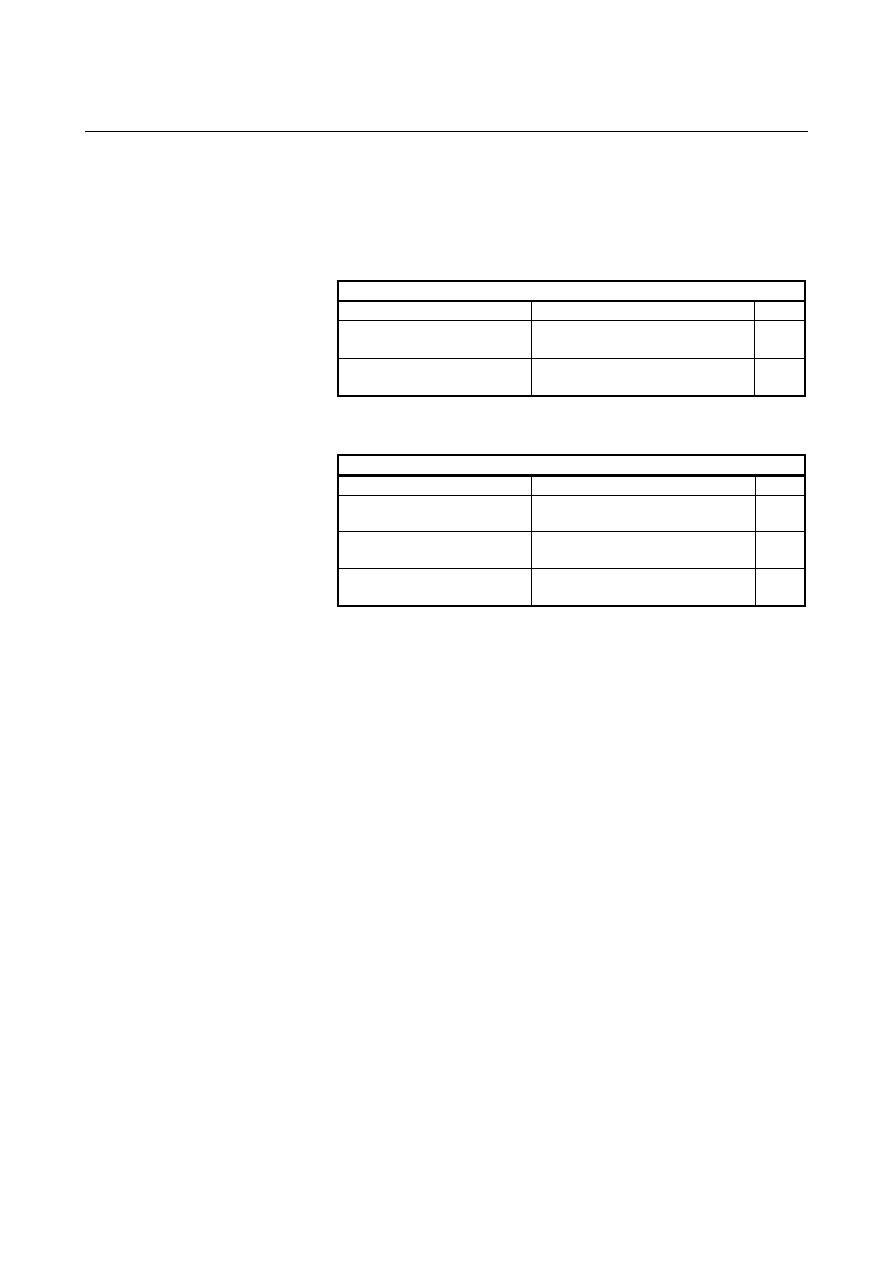
When the set effective data range is valid 

Message list 1 

Input data status 

Message 

Color

The data in the input field is 
within the range. 

Input range xxx - xxx 

Black

The data in the input field is out 
of the range. 

Input range xxx - xxx 

Red

xxx:    Upper and lower limit values 
 
When the set effective data range is invalid 

Message list 2 

Range check status 

Message 

Color

Tool offset number overlap 

NG SETTING (OFFSET NUM 
OVERLAP) 

Red

Workpiece coordinate system 
overlap 

NG SETTING (WORK COORD VAL 
OVERLAP) 

Red

Invalid upper and lower limit 
values 

NG SETTING (U-LMT AND L-LMT 
ILLEGAL) 

Red

The message "NG SETTING (U-LMT AND L-LMT ILLEGAL)" is 
displayed in the following cases: 


The upper and lower limit values are reversed. 


The values are not effective (e.g., more pairs of offset numbers 
than allowed are set). 


Either of the tool offset numbers is 0. 


  - Range check for data changed by G10 or system variable 

If the data changed by G10 or system variable is out of the effective 
data range, the alarm PS0334 "OFFSET DATA OUT OF RANGE" is 
displayed. 
 

B-63944EN/03

 OPERATION 

6.SAFETY FUNCTIONS


- 1205 - 

6.5.1.2 

Confirmation of incremental input 

 
This function displays a confirmation message when you attempt to 
input an incremental value by using the [+INPUT] soft key. 
 

Confirmation of incremental input 

Explanation 

  - Outline of the confirmation of incremental input 

This function displays a confirmation message when you attempt to 
input an incremental value by using the [+INPUT] soft key in any of 
the input screens listed below.    It lets you confirm whether you really 
want to change data or not before making that change. 
 
For example, when you set 5.[+INPUT] for 10., the message "15. 
INPUT OK?" is displayed. 
The function prevents improper absolute or incremental input 
operations. 
 

NOTE 

This function cannot be used to input two or more 
values consecutively by delimiting them by 
semicolons (;). 


  - Input screens for which this function is effective 

 Tool 

compensation 


Workpiece origin offset 

 Settings 

 Parameter 


Pitch error compensation 

M


 Chopping 

T


 Workpiece 

shift 


Y-axis tool offset 


Second tool geometry offset 


Chuck tail stock barrier 


Tool geometry data 


 - Settings 

In the operation confirmation function setting screen, check or 
uncheck the "INCREMENTAL INPUT" box to enable or disable this 
function.  For information about how to display the setting screen, 
how to set the function, and other details, see the item “Operation 
confirmation setting” that describes the setting of the operation 
confirmation function. 

6.SAFETY FUNCTIONS

 OPERATION 

B-63944EN/03


- 1206 - 

6.5.1.3 

Prohibition of the absolute input by the soft key 

 
This function prohibits the absolute input using the [INPUT] soft key. 
 

Prohibition of the absolute input by the soft key 

Explanation 

  - Outline of the prohibition of the absolute input by the soft key 

This function prohibits the absolute input by the [INPUT] soft key in 
the input screens listed later. 
It prevents improper absolute or incremental input operations by 
requiring that the absolute input be made using the 

 MDI key 

and that the incremental input be made using the [+INPUT] soft key. 
 

  - Input screens for which this function is effective 

 Tool 

compensation 


Workpiece origin offset 

T


Y-axis tool offset 

 Workpiece 

shift 


 - Settings 

In the operation confirmation function setting screen, check or 
uncheck the "DISABLED SOFTKEY[INPUT] IN" box to enable or 
disable this function.  For information about how to display the 
setting screen, how to set the function, and other details, see the item 
“Operation confirmation setting” that describes the setting of the 
operation confirmation function. 
 

B-63944EN/03

 OPERATION 

6.SAFETY FUNCTIONS


- 1207 - 

6.5.1.4 

Confirmation of the deletion of the program 

 
This function displays the confirmation message "DELETE 
PROGRAM ?" when you attempt to delete the program. 
 

Confirmation of the deletion of the program 

Explanation 

  - Outline of the confirmation of the deletion of the program 

When you attempt to delete the program, this function displays the 
confirmation message "DELETE PROGRAM ?"    It lets you confirm 
whether you really want to delete the program or not before executing 
the deletion. 
The function prevents the program from being deleted due to an 
improper operation. 
 

 - Settings 

In the operation confirmation function setting screen, check or 
uncheck the "PROGRAM DELETE" box to enable or disable this 
function.  For information about how to display the setting screen, 
how to set the function, and other details, see the item “Operation 
confirmation setting” that describes the setting of the operation 
confirmation function. 
 

6.SAFETY FUNCTIONS

 OPERATION 

B-63944EN/03


- 1208 - 

6.5.1.5 

Confirmation of the deletion of all data 

 
This function displays the confirmation message "DELETE ALL 
DATA?" when you attempt to delete all data. 
 

Confirmation of the deletion of all data 

Explanation 

  - Outline of the confirmation of the deletion of all data 

When you attempt to delete all data on the input screen described later, 
this function displays the confirmation message "DELETE ALL 
DATA?".    It lets you confirm whether you really want to delete all 
data or not before executing the deletion. 
The function prevents all data from being deleted due to an improper 
operation. 
 

  - Input screens for which this function is effective 

 Tool 

compensation 

T


Y-axis tool offset 


 - Settings 

In the operation confirmation function setting screen, check or 
uncheck the "ALL DATA DELETE" box to enable or disable this 
function.  For information about how to display the setting screen, 
how to set the function, and other details, see the item “Operation 
confirmation setting” that describes the setting of the operation 
confirmation function. 
 

B-63944EN/03

 OPERATION 

6.SAFETY FUNCTIONS


- 1209 - 

6.5.1.6 

Confirmation of a data update during the data setting process 

 
This function displays the [CAN] and [EXEC] soft keys for 
confirmation when you attempt to update the data of an input screen 
during the data setting process. 
 

Confirmation of a data update during the data setting process 

Explanation 

  - Outline of the confirmation of a data update during the data setting process 

When you input data in input screen during the data setting process, 
this function displays the [CAN] and [EXEC] soft keys for 
confirmation.  It lets you confirm whether you really want to update 
the data or not before executing the update. 
The function prevents set values from being lost due to an improper 
operation. 
 
If you input data using the [+INPUT] soft key when the confirmation 
of incremental input is enabled, a message is displayed to confirm the 
incremental input. 
 

 - Settings 

In the operation confirmation function setting screen, check or 
uncheck the "INPUT IN SETTING" box to enable or disable this 
function.  For information about how to display the setting screen, 
how to set the function, and other details, see the item “Operation 
confirmation setting” that describes the setting of the operation 
confirmation function. 
 

6.SAFETY FUNCTIONS

 OPERATION 

B-63944EN/03


- 1210 - 

6.5.2 

Functions that are Used when the Program is Executed 


Overview 

The following functions are provided to prevent improper operations 
when the program is executed. 


Display of updated modal information 


Start check signal 


Axis status display 


Confirmation of the start from a middle block 


Data range check 


Maximum incremental value check 

 
In the operation confirmation function setting screen, specify whether 
to enable or disable these functions individually. 
For information about how to display the setting screen, how to 
manipulate it, and other details, see the item “Operation confirmation 
setting screen” that describes the operation procedures. 
 

6.5.2.1 

Display of updated modal information 

 
This function allows modal information updated by the NC command 
or RESET to be highlighted in the modal information display for the 
current block. 
 

Display of updated modal information 

Explanation 

  - Outline of the display of updated modal information 

This function allows modal information updated by the NC command 
or RESET to be highlighted in the modal information display for the 
current block. 
For example, when a absolute command has been changed to an 
incremental command or when the workpiece coordinate system has 
been initialized by RESET, the function displays the changed part of 
the data in an easy-to-recognize manner, in order to prevent improper 
operations during the execution of the program. 
 

 - Settings 

In the operation confirmation function setting screen, check or 
uncheck the "UPDATE MODAL HIGHLIGHT DISPLAY" box to 
enable or disable this function.    For information about how to display 
the setting screen, how to set the function, and other details, see the 
item “Operation confirmation setting” that describes the setting of the 
operation confirmation function. 
 

B-63944EN/03

 OPERATION 

6.SAFETY FUNCTIONS


- 1211 - 

6.5.2.2 

Start check signal 

 
This function displays the remaining amount of travel and modal 
information of the block to be executed and puts the program to a 
temporary halt before the program is executed. 
 

Start check signal 

Explanation 

  - Outline of the start check signal 

When a cycle start is made with the start check signal STCHK 
<G0408 #0> set to 1, the function displays the remaining amount of 
travel and modal information of the block to be executed and puts the 
program to a temporary halt.    Making the cycle start again resumes 
the execution of the program. 
The function lets you check the status of the block before executing it, 
thus helping to prevent improper operations at the time of execution. 
Using this function in combination with the updated modal 
information display function described in the preceding subsection 
makes it easier to check the status of the block to be executed. 
 

 - Settings 

This function does not require any setting on the operation 
confirmation function setting screen. 


Content      ..     154      155      156      157     ..