FANUC Series 30i/300i/300is-MODEL A. Machining Center System. User's manual - page 80
 

  Index      Manuals     FANUC Series 30i/300i/300is-MODEL A. Machining Center System. User's manual (B-63944EN/03)


Search            copyright infringement  


Content      ..     78      79      80      81     ..


FANUC Series 30i/300i/300is-MODEL A. Machining Center System. User's manual - page 80


17.REAL-TIME CUSTOM MACRO

 PROGRAMMING 

B-63944EN/03


- 596 - 

17.3 

ARITHMETIC AND LOGICAL OPERATION 

 
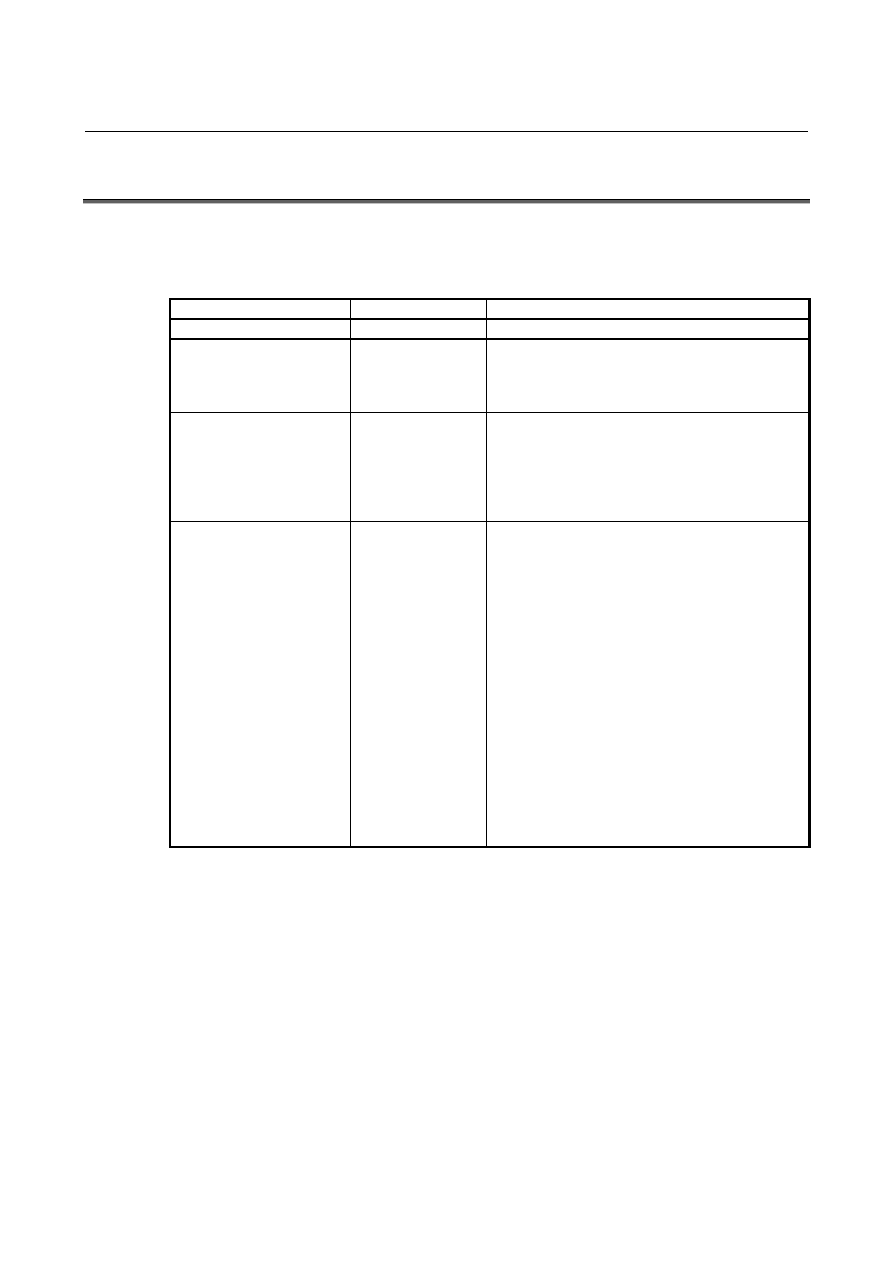
With the real time custom macros, the following arithmetic and logical 
operations can be specified: 
 

Table 1.3    Arithmetic and logical operation 

Type of operation 

Operation 

Description 

(1) Definition, substitution 

#i=#j 

Definition or substitution of a variable 

(2) Additive operation 

#i=#j+#k 
#i=#j-#k 
#i=#j OR #k 
#i=#j XOR #k 

Addition 
Subtraction 
Logical OR (Bit by bit for 32 bits) 
Exclusive OR (Bit by bit for 32 bits) 

(3) Multiplicative operation 

#i=#j*#k 
#i=#j/#k 
#i=#j AND #k 
#i=#j MOD #k 

Multiplication 
Division 
Logical AND (Bit by bit for 32 bits) 
Remainder (#j and #k are rounded to an integer to 
find a remainder.    When #j is negative, #i is also 
negative.) 

(4) Function 

#i=SIN[#j] 
#i=COS[#j] 
#i=TAN[#j] 
#i=ASIN[#j] 
#i=ACOS[#j] 
#i=ATAN[#j] 
#i=ATAN[#j]/[#k] 
#i=ATAN[#j,#k] 
#i=SQRT[#j] 
#i=ABS[#j] 
#i=BIN[#j] 
#i=BCD[#j] 
#i=ROUND[#j] 
#i=FIX[#j] 
#i=FUP[#j] 
#i=LN[#j] 
#i=EXP[#j] 
#i=POW[#j,#k] 

Sine (in deg) 
Cosine (in deg) 
Tangent (in deg) 
Arcsine 
Arccosine 
Arctangent (1 argument).    ATN is acceptable. 
Arctangent (2 arguments).    ATN is acceptable. 
Ditto 
Square root.    SQR is acceptable. 
Absolute value 
Binary conversion from BCD 
BCD conversion from binary 
Rounding.  RND is acceptable. 
Discarding fractional digits 
Rounding fractional digits upward to an integer 
Natural logarithm 
Exponent with e (2.718……) used as the base 
Power (#j to #k power) 


  - Constant specifiable in <expression> 

+0.00000000001 to +999999999999 
-999999999999 to -0.00000000001 
Up to 12 decimal digits can be specified. 
If the maximum allowable number of digits is exceeded, P/S0012 
alarm is issued. 


B-63944EN/03

 PROGRAMMING 

17.REAL-TIME CUSTOM MACRO


- 597 - 

NOTE 

1  The ADP function is not available. 
2  With an RTM statement, the external output 

commands (BPRNT, DPRNT, POPEN, and 
PCLOS) are unavailable. 

3  The FS16i compatibility specifications are not 

applicable.    Bit 0 (F16) of parameter No. 6008 = 1 
(with the operation result precision based on the 
FS16i compatibility specifications) is invalid. 

4  For information on decreased precision, see 

"When bit 0 (F16) of parameter No. 6008 is set to 
0" in "Caution concerning decreased precision" in 
the CUSTOM MACRO chapter. 

5  Bit 0 (NAT) of parameter No. 6004 is valid in an 

RTM command. 

6  The setting of bit 5 (SBM) of parameter No. 6000 

and bit 7 (SBV) of parameter No. 6000 is invalid.   
For the single block specifications, see the 
separate item. 


17.REAL-TIME CUSTOM MACRO

 PROGRAMMING 

B-63944EN/03


- 598 - 

17.4 

CONTROL ON REAL TIME MACRO COMMANDS 


Explanation 

By using a reserved word for controlling statements in an RTM 
command, the flow of the RTM command can be changed or multiple 
statements can be controlled as a set of statements.  Four reserved 
words are used to control an RTM command as indicated below. 
 

Reserved 

word name

Syntax Meaning 

ZONCE 

// ZONCE A B 

If A is true, B is executed. 

ZEDGE 

// ZEDGE A B 

If A becomes true, B is 
executed. 

ZWHILE 

// ZWHILE A B 

While A is true, B is executed 
repeatedly. 

ZDO...ZEND

// ZDO B1 B2 B3 ZEND

(Multiple statements)  B1, B2, 
and B3 are sequentially 
executed. 

 
The timing chart of an RTM command using these reserved words is 
indicated below.  (Multi-statement control ZDO...ZEND is 
excluded.) 
When the condition of a each reserved word is True, it shows ‘*’. 
 
When condition A makes transitions from True to False to True 
 

True  


False  


ZONCE 


ZEDGE  


ZWHILE 


When condition A makes transitions from False to True to False 
 

True  


False  


ZONCE  


ZEDGE  


ZWHILE  


Time

Time

B-63944EN/03

 PROGRAMMING 

17.REAL-TIME CUSTOM MACRO


- 599 - 

17.4.1 

Conditional Branch (ZONCE Statement) 

 
After ZONCE, <conditional-expression> and 
<real-time-macro-statement> are coded. 
 

  - //(n) ZONCE [<conditional-expression>] <real-time-macro-statement> 

 
If <conditional-expression> is true, <real-time-macro-statement> is 
executed.  If <conditional-expression> is false, 
<real-time-macro-statement> is not executed, but control exits from 
the ZONCE command to terminate the execution. 


<conditional-expression> conforms to the custom macro 
specifications. 
 
// ZONCE A B (If A is true, B is executed.) 
If A is true, the command is terminated after executing B. 
If A is false, the command is terminated without executing B. 
 

If the workpiece coordinate on the first axis is greater than 30, the Y1.0 signal 
is output. 

// ZONCE [#100101 GT 30.] #IOY[1,0] = 1 ; 


If the workpiece coordinate on the first axis is greater than 30 and #RV[0] 
matches #RV[3], the Y1.0 signal is output. 

// ZONCE[[#100101 GT 30.] AND [#RV[0] EQ #RV[3]]] #IOY[1,0]=1 ; 

 
In <real-time-macro-statement>, multiple RTM statements can be 
coded. 
In this case, code the following by using ZDO...ZEND of 
multi-statement structure: 
// ZONCE [<conditional-expression>] ZDO ; 
<real-time-macro-statement-1> ; 
<real-time-macro-statement-2> ; 
    : 
 ZEND ; 
 

If the workpiece coordinate on the second axis is equal to or less than 10, the 
rapid traverse override value is changed. 

// ZONCE [#100102 LE 10.] ZDO ; 
#IOG[14,0]=0 ; 
#IOG[14,1]=1 ; 
ZEND ;


However, if <conditional-expression-1> specifies an axis control 
command, be sure to use ZDO...ZEND even when a single statement 
is used. 
 

If the workpiece coordinate on the first axis is greater than 30 and #RV[0] 
matches #RV[3], a movement on the A-axis starts. 

//1 ZONCE [[#100101 GT 30.] AND [#RV[0] EQ #RV[3]]] ZDO ; 
G91 G00 A20. ; 
ZEND ;


17.REAL-TIME CUSTOM MACRO

 PROGRAMMING 

B-63944EN/03


- 600 - 

 
Similarly, use ZDO...ZEND for a multi-statement including an axis 
control command. 
 

If the workpiece coordinate on the second axis is equal to or less than 10, a 
movement on the V-axis starts and the Y1.0 signal is set to 1. 

//1 ZONCE [#100102 LE 10.] ZDO ; 
G91 G00 V10. ; 
#IOY[1,0] = 1 ; 
ZEND ;


17.4.2 

Condition Transition (ZEDGE Statement) 

 
After ZEDGE, <conditional-expression> and 
<real-time-macro-statement> are coded. 
// ZEDGE A B (If A becomes true, B is executed.) 
 

  - //(n) ZEDGE [<conditional-expression>] <real-time-macro-statement> 

When <conditional-expression> makes a transition from false to true, 
an RTM statement specified after <conditional-expression> is 
executed.  <conditional-expression> conforms to the custom macro 
specifications. 
With the ZEDGE command, the result of the first evaluation of 
<conditional-expression> is always false. 
 

Explanation 

The difference between the ZONCE command and ZEDGE command 
is that if <conditional-expression> is false, the RTM statement itself is 
terminated in the case of ZONCE, while the evaluation of 
<conditional-expression> continues until <conditional-expression> 
becomes true in the case of ZEDGE.  (With a one-shot real time 
macro command, the evaluation of <conditional-expression> 
continues until the execution of the NC statement that started 
operation simultaneously with the command ends.) 
 

On the rising edge of the G address signal 4.3, the workpiece coordinate on 
the third axis is read. 

// ZEDGE [#IOG[4,3] EQ 1] #RV[0]=#100103 ; 

 
In the example above, even if the [#IOG[4,3] EQ 1] is true from the 
beginning, #RV[0]=#100103 of the RTM statement is not executed.  
#RV[0]=#100103 is executed when the result of evaluation of 
[#IOG[4,3] EQ 1] changes from false to true. 
 
As in the case of ZONCE, multiple RTM statements can be coded in 
<real-time-macro-statement>. 
If <conditional-expression-1> specifies an axis control command, be 
sure to use ZDO...ZEND even when a single statement is used. 
Code the following by using ZDO...ZEND of multi-statement 
structure: 
// ZEDGE [<conditional-expression>] ZDO ; 
<real-time-macro-statement-1> ; 

B-63944EN/03

 PROGRAMMING 

17.REAL-TIME CUSTOM MACRO


- 601 - 

<real-time-macro-statement-2> ; 
    : 
 ZEND ; 
 

On the falling edge of the X address signal, a movement on the B-axis is 
started and the Y1.0 signal is set to 1. 

// ZEDGE [#IOX[1,3] EQ 0] ZDO ; 
G91 G00 B10. ; 
  #IOY[1,0] = 1 ; 
ZEND ;


On the rising edge of the 

  address signal, a movement on the U-axis is 

started. 

// ZEDGE [#IOG[4,3] EQ 1] ZDO ; 
G91 G00 U25. ; 
ZEND ;


If the remaining travel distance on the second axis is equal to or less than 10, 
the rapid traverse override value is changed. 

// ZEDGE [#100802 LE 10.] ZDO ; 
#IOG[14,0]=0 ; 
#IOG[14,1]=1 ; 
ZEND ;


17.4.3 

Repetition (ZWHILE Statement) 

 
After ZWHILE, a <conditional statement> is coded. 
// ZWHILE A B (While A is true, B is executed repeatedly.) 
 

  - //(n) ZWHILE [<conditional-expression>] <real-time-macro-statement> 

While <conditional-expression> is true, the RTM statement specified 
after <conditional-expression> is executed. 
If <conditional-expression> is not satisfied, the ZWHILE statement is 
terminated, and the next block is processed. 


ZEND  ;
    : 

<Real time macro 
statement> 

When 
condition 
is true 

*  When the <real time macro statement> is a single statement and is not 

an axis control statement, ZDO and ZEND are not required. 

*  When “conditional-expression” is fulfilled and “Real time macro 

statement” is complete, interpolation cycle time has passed before the 
next evaluation of "ZWHILE conditional-expression". 

ZWHILE 
<conditional-expression> ZDO ;

When condition is 
false 

17.REAL-TIME CUSTOM MACRO

 PROGRAMMING 

B-63944EN/03


- 602 - 

Explanation 

While <conditional-expression> is true, the command or commands 
between ZDO and ZEND after ZWHILE are executed. 
If <conditional-expression> is not satisfied, the command after ZEND 
is processed. 
The same <conditional-expression> and operators as for the ZONCE 
statement


are used.


While the F address 234.1 signal is 1, an incremental movement on the 
U-axis is repeatedly performed, and #RV[0] is incremented by 1 each time. 

//1 ZWHILE [#IOF[234,1] EQ 1] ZDO ; 
  G91 G00 U10. ; 
    #RV[0] = #RV[0]+1 ; 
ZEND ;


17.4.4 

Multi-statement (ZDO...ZEND Statement) 


  - //(n) ZDO ; 
 <real-time-macro-statement-1> 

<real-time-macro-statement-2> 

<real-time-macro-statement-3> … 

 ZEND 

One or multiple statements enclosed in ZDO...ZEND are regarded as a 
one RTM statement (multiple-statement structure). 
 

Explanation 

The maximum number of RTM statements in one multi-statement 
(between ZDO...ZEND) is roughly five, but it is subject to change 
(Because it depends on the contents of RTM statements). 
 
ZDO...ZEND is used in the following cases: 


When multiple <real time macro statements> are handled as a 
series of commands 


If the workpiece coordinate on the first axis exceeds 30, the rapid traverse 
override value is changed. 

// ZEDGE [#100101 GT 30.] ZDO ; 
#IOG[14,0]=1 ; 
#IOG[14,1]=0 ; 
ZEND ;


When an axis control command is specified 


On the rising edge of the X signal 7.0, a movement on the V-axis is started. 

// ZEDGE [#IOX[7,0] EQ 1] ZDO ; 
G91 G00 V35. ; 
ZEND ;


B-63944EN/03

 PROGRAMMING 

17.REAL-TIME CUSTOM MACRO


- 603 - 

 - Nesting 

ZONCE, ZEDGE, ZWHILE, and ZDO...ZEND cannot be nested and 
overlapped. 
For details, see the following: 


 - Endless loop 

An endless loop is formed if the conditional expression enclosed in 
brackets after the ZWHILE statement is always satisfied. 
 
Example) 
 

In the example below, #RV[0] is counted up unconditionally. 


// ZWHILE [1] #RV[1]=#RV[1]+1 ; 


Processing

1.  ZONCE, ZEDGE, ZWHILE, and 

ZDO...ZEND may be used any 
number times. 

// ZWHILE [

] ZDO ; 

ZEND ;


Processing

// ZONCE[

] ZDO ; 

ZEND ;


2.  One ZDO...ZEND range must not 

overlap another ZDO...ZEND range.

Processing

// ZONCE [

] ZDO ; 

ZEND ;

Processing

// ZWHILE [

] ZDO ; 


ZEND ;

3.  ZONCE, ZEDGE, ZWHILE, and 

ZDO...ZEND must not be 
nested. 

// ZWHILE [

] ZDO ; 


ZONCE [

] ZDO ; 


ZEDGE [

] ZDO ; 

Processin
g

ZEND ; 


ZEND ; 


ZEND ; 


Content      ..     78      79      80      81     ..