FANUC Series 0i-MODEL F Plus. CONNECTION MANUAL (FUNCTION) - page 387
 

  Index      Manuals     FANUC Series 0i-MODEL F Plus. CONNECTION MANUAL (FUNCTION) B-64693EN-1/01


Search            copyright infringement  


Content      ..     385      386      387     


FANUC Series 0i-MODEL F Plus. CONNECTION MANUAL (FUNCTION) - page 387


B-64693EN-1/01


APPENDIX


F. 0i-F PLUS START-UP PROCEDURE


- 3053 - 

番号


Message 

Description 

DS2075 

ILLEGAL AXIS FOR BATCH 
SETTING 

Batch setting of recommended values cannot be started for the 
following reason. 
-    The incremental system of the axis is IS-E and   

parameter IESPx(No.1013#7) is set to 0 

DS2076 

BATCH SETTING CANNOT BE 
DONE 

Batch setting of recommended values has not been 
performed. Set parameter MBE (Bit 0 of No.25002) and start 
the batch setting again. 


F.4 

OPERATION CHECK 

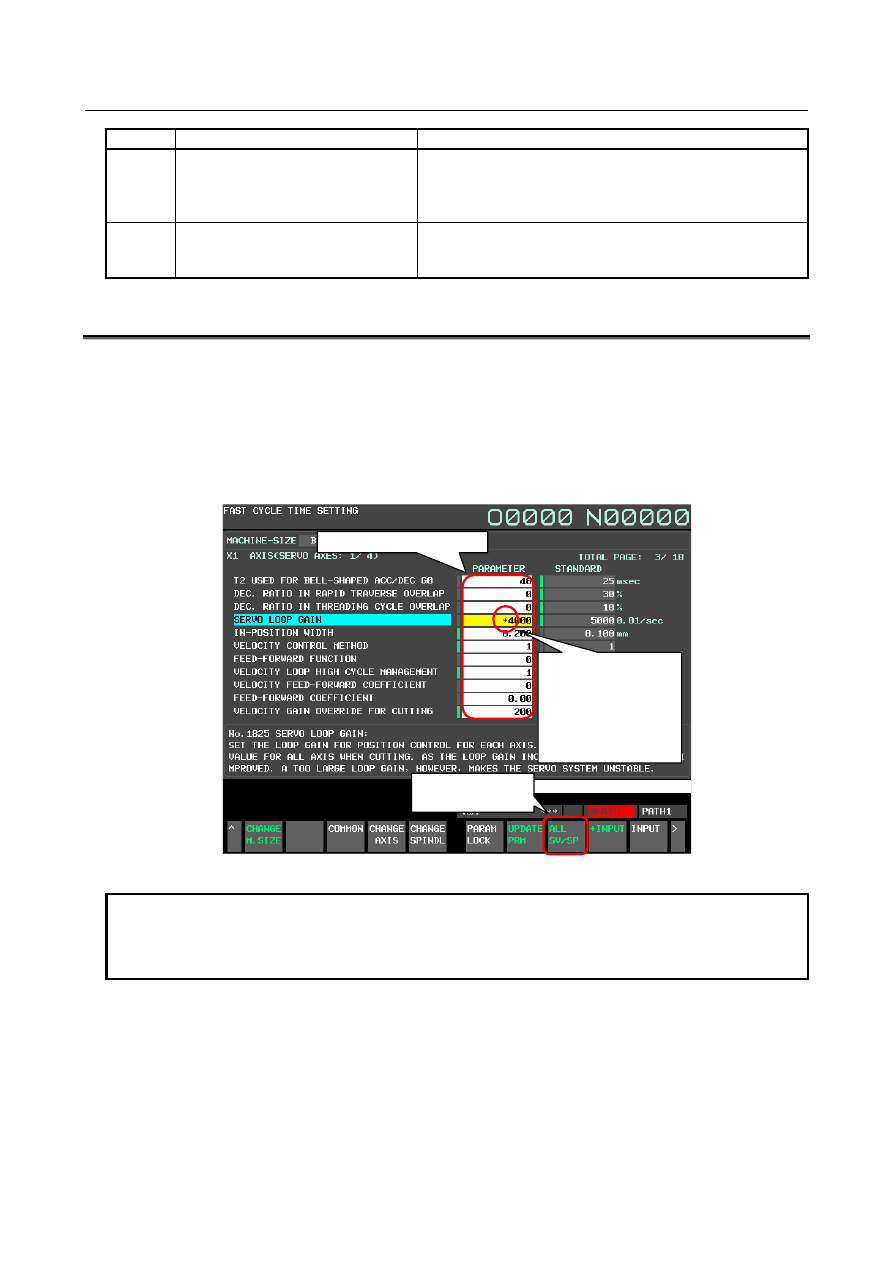
Perform automatic operation and check cycle time and shape of workpiece. Adjust the parameters on each 
setting screen (FCS screen, FSS screen) as necessary. Parameters set by Fast cycle-time setting and Fine 
surface setting can be changed directly from each setting screen (FCS screen, FSS screen). For parameters 
of the axis type and spindle type, the same setting can be made for all axes with one input by using the 
soft key [ALL SV/SP]. As for the parameters of the axis type and the spindle type, when the parameter 
values of all axis (basic three axis in the case of the axis type and all spindle in case of the spindle type) 
are not the same value, an asterisk (*) is displayed. 


Direct input is possible 

Soft key   

[All SV/SP] 

An asterisk (*) is 
displayed when 
the parameter 
values of all axis 
are not the same 
value 


Fig. F.4 (a) Direct input of parameters (FCS screen) 


NOTE 


Check operation with all setting pattern of Fine surface setting. For details on 
how to select the setting pattern, refer to the section "Setting of pattern 
selection". 


F. 0i-F PLUS START-UP PROCEDURE

  APPENDIX


B-64693EN-1/01


- 3054 - 

  WARNING 


By Fast cycle-time setting, the function to reduce the cycle-time, such as the 
overlap function, becomes valid and the tool path may change. Never attempt to 
machine a workpiece without first checking the operation of the machine. Before 
starting a production run, ensure that the machine is operating correctly by 
performing a trial run using, for example, the single block, feedrate override, or 
machine lock function or by operating the machine with neither a tool nor 
workpiece mounted. Failure to confirm the correct operation of the machine may 
result in the machine behaving unexpectedly, possibly causing damage to the 
workpiece and/or machine itself, or injury to the user. 


F.5 

ADJUSTMENT COMPLETION SETTING 

Fast cycle-time setting and Fine surface setting are functions for the machine tool builder. Set adjustment 
completion before machine shipment and hide FCS screen, FSS screen, and "ADJUST" of status section. 
 
The setting method of adjustment completion is as follows. 

Fast cycle-time setting 

Set the bit 0 (FCS) of parameter No. 24745 to 1 on the parameter screen. 

Fine surface setting 

Set the bit 7 (FSS) of parameter No. 24745 to 1 on the parameter screen. 


NOTE 

1.  Disable Fine surface setting to set FSD(bit 7 of parameter 25000) to 1 when 

pattern switching of Fine surface setting is not used. 

2.  Disable Fine surface setting to set FSD(bit 7 of parameter 25000) to 1 when 

enable Machining condition selection function.   


Parameter 


#7 

#6 

#5 

#4 

#3 

#2 

#1 

#0 

24745 


FSS 


FCS 


[Input type]  Parameter input 


[Data type]  Bit 


#0  FCS

  The adjustment by Fast cycle-time setting is : 

0: 

not completed. 

1: 

completed. 


NOTE 


When this parameter is 0, Fast cycle-time setting screen (FCS 
screen) is displayed. Moreover, "ADJUST" is blinked in the status 
section. Set this parameter to 1 before shipment of machines and 
hide FCS screen and "ADJUST" of status section. 


#7  FSS

  The adjustment by Fine surface setting is : 

0: 

not completed. 

1: 

completed. 


B-64693EN-1/01


APPENDIX


F. 0i-F PLUS START-UP PROCEDURE


- 3055 - 

NOTE 


When this parameter is 0, Fine surface setting screen (FSS screen) 
is displayed. Moreover, "ADJUST" is blinked in the status section. 
Set this parameter to 1 before shipment of machines and hide FSS 
screen and "ADJUST" of status section. 


Content      ..     385      386      387