FANUC Series 0i-MODEL F Plus. CONNECTION MANUAL (FUNCTION) - page 359
 

  Index      Manuals     FANUC Series 0i-MODEL F Plus. CONNECTION MANUAL (FUNCTION) B-64693EN-1/01


Search            copyright infringement  


Content      ..     357      358      359      360     ..


FANUC Series 0i-MODEL F Plus. CONNECTION MANUAL (FUNCTION) - page 359


19. MAINTENANCE FUNCTION


B-64693EN-1/01


- 2826 - 

Common Information 

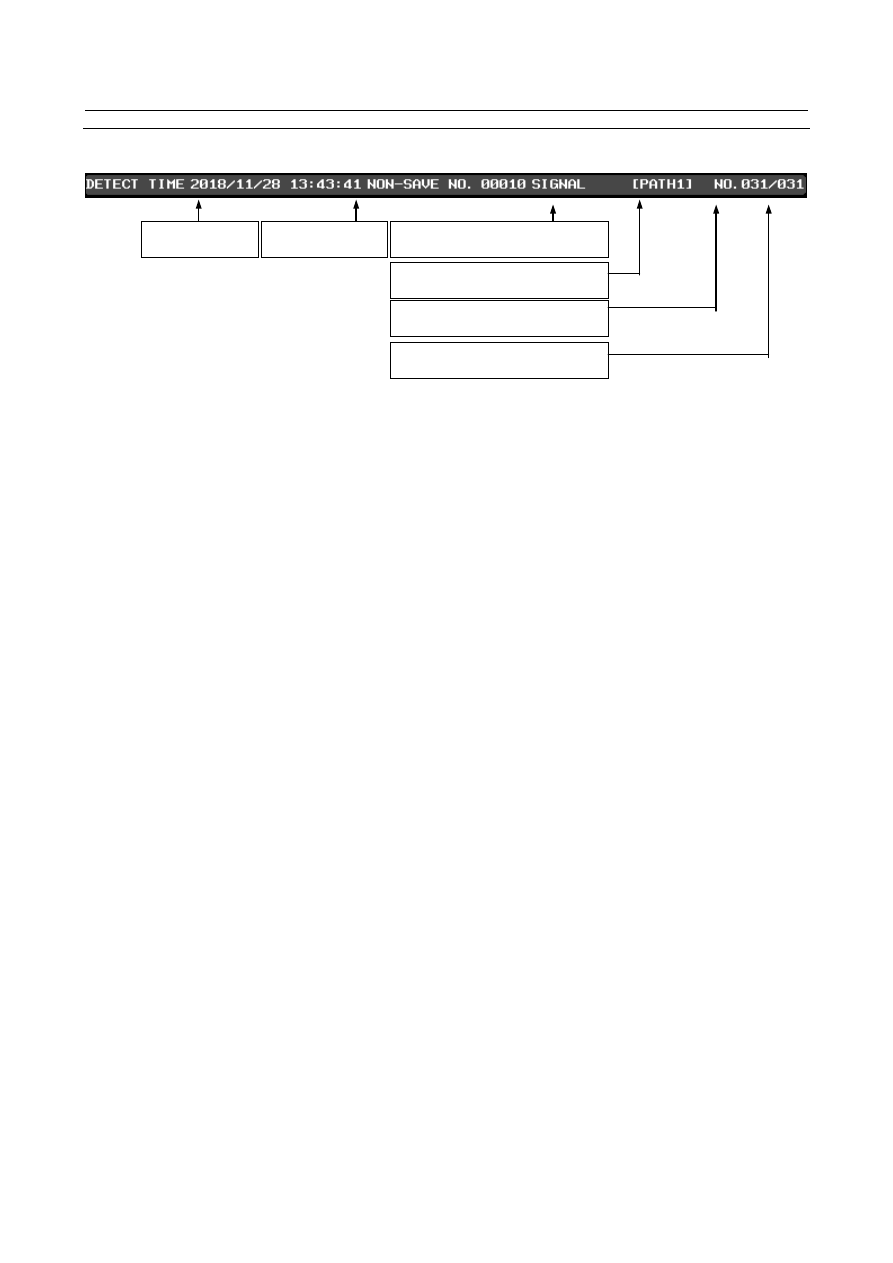
Common information is displayed in the upper part of the screen. 


Fig. 19.1.8.1 (e) Common Area 

 
(1)  Displayed history number 
 

The selected history number is displayed. A history number is smaller, a data is older. 

 
(2)  Total history number 
 

The total number of machine state histories saved in CNC is displayed. 

 
(3)  Detect time 
 

The time that the machine state history save request signal MSUSRQ<G0534.6> becomes “1” and 
the history was saved is displayed. 

 
(4)  Path number 
 

In the case of multi path system, the path number of the displayed history is displayed. 

 
(5)  Non-Save Number 
 

Non-Save Number is displayed. 


The number of history that was not saved due to the number limit is displayed. 


When Non-Save Number is 0, it is not displayed on screen. 


The maximum value of Non-Save Number is 65535. 

 
(6)  Save trigger 
 

Trigger when saving history is displayed. 

Detect Time 

Path Number (Multi Path System) 

Displayed History Number 

Total History Number 

Non-Save Number 

Save trigger 

B-64693EN-1/01


19. MAINTENANCE FUNCTION


- 2827 - 

History List information 

The history list information is displayed in the area in the left half of the machine state history list screen. 
History number and detect time are displayed. 
If Non-Save Number is not 0, “*” is displayed. 


Fig. 19.1.8.1 (f) History List Area 


Operation in History List Area 

(1)  Cursor Key and Page Change Key 


The cursor is moved up and down by the cursor key 


  and page change key 


and the displayed history number can be changed. 

 
(2)  Soft Key [REC TOP] and [REC END] 
 

If the soft key [REC TOP] is pressed, the oldest history number is displayed. 


If the soft key [REC END] is pressed, the latest history number is displayed. 

 
(3)  Soft Key [F OUTPUT] 
 

When the emergency stop state or EDIT mode is entered and the soft key [F OUTPUT] is pressed, 
the following soft keys are displayed. 


When any file name is input and the soft key [EXEC] is pressed, all the histories saved in CNC are 
output. 


If no name is input and the soft key [EXEC] is pressed, file name is “MSRHSTRY.TXT” 


History Number 

Detect Time 

Non-Save 

Number 

19. MAINTENANCE FUNCTION


B-64693EN-1/01


- 2828 - 

Signal Information 

The signal information is displayed in the area in the right half of the machine state history list screen. 
The signal information of selected number history is displayed. 


Fig. 19.1.8.1 (g) Signal Information 

 
The content of the display and the operation are similar to the machine state monitoring screen. 
Refer to

Monitoring of PMC signals” and “With Multi-Sensor Unit”. 


CNC Information 

The CNC information is displayed in the area in the right half of the machine state history list screen. 
The CNC information of selected number history is displayed. 


Fig. 19.1.8.1 (h) CNC Information 

Machine Position 

Absolute Position 

Feedrate 

Program 

Mode 

Spindle Speed 

Block Number 

Modal 

B-64693EN-1/01


19. MAINTENANCE FUNCTION


- 2829 - 

(1)  Machine Position 
 

Machine position is displayed. 


When the number of control axis is six or more, if the soft key [AXIS SWITCH] is pressed then the 
axis since the sixth axis is displayed. 

 
(2)  Absolute Position 
 

Absolute position is displayed. 


When the number of control axis is six or more, if the soft key [AXIS SWITCH] is pressed then the 
axis since the sixth axis is displayed. 

 
(3)  Feedrate 
 

Feedrate is displayed. 

 
(4)  Spindle Speed 
 

Spindle speed is displayed. 


When the number of spindle is two or more, if the soft key [SPINDLE SWITCH] is pressed then the 
spindle since the second spindle is displayed. 

 
(5)  Mode 
 

Mode is displayed. 

 
(6)  Modal 
 

Modal is displayed. 


The modal that can be displayed is M, S, T, and B. 


Operation in CNC Information 

(1)  Soft Key [AXIS SWITCH] 
 

When the number of control axis is six or more, the soft key [AXIS SWITCH] is displayed. 


If this soft key is pressed, the positions of the sixth and after axes are displayed in the machine and 
absolute coordinates. 

 
(2)  Soft Key [SPINDLE SWITCH] 
 

When the number of spindle is two or more, the soft key [SPINDLE SWITCH] is displayed. 


If this soft key is pressed, the speed of the second and after spindles is displayed. 

 
(3)  Soft Key [PATH SWITCH] 
 

When the number of paths are two or more, the soft key [PATH SWITCH] is displayed. 


If this soft key is pressed, the displayed path number is changed. 


19. MAINTENANCE FUNCTION


B-64693EN-1/01


- 2830 - 

Operation History Information 

The operation history information is displayed in the right half of the machine state history list screen. 
The operation history until the time that the selected history was saved is displayed. 
The operation history is saved about 400 MDI keys. 


Fig. 19.1.8.1 (i) Operation History Information 


Operation in Operation History Information 

(1)  Soft Key [TOP] 
 

The oldest operation history is displayed. 

 
(2)  Soft Key [BOTTOM] 
 

The newest operation history is displayed. 

 
(3)  Soft Key [Prev Page] 
 

The previous page is displayed. 

 
(4)  Soft Key [Next Page] 
 

The next page is displayed. 


Operation History 

Total Operation History 

Number 

Displayed Top Operation 

History Number 

B-64693EN-1/01


19. MAINTENANCE FUNCTION


- 2831 - 

19.1.8.2 

Machine State History CNC Data Screen 

In the machine state history CNC data screen, the common information, the signal information and CNC 
information are displayed together. 
In each machine state history screen, If the soft key [CNC DATA] is pressed, the machine state history 
CNC data screen is displayed. 


Fig. 19.1.8.2 (a) CNC Data Screen 

 
Refer to

Machine State History List Screen” for each information. 


19. MAINTENANCE FUNCTION


B-64693EN-1/01


- 2832 - 

19.1.8.3 

Machine State History Operation History Screen 

In the machine state history operation  history screen, the common information and operation history 
information are displayed together. 
If the soft key [OPERAT HISTRY] is pressed, the machine state history operation history screen is 
displayed. 
The operation history information is displayed in the full screen. 


Fig. 19.1.8.3 (a) Operation History Screen 

 
Refer to

Machine State History List Screen” for the displayed contents and the operation. 


B-64693EN-1/01


19. MAINTENANCE FUNCTION


- 2833 - 

19.1.8.4 

Output CNC Information 

When the soft key [F OUTPUT] is pressed in the machine state history list screen, all history saved in 
CNC is output. 
The composition of the output file is as follows. 


HEADER 

HISTORY DATA 1 

HISTORY DATA 2 

HISTORY DATA N 


Fig. 19.1.8.4 (a) The composition of the output file 


Header 

In the header, total history number and file information is output. The file information is for maintenance. 
 
NUMBER OF HISTORY : 010 


 Total history number 

FILE INFORMATION : 1-100-10-9 

 File Information (For maintenance) 


History Data 

In the history data, history number, detect time, Non-Save Number,  save  trigger,  Multi-Sensor Unit 
data(All MSU), PMC signal, CNC data(All Path), operation history and auxiliary information are output. 
 
(1)  History number, detect time and Non-Save Number. 
The history number and the detect time are output as follows. 
[HISTORY NO.001]--------------------------------   

 History Number 

DETECT TIME : 2010/03/10 21:15:07 


 Detect Time 

NON-SAVE NO. : 00025                       

 Non-Save Number 

SAVE TRIGGER: ABTRQ 


 Save Trigger 


Content      ..     357      358      359      360     ..