FANUC Series 0i-MODEL F Plus. CONNECTION MANUAL (FUNCTION) - page 349
 

  Index      Manuals     FANUC Series 0i-MODEL F Plus. CONNECTION MANUAL (FUNCTION) B-64693EN-1/01


Search            copyright infringement  


Content      ..     347      348      349      350     ..


FANUC Series 0i-MODEL F Plus. CONNECTION MANUAL (FUNCTION) - page 349


17. EMBEDDED ETHERNET FUNCTION


B-64693EN-1/01


- 2746 - 

TASK STATE screen 

Procedure 

Press the function key 


Soft keys [EMBED] and [PCMCIA LAN] appear.   


(When there is no soft keys, press the continue key.) 

To display the Ethernet Setting screen for the embedded Ethernet port or the PCMCIA Ethernet card, 

press soft key [EMBED] or [PCMCIA LAN], respectively. 

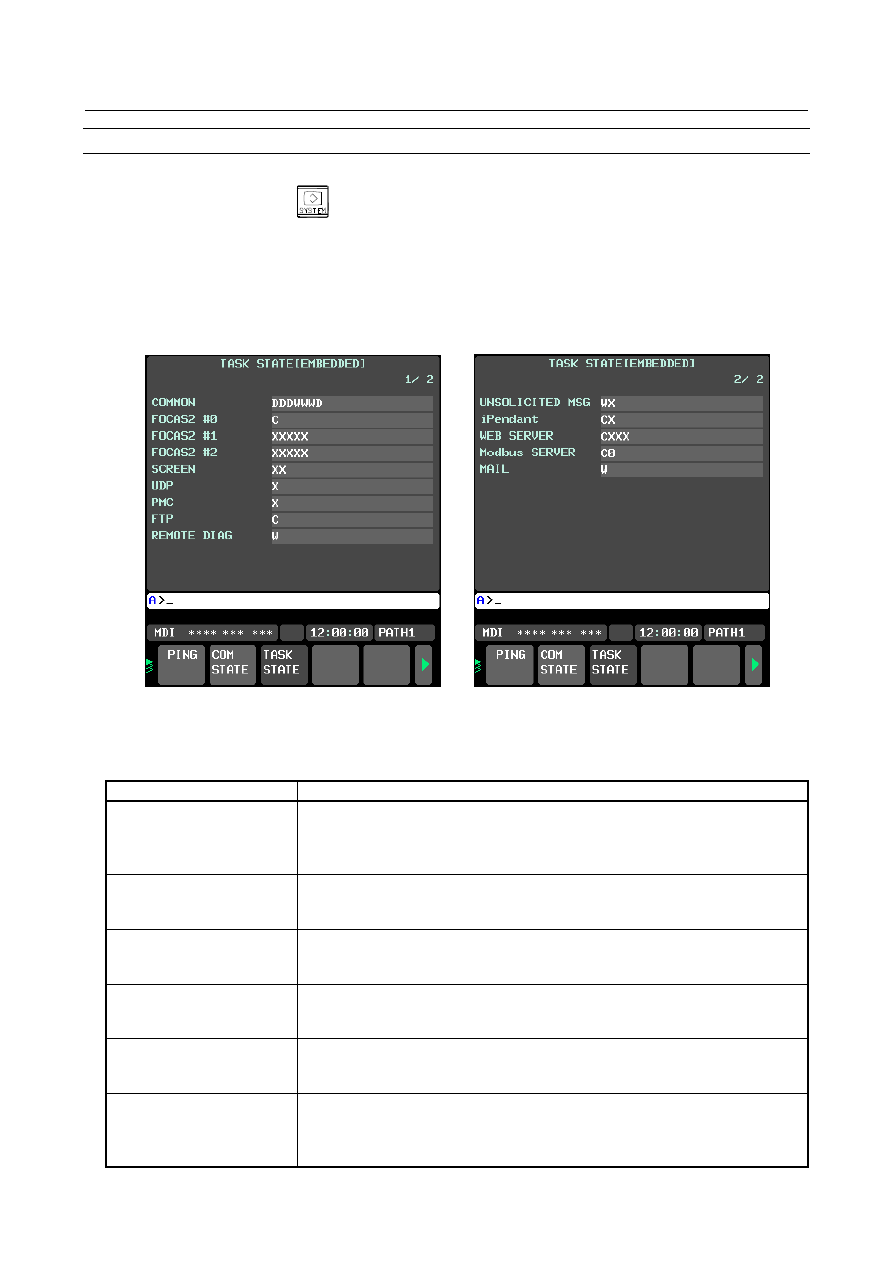
Pressing soft key [TASK STATUS] causes the task status (Fig. 17.5(d)) of the embedded Ethernet 
function to be displayed.   


Fig. 17.5 (d) TAST STATE screen 

 
Table 17.5 (a) lists the meaning of each symbol. 
 

Table 17.5 (a) 


Symbol and meaning 

FOCAS2 #0 

C:  Waiting for a connection from the host   
W:  Data processing in progress (1)   
D:  Data processing in progress (2) 
N:  FOCAS2 out of service 

FOCAS2 #1,#2 

W:  Data processing in progress (1)   
D:  Data processing in progress (2) 
X:  Not yet executed 

SCREEN 

W:  Data processing in progress (1)   
D:  Data processing in progress (2) 
X:  Not yet executed 

UDP 

W:  Data processing in progress (1)   
D:  Data processing in progress (2) 
X:  Not yet executed 

PMC 

W:  Data processing in progress (1)   
D:  Data processing in progress (2) 
X:  Not yet executed 

FTP 

C:  Execution wait 
W:  Data processing in progress (1)   
D:  Data processing in progress (2) 
X:  Not yet executed 

B-64693EN-1/01


17. EMBEDDED ETHERNET FUNCTION


- 2747 - 


Symbol and meaning 

REMOTE DIAG 

W:  Data processing in progress (1)   
D:  Data processing in progress (2) 
X:  Not yet executed 

UNSOLICITED MSG 

W:  Data processing in progress (1)   
D:  Data processing in progress (2) 
N:  Abnormal state 
X:  Not yet executed 
Number:  Alive signal (UDP) transmission in progress when count-up operation is 

performed 

iPendant 

C:  Waiting for a connection from iPendant 
W:  Data processing in progress (1) 
D:  Data processing in progress (2) 
X:  Not yet executed 

WEB SERVER 

C:  Waiting for a connection 
W:  Data processing in progress (1) 
D:  Data processing in progress (2) 
X:  Not yet executed 

Modbus SERVER 

C:  Waiting for a connection 
W:  Data processing in progress (1) 
D:  Data processing in progress (2) 
X:  Not yet executed 
Number:  Number of sockets currently connected 

MAIL 

W:  Data processing in progress (1)   
D:  Data processing in progress (2) 
X:  Not yet executed 


17. EMBEDDED ETHERNET FUNCTION


B-64693EN-1/01


- 2748 - 

17.6 

LOG SCREEN OF THE EMBEDDED ETHERNET 
FUNCTION 

This screen displays the log of the embedded Ethernet function. 
 

NOTE 

1  If alarm SR2032, “EMBEDDED ETHERNET/DATA SERVER ERROR” is issued 

during data transfer using the embedded Ethernet function, check the error 
details on the log screen of the embedded Ethernet function. 

2  The log information for the embedded Ethernet function is stored in volatile 

memory and it is lost when the power of CNC is turned off. If an error occurs, 
check the log information before turning the power off. 


Displaying the log screen 

Procedure 

Press the function key 


To display the log screen (Fig. 17.6(a)) for the embedded Ethernet port or PCMCIA Ethernet card, 
press soft key [EMBED LOG] or [PCMCIA LOG], respectively. (When there is no soft keys, press 
the continue key.) 


Fig. 17.6 (a) LOG screen 

 
The newest error log appears at the top of the screen. The date and time when an error occurred are 
displayed at the right end of the line. The format of date and time data is “MMM.DD hh:mm:ss” where 
MMM represents a month, dd represents a day, hh represents hours, mm represents minutes, and ss 
represents seconds.   
The date and time of the upper item shown Fig. 17.6(a) is October 16, 12:57:06. 
To clear the log, press soft keys [(OPRT)] and [CLEAR] in that order. (Fig. 17.6 (b)) 


Fig. 17.6 (b) 


B-64693EN-1/01


17. EMBEDDED ETHERNET FUNCTION


- 2749 - 

The log for each function can be displayed by using soft keys on the embedded Ethernet log screen. 
(1)  Soft key [ALL] 
 

Displays all log related to the embedded Ethernet. 

(2)  Soft key [COMMON] 
 

Displays the log related to the parameter settings of the embedded Ethernet function and the basic 
communication function. 

(3)  Soft key [FOCAS2] 
 

Displays the log related to the FOCAS2/Ethernet function. 

(4)  Soft key [FTP TRANS] 
 

Displays the log related to FTP file transfer. 

(5)  Soft key [UNSOLT MSG] 
 

Displays the log related to the unsolicited messaging function. 

(6)  Soft key [WEB] 
 

Displays the log related to the CNC screen Web server function. 

(7)  Soft key [Modbus] 
 

Displays the log related to the Modbus/TCP Server function. 

(8)  Soft key [REMOTE DIAG] 
 

Displays the log related to the Machine Remote Diagnosis. 

(9)  Soft key [MAIL] 
 

Displays the log related to the CNC Status Notification function. 


Error and message 

Error No. 

Log message 

Description and necessary action 

E-0118 
E-0119 

Error occurred while wait for FOCAS2 
pdu 

A communication error has occurred because of any of the 
following: 

 The network quality has been lowered to such a level that 

data cannot be received from a PC at the other end. The 
communication channel has been logically shut down. 

 Software running on a PC at the other end has logically 

shut down the communication channel.   

 The Ethernet cable has been disconnected. 

E-011A 

All communication paths are busy 

All the FOCAS2/Ethernet communication channels are busy. 

E-0126 

No response from RMT DIAG server 

The IP address of the machine remote diagnosis accepting 
server may be invalid or the power to the machine remote 
diagnosis accepting server may be off. Check whether the 
IP address of the machine remote diagnosis accepting 
server is valid and whether the power to the machine remote 
diagnosis accepting server is on. 
Alternatively, the machine remote diagnosis accepting 
server may not respond to the PING command to increase 
the security level (such as a firewall setting). 
Set bit 1 of parameter No.14880 to 1 and connect the server 
again. 

E-0148 

Cannot save parameter for Unsolicited 
Message 

When the FOCAS2 function cnc_wrunsolicprm2 was 
received, the parameter for the unsolicited messaging 
function could not be saved for one of the following causes: 

 The mode of the unsolicited messaging function is not set 

to "PC mode". 

 The state of the unsolicited messaging function is not 

"Not Ready". 

 The argument "parameter-for-unsolicited-message" of the 

FOCAS2 function cnc_wrunsolicprm2 includes an invalid 
value. 

17. EMBEDDED ETHERNET FUNCTION


B-64693EN-1/01


- 2750 - 

Error No. 

Log message 

Description and necessary action 

E-0149 

The received parameter for Unsolicited 
Message is wrong 

When the FOCAS2 function cnc_wrunsolicprm2, 
cnc_rdunsolicprm2, cnc_unsolicstart, or cnc_unsolicstop 
was received, the argument 
"parameter-number-for-unsolicited-message" was found to 
be invalid. 

E-0200 

(Received message from FTP server) 

A message sent by the FTP server is displayed as it is. 
A message containing characters other than ASCII 
characters may not be displayed correctly. 

E-0202 

Connection failed with FTP server 

Software of the FTP server may not be running. Run the 
FTP server software.   
Alternatively, the FTP server may not respond to the PING 
command to increase the security level (such as a firewall 
setting). Set bit 1(PCH) of parameter No. 14880 to “1” and 
connect the server again. 

E-0207 

The router is not found 

The specified IP address of the router may be wrong. 
Alternatively, the router may be turned off. Check whether 
the IP address of the router has been correctly specified and 
whether the router is turned on.   

E-0208 

The FTP server is not found 

The specified IP address of the FTP server may be wrong. 
Alternatively, the FTP server may be turned off. Check 
whether the IP address of the FTP server has been correctly 
specified and whether the FTP server is turned on.   
Alternatively, the FTP server may not respond to the PING 
command to increase the security level (such as a firewall 
setting). Set bit 1(PCH) of parameter No. 14880 to “1” and 
connect the server again. 

E-020B 

Cannot login into FTP server 

Check whether a correct user name and password are 
specified when logging into the FTP server. 

E-020C 

The parameters of FTP server are 
wrong 

Check whether a correct user name and password are 
specified when logging into the FTP server. 

E-020D 

Changing a work folder of host failed 

Check the work folder logging into the FTP server. 

E-041A 

Frame transmission failed (TCP) 

A communication error has occurred because of any of the 
following: 

 The network quality has been lowered to such a level that 

data cannot be received from a PC at the other end. The 
communication channel has been logically shut down. 

 Software running on a PC at the other end has logically 

shut down the communication channel.   

 The Ethernet cable has been disconnected. 

 Data cannot be posted to the communication destination 

due to a firewall setting. 

E-0901 

Cannot read MAC address 

The MAC address is not written in the hardware. 
Alternatively, the hardware has been damaged.   

E-0A06 

Network is too busy 

An excessive amount of data is flowing over the network. 
One possible solution is to divide the network.   

E-0B00 

The own IP address is wrong 

Specify a correct IP address in the designated format. 

E-0B01 

The own IP address is not set 

Specify an IP address. 

E-0B02 

Subnet mask is wrong 

Specify a correct subnet mask in the designated format. 

E-0B03 

Subnet mask is not set 

Specify a subnet mask.   

E-0B04 

Router IP address is wrong 

There may be class disagreement between the IP address 
of the local node and the IP address of the router. 

E-0B05 

IP address of DNS server is wrong 

There may be class disagreement between the IP address 
of the local node and the IP address of the DNS server. 

E-0B06 

The own host name is wrong 

Check whether a correct host name is specified. 

E-0B07 

The own domain name is wrong 

Check whether a correct domain name is specified. 

B-64693EN-1/01


17. EMBEDDED ETHERNET FUNCTION


- 2751 - 

Error No. 

Log message 

Description and necessary action 

E-0B08 

TCP port number is wrong 

A value beyond the permissible setting range may be 
specified.   

E-0B09 

UDP port number is wrong 

A value beyond the permissible setting range may be 
specified. 

E-0B0B 

IP address of remote FTP server is 
wrong 

Specify a correct IP address in the designated format. 

E-0B0C 

Port NO of a remote FTP server is 
wrong 

A value beyond the permissible setting range may be 
specified. 

E-0B0D 

User name of remote FTP server is 
wrong 

The specified user name may contain a prohibited 
character. 

E-0B0E 

Password of remote FTP server is 
wrong 

The specified password may contain a prohibited character. 

E-0B0F 

Login folder of remote FTP srv is wrong  The specified log-in folder name may contain a prohibited 

character. 

E-0B18 

Cannot set because DHCP is available 

To allow a set-up, disable the DHCP client function.   

E-0B19 

E-0B1A 

Embedded Ethernet hardware isn't 
found 

The software or hardware of embedded Ethernet function 
cannot be recognized. Check whether the software has 
been incorporated. Check whether the hardware is sound. 

E-0B27 

Unsolicited Message isn't available 

The software condition for using the unsolicited messaging 
function is not satisfied. The cause may be one of the 
following: 

 parameters for using the unsolicited messaging function 

are not set. 

For the parameters, see Subsection 18.2.4, "Setting of the 
Unsolicited Messaging Function". 

E-0B29 

Mode of Unsolicited Message is wrong 

In the CNC mode, the FOCAS2 function cnc_wrunsolicprm2 
cannot be executed. 

E-0B2A 

Status of Unsolicited Message is wrong  The state of the unsolicited messaging function was other 

than "Not Ready", so that the parameters for the unsolicited 
messaging function could not be updated. The cause may 
be one of the following: 

 In a state other than "Not Ready", the FOCAS2 function 

cnc_wrunsolicprm2 or cnc_unsolicstart was executed. 

 In a state other than "Not Ready", soft key [APPLY] was 

pressed. 

E-0B2B 

Cannot refresh parameter of 
Unsolicited Message 

The parameters for the unsolicited messaging function could 
not be updated. The cause may be one of the following: 

 The problem of E-0B29 or E-0B2A occurred. 

 A parameter for the unsolicited messaging function 

includes an invalid value. 

E-0B44 

Invalid value exists in Transmission 
parameter of Unsolicited Message 

The parameter for the unsolicited messaging function, 
TRANSMISSION NUMBER or TRANSMISSION 
PARAMETER (NO. 1 to NO. 3), includes an invalid value. 

E-0B45 

The total of Transmission size of 
Unsolicited Message exceeds the 
limitation 

The sum of sizes specified by the parameters for the 
unsolicited messaging function, TRANSMISSION 
PARAMETER NO. 1 to NO. 3, exceeds the maximum 
specifiable number of bytes. For the maximum specifiable 
number of bytes, see the setting item "TRANSMISSION 
PARAMETER" in Subsection 18.2.4.4, "Setting on the CNC 
screen". 

E-0B47 

TCP port number of Modbus/TCP 
Server is wrong 

Zero is specified. To use this function, specify TCP port 
number. 

E-0B48 

Status PMC address of Modbus/TCP 
Server is out of range 

A value beyond the permissible setting range is specified. 
Check the status PMC address settings. 

E-0B49 

Data PMC address of Modbus/TCP 
Server is wrong 

An odd-numbered address is specified. Check the data 
PMC address setting. 

17. EMBEDDED ETHERNET FUNCTION


B-64693EN-1/01


- 2752 - 

Error No. 

Log message 

Description and necessary action 

E-0B4A 

Data PMC address of Modbus/TCP 
Server is out of range 

A value beyond the permissible setting range is specified. 
Check the data PMC address setting or data size setting. 

E-0B4B 

Modbus area of Modbus/TCP Server is 
out of range 

A value beyond the permissible setting range is specified. 
Check the data Modbus address setting or data size setting. 

E-1001 

All Modbus communication paths are 
busy 

The number of connected communication parties 
(Modbus/TCP clients) exceeded the maximum number of 
connectable clients.   
Connections to communication parties (Modbus/TCP 
clients) will be terminated in order of the oldest to the 
newest. 

E-1003 

Version number of Modbus packet is 
wrong 

Specify a correct version number according to the protocol 
of Modbus/TCP. 

E-1004 

Length of Modbus packet is wrong 

Specify a correct size according to the protocol of 
Modbus/TCP. 

E-100B 

Function code of Modbus packet is 
wrong 

The specified function code may not be supported.   
For details of supported function codes, see "Modbus/TCP 
function codes" in Subsection 18.2.6.1, "OVERVIEW". 

E-1015 
E-1016 

Data address of Modbus packet is 
wrong 

Specify a correct data address according to the protocol of 
Modbus/TCP. 

E-1017 
E-1018 
E-1019 

Data value of Modbus packet is wrong 

Specify a correct data address according to the protocol of 
Modbus/TCP. 

E-101A 

Data address that client requested is 
out of range (1-3) 

No PMC area is assigned to the Modbus area requested 
from the connected communication party (Modbus/TCP 
client). Assign a PMC area. 

E-1300 

(Sent message to Web browser) 

It is a message transmitted to notify the Web browser of the 
error detected with the Web server. 

E-1301 

User name is not set 

Specify a user name. 

E-1302 

Password is not set 

Specify a password. 

E-1303 

User name is wrong 

Check whether a correct user name. 

E-1304 

Password is wrong 

Check whether a correct password. 

E-1305 

All communication paths are busy 

All the Web communication channels are busy. 

E-1306 

Session ended 

The connection with the Web browser ended. 

E-1307 

Session canceled 

The connection with the Web browser aborted compulsorily 
by either of the following factor. 

 The Web browser connection prohibition signal WBEND 

<G0579.5> became “1”. 

 CNC screen display function started on other personal 

computer. 

E-1308 

Session started 

The connection with the Web browser started. 

E-1309 

Login failed 

The CNC screen Web server function became disabled. 
Turn off / on the power of the CNC. 

E-1400 

( Sent message to POP client ) 

It is not generated usually. 

E-1401 

( Sent message to SMTP client ) 

It is not generated usually. 

E-1402 

User name is not set 

Enter user name of CNC Status Notification. 

E-1403 

Password is not set 

Enter password of CNC Status Notification 

E-1404 

User name is wrong 

Confirm user name of CNC Status Notification. 

E-1405 

Password is wrong 

Confirm password of CNC Status Notification 

E-1406 

Login failed 

CNC Status Notification function has not been usable. 
Please restart the CNC. 

E-XXXX 

(No message) 

An internal error has occurred. 
Make a notification of the error number. 


B-64693EN-1/01


18. DIAGNOSIS FUNCTION


- 2753 - 

18 

DIAGNOSIS FUNCTION 

18.1 

SERVO WARNING INTERFACE 

Overview 

The servo system can report the warning status before one of the following target alarms occurs. 
When the warning status is entered, a report to the PMC is issued. For example, this signal can be used by 
the machine for retracting tools from the time a warning occurs by the time a servo alarm occurs. 
 

Signal 

Servo warning detail signals SVWRN1 to 4 <Fn093.4 to Fn093.7> 

  [Classification]  Output signal 
 

[Function]  Reports the warning signal corresponding to the state of the servo amplifier. 

[Output condition] The  Table  18.1(a)  shows the warning statuses of the servo amplifier and their 

corresponding warning signals. 


Table 18.1 (a) 

Corresponding alarm 

messages 

Warning status signals (F93) 

Time from when a 

warning state signal 

is issued to until an 

alarm occurs 

SVWRN4 

(#7) 

SVWRN3 

(#6) 

SVWRN2 

(#5) 

SVWRN1 

(#4) 

SV0444: SV INTERNAL FAN 
FAILURE 

One minute 

SV0601: SV EXTERNAL FAN 
FAILURE 

Until overheat occurs 
(inconstant) 

SV0040: SV EXTERNAL FAN 
FAILURE 

Depending on where 
the trouble occurs in 

SV0443 : SV INTERNAL FAN 
FAILURE 

One minute 

SV0606: PS EXTERNAL FAN 
FAILURE 

Until overheat occurs 
(inconstant) 

SV0431: PS OVERLOAD 

One minute 

SV0607: PS IMPROPER INPUT 
POWER 

PSMR: Five seconds,   
PSM: One minute 


A timing chart for handling a warning is shown Fig. 18.1. 


Occurrence and stop of the alarm corresponding to a warning 

Occurrence of a warning 

Servo amplifier 

SVWRN1-4 

(Warning) 

PMC 

Perform deceleration stop or block stop 
during this time period with the PMC to 
stop the machine without damage. The 
time period varies with the warning type. 

Activation 


Fig. 18.1 (a) 


Content      ..     347      348      349      350     ..