FANUC Series 0i-MODEL F Plus. CONNECTION MANUAL (FUNCTION) - page 345
 

  Index      Manuals     FANUC Series 0i-MODEL F Plus. CONNECTION MANUAL (FUNCTION) B-64693EN-1/01


Search            copyright infringement  


Content      ..     343      344      345      346     ..


FANUC Series 0i-MODEL F Plus. CONNECTION MANUAL (FUNCTION) - page 345


17. EMBEDDED ETHERNET FUNCTION


B-64693EN-1/01


- 2714 - 

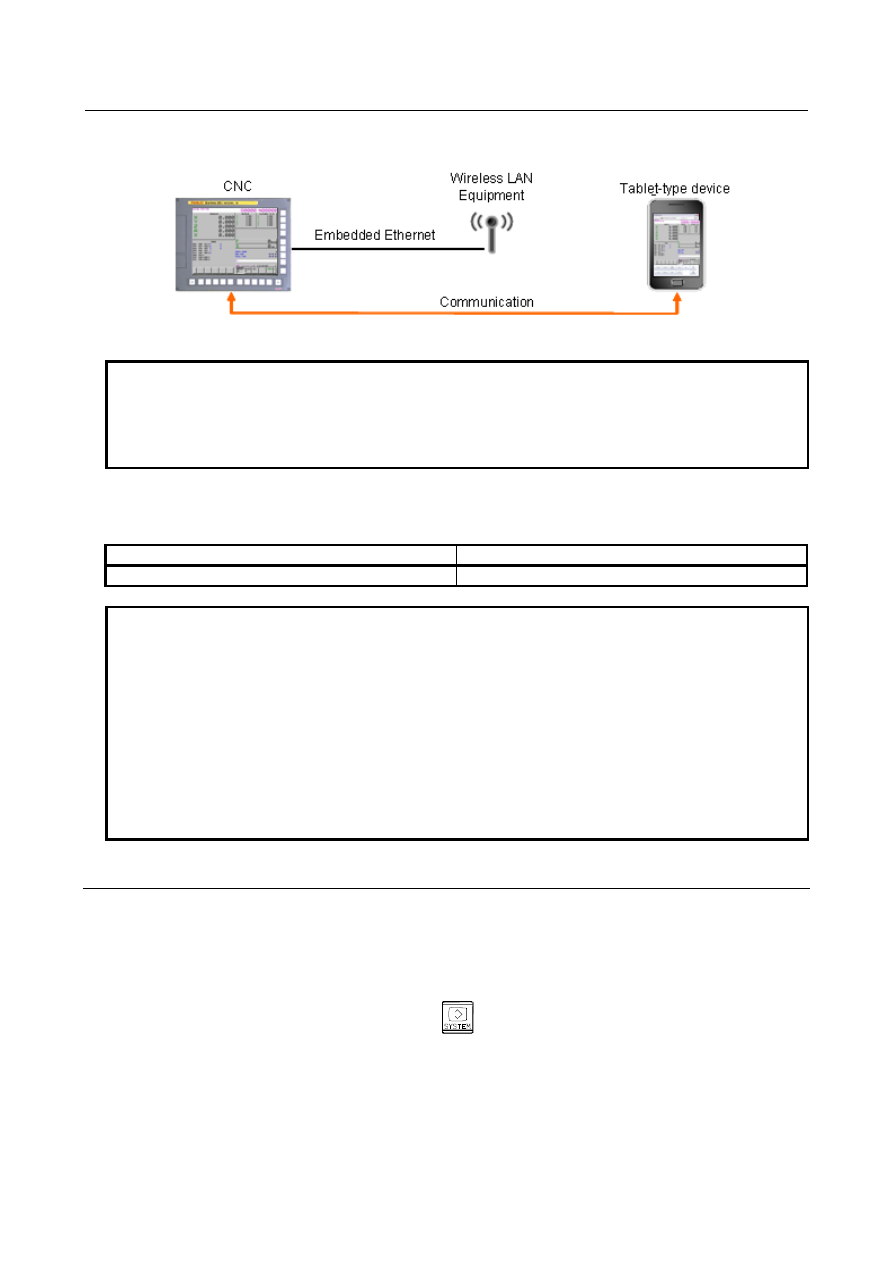
By starting a Web browser on the Tablet-type device and then inputting a URI, the Tablet-type device is 
connected with CNC. 


Fig.17.2.7.1 Connection 


NOTE 

1  It is not possible to connect CNC with two or more Tablet-type devices at the 

same time. Only the first Tablet-type device can be connected. 

2  It is not possible to connect CNC while the CNC screen is displayed on a 

personal computer by using CNC screen display function. 

 
The display units of CNC that can be used are as follows. 
 

Table17.2.7.1 (a) Display unit of CNC 

CNC 

Display unit 

LCD Mounted Type 

10.4” color LCD 


NOTE 

1  The update of CNC screen on a Tablet-type device might stop temporarily 

according to the CNC system configuration and the operation status. However, it 
doesn’t influence automatic operation of CNC. 

2  This function cannot be used in CNC that uses the following display. 

-  Without standard CNC Display unit (Use PC connecting) 
-  FANUC 

i

HMI display unit (Use PANEL 

i

H/

i

H Pro) 

-  The secondary display unit for Ethernet connection 
-  The shared display unit for Ethernet connection 

3  This function cannot be used while connecting 

i

Pendant. 

4  This function cannot be used by connecting via a PCMCIA Ethernet card. 


17.2.7.2 

Setting of the WEB SERVER function 

This subsection describes the setting of the WEB SERVER function for operating the CNC screen Web 
server function. 
 

Procedure 

Enable the CNC screen Web server function according to "Related parameters" described later. 

Start the CNC again then press function key 


Soft key [EMBED] is displayed. (Press the continuous menu key until the soft key is displayed.) 

Press soft key [EMBED]. The Ethernet Setting screen for the embedded Ethernet port is displayed. 

Press soft key [WEB]. The WEB SERVER screen is displayed. (Press the continuous menu key until 
the soft key [WEB] is displayed.) 

After setting items, restart the embedded Ethernet function. 


B-64693EN-1/01


17. EMBEDDED ETHERNET FUNCTION


- 2715 - 

WEB SERVER screen 

Press soft key [WEB]. The WEB SERVER screen (Fig. 17.2.7.2(a)) is displayed. 


Fig.17.2.7.2 (a) WEB SERVER screen 


Setting items 

Item 

Description 

PORT NUMBER 

Specify a port number to be used with the CNC screen Web server function. If 0 is 
specified, PORT NUMBER is treated as 80. 

TIMEOUT 

Specify a timeout of the CNC screen Web server function. TIMEOUT can be set the 
value of 0, 5 to 99 in seconds. If 0 is specified, TIMEOUT is treated as 10 seconds. 

USER NAME 

Specify a user name to be used for the CNC screen Web server function. (Up to 31 
characters can be specified.) 

PASSWORD 

Specify a password for the user name specified above. (Up to 31 characters can be 
specified.) 
Be sure to set a password. 


17.2.7.3 

Operation of the CNC screen Web server function 

This subsection describes the operation of the CNC screen Web server function. 
 

Start of the CNC screen Web server function 

Procedure 

Turn on the power of the CNC. 

Wait until the CNC screen is displayed. 

Start a Web browser on the Tablet-type device and input URI (Uniform Resource Identifier) 
“http://<IP Address>(:[port number])/cncscrn/”. The last “/” is not omissible. 


(Example 1) Case of IP Address (192.168.1.1) and PORT NUMBER (0 or 80) 


  Input “http://192.168.1.1/cncscrn/” to the address bar. 


Fig.17.2.7.3 (a) Input case 1 

17. EMBEDDED ETHERNET FUNCTION


B-64693EN-1/01


- 2716 - 


(Example 2) Case of IP Address (192.168.1.1) and PORT NUMBER (8501) 


  Input “http://192.168.1.1:8501/cncscrn/” to the address bar. 


Fig.17.2.7.3 (b) Input case 2 


When the login screen is displayed, input the username and password, and push the login button. 


Fig.17.2.7.3 (c) login screen 


NOTE 

1  When the Web browser connection prohibition signal WBEND <G0579.5> is set 

to “1”, the error “Access Denied : Forbidden by signal” is displayed. 

2  When the Web browser connection status signal WBCNT <F0578.2> is “1”, the 

error “Access Denied : Doubly access” is displayed. 

3  When bit 6 (WAL) of parameter No.14882 WAL (refer to chapter 4) is set to 0 

and failing in login continuously five times, CNC screen Web server function 
becomes disabled until the CNC is restarted. 


B-64693EN-1/01


17. EMBEDDED ETHERNET FUNCTION


- 2717 - 

The CNC screen  is displayed on a Web browser, and the Web browser connection status signal 
WBCNT <F0578.2> becomes “1”. 


Fig.17.2.7.3 (d) CNC screen on a Web browser 


NOTE 


The update cycle of the screen slows more than a standard CNC Display unit. 


End of the CNC screen Web server function 

The communication with CNC ends in the following cases. 

When Web browser on Tablet-type device is ended. 

When the connection of CNC and Tablet-type device is cut. 

When the Web browser connection prohibition signal WBEND <G0579.5> is set to "1". 

When CNC screen function is started on other personal computer. 

When END button on the Web browser is pushed. 

 
After the time interval that set on WEB SERVER screen is passed, the Web browser connection status 
signal WBCNT <F0578.2> becomes "0". 
To reconnect with the CNC, execute procedure 3 of "Start of CNC screen Web server function" after the 
Web browser connection status signal WBCNT <F0578.2> becomes “0”. 
 

17. EMBEDDED ETHERNET FUNCTION


B-64693EN-1/01


- 2718 - 

NOTE 


CNC cannot be operated with MDI key and touch panel of CNC while the Web 
browser connection status signal WBCNT <F0578.2> is “1”, even if the 
communication with CNC ends. The maximum time that CNC cannot be 
operated is the time having set to TIME INTERVAL. 


Operation on Web browser 

This subsection explains the operation method in a Web browser. 
 

NOTE 


While connecting with Web browser, neither MDI key nor touch panel of CNC 
can be used for operation. 


The reset key of CNC and External key input, however, are always usable on the 
CNC. 


Operation by button 

Function keys, help key, and page keys are displayed as buttons. 
CNC screen changes according to each key if these buttons are pushed. 
Selected item on the screen is changed if cursor keys are pushed. 
If [VF9] button is pushed, short-cut menu by vertical keys is displayed and the operation by touch screen 
becomes possible. 
[End] button is displayed in the upper part of screen.   
The communication with CNC ends by pushing the [END] button. 


Fig.17.2.7.3 (e) Button on a Web browser 


Operation by touch screen 

Tap 

Soft key on the CNC screen and button can be pushed. 
CNC can be operated with each key by pushing function key and page key. 

Double tap 

CNC screen size is set to be suitable for the screen size of Tablet-type device. 

Pinch out / Pinch in 

CNC screen is expanded and reduced. Pinch out is expansion, and Pinch in is 
reduction. 

 
Refer to the manual of Tablet-type device for explanation of each operation. 
 

NOTE 

1  To perform the Tap operation on the screen made by machine tool builder using 

C language executor, it is necessary to realize the operation with touch panel. 

2  The communication with CNC might become interrupted during the operation of 

Pinch out / Pinch in. If the time having set to TIME INTERVAL passed, the 
communication of CNC and a Tablet-type device is cut. 


Operation by direction of Tablet-type device 

The direction of screen is changed automatically according to the direction of Tablet-type device. 
 

B-64693EN-1/01


17. EMBEDDED ETHERNET FUNCTION


- 2719 - 

Operation by key input 

When the value of parameter KIE is one, the text input area, SEND button and CLEAR button next to the 
cursor keys, and the key input becomes possible. 


Fig.17.2.7.3 (f) Button on a Web browser 

 
If SEND button is pushed, the character string in the text input area is transmitted to the key-in buffer of 
CNC. If CLEAR button is pushed, the key-in buffer of CNC is cleared. 
The following characters can be input to the text input area. 
 

Enable character 

Remarks 

a-z, A-Z, 0-9 

Alphanumeric characters 

!”#&’()*+,-<=>?@[/]^`~.;:~ 

Special symbols 

Space 

Blank 


NOTE 


“{“, ”|”, ”}”, “$”, “¥” and 2-byte code used for Japanese cannot be sent to the 
key-in buffer of CNC. 


Input / Output of CNC data 

CNC data is input/output from/to CNC according to the setting of CNC by operation on Web browser 
screen. 
The data cannot be input/output from/to the Web browser side. 
 

Display language 

The title and buttons on Web browser are displayed in English. 
 

NOTE 


The display language of CNC screen is displayed according to the setting of 
CNC. 


Type of display screen 

The screens of CNC displayed in Web browser is the same as the screens displayed in CNC. It is not 
possible to display different size or kind of screens from CNC. 
 

NOTE 

1  Boot screen and IPL screen cannot be displayed. 
2  When the system alarm is generated by CNC, the connection of Tablet-type 

device is cut. The system alarm screen is not displayed in Web browser. 


17. EMBEDDED ETHERNET FUNCTION


B-64693EN-1/01


- 2720 - 

17.2.7.4 

Related signals 

Signal 

Web browser connection prohibition signal WBEND <G579.5> 

  [Classification]  Input signal 
 

[Function]  Forbid the connection with Web browser. 


[Operation]  “0”: Permit the connection with Web browser. 

“1”: Forbid the connection with Web browser. 

The connection is shut while connecting with Web browser. 


Web browser connection status signal WBCNT<F578.2> 

  [Classification]  Output signal 
 

[Function]  Show the status of the connection with Web browser. 


[Operation]  This signal is set to 1 when connecting with Web browser. 

This signal is set to 0 when not connecting with Web browser. 
 

NOTE 


Perform the sequences that check this signal and prohibit the 
operation which relates to the machine operation such as the data 
input and the operation from the screen, e.g. Virtual MDI key 
function, the data input by soft keys, or the operation on a machine 
operator’s panel screen made by machine tool builder. 


Signal address 


#7 

#6 

#5 

#4 

#3 

#2 

#1 

#0 

G0579 


WBEND 


#7 

#6 

#5 

#4 

#3 

#2 

#1 

#0 

F0578 


WBCNT 


17.2.7.5 

Related parameters 


#7 

#6 

#5 

#4 

#3 

#2 

#1 

#0 

11373 


WSE 


NOTE 


When this parameter is set, the power must be turned off before 
operation is continued. 


[Input type]  Parameter input 


[Data type]  Bit 


#7  WSE

  CNC screen Web server function is: 

0: 

Disabled. 

1: 

Enabled. 


#7 

#6 

#5 

#4 

#3 

#2 

#1 

#0 

14882 


WAL 

KIE 


NOTE 


When this parameter is set, the power must be turned off before 
operation is continued. 

B-64693EN-1/01


17. EMBEDDED ETHERNET FUNCTION


- 2721 - 


[Input type]  Parameter input 

 [Data 

type] 

Bit 


#5  KIE

  In CNC screen Web server function, key input is: 

0: Disabled. 
1: Enabled. 


#6  WAL

  In CNC screen Web server function, when failing in login continuously five times, this 

function becomes: 
0: Disabled. 
1: Enabled. 
 

NOTE 


When CNC screen Web server function has become disabled, 
restart the CNC. 


17.2.8 

CNC Status Notification Function 

This subsection describes the setting required to operate the CNC status notification function with the 
embedded Ethernet function. 
 

17.2.8.1 

Overview 

CNC status notification function is provided in the method of Monitoring the alarm even if the operator is 
not in front of the machine. 
This function delivers E-mail of the information about CNC status (for example, alarm number and alarm 
message) to the e-mail software of a portable terminal or a personal computer via the Embedded 
Ethernet.. 


Machine

(POP server)

Portable terminal 

(POP client) 

E-mail

Alarm 

occurs 

Wireless LAN (Wi-Fi) 


Content      ..     343      344      345      346     ..