FANUC Series 0i-MODEL F Plus. CONNECTION MANUAL (FUNCTION) - page 294
 

  Index      Manuals     FANUC Series 0i-MODEL F Plus. CONNECTION MANUAL (FUNCTION) B-64693EN-1/01


Search            copyright infringement  


Content      ..     292      293      294      295     ..


FANUC Series 0i-MODEL F Plus. CONNECTION MANUAL (FUNCTION) - page 294


13. DISPLAY/SET/EDIT


B-64693EN-1/01


- 2306 - 

Operation procedure 

The following explains how to display the parameter check sum information screen and how to make 
settings on the parameter check sum setting screen. 
 

  - 

Displaying parameter check sum information 

For the 10.4” display unit, follow the steps below. 

Press function key 


Press continuous menu key 


  several times until soft key [PARAM CHKSUM] appears. 


Press horizontal soft key [PARAM CHKSUM]. 

Press horizontal soft key [CHKSUM INFO]. The screen in the Fig. 13.1.6 (f) is then displayed: 


Fig. 13.1.6 (f) Parameter check sum information screen (10.4”) 


For the 15” display unit, follow the steps below. 

Press function key 


Press vertical soft key [NEXT PAGE] several times until soft key [PARAM CHKSUM] is 
displayed. 

Press vertical soft key [PARAM CHKSUM]. 

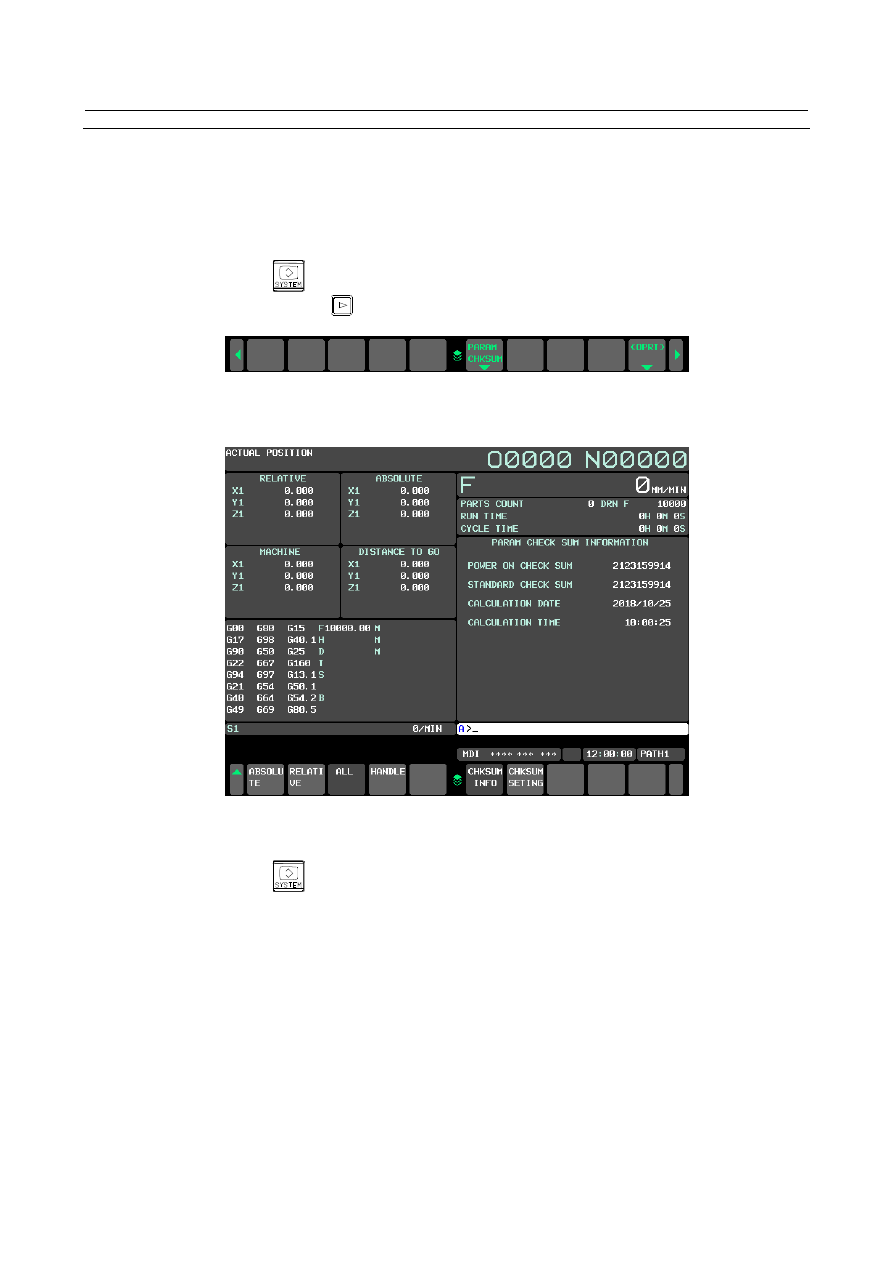
Press vertical soft key [CHKSUM INFO]. The screen in the Fig. 13.1.6 (g) is displayed: 


B-64693EN-1/01


13. DISPLAY/SET/EDIT


- 2307 - 


Fig. 13.1.6 (g) Parameter check sum information screen (15”) 


  - 

Setting parameters to be excluded 

For the 10.4” display unit, follow the steps below. 

Press function key 


Press continuous menu key [+] several times until soft key [PARAM CHKSUM] is displayed. 


Press horizontal soft key [PARAM CHKSUM]. 

Press horizontal soft key [CHKSUM SETING]. The screen in the Fig. 13.1.6 (h) is displayed: 


Fig. 13.1.6 (h) Parameter check sum setting screen (10.4”) 


13. DISPLAY/SET/EDIT


B-64693EN-1/01


- 2308 - 

By using page keys 


  and 


, the parameter check sum setting screen changes as follows: 


First page 


Third page 


Move the cursor to a target item. 

Enter the number of a parameter to be excluded from the check sum, and press the 


  key or soft 

key [INPUT]. 

When completing the setting of all parameters to be excluded, set bit 0 (CKS) of parameter No. 
13730 to 1. 


B-64693EN-1/01


13. DISPLAY/SET/EDIT


- 2309 - 

For the 15” display unit, follow the steps below. 

Press function key 


Press vertical soft key [NEXT PAGE] several times until soft key [PARAM CHKSUM] is 
displayed. 

Press vertical soft key [PARAM CHKSUM]. 

Press vertical soft key [CHKSUM SETING]. The following screen is displayed: 


Fig. 13.1.6 (i) Parameter check sum setting screen (15”) 


Move the cursor to a target item. 

Enter the number of a parameter to be excluded from the check sum, and press the 


  key or soft 

key [INPUT]. 

When completing the setting of all parameters to be excluded, set bit 0 (CKS) of parameter No. 
13730 to 1. 


NOTE 

1  Items set on this screen correspond to parameter Nos. 13731 to 13770 as 

shown below. These items can be set also on the parameter screen. 


Exclusion Nos. 01 to 20 

 Parameters Nos. 13731 to 13750 


Exclusion ranges 01 to 10 

 Parameters Nos. 13751 to 13770 

2  When 0 is set as an exclusion number, it is ignored. 
3  Numbers set as the start number and the end number of each exclusion range 

are also excluded. 

4  In a combination of the start No. and end No., if the start No. is greater than the 

end No. (start No. > end No.), the setting of check sum exclusion numbers 
becomes invalid. 

5  If the start No. equals the end No. (start number = end number), only the set 

number is excluded. 


13. DISPLAY/SET/EDIT


B-64693EN-1/01


- 2310 - 

Excluded parameters 

A check sum is not the sum of all parameters but is calculated with particular parameters excluded. The 
parameters to be excluded satisfy one of the following conditions: 
(1)  Parameters that can be input by setting input 
(2)  Parameters of which values may be changed by the system (see Table 13.1.6 (a)) 
(3)  Parameters set on the parameter check sum setting screen 
For parameters in (2), see the Table 13.1.6 (a): 
 

Table 13.1.6 (a) Parameters excluded from the check sum 

Parameter number 

Description 

1244 

Coordinates of the floating reference position 

1320 to 1327 

Coordinates at the boundary of stored stroke check 1 

1330 to 1348 

Chuck and tail stock barrier 

3226 

Keyword of the key lock for parameters related to dual check safety 

4911 to 4914 

Spindle speed fluctuation detection 

5130 

Amount of chamfering in thread cutting cycles G96 and G92 

5132 to 5133 

Depth of cut and escaping amount of multiple repetitive cycles G71 and G72 (T series) 

5134 

Clearance value of multiple repetitive cycles G71 and G72


5135 

Escaping amount along the X-axis in multiple repetitive cycle G73 (T series) 

5136 

Escaping amount along the Z-axis in multiple repetitive cycle G73 (T series) 

5137 

Divide number of multiple repetitive cycle G73 (T series) 

5139 

Return amount in multiple repetitive cycles G74 and G75 (T series) 

5140 

Minimum depth of cut in multiple repetitive cycle G76 (T series) 

5141 

Finishing allowance in multiple repetitive cycle G76 (T series) 

5142 

Number of repetitions of final finishing in multiple repetitive cycle G76 (T series) 

5143 

Tool nose angle in multiple repetitive cycle G76 (T series) 

5660 to 5668 

Flexible synchronization control 

5669 

Automatic phase synchronization for flexible synchronization control 

5670 to 5677 

Flexible synchronization control 

5680 to 5687 

Flexible synchronization control 

5690 to 5693 

Flexible synchronization control 

6581 to 6595 

VGA character color number 

6750 

Integrated value of power-on period 

7220 to 7283 

Name of general-purpose switch on software operator’s panel 

7310 

Program restart 

8210 

Slant angle 

8900 

PWE 

13420 

Automatic phase synchronization for flexible synchronization control 

13425 to 13436 

Automatic phase synchronization for flexible synchronization control 

14717 

Axis number of the C-axis in simulation (for MGi only)


B-64693EN-1/01


13. DISPLAY/SET/EDIT


- 2311 - 

When the machining condition selecting function is used, the parameters in the Table 13.1.6 (b) to (c) are 
also excluded from the check sum: 
 

Table 13.1.6 (b) Parameters excluded from the check sum


(when the machining condition selecting function is used) 

Parameter number 

Description 

1432 

Maximum cutting feedrate for all axes in the look-ahead acceleration/deceleration before 
interpolation 

1769 

Time constant for acceleration/deceleration after cutting feed interpolation in the 
look-ahead acceleration/deceleration before interpolation mode 

1772 

Acceleration change time of look-ahead bell-shaped acceleration/deceleration before 
interpolation 

1783 

Maximum allowable feedrate difference for feedrate determination based on corner 
feedrate difference 

1788 

Maximum allowable acceleration change rate in feedrate determination based on 
acceleration change for each axis 

1789 

Maximum allowable acceleration change rate in feedrate determination based on 
acceleration change for each axis (linear interpolation) 

1790 

Ratio of change time of the rate of change of acceleration in look-ahead smooth 
bell-shaped acceleration/deceleration before interpolation 

13634 

Precision level currently selected when AI contour control is used 


Table 13.1.6 (c) Parameters for setting the parameter numbers of parameters to be excluded from the check 

sum (when the machining condition selecting function is used) 

Parameter No. 

Parameter number set in parameter No. 13628 (parameter number corresponding to item 1 when AI contour 
control is used) 
Parameter number set in parameter No. 13629 (parameter number corresponding to item 2 when AI contour 
control is used) 


NOTE 

1  When the machining condition selecting function is not used, these parameters 

are included in the check sum. 

2  The parameters of which numbers are set in parameter Nos. 13628, 13629, 

13674, and 13675 are excluded, but parameter Nos. 13628, 13629, 13674, and 
13675 are not excluded. 


13. DISPLAY/SET/EDIT


B-64693EN-1/01


- 2312 - 

Parameter 

11358 


Power-On Checksum 


[Data type]  2-word 

When  parameter checksum function is effective, checksum value which is calculated at 
power-on is set. 
 
0 is set when the parameter checksum function is invalid. 
 

11359 


Standard Checksum 


[Data type]  2-word 

Checksum value which is calculated at when parameter  checksum function is changed 
from invalid to effective is set. It is used as standard value, when checksum is executed at 
power-on. 
 
0 or last parameter checksum value is set when the parameter checksum function is 
invalid. 
 

11360 


Calculation Data 


[Data type]  2-word 

The date when the parameter checksum function is changed to effective is set. 
The number of 8 digits which show year, month and day is set. 
First 4 digits show year. Second 2 digits show month. Last 2 digits show day. 
 
0 or last day when parameter checksum function was changed to effective is set when the 
parameter checksum function is invalid. 
 

11361 


Calculation Time 


[Data type]  2-word 

The time when the parameter checksum function is changed to effective is set. 
The number of 6 digits which show hour, minute and second is set. 
First 2 digits show hour. Second 2 digits show minute. Last 2 digits show second. 
 
0 or the last time when parameter checksum function has been changed to effective is set 
when the parameter checksum function is invalid. 


#7 

#6 

#5 

#4 

#3 

#2 

#1 

#0 

13730 


CSR 


CKS 


[Data type]  Bit 


#0  CKS

  A power-on, a parameter check sum check is: 

0: 

Not performed. 

1: 

Performed. 


#7  CSR

  Alarm DS5340,” PARAMETER CHECK SUM ERROR” is cleared with: 

0: 


  + 


  keys. 

1: 


  key. 


B-64693EN-1/01


13. DISPLAY/SET/EDIT


- 2313 - 

13731 


Number to be excluded from the NC parameter check sum, 01 


13732 


Number to be excluded from the NC parameter check sum, 02 


13733 


Number to be excluded from the NC parameter check sum, 03 


13734 


Number to be excluded from the NC parameter check sum, 04 


13735 


Number to be excluded from the NC parameter check sum, 05 


13736 


Number to be excluded from the NC parameter check sum, 06 


13737 


Number to be excluded from the NC parameter check sum, 07 


13738 


Number to be excluded from the NC parameter check sum, 08 


13739 


Number to be excluded from the NC parameter check sum, 09 


13740 


Number to be excluded from the NC parameter check sum, 10 


13741 


Number to be excluded from the NC parameter check sum, 11 


13742 


Number to be excluded from the NC parameter check sum, 12 


13743 


Number to be excluded from the NC parameter check sum, 13 


13744 


Number to be excluded from the NC parameter check sum, 14 


13745 


Number to be excluded from the NC parameter check sum, 15 


13746 


Number to be excluded from the NC parameter check sum, 16 


13747 


Number to be excluded from the NC parameter check sum, 17 


13748 


Number to be excluded from the NC parameter check sum, 18 


13749 


Number to be excluded from the NC parameter check sum, 19 


13750 


Number to be excluded from the NC parameter check sum, 20 


[Data type]  2-word path 

[Valid data range]  0 to maximum parameter number 

These parameters set the numbers of the parameters to be excluded from the check sum in 
the parameter check sum function. 
 

13751 


Start number of the range to be excluded from the NC parameter check sum, 01 


13752 


Start number of the range to be excluded from the NC parameter check sum, 02 


13753 


Start number of the range to be excluded from the NC parameter check sum, 03 


13754 


Start number of the range to be excluded from the NC parameter check sum, 04 


13755 


Start number of the range to be excluded from the NC parameter check sum, 05 


13756 


Start number of the range to be excluded from the NC parameter check sum, 06 


13757 


Start number of the range to be excluded from the NC parameter check sum, 07 


13758 


Start number of the range to be excluded from the NC parameter check sum, 08 


13759 


Start number of the range to be excluded from the NC parameter check sum, 09 


13760 


Start number of the range to be excluded from the NC parameter check sum, 10 


Content      ..     292      293      294      295     ..