FANUC Series 0i-MODEL F Plus. CONNECTION MANUAL (FUNCTION) - page 10
1. AXIS CONTROL
B-64693EN-1/01
- 34 -
1.2.11
Axis Total Travel Distance Display
Overview
Total travel distance of axis is calculated, the distance of each axis is displayed on the diagnosis screen. If
target distance is set, signal indicates that the travel distance exceeds the target.
Explanation
- Display of total travel distance
Total travel distance of axis is displayed on diagnosis data Nos. 365 and 366. When bit 3 (ETD) of
parameter No. 8906 is 1, this function is valid.
Diagnosis data No. 365 becomes 0 when total travel distance clear signal TDCx<Gn726> is set to "1"
from "0".
Diagnosis data No. 366 becomes 0 when it exceeds the upper limit.
When bit 3 (ETD) of parameter No. 8906 is 0, this function is executed as follows:
- Total travel distance is not calculated. However, the value calculated in the past is displayed.
- Diagnosis data No. 365 is not cleared by total travel distance clear signal TDCx<Gn726>.
Total travel distance clear signal
TDCx<Gn726> is set to "1" from "0"
Travel distance exceeds the upper
limit.
Diagnosis data No. 365
Becomes 0
Keeps the upper limit
Diagnosis data No. 366
Doesn’t become 0
Becomes 0
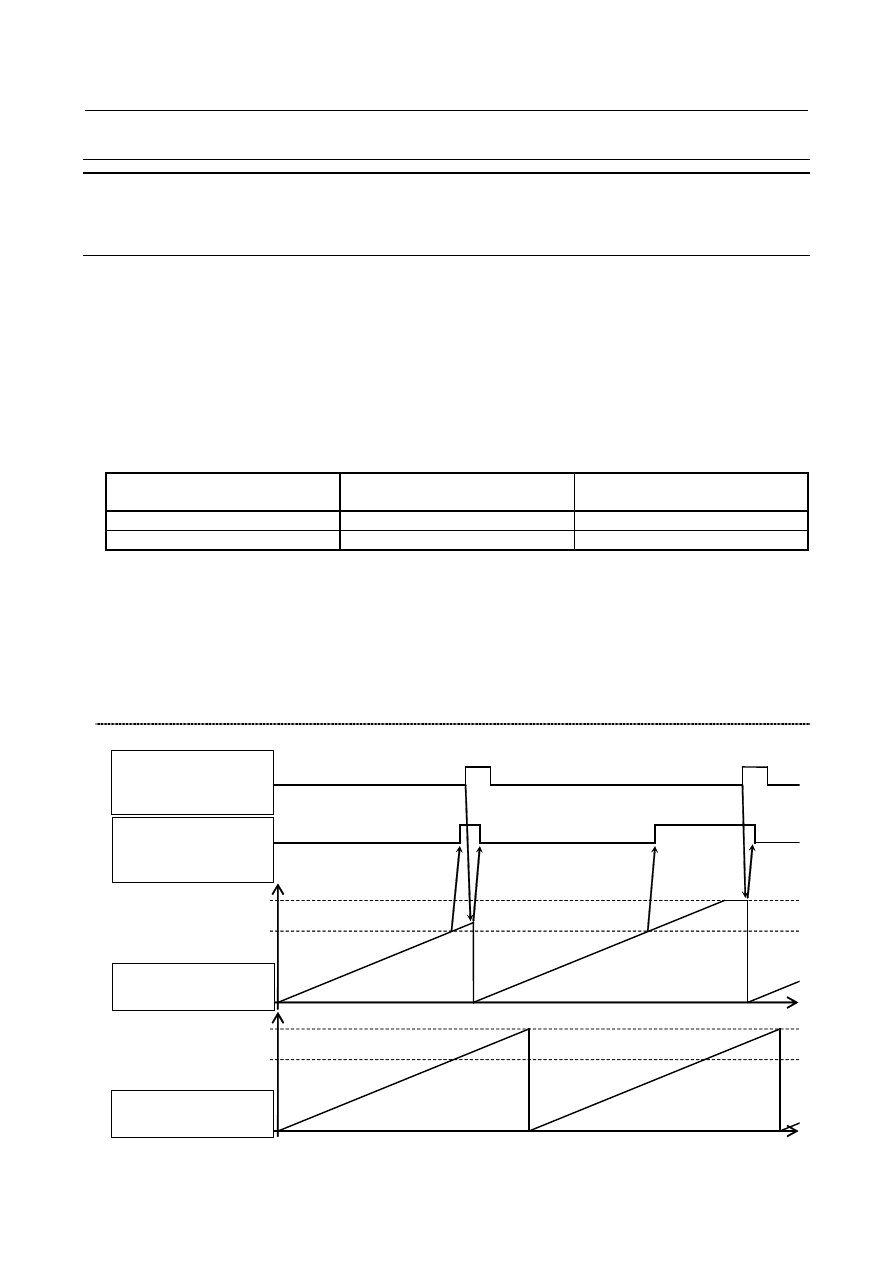
- Indication of target distance attainment
When total travel distance (diagnosis data No. 365) exceeds the target distance set in parameter No. 8852,
target distance attainment status signal TDAx<Fn730> becomes "1". Even if travel distance exceeds
target, the accumulation of diagnostic data(No.365) continues.
When bit 3 (ETD) of parameter No. 8906 is 1, this function is valid. If bit 3 (ETD) of parameter No. 8906
is 0 or the value set in parameter No.8852 is outside the data range, target distance attainment status
signal TDAx<Fn730> always becomes 0.
Timing chart
Upper limit
Parameter No.8852
Upper limit
Parameter No.8852
Total travel distance
clear signal
TDCx<Gn726>
Target distance
attainment status
signal TDAx<Fn730>
diagnosis data
No. 365
diagnosis data
No. 366