Cisco Industrial Ethernet 4000, 4010 and 5000 Switch Software. Configuration Guide (2022) - page 10
Configuring IEEE 802.1x Port-Based Authentication
Information About Configuring IEEE 802.1x Port-Based Authentication
When the stop message is not sent successfully, this message appears:
00:09:55: %RADIUS-4-RADIUS_DEAD: RADIUS server 172.20.246.201:1645,1646 is not responding.
Note: You must configure the RADIUS server to perform accounting tasks, such as logging start, stop, and interim-update
messages and time stamps. To turn on these functions, enable logging of “Update/Watchdog packets from this AAA
client” in your RADIUS server Network Configuration tab. Next, enable “CVS RADIUS Accounting” in your RADIUS server
System Configuration tab.
802.1x Authentication Guidelines
When 802.1x authentication is enabled, ports are authenticated before any other Layer 2 features are enabled.
If the VLAN to which an 802.1x-enabled port is assigned changes, this change is transparent and does not affect
the switch. For example, this change occurs if a port is assigned to a RADIUS server-assigned VLAN and is then
assigned to a different VLAN after reauthentication.
If the VLAN to which an 802.1x port is assigned to shut down, disabled, or removed, the port becomes unauthorized.
For example, the port is unauthorized after the access VLAN to which a port is assigned shuts down or is removed.
The 802.1x protocol is supported on Layer 2 static-access ports, and voice VLAN ports, but it is not supported on
these port types:
— Trunk port—If you try to enable 802.1x authentication on a trunk port, an error message appears, and 802.1x
authentication is not enabled. If you try to change the mode of an 802.1x-enabled port to trunk, an error
message appears, and the port mode is not changed.
— Dynamic ports—A port in dynamic mode can negotiate with its neighbor to become a trunk port. If you try to
enable 802.1x authentication on a dynamic port, an error message appears, and 802.1x authentication is not
enabled. If you try to change the mode of an 802.1x-enabled port to dynamic, an error message appears, and
the port mode is not changed.
— Dynamic-access ports—If you try to enable 802.1x authentication on a dynamic-access (VLAN Query Protocol
[VQP]) port, an error message appears, and 802.1x authentication is not enabled. If you try to change an
802.1x-enabled port to dynamic VLAN assignment, an error message appears, and the VLAN configuration is
not changed.
— EtherChannel port—Do not configure a port that is an active or a not-yet-active member of an EtherChannel as
an 802.1x port. If you try to enable 802.1x authentication on an EtherChannel port, an error message appears,
and 802.1x authentication is not enabled.
— Switched Port Analyzer (SPAN) and Remote SPAN (RSPAN) destination ports—You can enable 802.1x
authentication on a port that is a SPAN or RSPAN destination port. However, 802.1x authentication is disabled
until the port is removed as a SPAN or RSPAN destination port. You can enable 802.1x authentication on a SPAN
or RSPAN source port.
Before globally enabling 802.1x authentication on a switch by entering the dot1x system-auth-control global
configuration command, remove the EtherChannel configuration from the interfaces on which 802.1x authentication
and EtherChannel are configured.
System messages related to 802.1x authentication can be filtered. See Authentication Manager CLI Commands,
page 195.
VLAN Assignment, Guest VLAN, Restricted VLAN, and Inaccessible
Authentication Bypass Guidelines
When 802.1x authentication is enabled on a port, you cannot configure a port VLAN that is equal to a voice VLAN.
216
Configuring IEEE 802.1x Port-Based Authentication
Information About Configuring IEEE 802.1x Port-Based Authentication
The 802.1x authentication with VLAN assignment feature is not supported on trunk ports, dynamic ports, or with
dynamic-access port assignment through a VMPS.
You can configure 802.1x authentication on a private-VLAN port, but do not configure 802.1x authentication with
port security, a voice VLAN, a guest VLAN, a restricted VLAN, or a per-user ACL on private-VLAN ports.
You can configure any VLAN except an RSPAN VLAN, private VLAN, or a voice VLAN as an 802.1x guest VLAN. The
guest VLAN feature is not supported on internal VLANs (routed ports) or trunk ports; it is supported only on access
ports.
After you configure a guest VLAN for an 802.1x port to which a DHCP client is connected, you might need to get a
host IP address from a DHCP server. You can change the settings for restarting the 802.1x authentication process
on the switch before the DHCP process on the client times out and tries to get a host IP address from the DHCP
server. Decrease the settings for the 802.1x authentication process (authentication timer inactivity and
authentication timer reauthentication interface configuration commands). The amount to decrease the settings
depends on the connected 802.1x client type.
When configuring the inaccessible authentication bypass feature, follow these guidelines:
— The feature is supported on 802.1x port in single-host mode and multihosts mode.
— If the client is running Windows XP and the port to which the client is connected is in the critical-authentication
state, Windows XP might report that the interface is not authenticated.
— If the Windows XP client is configured for DHCP and has an IP address from the DHCP server, receiving an
EAP-Success message on a critical port might not reinitiate the DHCP configuration process.
— You can configure the inaccessible authentication bypass feature and the restricted VLAN on an 802.1x port. If
the switch tries to reauthenticate a critical port in a restricted VLAN and all the RADIUS servers are unavailable,
switch changes the port state to the critical authentication state and remains in the restricted VLAN.
You can configure any VLAN except an RSPAN VLAN or a voice VLAN as an 802.1x restricted VLAN. The restricted
VLAN feature is not supported on internal VLANs (routed ports) or trunk ports; it is supported only on access ports.
MAC Authentication Bypass Guidelines
Unless otherwise stated, the MAC authentication bypass guidelines are the same as the 802.1x authentication
guidelines. For more information, see 802.1x Authentication Guidelines, page 216.
If you disable MAC authentication bypass from a port after the port has been authorized with its MAC address, the
port state is not affected.
If the port is in the unauthorized state and the client MAC address is not the authentication-server database, the port
remains in the unauthorized state. However, if the client MAC address is added to the database, the switch can use
MAC authentication bypass to reauthorize the port.
If the port is in the authorized state, the port remains in this state until reauthorization occurs.
You can configure a timeout period for hosts that are connected by MAC authentication bypass but are inactive. The
range is 1to 65535 seconds.
Maximum Number of Allowed Devices Per Port Guidelines
This is the maximum number of devices allowed on an 802.1x-enabled port:
In single-host mode, only one device is allowed on the access VLAN. If the port is also configured with a voice VLAN,
an unlimited number of Cisco IP phones can send and receive traffic through the voice VLAN.
217

Configuring IEEE 802.1x Port-Based Authentication
How to Configure IEEE 802.1x Port-Based Authentication
In multidomain authentication (MDA) mode, one device is allowed for the access VLAN, and one IP phone is allowed
for the voice VLAN.
In multiple-host mode, only one 802.1x supplicant is allowed on the port, but an unlimited number of non-802.1x
hosts are allowed on the access VLAN. An unlimited number of devices are allowed on the voice VLAN.
How to Configure IEEE 802.1x Port-Based Authentication
802.1x Authentication Configuration Process
To configure 802.1x port-based authentication, you must enable authentication, authorization, and accounting (AAA) and
specify the authentication method list. A method list describes the sequence and authentication method to be queried
to authenticate a user.
To allow per-user ACLs or VLAN assignment, you must enable AAA authorization to configure the switch for all
network-related service requests.
This is the 802.1x AAA configuration process:
1. A user connects to a port on the switch.
2. Authentication is performed.
3. The VLAN assignment is enabled, as appropriate, based on the RADIUS server configuration.
4. The switch sends a start message to an accounting server.
5. Reauthentication is performed, as necessary.
6. The switch sends an interim accounting update to the accounting server, that is based on the result of
reauthentication.
7. The user disconnects from the port.
8. The switch sends a stop message to the accounting server.
Beginning in privileged EXEC mode, follow these steps to configure 802.1x port-based authentication:
Command
Purpose
1.
configure terminal
Enters global configuration mode.
2.
aaa new-model
Enables AAA.
3.
aaa authentication dot1x {default}
Creates an 802.1x authentication method list.
method1
To create a default list to use when a named list is not specified in the
authentication command, use the default keyword followed by the
method to use in default situations. The default method list is
automatically applied to all ports.
For method1, enter the group radius keywords to use the list of all
RADIUS servers for authentication.
Note: Though other keywords are visible in the command-line help string,
only the group radius keywords are supported.
4.
dot1x system-auth-control
Enables 802.1x authentication globally on the switch.
218

Configuring IEEE 802.1x Port-Based Authentication
How to Configure IEEE 802.1x Port-Based Authentication
Command
Purpose
5.
aaa authorization network {default}
(Optional) Configures the switch to use user-RADIUS authorization for all
group radius
network-related service requests, such as per-user ACLs or VLAN
assignment.
For per-user ACLs, single-host mode must be configured. This setting is
the default.
6.
radius-server host ip-address
(Optional) Specifies the IP address of the RADIUS server.
7.
radius-server key string
(Optional) Specifies the authentication and encryption key used between
the switch and the RADIUS daemon running on the RADIUS server.
8.
interface interface-id
Specifies the port connected to the client to enable for 802.1x
authentication, and enter interface configuration mode.
9.
switchport mode access
(Optional) Sets the port to access mode only if you configured the
RADIUS server in Step 6 and Step 7.
10.
authentication port-control auto
Enables 802.1x authentication on the port.
11.
dot1x pae authenticator
Sets the interface Port Access Entity to act only as an authenticator and
ignore messages meant for a supplicant.
12.
end
Returns to privileged EXEC mode.
13.
show authentication
Verifies your entries.
14.
copy running-config startup-config
(Optional) Saves your entries in the configuration file.
Configuring the Switch-to-RADIUS-Server Communication
You can globally configure the timeout, retransmission, and encryption key values for all RADIUS servers by using the
radius-server host global configuration command. If you want to configure these options on a per-server basis, use the
radius-server timeout, radius-server retransmit, and the radius-server key global configuration commands. For more
information, see Configuring Settings for All RADIUS Servers, page 176.
219

Configuring IEEE 802.1x Port-Based Authentication
How to Configure IEEE 802.1x Port-Based Authentication
Command
Purpose
1.
configure terminal
Enters global configuration mode.
2.
radius-server host {hostname |
Configures the RADIUS server parameters.
ip-address} auth-port port-number key
string
hostname | ip-address—Specifies the hostname or IP address of the
remote RADIUS server.
auth-port port-number—Specifies the UDP destination port for
authentication requests. The default is 1812. The range is 0 to 65536.
key string—Specifies the authentication and encryption key used between
the switch and the RADIUS daemon running on the RADIUS server. The
key is a text string that must match the encryption key used on the
RADIUS server.
Note: Always configure the key as the last item in the radius-server host
command syntax because leading spaces are ignored, but spaces within
and at the end of the key are used. If you use spaces in the key, do not
enclose the key in quotation marks unless the quotation marks are part of
the key. This key must match the encryption used on the RADIUS daemon.
If you want to use multiple RADIUS servers, reenter this command.
3.
end
Returns to privileged EXEC mode.
4.
show running-config
Verifies your entries.
5.
copy running-config startup-config
(Optional) Saves your entries in the configuration file.
Configuring 802.1x Readiness Check
Command
Purpose
1.
dot1x test eapol-capable [interface
Enables the 802.1x readiness check on the switch.
interface-id]
interface-id—Specifies the port on which to check for 802.1x readiness.
Note: If you omit the optional interface keyword, all interfaces on the
switch are tested.
1.
configure terminal
(Optional) Enters global configuration mode.
2.
dot1x test timeout timeout
(Optional) Configures the timeout used to wait for EAPOL response. The
range is from 1 to 65535 seconds. The default is 10 seconds.
3.
end
(Optional) Returns to privileged EXEC mode.
4.
show running-config
(Optional) Verifies your modified timeout values.
220

Configuring IEEE 802.1x Port-Based Authentication
How to Configure IEEE 802.1x Port-Based Authentication
Enabling Voice Aware 802.1x Security
Command
Purpose
1.
configure terminal
Enters global configuration mode.
2.
errdisable detect cause
Shuts down any VLAN on which a security violation error occurs.
security-violation shutdown vlan
Note: If the shutdown vlan keywords are not included, the entire port
enters the error-disabled state and shuts down.
3.
errdisable recovery cause
(Optional) Enables automatic per-VLAN error recovery.
security-violation
4.
clear errdisable interface interface-id
(Optional) Reenables individual VLANs that have been error-disabled.
vlan [vlan-list]
interface-id—Specifies the port on which to reenable individual
VLANs.
(Optional) vlan-list—Specifies a list of VLANs to be reenabled. If
vlan-list is not specified, all VLANs are reenabled.
5.
shutdown
(Optional) Reenables an error-disabled VLAN, and clear all error-disable
indications.
no-shutdown
6.
end
Returns to privileged EXEC mode.
7.
show errdisable detect
Verifies your entries.
8.
copy running-config startup-config
(Optional) Saves your entries in the configuration file.
Configuring 802.1x Violation Modes
You can configure an 802.1x port so that it shuts down, generates a syslog error, or discards packets from a new device
when:
A device connects to an 802.1x-enabled port
The maximum number of allowed about devices have been authenticated on the port
Command
Purpose
1.
configure terminal
Enters global configuration mode.
2.
aaa new-model
Enables AAA.
3.
aaa authentication dot1x {default}
Creates an 802.1x authentication method list.
method1
To create a default list to use when a named list is not specified in the
authentication command, use the default keyword followed by the
method that is to be used in default situations. The default method list is
automatically applied to all ports.
method1—Specifies the group radius keywords to use the list of all
RADIUS servers for authentication.
Note: Though other keywords are visible in the command-line help string,
only the group radius keywords are supported.
4.
interface interface-id
Specifies the port connected to the client that is to be enabled for 802.1x
authentication, and enter interface configuration mode.
221

Configuring IEEE 802.1x Port-Based Authentication
How to Configure IEEE 802.1x Port-Based Authentication
Command
Purpose
5.
switchport mode access
Sets the port to access mode.
6.
authentication violation {shutdown |
Configures the violation mode.
restrict | protect | replace}
shutdown—Error-disables the port.
restrict—Generates a syslog error.
protect—Drops packets from any new device that sends traffic to the
port.
replace—Removes the current session and authenticates with the
new host.
7.
end
Returns to privileged EXEC mode.
8.
show authentication
Verifies your entries.
9.
copy running-config startup-config
(Optional) Saves your entries in the configuration file.
Configuring the Host Mode
This task describes how to configure a single host (client) or multiple hosts on an 802.1x-authorized port.
Command
Purpose
1.
configure terminal
Enters global configuration mode.
2.
radius-server vsa send authentication
Configures the network access server to recognize and use
vendor-specific attributes (VSAs).
3.
interface interface-id
Specifies the port to which multiple hosts are indirectly attached, and
enter interface configuration mode.
4.
authentication host-mode [multi-auth
The keywords have these meanings:
| multi-domain | multi-host |
single-host]
multi-auth—Allows one client on the voice VLAN and multiple
authenticated clients on the data VLAN. Each host is individually
authenticated.
Note: The multi-auth keyword is only available with the authentication
host-mode command.
multi-host—Allows multiple hosts on an 802.1x-authorized port after
a single host has been authenticated.
multi-domain—Allows both a host and a voice device, such as an IP
phone (Cisco or non-Cisco), to be authenticated on
an 802.1x-authorized port.
Note: You must configure the voice VLAN for the IP phone when the host
mode is set to multi-domain. For more information, see Configuring
Voice VLAN, page 327
single-host—Allows a single host (client) on an 802.1x-authorized
port.
Make sure that the authentication port-control interface configuration
command set is set to auto for the specified interface.
5.
switchport voice vlan vlan-id
(Optional) Configures the voice VLAN.
222

Configuring IEEE 802.1x Port-Based Authentication
How to Configure IEEE 802.1x Port-Based Authentication
Command
Purpose
6.
end
Returns to privileged EXEC mode.
7.
show authentication interface
Verifies your entries.
interface-id
8.
copy running-config startup-config
(Optional) Saves your entries in the configuration file.
Configuring Periodic Reauthentication
You can enable periodic 802.1x client reauthentication and specify how often it occurs. If you do not specify a time period
before enabling reauthentication, the number of seconds between attempts is 3600. Beginning in privileged EXEC mode,
follow these steps to enable periodic reauthentication of the client and to configure the number of seconds between
reauthentication attempts. This procedure is optional.
Command
Purpose
1.
configure terminal
Enters global configuration mode.
2.
interface interface-id
Specifies the port to be configured, and enter interface configuration
mode.
3.
authentication periodic
Enables periodic reauthentication of the client, which is disabled by
default.
Note: The default value is 3600 seconds. To change the value of the
reauthentication timer or to have the switch use a RADIUS-provided
session timeout, enter the authentication timer reauthenticate
command.
4.
authentication timer {{[inactivity |
Sets the number of seconds between reauthentication attempts.
reauthenticate]} {restart value}}
inactivity—Interval in seconds after which if there is no activity from
the client then it is unauthorized
reauthenticate—Time in seconds after which an automatic
reauthentication attempt is be initiated.
restart value—Interval in seconds after which an attempt is made to
authenticate an unauthorized port.
This command affects the behavior of the switch only if periodic
reauthentication is enabled.
5.
authentication timer reauthenticate
Sets the number of seconds that the switch waits for a response to an
seconds
EAP-request/identity frame from the client before resending the request.
The range is 1 to 65535 seconds; the default is 5.
Note: You should change the default value of this command only to
adjust for unusual circumstances such as unreliable links or specific
behavioral problems with certain clients and authentication servers.
6.
end
Returns to privileged EXEC mode.
7.
show authentication interface
Verifies your entries.
interface-id
8.
copy running-config startup-config
(Optional) Save your entries in the configuration file.
223

Configuring IEEE 802.1x Port-Based Authentication
How to Configure IEEE 802.1x Port-Based Authentication
Configuring Optional 802.1x Authentication Features
Command
Purpose
1.
dot1x reauthenticate interface
(Optional) Manually initiates a reauthentication of the specified IEEE
interface-id
802.1x-enabled port.
2.
authentication mac-move permit
(Optional) Enables MAC move on the switch.
3.
authentication violation {protect |
(Optional) replace—Enables MAC replace on the interface. The port
replace | restrict | shutdown}
removes the current session and initiates authentication with the new
host.
The other keywords have these effects:
protect—Drops port packets with unexpected MAC addresses
without generating a system message.
restrict—Drops violating packets by the CPU and a system message
is generated.
shutdown—Error-disables the port when it receives an unexpected
MAC address.
1.
configure terminal
Enters global configuration mode.
2.
mab request format attribute 32 vlan
(Optional) Enables VLAN ID-based MAC authentication.
access-vlan
3.
interface interface-id
(Optional) Specifies the port to be configured, and enters interface
configuration mode.
4.
authentication timer inactivity seconds
(Optional) Sets the number of seconds that the switch remains in the quiet
state after a failed authentication exchange with the client.
The range is 1 to 65535 seconds; the default is 60.
5.
authentication timer reauthenticate
(Optional) Sets the number of seconds that the switch waits for a
seconds
response to an EAP-request/identity frame from the client before
resending the request.
The range is 1 to 65535 seconds; the default is 5.
Note: You should change the default value of this command only to
adjust for unusual circumstances such as unreliable links or specific
behavioral problems with certain clients and authentication servers.
6.
dot1x max-reauth-req count
(Optional) Sets the number of times that the switch sends an
EAP-request/identity frame to the client before restarting the
authentication process. The range is 1 to 10; the default is 2.
Note: You should change the default value of this command only to
adjust for unusual circumstances such as unreliable links or specific
behavioral problems with certain clients and authentication servers.
7.
dot1x max-req count
(Optional) Sets the number of times that the switch restarts the
authentication process before the port changes to the unauthorized state.
The range is 0 to 10; the default is 2.
224

Configuring IEEE 802.1x Port-Based Authentication
How to Configure IEEE 802.1x Port-Based Authentication
Command
Purpose
8.
authentication control-direction {both
(Optional) Enables 802.1x authentication with WoL on the port, and uses
| in}
these keywords to configure the port as bidirectional or unidirectional.
both—Sets the port as bidirectional. The port cannot receive packets
from or send packets to the host. By default, the port is bidirectional.
in—Sets the port as unidirectional. The port can send packets to the
host but cannot receive packets from the host.
9.
authentication order [mab] {webauth}
(Optional) Sets the order of authentication methods.
mab—Adds MAC authentication bypass (MAB) to the order of
authentication methods.
webauth—Adds web authentication to the order of authentication
methods.
10.
authentication order [dot1x | mab] |
(Optional) Sets the order of authentication methods used on a port.
{webauth}
11.
authentication priority [dot1x | mab] |
(Optional) Adds an authentication method to the port-priority list.
{webauth}
12.
dot1x default
Resets the 802.1x parameters to the default values.
13.
end
Returns to privileged EXEC mode.
14.
show authentication interface
Verifies your entries.
interface-id
15.
copy running-config startup-config
(Optional) Saves your entries in the configuration file.
Configuring 802.1x Accounting
Before You Begin
AAA must be enabled on your switch.
Command
Purpose
1.
configure terminal
Enters global configuration mode.
2.
interface interface-id
Specifies the port to be configured, and enter interface configuration
mode.
3.
aaa accounting dot1x default
Enables 802.1x accounting using the list of all RADIUS servers.
start-stop group radius
4.
aaa accounting system default
(Optional) Enables system accounting (using the list of all RADIUS
start-stop group radius
servers) and generates system accounting reload event messages when
the switch reloads.
5.
end
Returns to privileged EXEc mode.
6.
show running-config
Verifies your entries.
7.
copy running-config startup-config
(Optional) Saves your entries in the configuration file.
225

Configuring IEEE 802.1x Port-Based Authentication
How to Configure IEEE 802.1x Port-Based Authentication
Configuring a Guest VLAN
When you configure a guest VLAN, clients that are not 802.1x-capable are put into the guest VLAN when the server does
not receive a response to its EAP request/identity frame. Clients that are 802.1x-capable but that fail authentication are
not granted network access. The switch supports guest VLANs in single-host or multiple-hosts mode.
Command
Purpose
1.
configure terminal
Enters global configuration mode.
2.
interface interface-id
Specifies the port to be configured, and enters interface configuration
mode.
3.
switchport mode access
Sets the port to access mode
or
or
switchport mode private-vlan host
Configures the Layer 2 port as a private-VLAN host port.
4.
authentication port-control auto
Enables 802.1x authentication on the port.
5.
authentication event no-response
Specifies an active VLAN as an 802.1x guest VLAN. The range is
action authorize vlan vlan-id
1 to 4096.
You can configure any active VLAN except an internal VLAN (routed port),
an RSPAN VLAN, a primary private VLAN, or a voice VLAN as an 802.1x
guest VLAN.
6.
end
Returns to privileged EXEC mode.
7.
show authentication interface
Verifies your entries.
interface-id
8.
copy running-config startup-config
(Optional) Saves your entries in the configuration file.
Configuring a Restricted VLAN
When you configure a restricted VLAN on a switch, clients that are 802.1x-compliant are moved into the restricted VLAN
when the authentication server does not receive a valid username and password. The switch supports restricted VLANs
only in single-host mode.
Command
Purpose
1.
configure terminal
Enters global configuration mode.
2.
interface interface-id
Specifies the port to be configured, and enters interface configuration
mode.
3.
switchport mode access
Sets the port to access mode,
or
or
switchport mode private-vlan host
Configures the Layer 2 port as a private-VLAN host port.
4.
authentication port-control auto
Enables 802.1x authentication on the port.
5.
authentication event fail action authorize
Specifies an active VLAN as an 802.1x restricted VLAN. The range is
vlan-id
1 to 4096.
You can configure any active VLAN except an internal VLAN (routed port),
an RSPAN VLAN, a primary private VLAN, or a voice VLAN as an 802.1x
restricted VLAN.
226

Configuring IEEE 802.1x Port-Based Authentication
How to Configure IEEE 802.1x Port-Based Authentication
Command
Purpose
6.
end
Returns to privileged EXEC mode.
7.
show authentication interface
(Optional) Verifies your entries.
interface-id
8.
copy running-config startup-config
(Optional) Saves your entries in the configuration file.
Configuring the Maximum Number of Authentication Attempts
Command
Purpose
1.
configure terminal
Enters global configuration mode.
2.
interface interface-id
Specifies the port to be configured, and enters interface configuration
mode.
3.
switchport mode access
Sets the port to access mode,
or
or
switchport mode private-vlan host
Configures the Layer 2 port as a private-VLAN host port.
4.
authentication port-control auto
Enables 802.1x authentication on the port.
5.
authentication event fail action
Specifies an active VLAN as an 802.1x restricted VLAN. The range is
authorize vlan-id
1 to 4096.
You can configure any active VLAN except an internal VLAN (routed port),
an RSPAN VLAN, a primary private VLAN, or a voice VLAN as an 802.1x
restricted VLAN.
6.
authentication event retry retry count
Specifies a number of authentication attempts to allow before a port
moves to the restricted VLAN. The range is 1 to 3, and the default is 3.
7.
end
Returns to privileged EXEC mode.
8.
show authentication interface
(Optional) Verifies your entries.
interface-id
9.
copy running-config startup-config
(Optional) Saves your entries in the configuration file.
Configuring Inaccessible Authentication Bypass
Command
Purpose
1.
configure terminal
Enters global configuration mode.
2.
radius-server dead-criteria
(Optional) Sets the conditions that are used to decide when a RADIUS server is
time time tries tries
considered unavailable or dead.
The range for time is from 1 to 120 seconds. The switch dynamically determines the
default seconds value that is 10 to 60 seconds.
The range for tries is from 1 to 100. The switch dynamically determines the default
tries parameter that is 10 to 100.
3.
radius-server deadtime
(Optional) Sets the number of minutes that a RADIUS server is not sent requests.
minutes
The range is from 0 to 1440 minutes (24 hours). The default is 0 minutes.
227

Configuring IEEE 802.1x Port-Based Authentication
How to Configure IEEE 802.1x Port-Based Authentication
Command
Purpose
4.
radius-server host
(Optional) Configures the RADIUS server parameters by using these keywords:
ip-address [acct-port
udp-port] [auth-port
acct-port udp-port—Specifies the UDP port for the RADIUS accounting server.
udp-port] [test username
The range for the UDP port number is from 0 to 65536. The default is 1646.
name [idle-time time]
auth-port udp-port—Specifies the UDP port for the RADIUS authentication
[ignore-acct-port]
server. The range for the UDP port number is from 0 to 65536. The default is
[ignore-auth-port]] [key
1645.
string]
Note: You should configure the UDP port for the RADIUS accounting server and the
UDP port for the RADIUS authentication server to nondefault values.
test username name—Enables automated testing of the RADIUS server status,
and specifies the username to be used.
idle-time time—Sets the interval of time in minutes after which the switch sends
test packets to the server. The range is from 1 to 35791 minutes. The default is
60 minutes (1 hour).
ignore-acct-port—Disables testing on the RADIUS-server accounting port.
ignore-auth-port—Disables testing on the RADIUS-server authentication port.
key string—Specifies the authentication and encryption key for all RADIUS
communication between the switch and the RADIUS daemon.
Note: Always configure the key as the last item in the radius-server host command
syntax because leading spaces are ignored, but spaces within and at the end of the
key are used. If you use spaces in the key, do not enclose the key in quotation marks
unless the quotation marks are part of the key. This key must match the encryption
used on the RADIUS daemon.
You can also configure the authentication and encryption key by using the
radius-server key {0 string | 7 string | string} global configuration command.
5.
dot1x critical {eapol |
(Optional) Configures the parameters for inaccessible authentication bypass.
recovery delay milliseconds}
eapol—Specifies that the switch sends an EAPOL-Success message when the
switch successfully authenticates the critical port.
recovery delay milliseconds—Sets the recovery delay period during which the
switch waits to reinitialize a critical port when a RADIUS server that was
unavailable becomes available. The range is from 1 to 10000 milliseconds. The
default is 1000 milliseconds (a port can be reinitialized every second).
6.
interface interface-id
Specifies the port to be configured, and enter interface configuration mode.
7.
authentication event server
Use these keywords to move hosts on the port if the RADIUS server is unreachable:
dead action [authorize |
reinitialize] vlan vlan-id
authorize—Moves any new hosts trying to authenticate to the user-specified
critical VLAN.
reinitialize—Moves all authorized hosts on the port to the user-specified critical
VLAN.
8.
authentication event server
Enables the inaccessible authentication bypass feature and uses these keywords to
dead action {authorize |
configure the feature:
reinitialize} vlan vlan-id]
authorize—Authorizes the port.
reinitialize—Reinitializes all authorized clients.
228

Configuring IEEE 802.1x Port-Based Authentication
How to Configure IEEE 802.1x Port-Based Authentication
Command
Purpose
9.
authentication server dead
Authorizes the switch in access VLAN or configured VLAN (if the VLAN is specified)
action authorize [vlan]
when the ACS server is down.
10.
end
Returns to privileged EXEC mode.
11.
show authentication
(Optional) Verifies your entries.
interface interface-id
12.
copy running-config
(Optional) Saves your entries in the configuration file.
startup-config
Configuring 802.1x User Distribution
Beginning in global configuration, follow these steps to configure a VLAN group and to map a VLAN to it:
Command
Purpose
1.
vlan group vlan-group-name vlan-list vlan-list
Configures a VLAN group, and maps a single VLAN or a range of
VLANs to it.
2.
show vlan group all vlan-group-name
Verifies the configuration.
3.
no vlan group vlan-group-name vlan-list
Clears the VLAN group configuration or elements of the VLAN
vlan-list
group configuration.
Configuring NAC Layer 2 802.1x Validation
You can configure NAC Layer 2 802.1x validation, which is also referred to as 802.1x authentication with a RADIUS server.
Command
Purpose
1.
configure terminal
Enters global configuration mode.
2.
interface interface-id
Specifies the port to be configured, and enters interface configuration
mode.
3.
authentication event no-response
Specifies an active VLAN as an 802.1x guest VLAN. The range is 1
action authorize vlan vlan-id
to 4096.
You can configure any active VLAN except an internal VLAN (routed port),
an RSPAN VLAN, or a voice VLAN as an 802.1x guest VLAN.
4.
authentication periodic
Enables periodic reauthentication of the client, which is disabled by
default.
5.
authentication timer reauthenticate
Sets reauthentication attempt for the client (set to one hour).
This command affects the behavior of the switch only if periodic
reauthentication is enabled.
6.
end
Returns to privileged EXEC mode.
7.
show authentication interface
Verifies your 802.1x authentication configuration.
interface-id
8.
copy running-config startup-config
(Optional) Saves your entries in the configuration file.
229

Configuring IEEE 802.1x Port-Based Authentication
How to Configure IEEE 802.1x Port-Based Authentication
Configuring an Authenticator and Supplicant
You can also use an Auto Smartports user-defined macro instead of the switch VSA to configure the authenticator switch.
For information, seeConfiguring Smartports Macros, page 271.
Configuring an Authenticator
Before You Begin
One switch outside a wiring closet must be configured as a supplicant and be connected to an authenticator switch.
Note: The cisco-av-pairs must be configured as device-traffic-class=switch on the ACS, which sets the interface as a
trunk after the supplicant is successfully authenticated.
Command
Purpose
1.
configure terminal
Enters global configuration mode.
2.
cisp enable
Enables CISP.
3.
interface interface-id
Specifies the port to be configured, and enters interface configuration
mode.
4.
switchport mode access
Sets the port mode to access.
5.
authentication port-control auto
Sets the port-authentication mode to auto.
6.
dot1x pae authenticator
Configures the interface as a port access entity (PAE) authenticator.
7.
spanning-tree portfast
Enables Port Fast on an access port connected to a single workstation
or server.
8.
end
Returns to privileged EXEC mode.
9.
show running-config interface
Verifies your configuration.
interface-id
10.
copy running-config startup-config
(Optional) Saves your entries in the configuration file.
Configuring a Supplicant Switch with NEAT
Command
Purpose
1.
configure terminal
Enters global configuration mode.
2.
cisp enable
Enables CISP.
3.
dot1x credentials profile
Creates 802.1x credentials profile. This must be attached to the port
that is configured as supplicant.
4.
username suppswitch
Creates a username.
5.
password password
Creates a password for the new username.
6.
dot1x supplicant force-multicast
Forces the switch to send only multicast EAPOL packets when it
receives either unicast or multicast packets.
This also allows NEAT to work on the supplicant switch in all host
modes.
7.
interface interface-id
Specifies the port to be configured, and enters interface configuration
mode.
8.
switchport mode trunk
Configures the interface as a VLAN trunk port.
9.
dot1x pae supplicant
Configures the interface as a port access entity (PAE) supplicant.
10.
dot1x credentials profile-name
Attaches the 802.1x credentials profile to the interface.
230

Configuring IEEE 802.1x Port-Based Authentication
How to Configure IEEE 802.1x Port-Based Authentication
Command
Purpose
11.
end
Returns to privileged EXEC mode.
12.
show running-config interface
Verifies your configuration.
interface-id
13.
copy running-config startup-config
(Optional) Saves your entries in the configuration file.
Configuring 802.1x Authentication with Downloadable ACLs and Redirect
URLs
In addition to configuring 802.1x authentication on the switch, you need to configure the ACS. For more information, see
the Cisco Secure ACS configuration guides.
Note: You must configure a downloadable ACL on the ACS before downloading it to the switch.
Configuring Downloadable ACLs
The policies take effect after client authentication and the client IP address addition to the IP device tracking table. The
switch then applies the downloadable ACL to the port.
Command
Purpose
1.
configure terminal
Enters global configuration mode.
2.
ip device tracking
Configures the IP device tracking table.
3.
aaa new-model
Enables AAA.
4.
aaa authorization network default group radius
Sets the authorization method to local. To remove the
authorization method, use the no aaa authorization network
default group radius command.
5.
radius-server vsa send authentication
Configures the RADIUS VSA send authentication.
6.
interface interface-id
Specifies the port to be configured, and enters interface
configuration mode.
7.
ip access-group acl-id in
Configures the default ACL on the port in the input direction.
Note: The acl-id is an access list name or number.
8.
show running-config interface interface-id
Verifies your configuration.
9.
copy running-config startup-config
(Optional) Saves your entries in the configuration file.
231

Configuring IEEE 802.1x Port-Based Authentication
How to Configure IEEE 802.1x Port-Based Authentication
Configuring a Downloadable Policy
Command
Purpose
1.
configure terminal
Enters global configuration mode.
2.
access-list access-list-number deny
Defines the default port ACL by using a source address and wildcard.
source [source-wildcard log]
The access-list-number is a decimal number from 1 to 99 or 1300 to
1999.
deny or permit—Specifies whether to deny or permit access if conditions
are matched.
source—Specifies the source address of the network or host that sends a
packet:
The 32-bit quantity in dotted-decimal format.
The keyword any as an abbreviation for source and source-wildcard
value of 0.0.0.0 255.255.255.255. You do not need to enter a
source-wildcard value.
The keyword host as an abbreviation for source and source-wildcard
of source 0.0.0.0.
(Optional) source-wildcard—Applies the wildcard bits to the source.
(Optional) log—Creates an informational logging message about the
packet that matches the entry to be sent to the console.
3.
interface interface-id
Enters interface configuration mode.
4.
ip access-group acl-id in
Configures the default ACL on the port in the input direction.
Note: The acl-id is an access list name or number.
5.
exit
Returns to global configuration mode.
6.
aaa new-model
Enables AAA.
7.
aaa authorization network default group
Sets the authorization method to local. To remove the authorization
radius
method, use the no aaa authorization network default group radius
command.
8.
ip device tracking
Enables the IP device tracking table.
To disable the IP device tracking table, use the no ip device tracking
global configuration commands.
9.
ip device tracking probe [count |
(Optional) Configures the IP device tracking table:
interval | use-svi]
count count—Sets the number of times that the switch sends the ARP
probe. The range is from 1 to 5. The default is 3.
interval interval—Sets the number of seconds that the switch waits for
a response before resending the ARP probe. The range is from 30 to
300 seconds. The default is 30 seconds.
use-svi—Uses the switch virtual interface (SVI) IP address as source
of ARP probes.
10.
radius-server vsa send authentication
Configures the network access server to recognize and uses
vendor-specific attributes.
Note: The downloadable ACL must be operational.
232

Configuring IEEE 802.1x Port-Based Authentication
How to Configure IEEE 802.1x Port-Based Authentication
Command
Purpose
11.
end
Returns to privileged EXEC mode.
12.
show ip device tracking all
Displays information about the entries in the IP device tracking table.
13.
copy running-config startup-config
(Optional) Saves your entries in the configuration file.
Configuring Open1x
Command
Purpose
1.
configure terminal
Enters global configuration mode.
2.
interface interface-id
Specifies the port to be configured, and enters interface
configuration mode.
3.
authentication control-direction {both | in}
(Optional) Configures the port control as unidirectional or
bidirectional.
4.
authentication fallback name
(Optional) Configures a port to use web authentication as a
fallback method for clients that do not support 802.1x
authentication.
5.
authentication host-mode [multi-auth |
(Optional) Sets the authorization manager mode on a port.
multi-domain | multi-host | single-host]
6.
authentication open
(Optional) Enables or disables open access on a port.
7.
authentication order [dot1x | mab] |
(Optional) Sets the order of authentication methods used on a
{webauth}
port.
8.
authentication periodic
(Optional) Enables or disables reauthentication on a port.
9.
authentication port-control {auto |
(Optional) Enables manual control of the port authorization state.
force-authorized | force-un authorized}
10.
show authentication
(Optional) Verifies your entries.
11.
copy running-config startup-config
(Optional) Saves your entries in the configuration file.
Resetting the 802.1x Authentication Configuration to the Default Values
Command
Purpose
1.
configure terminal
Enters global configuration mode.
2.
interface interface-id
Enters interface configuration mode, and specifies the port to be
configured.
3.
dot1x default
Resets the 802.1x parameters to the default values.
4.
end
Returns to privileged EXEC mode.
5.
show authentication interface
Verifies your entries.
interface-id
6.
copy running-config startup-config
(Optional) Saves your entries in the configuration file.
233

Configuring IEEE 802.1x Port-Based Authentication
Monitoring and Maintaining IEEE 802.1x Port-Based Authentication
Monitoring and Maintaining IEEE 802.1x Port-Based
Authentication
Command
Purpose
show dot1x all statistics
Displays 802.1x statistics for all ports.
show dot1x statistics interface interface-id
Displays 802.1x statistics for a specific port.
show dot1x all [details | statistics | summary]
Displays the 802.1x administrative and operational status
for the switch.
show dot1x interface interface-id
Displays the 802.1x administrative and operational status
for a specific port.
Configuration Examples for Configuring IEEE 802.1x
Port-Based Authentication
Enabling a Readiness Check: Example
This example shows how to enable a readiness check on a switch to query a port. It also shows the response received
from the queried port verifying that the device connected to it is 802.1x-capable:
switch# dot1x test eapol-capable interface GigabitEthernet1/18
DOT1X_PORT_EAPOL_CAPABLE:DOT1X: MAC 00-01-02-4b-f1-a3 on GigabitEthernet1/18 is EAPOL capable
Enabling 802.1x Authentication: Example
This example shows how to enable 802.1x authentication and to allow multiple hosts:
Switch(config)# interface GigabitEthernet1/18
Switch(config-if)# authentication port-control auto
Switch(config-if)# authentication host-mode multi-host
Switch(config-if)# end
Enabling MDA: Example
This example shows how to enable MDA and to allow both a host and a voice device on the port:
Switch(config)# interface GigabitEthernet1/18
Switch(config-if)# authentication port-control auto
Switch(config-if)# authentication host-mode multi-domain
Switch(config-if)# switchport voice vlan 101
Switch(config-if)# end
Disabling the VLAN Upon Switch Violoation: Example
This example shows how to configure the switch to shut down any VLAN on which a security violation error occurs:
Switch(config)# errdisable detect cause security-violation shutdown vlan
This example shows how to reenable all VLANs that were error-disabled:
Switch# clear errdisable interface GigabitEthernet1/18 vlan
234
Configuring IEEE 802.1x Port-Based Authentication
Configuration Examples for Configuring IEEE 802.1x Port-Based Authentication
You can verify your settings by entering the show errdisable detect privileged EXEC command.
Configuring the Radius Server Parameters: Example
This example shows how to specify the server with IP address 172.20.39.46 as the RADIUS server, to use port 1612 as
the authorization port, and to set the encryption key to rad123, matching the key on the RADIUS server:
Switch(config)# radius-server host 172.l20.39.46 auth-port 1612 key rad123
Configuring 802.1x Accounting: Example
This example shows how to configure 802.1x accounting. The first command configures the RADIUS server, specifying
1813 as the UDP port for accounting:
Switch(config)# radius-server host 172.120.39.46 auth-port 1812 acct-port 1813 key rad123
Switch(config)# aaa accounting dot1x default start-stop group radius
Switch(config)# aaa accounting system default start-stop group radius
Enabling an 802.1x Guest VLAN: Example
This example shows how to enable VLAN 2 as an 802.1x guest VLAN:
Switch(config)# interface GigabitEthernet1/18
Switch(config-if)# authentication event no-response action authorize vlan 2
This example shows how to set 3 as the quiet time on the switch, to set 15 as the number of seconds that the switch
waits for a response to an EAP-request/identity frame from the client before resending the request, and to enable VLAN
2 as an 802.1x guest VLAN when an 802.1x port is connected to a DHCP client:
Switch(config-if)# authentication timer inactivity 3
Switch(config-if)# authentication timer reauthenticate 15
Switch(config-if)# authentication event no-response action authorize vlan 2
Displaying Authentication Manager Common Session ID: Examples
This example shows how the session ID appears in the output of the show authentication command. The session ID in
this example is 160000050000000B288508E5:
Switch# show authentication sessions
Interface MAC Address
Method
Domain
Status
Session ID
Fa4/0/4
0000.0000.0203 mab
DATA
Authz Success
160000050000000B288508E5
This is an example of how the session ID appears in the syslog output. The session ID in this example is also
160000050000000B288508E5:
1w0d: %AUTHMGR-5-START: Starting 'mab' for client (0000.0000.0203) on Interface Fa4/0/4 AuditSessionID
160000050000000B288508E5
1w0d: %MAB-5-SUCCESS: Authentication successful for client (0000.0000.0203) on Interface Fa4/0/4
AuditSessionID 160000050000000B288508E5
1w0d: %AUTHMGR-7-RESULT: Authentication result 'success' from 'mab' for client (0000.0000.0203) on
Interface Fa4/0/4 AuditSessionID 160000050000000B288508E5
The session ID is used by the NAD, the AAA server, and other report-analyzing applications to identify the client. The ID
appears automatically. No configuration is required.
235
Configuring IEEE 802.1x Port-Based Authentication
Configuration Examples for Configuring IEEE 802.1x Port-Based Authentication
Configuring Inaccessible Authentication Bypass: Example
This example shows how to configure the inaccessible authentication bypass feature:
Switch(config)# radius-server dead-criteria time 30 tries 20
Switch(config)# radius-server deadtime 60
Switch(config)# radius-server host 1.1.1.2 acct-port 1550 auth-port 1560 test username user1 idle-time
30 key abc1234
Switch(config)# dot1x critical eapol
Switch(config)# dot1x critical recovery delay 2000
Switch(config)# interface gigabitethernet 1/1
Switch(config)# radius-server deadtime 60
Switch(config-if)# dot1x critical
Switch(config-if)# dot1x critical recovery action reinitialize
Switch(config-if)# dot1x critical vlan 20
Switch(config-if)# end
Configuring VLAN Groups: Examples
This example shows how to configure the VLAN groups, to map the VLANs to the groups, and to verify the VLAN group
configurations and mapping to the specified VLANs:
switch(config)# vlan group eng-dept vlan-list 10
switch(config)# show vlan group group-name eng-dept
Group Name
Vlans Mapped
-------------
--------------
eng-dept
10
switch# show dot1x vlan-group all
Group Name
Vlans Mapped
-------------
--------------
eng-dept
10
hr-dept
20
This example shows how to add a VLAN to an existing VLAN group and to verify that the VLAN was added:
switch(config)# vlan group eng-dept vlan-list 30
switch(config)# show vlan group eng-dept
Group Name
Vlans Mapped
-------------
--------------
eng-dept
10,30
This example shows how to remove a VLAN from a VLAN group:
switch# no vlan group eng-dept vlan-list 10
This example shows that when all the VLANs are cleared from a VLAN group, the VLAN group is cleared:
switch(config)# no vlan group eng-dept vlan-list 30
Vlan 30 is successfully cleared from vlan group eng-dept.
switch(config)# show vlan group group-name eng-dept
This example shows how to clear all the VLAN groups:
switch(config)# no vlan group end-dept vlan-list all
switch(config)# show vlan-group all
For more information about these commands, see the Cisco IOS Security Command Reference.
236
Configuring IEEE 802.1x Port-Based Authentication
Configuration Examples for Configuring IEEE 802.1x Port-Based Authentication
Configuring NAC Layer 2 802.1x Validation: Example
This example shows how to configure NAC Layer 2 802.1x validation:
Switch# configure terminal
Switch(config)# interface GigabitEthernet1/17
Switch(config-if)# authentication periodic
Switch(config-if)# authentication timer reauthenticate
Configuring an 802.1x Authenticator Switch: Example
This example shows how to configure a switch as an 802.1x authenticator:
Switch# configure terminal
Switch(config)# cisp enable
Switch(config)# interface GigabitEthernet1/17
Switch(config-if)# switchport mode access
Switch(config-if)# authentication port-control auto
Switch(config-if)# dot1x pae authenticator
Switch(config-if)# spanning-tree portfast trunk
Configuring an 802.1x Supplicant Switch: Example
This example shows how to configure a switch as a supplicant:
Switch# configure terminal
Switch(config)# cisp enable
Switch(config)# dot1x credentials test
Switch(config)# username suppswitch
Switch(config)# password myswitch
Switch(config)# dot1x supplicant force-multicast
Switch(config)# interface GigabitEthernet1/17
Switch(config-if)# switchport mode trunk
Switch(config-if)# dot1x pae supplicant
Switch(config-if)# dot1x credentials test
Switch(config-if)# end
Configuring a Downloadable Policy: Example
This example shows how to configure a switch for a downloadable policy:
Switch# config terminal
Enter configuration commands, one per line. End with CNTL/Z.
Switch(config)# aaa new-model
Switch(config)# aaa authorization network default group radius
Switch(config)# ip device tracking
Switch(config)# ip access-list extended default_acl
Switch(config-ext-nacl)# permit ip any any
Switch(config-ext-nacl)# exit
Switch(config)# radius-server vsa send authentication
Switch(config)# interface GigabitEthernet1/17
Switch(config-if)# ip access-group default_acl in
Switch(config-if)# exit
Configuring Open 1x on a Port: Example
This example shows how to configure open 1x on a port:
237
Configuring IEEE 802.1x Port-Based Authentication
Additional References
Switch# configure terminal
Switch(config)# interface GigabitEthernet1/17
Switch(config)# authentication control-direction both
Switch(config)# au ten tic at ion fallback profile1
Switch(config)# authentication host-mode multi-auth
Switch(config)# authentication open
Switch(config)# authentication order dot1x webauth
Switch(config)# authentication periodic
Switch(config)# authentication port-control auto
Additional References
The following sections provide references related to switch administration:
238

Configuring IEEE 802.1x Port-Based Authentication
Additional References
Related Documents
Related Topic
Document Title
Cisco IOS basic commands
Cisco IOS Configuration Fundamentals Command Reference
Radius commands
Cisco IOS Security Command Reference
Switch authentication configuration
Configuring Switch-Based Authentication, page 143
Authenticator switch information
Configuring Smartports Macros, page 271
Standards
Standards
Title
No new or modified standards are supported by this
—
feature, and support for existing standards has not
been modified by this feature.
MIBs
MIBs
MIBs Link
—
To locate and download MIBs using Cisco IOS XR software, use the
Cisco MIB Locator found at the following URL and choose a platform
under the Cisco Access Products menu:
RFCs
RFCs
Title
No new or modified RFCs are supported by this
—
feature, and support for existing RFCs has not been
modified by this feature.
Technical Assistance
Description
Link
The Cisco Technical Support website contains
thousands of pages of searchable technical content,
including links to products, technologies, solutions,
technical tips, and tools. Registered Cisco.com users
can log in from this page to access even more content.
239
Configuring IEEE 802.1x Port-Based Authentication
Additional References
240
MACsec
Media Access Control Security (MACsec) is the IEEE 802.1AE standard for authenticating and encrypting packets
between two MACsec-capable devices.
For information about MACsec, including details about MACsec and MACsec Key Agreement (MKA), how to configure
MKA and MACsec, and how to configure Cisco TrustSec MACsec, see Configuring MACsec Encryption.
This chapter includes the following information about MACsec specific to the IE 4000, IE 4010, and IE 5000 switches:
PSK Based MKA Support for MACsec, page 243
Certificate-based MACsec Encryption, page 247
Note: On the IE 4000, IE 4010, and the IE 5000, MACsec is included in the IP Services image only.
Guidelines and Limitations
MACsec on the IE5000 has the following guidelines and limitations:
Both models of IE 5000 downlinks are fully interoperable with IE 4000, IE 4010, Catalyst 9300/3850, and Catalyst IE
3x00 platforms.
On the IE-5000-16S12P, uplinks are fully functional when connected to another IE-5000-16S12P or a Catalyst 3850.
On the IE-5000-12S12P-10G, uplinks when running at 10GE are fully functional when connected to another
IE-5000-12S12P-10G running at 10GE or to a Catalyst 3850 running at 10GE.
When an IE 5000 uplink is connected to a Catalyst 9300, the IE 5000 must be the key server. CSCvs36043
IE-5000-12S12P-10G uplinks MACsec is not currently supported at GE speeds. CSCvs41335
IE-5000-16S12P uplinks connected to downlinks of the IE 5000 and IE 4000 is not currently supported.
CSCvs44292
MKA-PSK: CKN Behavior Change
To interoperate with Cisco switches running IOS XE, the CKN configuration must be zero-padded. From Cisco IOS XE
Everest Release 16.6.1 onwards, for MKA-PSK sessions, instead of fixed 32 bytes, the Connectivity Association Key
name (CKN) uses exactly the same string as the CKN, which is configured as the hex-string for the key.
Example configuration:
configure terminal
key chain KEYCHAINONE macsec
key 1234
cryptographic-algorithm aes-128-cmac
key-string 123456789ABCDEF0123456789ABCDEF0
lifetime local 12:21:00 Sep 9 2015 infinite
end
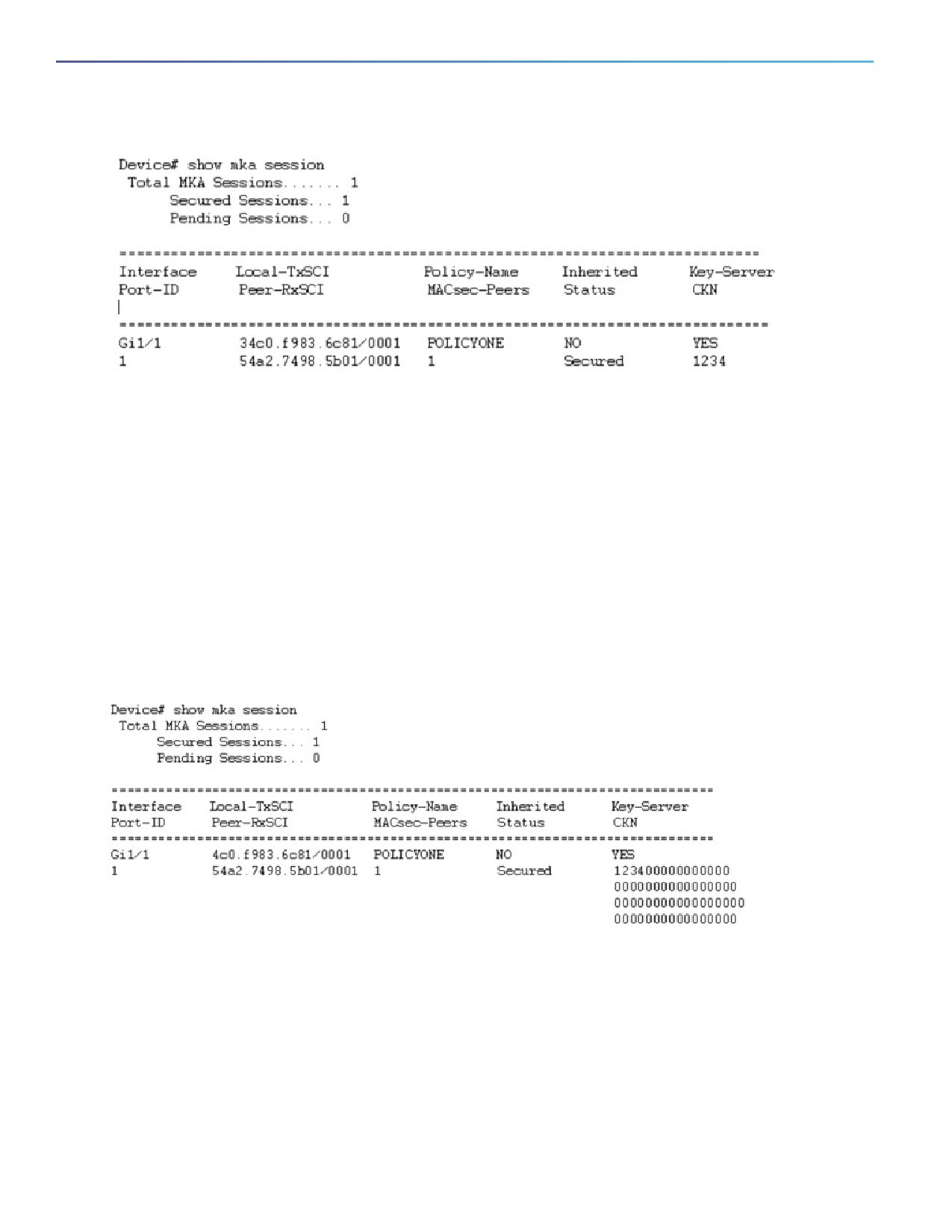
For the above example, following is the output for the show mka session command:
241
MACsec
Guidelines and Limitations
Note that the CKN key-string is exactly the same that has been configured for the key as hex-string.
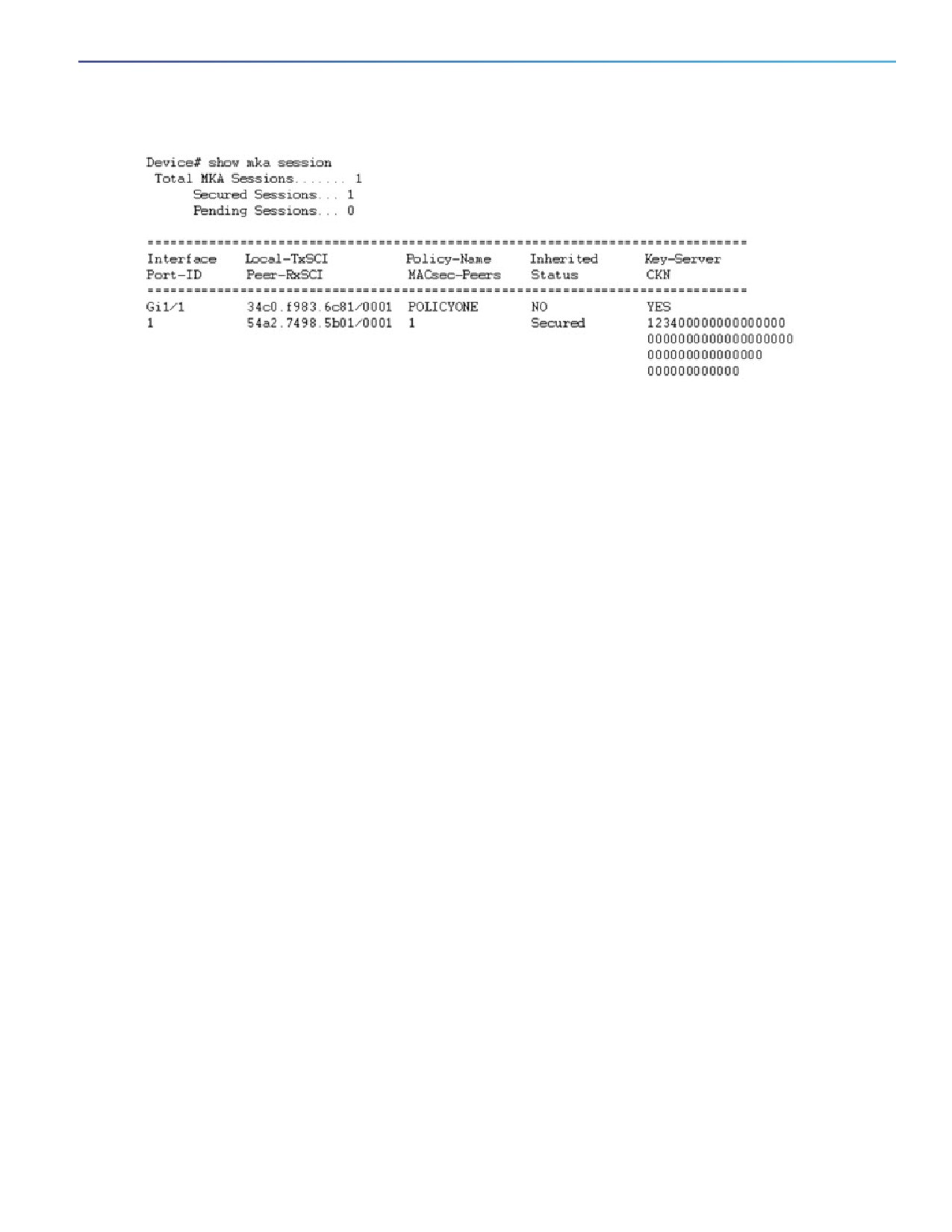
For interoperability between two images, one having the CKN behavior change and one without the CKN behavior
change, the hex-string for the key must be a 64-character hex-string padded with zeros to work on a device that has an
image with the CKN behavior change. See the example below:
Configuration without CKN key-string behavior change:
config t
key chain KEYCHAINONE macsec
key 1234
cryptographic-algorithm aes-128-cmac
key-string 123456789ABCDEF0123456789ABCDEF0
lifetime local 12:21:00 Sep 9 2015 infinite
Output:
Configuration with CKN key-string behavior change:
config t
key chain KEYCHAINONE macsec
key 1234000000000000000000000000000000000000000000000000000000000000
cryptographic-algorithm aes-128-cmac
key-string 123456789ABCDEF0123456789ABCDEF0
lifetime local 12:21:00 Sep 9 2015 infinite
Output:
242
MACsec
PSK Based MKA Support for MACsec
PSK Based MKA Support for MACsec
This section provides information about configuring pre-shared key (PSK) based MACsec Key Agreement (MKA)
MACsec encryption on the switch. This feature applies to Cisco IOS Release 15.2(7)E1a and later.
Information about PSK Based MKA
IE switches support Pairwise Master Key (PMK) Security Association Protocol (SAP) based support for MACsec to
interconnect links between the switches. The PMK keys can be either derived statically from the switch configuration
(manual mode) or derived from the RADIUS server during dot1X negotiation (dynamic mode). Manual mode does not
support switch-to-host MACsec connections because SAP is a Cisco proprietary protocol.
IE switches have MKA support for MACSec on switch-to-host links. Here the keys are derived from the RADIUS server
after dot1x authentication. However, manually configured PSK keys were not supported on IE switch platforms (running
Cisco IOS) prior to Cisco IOS Release 15.2(7)E1a. Catalyst IE 3x00 platforms (running Cisco IOS XE) have PSK based
MKA support for MACsec for statically derived keys from the switch configuration for switch-to-switch connections as
well as dynamically derived keys from RADIUS server for switch-to-host links.
Catalyst IE 3x00 platforms do not have PMK SAP based support for MACsec. Therefore, for interoperability with the
Catalyst IE 3x00 platforms, the PSK functionality is added to MACsec for Cisco IOS based IE switches.
Configuring PSK Based MKA
Follow the procedures in this section to configure PSK based MKA on IE 4000, IE 4010, and IE 5000 switches.
Configuring MKA
The MACsec Key Agreement (MKA) enables configuration and control of keying parameters. Perform the following task
to configure MKA.
243

MACsec
PSK Based MKA Support for MACsec
Command
Purpose
1.
enable
Enables privileged EXEC mode.
Example:
Enter your password if prompted.
Device> enable
2.
configure terminal
Enters global configuration mode.
Example:
Device# configure terminal
3.
mka policy policy-name
Configures an MKA policy.
Example:
Device(config)# mka policy
MKAPolicy
4.
key-server priority
(Optional) Configures MKA key server priority.
key-server-priority
Example:
Device(config-mka-policy)#
key-server priority 200
5.
macsec-cipher-suite
(Optional) Configures cipher suite(s) for secure association key (SAK)
{gcm-aes-128 }
derivation. Each of the cipher suite options can be repeated only once, but
they can be used in any order.
Example:
Device(config-mka-policy)#
macsec-cipher-suite gcm-aes-128
6.
replay-protection
(Optional) Configure MKA to use replay protection for MACsec operation.
Example:
Device(config-mka-policy)#
replay-protection
7.
confidentiality-offset 30
(Optional) Configures confidentiality offset for MACsec operation.
Example:
Device(config-mka-policy)#
confidentiality-offset 30
8.
end
Returns to privileged EXEC mode.
Example:
Device(config-mka-policy)# end
244
MACsec
PSK Based MKA Support for MACsec
Example
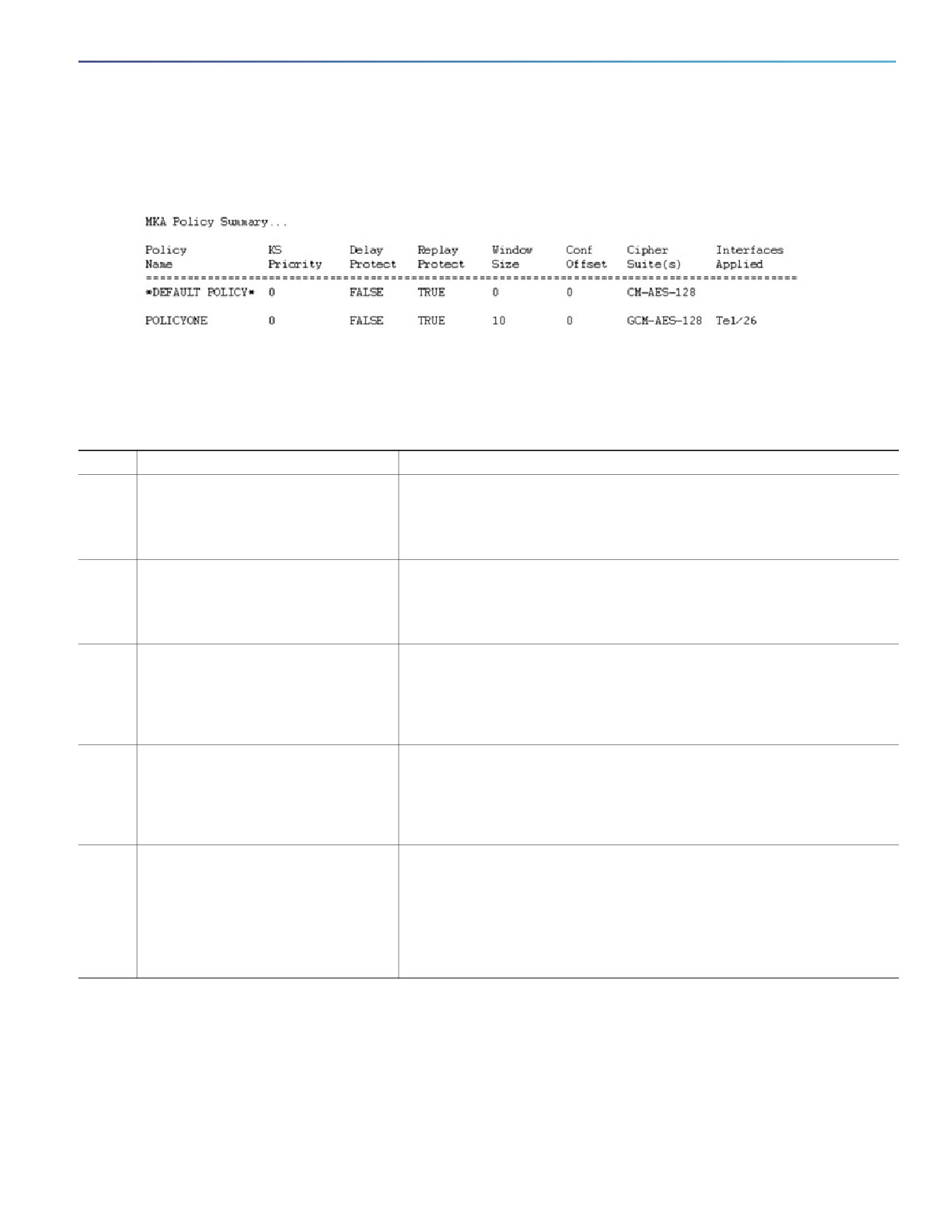
You can use the show mka policy command to verify the configuration. Here's a sample output of the show command.
Configuring MACsec and MKA on Interfaces
Perform the following task to configure MACsec and MKA on an interface.
Command
Purpose
1.
enable
Enables privileged EXEC mode.
Example:
Enter your password if prompted.
Device> enable
2.
configure terminal
Enters global configuration mode.
Example:
Device# configure terminal
3.
interface type number
Enters interface configuration mode.
Example:
Device(config)# interface
GigabitEthernet 1/1
4.
mka policy policy-name
Configures an MKA policy.
Example:
Device(config-if)# mka policy
MKAPolicy
5.
mka pre-shared-key key-chain
Configures an MKA pre-shared-key key-chain keychain1.
key-chain-name
Note: The MKA Pre-shared key can be configured on either physical
Example:
interface or subinterfaces and not on both physical and subinterfaces.
Device(config-if)# mka
pre-shared-key key-chain
keychain1
245