Cisco Industrial Ethernet 4000, 4010 and 5000 Switch Software. Configuration Guide (2022) - page 9
Configuring Switch-Based Authentication
Additional References
<output truncated>
You can remove this self-signed certificate by disabling the secure HTTP server and entering the no crypto pki trustpoint
TP-self-signed-30890755072 global configuration command. If you later reenable a secure HTTP server, a new
self-signed certificate is generated.
Verifying Secure HTTP Connection: Example
To verify the secure HTTP connection by using a Web browser, enter https://URL, where the URL is the IP address or
hostname of the server switch. If you configure a port other than the default port, you must also specify the port number
after the URL. For example:
or
Additional References
The following sections provide references related to switch administration:
186

Configuring Switch-Based Authentication
Additional References
Related Documents
Related Topic
Document Title
Cisco IOS basic commands
Cisco IOS Configuration Fundamentals Command Reference
Secure Copy Protocol configuration
Cisco IOS Security Configuration Guide: Securing User Services
RADIUS Server Load Balancing configuration
Cisco IOS Security Configuration Guide
Kerberos configuration examples
Cisco IOS Security Configuration Guide: Security Server Protocols
Authenticating a network service
Cisco IOS Security Configuration Guide: Security Server Protocols
Authenticating for KDC
Cisco IOS Security Configuration Guide: Security Server Protocols
Kerberos configuration task list
Cisco IOS Security Configuration Guide: Security Server Protocols
Login enhancement configuration
Cisco IOS User Security Configuration Guide
Password protection commands
Cisco IOS Security Command Reference
Kerberos commands
Cisco IOS Security Command Reference
Secure Shell commands
Cisco IOS Security Command Reference
Standards
Standards
Title
No new or modified standards are supported by this
—
feature, and support for existing standards has not
been modified by this feature.
MIBs
MIBs
MIBs Link
—
To locate and download MIBs using Cisco IOS XR software, use the
Cisco MIB Locator found at the following URL and choose a platform
under the Cisco Access Products menu:
RFCs
RFCs
Title
No new or modified RFCs are supported by this
—
feature, and support for existing RFCs has not been
modified by this feature.
Technical Assistance
Description
Link
The Cisco Technical Support website contains
thousands of pages of searchable technical content,
including links to products, technologies, solutions,
technical tips, and tools. Registered Cisco.com users
can log in from this page to access even more content.
187
Configuring Switch-Based Authentication
Additional References
188
Configuring IEEE 802.1x Port-Based
Authentication
Restrictions for Configuring IEEE 802.1x Port-Based
Authentication
To use this feature, the switch must be running the LAN Base image.
Information About Configuring IEEE 802.1x Port-Based
Authentication
IEEE 802.1x Port-Based Authentication
The standard defines a client-server-based access control and authentication protocol to prevent unauthorized clients
from connecting to a LAN through publicly accessible ports. The authentication server authenticates each client
connected to a switch port before making available any switch or LAN services.
Until the client is authenticated, IEEE 802.1x access control allows only Extensible Authentication Protocol over LAN
(EAPOL), Cisco Discovery Protocol (CDP), and Spanning Tree Protocol (STP) traffic through the port to which the client
is connected. After authentication, normal traffic passes through the port.
Device Roles
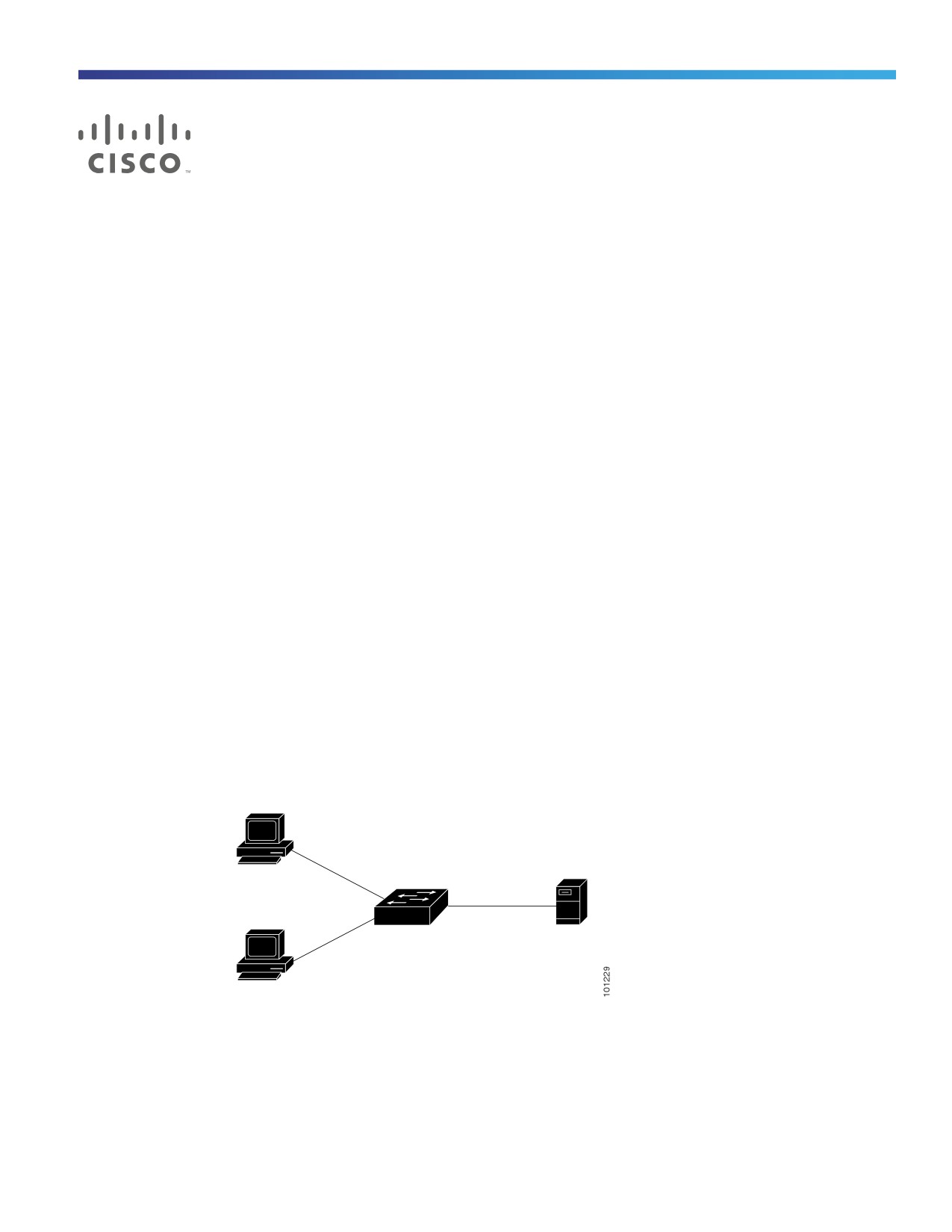
Figure 18
802.1x Device Roles
Authentication
server
(RADIUS)
Workstations
(clients)
Client—The device (workstation) that requests access to the LAN and switch services and responds to requests from
the switch. The workstation must be running 802.1x-compliant client software such as that offered in the Microsoft
Windows XP operating system. (The client is the supplicant in the 802.1x standard.)
189
Configuring IEEE 802.1x Port-Based Authentication
Information About Configuring IEEE 802.1x Port-Based Authentication
To resolve Windows XP network connectivity and 802.1x authentication issues, read the Microsoft Knowledge
Base article:
Authentication server—Performs the actual authentication of the client. The authentication server validates the
identity of the client and notifies the switch whether or not the client is authorized to access the LAN and switch
services. Because the switch acts as the proxy, the authentication service is transparent to the client. In this release,
the RADIUS security system with Extensible Authentication Protocol (EAP) extensions is the only supported
authentication server. It is available in Cisco Secure Access Control Server Version 3.0 or later. RADIUS operates in
a client/server model in which secure authentication information is exchanged between the RADIUS server and one
or more RADIUS clients.
Switch (edge switch or wireless access point)—Controls the physical access to the network based on the
authentication status of the client. The switch acts as an intermediary (proxy) between the client and the
authentication server, requesting identity information from the client, verifying that information with the
authentication server, and relaying a response to the client. The switch includes the RADIUS client, which is
responsible for encapsulating and decapsulating the EAP frames and interacting with the authentication server. (The
switch is the authenticator in the 802.1x standard.)
When the switch receives EAPOL frames and relays them to the authentication server, the Ethernet header is
stripped, and the remaining EAP frame is re-encapsulated in the RADIUS format. The EAP frames are not modified
during encapsulation, and the authentication server must support EAP within the native frame format. When the
switch receives frames from the authentication server, the server’s frame header is removed, leaving the EAP frame,
which is then encapsulated for Ethernet and sent to the client.
The devices that can act as intermediaries (switches, or a wireless access point) must be running software that
supports the RADIUS client and 802.1x authentication.
Authentication Process
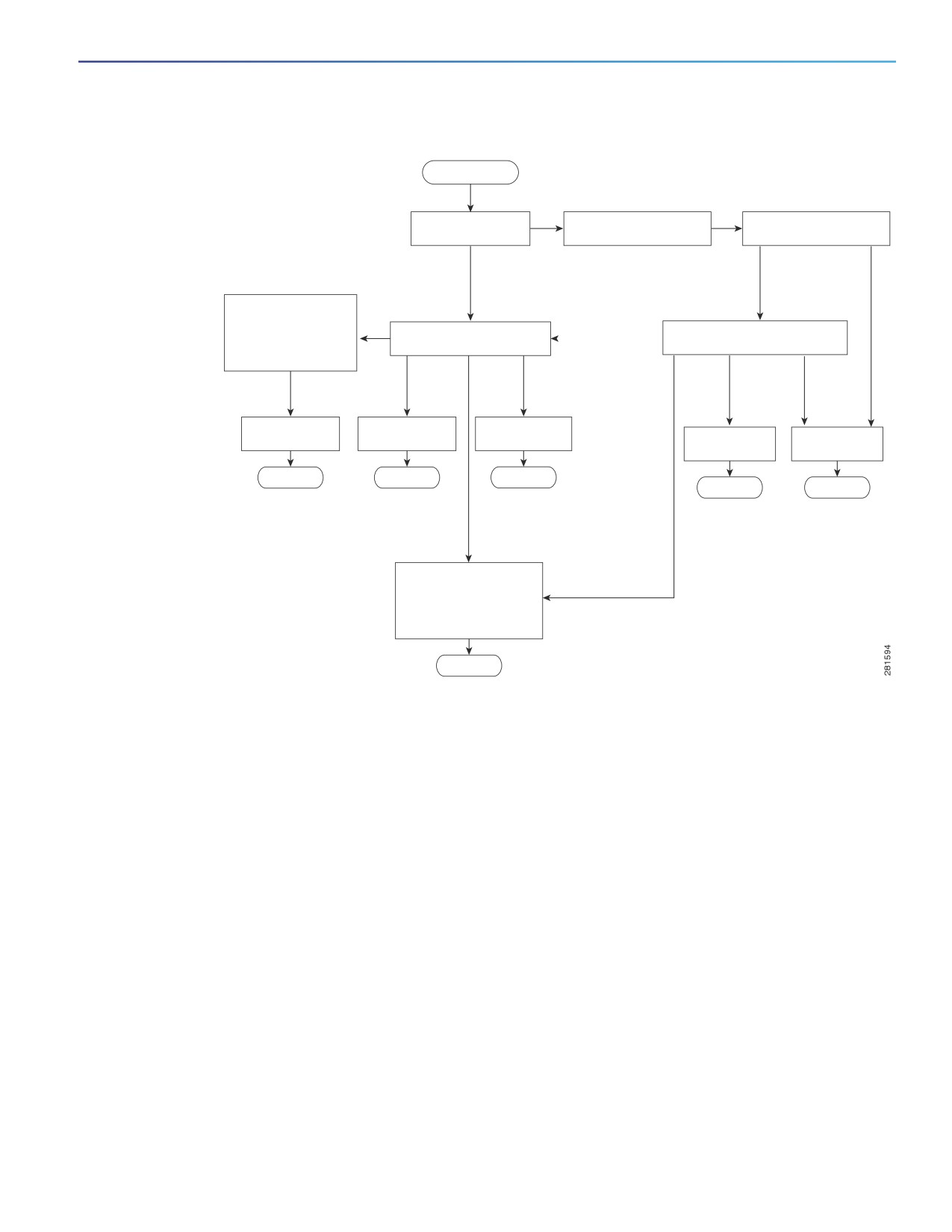
When 802.1x port-based authentication is enabled and the client supports 802.1x-compliant client software, these
events occur:
If the client identity is valid and the 802.1x authentication succeeds, the switch grants the client access to the
network.
If 802.1x authentication times out while waiting for an EAPOL message exchange and MAC authentication bypass is
enabled, the switch can use the client MAC address for authorization. If the client MAC address is valid and the
authorization succeeds, the switch grants the client access to the network. If the client MAC address is invalid and
the authorization fails, the switch assigns the client to a guest VLAN that provides limited services if a guest VLAN
is configured.
If the switch gets an invalid identity from an 802.1x-capable client and a restricted VLAN is specified, the switch can
assign the client to a restricted VLAN that provides limited services.
If the RADIUS authentication server is unavailable (down) and inaccessible authentication bypass is enabled, the
switch grants the client access to the network by putting the port in the critical-authentication state in the
RADIUS-configured or the user-specified access VLAN.
Note: Inaccessible authentication bypass is also referred to as critical authentication or the AAA fail policy.
190
Configuring IEEE 802.1x Port-Based Authentication
Information About Configuring IEEE 802.1x Port-Based Authentication
Figure
19
Authentication Flowchart
Start
Is the client IEEE
No
IEEE 802.1x authentication
Is MAC authentication
802.1x capable?
process times out.
bypass enabled? 1
Y
es
Yes
No
The switch gets an
EAPOL message,
User does not have a
and the EAPOL
certificate but the system
message
previously logged on to
Start IEEE 802.1x port-based
exchange begins.
Use MAC authentication
the network using
authentication.
bypass.1
a computer certificate.
Client
Client
Client MAC
Client MAC
identity is
identity is
address
address
invalid
valid
identity
identity
is invalid.
is valid.
Assign the port to
Assign the port to
Assign the port to
Assign the port to
Assign the port to
a guest VLAN.
a restricted VLAN.
a VLAN.
a VLAN.
a guest VLAN.1
Done
Done
Done
Done
Done
All authentication
All authentication
servers are down.
servers are down.
Use inaccessible
authentication bypass
(critical authentication)
to assign the critical
1 = This occurs if the switch does not
port to a VLAN.
detect EAPOL packets from the client.
Done
The switch reauthenticates a client when one of these situations occurs:
Periodic reauthentication is enabled, and the reauthentication timer expires.
You can configure the reauthentication timer to use a switch-specific value or to be based on values from the RADIUS
server.
After 802.1x authentication using a RADIUS server is configured, the switch uses timers based on the
Session-Timeout RADIUS attribute (Attribute[27]) and the Termination-Action RADIUS attribute (Attribute [29]).
The Session-Timeout RADIUS attribute (Attribute[27]) specifies the time after which reauthentication occurs.
The Termination-Action RADIUS attribute (Attribute [29]) specifies the action to take during reauthentication. The
actions are Initialize and ReAuthenticate. When the Initialize action is set (the attribute value is DEFAULT), the 802.1x
session ends, and connectivity is lost during reauthentication. When the ReAuthenticate action is set (the attribute
value is RADIUS-Request), the session is not affected during reauthentication.
You manually reauthenticate the client by entering the dot1x re-authenticate interface interface-id privileged EXEC
command.
If multidomain authentication (MDA) is enabled on a port, this flow can be used with some exceptions that are applicable
to voice authorization. For more information on MDA, see Multidomain Authentication, page 197.
191
Configuring IEEE 802.1x Port-Based Authentication
Information About Configuring IEEE 802.1x Port-Based Authentication
Switch-to-RADIUS-Server Communication
RADIUS security servers are identified by their hostname or IP address, hostname and specific UDP port numbers, or IP
address and specific UDP port numbers. The combination of the IP address and the UDP port number creates a unique
identifier, which enables RADIUS requests to be sent to multiple UDP ports on a server at the same IP address. If two
different host entries on the same RADIUS server are configured for the same service—for example, authentication—the
second host entry configured acts as the failover backup to the first one. The RADIUS host entries are tried in the order
in which they were configured.
Authentication Initiation and Message Exchange
During 802.1x authentication, the switch or the client can initiate authentication. If you enable authentication on a port by
using the authentication port-control auto interface configuration command, the switch initiates authentication when
the link state changes from down to up or periodically as long as the port remains up and unauthenticated. The switch
sends an EAP-request/identity frame to the client to request its identity. Upon receipt of the frame, the client responds
with an EAP-response/identity frame.
However, if during boot up, the client does not receive an EAP-request/identity frame from the switch, the client can
initiate authentication by sending an EAPOL-start frame, which prompts the switch to request the client’s identity.
Note: If 802.1x authentication is not enabled or supported on the network access device, any EAPOL frames from the
client are dropped. If the client does not receive an EAP-request/identity frame after three attempts to start
authentication, the client sends frames as if the port is in the authorized state. A port in the authorized state effectively
means that the client has been successfully authenticated. For more information, see Ports in Authorized and
Unauthorized States, page 195.
When the client supplies its identity, the switch begins its role as the intermediary, passing EAP frames between the client
and the authentication server until authentication succeeds or fails. If the authentication succeeds, the switch port
becomes authorized. If the authentication fails, authentication can be retried, the port might be assigned to a VLAN that
provides limited services, or network access is not granted. For more information, see Ports in Authorized and
Unauthorized States, page 195.
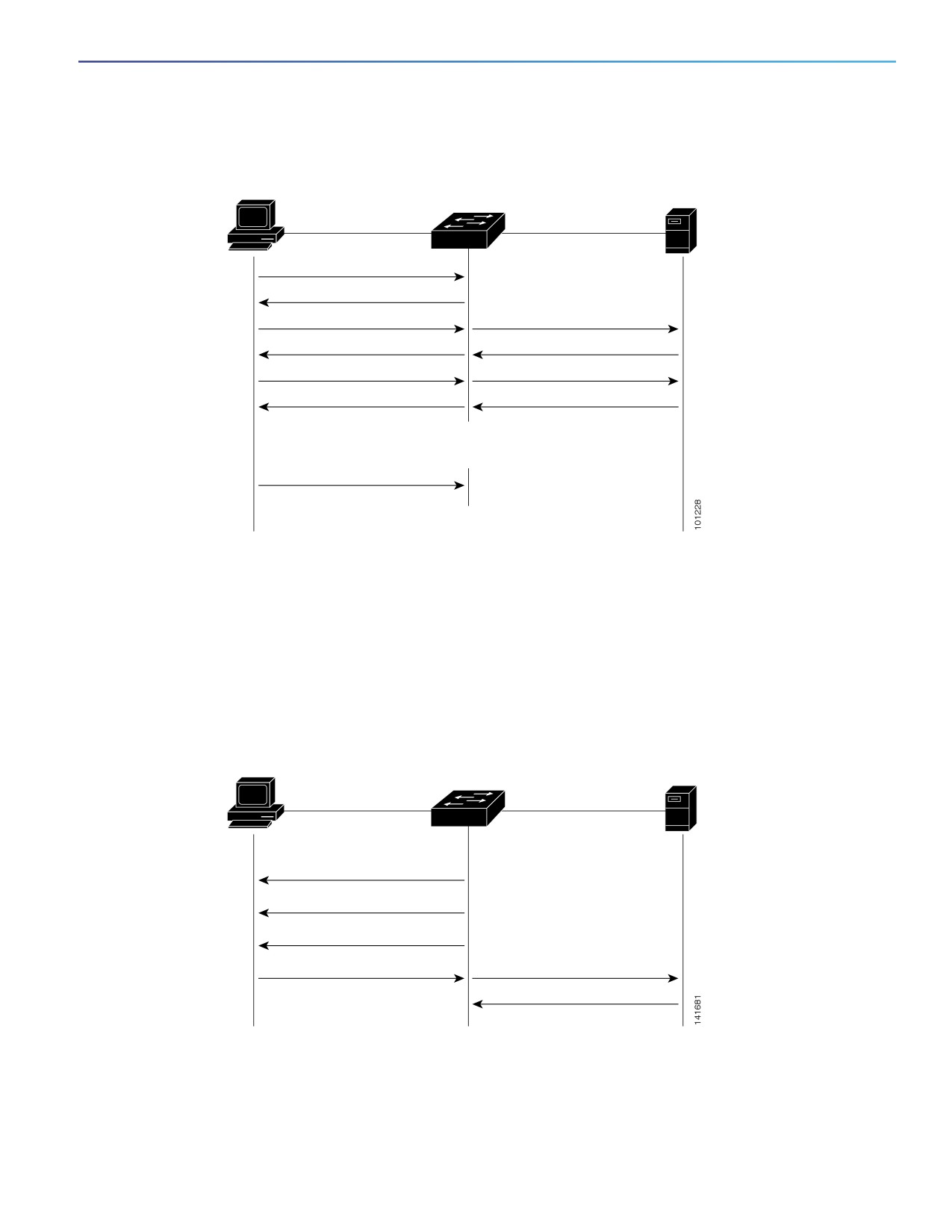
The specific exchange of EAP frames depends on the authentication method being used. Figure 20 on page 193 shows
a message exchange initiated by the client when the client uses the One-Time-Password (OTP) authentication method
with a RADIUS server.
192
Configuring IEEE 802.1x Port-Based Authentication
Information About Configuring IEEE 802.1x Port-Based Authentication
Figure 20
Message Exchange
Authentication
server
Client
(RADIUS)
EAPOL-Start
EAP-Request/Identity
EAP-Response/Identity
RADIUS Access-Request
EAP-Request/OTP
RADIUS Access-Challenge
EAP-Response/OTP
RADIUS Access-Request
EAP-Success
RADIUS Access-Accept
Port Authorized
EAPOL-Logoff
Port Unauthorized
If 802.1x authentication times out while waiting for an EAPOL message exchange and MAC authentication bypass is
enabled, the switch can authorize the client when the switch detects an Ethernet packet from the client. The switch uses
the MAC address of the client as its identity and includes this information in the RADIUS-access/request frame that is
sent to the RADIUS server. After the server sends the switch the RADIUS-access/accept frame (authorization is
successful), the port becomes authorized. If authorization fails and a guest VLAN is specified, the switch assigns the port
to the guest VLAN. If the switch detects an EAPOL packet while waiting for an Ethernet packet, the switch stops the MAC
authentication bypass process and stops 802.1x authentication.
Figure 21
Message Exchange During MAC Authentication Bypass
Authentication
server
Client
Switch
(RADIUS)
EAPOL Request/Identity
EAPOL Request/Identity
EAPOL Request/Identity
Ethernet packet
RADIUS Access/Request
RADIUS Access/Accept
193

Configuring IEEE 802.1x Port-Based Authentication
Information About Configuring IEEE 802.1x Port-Based Authentication
Authentication Manager
Port-Based Authentication Methods
Table 29 on page 194 lists the authentication methods supported in these host modes:
Single host—Only one data or voice host (client) can be authenticated on a port.
Multiple host—Multiple data hosts can be authenticated on the same port. (If a port becomes unauthorized in
multiple-host mode, the switch denies network access to all of the attached clients.)
Multidomain authentication (MDA)—Both a data device and voice device can be authenticated on the same switch
port. The port is divided into a data domain and a voice domain.
Multiple authentication—Multiple hosts can authenticate on the data VLAN. This mode also allows one client on the
VLAN if a voice VLAN is configured.
Table 29
802.1x Features
Authentication Method
Mode
Single Host
Multiple Host
MDA1
Multiple
Authentication2
802.1x
VLAN assignment
VLAN assignment
VLAN assignment
Per-user ACL
Per-user ACL
Per-user ACL
Per-user ACL
Filter-Id attribute
Filter-ID attribute
Filter-ID attribute
Filter-Id attribute
Downloadable ACL
Downloadable ACL
Downloadable ACL
Downloadable ACL
Redirect URL
Redirect URL
Redirect URL
Redirect URL
MAC authentication bypass
VLAN assignment
VLAN assignment
VLAN assignment
Per-user ACL
Per-user ACL
Per-user ACL
Per-user ACL
Filter-Id attribute
Filter-ID attribute
Filter-ID attribute
Filter-Id attribute
Downloadable ACL
Downloadable ACL
Downloadable ACL
Downloadable ACL
Redirect URL
Redirect URL
Redirect URL
Redirect URL
Standalone web authentication
Proxy ACL, Filter-Id attribute, downloadable ACL2
NAC Layer 2 IP validation
Filter-Id attribute
Filter-Id attribute
Filter-Id attribute
Filter-Id attribute3
Downloadable ACL
Downloadable ACL
Downloadable ACL
Downloadable ACL
Redirect URL
Redirect URL
Redirect URL
Redirect URL
Web authentication as fallback
Proxy ACL
Proxy ACL
Proxy ACL
Proxy ACL3
method3
Filter-Id attribute
Filter-Id attribute
Filter-Id attribute
Filter-Id attribute
Downloadable ACL
Downloadable ACL
Downloadable ACL
Downloadable ACL
1. MDA = Multidomain authentication.
2. Also referred to as multiauth.
3. For clients that do not support 802.1x authentication.
194
Configuring IEEE 802.1x Port-Based Authentication
Information About Configuring IEEE 802.1x Port-Based Authentication
Per-User ACLs and Filter-Ids
Support was added for MDA- and multiauth-enabled ports. In 12.2(52)SE and later, support was added for ports in
multihost mode.
An ACL configured on the switch is not compatible with an ACL configured on another device running Cisco IOS
software, such as a Catalyst 6500 switch.
The ACLs configured on the switch are compatible with other devices running the Cisco IOS release.
Note: You can only set any as the source in the ACL.
Note: For any ACL configured for multiple-host mode, the source portion of statement must be any. (For example,
permit icmp any host 10.10.1.1.)
You must specify any in the source ports of any defined ACL. Otherwise, the ACL cannot be applied and authorization
fails. Single host is the only exception to support backward compatibility.
More than one host can be authenticated on MDA- enabled and multiauth ports. The ACL policy applied for one host
does not effect the traffic of another host.
If only one host is authenticated on a multihost port, and the other hosts gain network access without authentication, the
ACL policy for the first host can be applied to the other connected hosts by specifying any in the source address.
Authentication Manager CLI Commands
The authentication-manager interface-configuration commands control all the authentication methods, such as 802.1x,
MAC authentication bypass, and web authentication. The authentication manager commands determine the priority and
order of authentication methods applied to a connected host.
The authentication manager commands control generic authentication features, such as host-mode, violation mode, and
the authentication timer. Generic authentication commands include the authentication host-mode, authentication
violation, and authentication timer interface configuration commands.
802.1x-specific commands begin with the dot1x or authentication keyword. For example, the authentication
port-control auto interface configuration command enables authentication on an interface. However, the dot1x
system-authentication control global configuration command only globally enables or disables 802.1x authentication.
Note: If 802.1x authentication is globally disabled, other authentication methods are still enabled on that port, such as
web authentication.
You can filter out verbose system messages generated by the authentication manager. The filtered content typically
relates to authentication success. You can also filter verbose messages for 802.1x authentication and MAB
authentication. There is a separate command for each authentication method:
The no authentication logging verbose global configuration command filters verbose messages from the
authentication manager.
The no dot1x logging verbose global configuration command filters 802.1x authentication verbose messages.
The no mab logging verbose global configuration command filters MAC authentication bypass (MAB) verbose
messages
Ports in Authorized and Unauthorized States
During 802.1x authentication, depending on the switch port state, the switch can grant a client access to the network.
The port starts in the unauthorized state. While in this state, the port that is not configured as a voice VLAN port disallows
all ingress and egress traffic except for 802.1x authentication, CDP, and STP packets. When a client is successfully
195
Configuring IEEE 802.1x Port-Based Authentication
Information About Configuring IEEE 802.1x Port-Based Authentication
authenticated, the port changes to the authorized state, allowing all traffic for the client to flow normally. If the port is
configured as a voice VLAN port, the port allows VoIP traffic and 802.1x protocol packets before the client is successfully
authenticated.
If a client that does not support 802.1x authentication connects to an unauthorized 802.1x port, the switch requests the
client’s identity. In this situation, the client does not respond to the request, the port remains in the unauthorized state,
and the client is not granted access to the network.
In contrast, when an 802.1x-enabled client connects to a port that is not running the 802.1x standard, the client initiates
the authentication process by sending the EAPOL-start frame. When no response is received, the client sends the
request for a fixed number of times. Because no response is received, the client begins sending frames as if the port is
in the authorized state.
You control the port authorization state by using the authentication port-control interface configuration command and
these keywords:
force-authorized—Disables 802.1x authentication and causes the port to change to the authorized state without any
authentication exchange required. The port sends and receives normal traffic without 802.1x-based authentication
of the client. This is the default setting.
force-unauthorized—Causes the port to remain in the unauthorized state, ignoring all attempts by the client to
authenticate. The switch cannot provide authentication services to the client through the port.
auto—Enables 802.1x authentication and causes the port to begin in the unauthorized state, allowing only EAPOL
frames to be sent and received through the port. The authentication process begins when the link state of the port
changes from down to up or when an EAPOL-start frame is received. The switch requests the identity of the client
and begins relaying authentication messages between the client and the authentication server. Each client
attempting to access the network is uniquely identified by the switch by using the client MAC address.
If the client is successfully authenticated (receives an Accept frame from the authentication server), the port state
changes to authorized, and all frames from the authenticated client are allowed through the port. If the authentication
fails, the port remains in the unauthorized state, but authentication can be retried. If the authentication server cannot be
reached, the switch can resend the request. If no response is received from the server after the specified number of
attempts, authentication fails, and network access is not granted.
When a client logs off, it sends an EAPOL-logoff message, causing the switch port to change to the unauthorized state.
If the link state of a port changes from up to down, or if an EAPOL-logoff frame is received, the port returns to the
unauthorized state.
802.1x Host Mode
You can configure an 802.1x port for single-host or for multiple-hosts mode. In single-host mode (see Figure 18 on
page 189), only one client can be connected to the 802.1x-enabled switch port. The switch detects the client by sending
an EAPOL frame when the port link state changes to the up state. If a client leaves or is replaced with another client, the
switch changes the port link state to down, and the port returns to the unauthorized state.
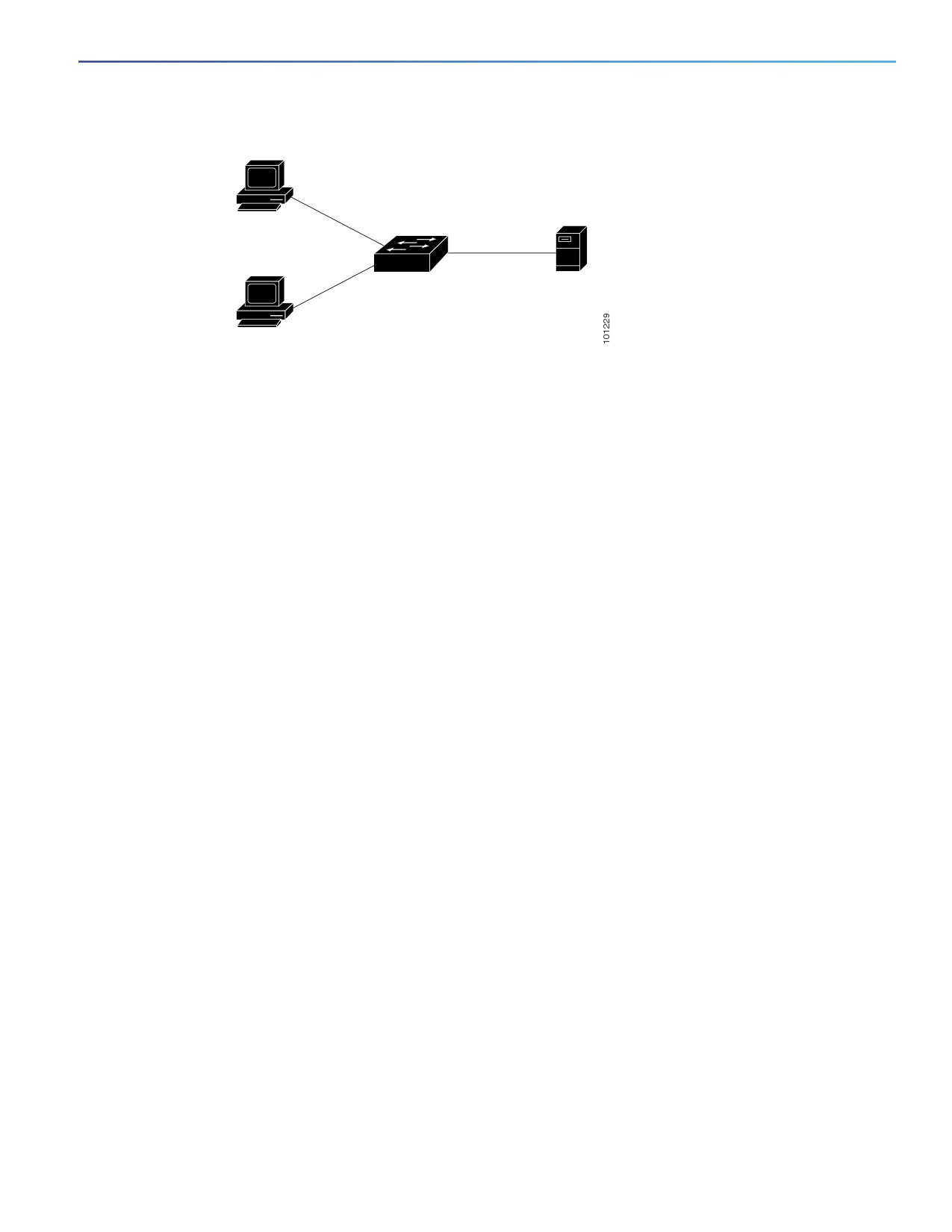
In multiple-hosts mode, you can attach multiple hosts to a single 802.1x-enabled port. Figure 22 on page 197 shows
802.1x port-based authentication in a wireless LAN. In this mode, only one of the attached clients must be authorized
for all clients to be granted network access. If the port becomes unauthorized (reauthentication fails or an EAPOL-logoff
message is received), the switch denies network access to all of the attached clients. In this topology, the wireless
access point is responsible for authenticating the clients attached to it, and it also acts as a client to the switch.
196
Configuring IEEE 802.1x Port-Based Authentication
Information About Configuring IEEE 802.1x Port-Based Authentication
Figure 22
Multiple Host Mode Example
Authentication
server
(RADIUS)
Workstations
(clients)
The switch supports multidomain authentication (MDA), which allows both a data device and a voice device, such as an
IP Phone (Cisco or non-Cisco), to connect to the same switch port. For more information, see Multidomain
Authentication, page 197.
Multidomain Authentication
The switch supports multidomain authentication (MDA), which allows both a data device and voice device, such as an IP
phone (Cisco or non-Cisco), to authenticate on the same switch port. The port is divided into a data domain and a voice
domain.
MDA does not enforce the order of device authentication. However, for best results, we recommend that a voice device
is authenticated before a data device on an MDA-enabled port.
Follow these guidelines for configuring MDA:
To configure a switch port for MDA, see Configuring the Host Mode, page 222.
You must configure the voice VLAN for the IP phone when the host mode is set to multidomain. For more information,
see Configuring VLANs, page 289
To authorize a voice device, the AAA server must be configured to send a Cisco Attribute-Value (AV) pair attribute
with a value of device-traffic-class=voice. Without this value, the switch treats the voice device as a data device.
The guest VLAN and restricted VLAN features only apply to the data devices on an MDA-enabled port. The switch
treats a voice device that fails authorization as a data device.
If more than one device attempts authorization on either the voice or the data domain of a port, it is error disabled.
Until a device is authorized, the port drops its traffic. Non-Cisco IP phones or voice devices are allowed into both
the data and voice VLANs. The data VLAN allows the voice device to contact a DHCP server to obtain an IP address
and acquire the voice VLAN information. After the voice device starts sending on the voice VLAN, its access to the
data VLAN is blocked.
A voice device MAC address that is binding on the data VLAN is not counted towards the port security MAC address
limit.
MDA can use MAC authentication bypass as a fallback mechanism to allow the switch port to connect to devices
that do not support 802.1x authentication. For more information, see MAC Authentication Bypass Guidelines,
page 217.
When a data or a voice device is detected on a port, its MAC address is blocked until authorization succeeds. If the
authorization fails, the MAC address remains blocked for 5 minutes.
197
Configuring IEEE 802.1x Port-Based Authentication
Information About Configuring IEEE 802.1x Port-Based Authentication
If more than five devices are detected on the data VLAN or more than one voice device is detected on the voice
VLAN while a port is unauthorized, the port is error disabled.
When a port host mode changes from single- or multihost to multidomain mode, an authorized data device remains
authorized on the port. However, a Cisco IP phone on the port voice VLAN is automatically removed and must be
reauthenticated on that port.
Active fallback mechanisms such as guest VLAN and restricted VLAN remain configured after a port changes from
single-host or multiple-host mode to multidomain mode.
Switching a port host mode from multidomain to single-host or multiple-hosts mode removes all authorized devices
from the port.
If a data domain is authorized first and placed in the guest VLAN, non-802.1x-capable voice devices need their
packets tagged on the voice VLAN to trigger authentication. The phone need not need to send tagged traffic. (The
same is true for an 802.1x-capable phone.)
We do not recommend per-user ACLs with an MDA-enabled port. An authorized device with a per-user ACL policy
might impact traffic on both the port voice and data VLANs. You can use only one device on the port to enforce
per-user ACLs.
For more information, see Configuring the Host Mode, page 222.
802.1x Multiple Authentication Mode
Multiple-authentication (multiauth) mode allows multiple authenticated clients on the data VLAN. Each host is individually
authenticated. If a voice VLAN is configured, this mode also allows one client on the VLAN. (If the port detects any
additional voice clients, they are discarded from the port, but no violation errors occur.)
If a hub or access point is connected to an 802.1x-enabled port, each connected client must be authenticated.
For non-802.1x devices, you can use MAC authentication bypass or web authentication as the per-host authentication
fallback method to authenticate different hosts with different methods on a single port.
There is no limit to the number of data hosts can authenticate on a multiauthport. However, only one voice device is
allowed if the voice VLAN is configured. Since there is no host limit defined violation will not be trigger, if a second voice
is seen we silently discard it but do not trigger violation.
For MDA functionality on the voice VLAN, multiple-authentication mode assigns authenticated devices to either a data
or a voice VLAN, depending on the VSAs received from the authentication server.
Note: When a port is in multiple-authentication mode, the guest VLAN and the authentication-failed VLAN features do
not activate.
For more information about critical authentication mode and the critical VLAN, see 802.1x Authentication with
Inaccessible Authentication Bypass, page 207.
For more information about configuring multiauth mode on a port, see Configuring the Host Mode, page 222.
MAC Move
When a MAC address is authenticated on one switch port, that address is not allowed on another authentication
manager-enabled port of the switch. If the switch detects that same MAC address on another authentication
manager-enabled port, the address is not allowed.
There are situations where a MAC address might need to move from one port to another on the same switch. For
example, when there is another device (for example a hub or an IP phone) between an authenticated host and a switch
port, you might want to disconnect the host from the device and connect it directly to another port on the same switch.
198
Configuring IEEE 802.1x Port-Based Authentication
Information About Configuring IEEE 802.1x Port-Based Authentication
You can globally enable MAC move so the device is reauthenticated on the new port. When a host moves to a second
port, the session on the first port is deleted, and the host is reauthenticated on the new port.
MAC move is supported on all host modes. (The authenticated host can move to any port on the switch, no matter which
host mode is enabled on the that port.)
When a MAC address moves from one port to another, the switch terminates the authenticated session on the original
port and initiates a new authentication sequence on the new port.
The MAC move feature applies to both voice and data hosts.
Note: In open authentication mode, a MAC address is immediately moved from the original port to the new port, with no
requirement for authorization on the new port.
For more information see Configuring Optional 802.1x Authentication Features, page 224.
MAC Replace
The MAC replace feature can be configured to address the violation that occurs when a host attempts to connect to a
port where another host was previously authenticated.
Note: This feature does not apply to ports in multiauth mode, because violations are not triggered in that mode. It does
not apply to ports in multiple host mode, because in that mode, only the first host requires authentication.
If you configure the authentication violation interface configuration command with the replace keyword, the
authentication process on a port in multidomain mode is:
A new MAC address is received on a port with an existing authenticated MAC address.
The authentication manager replaces the MAC address of the current data host on the port with the new MAC
address.
The authentication manager initiates the authentication process for the new MAC address.
If the authentication manager determines that the new host is a voice host, the original voice host is removed.
If a port is in open authentication mode, any new MAC address is immediately added to the MAC address table.
For more information see Configuring Optional 802.1x Authentication Features, page 224.
802.1x Accounting
The 802.1x standard defines how users are authorized and authenticated for network access but does not keep track of
network usage. 802.1x accounting is disabled by default. You can enable 802.1x accounting to monitor this activity on
802.1x-enabled ports:
User successfully authenticates.
User logs off.
Link-down occurs.
Reauthentication successfully occurs.
Reauthentication fails.
The switch does not log 802.1x accounting information. Instead, it sends this information to the RADIUS server, which
must be configured to log accounting messages.
199

Configuring IEEE 802.1x Port-Based Authentication
Information About Configuring IEEE 802.1x Port-Based Authentication
802.1x Accounting Attribute-Value Pairs
The information sent to the RADIUS server is represented in the form of Attribute-Value (AV) pairs. These AV pairs
provide data for different applications. (For example, a billing application might require information that is in the
Acct-Input-Octets or the Acct-Output-Octets attributes of a RADIUS packet.)
AV pairs are automatically sent by a switch that is configured for 802.1x accounting. Three types of RADIUS accounting
packets are sent by a switch:
START—Sent when a new user session starts
INTERIM—Sent during an existing session for updates
STOP—Sent when a session terminates
Attribute Number
AV Pair Name
START
INTERIM
STOP
Attribute[1]
User-Name
Always
Always
Always
Attribute[4]
NAS-IP-Address
Always
Always
Always
Attribute[5]
NAS-Port
Always
Always
Always
Attribute[8]
Framed-IP-Address
Never
Sometimes1
Sometimes1
Attribute[25]
Class
Always
Always
Always
Attribute[30]
Called-Station-ID
Always
Always
Always
Attribute[31]
Calling-Station-ID
Always
Always
Always
Attribute[40]
Acct-Status-Type
Always
Always
Always
Attribute[41]
Acct-Delay-Time
Always
Always
Always
Attribute[42]
Acct-Input-Octets
Never
Always
Always
Attribute[43]
Acct-Output-Octets
Never
Always
Always
Attribute[44]
Acct-Session-ID
Always
Always
Always
Attribute[45]
Acct-Authentic
Always
Always
Always
Attribute[46]
Acct-Session-Time
Never
Always
Always
Attribute[49]
Acct-Terminate-Cause
Never
Never
Always
Attribute[61]
NAS-Port-Type
Always
Always
Always
1. The Framed-IP-Address AV pair is sent only if a valid Dynamic Host Control Protocol (DHCP) binding exists for the
host in the DHCP snooping bindings table.
You can view the AV pairs that are being sent by the switch by entering the debug radius accounting privileged EXEC
command.
For more information about AV pairs, see RFC 3580, “802.1x Remote Authentication Dial In User Service (RADIUS)
Usage Guidelines.”
802.1x Readiness Check
The 802.1x readiness check monitors 802.1x activity on all the switch ports and displays information about the devices
connected to the ports that support 802.1x. You can use this feature to determine if the devices connected to the switch
ports are 802.1x-capable. You use an alternate authentication such as MAC authentication bypass or web authentication
for the devices that do not support 802.1x functionality.
This feature only works if the supplicant on the client supports a query with the NOTIFY EAP notification packet. The client
must respond within the 802.1x timeout value.
200
Configuring IEEE 802.1x Port-Based Authentication
Information About Configuring IEEE 802.1x Port-Based Authentication
Follow these guidelines to enable the readiness check on the switch:
The readiness check is typically used before 802.1x is enabled on the switch.
The 802.1x readiness check is allowed on all ports that can be configured for 802.1x. The readiness check is not
available on a port that is configured as dot1x force-unauthorized.
If you use the dot1x test eapol-capable privileged EXEC command without specifying an interface, all the ports on
the switch stack are tested.
When you configure the dot1x test eapol-capable command on an 802.1x-enabled port, and the link comes up,
the port queries the connected client about its 802.1x capability. When the client responds with a notification packet,
it is 802.1x-capable. A syslog message is generated if the client responds within the timeout period. If the client
does not respond to the query, the client is not 802.1x-capable. No syslog message is generated.
The readiness check can be sent on a port that handles multiple hosts (for example, a PC that is connected to an IP
phone). A syslog message is generated for each of the clients that respond to the readiness check within the timer
period.
For information on configuring the switch for the 802.1x readiness check, see Configuring 802.1x Readiness Check,
page 220.
802.1x Authentication with VLAN Assignment
The RADIUS server sends the VLAN assignment to configure the switch port. The RADIUS server database maintains the
username-to-VLAN mappings, assigning the VLAN based on the username of the client connected to the switch port.
You can use this feature to limit network access for certain users.
When a voice device is authorized and the RADIUS server returns an authorized VLAN, the voice VLAN on the port is
configured to send and receive packets on the assigned voice VLAN. Voice VLAN assignment behaves the same as data
VLAN assignment on multidomain authentication (MDA)-enabled ports. For more information, see Multidomain
Authentication, page 197.
When configured on the switch and the RADIUS server, 802.1x authentication with VLAN assignment has these
characteristics:
If no VLAN is supplied by the RADIUS server or if 802.1x authentication is disabled, the port is configured in its
access VLAN after successful authentication. Recall that an access VLAN is a VLAN assigned to an access port. All
packets sent from or received on this port belong to this VLAN.
If 802.1x authentication is enabled but the VLAN information from the RADIUS server is not valid, authorization fails
and configured VLAN remains in use. This prevents ports from appearing unexpectedly in an inappropriate VLAN
because of a configuration error.
Configuration errors could include specifying a VLAN for a routed port, a malformed VLAN ID, a nonexistent or
internal (routed port) VLAN ID, an RSPAN VLAN, a shut down or suspended VLAN. In the case of a mutlidomain host
port, configuration errors can also be due to an attempted assignment of a data VLAN that matches the configured
or assigned voice VLAN ID (or the reverse).
If 802.1x authentication is enabled and all information from the RADIUS server is valid, the authorized device is
placed in the specified VLAN after authentication.
If the multiple-hosts mode is enabled on an 802.1x port, all hosts are placed in the same VLAN (specified by the
RADIUS server) as the first authenticated host.
Enabling port security does not impact the RADIUS server-assigned VLAN behavior.
If 802.1x authentication is disabled on the port, it is returned to the configured access VLAN and configured voice
VLAN.
201
Configuring IEEE 802.1x Port-Based Authentication
Information About Configuring IEEE 802.1x Port-Based Authentication
If an 802.1x port is authenticated and put in the RADIUS server-assigned VLAN, any change to the port access VLAN
configuration does not take effect. In the case of a multidomain host, the same applies to voice devices when the
port is fully authorized with these exceptions:
— If the VLAN configuration change of one device results in matching the other device configured or assigned
VLAN, then authorization of all devices on the port is terminated and multidomain host mode is disabled until a
valid configuration is restored where data and voice device configured VLANs no longer match.
— If a voice device is authorized and is using a downloaded voice VLAN, the removal of the voice VLAN
configuration, or modifying the configuration value to dot1p or untagged results in voice device un-authorization
and the disablement of multi-domain host mode.
When the port is in the force authorized, force unauthorized, unauthorized, or shutdown state, it is put into the configured
access VLAN.
The 802.1x authentication with VLAN assignment feature is not supported on trunk ports, dynamic ports, or with
dynamic-access port assignment through a VLAN Membership Policy Server (VMPS).
To configure VLAN assignment you need to perform these tasks:
Enable AAA authorization by using the network keyword to allow interface configuration from the RADIUS server.
Enable 802.1x authentication. (The VLAN assignment feature is automatically enabled when you configure 802.1x
authentication on an access port.)
Assign vendor-specific tunnel attributes in the RADIUS server. The RADIUS server must return these attributes to the
switch:
—
[64] Tunnel-Type = VLAN
—
[65] Tunnel-Medium-Type = 802
—
[81] Tunnel-Private-Group-ID = VLAN name, VLAN ID, or VLAN-Group
—
[83] Tunnel-Preference
Attribute [64] must contain the value VLAN (type 13). Attribute [65] must contain the value 802 (type 6). Attribute
[81] specifies the VLAN name or VLAN ID assigned to the 802.1x-authenticated user.
For examples of tunnel attributes, see Configuring Vendor-Specific RADIUS Attributes: Examples, page 185.
Voice Aware 802.1x Security
You use the voice aware 802.1x security feature on the switch to disable only the VLAN on which a security violation
occurs, whether it is a data or voice VLAN. You can use this feature in IP phone deployments where a PC is connected
to the IP phone. A security violation found on the data VLAN results in the shutdown of only the data VLAN. The traffic
on the voice VLAN flows through the switch without interruption.
Follow these guidelines to configure voice aware 802.1x voice security on the switch:
You enable voice aware 802.1x security by entering the errdisable detect cause security-violation shutdown vlan
global configuration command. You disable voice aware 802.1x security by entering the no version of this command.
This command applies to all 802.1x-configured ports in the switch.
Note: If you do not include the shutdown vlan keywords, the entire port is shut down when it enters the error-disabled
state.
If you use the errdisable recovery cause security-violation global configuration command to configure
error-disabled recovery, the port is automatically reenabled. If error-disabled recovery is not configured for the port,
you reenable it by using the shutdown and no-shutdown interface configuration commands.
202
Configuring IEEE 802.1x Port-Based Authentication
Information About Configuring IEEE 802.1x Port-Based Authentication
You can reenable individual VLANs by using the clear errdisable interface interface-id vlan [vlan-list] privileged
EXEC command. If you do not specify a range, all VLANs on the port are enabled.
802.1x Authentication with Per-User ACLs
You can enable per-user access control lists (ACLs) to provide different levels of network access and service to an
802.1x-authenticated user. When the RADIUS server authenticates a user connected to an 802.1x port, it retrieves the
ACL attributes based on the user identity and sends them to the switch. The switch applies the attributes to the 802.1x
port for the duration of the user session. The switch removes the per-user ACL configuration when the session is over,
if authentication fails, or if a link-down condition occurs. The switch does not save RADIUS-specified ACLs in the running
configuration. When the port is unauthorized, the switch removes the ACL from the port.
You can configure router ACLs and input port ACLs on the same switch. However, a port ACL takes precedence over a
router ACL. If you apply input port ACL to an interface that belongs to a VLAN, the port ACL takes precedence over an
input router ACL applied to the VLAN interface. Incoming packets received on the port to which a port ACL is applied are
filtered by the port ACL. Incoming routed packets received on other ports are filtered by the router ACL. Outgoing routed
packets are filtered by the router ACL. To avoid configuration conflicts, you should carefully plan the user profiles stored
on the RADIUS server.
RADIUS supports per-user attributes, including vendor-specific attributes. These vendor-specific attributes (VSAs) are
in octet-string format and are passed to the switch during the authentication process. The VSAs used for per-user ACLs
are inacl#<n> for the ingress direction and outacl#<n> for the egress direction. MAC ACLs are supported only in the
ingress direction. The switch supports VSAs only in the ingress direction. It does not support port ACLs in the egress
direction on Layer 2 ports. For more information, see Configuring Network Security with ACLs, page 575
Use only the extended ACL syntax style to define the per-user configuration stored on the RADIUS server. When the
definitions are passed from the RADIUS server, they are created by using the extended naming convention. However, if
you use the Filter-Id attribute, it can point to a standard ACL.
You can use the Filter-Id attribute to specify an inbound or outbound ACL that is already configured on the switch. The
attribute contains the ACL number followed by .in for ingress filtering or .out for egress filtering. If the RADIUS server
does not allow the .in or .out syntax, the access list is applied to the outbound ACL by default. Because of limited support
of Cisco IOS access lists on the switch, the Filter-Id attribute is supported only for IP ACLs numbered 1 to 199 and 1300
to 2699 (IP standard and IP extended ACLs).
The maximum size of the per-user ACL is
4000 ASCII characters but is limited by the maximum size of RADIUS-server per-user ACLs.
For examples of vendor-specific attributes, see Configuring Vendor-Specific RADIUS Attributes: Examples, page 185.
For more information about configuring ACLs, see Configuring Network Security with ACLs, page 575
Note: Per-user ACLs are supported only in single-host mode.
To configure per-user ACLs, you need to perform these tasks:
Enable AAA authentication.
Enable AAA authorization by using the network keyword to allow interface configuration from the RADIUS server.
Enable 802.1x authentication.
Configure the user profile and VSAs on the RADIUS server.
Configure the 802.1x port for single-host mode.
For more configuration information, see Authentication Manager, page 194.
203
Configuring IEEE 802.1x Port-Based Authentication
Information About Configuring IEEE 802.1x Port-Based Authentication
802.1x Authentication with Downloadable ACLs and Redirect URLs
You can download ACLs and redirect URLs from a RADIUS server to the switch during 802.1x authentication or MAC
authentication bypass of the host. You can also download ACLs during web authentication.
Note: A downloadable ACL is also referred to as a dACL.
If more than one host is authenticated and the host is in single-host, MDA, or multiple-authentication mode, the switch
changes the source address of the ACL to the host IP address.
You can apply the ACLs and redirect URLs to all the devices connected to the 802.1x-enabled port.
If no ACLs are downloaded during 802.1x authentication, the switch applies the static default ACL on the port to the host.
On a voice VLAN port configured in multi-auth or MDA mode, the switch applies the ACL only to the phone as part of
the authorization policies.
Note: The auth-default ACL does not appear in the running configuration.
The auth-default ACL is created when at least one host with an authorization policy is detected on the port. The
auth-default ACL is removed from the port when the last authenticated session ends. You can configure the auth-default
ACL by using the ip access-list extended auth-default-acl global configuration command.
Note: The auth-default ACL does not support Cisco Discovery Protocol (CDP) bypass in the single host mode. You must
configure a static ACL on the interface to support CDP bypass.
The 802.1x and MAB authentication methods support two authentication modes, open and closed. If there is no static
ACL on a port in closed authentication mode:
An auth-default-ACL is created.
The auth-default-ACL allows only DHCP traffic until policies are enforced.
When the first host authenticates, the authorization policy is applied without IP address insertion.
When a second host is detected, the policies for the first host are refreshed, and policies for the first and subsequent
sessions are enforced with IP address insertion.
If there is no static ACL on a port in open authentication mode:
An auth-default-ACL-OPEN is created and allows all traffic.
Policies are enforced with IP address insertion to prevent security breaches.
Web authentication is subject to the auth-default-ACL-OPEN.
To control access for hosts with no authorization policy, you can configure a directive. The supported values for the
directive are open and default. When you configure the open directive, all traffic is allowed. The default directive subjects
traffic to the access provided by the port. You can configure the directive either in the user profile on the AAA server or
on the switch. To configure the directive on the AAA server, use the authz-directive = open/default global command. To
configure the directive on the switch, use the epm access-control open global configuration command.
Note: The default value of the directive is default.
If a host falls back to web authentication on a port without a configured ACL:
If the port is in open authentication mode, the auth-default-ACL-OPEN is created.
If the port is in closed authentication mode, the auth-default-ACL is created.
The access control entries (ACEs) in the fallback ACL are converted to per-user entries. If the configured fallback profile
does not include a fallback ACL, the host is subject to the auth-default-ACL associated with the port.
204
Configuring IEEE 802.1x Port-Based Authentication
Information About Configuring IEEE 802.1x Port-Based Authentication
Note: If you use a custom logo with web authentication and it is stored on an external server, the port ACL must allow
access to the external server before authentication. You must either configure a static port ACL or change the
auth-default-ACL to provide appropriate access to the external server.
Cisco Secure ACS and Attribute-Value Pairs for the Redirect URL
The switch uses these cisco-av-pair VSAs:
url-redirect is the HTTP to HTTPS URL.
url-redirect-acl is the switch ACL name or number.
The switch uses the CiscoSecure-Defined-ACL attribute value pair to intercept an HTTP or HTTPS request from the end
point device. The switch then forwards the client web browser to the specified redirect address. The url-redirect attribute
value pair on the Cisco Secure ACS contains the URL to which the web browser is redirected. The url-redirect-acl
attribute value pair contains the name or number of an ACL that specifies the HTTP or HTTPS traffic to redirect. Traffic
that matches a permit ACE in the ACL is redirected.
Note: Define the URL redirect ACL and the default port ACL on the switch.
If a redirect URL is configured for a client on the authentication server, a default port ACL on the connected client switch
port must also be configured.
Cisco Secure ACS and Attribute-Value Pairs for Downloadable ACLs
You can set the CiscoSecure-Defined-ACL Attribute-Value pair on the Cisco Secure ACS with the RADIUS cisco-av-pair
vendor-specific attributes (VSAs). This pair specifies the names of the downloadable ACLs on the Cisco Secure ACS
with the #ACL#-IP-name-number attribute.
The name is the ACL name.
The number is the version number (for example, 3f783768).
If a downloadable ACL is configured for a client on the authentication server, a default port ACL on the connected client
switch port must also be configured.
If the default ACL is configured on the switch and the Cisco Secure ACS sends a host-access-policy to the switch, it
applies the policy to traffic from the host connected to a switch port. If the policy does not apply, the switch applies the
default ACL. If the Cisco Secure ACS sends the switch a downloadable ACL, this ACL takes precedence over the default
ACL that is configured on the switch port. However, if the switch receives an host access policy from the Cisco Secure
ACS but the default ACL is not configured, the authorization failure is declared.
For configuration details, see Authentication Manager, page 194 and Configuring 802.1x Authentication with
Downloadable ACLs and Redirect URLs, page 231.
VLAN ID-Based MAC Authentication
You can use VLAN ID-based MAC authentication if you want to authenticate hosts based on a static VLAN ID instead of
a downloadable VLAN. When you have a static VLAN policy configured on your switch, VLAN information is sent to an
IAS (Microsoft) RADIUS server along with the MAC address of each host for authentication. The VLAN ID configured on
the connected port is used for MAC authentication. By using VLAN ID-based MAC authentication with an IAS server, you
can have a fixed number of VLANs in the network.
The feature also limits the number of VLANs monitored and handled by STP. The network can be managed as a fixed
VLAN.
Note: This feature is not supported on Cisco ACS Server. (The ACS server ignores the sent VLAN-IDs for new hosts and
only authenticates based on the MAC address.)
205
Configuring IEEE 802.1x Port-Based Authentication
Information About Configuring IEEE 802.1x Port-Based Authentication
For configuration information, see Configuring Optional 802.1x Authentication Features, page 224. Additional
configuration is similar MAC authentication bypass, as described in Configuring 802.1x User Distribution, page 229.
802.1x Authentication with Guest VLAN
You can configure a guest VLAN for each 802.1x port on the switch to provide limited services to clients, such as
downloading the 802.1x client. These clients might be upgrading their system for 802.1x authentication, and some hosts,
such as Windows 98 systems, might not be 802.1x-capable.
When you enable a guest VLAN on an 802.1x port, the switch assigns clients to a guest VLAN when the switch does not
receive a response to its EAP request/identity frame or when EAPOL packets are not sent by the client. The port is
automatically set to multi-host mode.
The switch maintains the EAPOL packet history. If an EAPOL packet is detected on the interface during the lifetime of the
link, the switch determines that the device connected to that interface is an 802.1x-capable supplicant, and the interface
does not change to the guest VLAN state. EAPOL history is cleared if the interface link status goes down. If no EAPOL
packet is detected on the interface, the interface changes to the guest VLAN state.
If devices send EAPOL packets to the switch during the lifetime of the link, the switch no longer allows clients that fail
authentication access to the guest VLAN.
If the switch is trying to authorize an 802.1x-capable voice device and the AAA server is unavailable, the authorization
attempt fails, but the detection of the EAPOL packet is saved in the EAPOL history. When the AAA server becomes
available, the switch authorizes the voice device. However, the switch no longer allows other devices access to the guest
VLAN. To prevent this situation, use one of these command sequences:
Enter the authentication event no-response action authorize vlan vlan-id interface configuration command to
allow access to the guest VLAN.
Enter the shutdown interface configuration command followed by the no shutdown interface configuration
command to restart the port.
Note: If an EAPOL packet is detected after the interface has changed to the guest VLAN, the interface reverts to an
unauthorized state, and 802.1x authentication restarts.
Any number of 802.1x-incapable clients are allowed access when the switch port is moved to the guest VLAN. If an
802.1x-capable client joins the same port on which the guest VLAN is configured, the port is put into the unauthorized
state in the user-configured access VLAN, and authentication is restarted.
Guest VLANs are supported on 802.1x ports in single host, multiple host, or multi-domain modes.
You can configure any active VLAN except an RSPAN VLAN, a private VLAN, or a voice VLAN as an 802.1x guest VLAN.
The guest VLAN feature is not supported on internal VLANs (routed ports) or trunk ports; it is supported only on access
ports.
The switch supports MAC authentication bypass. When MAC authentication bypass is enabled on an 802.1x port, the
switch can authorize clients based on the client MAC address when 802.1x authentication times out while waiting for
an EAPOL message exchange. After detecting a client on an 802.1x port, the switch waits for an Ethernet packet from
the client. The switch sends the authentication server a RADIUS-access/request frame with a username and password
based on the MAC address. If authorization succeeds, the switch grants the client access to the network. If authorization
fails, the switch assigns the port to the guest VLAN if one is specified. For more information, see 802.1x Authentication
with MAC Authentication Bypass, page 210.
For more information, see Configuring a Guest VLAN, page 226.
206
Configuring IEEE 802.1x Port-Based Authentication
Information About Configuring IEEE 802.1x Port-Based Authentication
802.1x Authentication with Restricted VLAN
You can configure a restricted VLAN (also referred to as an authentication failed VLAN) for each 802.1x port on a switch
to provide limited services to clients that cannot access the guest VLAN. These clients are 802.1x-compliant and cannot
access another VLAN because they fail the authentication process. A restricted VLAN allows users without valid
credentials in an authentication server (typically, visitors to an enterprise) to access a limited set of services. The
administrator can control the services available to the restricted VLAN.
Note: You can configure a VLAN to be both the guest VLAN and the restricted VLAN if you want to provide the same
services to both types of users.
Without this feature, the client attempts and fails authentication indefinitely, and the switch port remains in the
spanning-tree blocking state. With this feature, you can configure the switch port to be in the restricted VLAN after a
specified number of authentication attempts (the default value is 3 attempts).
The authenticator counts the failed authentication attempts for the client. When this count exceeds the configured
maximum number of authentication attempts, the port moves to the restricted VLAN. The failed attempt count increments
when the RADIUS server replies with either an EAP failure or an empty response without an EAP packet. When the port
moves into the restricted VLAN, the failed attempt counter resets.
Users who fail authentication remain in the restricted VLAN until the next reauthentication attempt. A port in the restricted
VLAN tries to reauthenticate at configured intervals (the default is 60 seconds). If reauthentication fails, the port remains
in the restricted VLAN. If reauthentication is successful, the port moves either to the configured VLAN or to a VLAN sent
by the RADIUS server. You can disable reauthentication. If you do this, the only way to restart the authentication process
is for the port to receive a link down or EAP logoff event. We recommend that you keep reauthentication enabled if a
client might connect through a hub. When a client disconnects from the hub, the port might not receive the link down or
EAP logoff event.
After a port moves to the restricted VLAN, a simulated EAP success message is sent to the client. This prevents clients
from indefinitely attempting authentication. Some clients (for example, devices running Windows XP) cannot implement
DHCP without EAP success.
Restricted VLANs are supported only on 802.1x ports in single-host mode and on Layer 2 ports.
You can configure any active VLAN except an RSPAN VLAN, a primary private VLAN, or a voice VLAN as an 802.1x
restricted VLAN. The restricted VLAN feature is not supported on internal VLANs (routed ports) or trunk ports; it is
supported only on access ports.
Other security features such as dynamic ARP inspection, DHCP snooping, and IP source guard can be configured
independently on a restricted VLAN.
For more information, see Configuring a Restricted VLAN, page 226.
802.1x Authentication with Inaccessible Authentication Bypass
Use the inaccessible authentication bypass feature, also referred to as critical authentication or the AAA fail policy, when
the switch cannot reach the configured RADIUS servers and new hosts cannot be authenticated. You can configure the
switch to connect those hosts to critical ports.
When a new host tries to connect to the critical port, that host is moved to a user-specified access VLAN, the critical
VLAN. The administrator gives limited authentication to the hosts.
When the switch tries to authenticate a host connected to a critical port, the switch checks the status of the configured
RADIUS server. If a server is available, the switch can authenticate the host. However, if all the RADIUS servers are
unavailable, the switch grants network access to the host and puts the port in the critical-authentication state, which is
a special case of the authentication state.
207
Configuring IEEE 802.1x Port-Based Authentication
Information About Configuring IEEE 802.1x Port-Based Authentication
Support on Multiple-Authentication Ports
When a port is configured on any host mode and the AAA server is unavailable, the port is then configured to multi-host
mode and moved to the critical VLAN. To support this inaccessible bypass on multiple-authentication (multiauth) ports,
use the authentication event server dead action reinitialize vlan vlan-id command. When a new host tries to connect
to the critical port, that port is reinitialized and all the connected hosts are moved to the user-specified access VLAN.
This command is supported on all host modess.
Authentication Results
The behavior of the inaccessible authentication bypass feature depends on the authorization state of the port:
If the port is unauthorized when a host connected to a critical port tries to authenticate and all servers are unavailable,
the switch puts the port in the critical-authentication state in the RADIUS-configured or user-specified access VLAN.
If the port is already authorized and reauthentication occurs, the switch puts the critical port in the
critical-authentication state in the current VLAN, which might be the one previously assigned by the RADIUS server.
If the RADIUS server becomes unavailable during an authentication exchange, the current exchange times out, and
the switch puts the critical port in the critical-authentication state during the next authentication attempt.
You can configure the critical port to reinitialize hosts and move them out of the critical VLAN when the RADIUS server
is again available. When this is configured, all critical ports in the critical-authentication state are automatically
reauthenticated. For more information, see Configuring Inaccessible Authentication Bypass, page 227.
Feature Interactions
Inaccessible authentication bypass interacts with these features:
Guest VLAN—Inaccessible authentication bypass is compatible with guest VLAN. When a guest VLAN is enabled on
8021.x port, the features interact as follows:
— If at least one RADIUS server is available, the switch assigns a client to a guest VLAN when the switch does not
receive a response to its EAP request/identity frame or when EAPOL packets are not sent by the client.
— If all the RADIUS servers are not available and the client is connected to a critical port, the switch authenticates
the client and puts the critical port in the critical-authentication state in the RADIUS-configured or
user-specified access VLAN.
— If all the RADIUS servers are not available and the client is not connected to a critical port, the switch might not
assign clients to the guest VLAN if one is configured.
— If all the RADIUS servers are not available and if a client is connected to a critical port and was previously
assigned to a guest VLAN, the switch keeps the port in the guest VLAN.
Restricted VLAN—If the port is already authorized in a restricted VLAN and the RADIUS servers are unavailable, the
switch puts the critical port in the critical-authentication state in the restricted VLAN.
802.1x accounting—Accounting is not affected if the RADIUS servers are unavailable.
Private VLAN—You can configure inaccessible authentication bypass on a private VLAN host port. The access VLAN
must be a secondary private VLAN.
Voice VLAN—Inaccessible authentication bypass is compatible with voice VLAN, but the RADIUS-configured or
user-specified access VLAN and the voice VLAN must be different.
Remote Switched Port Analyzer (RSPAN)—Do not configure an RSPAN VLAN as the RADIUS-configured or
user-specified access VLAN for inaccessible authentication bypass.
208
Configuring IEEE 802.1x Port-Based Authentication
Information About Configuring IEEE 802.1x Port-Based Authentication
802.1x Authentication with Voice VLAN Ports
A voice VLAN port is a special access port associated with two VLAN identifiers:
VVID to carry voice traffic to and from the IP phone. The VVID is used to configure the IP phone connected to the port.
PVID to carry the data traffic to and from the workstation connected to the switch through the IP phone. The PVID is
the native VLAN of the port.
The IP phone uses the VVID for its voice traffic, regardless of the authorization state of the port. This allows the phone
to work independently of 802.1x authentication.
In single-host mode, only the IP phone is allowed on the voice VLAN. In multiple-hosts mode, additional clients can send
traffic on the voice VLAN after a supplicant is authenticated on the PVID. When multiple-hosts mode is enabled, the
supplicant authentication affects both the PVID and the VVID.
A voice VLAN port becomes active when there is a link, and the device MAC address appears after the first CDP message
from the IP phone. Cisco IP phones do not relay CDP messages from other devices. As a result, if several IP phones are
connected in series, the switch recognizes only the one directly connected to it. When 802.1x authentication is enabled
on a voice VLAN port, the switch drops packets from unrecognized IP phones more than one hop away.
When 802.1x authentication is enabled on a port, you cannot configure a port VLAN that is equal to a voice VLAN.
Note: If you enable 802.1x authentication on an access port on which a voice VLAN is configured and to which a Cisco
IP Phone is connected, the Cisco IP phone loses connectivity to the switch for up to 30 seconds.
For more information about voice VLANs, see Configuring Voice VLAN, page 327
802.1x Authentication with Port Security
In general, Cisco does not recommend enabling port security when IEEE 802.1x is enabled. Since IEEE 802.1x enforces
a single MAC address per port (or per VLAN when MDA is configured for IP telephony), port security is redundant and
in some cases may interfere with expected IEEE 802.1x operations.
802.1x Authentication with Wake-on-LAN
The 802.1x authentication with the wake-on-LAN (WoL) feature allows dormant PCs to be powered when the switch
receives a specific Ethernet frame, known as the magic packet. You can use this feature in environments where
administrators need to connect to systems that have been powered down.
When a host that uses WoL is attached through an 802.1x port and the host powers off, the 802.1x port becomes
unauthorized. The port can only receive and send EAPOL packets, and WoL magic packets cannot reach the host. When
the PC is powered off, it is not authorized, and the switch port is not opened.
When the switch uses 802.1x authentication with WoL, the switch forwards traffic to unauthorized 802.1x ports, including
magic packets. While the port is unauthorized, the switch continues to block ingress traffic other than EAPOL packets.
The host can receive packets but cannot send packets to other devices in the network.
Note: If PortFast is not enabled on the port, the port is forced to the bidirectional state.
When you configure a port as unidirectional by using the authentication control-direction in interface configuration
command, the port changes to the spanning-tree forwarding state. The port can send packets to the host but cannot
receive packets from the host.
When you configure a port as bidirectional by using the authentication control-direction both interface configuration
command, the port is access-controlled in both directions. The port does not receive packets from or send packets to
the host.
209
Configuring IEEE 802.1x Port-Based Authentication
Information About Configuring IEEE 802.1x Port-Based Authentication
802.1x Authentication with MAC Authentication Bypass
You can configure the switch to authorize clients based on the client MAC address (see Figure 19 on page 191) by using
the MAC authentication bypass feature. For example, you can enable this feature on 802.1x ports connected to devices
such as printers.
If 802.1x authentication times out while waiting for an EAPOL response from the client, the switch tries to authorize the
client by using MAC authentication bypass.
When the MAC authentication bypass feature is enabled on an 802.1x port, the switch uses the MAC address as the
client identity. The authentication server has a database of client MAC addresses that are allowed network access. After
detecting a client on an 802.1x port, the switch waits for an Ethernet packet from the client. The switch sends the
authentication server a RADIUS-access/request frame with a username and password based on the MAC address. If
authorization succeeds, the switch grants the client access to the network. If authorization fails, the switch assigns the
port to the guest VLAN if one is configured.
If an EAPOL packet is detected on the interface during the lifetime of the link, the switch determines that the device
connected to that interface is an 802.1x-capable supplicant and uses 802.1x authentication (not MAC authentication
bypass) to authorize the interface. EAPOL history is cleared if the interface link status goes down.
If the switch already authorized a port by using MAC authentication bypass and detects an 802.1x supplicant, the switch
does not unauthorize the client connected to the port. When reauthentication occurs, the switch uses 802.1x
authentication as the preferred reauthentication process if the previous session ended because the Termination-Action
RADIUS attribute value is DEFAULT.
Clients that were authorized with MAC authentication bypass can be reauthenticated. The reauthentication process is the
same as that for clients that were authenticated with 802.1x. During reauthentication, the port remains in the previously
assigned VLAN. If reauthentication is successful, the switch keeps the port in the same VLAN. If reauthentication fails,
the switch assigns the port to the guest VLAN, if one is configured.
If reauthentication is based on the Session-Timeout RADIUS attribute (Attribute[27]) and the Termination-Action RADIUS
attribute (Attribute [29]) and if the Termination-Action RADIUS attribute (Attribute [29]) action is Initialize, (the attribute
value is DEFAULT), the MAC authentication bypass session ends, and connectivity is lost during reauthentication. If MAC
authentication bypass is enabled and the 802.1x authentication times out, the switch uses the MAC authentication
bypass feature to initiate reauthorization. For more information about these AV pairs, see RFC 3580, “802.1X Remote
Authentication Dial In User Service (RADIUS) Usage Guidelines.”
MAC authentication bypass interacts with the features:
802.1x authentication—You can enable MAC authentication bypass only if 802.1x authentication is enabled on the
port.
Guest VLAN—If a client has an invalid MAC address identity, the switch assigns the client to a guest VLAN if one is
configured.
Restricted VLAN—This feature is not supported when the client connected to an 802.lx port is authenticated with
MAC authentication bypass.
Port security—See 802.1x Authentication with Port Security, page 209.
Voice VLAN—See 802.1x Authentication with Voice VLAN Ports, page 209.
VLAN Membership Policy Server (VMPS)—802.1x and VMPS are mutually exclusive.
Private VLAN—You can assign a client to a private VLAN.
Network admission control (NAC) Layer 2 IP validation—This feature takes effect after an 802.1x port is authenticated
with MAC authentication bypass, including hosts in the exception list.
Network Edge Access Topology (NEAT)—MAB and NEAT are mutually exclusive. You cannot enable MAB when NEAT
is enabled on an interface, and you cannot enable NEAT when MAB is enabled on an interface.
210
Configuring IEEE 802.1x Port-Based Authentication
Information About Configuring IEEE 802.1x Port-Based Authentication
For more configuration information, see Authentication Manager, page 194.
Cisco IOS Release 12.2(55)SE and later supports filtering of verbose MAB system messages. See Authentication
Manager CLI Commands, page 195.
802.1x User Distribution
You can configure 802.1x user distribution to load-balance users with the same group name across multiple different
VLANs.
The VLANs are either supplied by the RADIUS server or configured through the switch CLI under a VLAN group name.
Configure the RADIUS server to send more than one VLAN name for a user. The multiple VLAN names can be sent
as part of the response to the user. The 802.1x user distribution tracks all the users in a particular VLAN and achieves
load balancing by moving the authorized user to the least populated VLAN.
Configure the RADIUS server to send a VLAN group name for a user. The VLAN group name can be sent as part of
the response to the user. You can search for the selected VLAN group name among the VLAN group names that you
configured by using the switch CLI. If the VLAN group name is found, the corresponding VLANs under this VLAN
group name are searched to find the least populated VLAN. Load balancing is achieved by moving the corresponding
authorized user to that VLAN.
Note: The RADIUS server can send the VLAN information in any combination of VLAN-IDs, VLAN names, or VLAN
groups.
802.1x User Distribution Configuration Guidelines
Confirm that at least one VLAN is mapped to the VLAN group.
You can map more than one VLAN to a VLAN group.
You can modify the VLAN group by adding or deleting a VLAN.
When you clear an existing VLAN from the VLAN group name, none of the authenticated ports in the VLAN are
cleared, but the mappings are removed from the existing VLAN group.
If you clear the last VLAN from the VLAN group name, the VLAN group is cleared.
You can clear a VLAN group even when the active VLANs are mapped to the group. When you clear a VLAN group,
none of the ports or users that are in the authenticated state in any VLAN within the group are cleared, but the VLAN
mappings to the VLAN group are cleared.
For more information, see Configuring 802.1x User Distribution, page 229.
Network Admission Control Layer 2 802.1x Validation
The switch supports the Network Admission Control (NAC) Layer 2 802.1x validation, which checks the antivirus
condition or posture of endpoint systems or clients before granting the devices network access. With NAC Layer 2 802.1x
validation, you can do these tasks:
Download the Session-Timeout RADIUS attribute (Attribute[27]) and the Termination-Action RADIUS attribute
(Attribute[29]) from the authentication server.
Set the number of seconds between reauthentication attempts as the value of the Session-Timeout RADIUS attribute
(Attribute[27]) and get an access policy against the client from the RADIUS server.
211
Configuring IEEE 802.1x Port-Based Authentication
Information About Configuring IEEE 802.1x Port-Based Authentication
Set the action to be taken when the switch tries to reauthenticate the client by using the Termination-Action RADIUS
attribute (Attribute[29]). If the value is the DEFAULT or is not set, the session ends. If the value is RADIUS-Request,
the reauthentication process starts.
Set the list of VLAN number or name or VLAN group name as the value of the Tunnel Group Private ID (Attribute[81])
and the preference for the VLAN number or name or VLAN group name as the value of the Tunnel Preference
(Attribute[83]). If you do not configure the Tunnel Preference, the first Tunnel Group Private ID (Attribute[81])
attribute is picked up from the list.
View the NAC posture token, which shows the posture of the client, by using the show authentication privileged
EXEC command.
Configure secondary private VLANs as guest VLANs.
Configuring NAC Layer 2 802.1x validation is similar to configuring 802.1x port-based authentication except that you
must configure a posture token on the RADIUS server. For information about configuring NAC Layer 2 802.1x validation,
see Configuring NAC Layer 2 802.1x Validation, page 229 and the Configuring Periodic Reauthentication, page 223.
For more information about NAC, see the Network Admission Control Software Configuration Guide.
For more configuration information, see Authentication Manager, page 194.
Flexible Authentication Ordering
You can use flexible authentication ordering to configure the order of methods that a port uses to authenticate a new
host. MAC authentication bypass and 802.1x can be the primary or secondary authentication methods, and web
authentication can be the fallback method if either or both of those authentication attempts fail. For the configuration
commands, see Configuring Optional 802.1x Authentication Features, page 224
Open1x Authentication
Open1x authentication allows a device access to a port before that device is authenticated. When open authentication
is configured, a new host can pass traffic according to the access control list (ACL) defined on the port. After the host
is authenticated, the policies configured on the RADIUS server are applied to that host.
You can configure open authentication with these scenarios:
Single-host mode with open authentication—Only one user is allowed network access before and after
authentication.
MDA mode with open authentication—Only one user in the voice domain and one user in the data domain are allowed.
Multiple-hosts mode with open authentication—Any host can access the network.
Multiple-authentication mode with open authentication—Similar to MDA, except multiple hosts can be authenticated.
For more information see Configuring the Host Mode, page 222.
Note: If open authentication is configured, it takes precedence over other authentication controls. This means that if you
use the authentication open interface configuration command, the port will grant access to the host irrespective of the
authentication port-control interface configuration command.
802.1x Supplicant and Authenticator Switches with Network Edge Access
Topology (NEAT)
The Network Edge Access Topology (NEAT) feature extends identity to areas outside the wiring closet (such as
conference rooms). This allows any type of device to authenticate on the port.
212
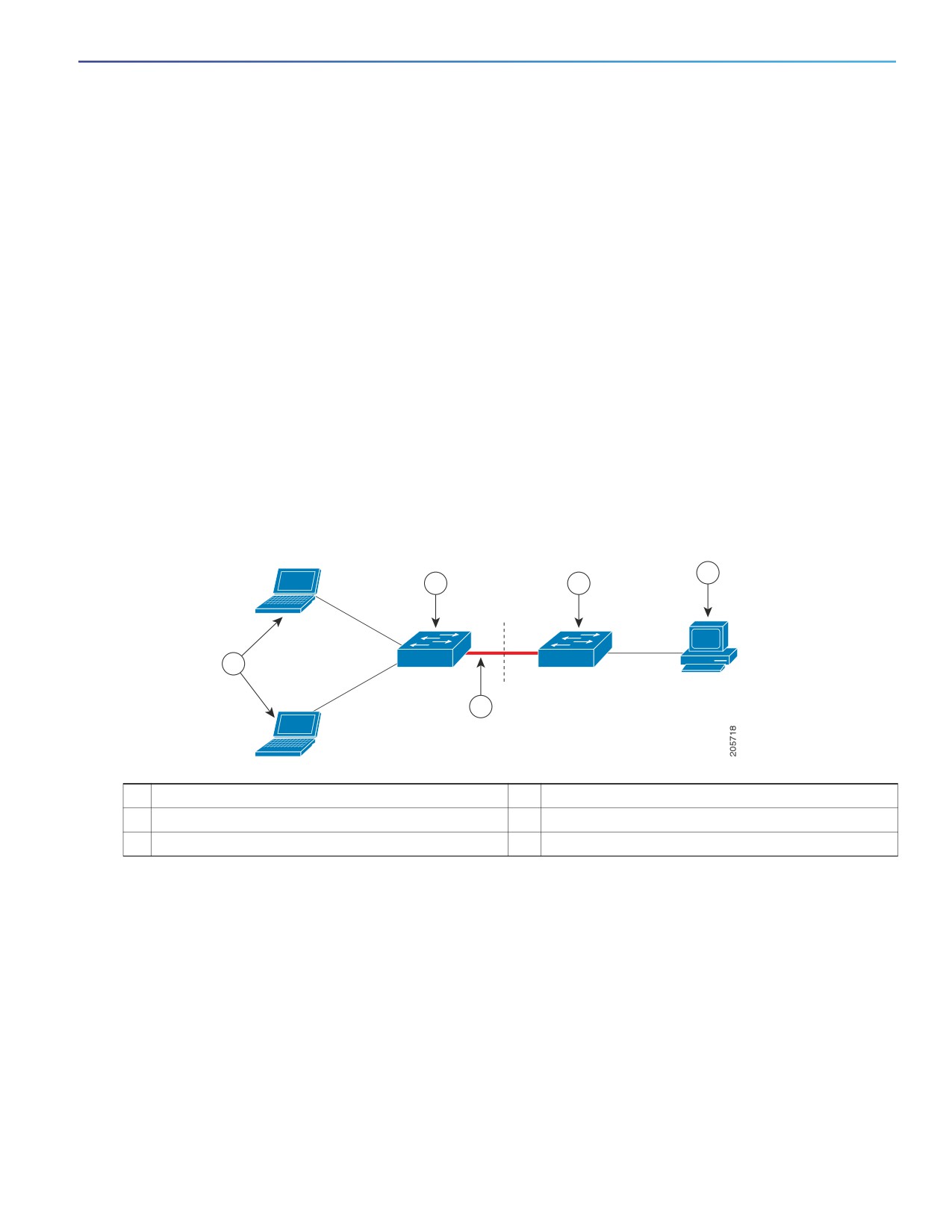
Configuring IEEE 802.1x Port-Based Authentication
Information About Configuring IEEE 802.1x Port-Based Authentication
You can configure a switch to act as a supplicant to another switch by using the 802.1x supplicant feature. This
configuration is helpful in a scenario, where, for example, a switch is outside a wiring closet and is connected to an
upstream switch through a trunk port. A switch configured with the 802.1x switch supplicant feature authenticates
with the upstream switch for secure connectivity.
Once the supplicant switch authenticates successfully the port mode changes from access to trunk.
If the access VLAN is configured on the authenticator switch, it becomes the native VLAN for the trunk port after
successful authentication.
You can enable MDA or multiauth mode on the authenticator switch interface that connects to one more supplicant
switches. Multihost mode is not supported on the authenticator switch interface.
Use the dot1x supplicant force-multicast global configuration command on the supplicant switch for Network Edge
Access Topology (NEAT) to work in all host modes.
Host authorization ensures that only traffic from authorized hosts (connecting to the switch with supplicant) is
allowed on the network. The switches use Client Information Signalling Protocol (CISP) to send the MAC addresses
connecting to the supplicant switch to the authenticator switch, as shown in Figure 23 on page 213.
Auto enablement automatically enables trunk configuration on the authenticator switch, allowing user traffic from
multiple VLANs coming from supplicant switches. Configure the cisco-av-pair as device-traffic-class=switch at the
ACS. (You can configure this under the group or the user settings.)
Figure 23
Authenticator and Supplicant Switch using CISP
4
2
3
1
5
1
Workstations (clients)
2
Supplicant switch (outside wiring closet)
3
Authenticator switch
4
Access control server (ACS)
5
Trunk port
802.1x Supplicant and Authenticator Switch Guidelines
You can configure NEAT ports with the same configurations as the other authentication ports. When the supplicant
switch authenticates, the port mode is changed from access to trunk based on the switch vendor-specific attributes
(VSAs). (device-traffic-class=switch)
The VSA changes the authenticator switch port mode from access to trunk and enables 802.1x trunk encapsulation
and the access VLAN if any would be converted to a native trunk VLAN. VSA does not change any of the port
configurations on the supplicant
To change the host mode and to apply a standard port configuration on the authenticator switch port, you can also
use Auto Smartports user-defined macros, instead of the switch VSA. This allows you to remove unsupported
configurations on the authenticator switch port and to change the port mode from access to trunk. For information,
see the AutoSmartports Configuration Guide.
213

Configuring IEEE 802.1x Port-Based Authentication
Information About Configuring IEEE 802.1x Port-Based Authentication
For more information, see Configuring an Authenticator, page 230.
Using IEEE 802.1x Authentication with ACLs and the RADIUS Filter-Id
Attribute
The switch supports both IP standard and IP extended port access control lists (ACLs) applied to ingress ports.
ACLs that you configure
ACLs from the Access Control Server (ACS)
An IEEE 802.1x port in single-host mode uses ACLs from the ACS to provide different levels of service to an IEEE
802.1x-authenticated user. When the RADIUS server authenticates this type of user and port, it sends ACL attributes
based on the user identity to the switch. The switch applies the attributes to the port for the duration of the user session.
If the session is over, authentication fails, or a link fails, the port becomes unauthorized, and the switch removes the ACL
from the port.
Only IP standard and IP extended port ACLs from the ACS support the Filter-Id attribute. It specifies the name or number
of an ACL. The Filter-id attribute can also specify the direction (inbound or outbound) and a user or a group to which the
user belongs.
The Filter-Id attribute for the user takes precedence over that for the group.
If a Filter-Id attribute from the ACS specifies an ACL that is already configured, it takes precedence over a
user-configured ACL.
If the RADIUS server sends more than one Filter-Id attribute, only the last attribute is applied.
If the Filter-Id attribute is not defined on the switch, authentication fails, and the port returns to the unauthorized state.
Authentication Manager Common Session ID
Authentication manager uses a single session ID (referred to as a common session ID) for a client no matter which
authentication method is used. This ID is used for all reporting purposes, such as the show commands and MIBs. The
session ID appears with all per-session syslog messages.
The session ID includes:
The IP address of the Network Access Device (NAD)
A monotonically increasing unique 32-bit integer
The session start time stamp (a 32-bit integer)
Default 802.1x Authentication Settings
Table 30 on page 214 shows the default 802.1x authentication settings.
Table 30
Default 802.1x Authentication Settings
Feature
Default Setting
Switch 802.1x enable state
Disabled.
Per-port 802.1x enable state
Disabled (force-authorized).
The port sends and receives normal traffic without 802.1x-based
authentication of the client.
AAA
Disabled.
214

Configuring IEEE 802.1x Port-Based Authentication
Information About Configuring IEEE 802.1x Port-Based Authentication
Table 30
Default 802.1x Authentication Settings (continued)
Feature
Default Setting
RADIUS server
IP address
None specified.
UDP authentication port
1812.
Key
None specified.
Host mode
Single-host mode.
Control direction
Bidirectional control.
Periodic reauthentication
Disabled.
Number of seconds between
3600 seconds.
reauthentication attempts
Reauthentication number
2 times (number of times that the switch restarts the authentication process
before the port changes to the unauthorized state).
Quiet period
60 seconds (number of seconds that the switch remains in the quiet state
following a failed authentication exchange with the client).
Retransmission time
30 seconds (number of seconds that the switch should wait for a response to
an EAP request/identity frame from the client before resending the request).
Maximum retransmission number
2 times (number of times that the switch will send an EAP-request/identity
frame before restarting the authentication process).
Client timeout period
30 seconds (when relaying a request from the authentication server to the
client, the amount of time the switch waits for a response before resending the
request to the client.)
Authentication server timeout period
30 seconds (when relaying a response from the client to the authentication
server, the amount of time the switch waits for a reply before resending the
response to the server.)
You can change this timeout period by using the authentication timer server
interface configuration command.
Inactivity timeout
Disabled.
Guest VLAN
None specified.
Inaccessible authentication bypass
Disabled.
Restricted VLAN
None specified.
Authenticator (switch) mode
None specified.
MAC authentication bypass
Disabled.
Voice-aware security
Disabled
802.1x Accounting
Enabling AAA system accounting with 802.1x accounting allows system reload events to be sent to the accounting
RADIUS server for logging. The server can then infer that all active 802.1x sessions are closed.
Because RADIUS uses the unreliable UDP transport protocol, accounting messages might be lost due to poor network
conditions. If the switch does not receive the accounting response message from the RADIUS server after a configurable
number of retransmissions of an accounting request, this system message appears:
Accounting message %s for session %s failed to receive Accounting Response.
215