Kawasaki Robot Controller E Series. Reference Manual (2015) - page 15
9. Functions
FRAME (transformation value variable 1䠈transformation value variable 2䠈
transformation value variable 3䠈transformation value variable 4)
Function㻌
Returns the transformation values of the frame (relative) coordinates with respect to the base
coordinates. Note that only the translational components of transformation values of the pose
variables are used as positional information to determine the frame coordinates.
㻌
Parameter㻌
Transformation value variable1, transformation value variable 2
Specifies transformation value variables to determine the direction of the X axis. The X axis of
the frame coordinates is set so that it passes through these two poses. The positive direction of
the X axis is set in the direction from pose determined by transformation values variable 1 to pose
determined by transformation value variable 2.
Transformation value variable 3
Specifies a transformation value variable to determine the direction of the Y axis. The Y axis of
the frame coordinates is set so that the three points, pose1, pose 2, and pose 3, each determined by
transformation value variables 1, 2 and 3, are on the XY plane. Also, pose 3 is set so it has the
positive Y value.
Transformation value variable 4
Specifies a transformation value variable to specify the origin of the frame coordinates, which
equals the values of X,Y,Z returned by this function.
Explanation㻌
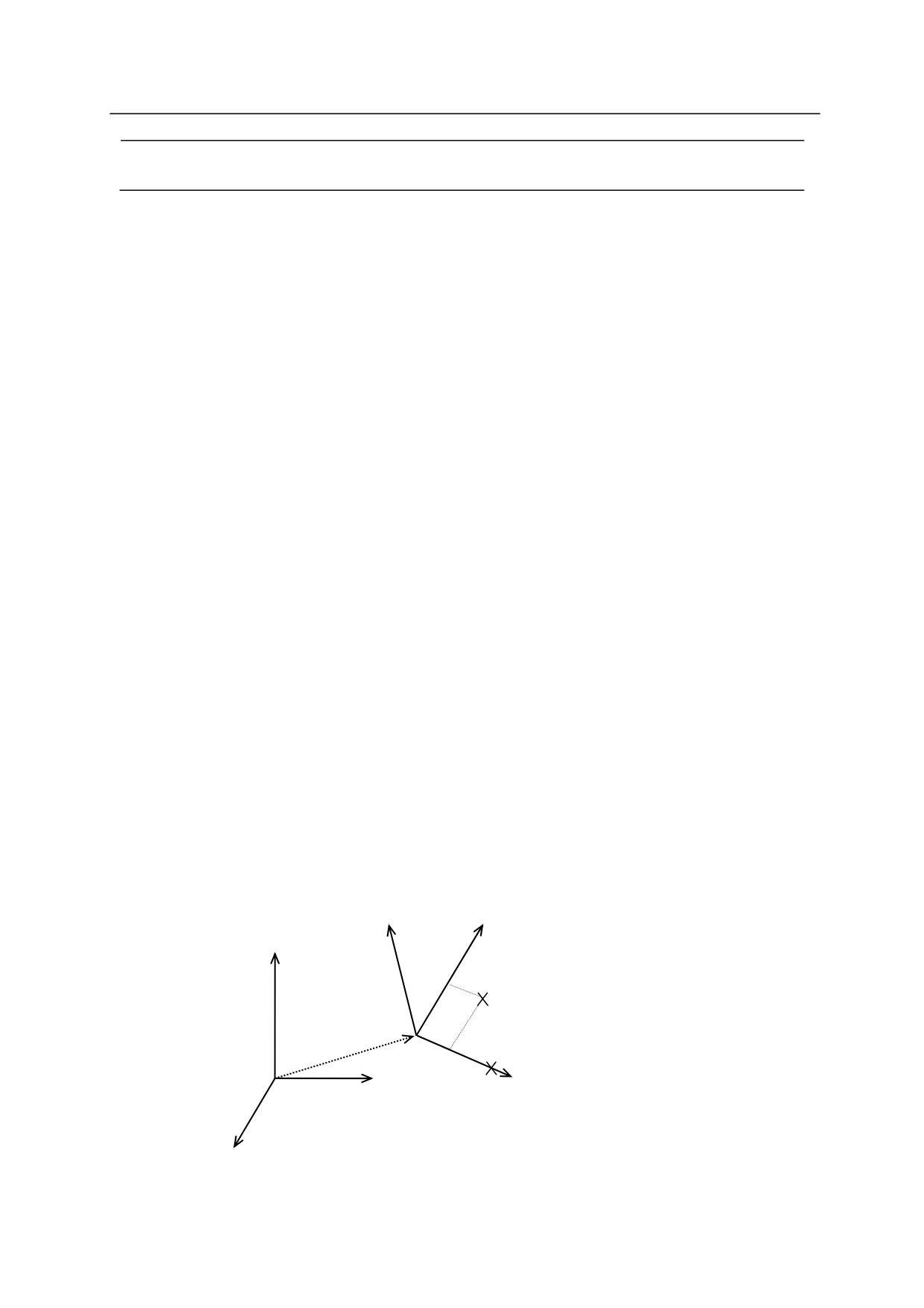
POINT F1=FRAME(O1, X1, Y1, O1)
Sets frame coordinates as in the diagram below.
z
y
z
Y1
F1
01
0
y
X1
x
Frame coordinates
(relative coordinates)
x Base coordinates
9-47
9. Functions
If the poses in the frame coordinates are taught as F1+A, then only F1 needs reteaching if the
coordinates change, as when the parts station is moved.
(See 11.6 Relative Pose Using the
Frame Coordinates).
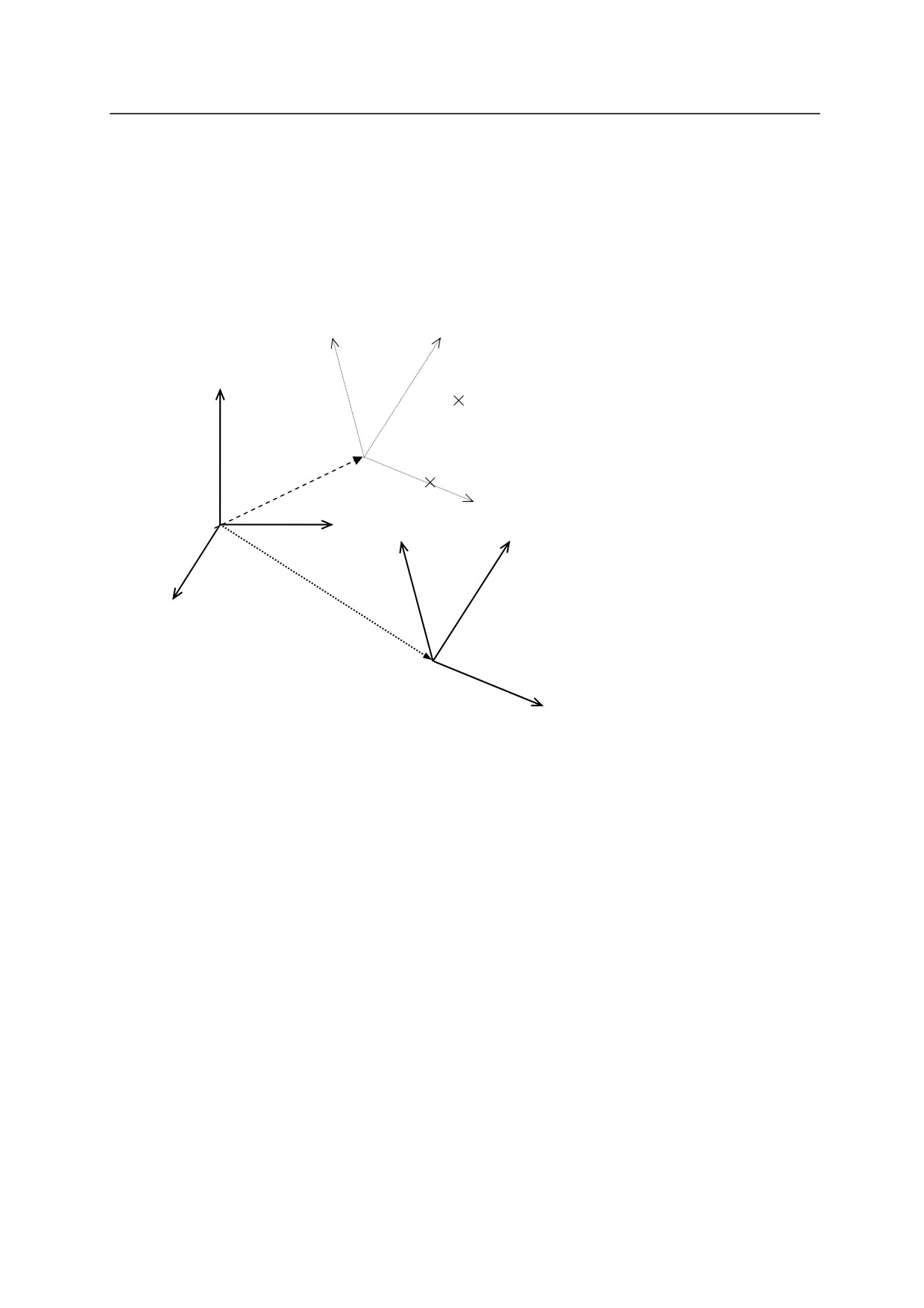
POINT F2=FRAME(O1, X1, Y1, O2)
Sets frame coordinates as shown in the
diagram below.
z
y
z
Y1
01
F1
X1
x
0
y
z
y
F2
x Base
Frame coordinates
coordinates
02
X
9-48
9. Functions
[ NOTE ]
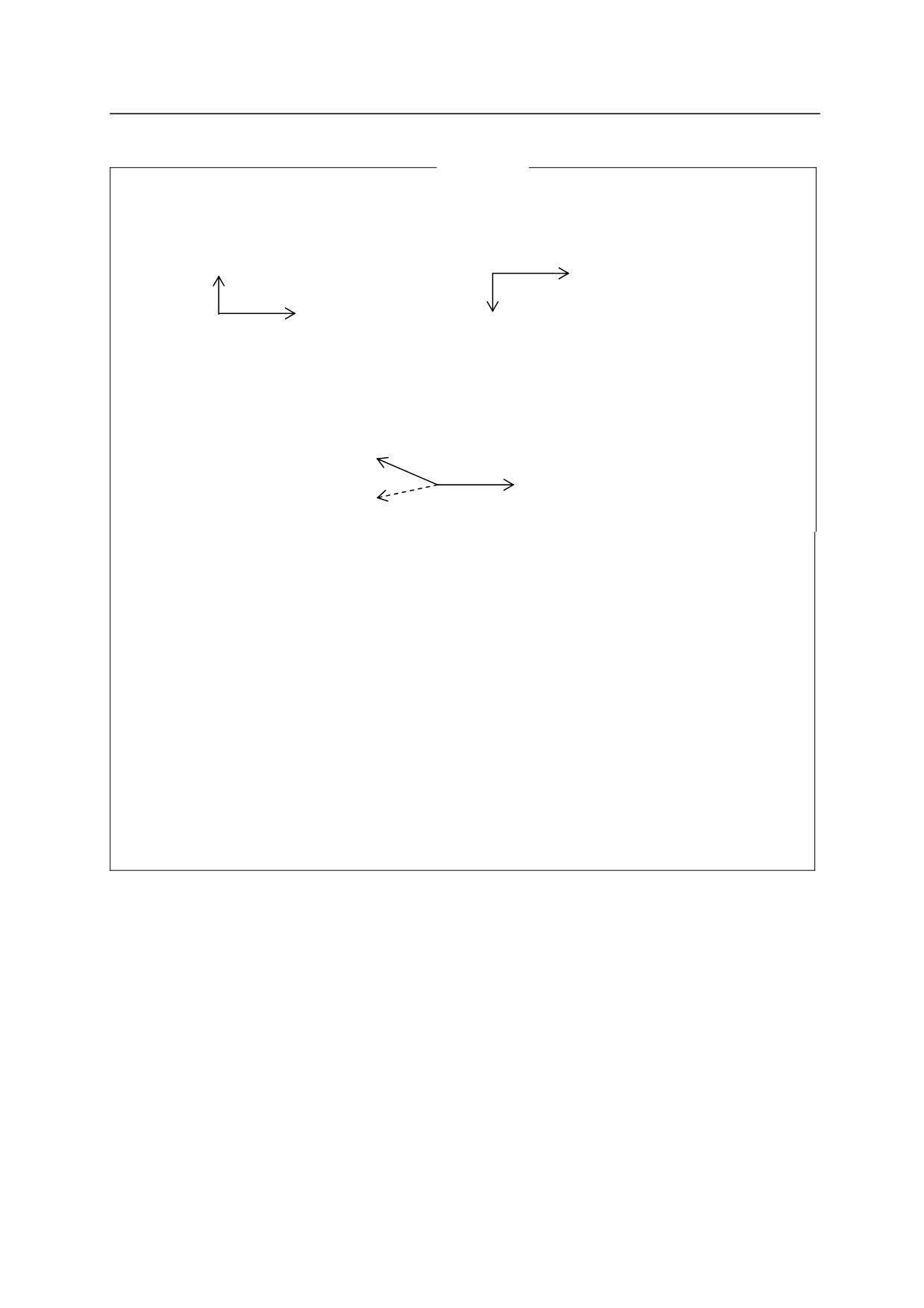
Pay attention to the following points when defining frame coordinates.
POINT F=FRAME(a1, a2, a3, a1)
a3
a1
a2
㻌
a1
a2
a3
㻌 㻌 㻌 㻌 㻌 㻌 㻌 㻌 㻌 㻌 㻌 㻌 㻌 㻌 㻌 㻌 㻌 㻌 㻌 㻌 㻌 㻌 㻌 㻌 㻌
Note that the Y and Z axes in the above two frame coordinates face opposite directions,
depending on where a3 is taught. Therefore, when a3 is taught close to the X axis (see
diagram below), the direction of the Z axis may not result in the desired direction, so always
check the frame coordinates before using the coordinates in any programs.
a3
a1
a2
(a3)
The three points a1, a2, a3 defines the position of the tool coordinates origin. When
redefining the frame coordinates, the tool transformation must be the same as when a1, a2, a3
were first taught.
For better accuracy, teach the three points a1, a2, a3 as far apart as possible. Especially, a3
should be a point near the Y axis but as far away from the X axis as possible.
When teaching a1, a2, a3, the origin of the tool coordinates should be defined at a point that
is easy to see, e.g. the tip of the tool, etc.
With some tools, it is difficult to determine the origin of the tool coordinates even when it has
been moved by tool transformation. In such case, a1, a2, a3 are taught at null tool, but note
that in this case, the origin of the tool coordinates is at the center of the flange surface.
9-49
9. Functions
NULL
Function㻌
Returns the null transformation values.
Explanation㻌
Returns the transformation values in which both the translational components and the rotational
components are all 0 (X=Y=Z=0, O=A=T=0). This function is convenient when used with the
SHIFT function enabling easy redefinition of transformation values. Coordinates can be shifted
in translation movement without any change in rotational components (OAT).
Example㻌
POINT new=SHIFT(NULL BY x.shift,y.shift,z.shift)+old
Defines the variable “new” by shifting the pose defined as “old” a specified distance along the
base coordinates.
dist=DISTANCE(NULL, test.pos)
Calculates the distance between the pose “test.pos” and the null origin of the robot (0,0,0,0,0,0),
and assigns that value to dist.
9-50
9. Functions
HERE
㻌
#HERE
㻌
Function㻌
HERE 䠖 Returns the transformation values which describe the current pose of the tool
coordinates.
#HERE 䠖 Returns the joint displacement values which describe the current pose of the tool
coordinates.
Explanation㻌
The encoder values at the moment this function is executed are read. Therefore, note that the
values returned by this function represent the pose of the robot when the function was executed.
[ NOTE ]
The name “here” cannot be used as a program name or a variable name.
㻌
Example㻌
dist=DISTANCE(HERE, pos1)
Calculates the distance between the pose “pos1” and
the current pose and assigns the value to “dist”.
9-51
9. Functions
TRANS (X component, Y component, Z component,
O component, A component, T component)㻌
Function㻌
Returns the transformation value that has the specified translational and rotational components.
Parameter㻌
X component, Y component, Z component
Specifies the translation components X, Y, Z. If not specified 0 is assumed.
O components, A component, T component
Specifies the rotation components O, A, T. If not specified 0 is assumed.
Explanation㻌
The transformation values are calculated from the values specified in each parameter. The new
transformation values can be used then to define pose variables, in compound transformation
values, or in motion instructions. This function is convenient when used with DECOMPOSE
instruction (see the example for #PPOINT function).
㻌
Example㻌
POINT temp.pos=TRANS(v[0], v[1]+100, v[2], v[3], v[4], v[5])
Array variable v[0] -
9-52
9. Functions
RX (angle)
RY (angle)㻌
RZ (angle)㻌
Function㻌
Returns the transformation values that represent the rotation around the specified axis.
Parameter㻌
Angle
Specifies the value of the rotation in degrees.
Explanation㻌
The X, Y, Z in this function represents the axes of coordinates. The rotational value around the
specified axis is returned. The translational values are not returned by this function (X, Y, Z =
0).
㻌
Example㻌
POINT x_rev =RX(30)
Returns the transformation value that represent
30 rotation
around the X axis and assigns the value to “x_rev”.
9-53

9. Functions
#PPOINT (jt1, jt2, jt3, jt4, jt5, jt6)
㻌
Function㻌
Returns the specified joint displacement values.
Parameter㻌
jt1
jt2
Specifies the value of each angle (in degrees for rotational joints)
jt3
:
If not specified, 0 is assumed.
jt6
Explanation㻌
This function returns the specified joint displacement values. The values represent the
displacement of each joint, from joint 1 to the last joint (not necessarily six).
[ NOTE ]
㻌
#PPOINT function is only processed in joint displacement values. Therefore,
always enter “#” at the beginning of the function.
㻌
Example㻌
In the program below, joints 2 and 3 of a six-joint robot are moved the specified amount from the
current pose.
㻌
HERE㻌 #ref
Stores the current pose in memory.(#ref)
DECOMPOSE x[0]=#ref
Decomposes each component into elements of
array variable x[0],……x[5].
JMOVE #PPOINT (X[0], x[1]+a, x[2]-a/2, x[3], x[4], x[5])
These two instructions result in the same pose as the program above, but unlike the program, the
two joints do not move at the same time.
DRIVE
2, a, 100
Move jt2 by a.
DRIVE 3, -a/2, 100
Move jt3 by a/2.
9-54
9. Functions
㻌
SHIFT(transformation value variable BY X shift, Y shift, Z shift䠅
㻌
Function㻌
Returns the transformation values of the pose shifted by the distance specified for each base axis
(X,Y,Z) from the specified pose.
Parameter㻌
Transformation value variable
Specifies a transformation value variable for the pose to be shifted.
X shift, Y shift, Z shift
Specifies the shift amount in X, Y, Z directions of the base coordinates. If any value is omitted,
0 is assumed.
Explanation㻌
The X shift, Y shift, Z shift amounts are added to each of the X, Y, Z component of the specified
transformation value variable. The result is returned in transformation values.
Example㻌
If the values of the transformation value variable x are (200, 150, 100, 10, 20, 30), then
POINT y=SHIFT(x BY 5, -5, 10)
“x” is shifted by the specified values to (205, 145, 110,10, 20, 30) and those values are assigned
to transformation value variable “y”.
9-55
9. Functions
㻌
AVE_ TRANS㻌 (transformation value variable 1,
transformation value variable 2)
㻌
Function㻌
Returns the average values of the two transformation value variables 1 and 2.
Parameter㻌
Transformation value variable 1, transformation value variable 2
Specifies the two transformation value variables to calculate the average between them.
Explanation㻌
This function calculates the transformation values of the pose which defines the midpoint for each
of the components of transformation value variables 1 and 2.
This function is commonly used for calculating the average of pose information gained from
sensor checks.
[ NOTE ]
㻌
For the XYZ components, the average is given by adding each of the components and
dividing them by 2. However, for the OAT components, the average is not necessarily
given in that manner.
㻌
Example㻌
POINT x = AVE_TRANS(p,q)
JMOVE AVE TRANS(p,q)
9-56

9. Functions
㻌
BASE
㻌
Function㻌
Returns the current base transformation values.
Example㻌
point a = BASE
Assigns to variable “a” the current base transformation values.
㻌
㻌
㻌
㻌
㻌
TOOL
㻌
Function㻌
Returns the current tool transformation values.
Example㻌
point aa = TOOL
Assigns to variable “aa” the current tool transformation values.
㻌
9-57
9. Functions
㻌
TRADD (transformation value variable)
Option
Function㻌
Returns the sum of the traverse axis value and the X component of the specified transformation
value variable.
Parameter㻌
Transformation value variable
Specifies the name of the transformation value variable to whose X component the traverse axis
value is added.
㻌
TRSUB (transformation value variable)
Option
Function㻌
Returns the value gained by subtracting traverse axis value from the X component of the
specified transformation value variable.
Parameter㻌
Transformation value variable
Specifies the name of the transformation value variable from whose X component the traverse
axis is subtracted.
9-58
9. Functions
㻌
#HOME (home pose number)
Function㻌
Returns the currently set home pose.
Parameter㻌
Home pose number
Specifies the home pose number.
1: Specifies home pose 1 set by SETHOME command.
2: Specifies home pose 2 set by SET2HOME command.
If not specified, 1 is selected.
Explanation㻌
Returns the pose of the currently set home pose in joint displacement values.
[ NOTE ]
#HOME function is only processed in joint displacement values. Therefore, always enter
“#” at the beginning of the function.
Example㻌
In the program below, the robot does not move in the direct path but first moves to the same
height as the home pose (in the direction of the Z axis only), and then it moves to the home pose.
POINT homepos = #HOME(1)
IF DZ(homepos) > DZ(HERE) THEN
HERE tmp
POINT/Z tmp = homepos
LMOVE tmp
END
HOME
9-59

9. Functions
CCENTER (transformation value variable1, transformation value variable 2,
transformation value variable 3, transformation value variable 4)
Option
Function㻌
Returns the center of the arc created by the three specified pose.
Parameter㻌
Transformation value variable 1, transformation value variable 2, transformation value variable 3
Specifies pose variables defined by transformation values to determine the three points on the arc.
Transformation value variable 4
Specifies the pose variable to determine the orientation of the robot.
㻌
㻌
CSHIFT (transformation value variable1, transformation value variable 2,
transformation value variable 3,
transformation value variable 4 BY shift amount)
Option
Function㻌
Returns the pose that was shifted the specified amount from the object pose.
Parameter㻌
Transformation value variables 1, 2, 3
Specifies transformation value variables to determine the three points on the arc.
Transformation value variables 4
Specifies a transformation value variable to specify the object pose in transformation values.
Shift amount
Specifies the amount to shift in real values.
9-60
9. Functions
Kawasaki Robot AS Language Reference Manuals
9.3㻌MATHEMATICAL FUNCTIONS
ABS
Returns the absolute value of a numerical expression.
SQRT
Returns the square root of a numerical expression.
PI
Returns the constant .
SIN
Returns the sine value.
COS
Returns the cosine value.
ATAN2
Returns the arctangent value.
RANDOM
Returns a random number.
9-61

9. Functions
Kawasaki Robot AS Language Reference Manuals
ABS䠄real value䠅
SQRT(real value)
PI
SIN(real value)
COS(real value)
ATAN2(real value1, real value 2)
RANDOM
9-62

9. Functions
Kawasaki Robot AS Language Reference Manuals
Keyword
Function
Example
ABS
Returns the absolute value of a numerical expression.
ABS(value)
SQRT
Returns the square root of a numerical expression.
SQRT(value)
PI
Returns the constant (3.1415……).
PI
SIN
Returns the sine value of a given angle.
SIN(value)
COS
Returns the cosine value of a given angle.
COS(value)
Returns the values of an angle (in degrees) whose tangent
ATAN2(v1,v2)
ATAN2
equals v1/v2.
RANDOM
Returns a random number from 0.0 to 1.0.
RANDOM
㻌
㻌
Example
x=ABS(y)
substitutes the value |y| into x
x=SQRT(y)
substitutes the square root of y into x
en=2PIr
substitutes the result of 2r into en
Z=(SIN(x)^2)+(COS(y)^2)
substitutes the result of (sin(x))2+(cos(y))2 into z
slope=ATAN2(rise,run)
substitutes the result of tan-1(rise/run) into slope
r=RANDOM10
substitutes a random number from 0 to 10 into r
9-63
9. Functions
9.4 STRING FUNCTIONS
$CHR
Returns the ASCII characters of the specified values.
$SPACE
Returns the specified number of blanks.
$LEFT
Returns the leftmost characters in the string.
$RIGHT
Returns the rightmost characters in the string.
$MID
Returns the specified number of characters.
$DECODE
Extracts characters separated by specified characters.
$ENCODE
Returns the string created by the print data.
$ERRORS
Returns the error message of the specified error code.
$ERROR
Returns the error message of the error code specified by a
negative number.
$DATE
Returns the system date.
$TIME
Returns the system time in a string.
$SYSDATA
Returns character strings for parameters in the AS system
$ERRLOG
Returns character strings for error message of the specified error
log.
$STR_ID
Returns character strings for robot information for Robot 1.
$STR_ID2
Returns character strings for robot information for Robot 2.
9-64
9. Functions
$CHR (real value)㻌
㻌
Function㻌
Returns the ASCII character string corresponding to the specified ASCII value.
Parameter㻌
Real value (or numeric expression)
Specifies the value to change into an ASCII character. Acceptable range: 0 to 255.
Example㻌
$CHR(65)
Returns “A” for ASCII value 65.
$CHR(䠺H61)
Returns “a” for ASCII value 97 (166+1)
$SPACE (number of blanks)㻌
㻌
Function㻌
Returns the specified number of blanks.
Parameter㻌
Number of blanks
Specifies the number of blanks. Specify 0 or a positive value.
Example㻌
Type ”a”㻌 +㻌 $SPACE(1)㻌 +㻌 䇾dog”㻌 㻌 㻌 㻌 㻌 㻌 㻌 㻌 Displays “a dog” (1 space is entered between “a”
and “dog”.
9-65

9. Functions
$LEFT (string, number of characters)
Function㻌
Returns the specified number of characters starting from the leftmost character of the specified
string.
Parameter㻌
String
Character string, string variable, or string expression.
Number of characters
Specifies how many characters to return counting from the leftmost (or first) character of the
entered string. If 0 or a negative number is specified, blank is returned. If the number
specified is larger than the number of characters in the string, the whole string is returned.
㻌
Example㻌
$LEFT (“abcdefgh”,3)
Returns the string “abc”.
$LEFT (“*1*2*3*4*5”,15)
Returns “*1*2*3*4*5” ( the whole string).
㻌
$RIGHT (string, number of characters)㻌
㻌
Function㻌
Returns the specified number of characters starting from the rightmost character of the specified
string.
Parameter㻌
String
Character string, string variable, or string expression.
Number of characters
Specifies how many characters to return counting from the rightmost (or last) character of the
entered string. If 0 or a negative number is specified, blank is returned. If the number
specified is larger than the number of characters in the string, the whole string is returned.
Example㻌
$RIGHT(“abcdefgh”,3)
㻌 Returns the string “fgh”.
㻌
9-66
9. Functions
㻌
$MID (string, real value, number of characters)㻌
㻌
Function㻌
Returns the specified number of characters from the specified string.
Parameter㻌
String
Character string, string variable, or string expression.
Real values (or numeric expression)
Specifies the starting position of the string is to be taken.
Number of character
Specifies the number of characters to extract.
Explanation㻌
If the starting position is not specified, or specified by a value of 1 or less, the characters are
extracted from the first character of the string. If the starting position is specified by a value of 0
or less, or if the number is larger than the number of characters in the string, blank is returned.
If the number of characters to extract is not specified, or when it is larger than the number of
characters in the string, the characters from the specified starting position to the end of the string
is returned.
Example㻌
In the instruction below, the $MID function returns “cd” (two characters starting from the third
character in the string “abcdef”). Then the result is substituted into string variable $substring.
$substring䠙$MID(“abcdef”,3,2)
9-67

9. Functions
㻌
$DECODE (string variable, separator character, mode)㻌
㻌
Function㻌
Returns the string separated by “separator characters”.
Parameter㻌
String variable
Specifies the string from where the characters are taken. Characters extracted as a result of this
function are removed from this string.
Separator character
Specifies the character to read as separator. (Any character in the string can be specified as
separator).
Mode
Specifies the real number for operation done by this function.
If the mode is a negative number or 0, or if it is not specified, the characters starting from the first
character in the string variable to the separator are returned. The returned string is removed
from the string variable. If a positive number specifies the mode, the first separator that appears
in the string is returned. The returned separator is removed from the value of the string variable.
If more than one separator characters exists in the string consecutively, all the separator characters
are returned and removed from the string variable.
Explanation㻌
This function searches the specified string for the separator character and extracts the characters
from the beginning of the string to the separator. The extracted characters are returned as the
result of the function, and at the same time they are removed from the original string.
The string returned as the result of the function (string removed from the original string) could be
either the characters before the separator or the separator itself.
[ NOTE ]
This function changes the original string at the same time it returns the characters.
The separator character is not case-sensitive.
9-68
9. Functions
Example㻌
In the instructions below, the numbers separated by commas or blanks are removed from the
string “$input”. The first instruction in the DO structure removes the first set of characters in
$input and substitutes them into variable “$temp”. Next the function VAL changes the string
gained in the previous instruction into a real value. The real value is then substituted into the
array variable “value”. Then, the program execution goes on to the next $DECODE function
and searches for the next separator (the separator is removed from $input).
i=0
;Resets counter
DO
$temp=$DECODE($input,”,”,0)
;Extracts characters up to the separator ”,”
value[i]=VAL($temp)
;Converts the characters to real values.
if $input ==” ” GOTO 100
$temp = $DECODE($input,”,”,1)
;Extracts the separator “,”
i=i+1
;Counter increment
UNTIL $input==“”
;Continues program execution until there are no
100 TYPE “END”
more characters
If the values of $input are as below, each separated by space and comma then the result of the
above program are as follows:
1234, 93465.2, .4358, 3458103,
value[0]
1234.0
value[1]
93465.2
value[2]
0.4358
value[3]
3458103.0
As the result of executing the program, the value of string variable $input becomes “” (blank).
9-69
9. Functions
$ENCODE
(print data, print data, ……)㻌
㻌
Function㻌
Returns the string created from the print data specified in the parameters. The string is created
in the same way as when using TYPE command.
Parameter㻌
Print data
Select one or more from below. Separate the data with commas when specifying more than one.
(1) character string
(2) real value expressions (the value is calculated and displayed)
(3) Format information (controls the format of the output message)
Explanation㻌
This function enables creating strings within programs using the same print data as in the TYPE
command. Unlike TYPE, the $ENCODE function does not display the created strings, but
instead the results are used as values in programs.
The following codes are used to specify the output format of numeric expressions. The same
format is used until a different code is specified. In any format, if the value is too large to be
displayed in the given width, asterisks () are shown instead of the values.
Format Specification Codes
/D
Uses the default format. This is the same as specifying the format as /G15.8
except that zeros following numeric values and all spaces but one between
numeric values are removed.
/Em.n
Expresses the numeric value in scientific notation (e.g. -1.234E䠇02).
“m”
describes the total number of characters shown on the terminal and “n” the
number of decimal places.
“m” should be greater than n by six or more, and
smaller than 32.
/Fm.n
Expresses the numeric values in fixed point notation (e.g. -1.234).
“m”
describes the total number of characters shown on the terminal and “n” the
number of decimal places.
/Gm.n
If the value can be expressed in Fm.n format within “m” digits (including “n”
digits after the decimal point), the value is expressed in that format. Otherwise,
the value is expressed in Gm.n format.
/Hn
Expresses the values as a hexadecimal number in the “n” digit field.
9-70
9. Functions
/In
Expresses the values as a decimal number in the “n” digit field.
The following parameters are used to insert certain characters between character strings.
/Cn
Inserts line feed n times in the place where this code is entered, either in front or
after the print data. If this code is placed within print data, n1 blank lines are
inserted.
/S
The line is not fed
/Xn
Inserts n spaces.
/Jn
Expresses the value as a hexadecimal number in the n digit field. Zeros are
used in place of blanks.
(Option)
/Kn
Expresses the value as a decimal number in the n digit field. Zeros are used in
place of blanks.
(Option)
/L
This is the same as /D except that all the spaces are removed with this code.
(Option)
Example㻌
$output = $output + $ENCODE(/F6.2,count)
The value of the real variable “count” is converted into a string in the format specified by /F6.2,
and added to the end of the string “$output”. Then the combined string is substituted back in the
string variable “$output”.
9-71

9. Functions
㻌
$ERRORS
(“error code”)㻌
㻌
Function㻌
Returns the error message for the specified error code. The error code is returned as a character
string with the error message.
Parameter㻌
Error code
Specifies the error code in the following format: Pxxxx, Wxxxx, Exxxx, or Dxxxx.
㻌
㻌
㻌
㻌
㻌
㻌
㻌
$ERROR
(error number)㻌
㻌
Function㻌
Returns the error message for the specified error code.
Parameter㻌
Error number
Specifies the error number by a negative number (starting with ).
The error codes are
converted into negative error numbers as shown below:
Dxxxx
:
4xxxx
Exxxx
:
3xxxx
Wxxxx :
2xxxx
Pxxxx
:
1xxxx
㻌
㻌
㻌
㻌
㻌
9-72
9. Functions
㻌
$DATE (date form)
㻌
Function㻌
Returns the system date in the specified string format.
Parameter㻌
Date form
Specifies by numbers 1 - 3, the date format to be output.
Explanation㻌
The types of date forms are as follows.
$DATE(1)
mm/dd/yyyy
( If the date is “July 10, 2008” then the value returned is 07/10/2008).
$DATE(2)
dd/mmm/yyyy
( If the date is “July 10, 2008” then the value returned is 10/JUL/2008). mmm is JAN/
FEB/MAR/APR/MAY/JUN/JUL/AUG/SEP/OCT/NOV/DEC in order from January to
December.
$DATE(3)
yyyy/mm/dd
( If the date is “July 10, 2008” then the value returned is 2008/07/10)
㻌
$TIME
㻌
Function㻌
Returns the system time in following string format:
hh:mm:ss
Example
18: 27: 50
The hour is expressed in 24 hours from 0 to 23.
9-73
9. Functions
$SYSDATA (keyword, opt1, opt2)㻌
㻌
Function㻌
Returns specified parameters in the AS system according to the given keyword.
Parameter㻌
Keyword, opt1, opt2
ZROB.NAME
Returns the model name of the robot.
Opt 1: Robot number (1 to number of robots). If not entered, 1 is assumed.
Opt 2: Not used.
$ERRLOG 㻔error log number㻕㻛$ERRORLOG 㻔error log number㻕㻌㻖㻝㻌
㻌
Function
Returns the character string of error message of the specified log number.
Parameter㻌
㻱㼞㼞㼛㼞㻌㼘㼛㼓㻌㼚㼡㼙㼎㼑㼞㻌
㻿㼜㼑㼏㼕㼒㼕㼑㼟㻌㼠㼔㼑㻌㼑㼞㼞㼛㼞㻌㼘㼛㼓㻌㼚㼡㼙㼎㼑㼞㻌㼛㼒㻌㼠㼔㼑㻌㼘㼛㼓㻌㼠㼛㻌㼞㼑㼠㼡㼞㼚㻚㻌
㻌
Example
When the error is recorded in the error log as below,
1 - [14/11/17 12:05:02 SIGNAL:00 Monitor speed䠖 10 Teach mode]
(E1162) Buffer overflow occurred in the gravity comp. value channel 2.
2 - [14/11/17 12:05:02 SIGNAL:00 Monitor speed䠖 10 Teach mode]
(E1352) Jt3 4 5 6 Codes set in software and power block do not match.
3 - [14/10/16 17:19:22 SIGNAL:00 Monitor speed䠖 10 Teach mode]
(D2023) Failed to load arm data.
㻌
㼃㼔㼑㼚㻌 㻌
> TYPE 㻌 $ERRLOG(2)
is input, the error message logged second “(E1352) Jt3 4 5 6 Codes set in software and power
block do not match.” Is displayed.
*1
$ERRORLOG is used for explosion proof software.
9-74
9. Functions
$STR_ID (number)㻌
$STR_ID2 (number)
㻌
Function
Returns the character string for the robot information.
$STR_ID
Robot 1
$STR_ID2
Robot 2
Parameter㻌
Number
Specifies the robot information to return by integer values 0 to 1.
0 : Robot name Returns the robot name of the controlled robot arm.
1: Machine number: Returns the machine number of the controlled robot arm.
㻌
Example
When
Robot 1
Robot name: RS020N-A001
Machine number: 1
Robot 2
Robot name: BX200L-B001
Machine number: 2
then,
$STR_ID(0)
String “RS020N-A001” is returned.
$STR_ID(1)
String “1” is returned.
$STR_ID2(0)
String “BX200L-B001” is returned.
$STR_ID2(1)
String “2” is returned.
9-75
9. Functions
9-76