Tractors X60 Series. Manual - part 26
 

  Index      Tractors     Tractors X60 Series - service repair manual 2012 year


Search            


Content   ..  24  25  26  27   ..


Tractors X60 Series. Manual - part 26


105

Operation 

5

Declutch button

The Declutch system allows the gear to be changed
by pressing the relative orange button on the gearshift
lever handle.

Changing gear with the Declutch system.

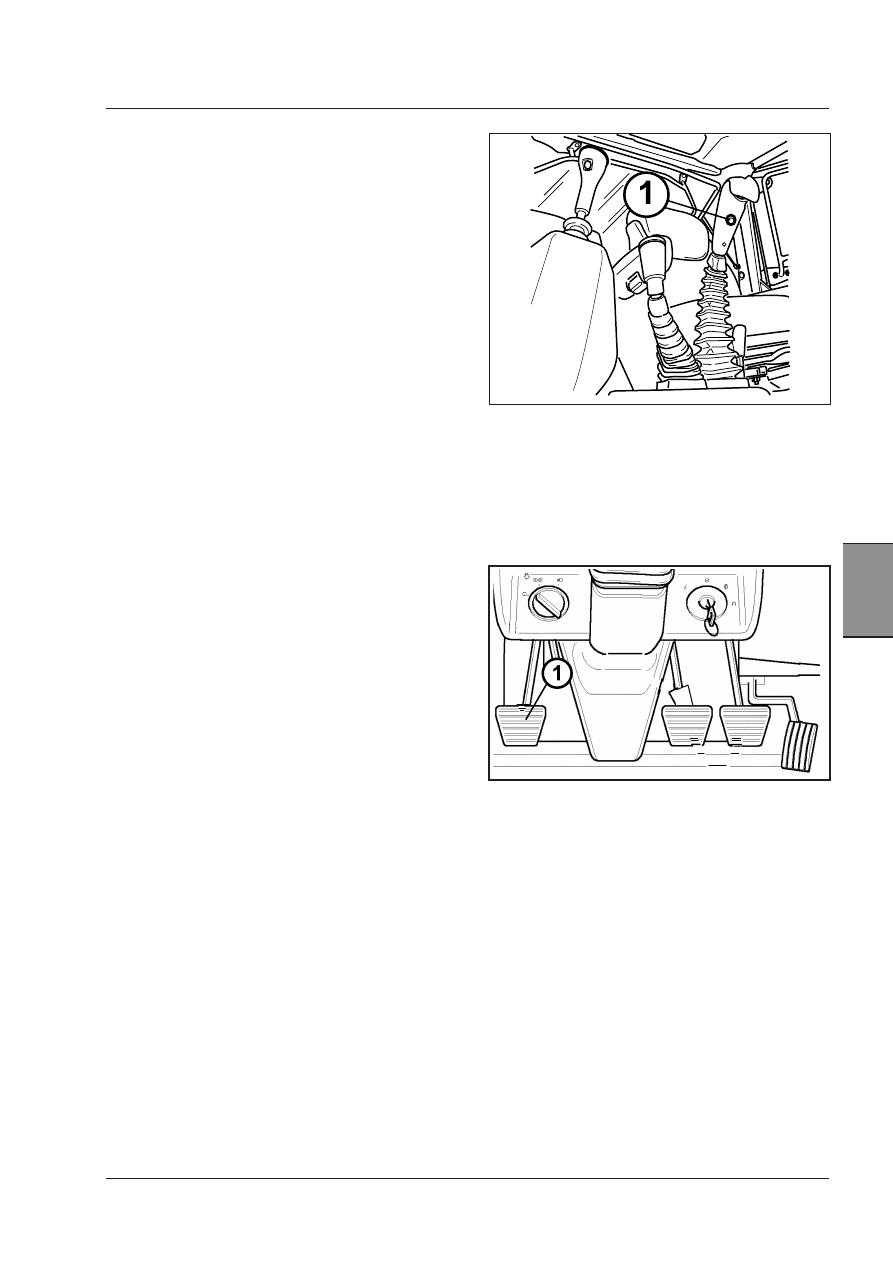
The Declutch button (1) practically acts as the clutch
pedal.

Press the button to disengage the hydraulic clutch, and
keep it depressed while engaging the required gear.
Release the button.

Gear change with the clutch pedal (1)

When the clutch pedal is depressed to change gear,
Deltashift remains in the range previously engaged.

Changing the range (creeper, low, standard, high) 
with the clutch pedal

Depress the clutch pedal and wait for the tractor to
stop before selecting a range (creeper - low - standard
- high).

106

Operation

Xtrashift warning lamps

For warning lamps and information on the instrument
panel, see the Instruments and Programming Section in
this manual.

Engagement of Powershift ranges under load

The gearbox provides 3 Powershift ranges (underdrive,
direct  drive  and  overdrive)  that  can  be  engaged  under
load in forward gears.
For each engaged gear, 3 speeds are available: Underdrive
- Direct - Overdrive.

To  select,  turn  the  Powershift  switch  on  the  gearshift
lever: changes from one range to the next are automatic
and under load (Fig.4-15).

Turn the switch up to shift the range up: + sign.

Turn the switch down to shift the range down: -- sign.

The switch always returns to the centre position.

The Powershift switch can be set on any position with the
tractor moving, without depressing the clutch pedal or
the clutch pedal or the Declutch disengagement button.
To ensure that the ranges are shifted in the correct se-
quence, move the switch one range at a time in the 1,
2, 3 order.

IMPORTANT: To prevent excessive deceleration of 
the tractor ALWAYS downshift one range at a time in 
sequence 3, 2, 1.

On  the  digital  instrument  panel,  the  Powershift  screen
displays  the  selected  speed:  see  the  Instruments  and
Programming Section in this manual.

Reaction to control settings

The monitoring system automatically analyzes the condi-
tions in which the tractor is used and chooses reaction
times most suitable to any condition.

107

Operation 

5

Use of reverse shuttle under load

The tractor’s driving direction is automatically reversed
by pushing the orange lever at the left of the steering
wheel forwards or backwards (1).

The reverse shuttle is automatically controlled through
the following phases:
·  DECELERATION
·  STOP
·  CHANGE OF DIRECTION
·  ACCELERATION
The speed at which these phases take place by softwa-
re.

Warning: Reversing can be obtained at any spe-
ed. However, to protect mechanical parts from
damage, this operation should be made ONLY at
speeds UNDER 10 Kph. A buzzer sounds to warn
from reversing at speeds over 10 Kph. To correctly
engege the reverse shuttle, reduce your speed to
under 10 Kph.

Use of reverse shuttle with clutch pedal

The clutch pedal is used to obtain small and precise
movements for certain work requirements.

·  Completely depress the clutch pedal (1).
·  Shift the orange shuttle control lever.
·  Wait for the reverse indicator LED to come on.
·  Use your foot on the pedal to engage the clutch gra-

dually and let the tractor move forward or backward
as required.

108

Operation

Stopping the tractor Xtrashift

Always stop the tractor safely: Engage the parking
brake (3), engage the Park-Lock (1) (if equipped), disen-

equipped), disen-

), disen-

gage the PTO, bring all the gearshift levers to neutral
position, lower any implement to the ground, stop the
engine and remove the ignition key BEFORE leaving the
driver’s seat.

Park-Lock (on request)

The  Xtrashift  transmission  is  mechanically  blocked  by
the  lever  engaging  the  Park-Lock  device  (1).  Therefore
the Park-Lock should be engaged every time you want
to stop the tractor with the engine stopped, particularly
when the tractor is on a slope.
To shift the lever (1), pull the block (2) upward.

The Park-Lock must be disengaged before using the re-
verse shuttle. Should the reverse shuttle be engaged in
forward or reverse gear with the Park-Lock still engaged,
the buzzer is activated until the Park-Lock is disengaged.
Disengage the Park-Lock and shift the shuttle switch to
neutral.
Now the shuttle can be shifted to forward or reverse gear
and the tractor started.

ATTENTION: To avoid damage to the Park Lock system,
proceed as follows. Brake first, then engage the Park
Lock. Always disengage the Park Lock first, then the
parking brake.

ATTENTION:When the Park-Lock is engaged, the en-
gine starts but the tractor does not and the buzzer 
is activated. The Park-Lock must be disengaged for 
the tractor to start.

Xtrashift Maintenance 

Xtrashift Transmission oil: See Lubricant and Fuel Chart.

For  the  maintenance  operations,  see  the  Maintenance
chapter.

Xtrashift troubleshooting

In case of malfunction of the Xtrashift system, an exclama-
tion mark will show on the left-hand side of the display
together with the message - Errr -.
For error codes, see the Instruments and Programming
Section in this manual.

To  solve  your  problem,  indicate  the  error  code  to  your
Dealer's service.


Content   ..  24  25  26  27   ..