MC Acadia Owner (2023 year). Manual in english - page 11
 

  Index      Manuals     General Motors MC Acadia Owner (2023 year). Manual in english


Search            copyright infringement  


Content      ..     9      10      11     


MC Acadia Owner (2023 year). Manual in english - page 11


GMC Acadia/Acadia Denali Owner Manual (GMNA-Localizing-U.S./Canada/

Mexico-16402009) - 2023 - CRC - 3/28/22

Vehicle Care

321

10. Remove any rust or dirt from the wheel

bolts, mounting surfaces, and spare
wheel.

11. Place the compact spare tire on the

wheel-mounting surface.

{

Warning

Never use oil or grease on bolts or nuts
because the nuts might come loose. The
vehicle's wheel could fall off, causing a
crash.

12. Reinstall the wheel nuts. Tighten each

nut by hand until the wheel is held
against the hub.

13. Lower the vehicle by turning the jack

handle counterclockwise.

{

Warning

Wheel nuts that are improperly or
incorrectly tightened can cause the
wheels to become loose or come off. The
wheel nuts should be tightened with a
torque wrench to the proper torque
specification after replacing. Follow the
torque specification supplied by the
aftermarket manufacturer when using

(Continued)

Warning (Continued)

accessory locking wheel nuts. See

Capacities and Specifications

0

348

for

original equipment wheel nut torque
specifications.

Caution

Improperly tightened wheel nuts can lead
to brake pulsation and rotor damage. To
avoid expensive brake repairs, evenly
tighten the wheel nuts in the proper
sequence and to the proper torque
specification. See

Capacities and

Specifications

0

348

for the wheel nut

torque specification.

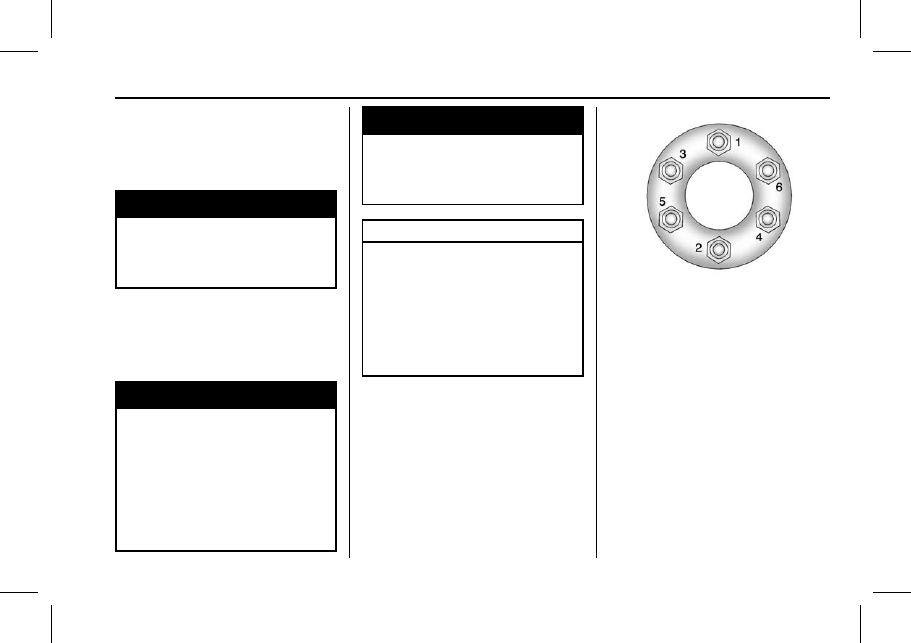
14. Tighten the wheel nuts firmly in a

crisscross sequence, as shown.

15. Lower the jack all the way and remove

the jack from under the vehicle.

16. Tighten the wheel nuts firmly with the

wheel wrench.

When reinstalling the wheel cover or center
cap on the full-size tire, tighten all six plastic
caps hand snug with the aid of the wheel
wrench and tighten them with the wheel
wrench an additional one-quarter of a turn.

OwnersManuals2.com

GMC Acadia/Acadia Denali Owner Manual (GMNA-Localizing-U.S./Canada/

Mexico-16402009) - 2023 - CRC - 3/28/22

322

Vehicle Care

Caution

Wheel covers will not fit on the vehicle's
compact spare. If you try to put a wheel
cover on the compact spare, the cover or
the spare could be damaged.

{

Warning

Storing a jack, a tire, or other equipment
in the passenger compartment of the
vehicle could cause injury. In a sudden
stop or collision, loose equipment could
strike someone. Store all these in the
proper place.

Storing the Flat Tire

1. Liftgate Hinges
2. Cable
3. Center of the Wheel
4. Door Striker

To store the flat tire:

1. Remove the cable package from under

the spare tire, jack, and tools, or from
the jack container.

2. Remove the small cap by tapping the

back of the cap with the extension of
the shaft, if the vehicle has aluminum
wheels.

3. Put the flat tire in the rear storage area

with the valve stem facing the rear of
the vehicle.

4. Pull the cable through the door striker

and the center of the wheel.

OwnersManuals2.com

GMC Acadia/Acadia Denali Owner Manual (GMNA-Localizing-U.S./Canada/

Mexico-16402009) - 2023 - CRC - 3/28/22

Vehicle Care

323

5. Hook the cable onto the outside portion

of the liftgate hinges.

6. Hook the other end of the cable onto

the outside portion of the liftgate hinge
on the other side of the vehicle.

7. Pull on the cable to make sure it is

secure.

8. Make sure the metal tube is centered at

the striker. Push the tube toward the
front of the vehicle.

9. Close the liftgate and make sure it is

fully latched.

The compact spare is for temporary use
only. Replace the compact spare tire with a
full-size tire as soon as you can.

Storing the Compact Spare Tire and
Tools

To store the spare tire and tools:

1. Open the liftgate. See

Liftgate

0

18

.

2. Lift the load floor.
3. Remove the cargo management system.

4. Put back the spare tire and all tools as

they were stored in the rear storage
compartment.

5. Install the cargo management system

and load floor.

The compact spare is for temporary use
only. Replace the compact spare tire with a
full-size tire as soon as you can.

Compact Spare Tire

{

Warning

Driving with more than one compact
spare tire at a time could result in loss of
braking and handling. This could lead to a
crash and you or others could be injured.
Use only one compact spare tire at
a time.

If this vehicle has a compact spare tire, it
was fully inflated when new; however, it
can lose air over time. Check the inflation
pressure regularly. It should be 420 kPa
(60 psi).

Stop as soon as possible and check that the
spare tire is correctly inflated after being
installed on the vehicle. The compact spare
tire is designed for temporary use only. The

OwnersManuals2.com

GMC Acadia/Acadia Denali Owner Manual (GMNA-Localizing-U.S./Canada/

Mexico-16402009) - 2023 - CRC - 3/28/22

324

Vehicle Care

vehicle will perform differently with the
spare tire installed and it is recommended
that the vehicle speed be limited to 80 km/h
(50 mph). To conserve the tread of the spare
tire, have the standard tire repaired or
replaced as soon as convenient and return
the spare tire to the storage area.

When using a compact spare tire, the AWD
(if equipped), ABS, and Traction Control
systems may engage until the spare tire is
recognized by the vehicle, especially on
slippery roads. Adjust driving to reduce
possible wheel slip.

Caution

When the compact spare is installed, do
not take the vehicle through an
automatic car wash with guide rails. The
compact spare can get caught on the rails
which can damage the tire, wheel, and
other parts of the vehicle.

Do not use the compact spare on other
vehicles.

Do not mix the compact spare tire or wheel
with other wheels or tires. They will not fit.
Keep the spare tire and its wheel together.

Caution

Tire chains will not fit the compact spare.
Using them can damage the vehicle and
the chains. Do not use tire chains on the
compact spare.

Jump Starting

Jump Starting - North America

For more information about the vehicle
battery, see

Battery - North America

0

279

.

If the battery has run down, try to use
another vehicle and some jumper cables to
start your vehicle. Be sure to use the
following steps to do it safely.

{

Warning

WARNING:

Battery posts, terminals and

related accessories can expose you to
chemicals including lead and lead
compounds, which are known to the
State of California to cause cancer and
birth defects or other reproductive harm.
Wash hands after handling. For more
information go to
www.P65Warnings.ca.gov.

See

California Proposition 65 Warning

0

1

.

{

Warning

Batteries can hurt you. They can be
dangerous because:

.

They contain acid that can burn you.

.

They contain gas that can explode or
ignite.

.

They contain enough electricity to
burn you.

If you do not follow these steps exactly,
some or all of these things can hurt you.

Caution

Ignoring these steps could result in costly
damage to the vehicle that would not be
covered by the vehicle warranty. Trying
to start the vehicle by pushing or pulling
it will not work, and it could damage the
vehicle.

OwnersManuals2.com

GMC Acadia/Acadia Denali Owner Manual (GMNA-Localizing-U.S./Canada/

Mexico-16402009) - 2023 - CRC - 3/28/22

Vehicle Care

325

Caution

If the jumper cables are connected or
removed in the wrong order, electrical
shorting may occur and damage the
vehicle. The repairs would not be covered
by the vehicle warranty. Always connect
and remove the jumper cables in the
correct order, making sure that the cables
do not touch each other or other metal.

Connection Points and Sequence

1. Discharged Battery Positive (+)

Terminal

2. Good Battery Positive (+) Terminal
3. Good Battery Negative (

) Terminal

4. Discharged Battery Remote Negative

(

) Terminal

The discharged battery positive (+) terminal
and the discharged battery remote negative
(

) terminal are on the driver side of the

vehicle.

The good battery negative (

) terminal and

the good battery positive (+) terminal are
on the battery of the vehicle providing the
jump start.

1. Check the other vehicle. It must have a

12-volt battery with a negative ground
system.

Caution

If the other vehicle does not have a
12-volt system with a negative ground,
both vehicles can be damaged. Only use
a vehicle that has a 12-volt system with a
negative ground for jump starting.

2. Position the two vehicles so that they

are not touching.

3. Set the parking brake and shift the

vehicle into P (Park) with an automatic
transmission, or Neutral with a manual
transmission. See

Shifting Into Park

0

209

.

Caution

If any accessories are left on or plugged
in during the jump starting procedure,
they could be damaged. The repairs
would not be covered by the vehicle
warranty. Whenever possible, turn off or
unplug all accessories on either vehicle
when jump starting.

4. Turn the ignition off. Turn off all lights

and accessories in both vehicles, except
the hazard warning flashers if needed.

{

Warning

An electric fan can start up even when
the engine is not running and can injure
you. Keep hands, clothing, and tools
away from any underhood electric fan.

{

Warning

Using a match near a battery can cause
battery gas to explode. People have been
hurt doing this, and some have been
blinded. Use a flashlight if you need
more light.

(Continued)

OwnersManuals2.com

GMC Acadia/Acadia Denali Owner Manual (GMNA-Localizing-U.S./Canada/

Mexico-16402009) - 2023 - CRC - 3/28/22

326

Vehicle Care

Warning (Continued)

Battery fluid contains acid that can burn
you. Do not get it on you. If you
accidentally get it in your eyes or on
your skin, flush the place with water and
get medical help immediately.

{

Warning

Fans or other moving engine parts can
injure you badly. Keep your hands away
from moving parts once the engine is
running.

5. Connect one end of the red positive (+)

cable to the positive (+) terminal on the
discharged battery.

6. Connect the other end of the red

positive (+) cable to the positive (+)
terminal of the good battery.

7. Connect one end of the black

negative (

) cable to the negative (

)

terminal of the good battery.

8. Connect the other end of the black

negative (

) cable to the remote

negative (

) terminal on the driver side

shock tower for the discharged battery.

9. Start the engine in the vehicle with the

good battery and run the engine at idle
speed for at least four minutes.

10. Try to start the vehicle that had the

dead battery. If it will not start after a
few tries, it probably needs service.

Jumper Cable Removal

Reverse the sequence exactly when
removing the jumper cables.

After starting the disabled vehicle and
removing the jumper cables, allow it to idle
for several minutes.

Towing the Vehicle

Transporting a Disabled Vehicle

Caution

Incorrectly transporting a disabled vehicle
may cause damage to the vehicle. Use
proper tire straps to secure the vehicle to
the flatbed tow truck. Do not strap or
hook to any frame, underbody,
or suspension component not specified
below. Do not move vehicles with drive
axle tires on the ground. Damage is not
covered by the vehicle warranty.

Caution

The vehicle may be equipped with an
electric parking brake and/or an
electronic shifter. In the event of a loss of
12-volt battery power, the electric parking
brake cannot be released, and the vehicle
cannot be shifted to N (Neutral). Tire
skates or dollies must be used under the
non-rolling tires to prevent damage while
loading/unloading the vehicle. Dragging
the vehicle will cause damage not
covered by the vehicle warranty.

Caution

The vehicle may be equipped with a tow
eye. Improper use of the tow eye may
cause damage to the vehicle and is not
covered by the vehicle warranty.
If equipped, use the tow eye to load the
vehicle onto a flatbed tow truck from a
flat road surface, or to move the vehicle
a very short distance at a walking pace.
The tow eye is not designed for off-road
recovery. The vehicle must be in
N (Neutral) with the electric parking
brake released when using the tow eye.

OwnersManuals2.com

GMC Acadia/Acadia Denali Owner Manual (GMNA-Localizing-U.S./Canada/

Mexico-16402009) - 2023 - CRC - 3/28/22

Vehicle Care

327

Contact a professional towing service if the
disabled vehicle must be transported. GM
recommends a flatbed tow truck to
transport a disabled vehicle. Use ramps to
help reduce approach angles, if necessary.

If equipped, a tow eye may be located near
the spare tire or emergency jack. Do not use
the tow eye to pull the vehicle from the
snow, mud, sand, or ditch. Tow eye threads
may have right or left-hand threads. Use
caution when installing or removing the
tow eye.

The vehicle must be in N (Neutral) and the
electric parking brake must be released
when loading the vehicle onto a flatbed tow
truck.

.

If the vehicle is equipped with car wash
mode and has 12-volt battery power, refer
to

Car Wash Mode

under

Automatic

Transmission

0

211

to place the vehicle in

N (Neutral).

.

If the 12-volt battery is dead and/or the
engine will not start, the vehicle will not
move. Try to jump start the vehicle. Refer
to

Jump Starting - North America

0

324

and if the jump start is successful, retry
the

Car Wash Mode

procedure.

.

If jump starting is unsuccessful, the
vehicle will not move. Tire skates or
dollies must be used under the non-rolling
tires to prevent vehicle damage.

Front Attachment Points

The vehicle is equipped with specific
attachment points to be used by the towing
provider. These holes may be used to pull
the vehicle from a flat road surface onto the
flatbed tow truck.

Recreational Vehicle Towing

Recreational vehicle towing means towing
the vehicle behind another vehicle, such as
behind a motor home. The two most
common types of recreational vehicle

towing are known as dinghy towing and
dolly towing. Dinghy towing is towing the
vehicle with all four wheels on the ground.
Dolly towing is towing the vehicle with two
wheels on the ground and two wheels up
on a device known as a dolly.

Here are some important things to consider
before recreational vehicle towing:

.

Become familiar with the local laws that
apply to recreational vehicle towing.
These laws may vary by region.

.

The towing capacity of the towing
vehicle. Be sure to read the tow vehicle
manufacturer's recommendations.

.

How far the vehicle will be towed. Some
vehicles have restrictions on how far and
how long they can be towed.

.

The proper towing equipment. See your
dealer or trailering professional for
additional advice and equipment
recommendations.

.

If the vehicle is ready to be towed. Just
as preparing the vehicle for a long trip,
make sure the vehicle is prepared to be
towed.

OwnersManuals2.com

GMC Acadia/Acadia Denali Owner Manual (GMNA-Localizing-U.S./Canada/

Mexico-16402009) - 2023 - CRC - 3/28/22

328

Vehicle Care

Caution

Use of a shield mounted in front of the
vehicle grille could restrict airflow and
cause damage to the transmission. The
repairs would not be covered by the
vehicle warranty. If using a shield, only
use one that attaches to the towing
vehicle.

Dinghy Towing

Caution

If the vehicle is towed with all four
wheels on the ground, the drivetrain
components could be damaged. The

(Continued)

Caution (Continued)

repairs would not be covered by the
vehicle warranty. Do not tow the vehicle
with all four wheels on the ground.

The vehicle is neither designed nor intended
to be towed with all four wheels on the
ground. If the vehicle must be towed, a
dolly should be used. See the following
information on dolly towing.

Dolly Towing

Driving onto a Dolly

1. Park the vehicle on level ground in front

of the dolly and turn the vehicle off.

2. Make sure the parking brake is released.

3. Press and hold ENGINE START/STOP with

your foot off the brake for five seconds.

4. Hold the brake pedal and press the

parking brake switch for 15 seconds until
the service parking brake light flashes.

5. While the service parking brake light is

still flashing, remove your foot from the
brake pedal and release the parking
brake switch.

6. Immediately press and release the

parking brake switch again while the
service park brake light is still flashing.

7. Start the vehicle and drive onto the

dolly.

8. Place the vehicle in P (Park).
9. Turn off the vehicle.

10. Open the hood.
11. Exit the vehicle and secure the vehicle

onto the dolly.

12. Disconnect the negative (

) terminal

connector from the 12-volt battery.

13. Close the hood of the vehicle.

Removing the Vehicle from a Dolly

1. Make sure the vehicle is secured to the

dolly.

OwnersManuals2.com

GMC Acadia/Acadia Denali Owner Manual (GMNA-Localizing-U.S./Canada/

Mexico-16402009) - 2023 - CRC - 3/28/22

Vehicle Care

329

2. Open the door and open the hood of the

vehicle.

3. Connect the negative (

) terminal

connector from the 12-volt battery.

4. Press and hold ENGINE START/STOP with

your foot off the brake for five seconds.

5. Hold the brake pedal and press the

parking brake switch for five seconds
until the parking brake light flashes.

6. Turn the vehicle off.
7. Unsecure the vehicle and remove it from

the dolly.

Towing the Vehicle from the Rear

Caution

Towing the vehicle from the rear could
damage it. Also, repairs would not be
covered by the vehicle warranty. Never
have the vehicle towed from the rear.

Do not tow the vehicle from the rear.

Appearance Care

Exterior Care

Locks

Locks are lubricated at the factory. Use a
de-icing agent only when absolutely
necessary, and have the locks greased after
using. See

Recommended Fluids and

Lubricants

0

343

.

Washing the Vehicle

To preserve the vehicle's finish, wash it
often and out of direct sunlight.

Caution

Do not use petroleum-based, acidic,
or abrasive cleaning agents as they can
damage the vehicle's paint, metal,
or plastic parts. If damage occurs, it
would not be covered by the vehicle
warranty. Approved cleaning products can
be obtained from your dealer. Follow all
manufacturer directions regarding correct
product usage, necessary safety
precautions, and appropriate disposal of
any vehicle care product.

OwnersManuals2.com

GMC Acadia/Acadia Denali Owner Manual (GMNA-Localizing-U.S./Canada/

Mexico-16402009) - 2023 - CRC - 3/28/22

330

Vehicle Care

Caution

Avoid using high-pressure washes closer
than 30 cm (12 in) to the surface of the
vehicle. Use of power washers exceeding
8 274 kPa (1,200 psi) can result in
damage or removal of paint and decals.

If using an automatic car wash, follow the
car wash instructions. The windshield wiper
and rear window wiper, if equipped, must
be off. Remove any accessories that may be
damaged or interfere with the car wash
equipment.

Rinse the vehicle well, before washing and
after, to remove all cleaning agents
completely. If they are allowed to dry on
the surface, they could stain.

Dry the finish with a soft, clean chamois or
an all-cotton towel to avoid surface
scratches and water spotting.

Cleaning Underhood Components

Caution

Do not power wash any component
under the hood that has this

e

symbol.

(Continued)

Caution (Continued)

This could cause damage that would not
be covered by the vehicle warranty.

Solvents or aggressive cleaners may harm
underhood components. The usages of these
chemicals should be avoided.

Recommend water only.

A pressure washer may be used, but care
must be utilized. The following criteria must
be followed:

.

Water pressure must be kept below
14 000 KPa (2,000 PSI).

.

Water temperature must be below 80 °C
(180 °F).

.

Spray nozzle with a 40 degree wide angle
spray pattern or wider must be used.

.

Nozzle must be kept at least 30 cm (1 ft)
away from all surfaces.

Finish Care

Application of aftermarket clearcoat sealant/
wax materials is not recommended.
If painted surfaces are damaged, see your
dealer to have the damage assessed and
repaired. Foreign materials such as calcium
chloride and other salts, ice melting agents,
road oil and tar, tree sap, bird droppings,

chemicals from industrial chimneys, etc., can
damage the vehicle's finish if they remain
on painted surfaces. Wash the vehicle as
soon as possible. If necessary, use
non-abrasive cleaners that are marked safe
for painted surfaces to remove foreign
matter.

Occasional hand waxing or mild polishing
should be done to remove residue from the
paint finish. See your dealer for approved
cleaning products.

Do not apply waxes or polishes to uncoated
plastic, vinyl, rubber, decals, simulated
wood, or flat paint as damage can occur.

Caution

Machine compounding or aggressive
polishing on a basecoat/clearcoat paint
finish may damage it. Use only
non-abrasive waxes and polishes that are
made for a basecoat/clearcoat paint finish
on the vehicle.

To keep the paint finish looking new, keep
the vehicle garaged or covered whenever
possible.

OwnersManuals2.com

GMC Acadia/Acadia Denali Owner Manual (GMNA-Localizing-U.S./Canada/

Mexico-16402009) - 2023 - CRC - 3/28/22

Vehicle Care

331

Protecting Exterior Bright Metal Moldings

Caution

Failure to clean and protect the bright
metal moldings can result in a hazy
white finish or pitting. This damage
would not be covered by the vehicle
warranty.

The bright metal moldings on the vehicle
are aluminum, chrome, or stainless steel. To
prevent damage always follow these
cleaning instructions:

.

Be sure the molding is cool to the touch
before applying any cleaning solution.

.

Use only approved cleaning solutions for
aluminum, chrome, or stainless steel.
Some cleaners are highly acidic or contain
alkaline substances and can damage the
moldings.

.

Always dilute a concentrated cleaner
according to the manufacturer

s

instructions.

.

Do not use cleaners that are not intended
for automotive use.

.

Use a nonabrasive wax on the vehicle
after washing to protect and extend the
molding finish.

Cleaning Exterior Lamps/Lenses,
Emblems, Decals, and Stripes

Use only lukewarm or cold water, a soft
cloth, and a car washing soap to clean
exterior lamps, lenses, emblems, decals, and
stripes. Follow instructions under "Washing
the Vehicle" previously in this section.

Lamp covers are made of plastic, and some
have a UV protective coating. Do not clean
or wipe them when dry.

Do not use any of the following on lamp
covers:

.

Abrasive or caustic agents.

.

Washer fluids and other cleaning agents
in higher concentrations than suggested
by the manufacturer.

.

Solvents, alcohols, fuels, or other harsh
cleaners.

.

Ice scrapers or other hard items.

.

Aftermarket appearance caps or covers
while the lamps are illuminated, due to
excessive heat generated.

Caution

Failure to clean lamps properly can cause
damage to the lamp cover that would
not be covered by the vehicle warranty.

Caution

Using wax on low gloss black finish
stripes can increase the gloss level and
create a non-uniform finish. Clean low
gloss stripes with soap and water only.

Air Intakes

Clear debris from the air intakes, between
the hood and windshield, when washing the
vehicle.

Shutter System

The vehicle may have a shutter system
designed to help improve fuel economy.
Keep the shutter system clear of debris,

OwnersManuals2.com

GMC Acadia/Acadia Denali Owner Manual (GMNA-Localizing-U.S./Canada/

Mexico-16402009) - 2023 - CRC - 3/28/22

332

Vehicle Care

snow and ice. If the check engine light is
activated, please check to see if the shutter
system is clear of debris, snow or ice.

Windshield and Wiper Blades

Clean the outside of the windshield with
glass cleaner.

Clean rubber blades using a lint-free cloth or
paper towel soaked with windshield washer
fluid or a mild detergent. Wash the
windshield thoroughly when cleaning the
blades. Bugs, road grime, sap, and a buildup
of vehicle wash/wax treatments may cause
wiper streaking.

Replace the wiper blades if they are worn or
damaged. Damage can be caused by
extreme dusty conditions, sand, salt, heat,
sun, snow, and ice.

Weatherstrips

Apply weatherstrip lubricant on
weatherstrips to make them last longer, seal
better, and not stick or squeak. Lubricate
weatherstrips at least once a year. Hot, dry
climates may require more frequent
application. Black marks from rubber
material on painted surfaces can be removed
by rubbing with a clean cloth. See

Recommended Fluids and Lubricants

0

343

.

Tires

Use a stiff brush with tire cleaner to clean
the tires.

Caution

Using petroleum-based tire dressing
products on the vehicle may damage the
paint finish and/or tires. When applying a
tire dressing, always wipe off any
overspray from all painted surfaces on
the vehicle.

Wheels and Wheel Trim

Use a soft, clean cloth with mild soap and
water to clean the wheels. After rinsing
thoroughly with clean water, dry with a
soft, clean towel. A wax may then be
applied.

Caution

Chrome wheels and chrome wheel trim
may be damaged if the vehicle is not
washed after driving on roads that have
been sprayed with magnesium chloride or
calcium chloride. These are used on roads
for conditions such as dust and ice.
Always wash the chrome with soap and
water after exposure.

Caution

To avoid surface damage on wheels and
wheel trim, do not use strong soaps,
chemicals, abrasive polishes, cleaners,
or brushes. Use only GM approved
cleaners. Do not drive the vehicle through
an automatic car wash that uses silicon
carbide tire/wheel cleaning brushes.
Damage could occur and the repairs
would not be covered by the vehicle
warranty.

Brake System

Visually inspect brake lines and hoses for
proper hook-up, binding, leaks, cracks,
chafing, etc. Inspect disc brake pads for wear
and rotors for surface condition. Inspect all
other brake parts.

Steering, Suspension, and Chassis
Components

Visually inspect steering, suspension, and
chassis components for damaged, loose,
or missing parts or signs of wear at least
once a year.

Inspect power steering for proper electrical
connections, binding, cracks, chafing, etc.

OwnersManuals2.com

GMC Acadia/Acadia Denali Owner Manual (GMNA-Localizing-U.S./Canada/

Mexico-16402009) - 2023 - CRC - 3/28/22

Vehicle Care

333

Visually check constant velocity joint boots
and axle seals for leaks.

Body Component Lubrication

Lubricate all key lock cylinders, hood hinges,
liftgate hinges, and the steel fuel door
hinges, unless the components are plastic.
Applying silicone grease on weatherstrips
with a clean cloth will make them last
longer, seal better, and not stick or squeak.

Underbody Maintenance

At least twice a year, spring and fall, use
plain water to flush any corrosive materials
from the underbody. Take care to
thoroughly clean any areas where mud and
other debris can collect.

Do not directly power wash the transfer
case and/or front/rear axle output seals.
High pressure water can overcome the seals
and contaminate the fluid. Contaminated
fluid will decrease the life of the transfer
case and/or axles and should be replaced.

Sheet Metal Damage

If the vehicle is damaged and requires sheet
metal repair or replacement, make sure the
body repair shop applies anti-corrosion
material to parts repaired or replaced to
restore corrosion protection.

Original manufacturer replacement parts will
provide the corrosion protection while
maintaining the vehicle warranty.

Finish Damage

Quickly repair minor chips and scratches
with touch-up materials available from your
dealer to avoid corrosion. Larger areas of
finish damage can be corrected in your
dealer's body and paint shop.

Chemical Paint Spotting

Airborne pollutants can fall upon and attack
painted vehicle surfaces causing blotchy,
ring-shaped discolorations, and small,
irregular dark spots etched into the paint
surface. See

Finish Care

previously in this

section.

Interior Care

To prevent dirt particle abrasions, regularly
clean the vehicle's interior. Before using
cleaners, read and follow all safety
instructions on the label. While cleaning the
interior, open the doors and windows to get
proper ventilation. Newspapers or dark
garments can transfer color to the vehicle

s

interior.

Caution

Immediately remove cleaners, hand
lotions, sunscreen, and insect repellent
from all interior surfaces or permanent
damage may result.

Caution

Use cleaners specifically designed for the
surfaces being cleaned to prevent
permanent damage to the vehicle. Apply
all cleaners directly to a cleaning cloth.
Do not spray cleaners on any switches or
controls.

When using liquid soap cleaners, follow the
directions on the specific cleaner or soap
solution for dilution instructions.

Caution

To prevent damage:

.

Never use a razor or any other sharp
object to remove soil from any interior
surface

.

Never use a brush with stiff bristles.

(Continued)

OwnersManuals2.com

GMC Acadia/Acadia Denali Owner Manual (GMNA-Localizing-U.S./Canada/

Mexico-16402009) - 2023 - CRC - 3/28/22

334

Vehicle Care

Caution (Continued)

.

Never rub any surface aggressively or
with too much pressure.

.

Do not get any exposed electrical
components wet.

.

Do not use laundry detergents or
dishwashing soaps with degreasers. Do
not use solutions that contain strong
or caustic soap.

.

Do not heavily saturate the upholstery
when cleaning.

.

Do not use solvents or cleaners
containing solvents.

.

Do not use disinfecting wipes that are
scented or contain bleach. Do not use
wipes or cleaners that show a color
transfer to the wipe or change the
appearance of the interior surface
when used.

.

Do not use scented or gel-type hand
sanitizers. If hand sanitizer comes in
contact with interior surfaces of the
vehicle, blot immediately and clean
with a soft cloth dampened with a
mild soap and water solution.

Interior Glass

To clean, use a microfiber cloth fabric
dampened with water. Wipe droplets left
behind with a clean dry cloth. If necessary,
use a commercial glass cleaner after
cleaning with plain water.

Caution

To prevent scratching, never use abrasive
cleaners on automotive glass. Abrasive
cleaners or aggressive cleaning may
damage the rear window defogger.

Cleaning the windshield with water during
the first three to six months of ownership
will reduce tendency to fog.

Speaker Covers

Vacuum around a speaker cover gently, so
that the speaker will not be damaged. Clean
spots with water and mild soap.

Coated Moldings

Coated moldings should be cleaned.

.

When lightly soiled, wipe with a sponge
or soft, lint-free cloth dampened with
water.

.

When heavily soiled, use warm soapy
water.

Vinyl/Rubber

If equipped with vinyl floor and rubber floor
mats, use a soft cloth and/or brush
dampened with water to remove dust and
loose dirt. For more thorough cleaning, use
a mild soap and water solution.

{

Warning

Do not use cleaners that contain silicone,
wax-based products, or cleaners that
increase gloss on vinyl/rubber floor and
mats. These cleaners can permanently
change the appearance and feel of the
vinyl/rubber and can make the floor
slippery. Your foot could slip while
operating the vehicle, and you could lose
control, resulting in a crash. You or
others could be injured.

Fabric/Carpet/Suede

Start by vacuuming the surface using a soft
brush attachment. If a rotating vacuum
brush attachment is being used, only use it
on the floor carpet. Before cleaning, gently
remove as much of the soil as possible:

.

Gently blot liquids with a paper towel.
Continue blotting until no more soil can
be removed.

OwnersManuals2.com

GMC Acadia/Acadia Denali Owner Manual (GMNA-Localizing-U.S./Canada/

Mexico-16402009) - 2023 - CRC - 3/28/22

Vehicle Care

335

.

For solid soils, remove as much as
possible prior to vacuuming.

To clean:

1. Saturate a clean, lint-free colorfast cloth

with water. Microfiber cloth is
recommended to prevent lint transfer to
the fabric or carpet.

2. Remove excess moisture by gently

wringing until water does not drip from
the cleaning cloth.

3. Start on the outside edge of the soil and

gently rub toward the center. Fold the
cleaning cloth to a clean area frequently
to prevent forcing the soil into the
fabric.

4. Continue gently rubbing the soiled area

until there is no longer any color
transfer from the soil to the cleaning
cloth.

5. If the soil is not completely removed,

use a mild soap solution followed only
by plain water.

If the soil is not completely removed, it may
be necessary to use a commercial upholstery
cleaner or spot lifter. Test a small hidden
area for colorfastness before using a

commercial upholstery cleaner or spot lifter.
If ring formation occurs, clean the entire
fabric or carpet.

After cleaning, use a paper towel to blot
excess moisture.

Cleaning High Gloss Surfaces and Vehicle
Information and Radio Displays

Use a microfiber cloth on high gloss surfaces
or vehicle displays. First, use a soft bristle
brush to remove dirt that can scratch the
surface. Then gently clean by rubbing with a
microfiber cloth. Never use window cleaners
or solvents. Periodically hand wash the
microfiber cloth separately, using mild soap.
Do not use bleach or fabric softener. Rinse
thoroughly and air dry before next use.

Caution

Do not attach a device with a suction cup
to the display. This may cause damage
and would not be covered by the vehicle
warranty.

Instrument Panel, Leather, Vinyl, Other
Plastic Surfaces, Low Gloss Paint
Surfaces, and Natural Open Pore Wood
Surfaces

Use a soft bristle brush to remove dust from
knobs and crevices on the instrument
cluster. Use a soft microfiber cloth
dampened with water to remove dust and
loose dirt. For a more thorough cleaning,
use a soft microfiber cloth dampened with a
mild soap and water solution.

Caution

Soaking or saturating leather, especially
perforated leather, as well as other
interior surfaces, may cause permanent
damage. Wipe excess moisture from
these surfaces after cleaning and allow
them to dry naturally. Never use heat,
steam, or spot removers. Do not use
liquids that contain alcohol or solvents on
leather seats. Do not use cleaners that
contain silicone or wax-based products.
Cleaners containing these solvents can
permanently change the appearance and
feel of leather or soft trim, and are not
recommended.

OwnersManuals2.com

GMC Acadia/Acadia Denali Owner Manual (GMNA-Localizing-U.S./Canada/

Mexico-16402009) - 2023 - CRC - 3/28/22

336

Vehicle Care

Do not use cleaners that increase gloss,
especially on the instrument panel. Reflected
glare can decrease visibility through the
windshield under certain conditions.

Caution

Use of air fresheners may cause
permanent damage to plastics and
painted surfaces. If an air freshener
comes in contact with any plastic or
painted surface in the vehicle, blot
immediately and clean with a soft cloth
dampened with a mild soap solution.
Damage caused by air fresheners would
not be covered by the vehicle warranty.

Cargo Cover and Convenience Net

If equipped, wash with warm water and
mild detergent. Do not use chlorine bleach.
Rinse with cold water, and then dry
completely.

Care of Seat Belts

Keep belts clean and dry.

{

Warning

Do not bleach or dye seat belt webbing.
It may severely weaken the webbing. In
a crash, they might not be able to
provide adequate protection. Clean and
rinse seat belt webbing only with mild
soap and lukewarm water. Allow the
webbing to dry.

Floor Mats

{

Warning

If a floor mat is the wrong size or is not
properly installed, it can interfere with
the pedals. Interference with the pedals
can cause unintended acceleration and/or
increased stopping distance which can
cause a crash and injury. Make sure the
floor mat does not interfere with the
pedals.

Use the following guidelines for proper floor
mat use:

.

The original equipment floor mats are
designed for your vehicle. If the floor
mats need to be replaced, it is
recommended that GM-certified floor
mats are purchased. Non-GM floor mats
may not fit properly and may interfere
with the pedals. Always check that the
floor mats do not interfere with the
pedals.

.

Do not use a floor mat if the vehicle is
not equipped with a floor mat retainer on
the driver side floor.

.

Use the floor mat with the correct side
up. Do not turn it over.

.

Do not place anything on top of the
driver side floor mat.

.

Use only a single floor mat on the
driver side.

.

Do not place one floor mat on top of
another.

OwnersManuals2.com

GMC Acadia/Acadia Denali Owner Manual (GMNA-Localizing-U.S./Canada/

Mexico-16402009) - 2023 - CRC - 3/28/22

Vehicle Care

337

Button Retainer

Some vehicles have floor mats with a
button-type retainer.

Removing and Replacing the Floor Mat

1. Pull up on the rear of the mat to unlock

and remove.

2. Reinstall the floor mat by lining up the

floor mat opening over the carpet
retainer and snapping into position.

3. Make sure the floor mat is properly

secured. Verify the floor mat does not
interfere with the pedals.

Cleaning Rubber Floor Mats (All-Weather
Mats and Floor Liners)

See

Vinyl/Rubber

under

Interior Care

0

333

for important cleaning information.

OwnersManuals2.com

GMC Acadia/Acadia Denali Owner Manual (GMNA-Localizing-U.S./Canada/

Mexico-16402009) - 2023 - CRC - 3/28/22

338

Service and Maintenance

Service and Maintenance

General Information

General Information . . . . . . . . . . . . . . . . . . . 338

Maintenance Schedule

Maintenance Schedule . . . . . . . . . . . . . . . . 339

Multi-Point Vehicle Inspection (MPVI)

Multi-Point Vehicle

Inspection (MPVI) . . . . . . . . . . . . . . . . . . . . 341

Special Application Services

Special Application Services . . . . . . . . . . . . 342

Recommended Fluids, Lubricants, and
Parts

Recommended Fluids and

Lubricants . . . . . . . . . . . . . . . . . . . . . . . . . . . 343

Maintenance Replacement Parts . . . . . . . 344

Maintenance Records

Maintenance Records . . . . . . . . . . . . . . . . . . 346

General Information

Your vehicle is an important investment.
This section describes the required
maintenance for the vehicle. Follow this
schedule to help protect against major repair
expenses resulting from neglect or
inadequate maintenance. It may also help to
maintain the value of the vehicle if it is
sold. It is the responsibility of the owner to
have all required maintenance performed.

Your dealer has trained technicians who can
perform required maintenance using genuine
replacement parts. They have up-to-date
tools and equipment for fast and accurate
diagnostics. Many dealers have extended
evening and Saturday hours, courtesy
transportation, and online scheduling to
assist with service needs.

Your dealer recognizes the importance of
providing competitively priced maintenance
and repair services. With trained technicians,
the dealer is the place for routine
maintenance such as oil changes and tire
rotations and additional maintenance items
like tires, brakes, batteries, and wiper blades.

Caution

Damage caused by improper maintenance
can lead to costly repairs and may not be
covered by the vehicle warranty.
Maintenance intervals, checks,
inspections, recommended fluids, and
lubricants are important to keep the
vehicle in good working condition.

Do not have chemical flushes that are not
approved by GM performed on the
vehicle. The use of flushes, solvents,
cleaners, or lubricants that are not
approved by GM could damage the
vehicle, requiring expensive repairs that
are not covered by the vehicle warranty.

The Tire Rotation and Required Services are
the responsibility of the vehicle owner. It is
recommended to have your dealer perform
these services every 12 000 km/7,500 mi.
Proper vehicle maintenance helps to keep
the vehicle in good working condition,
improves fuel economy, and reduces vehicle
emissions.

OwnersManuals2.com

GMC Acadia/Acadia Denali Owner Manual (GMNA-Localizing-U.S./Canada/

Mexico-16402009) - 2023 - CRC - 3/28/22

Service and Maintenance

339

Because of the way people use vehicles,
maintenance needs vary. There may need to
be more frequent checks and services. The
Additional Required Services - Normal are for
vehicles that:

.

Carry passengers and cargo within
recommended limits on the Tire and
Loading Information label. See

Vehicle

Load Limits

0

200

.

.

Are driven on reasonable road surfaces
within legal driving limits.

.

Use the recommended fuel. See

Recommended Fuel

0

247

.

Refer to the information in the Maintenance
Schedule Additional Required Services -
Normal Service.

The Additional Required Services - Severe are
for vehicles that are:

.

Mainly driven in heavy city traffic in hot
weather.

.

Mainly driven in hilly or mountainous
terrain.

.

Frequently towing a trailer.

.

Used for high speed or competitive
driving.

.

Used for taxi, police, or delivery service.

Refer to the information in the Maintenance
Schedule Additional Required Services -
Severe Service.

{

Warning

Performing maintenance work can be
dangerous and can cause serious injury.
Perform maintenance work only if the
required information, proper tools, and
equipment are available. If they are not,
see your dealer to have a trained
technician do the work. See

Doing Your

Own Service Work

0

262

or

Doing Your Own Service Work

0

263

.

Maintenance Schedule

Tire Rotation and Required Services
Every 12 000 km (7,500 mi)

Tires are rotated to achieve a more uniform
wear for all tires. The first rotation is the
most important.

Anytime unusual wear is noticed, rotate the
tires as soon as possible, check for proper
tire inflation pressure, and check for
damaged tires or wheels. If the unusual
wear continues after the rotation, check the

wheel alignment. See

When It Is Time for

New Tires

0

306

and

Wheel Replacement

0

310

.

.

Perform Multi-Point Vehicle Inspection.
See

Multi-Point Vehicle Inspection (MPVI)

0

341

.

.

Lubricate body components. See

Exterior

Care

0

329

.

Additional Required Services

Normal

Service

Every 12 000 km (7,500 mi)

.

Check the engine oil level and oil
life percentage. If needed, change engine
the oil and filter, and reset oil the life
system. Or when the CHANGE ENGINE OIL
SOON message displays, have the engine
oil and filter changed within the next
1 000 km/600 mi. If driven under the best
conditions, the engine oil life system may
not indicate the need for vehicle service
for up to a year. The engine oil and filter
must be changed at least once a year and
the oil life system must be reset. Your
trained dealer technician can perform this
work. If the engine oil life system is reset
accidentally, service the vehicle within
5 000 km/3,000 mi since the last service.

OwnersManuals2.com

GMC Acadia/Acadia Denali Owner Manual (GMNA-Localizing-U.S./Canada/

Mexico-16402009) - 2023 - CRC - 3/28/22

340

Service and Maintenance

Reset the oil life system when the oil is
changed. See

Engine Oil Life System

0

270

.

.

When the REPLACE AT NEXT OIL CHANGE
message displays, the engine air filter
should be replaced at the next engine oil
change. When the REPLACE ENGINE AIR
FILTER SOON message displays, the
engine air filter should be replaced at the
earliest convenience. Reset the engine air
filter life system after the engine air filter
is replaced. See

Engine Air Filter Life

System

0

271

.

Every 36 000 km (22,500 mi)

.

Replace the passenger compartment air
filter. Or every 24 months, whichever
comes first. More frequent passenger
compartment air filter replacement may
be needed if driving in areas with heavy
traffic, poor air quality, high dust levels,
or environmental allergens. Passenger
compartment air filter replacement may
also be needed if there is reduced airflow,
window fogging, or odors. Your GM
dealer can help determine when to
replace the filter.

Every 96 000 km (60,000 mi)

.

Replace spark plugs. (2.0L L4 Engine Only.)
Inspect spark plug wires and/or boots.

Every 156 000 km (97,500 mi)

.

Replace spark plugs. (3.6L V6 Engine
Only.) Inspect spark plug wires and/or
boots.

Every 161 000 km (100,000 mi)

.

Replace hood and/or body lift support gas
struts. Or every 10 years, whichever
comes first. See

Gas Strut(s)

0

282

.

Every 240 000 km (150,000 mi)

.

Change rear axle fluid, if equipped with
AWD. Do not directly power wash the
transfer case and/or front/rear axle
output seals. High pressure water can
overcome the seals and contaminate the
transfer case fluid. Contaminated fluid will
decrease the life of the transfer case and/
or axles and should be replaced.

.

Drain and fill engine cooling system. Or
every six years, whichever comes first.
See

Cooling System

0

272

.

Severe Conditions Requiring More
Frequent Maintenance*

.

Public service, military, or commercial use
vehicles to include the following:

Ambulances, police cars, and
emergency rescue vehicles.

Civilian vehicles such as light duty
pick-up trucks, SUVs, and passenger
cars that are used in military
applications.

Recovery vehicles such as tow trucks
and flatbed single vehicle carriers or
any vehicle that is consistently used in
towing trailers or other loads.

High use commercial vehicles such as
courier delivery vehicles, private
security patrol vehicles, or any vehicles
that operate on a 24

hour basis.

Any vehicle consistently operated in a
high sand or dust environment such as
those used on oil pipelines and similar
applications.

OwnersManuals2.com

GMC Acadia/Acadia Denali Owner Manual (GMNA-Localizing-U.S./Canada/

Mexico-16402009) - 2023 - CRC - 3/28/22

Service and Maintenance

341

.

Vehicles that are regularly used for short
trips of 6 km (4 mi) or less.
The oil life indicator will show you when
to change the oil and filter. Under severe
conditions the indicator may come on
before 12 000 km (7,500 mi).
* Footnote: Under extreme driving
conditions listed above, it may be
necessary to replace your spark plugs at
more frequent intervals. For further
assistance in determining the most
suitable service maintenance intervals for
your vehicle, please contact your
authorized GM Dealer.
Extreme service is for vehicles mainly
driven off-road in four-wheel drive or used
in farming, mining, forestry, or snow
plowing.

Additional Required Services

Severe

Service

Every 72 000 km (45,000 mi)

.

Change automatic transmission fluid.

Every 120 000 km (75,000 mi)

.

Change rear axle fluid, if equipped with
AWD. Do not directly power wash the
transfer case and/or front/rear axle
output seals. High pressure water can

overcome the seals and contaminate the
transfer case fluid. Contaminated fluid will
decrease the life of the transfer case and/
or axles and should be replaced.

Owner Checks and Services

Every Five Years

.

Replace brake fluid.

Every Seven Years

.

Replace Air Conditioning Desiccant and
perform air conditioning system
maintenance every seven years. This
service requires replacement of the
desiccant to help the longevity and
efficient operation of the air conditioning
system. This service can be complex. See
your dealer.

Multi-Point Vehicle
Inspection (MPVI)

A Multi Point Vehicle Inspection (MPVI)
completed by a GM dealer technician is a
maintenance assessment of your vehicle.
The benefit of the MPVI is to identify and
inform the customer of service items that
require immediate attention and those that
may require attention in the future.

The technician will perform the following
checks on your vehicle. For a complete list
of checks, inspections, and services, see your
dealer.

Some items may not apply to your vehicle
and/or region.

Diagnostics

.

OnStar active, if equipped

.

Service history/recall check

Engine Oil and Filter

.

Engine oil

.

Oil life monitor

Reset oil life monitor

Exterior Lights

.

Visual inspection

Windshield and Wipers

.

Visual inspection

Battery

.

Battery visual inspection

.

Battery test results

.

Battery cables and connections

OwnersManuals2.com

GMC Acadia/Acadia Denali Owner Manual (GMNA-Localizing-U.S./Canada/

Mexico-16402009) - 2023 - CRC - 3/28/22

342

Service and Maintenance

Systems, Fluids, and Visible Leak
Inspection

.

Engine oil

.

Transmission

.

Drive axle

.

Transfer case

.

Engine cooling system

.

Power steering, if equipped

.

Fuel system

.

Windshield washer fluid

Tire Inspection

.

Tire pressure, tread depth, and wear

.

Rotation, if applicable

.

Alignment check, optional

.

Reset tire pressure monitor

.

Check tire sealant expiration date,
if equipped

.

Check spare tire, if equipped

Brakes

.

Check brake system

Visible and Functional Inspections

.

Seat belt components

.

Exhaust system

.

Accelerator pedal

.

Passenger compartment air filter,
if equipped

.

Engine air filter

.

Hoses

.

Belts

.

Shocks and struts

.

Steering components

.

Axle boots or driveshaft and u-joints

.

Compartment lift struts, if equipped

.

Floor mats secured, no interference with
pedals

.

Horn

.

Ignition lock, if equipped

.

Starter switch

.

Evaporative control system

Lubricate

.

Chassis components

Special Application Services

.

Severe Commercial Use Vehicles Only:
Lubricate chassis components every oil
change.

.

Have underbody flushing service
performed. See "Underbody Maintenance"
in

Exterior Care

0

329

.

OwnersManuals2.com

GMC Acadia/Acadia Denali Owner Manual (GMNA-Localizing-U.S./Canada/

Mexico-16402009) - 2023 - CRC - 3/28/22

Service and Maintenance

343

Recommended Fluids, Lubricants, and Parts

Recommended Fluids and Lubricants

Fluids and lubricants identified below by name or specification, including fluids or lubricants not listed here, can be obtained from your dealer.

Usage

Fluid/Lubricant

Automatic Transmission

DEXRON-VI Automatic Transmission Fluid.

Engine Coolant

50/50 mixture of clean, drinkable water and use only DEX-COOL Coolant. See

Cooling

System

0

272

.

Engine Oil

Engine oil meeting the dexos1 specification of the proper SAE viscosity grade. ACDelco
dexos1 full synthetic is recommended. See

Engine Oil

0

268

.

Hood Latch Assembly, Secondary Latch, Pivots,

Spring Anchor, and Release Pawl

Lubriplate Lubricant Aerosol or lubricant meeting requirements of NLGI #2, Category LB
or GC-LB.

Hydraulic Brake System

DOT 4 Hydraulic Brake Fluid.

Key Lock Cylinders, Hood and Door Hinges

Multi-Purpose Lubricant, Superlube. See your dealer.

Windshield Washer

Automotive windshield washer fluid that meets regional freeze protection requirements.

OwnersManuals2.com

GMC Acadia/Acadia Denali Owner Manual (GMNA-Localizing-U.S./Canada/

Mexico-16402009) - 2023 - CRC - 3/28/22

344

Service and Maintenance

Maintenance Replacement Parts

Replacement parts identified below by name, part number, or specification, can be obtained from your dealer.

Part

GM Part Number

ACDelco Part Number

Engine Air Cleaner/Filter

I

2.0L L4 Engine

23321606

A3212C

I

3.6L V6 Engine

23321606

A3212C

Engine Oil Filter

I

2.0L L4 Engine

55495105

PF66

I

3.6L V6 Engine

12693541

UPF63R

Passenger Compartment Air Filter

13508023

CF185

Spark Plugs

I

2.0L L4 Engine

55504354

41-103-IP

I

3.6L V6 Engine

12646780

41-130

OwnersManuals2.com

GMC Acadia/Acadia Denali Owner Manual (GMNA-Localizing-U.S./Canada/

Mexico-16402009) - 2023 - CRC - 3/28/22

Service and Maintenance

345

Part

GM Part Number

ACDelco Part Number

Wiper Blades

I

Front Driver

60 cm (23.6 in)

84586337

I

Front Passenger

45 cm (17.7 in)

84574892

I

Rear

30 cm (11.8 in)

84270770

OwnersManuals2.com

GMC Acadia/Acadia Denali Owner Manual (GMNA-Localizing-U.S./Canada/

Mexico-16402009) - 2023 - CRC - 3/28/22

346

Service and Maintenance

Maintenance Records

After the scheduled services are performed, record the date, odometer reading, who performed the service, and the type of services performed
in the boxes provided. Retain all maintenance receipts.

Date

Odometer Reading

Serviced By

Services Performed

OwnersManuals2.com

GMC Acadia/Acadia Denali Owner Manual (GMNA-Localizing-U.S./Canada/

Mexico-16402009) - 2023 - CRC - 3/28/22

Technical Data

347

Technical Data

Vehicle Identification

Vehicle Identification Number (VIN) . . . 347
Service Parts Identification . . . . . . . . . . . . 347

Vehicle Data

Capacities and Specifications . . . . . . . . . . 348
Engine Drive Belt Routing . . . . . . . . . . . . . 350

Vehicle Identification

Vehicle Identification
Number (VIN)

This legal identifier is in the front corner of
the instrument panel, on the driver side of
the vehicle. It can be seen through the
windshield from outside. The Vehicle
Identification Number (VIN) also appears on
the Vehicle Certification label and certificates
of title and registration.

Engine Identification

The eighth character in the VIN is the
engine code. This code identifies the
vehicle's engine, specifications, and
replacement parts. See

Engine

Specifications

under

Capacities and

Specifications

0

348

for the vehicle's

engine code.

Service Parts Identification

There may be a large barcode on the
certification label on the center pillar that
you can scan for the following information:

.

Vehicle Identification Number (VIN)

.

Model designation

.

Paint information

.

Production options

If there is not a large barcode on this label,
then you will find this same information on
a label under the load floor, inside the cargo
storage shelf unit.

OwnersManuals2.com

GMC Acadia/Acadia Denali Owner Manual (GMNA-Localizing-U.S./Canada/

Mexico-16402009) - 2023 - CRC - 3/28/22

348

Technical Data

Vehicle Data

Capacities and Specifications

The following approximate capacities are given in metric and English conversions. See

Recommended Fluids and Lubricants

0

343

for more

information.

Application

Capacities

Metric

English

Air Conditioning Refrigerant

For the air conditioning system refrigerant type and charge

amount, see the refrigerant label under the hood. See your

dealer for more information.

Engine Cooling System*

I

2.0L L4 Engine

10.4 L

11.0 qt

I

3.6L V6 Engine

13.0 L

13.7 qt

Engine Oil with Filter

I

2.0L L4 Engine

5.0 L

5.3 qt

I

3.6L V6 Engine

5.7 L

6.0 qt

OwnersManuals2.com

GMC Acadia/Acadia Denali Owner Manual (GMNA-Localizing-U.S./Canada/

Mexico-16402009) - 2023 - CRC - 3/28/22

Technical Data

349

Application

Capacities

Metric

English

Fuel Tank

I

FWD

73.4 L

19.4 gal

I

AWD

82.1 L

21.7 gal

Wheel Nut Torque

190

Y

140 lb ft

All capacities are approximate. When adding, be sure to fill to the approximate level, as recommended in this manual. Recheck fluid level
after filling.

*Engine cooling system capacity values are based on the entire cooling system and its components.

Engine Specifications

Engine

VIN Code

Transmission

Spark Plug Gap

2.0L L4 Engine (LSY)

4

Automatic

0.65

0.75 mm (0.026

0.030 in)

3.6L V6 Engine (LGX)

S

Automatic

0.80

0.90 mm (0.031

0.035 in)

Spark plug gaps are preset by the manufacturer. Re-gapping the spark plug is not recommended and can damage the spark plug.

OwnersManuals2.com

GMC Acadia/Acadia Denali Owner Manual (GMNA-Localizing-U.S./Canada/

Mexico-16402009) - 2023 - CRC - 3/28/22

350

Technical Data

Engine Drive Belt Routing

2.0L L4 Engine (LSY)

3.6L V6 Engine (LGX)

OwnersManuals2.com

GMC Acadia/Acadia Denali Owner Manual (GMNA-Localizing-U.S./Canada/

Mexico-16402009) - 2023 - CRC - 3/28/22

Customer Information

351

Customer Information

Customer Information

Customer Satisfaction Procedure . . . . . . . 351
Customer Assistance Offices . . . . . . . . . . . 353
Customer Assistance for Text Telephone

(TTY) Users . . . . . . . . . . . . . . . . . . . . . . . . . . 353

Online Account . . . . . . . . . . . . . . . . . . . . . . . . 353
GM Mobility Reimbursement

Program . . . . . . . . . . . . . . . . . . . . . . . . . . . . . 354

Roadside Assistance Program . . . . . . . . . . 354
Scheduling Service Appointments . . . . . . 355
Courtesy Transportation Program . . . . . 356
Collision Damage Repair . . . . . . . . . . . . . . . 357
Publication Ordering Information . . . . . . 358
Radio Frequency Statement . . . . . . . . . . . 359

Reporting Safety Defects

Reporting Safety Defects to the United

States Government . . . . . . . . . . . . . . . . . . 359

Reporting Safety Defects to the

Canadian Government . . . . . . . . . . . . . . . 360

Reporting Safety Defects to General

Motors . . . . . . . . . . . . . . . . . . . . . . . . . . . . . . 360

Vehicle Data Recording and Privacy

Vehicle Data Recording and Privacy . . . 360
Cybersecurity . . . . . . . . . . . . . . . . . . . . . . . . . 360
Event Data Recorders . . . . . . . . . . . . . . . . . . 361
OnStar . . . . . . . . . . . . . . . . . . . . . . . . . . . . . . . . . 361
Infotainment System . . . . . . . . . . . . . . . . . . 362

Customer Information

Customer Satisfaction Procedure

Your satisfaction and goodwill are important
to your dealer and to GMC. Normally, any
concerns with the sales transaction or the
operation of the vehicle will be resolved by
your dealer's sales or service departments.
Sometimes, however, despite the best
intentions of all concerned,
misunderstandings can occur. If your concern
has not been resolved to your satisfaction,
the following steps should be taken:

STEP ONE :

Discuss your concern with a

member of dealership management.
Normally, concerns can be quickly resolved
at that level. If the matter has already been
reviewed with the sales, service, or parts
manager, contact the owner of your
dealership or the general manager.

STEP TWO :

If after contacting a member of

dealership management, it appears your
concern cannot be resolved by your
dealership without further help, in the U.S.,
call 1-800-462-8782. In Canada, call General
Motors of Canada Customer Care Centre at
1-800-263-3777 (English), or 1-800-263-7854
(French).

OwnersManuals2.com

GMC Acadia/Acadia Denali Owner Manual (GMNA-Localizing-U.S./Canada/

Mexico-16402009) - 2023 - CRC - 3/28/22

352

Customer Information

We encourage you to call the toll-free
number in order to give your inquiry
prompt attention. Have the following
information available to give the Customer
Assistance representative:

.

Vehicle Identification Number (VIN). This is
available from the vehicle registration or
title, or the plate at the top left of the
instrument panel and visible through the
windshield.

.

Dealership name and location.

.

Vehicle delivery date and present mileage.

When contacting GMC, remember that your
concern will likely be resolved at a dealer's
facility. That is why we suggest following
Step One first.

STEP THREE

U.S. Owners :

Both General

Motors and your dealer are committed to
making sure you are completely satisfied
with your new vehicle. However, if you
continue to remain unsatisfied after
following the procedure outlined in
Steps One and Two, you can file with the
Better Business Bureau (BBB) AUTO LINE
Program to enforce your rights.

The BBB AUTO LINE Program is an
out-of-court program administered by the
BBB National Programs, Inc. to settle

automotive disputes regarding vehicle
repairs or the interpretation of the New
Vehicle Limited Warranty. Although you
may be required to resort to this informal
dispute resolution program prior to filing a
court action, use of the program is free of
charge and your case will generally be heard
within 40 days. If you do not agree with the
decision given in your case, you may reject
it and proceed with any other venue for
relief available to you.

You may contact the BBB AUTO LINE
Program using the toll-free telephone
number or write them at the following
address:

BBB Auto Line a Division of
BBB National Programs, Inc.
1676 International Drive
Suite 550
McLean, VA 22102

Telephone: 1-800-955-5100
www.bbbautoline.org

This program is available in all 50 states and
the District of Columbia. Eligibility is limited
by vehicle age, mileage, and other factors.
General Motors reserves the right to change
eligibility limitations and/or discontinue its
participation in this program.

STEP THREE

Canadian Owners :

In the

event that you do not feel your concerns
have been addressed after following the
procedure outlined in Steps One and Two,
General Motors of Canada Company wants
you to be aware of its participation in a
no-charge Mediation/Arbitration Program.
General Motors of Canada Company has
committed to binding arbitration of owner
disputes involving factory-related vehicle
service claims. The program provides for the
review of the facts involved by an impartial
third party arbiter, and may include an
informal hearing before the arbiter. The
program is designed so that the entire
dispute settlement process, from the time
you file your complaint to the final decision,
should be completed in about 70 days. We
believe our impartial program offers
advantages over courts in most jurisdictions
because it is informal, quick, and free of
charge.

For further information concerning eligibility
in the Canadian Motor Vehicle Arbitration
Plan (CAMVAP), call toll-free 1-800-207-0685,
or call the General Motors Customer Care
Centre, 1-800-263-3777 (English),
1-800-263-7854 (French), or write to:

OwnersManuals2.com

GMC Acadia/Acadia Denali Owner Manual (GMNA-Localizing-U.S./Canada/

Mexico-16402009) - 2023 - CRC - 3/28/22

Customer Information

353

Mediation/Arbitration Program
c/o Customer Care Centre
General Motors of Canada Company
500 Wentworth Street W
Oshawa, ON L1J 0C5

Your inquiry should be accompanied by the
Vehicle Identification Number (VIN).

Customer Assistance Offices

GMC is committed to assisting customers.
Visit us online at www.gmc.com/support
(U.S.) or www.mygmc.ca (Canada) to chat
with us or find answers to commonly asked
questions, tips, vehicle how-to instructions,
and available support.

Need more help? Use the phone numbers or
mailing addresses below for additional
assistance.

United States and Puerto Rico

GMC Customer Assistance Center
P.O. Box 33172
Detroit, MI 48232-5172

1-800-GMC-8782 (1-800-462-8782)
1-888-889-2438 (For Text Telephone devices
(TTYs))
Roadside Assistance: 1-888-881-3302

From U.S. Virgin Islands:

1-800-496-9994

Canada

Customer Care Centre
General Motors of Canada Company
500 Wentworth Street W
Oshawa, ON L1J 0C5

1-800-263-3777 (English)
1-800-263-7854 (French)
1-800-263-3830 (For Text Telephone Devices
(TTYs))
Roadside Assistance: 1-800-268-6800

Overseas

Please contact the local General Motors
Business Unit.

Customer Assistance for Text
Telephone (TTY) Users

To assist customers who are deaf, hard of
hearing, or speech-impaired and who use
Text Telephones (TTYs), GMC has TTY
equipment available at its Customer
Assistance Center. Any TTY user in the U.S.
can communicate with GMC by dialing:
1-888-889-2438. TTY users in Canada can dial
1-800-263-3830.

Online Account

Create a GMC Account (U.S.) at gmc.com

Learn more about your vehicle features,
shop for and manage your connected
services and OnStar plans, and access
diagnostic information specific to your
vehicle.

Membership Benefits

E

:

Download owner

s manuals and view

vehicle-specific how-to videos.

G

:

View maintenance schedules, alerts, and

Vehicle Diagnostic Information. Schedule
service appointments.

I

:

View service records from your

dealership and add your own.

D

:

Select a dealer and view locations,

maps, phone numbers, and hours.

r

:

Track your vehicle

s warranty

information.

J

:

View active recalls by Vehicle

Identification Number (VIN). See

Vehicle

Identification Number (VIN)

0

347

.

OwnersManuals2.com

GMC Acadia/Acadia Denali Owner Manual (GMNA-Localizing-U.S./Canada/

Mexico-16402009) - 2023 - CRC - 3/28/22

354

Customer Information

H

:

Manage your profile and payment

information. View your GM Rewards Card
earnings and My GMC Rewards points.

F

:

Chat live with online help

representatives.

Visit gmc.com and create an account today.

GMC Owner Centre (Canada)
mygmccanada.ca

Visit the GMC Owner Centre at
mygmccanada.ca (English) or
my.gmccanada.ca (French) to access similar
benefits to the U.S. site.

GM Mobility Reimbursement
Program

This program is available to qualified
applicants for cost reimbursement, up to
certain limits, of eligible aftermarket

adaptive equipment required for the vehicle,
such as hand controls or a wheelchair/
scooter lift for the vehicle.

To learn about the GM Mobility program,
see www.gmmobility.com or call the GM
Mobility Assistance Center at 1-800-323-9935.
Text Telephone (TTY) users, call
1-800-833-9935.

General Motors of Canada also has a
Mobility program. See www.gm.ca, or call
1-800-GM-DRIVE (800-463-7483) for details.
TTY users call 1-800-263-3830.

Roadside Assistance Program

For U.S.-purchased vehicles, call
1-888-881-3302; (Text Telephone (TTY):
1-888-889-2438).

For Canadian-purchased vehicles, call
1-800-268-6800.

Service is available 24 hours a day, 365 days
a year.

Calling for Assistance

When calling Roadside Assistance, have the
following information ready:

.

Your name, home address, and home
telephone number

.

Telephone number of your location

.

Location of the vehicle

.

Model, year, color, and license plate
number of the vehicle

.

Odometer reading, Vehicle Identification
Number (VIN), and delivery date of the
vehicle

.

Description of the problem

Coverage

Services are provided for the duration of the
vehicle's powertrain warranty.

In the U.S., anyone driving the vehicle is
covered. In Canada, a person driving the
vehicle without permission from the owner
is not covered.

Roadside Assistance is not a part of the New
Vehicle Limited Warranty. General Motors
North America and GMC reserve the right to
make any changes or discontinue the
Roadside Assistance program at any time
without notification.

General Motors North America and GMC
reserve the right to limit services or
payment to an owner or driver if they
decide the claims are made too often, or the
same type of claim is made many times.

OwnersManuals2.com

GMC Acadia/Acadia Denali Owner Manual (GMNA-Localizing-U.S./Canada/

Mexico-16402009) - 2023 - CRC - 3/28/22

Customer Information

355

Services Provided

.

Emergency Fuel Delivery:

Delivery of

enough fuel for the vehicle to get to the
nearest service station.

.

Lock-Out Service:

Service to unlock the

vehicle if you are locked out. A remote
unlock may be available if you have
OnStar. For security reasons, the driver
must present identification before this
service is given.

.

Emergency Tow from a Public Road or
Highway:

Tow to the nearest GMC dealer

for warranty service, or if the vehicle was
in a crash and cannot be driven.
Assistance is not given when the vehicle
is stuck in the sand, mud, or snow.

.

Flat Tire Change:

Service to change a flat

tire with the spare tire. The spare tire,
if equipped, must be in good condition
and properly inflated. It is the owner's
responsibility for the repair or
replacement of the tire if it is not covered
by the warranty.

.

Battery Jump Start:

Service to jump start

a dead battery.

.

Trip Interruption Benefits and Assistance:

If your trip is interrupted due to a
warranty event, incidental expenses may
be reimbursed within the Powertrain

warranty period. Items considered are
reasonable and customary hotel, meals,
rental car, or a vehicle being delivered
back to the customer, up to 500 miles.

Services Not Included in Roadside
Assistance

.

Impound towing caused by violation of
any laws

.

Legal fines

.

Mounting, dismounting, or changing of
snow tires, chains, or other traction
devices

Service is not provided if a vehicle is in an
area that is not accessible to the service
vehicle or is not a regularly traveled or
maintained public road, which includes ice
and winter roads. Off-road use is not
covered.

Services Specific to Canadian-Purchased
Vehicles

.

Fuel Delivery:

Reimbursement is up to 7 L.

Propane and other fuels are not provided
through this service.

.

Lock-Out Service:

Vehicle registration is

required.

.

Trip Interruption Benefits and Assistance:

Must be over 150 km from where your
trip was started to qualify.
Pre-authorization, original detailed
receipts, and a copy of the repair orders
are required. Once authorization has been
received, the Roadside Assistance advisor
will help to make arrangements and
explain how to receive payment.

.

Alternative Service:

If assistance cannot

be provided right away, the Roadside
Assistance advisor may give permission to
get local emergency road service. You will
receive payment, up to $100, after
sending the original receipt to Roadside
Assistance. Mechanical failures may be
covered, however any cost for parts and
labor for repairs not covered by the
warranty are the owner

s responsibility.

Scheduling Service Appointments

When the vehicle requires warranty service,
contact your dealer and request an
appointment. By scheduling a service
appointment and advising the service
consultant of your transportation needs,
your dealer can help minimize your
inconvenience.

OwnersManuals2.com

GMC Acadia/Acadia Denali Owner Manual (GMNA-Localizing-U.S./Canada/

Mexico-16402009) - 2023 - CRC - 3/28/22

356

Customer Information

If the vehicle cannot be scheduled into the
service department immediately, keep
driving it until it can be scheduled for
service, unless, of course, the problem is
safety related. If it is, please call your
dealership, let them know this, and ask for
instructions.

If your dealer requests you to bring the
vehicle for service, you are urged to do so
as early in the work day as possible to
allow for same-day repair.

Courtesy Transportation Program

To enhance your ownership experience, we
and our participating dealers are proud to
offer Courtesy Transportation, a customer
support program for vehicles with the
Bumper-to-Bumper (Base Warranty Coverage
period in Canada), Federal Emission,
Extended Powertrain or Electric specific
warranties in both the U.S. and Canada.

Several Courtesy Transportation options are
available to assist in reducing inconvenience
when warranty repairs are required.

Courtesy Transportation is not a part of the
New Vehicle Limited Warranty. A separate
manual entitled

Limited Warranty and

Owner Assistance Information

produced for

new vehicles provides detailed warranty
coverage information.

Transportation Options

Warranty service can generally be
completed while you wait. However, if you
are unable to do so, your dealer may offer
the following transportation options:

Shuttle Service

This includes one-way or round-trip shuttle
service within reasonable time and distance
parameters of your dealer's area.

Public Transportation or Fuel Reimbursement

If overnight warranty repairs are needed,
and public transportation is used, the
expense must be supported by original
receipts and within the maximum amount
allowed by GM. If U.S. customers arrange
their own transportation, limited
reimbursement for reasonable fuel expenses
may be available. Claim amounts should
reflect actual costs and be supported by
original receipts. See your dealer for
information.

Courtesy Rental Vehicle

For an overnight warranty repair, the dealer
may provide an available courtesy rental
vehicle or provide for reimbursement of a
rental vehicle. Reimbursement is limited and
must be supported by original receipts as
well as a signed and completed rental
agreement and meet state/provincial, local,
and rental vehicle provider requirements.
Requirements vary and may include
minimum age requirements, insurance
coverage, credit card, etc. Additional fees
such as fuel, rental vehicle insurance, taxes,
levies, usage fees, excessive mileage,
or rental usage beyond the completion of
the repair are also your responsibility.

It may not be possible to provide a like
vehicle as a courtesy rental.

Additional Program Information

All program options, such as shuttle service,
may not be available at every dealer.
Contact your dealer for specific availability.

General Motors reserves the right to
unilaterally modify, change, or discontinue
Courtesy Transportation at any time and to
resolve all questions of claim eligibility
pursuant to the terms and conditions
described herein at its sole discretion.

OwnersManuals2.com

GMC Acadia/Acadia Denali Owner Manual (GMNA-Localizing-U.S./Canada/

Mexico-16402009) - 2023 - CRC - 3/28/22

Customer Information

357

Collision Damage Repair

If the vehicle is involved in a collision and it
is damaged, have the damage repaired by a
qualified technician using the proper
equipment and quality replacement parts.
Poorly performed collision repairs diminish
the vehicle resale value, and safety
performance can be compromised in
subsequent collisions.

Collision Parts

Genuine GM Collision parts are new parts
made with the same materials and
construction methods as the parts with
which the vehicle was originally built.
Genuine GM Collision parts are the best
choice to ensure that the vehicle's designed
appearance, durability, and safety are
preserved. The use of Genuine GM parts can
help maintain the GM New Vehicle Limited
Warranty.

Recycled original equipment parts may also
be used for repair. These parts are typically
removed from vehicles that were total losses
in prior crashes. In most cases, the parts
being recycled are from undamaged sections
of the vehicle. A recycled original equipment
GM part may be an acceptable choice to
maintain the vehicle's originally designed

appearance and safety performance;
however, the history of these parts is not
known. Such parts are not covered by the
GM New Vehicle Limited Warranty, and any
related failures are not covered by that
warranty.

Aftermarket collision parts are also available.
These are made by companies other than
GM and may not have been tested for the
vehicle. As a result, these parts may fit
poorly, exhibit premature durability/
corrosion problems, and may not perform
properly in subsequent collisions.
Aftermarket parts are not covered by the
GM New Vehicle Limited Warranty, and any
vehicle failure related to such parts is not
covered by that warranty.

Repair Facility

GM also recommends that you choose a
collision repair facility that meets your
needs before you ever need collision repairs.
Your dealer may have a collision repair
center with GM-trained technicians and
state-of-the-art equipment, or be able to
recommend a collision repair center that has
GM-trained technicians and comparable
equipment.

Insuring the Vehicle

Protect your investment in the GM vehicle
with comprehensive and collision insurance
coverage. There are significant differences in
the quality of coverage afforded by various
insurance policy terms. Many insurance
policies provide reduced protection to the
GM vehicle by limiting compensation for
damage repairs through the use of
aftermarket collision parts. Some insurance
companies will not specify aftermarket
collision parts. When purchasing insurance,
we recommend that you ensure that the
vehicle will be repaired with GM original
equipment collision parts. If such insurance
coverage is not available from your current
insurance carrier, consider switching to
another insurance carrier.

If the vehicle is leased, the leasing company
may require you to have insurance that
ensures repairs with Genuine GM Original
Equipment Manufacturer (OEM) parts or
Genuine Manufacturer replacement parts.
Read the lease carefully, as you may be
charged at the end of the lease for poor
quality repairs.

OwnersManuals2.com

GMC Acadia/Acadia Denali Owner Manual (GMNA-Localizing-U.S./Canada/

Mexico-16402009) - 2023 - CRC - 3/28/22

358

Customer Information

If a Crash Occurs

If there has been an injury, call emergency
services for help. Do not leave the scene of
a crash until all matters have been taken
care of. Move the vehicle only if its position
puts you in danger, or you are instructed to
move it by a police officer.

Give only the necessary information to
police and other parties involved in the
crash.

For emergency towing see

Roadside

Assistance Program

0

354

.

Gather the following information:

.

Driver name, address, and telephone
number

.

Driver license number

.

Owner name, address, and telephone
number

.

Vehicle license plate number

.

Vehicle make, model, and model year

.

Vehicle Identification Number (VIN)

.

Insurance company and policy number

.

General description of the damage to the
other vehicle

Choose a reputable repair facility that uses
quality replacement parts. See

Collision

Parts

earlier in this section.

If the airbag has inflated, see

What Will You

See after an Airbag Inflates?

0

58

.

Managing the Vehicle Damage Repair
Process

In the event that the vehicle requires
damage repairs, GM recommends that you
take an active role in its repair. If you have
a pre-determined repair facility of choice,
take the vehicle there, or have it towed
there. Specify to the facility that any
required replacement collision parts be
original equipment parts, either new
Genuine GM parts or recycled original GM
parts. Remember, recycled parts will not be
covered by the GM vehicle warranty.

Insurance pays the bill for the repair, but
you must live with the repair. Depending on
your policy limits, your insurance company
may initially value the repair using
aftermarket parts. Discuss this with the
repair professional, and insist on Genuine
GM parts. Remember, if the vehicle is
leased, you may be obligated to have the

vehicle repaired with Genuine GM parts,
even if your insurance coverage does not
pay the full cost.

If another party's insurance company is
paying for the repairs, you are not obligated
to accept a repair valuation based on that
insurance company's collision policy repair
limits, as you have no contractual limits
with that company. In such cases, you can
have control of the repair and parts choices
as long as the cost stays within reasonable
limits.

Publication Ordering Information

Service Manuals

Service manuals have the diagnosis and
repair information on the engine/propulsion,
transmission, axle, suspension, brakes,
electrical system, steering system, body, etc.

Customer Literature

Owner

s manuals are written specifically for

owners and are intended to provide basic
operational information about the vehicle.
The owner

s manual includes the

Maintenance Schedule for all models.

OwnersManuals2.com

GMC Acadia/Acadia Denali Owner Manual (GMNA-Localizing-U.S./Canada/

Mexico-16402009) - 2023 - CRC - 3/28/22

Customer Information

359

Customer literature publications available for
purchase include owner

s manuals, warranty

manuals, and portfolios. Portfolios include an
owner

s manual, warranty manual,

if applicable, and zip lock bag or pouch.

Current and Past Models

Service manuals and customer literature are
available for many current and past model
year GM vehicles.

To order, call 1-800-551-4123 Monday

Friday,

8:00 a.m.

6:00 p.m. Eastern Time

For credit card orders only (VISA,
MasterCard, or Discover), see Helm, Inc. at:
www.helminc.com.

To order by mail, write to:

Helm, Incorporated
Attention: Customer Service
47911 Halyard Drive
Plymouth, MI 48170

Make checks payable in U.S. funds.

Radio Frequency Statement

This vehicle uses license-exempt transmitters
/ receivers / systems that operate on a
radio frequency that complies with Part 15/
Part 18 of the Federal Communications
Commission (FCC) rules and with Innovation,

Science and Economic Development (ISED)
Canada's license-exempt RSS(s) / RSP-100 /
ICES-GEN.

Operation is subject to the following two
conditions:

1. The device may not cause harmful

interference.

2. The device must accept any interference

received, including interference that may
cause undesired operation of the device.

Changes or modifications to any of these
systems by other than an authorized service
facility could void authorization to use this
equipment.

Radio Frequency Statement

This vehicle has systems that operate on a
radio frequency that complies with
NOM-EM-016-SCFI-2015 or NOM-208

SCFI-2016 and National Radio Frequency
Allocation Chart.

Operation of this equipment is subject to
the following two conditions:

1. This equipment or device may not cause

harmful interference.

2. This equipment or device must accept

any interference received, including
interference that may cause undesired
operation.

Reporting Safety Defects

Reporting Safety Defects to the
United States Government

If you believe that your vehicle has a
defect which could cause a crash or
could cause injury or death, you should
immediately inform the National
Highway Traffic Safety Administration
(NHTSA) in addition to notifying General
Motors.

If NHTSA receives similar complaints, it
may open an investigation, and if it
finds that a safety defect exists in a
group of vehicles, it may order a recall
and remedy campaign. However, NHTSA
cannot become involved in individual
problems between you, your dealer,
or General Motors.

OwnersManuals2.com

GMC Acadia/Acadia Denali Owner Manual (GMNA-Localizing-U.S./Canada/

Mexico-16402009) - 2023 - CRC - 3/28/22

360

Customer Information

To contact NHTSA, you may call the
Vehicle Safety Hotline toll-free at
1-888-327-4236 (TTY: 1-800-424-9153); go
to

https://www.safercar.gov;

or write to:

Administrator, NHTSA
1200 New Jersey Avenue, S.E.
Washington, D.C. 20590

You can also obtain other information
about motor vehicle safety from

https://www.safercar.gov

.

Reporting Safety Defects to the
Canadian Government

If you live in Canada, and you believe
that the vehicle has a safety defect,
notify Transport Canada immediately,
and notify General Motors of Canada
Company. Call Transport Canada at
1-800-333-0510; go to:

www.tc.gc.ca/recalls (English)

www.tc.gc.ca/rappels (French)

or write to:

Transport Canada
Motor Vehicle Safety Directorate
Defect Investigations and Recalls
Division
80 Noel Street
Gatineau

,

QC J8Z 0A1

Reporting Safety Defects to
General Motors

In addition to notifying NHTSA (or Transport
Canada) in a situation like this, notify
General Motors.

In the U.S., call 1-800-462-8782, or write:

GMC Customer Assistance Center
P.O. Box 33172
Detroit, MI 48232-5172

In Canada, call 1-800-263-3777 (English) or
1-800-263-7854 (French), or write:

Customer Care Centre
General Motors of Canada Company
500 Wentworth Street W
Oshawa, ON L1J 0C5

In Mexico, call 800-466-0812 or
800-466-0801.

In other Central America and Caribbean
Countries, call 52-555-901-2369.

Vehicle Data Recording and
Privacy

The vehicle has a number of computers that
record information about the vehicle

s

performance and how it is driven or used.
For example, the vehicle uses computer
modules to monitor and control engine and
transmission performance, to monitor the
conditions for airbag deployment and
deploy them in a crash, and, if equipped, to
provide antilock braking to help the driver
control the vehicle. These modules may
store data to help the dealer technician
service the vehicle or to help GM improve
safety or features. Some modules may also
store data about how the vehicle is
operated, such as rate of fuel consumption
or average speed. These modules may retain
personal preferences, such as radio presets,
seat positions, and temperature settings.

Cybersecurity

GM collects information about the use of
your vehicle including operational and safety
related information. We collect this
information to provide, evaluate, improve,
and troubleshoot our products and services
and to develop new products and services.

OwnersManuals2.com

GMC Acadia/Acadia Denali Owner Manual (GMNA-Localizing-U.S./Canada/

Mexico-16402009) - 2023 - CRC - 3/28/22

Customer Information

361

The protection of vehicle electronics systems
and customer data from unauthorized
outside electronic access or control is
important to GM. GM maintains appropriate
security standards, practices, guidelines and
controls aimed at defending the vehicle and
the vehicle service ecosystem against
unauthorized electronic access, detecting
possible malicious activity in related
networks, and responding to suspected
cybersecurity incidents in a timely,
coordinated and effective manner. Security
incidents could impact your safety or
compromise your private data. To minimize
security risks, please do not connect your
vehicle electronic systems to unauthorized
devices or connect your vehicle to any
unknown or untrusted networks (such as
Bluetooth, WIFI or similar technology). In
the event you suspect any security incident
impacting your data or the safe operation of
your vehicle, please stop operating your
vehicle and contact your dealer.

Event Data Recorders

This vehicle is equipped with an Event Data
Recorder (EDR). The main purpose of an EDR
is to record, in certain crash or near
crash-like situations, such as an air bag
deployment or hitting a road obstacle, data

that will assist in understanding how a
vehicle

s systems performed. The EDR is

designed to record data related to vehicle
dynamics and safety systems for a short
period of time, typically 30 seconds or less.
The EDR in this vehicle is designed to record
such data as:

.

How various systems in your vehicle were
operating;

.

Whether or not the driver and passenger
safety belts were buckled/fastened;

.

How far (if at all) the driver was
depressing the accelerator and/or brake
pedal; and,

.

How fast the vehicle was traveling.

These data can help provide a better
understanding of the circumstances in which
crashes and injuries occur.

Note

EDR data are recorded by your vehicle only
if a non-trivial crash situation occurs; no
data are recorded by the EDR under normal
driving conditions and no personal data
(e.g., name, gender, age, and crash location)
are recorded. However, other parties, such
as law enforcement, could combine the EDR

data with the type of personally identifying
data routinely acquired during a crash
investigation.

To read data recorded by an EDR, special
equipment is required, and access to the
vehicle or the EDR is needed. In addition to
the vehicle manufacturer, other parties, such
as law enforcement, that have the special
equipment, can read the information if they
have access to the vehicle or the EDR.

GM will not access these data or share it
with others except: with the consent of the
vehicle owner or, if the vehicle is leased,
with the consent of the lessee; in response
to an official request by police or similar
government office; as part of GM's defense
of litigation through the discovery process;
or, as permitted by law. Data that GM
collects or receives may also be used for GM
research needs or may be made available to
others for research purposes, where a need
is shown and the data is not tied to a
specific vehicle or vehicle owner.

OnStar

If the vehicle is equipped with OnStar and
has an active service plan, additional data
may be collected and transmitted through
the OnStar system. This includes information

OwnersManuals2.com

GMC Acadia/Acadia Denali Owner Manual (GMNA-Localizing-U.S./Canada/

Mexico-16402009) - 2023 - CRC - 3/28/22

362

Customer Information

about the vehicle

s operation; collisions

involving the vehicle; the use of the vehicle
and its features, including infotainment; and
the location and approximate GPS speed of
the vehicle. Refer to the OnStar Terms and
Conditions and Privacy Statement on the
OnStar website.

See

OnStar Additional Information

0

365

.

Infotainment System

If the vehicle is equipped with a navigation
system as part of the infotainment system,
use of the system may result in the storage
of destinations, addresses, telephone
numbers, and other trip information. See the
infotainment section for information on
stored data and for deletion instructions.

OwnersManuals2.com

GMC Acadia/Acadia Denali Owner Manual (GMNA-Localizing-U.S./Canada/

Mexico-16402009) - 2023 - CRC - 3/28/22

OnStar

363

OnStar

OnStar Overview

OnStar Overview . . . . . . . . . . . . . . . . . . . . . . 363

OnStar Services

Emergency . . . . . . . . . . . . . . . . . . . . . . . . . . . . 364
Security . . . . . . . . . . . . . . . . . . . . . . . . . . . . . . . 364

OnStar Additional Information

OnStar Additional Information . . . . . . . . . 365

OnStar Overview

=

Voice Command Button

Q

Blue OnStar Button

>

Red Emergency Button

This vehicle may be equipped with a
comprehensive, in-vehicle system that can
connect to an OnStar Advisor for Emergency,
Security, Navigation, Connections, and
Diagnostics Services. OnStar services may
require a paid service plan and data plan.
OnStar requires the vehicle battery and
electrical system, cellular service, and GPS
satellite signals to be available and
operating. OnStar acts as a link to existing
emergency service providers. OnStar may
collect information about you and your
vehicle, including location information. See
OnStar User Terms, Privacy Statement, and
Software Terms for more details including
system limitations at www.onstar.com (U.S.)
or www.onstar.ca (Canada).

The OnStar system status light is next to
the OnStar buttons. If the status light is:

.

Solid Green: System is ready.

.

Flashing Green: On a call.

.

Red: Indicates a problem.

.

Off: System is off. Press

Q

twice to

speak with an OnStar Advisor.

Press

Q

or call 1-888-4ONSTAR

(1-888-466-7827) to speak to an Advisor.

Functionality of the Voice Command button
may vary by vehicle and region.

Press

=

to:

.

Open the OnStar app on the infotainment
display. If equipped, the infotainment
system has OnStar controls in the
embedded OnStar app on the Home Page.
Most OnStar functions that can be
performed with the buttons can be done
using the app. To open the app, touch the
OnStar icon on the Home Page. App
updates require a corresponding service
plan. Features vary by region and model.
Features are subject to change. For more
information, see my.gmc.com/learn or
press

Q

.

OwnersManuals2.com

GMC Acadia/Acadia Denali Owner Manual (GMNA-Localizing-U.S./Canada/

Mexico-16402009) - 2023 - CRC - 3/28/22

364

OnStar

Or

.

Give OnStar Turn-by-Turn Navigation voice
commands.

.

Obtain and customize the Wi-Fi hotspot
name or SSID and password, if equipped.

Press

Q

to connect to an Advisor to:

.

Verify account information or update
contact information.

.

Get driving directions.

.

Receive a Diagnostic check of the vehicle's
key operating systems.

.

Receive Roadside Assistance.

.

Manage Wi-Fi Settings, if equipped.

Press

>

to get a priority connection to an

OnStar Advisor available 24/7 to:

.

Get help for an emergency.

.

Be a Good Samaritan or respond to an
AMBER Alert.

.

Get assistance in severe weather or other
crisis situations and find evacuation
routes.

OnStar Services

Emergency

Emergency Services require an active safety
and security plan. With Automatic Crash
Response, built-in sensors can automatically
alert a specially trained OnStar Advisor who
is immediately connected in to the vehicle
to help.

Press

>

for a priority connection to an

OnStar Advisor who can contact emergency
service providers, direct them to your exact
location, and relay important information.

With OnStar Crisis Assist, specially trained
Advisors are available 24 hours a day, 7 days
a week, to provide a central point of
contact, assistance, and information during a
crisis.

With Roadside Assistance, Advisors can
locate a nearby service provider to help with
a flat tire, a battery jump, or an empty
gas tank.

Security

If equipped, OnStar provides these services:

.

With Stolen Vehicle Assistance, OnStar
Advisors can use GPS to pinpoint the
vehicle and help authorities quickly
recover it.

.

With Remote Ignition Block, if equipped,
OnStar can block the vehicle from being
restarted.

.

With Stolen Vehicle Slowdown,
if equipped, OnStar can work with law
enforcement to gradually slow the
vehicle down.

Theft Alarm Notification

If equipped, if the doors are locked and the
vehicle alarm sounds, a notification by text,
e-mail, or phone call will be sent. If the
vehicle is stolen, an OnStar Advisor can work
with authorities to recover the vehicle.

OwnersManuals2.com

GMC Acadia/Acadia Denali Owner Manual (GMNA-Localizing-U.S./Canada/

Mexico-16402009) - 2023 - CRC - 3/28/22

OnStar

365

OnStar Additional
Information

In-Vehicle Audio Messages

Audio messages may play important
information at the following times:

.

Prior to vehicle purchase. Press

Q

to set

up an account.

.

After change in ownership and at
90 days.

Transferring Service

Press

Q

to request account transfer

eligibility information. The Advisor can
cancel or change account information.

Selling/Transferring the Vehicle

Call 1-888-4ONSTAR (1-888-466-7827)
immediately to terminate your OnStar or
connected services if the vehicle is disposed
of, sold, transferred, or if the lease ends.

Reactivation for Subsequent Owners

Press

Q

and follow the prompts to speak to

an Advisor as soon as possible. The Advisor
will update vehicle records and explain
OnStar or connected service options.

How OnStar Service Works

Automatic Crash Response, Emergency
Services, Crisis Assist, Stolen Vehicle
Assistance, Remote Services, and Roadside
Assistance are available on most vehicles.
Not all OnStar services are available
everywhere or on all vehicles. For more
information, a full description of OnStar
services, system limitations, and OnStar User
Terms, Privacy Statement, and Software
Terms:

.

Call 1-888-4ONSTAR (1-888-466-7827).

.

See www.onstar.com (U.S.).

.

See www.onstar.ca (Canada).

.

Call TTY 1-877-248-2080.

.

Press

Q

to speak with an Advisor.

OnStar or connected services cannot work
unless the vehicle is in a place where OnStar
has an agreement with a wireless service
provider for service in that area. The
wireless service provider must also have
coverage, network capacity, reception, and
technology compatible with OnStar or
connected services. Service involving location
information about the vehicle cannot work
unless GPS signals are available,
unobstructed, and compatible with the
OnStar hardware. OnStar or connected

services may not work if the OnStar
equipment is not properly installed or it has
not been properly maintained. If equipment
or software is added, connected,
or modified, OnStar or connected services
may not work. Other problems beyond the
control of OnStar

such as hills, tall

buildings, tunnels, weather, electrical system
design and architecture of the vehicle,
damage to the vehicle in a crash, or wireless
phone network congestion or jamming

may prevent service.

See

Radio Frequency Statement

0

359

or

Radio Frequency Statement

0

359

.

Services for People with Disabilities

Advisors provide services to help with
physical disabilities and medical conditions.

Press

Q

to help:

.

Locate a gas station with an attendant to
pump gas.

.

Find a hotel, restaurant, etc., that meets
accessibility needs.

.

Provide directions to the closest hospital
or pharmacy in urgent situations.

OwnersManuals2.com

GMC Acadia/Acadia Denali Owner Manual (GMNA-Localizing-U.S./Canada/

Mexico-16402009) - 2023 - CRC - 3/28/22

366

OnStar

TTY Users

OnStar has the ability to communicate to
deaf, hard-of-hearing, or speech-impaired
customers while in the vehicle. The available
TTY system can provide in-vehicle access to
all OnStar services, except Virtual Advisor
and OnStar Turn-by-Turn Navigation.

If equipped, TTY mode can be turned on or
off by touching Settings, then Apps, and
then Phone. When TTY mode is on, phone
calls can be made or received with OnStar
using the infotainment display.

OnStar Personal Identification
Number (PIN)

A PIN is needed to access some OnStar
services. The PIN will need to be changed
the first time when speaking with an
Advisor. To change the OnStar PIN, contact
an OnStar Advisor by pressing

Q

or calling

1-888-4ONSTAR.

Warranty

OnStar equipment may be warranted as part
of the vehicle warranty.

Languages

The vehicle can be programmed to respond
in multiple languages. Press

Q

and ask for

an Advisor. Advisors are available in English,
Spanish, and French. Available languages
may vary by country.

Potential Issues

OnStar cannot perform Remote Door Unlock
or Stolen Vehicle Assistance after the vehicle
has been off continuously for an extended
period of time without an ignition cycle. To
find out the duration of time that applies
for the vehicle, contact an OnStar Advisor by
pressing

Q

or calling 1-888-4ONSTAR. If the

vehicle has not been started for an extended
period of time, OnStar can contact Roadside
Assistance or a locksmith to help gain access
to the vehicle.

Global Positioning System (GPS)

.

Obstruction of the GPS can occur in a
large city with tall buildings; in parking
garages; around airports; in tunnels and
underpasses; or in an area with very
dense trees. If GPS signals are not
available, the OnStar system should still

operate to call OnStar. However, OnStar
could have difficulty identifying the exact
location.

.

In emergency situations, OnStar can use
the last stored GPS location to send to
emergency responders.

A temporary loss of GPS can cause loss of
the ability to send a Turn-by-Turn
Navigation route. The Advisor may give a
verbal route or may ask for a call back after
the vehicle is driven into an open area.

Cellular and GPS Antennas

Cellular reception is required for OnStar to
send remote signals to the vehicle. Do not
place items over or near the antenna to
prevent blocking cellular and GPS signal
reception.

Unable to Connect to OnStar Message

If there is limited cellular coverage or the
cellular network has reached maximum
capacity, this message may come on. Press

Q

to try the call again or try again after

driving a few miles into another
cellular area.

OwnersManuals2.com

GMC Acadia/Acadia Denali Owner Manual (GMNA-Localizing-U.S./Canada/

Mexico-16402009) - 2023 - CRC - 3/28/22

OnStar

367

Vehicle and Power Issues

OnStar services require a vehicle electrical
system, wireless service, and GPS satellite
technologies to be available and operating
for features to function properly. These
systems may not operate if the battery is
discharged or disconnected.

Add-on Electrical Equipment

The OnStar system is integrated into the
electrical architecture of the vehicle. Do not
add any electrical equipment. See

Add-On

Electrical Equipment

0

259

Added electrical

equipment may interfere with the operation
of the OnStar system and cause it to not
operate.

Vehicle Software Updates

OnStar or GM may remotely deliver
software updates or changes to the vehicle
without further notice or consent. These
updates or changes may enhance or
maintain safety, security, or the operation
of the vehicle or the vehicle systems.
Software updates or changes may affect or
erase data or settings that are stored in the
vehicle, such as saved navigation
destinations or pre-set radio stations.
Neither OnStar nor GM is responsible for
any affected or erased data or settings.

These updates or changes may also collect
personal information. Such collection is
described in the OnStar privacy statement or
separately disclosed at the time of
installation. These updates or changes may
also cause a system to automatically
communicate with GM servers to collect
information about vehicle system status,
identify whether updates or changes are
available, or deliver updates or changes. An
active OnStar agreement constitutes consent
to these software updates or changes and
agreement that either OnStar or GM may
remotely deliver them to the vehicle.

Privacy

The complete OnStar Privacy Statement may
be found at www.onstar.com (U.S.),
or www.onstar.ca (Canada). We recommend
that you review it. If you have any
questions, call 1-888-4ONSTAR
(1-888-466-7827) or press

Q

to speak with

an Advisor. Users of wireless
communications are cautioned that the
privacy of any information sent via wireless
cellular communications cannot be assured.
Third parties may unlawfully intercept or
access transmissions and private
communications without consent.

OnStar - Software Acknowledgements

To obtain the source code under GPL, LGPL,
MPL, and other open source licenses, that is
contained in this product, please visit
https://opensource.lge.com. In addition to
the source code, all referred license terms,
warranty disclaimers, and copyright notices
are available for download. This offer is valid
for a period of three years after our last
shipment of this product. This offer is valid
to anyone in receipt of this information.

*Provided through LG Electronics Inc., who is
solely responsible for provisions of related
OSS compliance.

OwnersManuals2.com

GMC Acadia/Acadia Denali Owner Manual (GMNA-Localizing-U.S./Canada/

Mexico-16402009) - 2023 - CRC - 3/28/22

368

Connected Services

Connected Services

Connected Services

Navigation . . . . . . . . . . . . . . . . . . . . . . . . . . . . 368
Connections . . . . . . . . . . . . . . . . . . . . . . . . . . . 368
Diagnostics . . . . . . . . . . . . . . . . . . . . . . . . . . . . 370

Connected Services

Navigation

Navigation requires a specific OnStar or
connected service plan.

Press

Q

to receive Turn-by-Turn directions

or have them sent to the vehicle

s

navigation screen, if equipped. Select
Turn-by-Turn Directions from the Services
tab of the OnStar app to call an Advisor or
select a recent or favorite destination. Touch
the navigation icons to select home, address,
or place. A destination transfer from OnStar
will show the detail view of the destination
when it is transferred from OnStar to the
Navigation application. See www.onstar.com
for a coverage map. Services vary by model.
Map coverage is available in the United
States and Canada.

Turn-by-Turn Navigation

1. Press

Q

to connect to an Advisor.

2. Request directions to be downloaded to

the vehicle.

3. Follow the voice-guided commands.

Using Voice Commands During a
Planned Route

Functionality of the Voice Command button,
if equipped, may vary by vehicle and region.
For some vehicles, press

=

to open the

OnStar app on the infotainment display.

Send Destination to Vehicle

Directions can be sent to the vehicle

s

navigation screen, if equipped.

Press

Q

, then ask the Advisor to download

directions to the vehicle

s navigation system,

if equipped. After the call ends, the
navigation screen will provide prompts to
begin driving directions. Routes that are sent
to the navigation screen can only be
canceled through the navigation system.

See www.onstar.com (U.S.) or www.onstar.ca
(Canada).

Connections

The following services help with staying
connected.

For coverage maps, see www.onstar.com
(U.S.) or www.onstar.ca (Canada).

OwnersManuals2.com

GMC Acadia/Acadia Denali Owner Manual (GMNA-Localizing-U.S./Canada/

Mexico-16402009) - 2023 - CRC - 3/28/22

Connected Services

369

Ensuring Security

.

Change the default passwords for the
Wi-Fi hotspot and myGMC mobile
application. Make these passwords
different from each other and use a
combination of letters and numbers to
increase the security.

.

Change the default name of the SSID
(Service Set Identifier). This is your
network

s name that is visible to other

wireless devices. Choose a unique name
and avoid family names or vehicle
descriptions.

Wi-Fi Hotspot (If Equipped)

The vehicle may have a built-in Wi-Fi
hotspot that provides access to the Internet
and web content at 4G LTE speed. Up to
seven mobile devices can be connected.
A data plan is required. Use the in-vehicle
controls only when it is safe to do so.

1. To retrieve Wi-Fi hotspot information,

press

=

to open the OnStar app on the

infotainment display, then select Wi-Fi
Hotspot. On some vehicles, touch Wi-Fi
or Wi-Fi Settings on the screen.

2. The Wi-Fi settings will display the Wi-Fi

hotspot name (SSID), password, and on
some vehicles, the connection type (no

Internet connection, 3G, 4G, 4G LTE), and
signal quality (poor, good, excellent). The
LTE icon shows connection to Wi-Fi. It is
possible that the icon may not illuminate
even though the vehicle has an active
connection.

3. To change the SSID or password, press

Q

or call 1-888-4ONSTAR to connect

with an Advisor. On some vehicles, the
SSID and password can be changed in
the Wi-Fi Hotspot menu.

After initial set-up, your vehicle

s Wi-Fi

hotspot will connect automatically to your
mobile devices. Manage data usage by
turning Wi-Fi on or off on your mobile
device, using the myGMC mobile app, or by
contacting an OnStar Advisor. On some
vehicles, Wi-Fi can also be managed from
the Wi-Fi Hotspot menu.

MyGMC Mobile App (If Available)

Download the myGMC mobile app to
compatible Apple and Android smartphones.
GMC users can access the following services
from a smartphone:

.

Remotely start/stop the vehicle,
if factory-equipped.

.

Lock/unlock doors, if equipped with
automatic locks.

.

Activate the horn and lamps.

.

Check the vehicle

s fuel level, oil life,

or tire pressure, if factory-equipped
with the Tire Pressure Monitor System.

.

Send destinations to the vehicle.

.

Locate the vehicle on a map (U.S.
market only).

.

Turn the vehicle's Wi-Fi hotspot on/off,
manage settings, and monitor data
consumption, if equipped.

.

Locate a dealer and schedule service.

.

Request Roadside Assistance.

.

Set a parking reminder with pin drop,
take a photo, make a note, and set a
timer.

.

Connect with GMC on social media.

Features are subject to change. For myGMC
mobile app information and compatibility,
see my.gmc.com.

An active OnStar or connected service plan
may be required. A compatible device,
factory-installed remote start, and power
locks are required. Data rates apply. See
www.onstar.com for details and system
limitations.

OwnersManuals2.com

GMC Acadia/Acadia Denali Owner Manual (GMNA-Localizing-U.S./Canada/

Mexico-16402009) - 2023 - CRC - 3/28/22

370

Connected Services

Remote Services

Contact an OnStar Advisor to unlock the
doors or sound the horn and flash the
lamps.

Marketplace

OnStar Advisors can provide offers from
restaurants and retailers on your route, help
locate hotels, or book a room. These services
vary by market.

Diagnostics

By monitoring and reporting on the vehicle's
key systems, OnStar Advanced Diagnostics,
if equipped, provides a way to keep up on
maintenance. Capabilities vary by model.
See www.onstar.com for details and system
limitations. Features are subject to change.
For updates on feature capabilities, see
my.gmc.com. Message and data rates may
apply.

OwnersManuals2.com


Content      ..     9      10      11