Kobelco SK160LC-6E / ED190 / SK210LC-6E / SK250LC-6E / SK290LC-6E / SK330LC-6E. Service Manual - page 3


  Index      Manuals     Kobelco SK160LC-6E / ED190 / SK210LC-6E / SK250LC-6E / SK290LC-6E / SK330LC-6E. Service Manual (2002)


Search            copyright infringement  


Content      ..     1      2      3      4      ..


Kobelco SK160LC-6E / ED190 / SK210LC-6E / SK250LC-6E / SK290LC-6E / SK330LC-6E. Service Manual - page 3


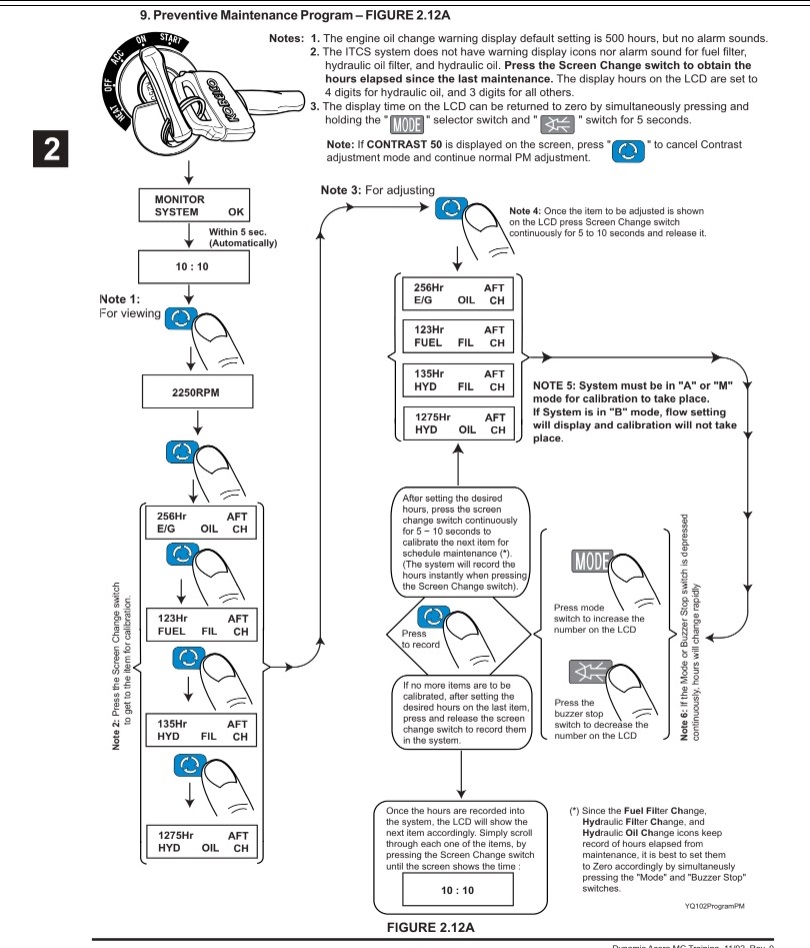
9. Preventive Maintenance Program - FIGURE 2.12A
 

10. Monitor Time Adjustment - FIGURE 2.13A


11. LCD Contrast Adjustment-FIGURE 2.13B


13. Operability fine adjustment function for Dynamic Acera minor change (SK160I_C~SK330LC-6E)


SK160LC-SK330LC-6E


14. Draining Hydraulic System Pressure - FIG URE2.15A


А5. 24 Volt Cigarette Lighter - FIGURE 2.16A


А6. Location for Optional Switches - FIGURE 2-16B

This additional switch panel is provided on the right side console for any machine customizaton if desired.


А7. Cup Holder and Ashtray - FIGURE 2.16C

A cup holder is provided on the right side panel, below the monitor, and the ashtray is located on right side console, as shown in the figure.


А8. Radio-FIGURE 2.17А


2. How to select stations - FIGURE 2.17B


LEFT HAND OPERATOR CONSOLE


I. Control Panel Description


SUPPLEMENTARY EXPLANATION

The LCD display indicates temperature, air outlet mode, compressor ON - OFF, AUTO, recirculate, fresh air, and fan speed.

The background of the control panel is illuminated when ever the A/С system is activated.
II. Fundamental Use - FIGURE 2.18B

Before turning the air conditioner on, close the door and windows to achieve the best performance.

1. Press the “AUTO” control switch to control air capacity and blower outlet automatically, and set the temperature in the range from 18.5ГС (65.3VF) to 31.5ГС (88.7VF). The AUTO indicator in the LCD display will come on.

The outlet temperature, outlet opening and fan speed are adjusted automatically so that indoor temperature of the cab comes closer to the set temperature.

2. Select proper mode manually through recirculate and fresh air capacity selector switch and compressor switch ON - OFF.

3. Select preferable fan speed manually through fan speed selector switch when fan speed, selected through auto control, is not preferable. The “AUTO” indicator in the LCD display goes out. Press “AUTO” switch to return to automatic climate control.


III. Control Panel Functions


1. Main Power Switch and Display - FIGURE

2.19A

a. LCD display is illuminated when the climate control-АС is operating.

When the climate control-АС is stopped, LCD will be turned off.

b. Press main power switch, and all functions for the climate control-АС switch ON or OFF. Each time when this switch is pressed, the function switches ON and OFF. When switched ON, the climate control-АС starts operating at the point set before switching OFF (When it is set to AUTO, in auto mode; if NORMAL is selected, then in normal mode).


Content      ..     1      2      3      4      ..