Century Star Turning CNC System. Programming Guide (V3.5 April, 2015) - page 6
11. Custom Macro
11.3 Operators and Expression
1) Mathematic operator
+, -, *, /
2) Conditional operator
EQ(=), NE(≠), GT(>), GE(≥), LT(<), LE(≤)
3) Logic operator
AND, OR, NOT
4) Function
SIN
Sine
COS Cosine
TAN Tangent
ATAN Arctangent
ATAN2 Arctangent2
ABS Absolute value
INT
Integer
SIGN Sign
SQRT Square root
EXP
Exponential function
5) Expression
The expressions are composed of constants, operators and variables.
Example:
175/SQRT[2] * COS[55 * PI/180 ];
#3*6 GT 14;
146
11. Custom Macro
11.4 Assignment
Assignment refers to assign a variable value to a constant or expression.
Format:
Variable=constant or expression
Example
#2 = 175/SQRT[2] * COS[55 * PI/180]
#3 = 124.0
147
11. Custom Macro
11.5 Selection statement IF, ELSE,ENDIF
Format (i)
IF Conditional expression
…
ELSE
…
ENDIF
Explanation (i)
If the specified conditional expression is satisfied, the statements between IF and
ELSE are executed. If the specified conditional expression is not satisfied, the
statements between ELSE and ENDIF are executed.
Format (ii)
IF Conditional expression
…
ENDIF
Explanation (ii)
If the specified conditional expression is satisfied, the statements between IF and
ENDIF are executed. If the specified conditional expression is not satisfied, the
system would proceed to the blocks after ENDIF.
148
11. Custom Macro
11.6 Repetition Statement WHILE, ENDW
Format
WHILE Conditional expression
…
ENDW
Explanation
When the conditional expression is satisfied, the statements between WHILE and
ENDW are executed. If the conditional expression is not satisfied, the system would
proceed to the blocks after ENDW.
149
11. Custom Macro
11.7 Macro Call
The following table shows the local variable and the corresponding system variable
when it is macro call.
Table 11-2 Transmission of Macro Call
Local variables
System variables in macro call
#0
A
#1
B
#2
C
#3
D
#4
E
#5
F
#6
G
#7
H
#8
I
#9
J
#10
K
#11
L
#12
M
#13
N
#14
O
#15
P
#16
Q
#17
R
#18
S
#19
T
#20
U
#21
V
#22
W
#23
X
#24
Y
#25
Z
#26
Mode value of Z-plane in canned cycle
#27
Unavailable
#28
Unavailable
#29
Unavailable
#30
Absolute coordinate of 0-axis when subprogram call
#31
Absolute coordinate of 1-axis when subprogram call
#32
Absolute coordinate of 2-axis when subprogram call
#33
Absolute coordinate of 3-axis when subprogram call
#34
Absolute coordinate of 4-axis when subprogram call
#35
Absolute coordinate of 5-axis when subprogram call
#36
Absolute coordinate of 6-axis when subprogram call
#37
Absolute coordinate of 7-axis when subprogram call
#38
Absolute coordinate of 8-axis when subprogram call
150
11. Custom Macro
Explanation
1) To check whether the variable is defined in the program, the format is as
follows:
AR [#Variable number]
Return:
0 - the variable is not defined
90 - the variable is defined as absolute command G90
91 - the variable is defined as incremental command G91
2) When it is macro call (subprogram or canned cycle) with G code, the system
would copy the system variables (A~Z) to local variables #0-#25 in the macro.
Meanwhile, the system can copy the axis position (machine coordinate value
in absolute command) of nine channels to local variables #30-#38.
3) When calling a subprogram, the subprogram can modify the system mode.
4) When calling a canned cycle, the canned cycle does not modify the system
mode.
151
11. Custom Macro
11.8 Example
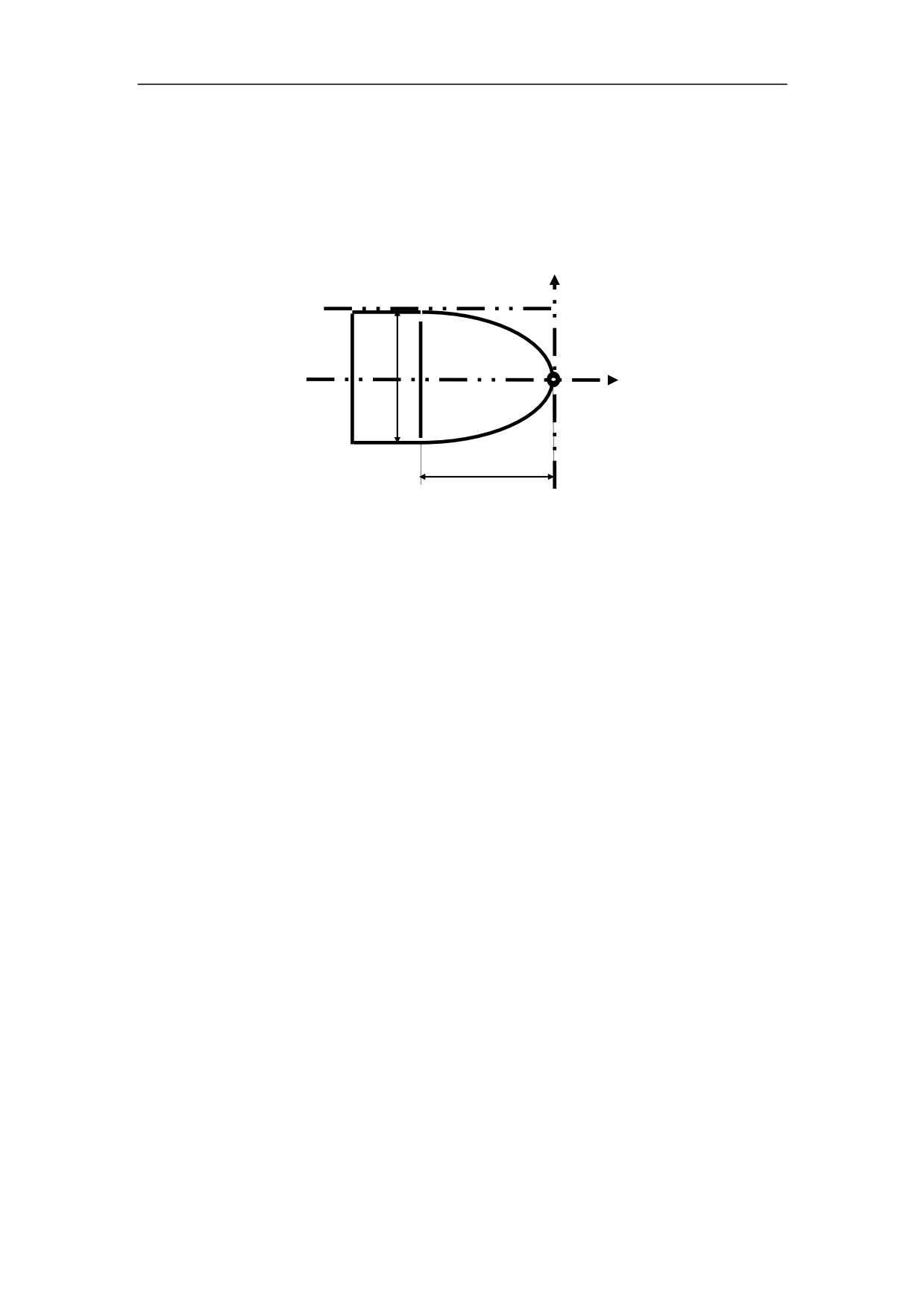
Example 1
Program the parabola B in interval [0,
8] shown in Figure 11.1. The parabola
2
B
A
/
2
A
8
Ф16
32
B
Ф32
Figure 11.1 Custom Macro - Example 1
%3401
N1 T0101
N2 G37
N3 #10=0;
N4 M03 S600
N5 WHILE #10 LE 8
N6 #11=#10*#10/2
N7 G90 G01 X[#10] Z[-#11] F500
N8 #10=#10+0.08
N9 ENDW
N10 G00 Z0 M05
N11 G00 X0
N12 M30
152
11. Custom Macro
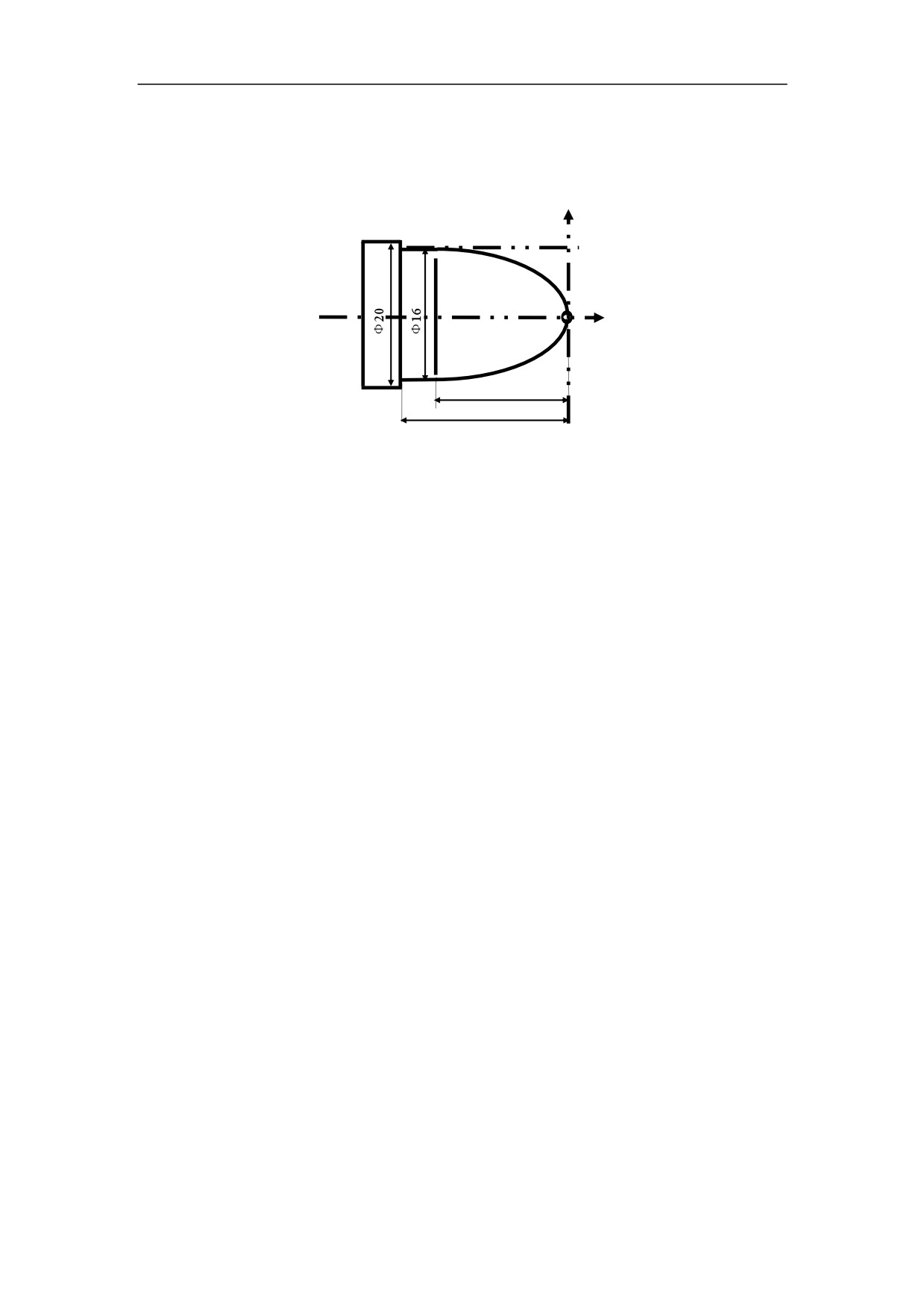
Example 2
Program the parabola B in interval [0,
8] shown in Figure 11.2. The parabola
2
B
A
/
2
A
8
32
B
32
40
Figure 11.2 Custom Macro Example 2
%3402
T0101
G00 X21 Z3
M03 S600
#10=7.5
WHILE #10 GE 0
#11=#10*#10/2
G90 G01 X[2*#10+0.8] F500
Z[-#11+0.05]
U2
Z3
#10=#10-0.6
ENDW
#10=0
WHILE #10 LE 8
#11=#10*#10/2
G90 G01 X[2*#10] Z[-#11] F500
#10=#10+0.08
ENDW
G01 X16 Z-32
Z-40
G00 X20.5 Z3
M05
M30
153
11. Custom Macro
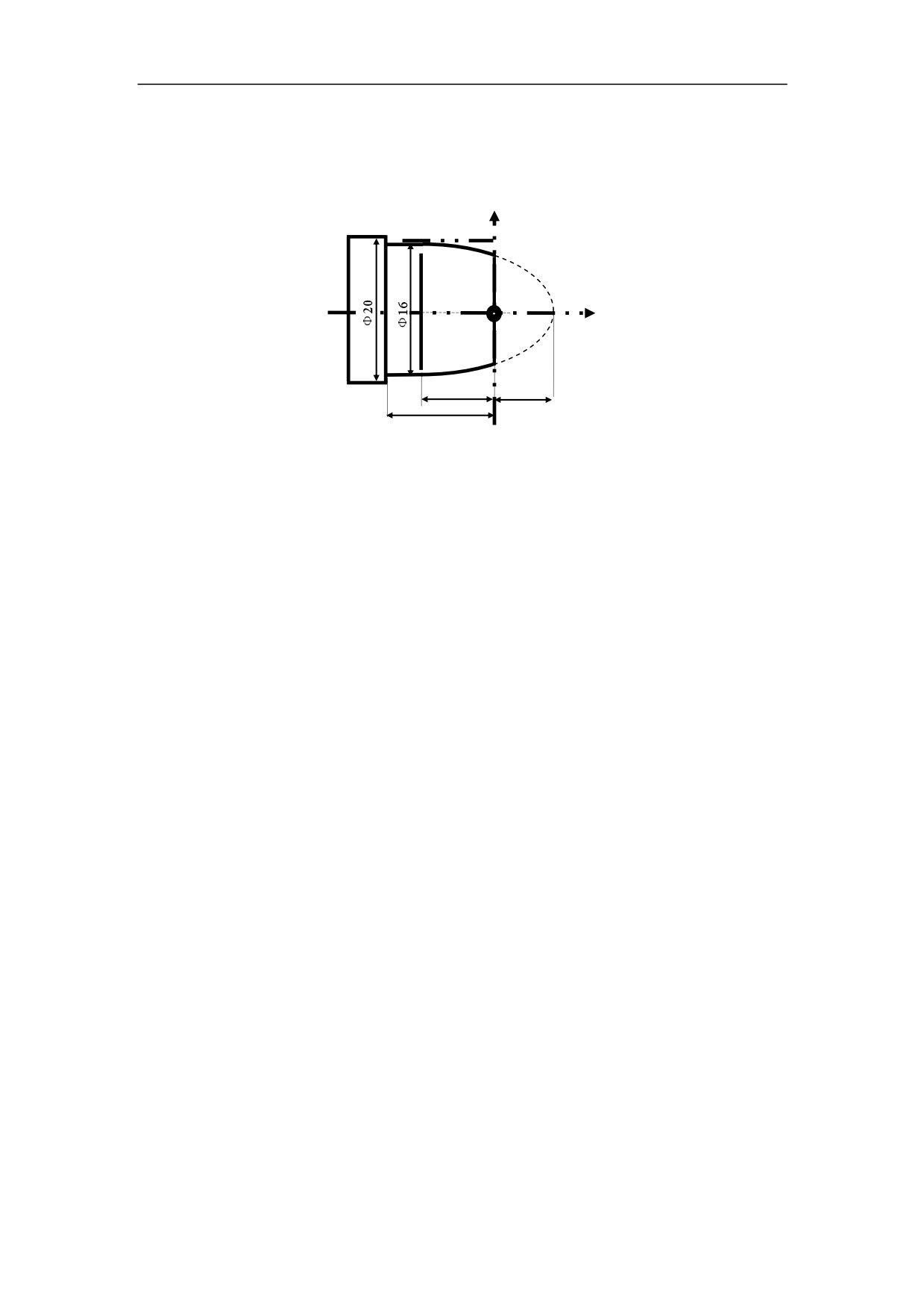
Example 3
Program the parabola B in interval [12, 32] shown in Figure 11.3. The parabola
2
B
A
/
2
A
8
B
20
12
28
Figure 11.3 Custom Macro Example 3
%3403
N1 T0101
N2 G00 X20.5 Z3
N3 #11=12
N4 M03 S600
N5 WHILE
#11 LE 32
N6 #10=SQRT[2*[#11]]
N7 G90 G01 X[2*#10] Z[-[#11-12]] F500
N8 #11=#11+0.05
N9 ENDW
N10 G01 X16 Z-20
N11 Z-28
N12 G00 X20.5 Z3 M05
N13 M30
11. Custom Macro
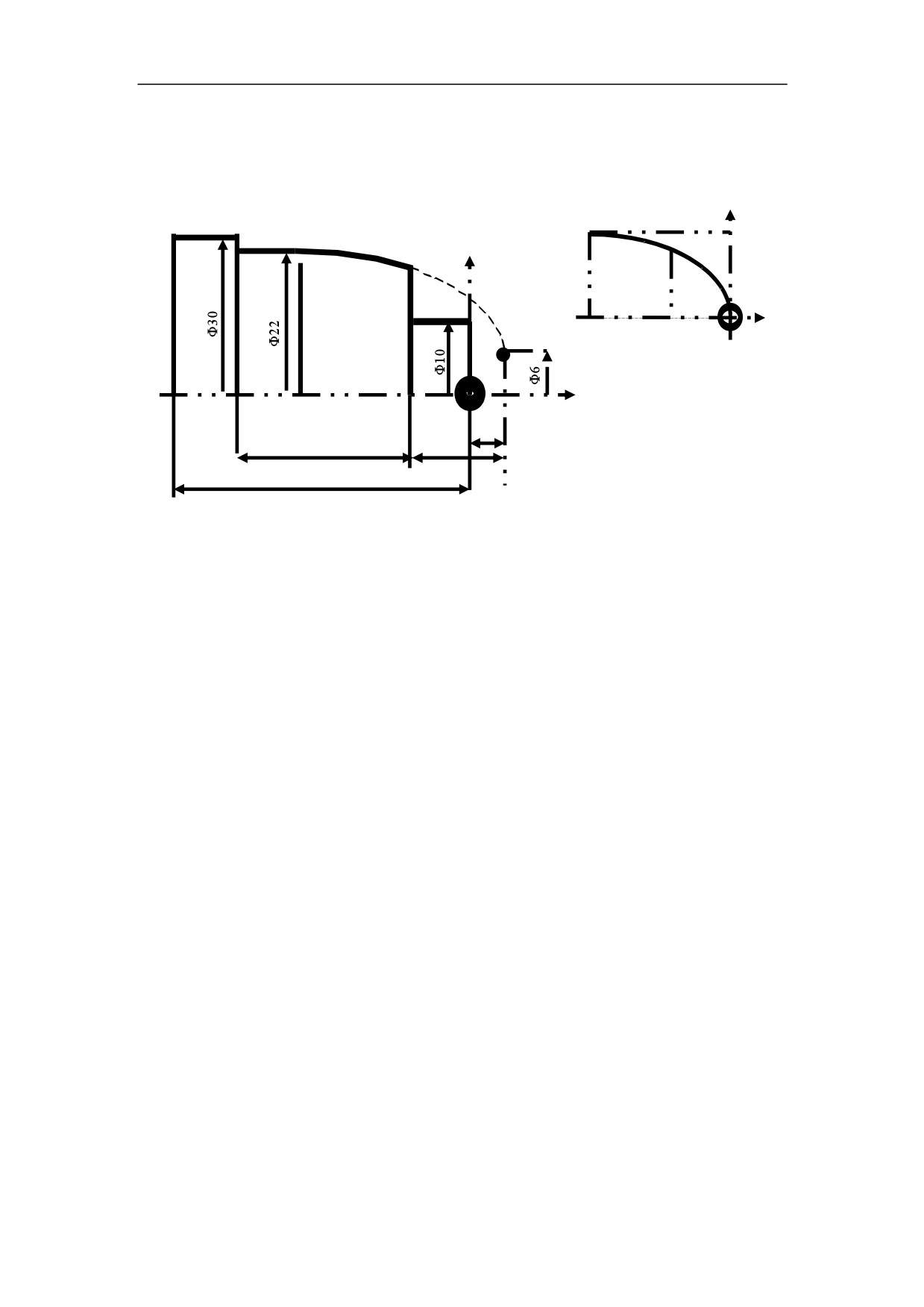
Example 4
Program the parabola B in interval [12, 32] shown in Figure 11.4. The parabola
2
B
A
/
2
A
8
32
12
B
4
28
8
38
Figure 11.4 Custom Macro Example 4
%3404
N1 T0101
N2 G00 X25 Z3
N3 #11=12
N4 M03 S600
N5 WHILE #11 LE 32
N6 #10=SQRT[2*[#11]]
N7G90G01X[2*#10+6]Z[-[#11-4]]F500
N8 #11=#11+0.06
N9 ENDW
N10 G01 X22 Z-28
N11 Z-36
N12 X30
N13 Z-40
N12 G00 X25 Z3 M05
N13 M30
11. Custom Macro
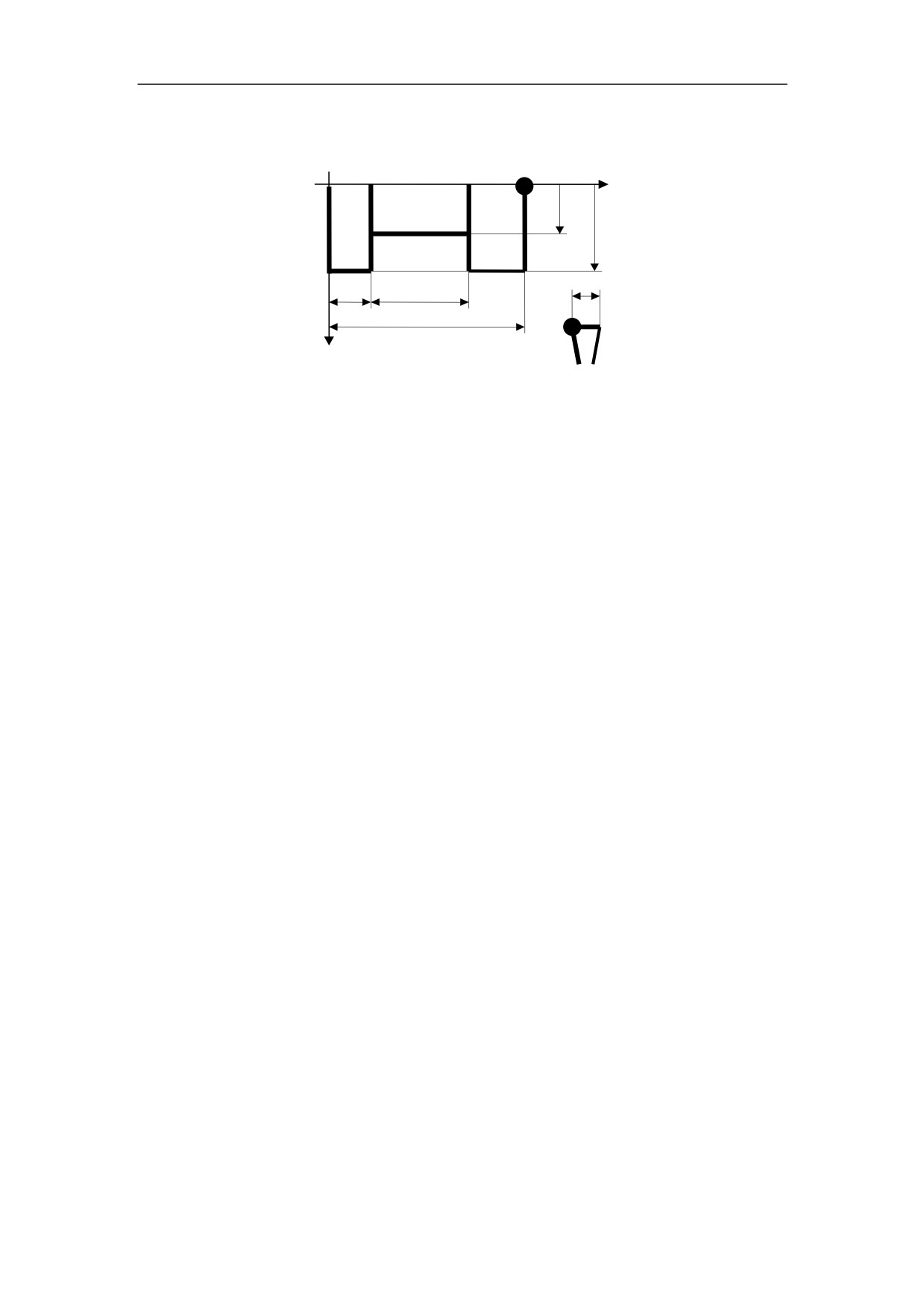
Example 5
Program the part shown in Figure 11.5.
A
B
C
U
V
W
Figure 11.5 Custom Macro Example 5
%3405
N1 T0101
N2 G00 X90 Z30
N3 U10 V50 W80 A20 B40 C3 M98 P01(#20=10, #21=50, #22=80, #0=20, #1=40,
#2=3)
N4 M30
%01
N1 G00 Z[-#22+#21+#20]
N2 X[#1+5]
N3 #10=#2
N4 WHILE
#10 LE #21
N5 G00 Z[-#22+#21+#20-#10]
N6 G01 X[#0]
N7 G00 X[#1+5]
N8 #10=#10+#2-1
N9 ENDW
N10 G00 Z[-#22+#20]
N11 G01 X[#0]
N12 G00 X[#1+5]
N13 G00 X90 Z30
N14 M99