Volvo XC90 (2021 year). Manual in english - page 19
DRIVER SUPPORT
* Option/accessory.
325
Adjusting set speed for driver
support
It is possible to adjust set speeds for the
cruise control, Adaptive Cruise Control
*
and
Pilot Assist
*
functions.
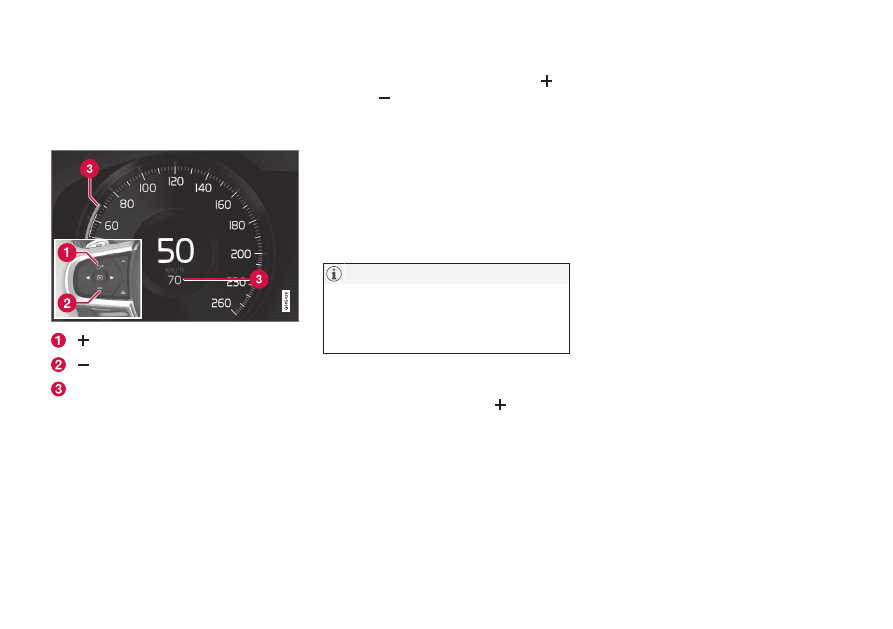
: Increases the set speed
: Reduces the set speed
Set speed
–
Change a set speed by pressing the
(1) or
(2) buttons briefly or by pressing
and holding them:
•
Brief
press: Each press changes the
speed in +/- 5 km/h (+/- 5 mph) incre-
ments.
•
Press
and
hold
: Release the button
when the set speed indicator (3) has
moved to the desired speed.
> The most recently set speed will be
stored.
For vehicles without Adaptive Cruise Con-
trol
*
, speed instead increases by +/- 1km/h
(+/- 1 mph) each time the button is
pressed.
Pressing the accelerator pedal
If speed is increased by depressing the accel-
erator pedal while pressing the
(1) button
on the steering wheel, the vehicle's speed
when the button is pressed will be stored as
the set speed.
Temporarily increasing speed using the accel-
erator pedal, e.g. when passing another vehi-
cle, will not affect the setting. The vehicle will
return to the set speed when the accelerator
pedal is released.
Possible speed
Automatic transmission
The driver support functions can follow
another vehicle at speeds from a standstill up
to 200 km/h (125 mph).
Pilot Assist can provide steering assistance
from near-stationary speeds up to 140 km/h
(87 mph).
The lowest speed that can be set is 30 km/h
(20 mph). When following another vehicle,
ACC can monitor that vehicle's speed and
slow your own vehicle down to a standstill,
but it is not possible to set speeds lower than
30 km/h (20 mph).
Related information
•
Driver support systems (p. 282)
•
•
•