Volvo XC60 Recharge Plug-in Hybrid (2021 year). Manual in english - page 30
||
AUDIO, MEDIA AND INTERNET
* Option/accessory.
508
Related information
•
•
Controlling and changing media (p. 509)
•
•
•
•
•
•
Playing media via the USB port (p. 514)
•
Playing media
The media player is controlled from the cen-
ter display. Several other functions can also
be controlled using the right-side steering
wheel keypad or by using voice commands.
The radio can also be controlled in the media
player. See the section describing the radio.
Starting a media source
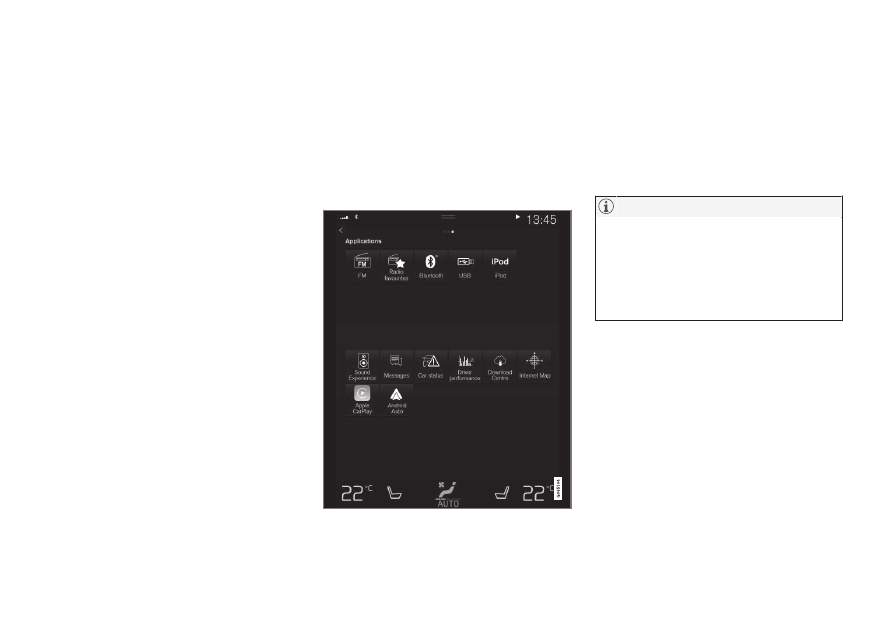
App view. (Generic illustration; basic apps vary
depending on market and model).
USB flash drive
1. Inset a USB flash drive.
2. Open the
USB
app from App view.
3. Select the track you would like to play.
> Playback will begin.
MP3 player and iPod
®
To start playback from an iPod, the iPod
app must be used (not USB).
When an iPod is used as source, the car's
audio and media system has a menu struc-
ture similar to the iPod player's own menu
structure.
1. Connect a media source.
2. Start playback in the connected media
source.
3. Open the app (
iPod
,
USB
) from App view.
> Playback will begin.
Bluetooth-connected device
1. Activate Bluetooth in the media source.
2. Connect a media source.
3. Start playback in the connected media
source.
4. Open the
Bluetooth
app from App view.
> Playback will begin.